
For each of the following statements, select Yes if the statement is true. Otherwise, select No. NOTE: Each correct selection is worth one point.

Explanation:
This question tests detailed knowledge of core compensation management concepts within the Dynamics 365 Human Resources module. It requires understanding the specific terminology and components used to define pay structures and benefits programs.
Correct Option Explanations:
Statement 2:
Yes. This is accurate terminology. A Compensation grid is the specific tool in D365 HR used to define the pay structure (e.g., salary ranges, grades, steps) for a fixed compensation plan. It is the matrix that establishes the valid pay rates.
Statement 3:
Yes. This describes a standard flexible benefits (or "cafeteria plan") feature. In D365 HR, employees can be allocated a predetermined number of flex credits to "spend" on selecting from a menu of benefit options (e.g., different health insurance tiers, extra vacation), allowing for personalized benefits packages.
Incorrect Option Explanation:
Statement 1:
No. This statement incorrectly swaps key terms. In D365 HR, a Compensation structure is the high-level framework (e.g., "Grade-based" or "Step-based") that determines how pay is administered. The matrix containing the actual pay rate ranges for each job level is called the Compensation grid. The grid is a component within a structure.
Reference:
Microsoft Learn - "Configure compensation management in Dynamics 365 Human Resources." The documentation details that Compensation grids define salary ranges and steps, and are assigned to fixed compensation plans. It also explains flex credit programs as part of benefits management. The term "compensation structure" is defined as the overarching plan type.
A company is evaluating Dynamics 365 Supply Chain Management.
You need to identify the available modules in Supply Chain Management.
Which two modules can you identify? Each correct answer presents a complete solution.
Choose two.
NOTE: Each correct selection is worth one point.
A. Time and attendance
B. Inventory management
C. Fixed assets
D. Procurement and sourcing
E. Cash and bank management
Explanation:
This is a foundational question testing knowledge of the core functional scope of Dynamics 365 Supply Chain Management (SCM). The correct answers must be native, central modules that are part of the SCM application itself, as opposed to modules that belong to other Dynamics 365 apps like Finance or Human Resources.
Correct Options:
B. Inventory management:
This is a quintessential module of any supply chain system. In D365 SCM, it provides comprehensive functionality for setting up and tracking inventory items, handling receipts and issues, managing inventory dimensions (like site, warehouse, batch, serial), and performing inventory counting and adjustments.
D. Procurement and sourcing:
This is a primary module within D365 SCM that manages the end-to-end process of acquiring goods and services. It covers requisitions, requests for quotation (RFQ), vendor management, purchase order processing, and procurement analytics.
Incorrect Options:
A. Time and attendance:
This is a core module of Dynamics 365 Human Resources. While workers in a warehouse might clock in/out, the dedicated system for tracking employee hours, leave, and attendance is part of the HR application, not the Supply Chain Management application.
C. Fixed assets:
This is a core financial module of Dynamics 365 Finance. It is used to manage the accounting for tangible assets (like machinery or vehicles), including acquisition, depreciation, and disposal. While SCM might use these assets, the financial accounting for them is handled in Finance.
E. Cash and bank management:
This is a core financial module of Dynamics 365 Finance. It manages the company's liquidity, including bank accounts, checks, promissory notes, and bank reconciliation. It is part of the financial management suite, not the supply chain operations suite.
Reference:
Microsoft Learn - "Explore Dynamics 365 Supply Chain Management." The official module list for Supply Chain Management explicitly includes Inventory management and Procurement and sourcing, while Time and attendance, Fixed assets, and Cash and bank management are listed under Human Resources and Finance respectively.
An oil refinery uses Dynamics 365 Supply Chain Management. They create work orders for their equipment and machinery.
The refinery needs to perform equipment and machinery maintenance according to internal requests.
Which maintenance type is performed in enterprise asset management based on internal requests? To answer, select the appropriate option in the answer area.

Explanation:
This question tests the classification of maintenance types in the Enterprise Asset Management (EAM) module of Dynamics 365 Supply Chain Management. Maintenance is categorized by its trigger or reason. Performing work "based on internal requests" means the maintenance is initiated in response to an ad-hoc report or observation of a fault, breakdown, or needed repair—not according to a schedule or to prevent a future failure.
Correct Option:
Reactive maintenance.
This is the correct classification. Reactive maintenance (also called corrective or breakdown maintenance) is performed after an asset has failed or a fault has been identified. An "internal request" (e.g., an operator reporting a broken valve, a technician noting abnormal vibrations) is a common trigger for creating a work order to reactively fix the issue and restore the asset to working condition.
Why the Other Options Are Incorrect:
Preventive maintenance:
This type is performed proactively on a scheduled basis (time-based) or based on usage meters (meter-based) to prevent failures before they occur (e.g., changing oil every 6 months). It is not triggered by an internal request for a specific problem.
Corrective maintenance:
This is a trick, as the term is often used synonymously with "Reactive" maintenance. However, in the specific taxonomy of D365 EAM, "Corrective maintenance" is sometimes categorized as a sub-type of reactive maintenance performed specifically to correct a known fault and return an asset to its designed condition. Given the table structure and the context of an internal request identifying a fault, the most precise match from the given column headers is Reactive, which is the broader category encompassing unplanned corrective work.
Reference:
Microsoft Learn - "Types of maintenance in Dynamics 365 Supply Chain Management." The documentation defines Reactive maintenance as work performed after a failure or when a fault is detected, which aligns with work orders created from internal requests or failure reports. Preventive maintenance is defined as scheduled work to reduce the risk of failure.
An international hotel company implements Dynamics 365 Finance.
You need to help the hotel company identify email integration capabilities.
What are two valid use cases for sharing Dynamics 365 Finance documents with customers by using email integration? Each correct answer presents part of the solution.
NOTE: Each correct selection is worth one point.
A. The company sends statements to customers based on request.
B. Customers negotiate prices for hotel reservations with company agents by using their personal email addresses.
C. A customer registers a complaint online regarding their stay at any of the company's hotels.
D. The company emails invoices to customers after their hotel stay.
Explanation:
This question asks for valid email integration use cases for sharing Dynamics 365 Finance documents. The key phrase is "by using email integration," which refers to the system's native ability to generate and send formal business documents (like invoices) directly from a transaction to a customer's email address, or to embed a direct link for interaction. The use case must involve the system sending an email containing a document or link.
Correct Options:
B. Customers negotiate prices for hotel reservations with company agents by using their personal email addresses.
This is a valid use case for email integration. It typically refers to the Sales order confirmation or Quotation process. A sales agent can create a quotation in D365 Finance and use the Send by email function. The system emails the customer a PDF of the quote with embedded links, allowing the customer to view, and in some configurations, accept or negotiate terms directly via their email, linking back to the Dynamics system.
D. The company emails invoices to customers after their hotel stay.
This is the most classic and direct use case for email integration. From a posted free text invoice or a sales order invoice in D365 Finance, the system can automatically generate a PDF invoice and send it directly to the customer's email address, streamlining the billing process.
Incorrect Options:
A. The company sends statements to customers based on request.
While statements can be generated, the standard method for sending customer statements in D365 Finance is typically a batch process (using the "Collection" module or periodic jobs) that prints or emails statements to a list of customers, not an on-demand "send by email" action from a specific transaction. It's less about the integration for a specific document and more about a scheduled batch report.
C. A customer registers a complaint online regarding their stay at any of the company's hotels.
This describes a customer service or case management scenario, which is handled by Dynamics 365 Customer Service, not a native document-emailing function within the Finance application. While an email might be sent to acknowledge the complaint, this is not an example of emailing a transactional Finance document (like an invoice or quote) to a customer.
Reference:
Microsoft Learn - "Email integration in finance and operations apps" or "Configure and send email." The documentation details how email templates are configured and used to send transactional documents like sales quotations, purchase orders, and customer invoices directly from the system. It also covers functionality for customer interaction via email links.
Match each order-to-cash document to its definition. To answer, move the appropriate order-to-cash document from the column on the left to its definition on the right.
You may use each order-to-cash document once, mere than once, or not at all.
NOTE: Each correct match is worth one point.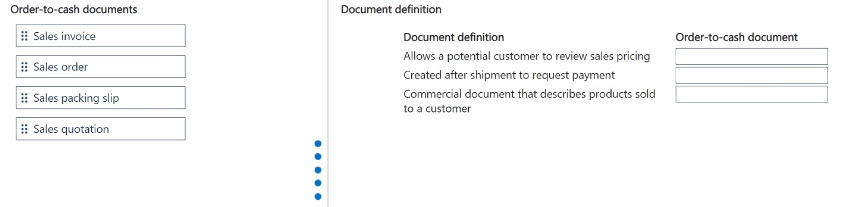
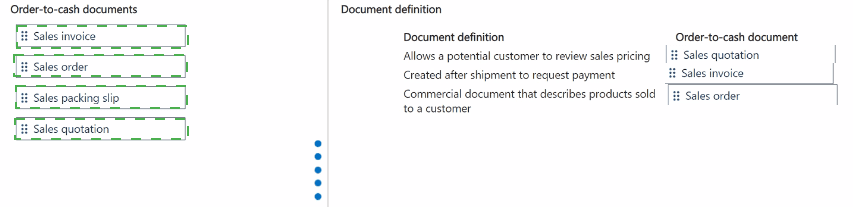
Explanation:
This drag-and-drop question tests knowledge of the standard document flow in the Order-to-Cash process within Dynamics 365 Finance/Supply Chain Management. It requires matching each primary sales document to its correct purpose and stage in the cycle, from initial inquiry to final billing.
Why These Pairings Are Correct:
Definition:
Allows a potential customer to review sales pricing.
Document:
Sales quotation. This is the initial, non-binding document sent to a potential customer. It outlines proposed products, quantities, prices, and terms for their review and approval before they commit to a purchase.
Definition:
Created after shipment to request payment.
Document:
Sales invoice. This is the final, legally binding request for payment. It is generated after goods have been shipped (confirmed by the packing slip) or services have been delivered, and is sent to the customer to collect the receivable.
Definition:
Commercial document that describes products sold to a customer.
Document:
Sales order. This is the core internal document created once a customer's request (often from a quotation) is confirmed. It legally commits the company to deliver specified products/services at agreed prices and terms, and triggers all subsequent fulfillment activities (picking, packing, shipping).
Where the Other Document Fits:
Sales packing slip:
This document is created upon shipment to accompany the physical goods. It lists what was actually shipped and serves as proof of delivery. It is a shipping document, not a pricing document (quotation), a commercial sales contract (order), or a payment request (invoice).
Reference:
Microsoft Learn - "Sales order processing" or "Overview of sales orders." The documentation outlines the standard sales process flow: Quotation -> Order -> Packing Slip -> Invoice, defining the purpose of each document in the cycle.
A company uses Dynamics 365 Supply Chain Management for warehousing operations Users need to aggregate and manage inventory across multiple warehouses.
Which feature should users configure? To answer, select the appropriate option in the answer area.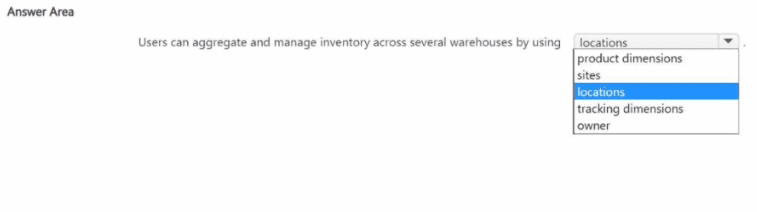
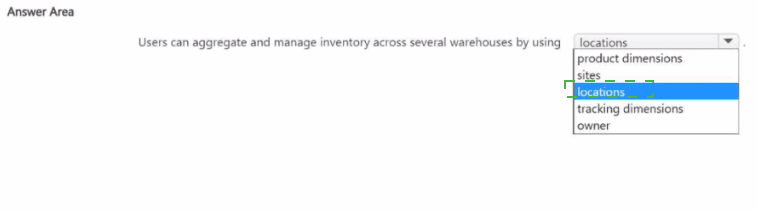
Explanation:
This question asks for the highest-level organizational feature in Dynamics 365 Supply Chain Management that is used to aggregate and manage inventory across multiple warehouses. The key term is "aggregate," meaning you need a feature that acts as a parent container, allowing you to view and manage the total inventory of all the warehouses under it.
Correct Option:
Sites.
A Site is the highest physical/logical grouping in the inventory hierarchy. You define Warehouses within a Site. Inventory is managed at the Warehouse level, but you can view, report on, and perform transfers for the aggregated inventory across all warehouses belonging to a single Site. This allows for consolidated inventory management and planning at a regional or operational level.
Why the Other Options Are Incorrect:
Locations:
Locations are specific storage bins or positions within a Warehouse (e.g., Aisle 1, Rack 2, Bin 3). They are the most granular level of inventory storage and do not provide aggregation across warehouses.
Product dimensions:
These are attributes of an item (like Color, Size, Style) that define its variants. They describe the product itself, not the organizational structure for managing inventory across physical warehouses.
Tracking dimensions:
These are attributes used to track individual items (like Batch numbers or Serial numbers). They are about tracing specific units, not grouping warehouses.
Owner:
This is a financial/inventory dimension that denotes who owns the inventory (e.g., the company itself vs. a customer on consignment). It does not aggregate physical warehouse structures.
Reference:
Microsoft Learn - "Inventory organization" or "Sites overview." The documentation explains the standard inventory hierarchy: Site -> Warehouse -> Location. Sites are described as the primary unit for inventory security and management, allowing you to group one or more warehouses together.
A company uses Dynamics 365 Finance.
Instructions: For each of the following statements, select Yes if the statement is true.
Otherwise, select No.
NOTE: Each correct selection is worth one point.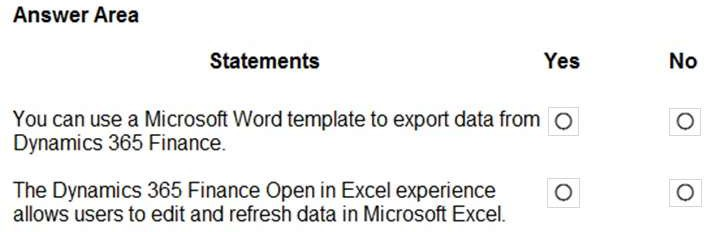
Explanation:
This question tests knowledge of two specific data interaction and reporting features in Dynamics 365 Finance: the use of Microsoft Word for document generation and the functionality of the "Open in Excel" feature.
Correct Option Explanation:
Statement 1:
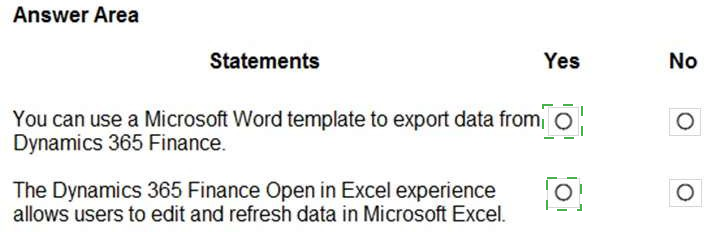
Yes. This is true for document generation. Dynamics 365 Finance integrates with Microsoft Word to create templates for business documents (like purchase orders, sales invoices, and free text invoices). Users can design the layout in Word, and the system merges data from Finance into the template to generate PDFs or Word documents. This is a form of structured data export for reporting/presentation.
Incorrect Option Explanation:
Statement 2:
No. This statement is misleading and false in its claim about editing. The "Open in Excel" feature (powered by the OData connector) allows users to export a read-only dataset from a Finance list page or report into Excel for offline viewing and analysis. Users can refresh the data in Excel to get the latest information from Finance. However, it is primarily a one-way, read-only export. While there is a separate "Edit in Excel" capability for certain entities that allows two-way synchronization for data entry, the standard "Open in Excel" experience referenced in the question does not permit editing data in Excel and pushing it back to Finance.
Reference:
Statement 1 (Word Templates):
Microsoft Learn - "Create Microsoft Word templates for document generation." This details how Word is used to design templates for documents in Finance.
Statement 2 (Open in Excel):
Microsoft Learn - "Office integration" or "Use the Open in Excel add-in." The documentation clarifies the distinction between the "Open in Excel" (view/refresh) and "Edit in Excel" (two-way sync) experiences.
A company implements Dynamics 365 Supply Chain Management. The company uses external vendors to produce some parts.
You need to recommend actions to manage vendor operations.
Which three actions should you recommend? Each correct answer presents part of the solution.
NOTE: Each correct selection is worth one point.
A. Update the status of production order operations that are subcontracted to Completed when the vendor's work is done.
B. Create an operation for the subcontractor to track the progress of the vendor's work.
C. Assign each operation in a production order to multiple vendors.
D. Ensure that each production order relates to a single vendor.
E. Automatically generate purchase orders for operations that you subcontract to a vendor.
Explanation:
This question tests the correct setup and process flow for subcontracting, a scenario where specific operations in a production order are outsourced to an external vendor (subcontractor). The solution must outline how to configure and manage this vendor relationship within Dynamics 365 Supply Chain Management.
Correct Options:
B. Create an operation for the subcontractor to track the progress of the vendor's work.
This is the foundational setup step. In the Route for the item, you must define a specific operation (e.g., "Vendor Painting") that is designated as a Subcontracted operation. This tells the system that this step in the manufacturing process is performed by an external party.
D. Ensure that each production order relates to a single vendor.
For subcontracting to function correctly, the production order itself must be associated with a single, specific subcontractor vendor account. This is configured on the production order header. All subcontracted operations for that order will be directed to this vendor.
E. Automatically generate purchase orders for operations that you subcontract to a vendor.
This is the core transactional mechanism. When you estimate or release a production order that contains a subcontracted operation, the system automatically generates a purchase order for that vendor for the service. This PO manages the cost, receipt of the service, and payment to the subcontractor.
Incorrect Options:
A. Update the status of production order operations that are subcontracted to Completed when the vendor's work is done.
This is incorrect procedure. The status of a subcontracted operation is not updated manually. It is updated automatically when the purchase order receipt for the subcontracted service is posted. This confirms the vendor has completed the work and received payment.
C. Assign each operation in a production order to multiple vendors.
This is not standard practice and would create logistical and accounting chaos. A specific operation (especially a subcontracted one) is assigned to a single work center or, in this case, a single subcontractor vendor. You cannot assign the same operation to multiple vendors simultaneously within a single production order.
Reference:
Microsoft Learn - "Subcontract manufacturing" or "Production orders overview" in the Dynamics 365 Supply Chain Management documentation. The process is defined as: setting up a subcontracted operation on a route, assigning a vendor to the production order, and having the system auto-generate purchase orders for the subcontracted services, with progress tracked via PO receipts.
A company has a legal entity. The company has multiple product lines that are independent of the legal entity. The company and the legal entity have independent strategic business objectives.
The company must report financials in the organizational hierarchy for the product lines.
Select the answer that correctly completes the sentence.

Explanation:
This question is about setting up the correct operating unit type within an organizational hierarchy to represent independent product lines that have their own strategic business objectives and require separate financial reporting, all while existing within a single legal entity. An operating unit is a segment used to control economic resources and operational processes, and to report on those segments.
Correct Option:
Business unit.
This is the correct operating unit type for this scenario. A Business Unit is an operating unit that is used to divide an organization into segments to meet strategic business objectives. It is semi-autonomous and treated as a profit center for financial reporting purposes. Setting up each independent product line as a separate Business Unit within the legal entity allows the company to track and report financials (like revenue and costs) specifically for each product line, aligning with their independent strategic goals.
Why the Other Options Are Incorrect:
Team:
This is a group of workers organized to fulfill tasks. It is not an operating unit used for strategic business segmentation or financial reporting.
Value Stream:
This is a lean manufacturing concept used to group production flows and resources, typically within a production unit. It is too operational and specific for representing an entire strategic product line with its own financial objectives.
Commerce Channel:
This is a specific type of operating unit used in Dynamics 365 Commerce to represent a retail store or online sales channel. It is designed for commerce operations, not for general strategic business unit reporting for diverse product lines.
Reference:
Microsoft Learn - "Organizational hierarchies overview" and "Operating units." The documentation specifies that a Business Unit is an operating unit in which the manager has autonomous responsibility for its resources, goals, and profit and loss. It is used to report on performance for a segment of the business, which perfectly matches the requirement for independent product line financials.
A company uses Dynamics 365 Human Resources.
You need to ensure that workers can document their own performance relative to goals.
What should you direct the workers?
A. Compensation management page
B. Personnel management page
C. Performance goals page
D. Employee self-service workspace
Explanation:
This question asks where workers (employees) themselves can go within the system to document and manage their own performance relative to goals. The key requirement is self-service functionality, allowing employees to enter and update their information without requiring HR or manager intervention through administrative tools.
Correct Option:
D. Employee self-service workspace.
This is the correct destination. The Employee self-service workspace is a personalized, role-based portal in Dynamics 365 Human Resources where employees can manage their own HR-related tasks. This includes viewing and updating their performance goals, submitting documents related to performance reviews, and tracking progress against objectives—directly meeting the requirement for workers to document their own performance.
Incorrect Options:
A. Compensation management page:
This is an administrative page used by HR or compensation managers to design, configure, and manage compensation plans, structures, and budgets. Employees do not have access to this page to document their own performance goals.
B. Personnel management page:
This is another HR administrator page used to manage core employee data, positions, and employment details. It is not a self-service tool for employees to interact with their own performance goals.
C. Performance goals page:
While this page exists and deals with goals, it is typically part of the administrative or managerial interface for setting up and managing the performance management framework. The direct, self-service access point for an employee to enter their own goals is within the Employee self-service workspace, not a standalone "Performance goals" admin page.
Reference:
Microsoft Learn - "Employee self-service overview" in the Dynamics 365 Human Resources documentation. This resource describes the Employee self-service workspace as the hub where employees can manage personal information, benefits, time off, and performance goals, clearly differentiating it from administrative workspaces.
A company plans to implement a manufacturing solution that includes integrated rate shipping costs for distribution.
You need to recommend a product to the company. What should you recommend?
A. Dynamics 365 Sales
B. Dynamics 365 Field Service
C. Dynamics 365 Commerce
D. Dynamics 365 Supply Chain Management
Explanation:
This scenario has two core requirements: 1) a manufacturing solution, and 2) integrated rate shipping costs for distribution. This describes a need for an end-to-end system that manages the production of goods and the subsequent logistics of shipping them to customers, including calculating freight costs. This is the exact domain of an Enterprise Resource Planning (ERP) system focused on supply chain and operations.
Correct Option:
D. Dynamics 365 Supply Chain Management. This is the comprehensive recommendation. D365 Supply Chain Management includes:
Manufacturing modules for production planning, scheduling, and execution.
Transportation Management (TMS), which provides the functionality for integrated rate shipping. The TMS module allows you to set up carriers, rate engines, and route plans to automatically calculate shipping costs during the sales order or distribution process, integrating freight costs directly into the supply chain workflow.
Incorrect Options:
A. Dynamics 365 Sales:
This is a Customer Relationship Management (CRM) application focused on the sales process: lead management, opportunity tracking, and quotes. It does not include manufacturing or native, integrated shipping rate calculation for distribution logistics.
B. Dynamics 365 Field Service:
This application is for managing mobile workforce and service operations, such as scheduling technicians, managing service calls, and inventory in service vehicles. It is not designed for manufacturing or the broad distribution shipping rate calculations required here.
C. Dynamics 365 Commerce:
This is a solution for unified commerce (omnichannel sales, point of sale, e-commerce). While it handles selling and can integrate with shipping carriers for e-commerce fulfillment, its core is retail, not manufacturing. It lacks the native, deep production planning and shop floor control capabilities of Supply Chain Management.
Reference:
Microsoft Learn - "Explore Dynamics 365 Supply Chain Management." The product capabilities list includes manufacturing and transportation management as core modules, with Transportation Management specifically highlighted for managing shipping carriers, freight rates, and logistics.
A company is using Dynamics 365 Finance to manage its customers.
A customer is past due on several invoices. Late fees and penalties are applied to the customer account based on the number of days late. Due to the past due payments and fees, the amount of product the customer can purchase before receiving a payment is reduced.
If all invoices are paid in full, the company will waive all late fees and increase the amount of product the customer can purchase before receiving a payment.
You need to identify the modules to use for the requirements.
Which modules should you use? To answer, drag the appropriate modules to the correct actions. Each module may be used once, more than once, or not at all. You may need to drag the split bar between panes or scroll to view content.
NOTE: Each collect selection Is worth one point.

Explanation:
This question maps specific customer account management actions to the correct functional modules within the Accounts receivable area of Dynamics 365 Finance. The key is to identify which module's tools are used to perform the settlement of cash, the adjustment of charges (fees), and the change to credit terms.
Why These Pairings Are Correct:
Settle the payments against the past due invoices.
Module:
Accounts receivable. The core function of the Accounts receivable module is to process customer payments. The Settle transactions function is the specific tool used to apply a customer's payment to one or more specific open invoices, clearing the outstanding balance.
Waive the late fees.
Module:
Credit and collections. Waiving late fees is a collections management action. The Credit and collections module provides the workspace and tools for collections agents to manage past-due accounts, which includes the ability to waive, reinstate, or reverse interest and fees directly from the customer's account page.
Increase the customer outstanding amount due upper limit.
Module:
Credit and collections. The "upper limit" refers to the customer's credit limit. Managing customer credit limits (increasing, decreasing, placing holds) is a central function of the Credit and collections module, which is used to control the risk of customer non-payment.
Why the Other Modules Are Incorrect for These Actions:
Accounts payable:
This module manages money the company owes to its vendors/suppliers, not money owed by customers.
General ledger:
This is the central repository for all financial postings. While the results of these actions (settled invoices, waived fees, updated credit) will post to the general ledger, the GL module itself is not the tool used to perform the operational tasks of payment settlement, fee waiving, or credit limit changes.
Reference:
Microsoft Learn - "Accounts receivable overview" and "Credit and collections in Dynamics 365 Finance." The documentation specifies that payments are settled in the Accounts receivable module, while waiving interest/fees and managing customer credit limits are core tasks performed within the Credit and collections workspace.
| Page 5 out of 13 Pages |
| Previous |