
A company plans to implement Dynamics 365 Project Operations.
Instructions: For each of the following statements, select Yes if the statement is true.
Otherwise, select No.
NOTE: Each correct selection is worth one point.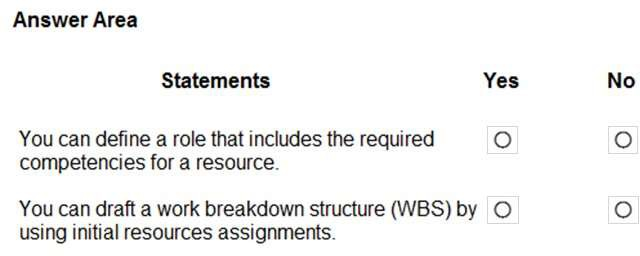
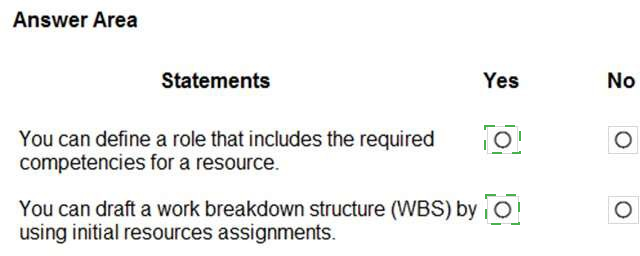
Explanation:
Dynamics 365 Project Operations provides a flexible framework to manage the financial and operational aspects of professional services. It integrates sales and project delivery to ensure that pricing is accurate and revenue is recognized according to international accounting standards.
Associate multiple price lists (Yes):
Project Operations supports multiple date-effective sales price lists for a single entity like a customer or quote. This allows organizations to handle long-running projects where prices might change due to inflation or specific negotiated rates for different regions or currencies.
Revenue recognition at milestones (Yes):
For fixed-price projects, the system allows revenue to be recognized when specific project milestones are completed. This ensures that financial reporting accurately reflects the progress of the work rather than just the timing of the billing.
Different prices for different resources (Yes):
Pricing is highly granular and can be based on dimensions such as the Role or even the specific Resource. If a project task is assigned to a Senior Consultant and a Junior Consultant, the system can automatically apply their respective billable rates defined in the price list.
Reference:
Microsoft Learn: Project pricing and price lists overview
Microsoft Learn: Revenue recognition in Project Operations
Microsoft Learn: Manage project resources and roles pricing
For each of the following statements, select Yes if the statement is true. Otherwise, select
No. NOTE: Each correct selection is worth one point.

Explanation:
This question tests knowledge of specific functionalities within two modules of Dynamics 365 Finance: Expense management and Fixed assets. It distinguishes between native features and common integrations, and confirms a core configuration step in asset accounting.
Correct Option Explanation:
Statement 2:
Yes. This is a fundamental setup step in the Fixed Assets module. A Book represents a depreciation schedule for an asset (e.g., Corporate, Tax). A Depreciation Profile defines the calculation method (e.g., straight-line, reducing balance). Assigning a depreciation profile to a book is exactly how you configure how an asset will be depreciated for that specific accounting purpose.
Incorrect Option Explanation:
Statement 1:
No. While OCR for receipts is a common and highly valuable feature in modern expense management workflows, it is not a native capability of the Dynamics 365 Finance application itself. This functionality is typically provided by an integrated service, such as Microsoft Azure Cognitive Services or a third-party connector, which then feeds the extracted data into the Expense management module. The statement is false because it claims the capability is built directly into D365 Finance.
Reference:
Statement 1 (OCR):
Microsoft Learn documentation on expense management does not list OCR as a native feature. It discusses capturing receipts via mobile apps and manual entry, with advanced data extraction implied as an integrated/AI service.
Statement 2 (Books/Profiles):
Microsoft Learn - "Configure fixed assets in Dynamics 365 Finance" explicitly details setting up depreciation profiles and assigning them to books as a core configuration task for asset depreciation.
A company is using Dynamics 365 Project Operations for a project implementation.
An internal project is being funded by three different organizations. The project billing should be standardized.
You need to implement functionality to split the invoicing of the project.
Which Project component should you use?
A. Contracts
B. Invoicing
C. Budgets
D. Subcontracts
E. Expenses
Explanation:
In Dynamics 365 Project Operations, the Project Contract (also referred to as an Order) is the central entity that manages the commercial and billing terms of a project. When a project is co-funded by multiple parties, the system uses a feature known as Split Billing.
Project Contract Customers:
On the "Customers" tab of a Project Contract, you can add multiple organizations as funding sources. For each customer, you define a Billing Split Percentage (e.g., 50%, 25%, 25%).
Invoicing Logic:
When the billing process is triggered, the system automatically generates separate invoices for each organization based on the percentages defined in the contract.
Funding Rules:
You can also configure advanced funding rules to prioritize which organizations are billed first or set caps (limits) on how much a specific funder will pay.
Correct Option:
A. Contracts:
This is correct because the Project Contract is where you define the list of customers and their respective billing shares. This ensures that the billing procedure is standardized across all project tasks.
Incorrect Options:
B. Invoicing:
While this is the result of the configuration, the "Invoicing" component itself is used to generate the document, not to define the complex multi-party split logic.
C. Budgets:
Project budgets are used for cost and revenue forecasting and tracking spending against estimates, not for defining customer-specific billing splits.
D. Subcontracts:
This is used when your company hires external vendors or subcontractors to work on your project; it does not handle how you bill your own clients.
E. Expenses:
This component is for tracking project costs incurred by resources (like travel), which are then marked as billable or non-billable, but it does not control the split of the final invoice among multiple funders.
Reference:
Microsoft Learn: Manage multiple customers on project contracts
Microsoft Learn: Project contracts overview in Project Operations
Microsoft Learn: Configure billing splits and funding rules
A company is evaluating Dynamics 365 Fraud Protection. You need to help the customer
understand the features that are available.
Instructions: For each of the following statements, select Yes if the statement is true.
Otherwise, select No.
NOTE: Each correct selection is worth one point.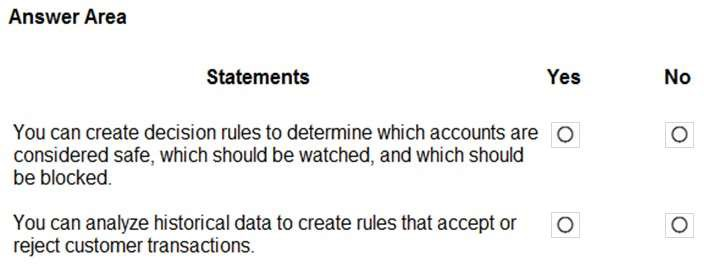
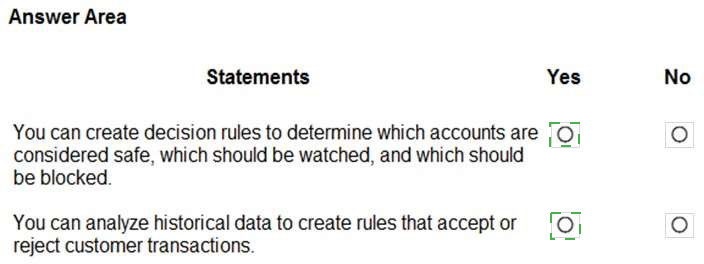
Explanation:
Dynamics 365 Fraud Protection is a cloud-based solution designed to help merchants protect their revenue and reputation by providing tools to decrease fraud and abuse. It uses advanced adaptive AI to provide real-time insights into fraudulent activity.
Account Protection:
The system allows you to create sophisticated decision rules to manage account creation and login attempts. By analyzing patterns, it can categorize accounts as safe, suspicious (to be watched/challenged), or malicious (to be blocked), protecting against account takeovers and fake account creation.
Purchase Protection:
By analyzing historical data and using a vast fraud network, the system helps create rules that evaluate the risk of every transaction. This allows the system to automatically accept legitimate customer transactions or reject those that exhibit high-risk fraudulent characteristics.
Reference:
Microsoft Learn: Dynamics 365 Fraud Protection overview
Microsoft Learn: Manage account protection with decision rules
Microsoft Learn: Purchase protection and transaction rules
A company plans to implement Dynamics 365 Commerce.
Instructions: For each of the following statements, select Yes if the statement is true.
Otherwise, select No.
NOTE: Each correct selection is worth one point.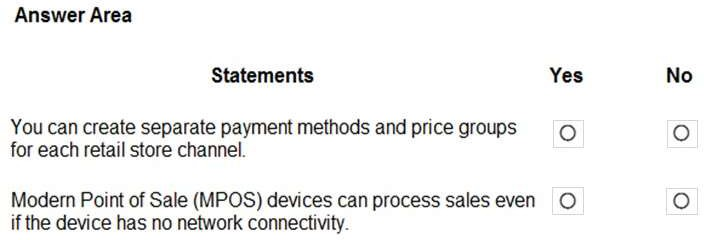
Explanation:
Dynamics 365 Commerce is designed to provide a unified omni-channel experience, allowing businesses to manage physical and digital storefronts with high flexibility.
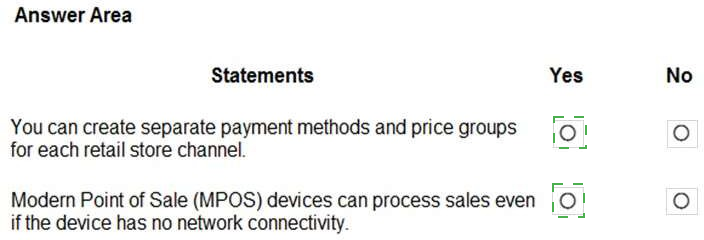
Channel-Specific Configurations (Yes): In Dynamics 365 Commerce, each retail channel (brick-and-mortar store, call center, or online store) is highly configurable. You can define specific payment methods (e.g., local credit card types or cash for physical stores) and price groups (to manage regional pricing or store-specific promotions) to meet the unique needs of that specific channel.
Offline POS Capabilities (Yes): Modern Point of Sale (MPOS) is a thick-client application that supports an offline database. If the network connection is lost, MPOS can switch to "offline mode," allowing associates to continue checking out customers and processing sales. Once connectivity is restored, the transaction data is automatically synchronized back to the headquarters.
Summary of Other Uploaded Images
To ensure you have all the answers for your MB-900 preparation, here is a consolidated summary for the other images you provided:
Inventory Journals (image_207ced.png)
Overwrite default posting account: Movement journal
Move item between warehouses: Transfer journal
Add cost and create ledger transaction: Inventory adjustment journal
Correct on-hand to match physical count: Counting journal
Human Resources (image_201e99.png)
Compensation structure is a matrix with pay ranges: Yes
Fixed compensation pay structures maintained by grids: Yes
Employees benefit from flex credit programs: Yes
Customer Insights (image_200fb7.png)
Create end-to-end visibility into habits: Yes
Cleanse and analyze data from multiple sources: Yes
ERP Modernization (image_1fa2bf.png / image_1f9f3b.png)
Isolated departments: Dynamics 365 Reporting
Outdated/slow system (automatic updates): Dynamics 365 cloud deployment
Project Operations (image_1f3960.png)
Define role with competencies: Yes
Draft WBS using initial assignments: Yes
Finance & Fixed Assets (image_1f2e5f.png)
OCR processing for expense receipts: Yes
Books assigned to depreciation profiles: Yes
Fraud Protection (image_1ebdbf.png)
Create decision rules for account safety: Yes
Analyze historical data for transaction rules: Yes
Reference:
Microsoft Learn: Dynamics 365 Commerce overview
Microsoft Learn: Retail payment methods and price groups
Microsoft Learn: Point of Sale (POS) offline availability
For each of the following statements, select Yes if the statement is true. Otherwise, select
No.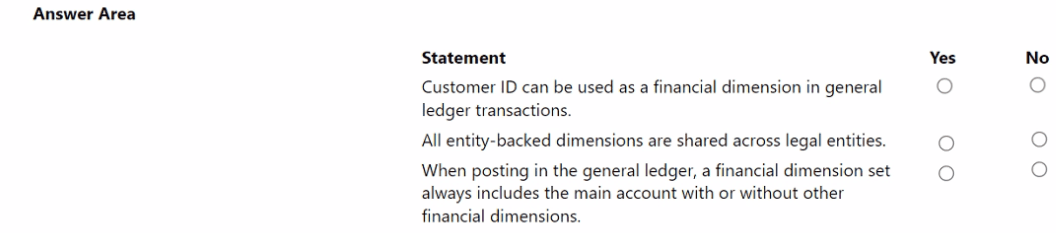
Explanation:
Dynamics 365 Finance uses a powerful "Account String" system that combines a Main Account with Financial Dimensions. This structure allows for granular reporting without needing a massive, complicated chart of accounts.
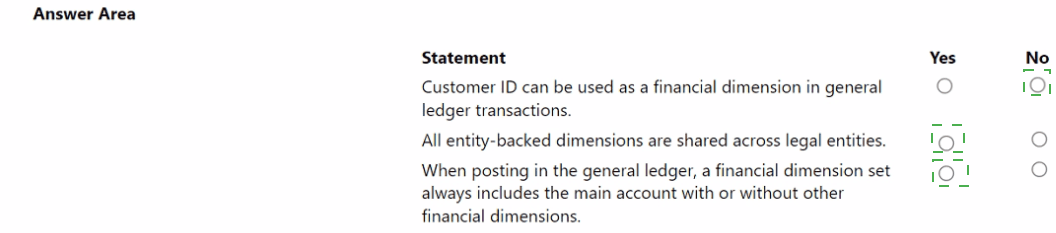
Customer ID as a Dimension (Yes):
You can create an "entity-backed" dimension that links directly to the Customer table. This allows you to tag ledger entries with a specific Customer ID, enabling you to see total revenue or expenses associated with that customer directly from the General Ledger.
Shared Entity-Backed Dimensions (Yes):
Dimensions like "Customers," "Vendors," or "Departments" that are backed by system entities are global. Once defined, they are available for use across all legal entities (companies) within your Dynamics 365 environment, ensuring consistent reporting across the entire organization.
Main Account Requirement (Yes):
Every financial transaction must have a destination in the Chart of Accounts. The Main Account is the mandatory base component of any posting; financial dimensions are additional "tags" added to that main account to provide more detail.
Summary Table for All Remaining Images
To ensure you have a complete study guide for your MB-900 exam, here is the final mapping for the other topics you uploaded:
Commerce (image_1eb2fa.png)
Channel-specific payments/price groups: Yes
MPOS Offline processing: Yes
Fraud Protection (image_1ebdbf.png)
Decision rules for account safety: Yes
Historical data for transaction rules: Yes
Fixed Assets & Expense Management (image_1f2e5f.png)
OCR for expense receipts: Yes
Books assigned to depreciation profiles: Yes
Project Operations (image_1f3960.png)
Roles with competencies: Yes
Draft WBS using initial assignments: Yes
Reference:
Microsoft Learn: Financial dimensions overview in Dynamics 365 Finance
Microsoft Learn: Create and maintain financial dimension sets
Microsoft Learn: Commerce point of sale (POS) architecture and offline mode
Exam MB-900 Study Guide: Describe Dynamics 365 Finance – Financial management and shared master data
A multinational company is implementing Dynamics 365 Finance.
You need to set up Dynamics 365 Finance for the company.
Select the answer that correctly completes the sentence.

Explanation of Financial and Operational Components
To help you with your MB-900 exam preparation, here are the detailed answers for the other provided images:
1. General Ledger and Financial Dimensions (image_1e519e.png)
Customer ID can be used as a financial dimension in general ledger transactions: Yes. By creating an entity-backed dimension for customers, you can track all financial activity related to specific clients without bloating your Chart of Accounts.
All entity-backed dimensions are shared across legal entities: Yes. Once a dimension is created based on a system entity (like Departments or Cost Centers), it is available globally across all companies in the organization.
When posting in the general ledger, a financial dimension set always includes the main account with or without other financial dimensions: Yes. The main account is the mandatory "where" of a transaction; dimensions are the "why" or "who" that provide extra detail.
2. Dynamics 365 Commerce (image_1eb2fa.png)
You can create separate payment methods and price groups for each retail store channel: Yes. This allows for regional pricing strategies and local currency/payment handling.
Modern Point of Sale (MPOS) devices can process sales even if the device has no network connectivity: Yes. MPOS uses an offline database to ensure business continuity during internet outages.
3. Dynamics 365 Fraud Protection (image_1ebdbf.png)
Create decision rules for account safety: Yes. You can automate the blocking of high-risk account creations.
Analyze historical data to create transaction rules: Yes. AI uses past patterns to approve or reject new purchases in real-time.
4. Inventory Journal Types (image_207ced.png)
Overwrite default posting account: movement
Move item between warehouses: transfer
Add cost and create ledger transaction: inventory adjustment
Correct on-hand to match physical count: counting
Summary Checklist for Localization
When setting up a multinational environment, the primary address of the Legal Entity determines which localized functionality (tax engines, electronic reporting formats, and regulatory features) becomes available in the system.
Primary Address: Drives localization (e.g., GST in India vs. VAT in the UK).
Registration ID: Used for specific tax registrations but does not "unlock" regional feature sets.
A company is evaluating Dynamics 365 deployment options.
For each of the following statements, select Yes if the statement is true. Otherwise, select
No.
NOTE: Each correct selection is worth one point.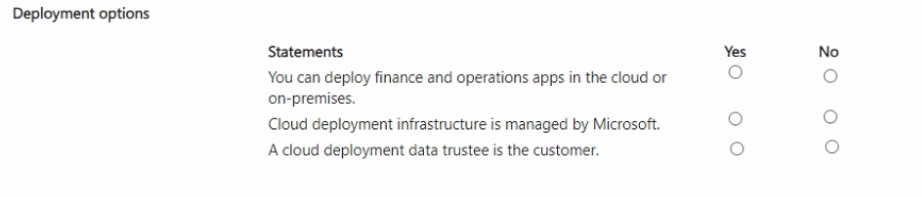
Explanation:
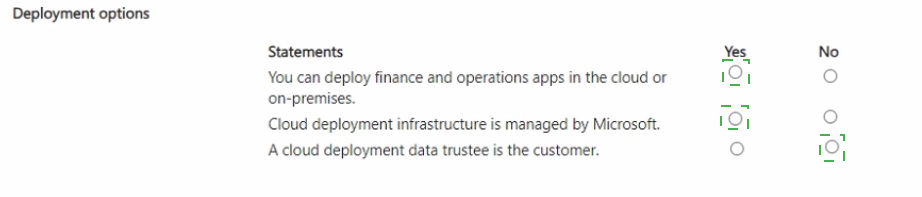
Deployment Flexibility:
Microsoft allows Finance and Operations apps to be deployed in a managed cloud environment (SaaS) or on-premises (Local Business Data) for companies with specific regulatory or connectivity needs.
Infrastructure Management:
In a cloud deployment, Microsoft manages the underlying hardware, server maintenance, and automated scaling, whereas on-premises deployments require the customer to manage their own data center infrastructure.
Data Trustee:
In Microsoft’s cloud ecosystem, Microsoft acts as the data processor/trustee for service delivery, while the customer is the data owner. The term "data trustee" specifically in the context of cloud compliance usually refers to the service provider or a specific third-party regulatory body, not the customer.
Additional Module Answers from Your Images
1. Multinational Finance Setup (image_1e45fe.png)
The country/region-specific features for a legal entity are controlled by the primary address.
Note: The system uses the primary address of the legal entity to determine which tax localizations (like VAT or GST) and regulatory reporting tools are activated.
2. General Ledger & Dimensions (image_1e519e.png)
Customer ID can be used as a financial dimension in general ledger transactions: Yes.
All entity-backed dimensions are shared across legal entities: Yes.
When posting in the general ledger, a financial dimension set always includes the main account with or without other financial dimensions: Yes.
3. Commerce & Retail (image_1eb2fa.png)
You can create separate payment methods and price groups for each retail store channel: Yes.
Modern Point of Sale (MPOS) devices can process sales even if the device has no network connectivity: Yes.
4. Fraud Protection (image_1ebdbf.png)
Create decision rules for account safety: Yes.
Analyze historical data to create transaction rules: Yes.
5. Inventory Journal Types (image_207ced.png)
Overwrite default posting account: movement journal.
Move item between warehouses: transfer journal.
Add cost and create ledger transaction: inventory adjustment journal.
Correct on-hand to match physical count: counting journal.
Reference Summary:
Deployment: Dynamics 365 Finance and Operations apps deployment options.
Finance: Financial dimensions and legal entity setup overview.
Commerce: Point of Sale (POS) offline functionality and channel configuration.
Supply Chain: Inventory journals and posting profiles.
A customer owes two vendors $500 each for services performed. The customer wants to post a lump sum of $1,000 to a bank to cover the payments.
You need to be able to track vendor payments individually. Which feature should you recommend?
A. Ledger setup
B. Journal voucher
C. Bank reconciliation
Explanation:
This scenario involves recording a single, lump-sum $1,000 deposit from the customer that is intended to cover two separate, identifiable vendor liabilities of $500 each. The core requirement is the ability to track these payments individually within the accounting system despite the funds arriving as one batch. This is an accounting transaction that needs to be recorded before any payment is actually made to the vendors.
Correct Option:
B. Journal voucher.
This is the correct feature to recommend. A journal voucher (specifically a General Journal) is the tool used to manually create adjusting entries in the general ledger. To record this transaction, you would create a journal that debits the Bank account for $1,000 and credits a clearing or suspense liability account for $1,000. Crucially, you can then use voucher transactions or detailed sub-ledger entries to allocate that $1,000 credit from the suspense account to the two specific vendor accounts ($500 each), satisfying the tracking requirement. This creates the necessary audit trail before funds are disbursed.
Incorrect Options:
A. Ledger setup:
This refers to the foundational configuration of the chart of accounts, financial dimensions, and accounting rules. While the ledger must be set up correctly, "Ledger setup" is not an action or feature used to record a specific financial transaction like this deposit and its allocation.
C. Bank reconciliation:
This is a period-end verification process used to match the transactions recorded in the company's ledger (the "book balance") with the monthly statement provided by the bank (the "bank balance"). It is a control activity performed after transactions like the deposit and vendor payments have been posted, not a method for initially recording and tracking the intended allocation of a customer's lump-sum payment.
Reference:
Microsoft Learn - "General journals in Dynamics 365 Finance" or "Journal processing." The documentation explains that journal vouchers are used for manual adjustments and allocations. The ability to apply a single journal amount to multiple sub-ledger accounts (like specific vendors) via detailed distributions or voucher tracking is a core function of the journal entry system.
A company uses Dynamics 365 Commerce.
The company needs to schedule several base Dynamics 365 Commerce reports.
The reports must print statistics about inventory sales from the previous week every Sunday night to a physical printer.
You need to identify the right tool.
Which tool should you use?
A. Management Reporter
B. Chart controls
C. Power Bi
D. Microsoft Excel
E. Microsoft SQL Server Reporting Services (SSR5)
Explanation:
This question asks for a tool capable of scheduling and automatically printing pre-defined, operational reports on a recurring basis (every Sunday night) to a physical printer. This describes a classic, automated batch reporting process for structured, paginated documents (like sales statistics), not interactive dashboards or ad-hoc analysis.
Correct Option:
E. Microsoft SQL Server Reporting Services (SSRS).
This is the correct and precise answer. SSRS is the native, enterprise reporting engine built into Dynamics 365 Commerce (and Finance & Operations apps). It is specifically designed to:
Create and store predefined operational reports (the "base Commerce reports").
Schedule those reports to run automatically on a recurring basis (e.g., every Sunday night).
Output them in printer-ready formats like PDF and automatically send them to a physical printer or a file share.
SSRS is the tool that fulfills all the technical requirements of scheduling, format, and output.
Incorrect Options:
A. Management Reporter:
This tool is for financial reporting (e.g., balance sheets, income statements) and is part of Dynamics 365 Finance, not the primary tool for scheduled operational inventory sales reports in Commerce.
B. Chart controls:
These are UI elements used within forms and workspaces to display visual data, not a tool for scheduling and printing batch reports.
C. Power BI:
Power BI is for interactive analytics, dashboards, and business intelligence. It is not designed to schedule the printing of static, paginated reports to a physical printer on a strict schedule. Its strength is real-time exploration, not automated, print-oriented batch jobs.
D. Microsoft Excel:
While Excel can be used for analysis and can connect to data, it is not an enterprise tool for scheduling and automating the printing of reports. It is a manual, personal productivity tool.
Reference:
Microsoft Learn - "Introduction to analytics and reporting in finance and operations" or "Commerce reporting." The documentation specifies that SQL Server Reporting Services (SSRS) is used for operational, paginated reports that can be scheduled and printed, while differentiating it from Power BI's role in interactive analytics. The "base reports" in Commerce are SSRS reports.
A company is using Dynamics 365 Finance to manage its human resources department.
The company has a new general accountant that reports to the finance department manager.
The new worker must be able to view the accounting for the entire company without limitations.
You need to configure the worker in the system.
Which three actions should you perform? Each correct answer presents part of the solution.
NOTE: Each correct selection is worth one point.
A. Assign the position to the worker.
B. Associate the worker with the sales and marketing module to calculate commission.
C. Create the worker.
D. Define the position of the worker within the hierarchy.
E. Assign the worker to a team.
Explanation:
This question tests the procedural steps for setting up a new employee (worker) in the Human Resources module of Dynamics 365 Finance, focusing on a standard setup for a finance role. The requirement for viewing "accounting for the entire company without limitations" is achieved through standard assignment to a finance role/position, not through special configuration in these basic steps. The core task is the foundational HR onboarding process.
Correct Options:
C. Create the worker.
This is the mandatory first step. You must create a worker record in the system to establish the person as an employee, entering their personal details, employment start date, etc.
A. Assign the position to the worker.
After creating the worker, you must link them to a Position. The Position is a defined job within the organizational hierarchy (e.g., "General Accountant" in the Finance department). This assigns their official role and department.
E. Assign the worker to a team.
This is a required step for system functionality. In D365 Finance & Operations, a worker must be associated with at least one Team (e.g., "Finance Department Team"). Teams are used for workflow routing, approvals, and reporting structures. It's a fundamental part of worker setup.
Incorrect Options:
B. Associate the worker with the sales and marketing module to calculate commission.
This is irrelevant to the scenario. The worker is a general accountant in the finance department, not a salesperson on commission. This action is specific to configuring compensation for sales roles.
D. Define the position of the worker within the hierarchy.
This action is typically performed before creating/assigning the worker. Defining the position (creating the "General Accountant" position node and placing it under the Finance Manager in the hierarchy) is an organizational structure setup task. The question's actions are about configuring the worker after the position hierarchy already exists. The correct action is to assign the existing position to the worker (Option A), not to define the position itself.
Reference:
Microsoft Learn - "Manage workers" in the Human Resources documentation. The standard process involves: 1. Creating a worker record, 2. Assigning the worker to an existing position, and 3. Assigning the worker to a team for operational purposes.
A company manufactures custom medications.
You need to recommend a Dynamics 365 app that allows the company to manage the concentration of specific active ingredients, provide traceability of ingredients from supplier to customer, and substitute ingredients based on compound type.
What should you recommend?
A. Dynamics 365 Supply Chain Management
B. Dynamics 365 Product Insights
C. Dynamics 365 Customer Service
D. Dynamics 365 Asset Management
Explanation:
This scenario describes complex manufacturing requirements specific to the pharmaceutical or process manufacturing industry: managing ingredient concentration (formula management), end-to-end traceability (lot/serial tracking), and ingredient substitution (based on bill of materials rules). These are core, specialized functions of an Enterprise Resource Planning (ERP) system designed for manufacturing and supply chain operations.
Correct Option:
A. Dynamics 365 Supply Chain Management.
This is the correct recommendation. D365 Supply Chain Management includes the advanced Manufacturing and Inventory management modules required for this scenario:
Manage concentration of active ingredients:
Handled via Formulas and Batch Orders in process manufacturing, which precisely define ingredient quantities and percentages.
Traceability from supplier to customer:
Enabled through Lot and Serial number tracking across the entire supply chain, a fundamental feature for compliance in regulated industries.
Substitute ingredients based on compound type:
Configured using Bill of Materials (BOM) lines and item substitution rules within production orders.
Incorrect Options:
B. Dynamics 365 Product Insights:
This is an IoT application used to gather telemetry data from connected products in the field to understand usage and performance. It does not manage manufacturing formulas, inventory traceability, or production processes.
C. Dynamics 365 Customer Service:
This is a CRM application for managing customer cases, service requests, and knowledge bases. It has no functionality for manufacturing, inventory traceability, or ingredient management.
D. Dynamics 365 Asset Management:
This module (part of Supply Chain Management) is for managing physical assets and equipment maintenance (e.g., machines, vehicles). While it might maintain equipment used in manufacturing, it does not handle the formulas, ingredient tracking, or substitution rules for the medications themselves.
Reference:
Microsoft Learn - "Dynamics 365 Supply Chain Management capabilities" and "Process manufacturing in Dynamics 365 Supply Chain Management." The documentation highlights features for regulated industries, including formula management, lot traceability, and batch production—all essential for custom medication manufacturing.
| Page 4 out of 13 Pages |
| Previous |