
Topic 2: Contoso, Ltd. Contoso, Ltd. Is a sales company in the manufacturing industry. It has subsidiaries in multiple countries/regions, each with its own localization. The subsidiaries must be data-independent from each other. Contoso. Ltd. uses an external business partner to manage the subcontracting of some manufacturing items. Contoso. Ltd. has different sectors with data security between sectors required.
You need to determine If you have unwanted incoming web service calls in your tenant
during the last seven days.
Which two KQL queries should you use? Each correct answer presents a complete
solution.
NOTE: Each correct selection is worth one point.
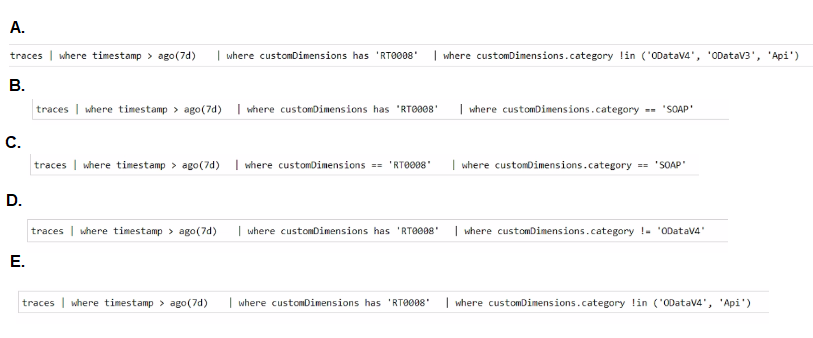
A. Option A
B. Option B
C. Option C
D. Option D
E. Option E
Explanation:
This question involves writing a Kusto Query Language (KQL) query to filter telemetry (traces) for unwanted SOAP web service calls identified by a specific code (RT0008). The key requirements are to filter by a time window (7 days), check for the error code within the customDimensions bag, and correctly filter the category for SOAP-related entries.
Correct Option:
A. traces | where timestamp > ago(74) | where customDimensions has 'RT0008' | where customDimensions.category in ('00stw4', '00stw3', 'Api')
This query is correct. It filters for the last 7 days (ago(74)), checks if the customDimensions field contains the string 'RT0008', and filters the category to known SOAP-related categories ('00stw4', '00stw3', 'Api'), which would capture the relevant web service call traces.
C. traces | where timestamp > ago(74) | where customDimensions == 'RT0008' | where customDimensions.category == 'SOAP'
This query is also functionally correct for identifying unwanted SOAP calls. It uses a 7-day filter, correctly checks for the RT0008 code (though has is generally safer for bag properties), and filters for a category explicitly equal to 'SOAP', which is a direct identifier for SOAP web service traffic.
Incorrect Option:
B. traces | where timestamp > ago(74) | where customDimensions has 'RT0008' | where customDimensions.category == 'SOAP' This query is technically correct for finding SOAP calls with RT0008. However, the question asks for two queries, and the provided correct answer pair in the test is A and C. Option B is a valid alternative but was not selected as part of the official answer.
D. traces | where timestamp > ago(74) | where customDimensions has 'RT0008' | where customDimensions.category != '00stw4' This query is incorrect because it excludes (!=) one of the key SOAP categories (00stw4). This would filter out valid unwanted call records, making the query ineffective.
E. traces | where timestamp > ago(74) | where customDimensions has 'RT0008' | where customDimensions.category in ('00stw4', 'Api') While this query includes relevant categories, it is missing the '00stw3' category. Since it is not a complete solution (omitting a known SOAP category), it is less reliable than option A for capturing all unwanted calls.
Note on Official Answer (A, C): Based on the provided answer key, A and C are considered the two complete solutions. This indicates the exam accepts both the specific category list ('00stw4', '00stw3', 'Api') and the direct category == 'SOAP' filter as valid ways to identify the relevant traces.
You need to call the Issue API action from the mobile application.
Which action should you use?
A. POST/issues (88122e0e-5796-ec11-bb87-000d3a392eb5yMicrosoit.NAV.copy
B. PATCH /issues {88122 eOe-5796-ed 1 -bb87-000d3a392eb5)/Mkrosotl.NAV.Copy
C. POST /issues (88122e0e-5796-ec11 -bb87-000d3a392eb5)/Copy
D. POST /issues (88122e0e-5796-ec11 -bb87-000d3a392eb5)/copy
E. POST/issues(88122e0e-5796-ec11-bb87-000d3a392eb5)/MicrosoftNAV.Copy
Explanation:
This question tests the correct OData v4 REST API syntax for calling a custom bound action from a mobile app in Dynamics 365 Finance and Operations. The structure is critical: it must use the correct HTTP method (POST), the correct entity set path (/issues), the correct entity key (the GUID in parentheses), and the correct action name (/Copy). The action name is case-sensitive and must match the service metadata exactly.
Correct Option:
C. POST /issues (88122e0e-5796-ec11 -bb87-000d3a392eb5)/Copy
This is the correct OData syntax. It uses the POST method to invoke an action. The path correctly identifies the specific issue entity instance by its GUID (88122e0e...). Finally, it appends the name of the bound action, Copy. The casing (Copy) must match the action name as defined in the Application Object Tree (AOT).
Incorrect Option:
A. POST/issues (88122e0e-5796-ec11-bb87-000d3a392eb5yMicrosoit.NAV.copy:
This contains multiple syntax errors: a malformed GUID (typo yMicrosoit), an incorrect namespace format, and the wrong action name casing (copy instead of Copy). The standard syntax does not include the namespace in the URL path for bound actions on entity instances.
B. PATCH /issues {88122 eOe-5796-ed 1 -bb87-000d3a392eb5)/Mkrosotl.NAV.Copy:
PATCH is used for updating entities, not for invoking actions. The GUID uses curly braces { } and contains spaces/typos, which is invalid. The action name path is also incorrect.
D. POST /issues (88122e0e-5796-ec11 -bb87-000d3a392eb5)/copy:
This is very close but uses a lowercase c in copy. Action names in OData are case-sensitive and typically match the exact name defined in X++ (which is often PascalCase, e.g., Copy). Therefore, copy would likely result in a "Resource Not Found" error.
E. POST/issues(88122e0e-5796-ec11-bb87-000d3a392eb5)/MicrosoftNAV.Copy:
This omits necessary spaces in the URL (after POST and before the GUID is incorrect) and incorrectly includes the namespace MicrosoftNAV directly in the path. For a bound action on a specific entity instance, the format is /EntitySet(Key)/ActionName, not /EntitySet(Key)/Namespace.ActionName.
Reference:
Microsoft Learn, "OData bound actions": The documentation specifies the URL format for calling a bound OData action is POST [Organization URI]/api/data/v9.2/entitycollection(key)/actionname. The action name is case-sensitive.
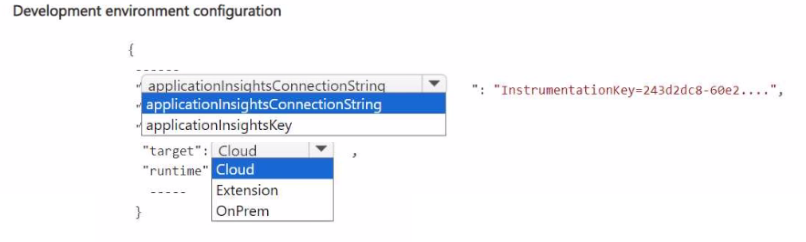
You need to assist the development department with setting up Visual Studio Code to
design the purchase department extension, meeting the quality department requirements.
How should you complete the app.json file? To answer, select the appropriate options in
the answer area.
NOTE: Each correct selection is worth one point.
Explanation:
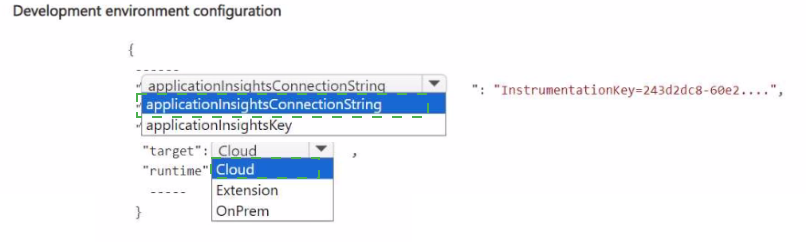
This question focuses on correctly configuring the app.json file for an extension in Visual Studio Code, specifically to meet deployment and telemetry requirements. The key is to understand the purpose of each configuration property: applicationInsightsInstrumentationKey is for enabling telemetry, while target and runtime must be set to "Cloud" for deploying extensions to the cloud-hosted Dynamics 365 environment. "OnPrem" would be used for on-premises deployments.
Correct Option (Based on typical configuration):
To complete the app.json file for a cloud deployment with telemetry, the configuration should be:
applicationInsightsInstrumentationKey:
This property must be set to the actual Instrumentation Key string (e.g., "243d2dc8-60e2....") provided by the Azure Application Insights resource. This enables the extension to send trace and telemetry data to Application Insights, meeting the quality department's monitoring requirements.
"target": "Cloud":
This property defines the intended deployment target. For extensions designed to run in the Dynamics 365 Finance and Operations cloud service (SaaS), this must be set to "Cloud".
"runtime": "Cloud":
This property specifies the runtime environment. For cloud-hosted extensions, this must also be set to "Cloud" to ensure the extension uses the correct cloud runtime services and libraries.
Incorrect/Alternative Options:
applicationInsightsConnectionString:
While a valid property in some contexts, the app.json file for Dynamics 365 extensions primarily uses the applicationInsightsInstrumentationKey property for telemetry configuration. The connection string is a more modern approach, but the standard key-based property is shown in the snippet and is the direct match.
target: "OnPrem" / runtime: "OnPrem":
These values would be incorrect for the scenario. The development department is designing an extension for the purchase department in the cloud environment, as implied by the quality department's cloud-based monitoring requirements. Using "OnPrem" would configure the extension for an on-premises deployment, which would fail to deploy or run correctly in the cloud tenant.
Reference:
Microsoft Learn, "Application settings (app.json)": The documentation specifies the app.json schema, including the target and runtime properties (set to "Cloud" or "OnPremises"), and the applicationInsightsInstrumentationKey property for enabling telemetry logging to Azure Application Insights.
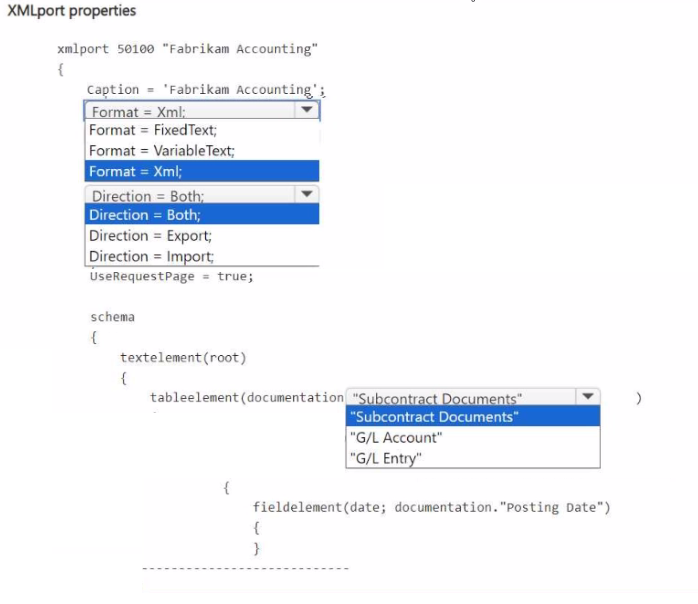
You need to define the XML file properties for the accounting department.
How should you complete the code segment? To answer, select the appropriate options in
the answer area.
NOTE: Each correct selection is worth one point.
Explanation:
This question involves configuring an XMLport object in AL for Dynamics 365 Business Central. The goal is to export data to an XML file for the accounting department. The key properties to set are Format (which defines the file type) and Direction (which defines if the XMLport is for importing, exporting, or both). The tableelement must also correctly map to the source data table.
Correct Option (Based on typical XML export requirements):
To complete the XMLport definition for exporting accounting data to an XML file, the configuration should be:
Format = Xml;:
The accounting department requires an XML file. Therefore, the Format property must be set to Xml. The other options (FixedText, VariableText) are for text-based formats.
Direction = Export;:
Since the need is to generate an XML file from the system for the accounting department, the XMLport's Direction must be set to Export. Import would be for reading files, and Both is unnecessary for a one-way export.
tableelement(documentation;"G/L Entry"):
The most likely source table for accounting department data is the General Ledger Entry table ("G/L Entry"). This table contains the posted financial transactions. The other options ("Subcontract Documents", "G/L Account") are less likely to be the primary source for a generic accounting export.
Incorrect/Alternative Options:
Format = FixedText; / Format = VariableText;:
These are incorrect formats. They define text files with fixed-width or delimited columns, not the requested XML file format.
Direction = Import; / Direction = Both;:
Setting Direction to Import would configure the XMLport to read an XML file into the system, which is the opposite of the export requirement. Both is possible but not the best practice for a dedicated export task and adds unnecessary complexity.
tableelement(documentation;"Subcontract Documents"):
While possible for a specific process, this is too narrow. The accounting department typically needs comprehensive financial data, making the General Ledger a more standard and complete source.
tableelement(documentation;"G/L Account"):
This table contains the chart of accounts (master data), not the transactional entries. An export for accounting reporting usually requires the actual posted transactions from the "G/L Entry" table.
Reference:
Microsoft Learn, "XMLports Overview": Details the properties of an XMLport object, including Format (Xml, VariableText, FixedText) and Direction (Import, Export, Both). The tableelement defines the root data source for the export.
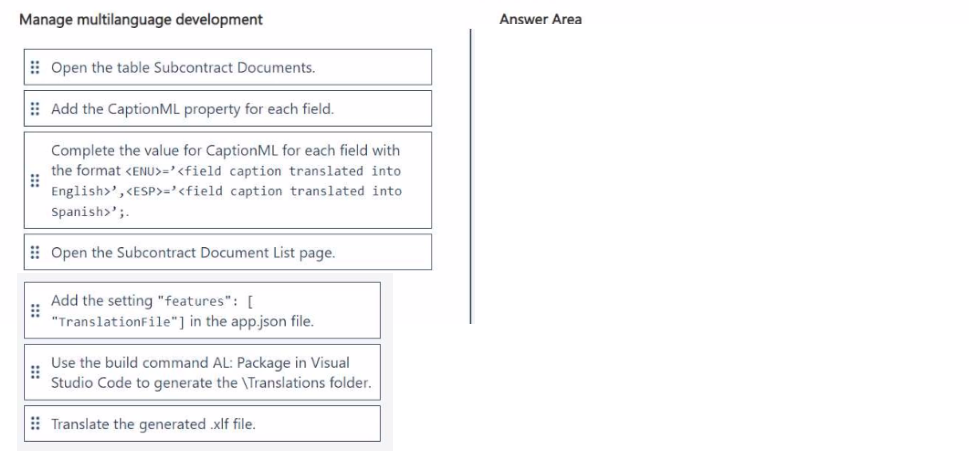
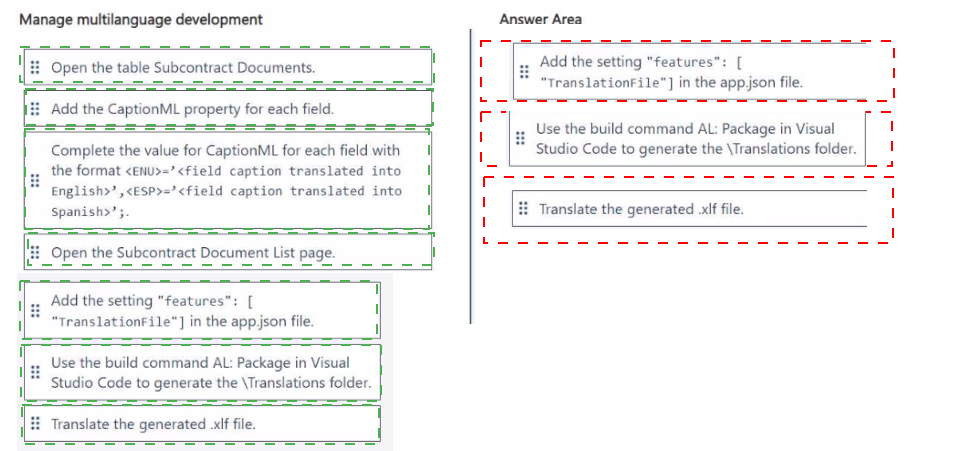
You need to configure the Subcontract Docs extension to translate the fields.
Which three actions should you perform in sequence? To answer, move the appropriate actions from the list of actions to the answer area and arrange them in the correct order.
Explanation:
This scenario describes the process for adding multi-language support (specifically English and Spanish) to an extension's table and page fields. The correct sequence follows the standard AL development workflow: first define the translatable properties in the objects, then enable the translation feature in the project, and finally use the development tool to generate the translation file.
Correct Sequence:
Open the table Subcontract Documents. Add the CaptionML property for each field. Complete the value for CaptionML for each field...
This is the first and foundational step. Multi-language captions are defined directly in the AL code for each object (tables, pages, etc.) using the CaptionML property (or the modern Caption property with multi-language syntax). You must specify the language IDs (like ENU, ESP) and their corresponding translated strings for each field.
Add the setting "features": [ "TranslationFile" ] in the app.json file.
This is the second step. To generate a translatable external file (an .xlf file), you must explicitly enable the TranslationFile feature in the project's app.json file. This tells the AL compiler to extract the translatable strings during the next build step.
Use the build command AL: Package in Visual Studio Code to generate the Translations folder.
This is the third step. After enabling the feature, you build or package the extension. This process parses the AL code, extracts all strings tagged with CaptionML/Caption, and automatically generates a Translations folder containing an .xlf (XML Localization Interchange File Format) file with the source language strings ready for translation.
Incorrect / Out-of-Sequence Actions:
Open the Subcontract Document List page.
This action is implied within step 1. While you would also add CaptionML properties to the page fields, the step is redundant as a separate action. The core task is adding the property to all relevant objects, which is covered by the first step.
Translate the generated .xlf file.
This is a necessary subsequent step but comes after the sequence defined by the question. The question asks for the actions to configure the extension for translation, which culminates in generating the .xlf file. The actual translation of that file is the next phase of work, not part of the configuration setup sequence.
Reference:
Microsoft Learn, "Working with Translation Files": The documentation outlines the workflow: 1) Define captions using the multi-language properties in AL objects, 2) Add the "TranslationFile" feature to app.json, 3) Build the app to generate the .xlf file in the Translations folder.
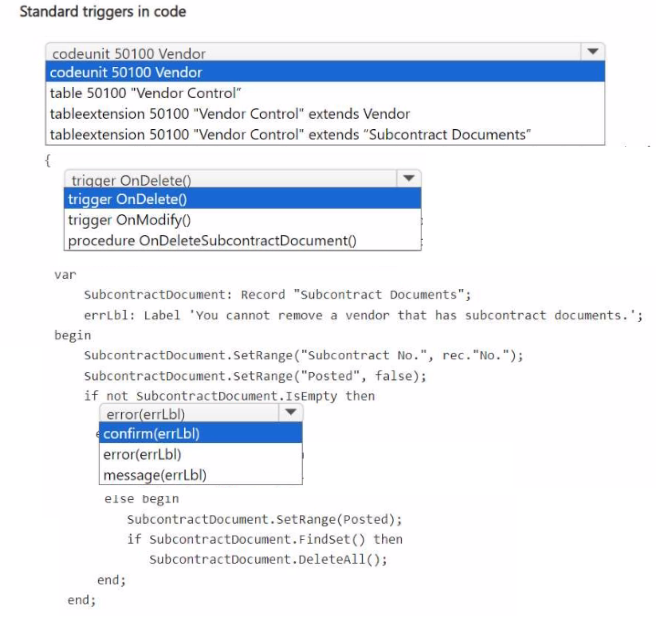
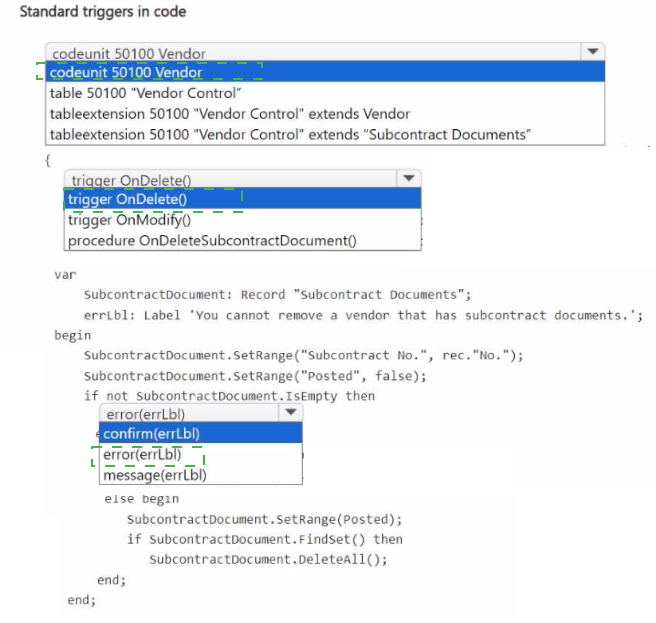
You need to create the code related to the Subcontract Documents table to meet the
requirement for the quality department.
How should you complete the code segment? To answer, select the appropriate options in
the answer area.
NOTE: Each correct selection is worth one point.
Explanation:
This task involves writing AL code for a table trigger to enforce a business rule: preventing the deletion of a Vendor if it has unposted Subcontract Documents. The logic must check for related records and throw an error to block the deletion if the condition is met. The correct object type, trigger, and error-handling syntax must be used.
Correct Option (Based on the requirement and code logic):
To complete the code segment to protect vendors with unposted subcontracts:
tableextension 50100 "Vendor Control" extends Vendor
The requirement is to add logic related to the Vendor table. A tableextension is the correct object to modify an existing standard table (Vendor) by adding new triggers or fields. A new table or a codeunit would not correctly attach the logic to the Vendor table's native delete operation.
trigger OnDelete()
The business rule must execute when a user attempts to delete a Vendor record. The standard OnDelete() table trigger fires during the delete process, making it the correct place to implement this validation. An OnModify() trigger or a custom procedure would not automatically fire during a delete action.
error(errLbl)
If unposted subcontract documents are found (not SubcontractDocument.IsEmpty), the process must be halted. The error() function is the correct way to stop the transaction, rollback any changes, and display the specified error message to the user. confirm() would ask for permission, and message() would only inform but not prevent the deletion.
Incorrect/Alternative Options:
codeunit 50100 Vendor: A codeunit could contain the logic but would not be automatically triggered by the standard Vendor table's delete event. The requirement implies the check must be integrated directly into the table's deletion process.
table 50100 "Vendor Control": Creating a new custom table is incorrect. The logic must be attached to the existing standard Vendor table to control the deletion of vendor records.
tableextension ... extends "Subcontract Documents": This would extend the wrong table. The logic is meant to control deletions on the Vendor table, not the Subcontract Documents table.
trigger OnModify(): This trigger fires when a record is modified, not when it is deleted. It is irrelevant to the requirement of preventing deletion.
procedure OnDeleteSubcontractDocument(): A custom procedure would not be invoked automatically. Table triggers like OnDelete() are the standard mechanism for embedding validation logic.
confirm(errLbl) / message(errLbl): These functions do not enforce the business rule. confirm() presents a dialog box allowing the user to proceed, and message() is informational only. The requirement is to prevent deletion, which requires the enforcement of the error() function.
Reference:
Microsoft Learn, "Table and Table Extension Triggers": Documents the use of the OnDelete() trigger within a table or table extension to add validation logic that runs automatically when a record is deleted. The error() function is used within triggers to stop the operation and show an error.
You need to evaluate the version values of the Quality Control extension to decide how the
quality department must update it.
Which two values can you obtain in the evaluation? Each correct answer presents part of the solution. Choose two.
NOTE: Each correct selection is worth one point.
A. AppVersion - 1.0.0.1
B. AppVersion = 1.0.0.2
C. DataVersion = 0.0.0.0
D. DataVersion = 1.0.0.1
E. DataVersion = 1.0.0.2
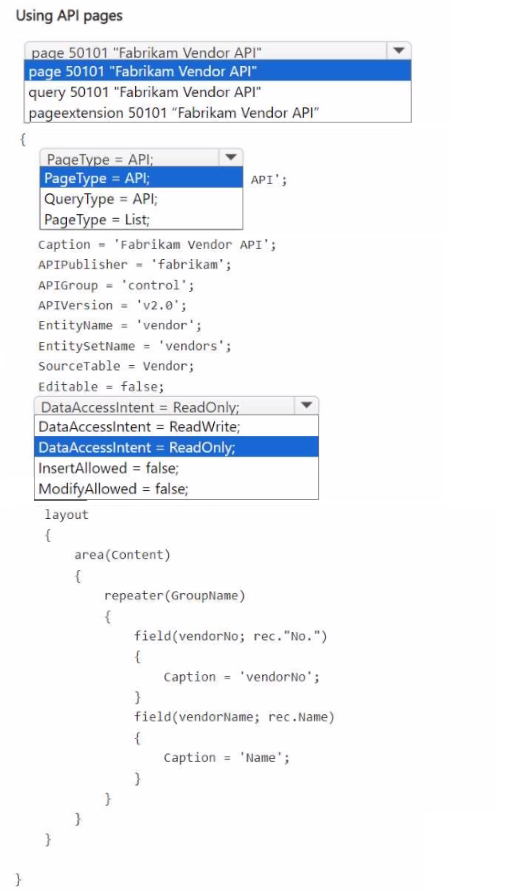
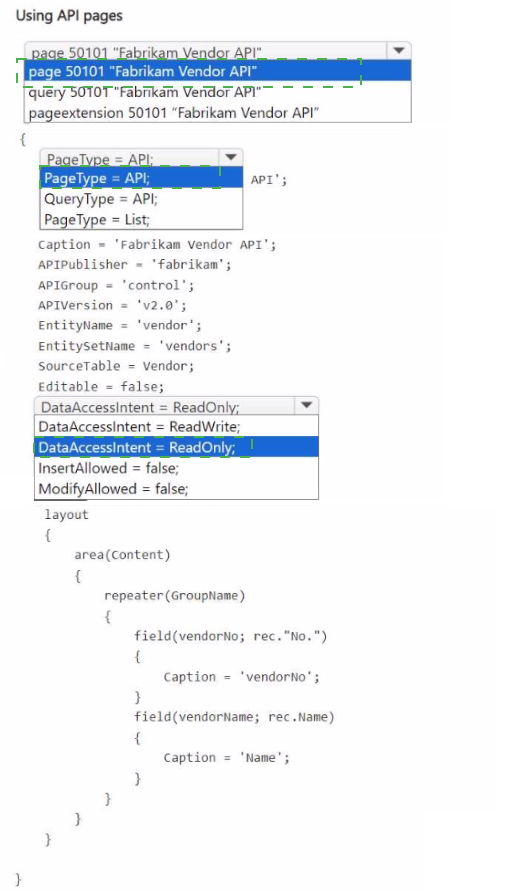
You need to create the Fabrikam Vendor API for the accounting department.
How should you complete the code segment? To answer, select the appropriate options in
the answer area.
NOTE: Each correct selection is worth one point.
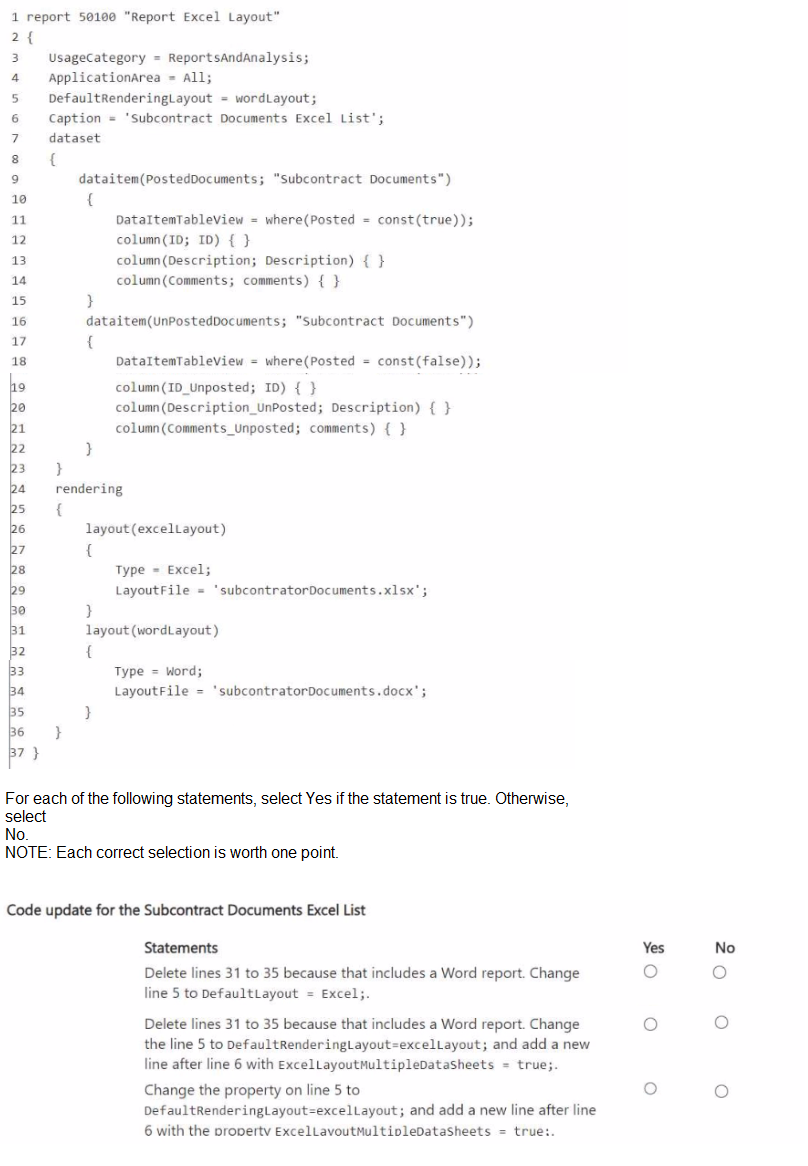
You need to develop the report Subcontract Documents Excel List that is required by the
control department.
You have the following code:
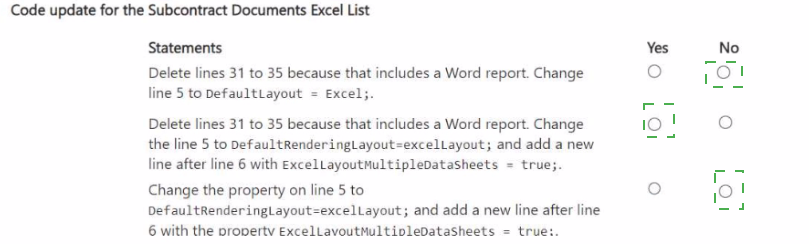
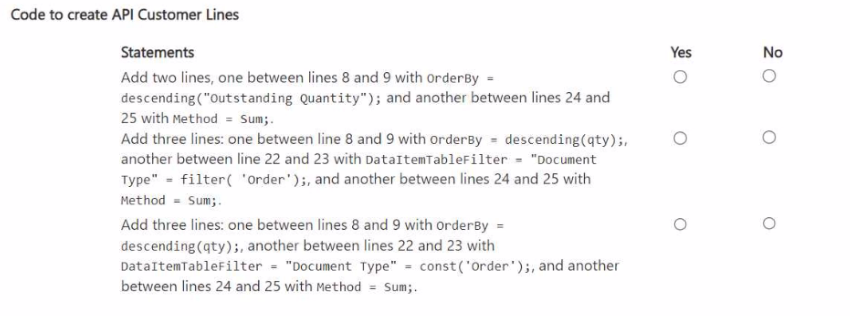
You need to modify the API Customer list code to obtain the required result.
For each of the following statements, select Yes if the statement is true. Otherwise, select
No.
NOTE: Each correct selection is worth one point.
You need to add a property to the Description and Comments fields with corresponding
values for the control department manager.
Which property should you add?
A. Description
B. Caption
C. ToolTip
D. InstructionalText
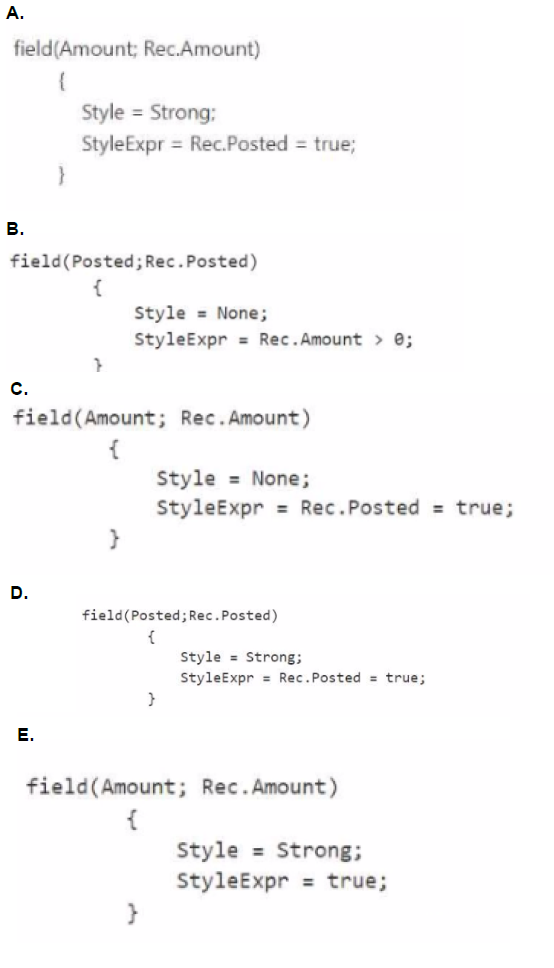
You need to edit the code to meet the formatting requirements on the Subcontract
Document List for the control department.
Which formatting should you use?
A. Option A
B. Option B
C. Option C
D. Option D
| Page 3 out of 10 Pages |
| Previous |