
Topic 5: Misc Questions
An organization has two million customers that are part of the International customer group.
Validation must occur when customer records are updated. For all customers where the
value of the customer group field is international, you must the delivery mode to Air.
You need to update the customer records.
Which two segments can you use? Each correct answer presents a complete solution.
NOTE: Each correct selection is worth one point.
A. Option A
B. Option B
C. Option C
D. Option D
Explanation:
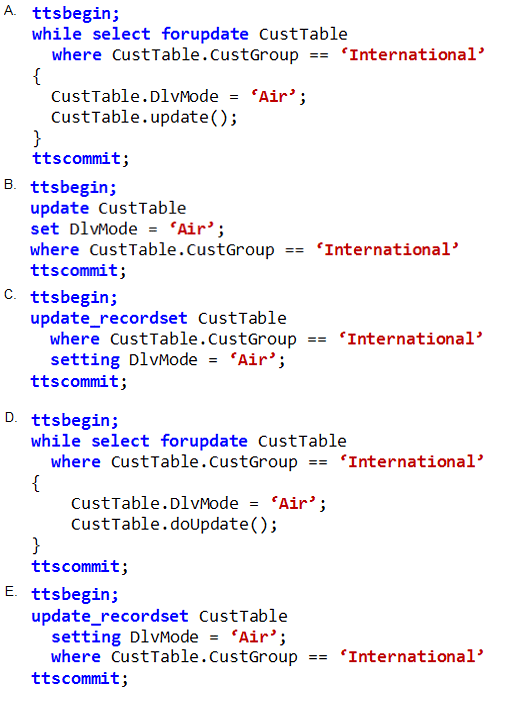
This question tests knowledge of efficient, bulk data operations in X++ within Dynamics 365 Finance and Operations. The requirement is to update millions of records while ensuring validation logic executes. While update_recordset is the most performant for bulk updates, it bypasses individual record validation by default. Using while select forupdate with .update() is the standard method to ensure per-record validation and business logic runs.
Correct Option:
Option A:
This is a correct solution. The while select forupdate loop fetches records individually. Inside the loop, field assignment and the .update() method call ensure that all table and field-level validation logic, including validateField, validateWrite, and update method overrides, are executed for each customer record. This guarantees business rules are enforced, which is the stated requirement.
Option D:
This is also a correct solution. It is functionally identical to Option A. The .doUpdate() method is the instance method called by the static Table.update() method. Using CustTable.doUpdate() performs the same core operation as CustTable.update(), invoking the full update sequence and all associated validation logic on the current record buffer.
Incorrect Options:
Option B:
This is incorrect syntax. X++ does not support a T-SQL style UPDATE...SET statement. The update keyword in X++ is used as a method on a table buffer (e.g., custTable.update();), not as a standalone SQL command. This code would not compile.
Option C:
This is incorrect for the requirement. While update_recordset is syntactically correct and offers superior performance for bulk updates, it performs a set-based operation directly in the database. This bypasses most application-layer validation, business logic, and event handlers (like onUpdating/onUpdated). Since the scenario mandates validation, this option does not fulfill the requirement.
Reference:
Reference: Microsoft Learn - "Perform maintenance and bulk operations" which contrasts update_recordset (for performance, minimal logging) with record-by-record operations (for business logic execution).
A company requires a change to one of the base Microsoft SQL Server Reporting Services
(SSRS) reports. The report must include a new field that automatically filters the report
based on the user who opens the report.
You need to add the new field as specified.
What should you do? To answer, select the appropriate options in the answer area.
NOTE: Each correct selection is worth one point.
Explanation:
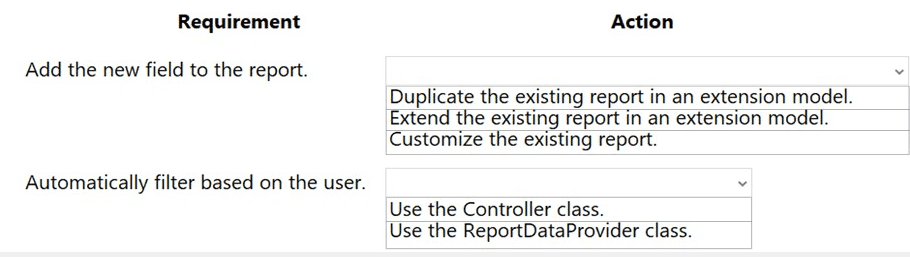
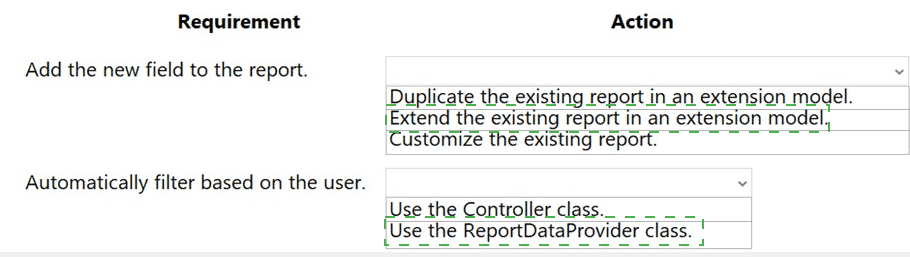
This scenario requires modifying a standard Microsoft report. The guiding principle is to avoid direct modifications ("customization") to base application code or artifacts, as they are not upgradable. Instead, you must use extensibility patterns. You extend the existing report in your own model and use a Report Data Provider (RDP) class to implement the custom logic for filtering based on the current user.
Correct Options:
Extend the existing report in an extension model.
This is the correct modern approach for modifying standard SSRS reports in D365 F&O. You create an extension of the base report in your own model. This allows you to add new controls (like the required field) and modify the design while preserving the ability to apply future Microsoft updates to the base report.
Use the ReportDataProvider class.
A Report Data Provider (RDP) class is the appropriate mechanism to implement complex business logic for a report, such as calculating or filtering data. Since the requirement is to "automatically filter based on the user," you would create an RDP class (or extend an existing one) that contains the logic to apply a filter using currentUserId(). The RDP then serves as the data source for the new field in the report design.
Incorrect Options:
Duplicate the existing report in an extension model.
Duplicating (creating a completely new copy) is not the recommended practice. It creates redundancy, breaks the link to the original report, and may cause maintenance issues. The extensibility framework is designed for modification, not replacement.
Customize the existing report.
"Customize" implies using the overlayering technique, where you modify the original Microsoft artifact directly. This practice is deprecated and strongly discouraged, as it makes applying future hotfixes and upgrades complex and unsupported. You must use extension models.
Use the Controller class.
While reports have controller classes, they are primarily used to manage the report's lifecycle (parameters, dialog, execution). They are not the primary class for implementing complex data filtering or business logic for a new data field. That is the role of an RDP class or a data method.
Reference:
Reference: Microsoft Learn - "Extend a report" and "Report Data Provider (RDP) classes", which detail the process of extending reports and using RDP classes as a data source for custom logic.
A company is developing a new solution in Dynamics 365 Supply Chain Management.
Customers will be able to use the solution in their own implementations.
Several of the classes in the solution are designed to be extended by customers in other
implementations to accommodate unique requirements.
Certain methods must show up in the output window during the build process to advise
other developers about the intent of the methods.
You need to implement the statements for the methods.
What should you implement?
A. global variables
B. info () function
C. properties
D. comments
E. attributes
Explanation:
This is a design-time requirement for a framework or library meant for extensibility. The goal is to embed metadata or instructions within the code itself that are visible to other developers during the build process (compile time), not during runtime execution. This is a classic use case for attributes in X++ and the .NET framework, which can be used to decorate methods with information that compilers, build tools, or development environments can inspect and display.
Correct Option:
E. Attributes:
Attributes are the correct solution. In X++, you can create custom attributes by extending the SysAttribute class. These attributes can be applied to methods, classes, or parameters. During the build process (or via reflection), a development tool or the compiler itself can read these attributes and output messages or warnings to the Output Window in Visual Studio, providing guidance to other developers about the method's purpose, usage, or requirements.
Incorrect Options:
A. global variables:
Global variables hold data at runtime and have no mechanism to display messages in the build output window. They are part of the application's execution state, not its design-time metadata.
B. info() function:
The info() function is a runtime method used to display messages in the Infolog for users or developers while the application is running. It does not produce output in the Visual Studio build process window.
C. properties:
Properties are members that provide a flexible mechanism to read, write, or compute the value of a private field. Like methods, they contain runtime logic. While they can be tagged with attributes, properties themselves do not generate build-time messages.
D. comments:
Comments (// or /* */) are ignored by the compiler and are not processed during the build. They provide documentation within the source code but cannot be programmatically accessed to generate mandatory output in the build window as described in the requirement.
Reference:
Reference: Microsoft Learn - "Metadata and Attributes" and "SysAttribute class". Attributes provide a way to add declarative information (metadata) to code, which can be retrieved at compile time or runtime. The scenario describes using attributes for developer guidance, a common practice in creating extensible APIs.
A company uses Dynamics 365 Finance.
You create a new extension for a standard table.
You need to add a new method in the extension.
Which five actions should you perform in sequence? To answer, move the appropriate
actions from the list of actions to the answer area and arrange them in the correct order.
Explanation:
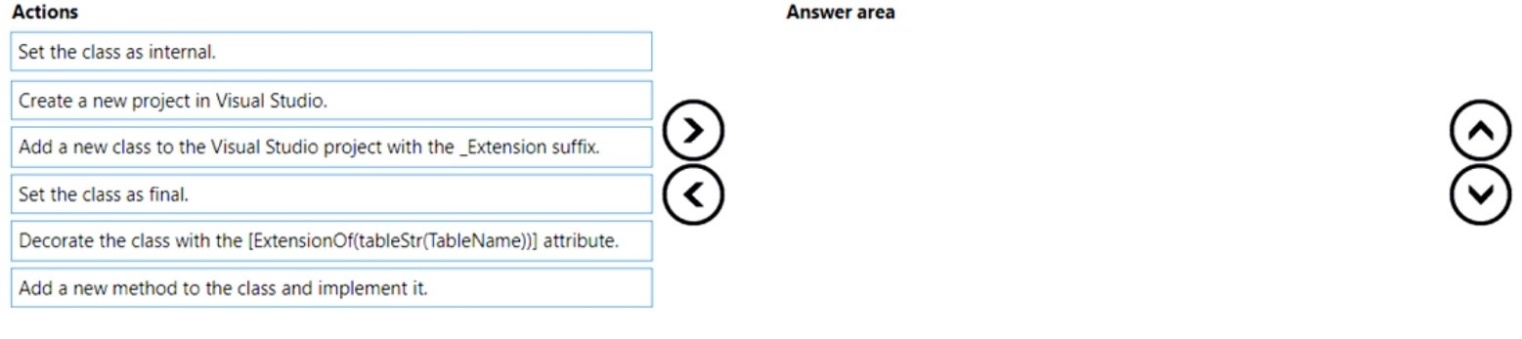
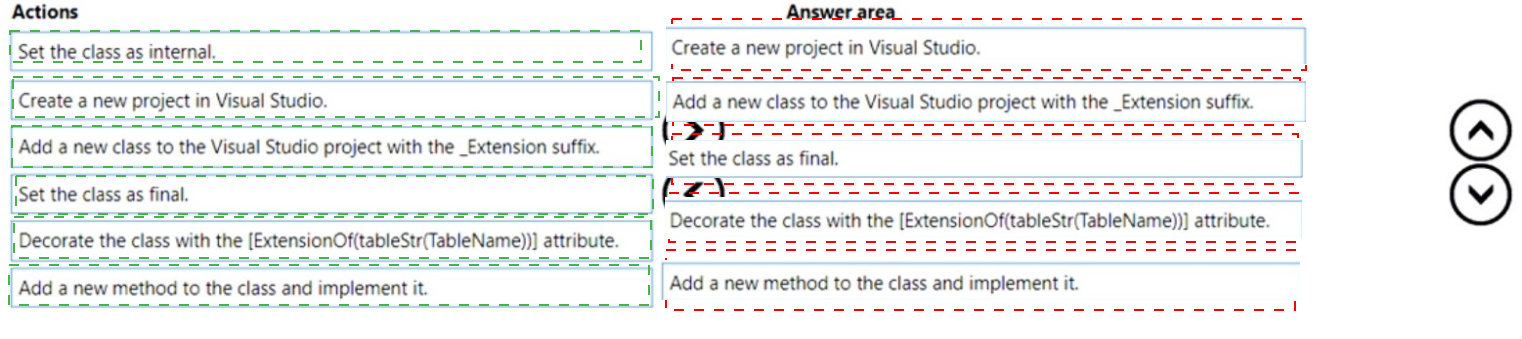
This question tests the standard, sequential procedure for creating a table extension class (also known as a class extension) in Microsoft Dynamics 365 Finance and Operations using Visual Studio. This pattern allows you to add new methods to a standard table without overlaying the original code. The process follows a strict set of steps to ensure the extension is correctly recognized by the framework.
Correct Sequence & Explanation:
Create a new project in Visual Studio.
You must first have a Visual Studio project within your extension model to contain the new class. All development artifacts are created within projects.
Add a new class to the Visual Studio project with the _Extension suffix.
The naming convention for class extensions is critical. The class name must end with _Extension (e.g., CustTable_Extension) to be automatically identified by the system as an extension class.
Decorate the class with the [ExtensionOf(tableStr(TableName))] attribute.
This attribute is the core of the extension mechanism. It explicitly defines which base class (in this case, a table buffer like CustTable) this new class extends. The tableStr() compiler directive provides the correct reference.
Set the class as final.
Extension classes must be marked as final. This prevents other developers from creating a chain of extensions on your extension, ensuring a stable and predictable inheritance hierarchy for the base artifact.
Add a new method to the class and implement it.
Finally, within the newly created and properly configured extension class, you write the new method that adds the required functionality to the extended table.
Incorrect/Excluded Action:
Set the class as internal.
While extension classes often have their access modifier automatically determined, explicitly setting it as internal is not a required step in the defined sequence. The framework handles the visibility appropriately. The final keyword is the mandatory modifier, not internal.
Reference:
Reference: Microsoft Learn - "Create extensions for tables and classes". This documentation outlines the precise steps: creating a class with the _Extension suffix, using the [ExtensionOf] attribute, marking it as final, and adding members.
You are a Dynamics 365 Supply Chain Management developer.
You are working on a project by using Visual Studio.
Several users check out a custom form version control and modify the form.
You need to find the user that has added a specific line of code to the form.
What should you do?
A. Open the object in Object Designer, select the title of the object, and then right-click View History.
B. In Solution Explorer, navigate to the object and right-click View History.
C. Using Visual Studio, navigate to the object. Add the object to a new solution, and then right-click View History.
D. Using Visual Studio, navigate to the object in Application Explorer and right-click View History.
Explanation:
This question focuses on the developer workflow for tracking changes to application objects (like forms) when using version control (like Azure DevOps or Git) within Visual Studio for Dynamics 365 development. The key is to understand that the source of truth and history for these objects is stored in the version-controlled project files in your workspace. You must access the history from the correct location within the Visual Studio IDE to see detailed change logs, including who added specific code.
Correct Option:
D. Using Visual Studio, navigate to the object in Application Explorer and right-click View History.
Application Explorer in Visual Studio provides a metadata view of all application objects in your model. When an object (like a form) is under version control, right-clicking it in Application Explorer and selecting View History opens the version control history for that specific element. This history shows all commits, authors, dates, and the exact code changes (diffs), allowing you to identify who added a specific line.
Incorrect Options:
A. Open the object in Object Designer, select the title of the object, and then right-click View History.
Object Designer is a legacy tool from the MorphX development environment within the Dynamics 365 client. It is not the primary tool for modern Visual Studio-based development and does not integrate with external version control systems like Azure DevOps. Its "View History" would not show the detailed, user-specific commit history from the source control repository.
B. In Solution Explorer, navigate to the object and right-click View History.
Solution Explorer shows the files and projects you have explicitly added to your current Visual Studio solution. If the custom form's project or file is not part of your open solution, you will not see it here. Application Explorer is the comprehensive view of all objects, regardless of your current solution.
C. Using Visual Studio, navigate to the object. Add the object to a new solution, and then right-click View History.
This is an unnecessary extra step. While you could add the object to a solution to access it, the direct and intended method is to use Application Explorer, which already contains all objects. Adding it to a solution first does not provide any additional historical data and is inefficient.
Reference:
Reference: Microsoft Learn - "Version control home page" and developer documentation on using Application Explorer. The standard practice for viewing the change history of an application object is via the version control context menu in Application Explorer within Visual Studio.
A company uses Dynamics 365 Finance.
You must create a process that updates the following:
• A single record for customer number A0001 in the customer table.
• The value of its customer group to 10.
You need to implement the process. Which code segment should you use?
A. Option A
B. Option B
C. Option C
D. Option D
Explanation:
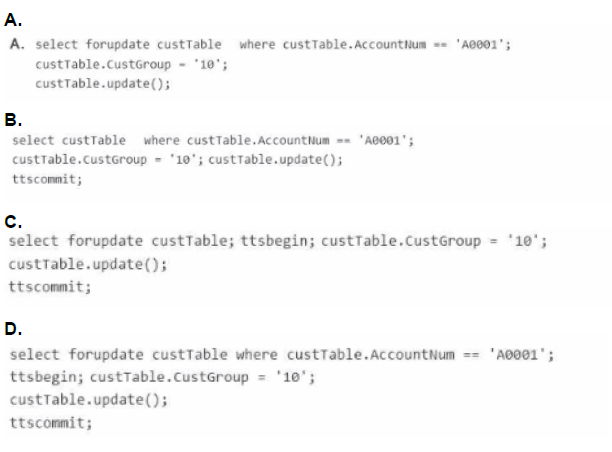
This question tests the fundamental and mandatory pattern for updating a single database record in X++ within Dynamics 365 Finance & Operations. The pattern ensures data integrity by combining the proper use of the Transaction Tracking System (ttsbegin/ttscommit) and the forupdate keyword when selecting a record for modification. The correct sequence is critical: start the transaction before selecting the record for update.
Correct Option:
D. Option D
This option follows the exact required sequence:
ttsbegin; - Starts an explicit database transaction.
select forupdate ... - Within the transaction, selects the specific record (AccountNum == 'A0001') and places a pessimistic lock on it using forupdate. This prevents other processes from modifying it until the transaction ends.
Modifies the field and calls .update().
ttscommit; - Commits the transaction, releasing the lock and persisting the changes. This pattern guarantees atomicity and consistency for the single-record update.
Incorrect Options:
A. Option A:
This code is missing the ttsbegin and ttscommit statements entirely. While it uses forupdate, the update is not wrapped in a transaction. This is a serious flaw that can lead to partial updates, concurrency issues, and a failure to maintain data integrity. All database writes in X++ must occur within a transaction scope.
B. Option B:
This code has two critical errors. First, it is missing the forupdate keyword on the select statement. You cannot call .update() on a record buffer retrieved without forupdate. Second, it places ttscommit after the .update() call but without a corresponding ttsbegin to start the transaction. The ttscommit without a ttsbegin will cause a runtime error.
C. Option C:
This code has a fatal sequence error. It performs the select forupdate statement outside and before the transaction (ttsbegin). The forupdate lock is acquired, but because it's not inside a transaction, the lock may be held incorrectly or released prematurely, leading to potential deadlocks or inconsistent data. The transaction must always be started before selecting records for update.
Reference:
Reference: Microsoft Learn - "Transaction integrity" and "Update data by using X++ statements". The documentation explicitly states the pattern: "To update a record in a table, use the following steps: 1. Start a transaction (ttsbegin). 2. In a select statement, use the forupdate keyword on the table variable... 3. Update the fields... 4. Call the update method... 5. Commit the transaction (ttscommit)."
You need to prepare to deploy a software deployable package to a test environment. What
are two possible ways to achieve the goal?
Each correct answer presents a complete solution.
NOTE: Each correct selection is worth one point.
A. In Visual Studio, create a Dynamics 365 deployment package and upload the package to the as
B. In Azure DevOps, queue a build from the corresponding branch and upload the model to the asset library.
C. In Azure DevOps, queue a build from the corresponding branch and upload the package to the asset library.
D. In Visual Studio, export the project and upload the project to the asset library.
Explanation:
A software deployable package is a deployable unit containing model binaries, reports, and other artifacts, generated through an automated build process. It is created in Azure DevOps (or another build agent) and then uploaded to the Lifecycle Services (LCS) Asset Library for deployment to environments. The question asks for two ways to prepare such a package.
Correct Options:
C. In Azure DevOps, queue a build from the corresponding branch and upload the package to the asset library.
This is the primary and recommended method. An Azure DevOps build pipeline (configured for Dynamics 365) compiles the source code from a branch, generates the software deployable package (a .zip file), and can automatically upload it to the LCS Asset Library. This is a complete, automated CI/CD process.
A. In Visual Studio, create a Dynamics 365 deployment package and upload the package to the LCS Asset Library.
This is a valid, developer-centric alternative. From within Visual Studio, you can use the "Create Deployment Package" menu option (or msbuild commands) to manually generate a deployable package from your local workspace. You can then manually upload the resulting .zip file to the LCS Asset Library.
Incorrect Options:
B. In Azure DevOps, queue a build from the corresponding branch and upload the model to the asset library.
This is incorrect because you upload the final package (.zip), not a model file (.axmodel). The build process packages the compiled model(s) and other assets into a single deployable package file. The Asset Library is designed to store these deployable packages, not raw model files.
D. In Visual Studio, export the project and upload the project to the asset library.
This is incorrect. "Exporting a project" from Visual Studio creates a file containing source code (e.g., a .axpp file). This is not a software deployable package. You cannot deploy a source code project file to a test environment. Deployable packages are compiled binaries, not source code. The Asset Library is for deployable packages and other assets, not for Visual Studio project files.
Reference:
Reference: Microsoft Learn - "Create deployable packages of models" and "Overview of deployment packages and environments". The documentation clearly states that packages are created either via a build pipeline or manually via the msbuild command/Visual Studio. The package is then uploaded to the LCS Asset Library.
You are a Dynamics 365 Finance and Operations developer.
You have a report in an existing model that connects with the following objects:
in-memory table
data provider class
controller class
contract class
The report is locked for modifications.
Explanation:
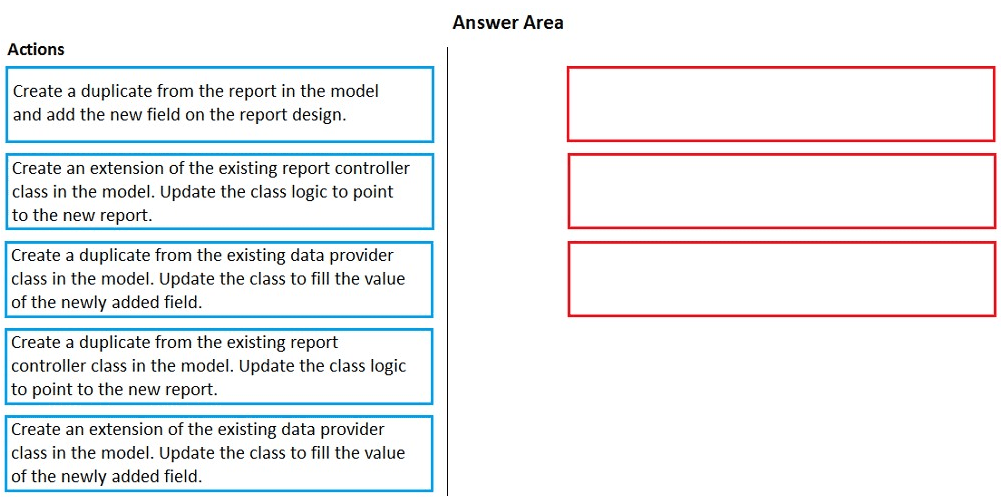
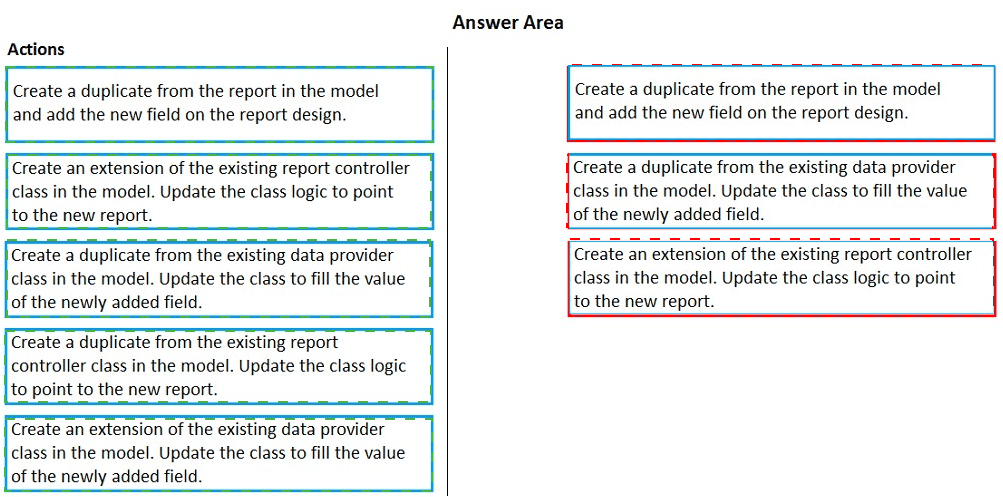
The guiding principle is extensibility over duplication. Since the original report and its classes are locked, you cannot modify them directly. The correct approach is to create an extension of the key artifacts in your own model. You extend the report design to add the field, extend the data provider class to populate it, and extend the controller class to link the new components. This preserves upgradability.
Correct Actions in Sequence:
Create an extension of the existing report controller class in the model. Update the class logic to point to the new report.
The controller orchestrates the report. You extend it to override its logic, such as the preRunModifyContract or prePrintModifyReport methods, to redirect processing to your new extended report and contract.
Create an extension of the existing data provider class in the model. Update the class to fill the value of the newly added field.
The data provider (RDP) class supplies the data. You extend it to add a new method or override an existing one to calculate and populate the value for your newly added report field.
Create a duplicate from the report in the model and add the new field on the report design.
Important: This step technically involves creating a new report (a duplicate/derived copy) because SSRS reports themselves are not directly "extended" in the same way as classes. In your extension model, you create a new report that is based on (copies) the original design. You then modify this new report's design to add the new field and bind it to the data from your extended RDP class. Your extended controller will point to this new report.
Incorrect/Excluded Actions:
Create a duplicate from the existing report controller class in the model.
This is incorrect because it promotes overlayering/customization (duplicating and modifying the original class) instead of extending it. The requirement to work with a locked model implies you must use extension techniques.
Create a duplicate from the existing data provider class in the model.
Same as above. Duplicating the class (overlayering) is a deprecated practice. You must create a class extension using the [ExtensionOf] attribute.
Reference:
Reference: Microsoft Learn - "Extend a report" and "Extend a class". The documented pattern involves extending the controller and RDP classes and creating a new report design in your extension model.
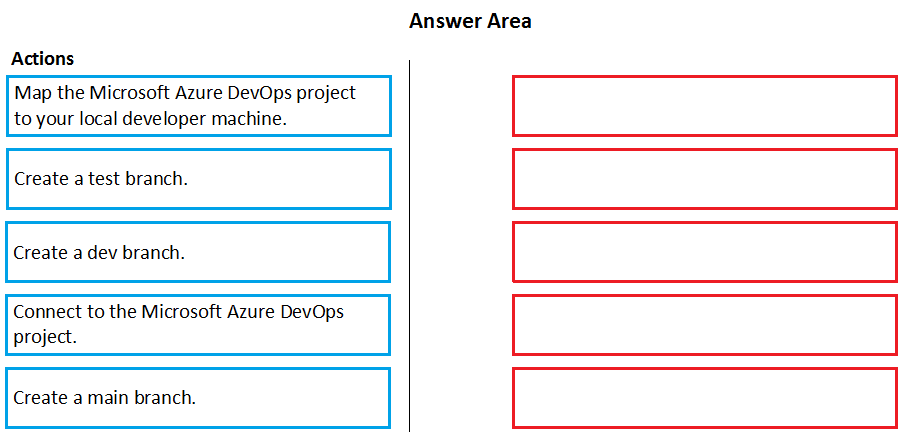
You are configuring your developer environment by using Team Explorer.
There are several developers working on a customization.
You need to ensure that all code is checked in and then merged to the appropriate
branches.
In which order should you perform the actions? To answer, move all actions from the list of
actions to the answer area and arrange them in the correct order.
NOTE: More than one order of answer choices is correct. You will receive credit for any of
the correct orders you select.
Explanation:
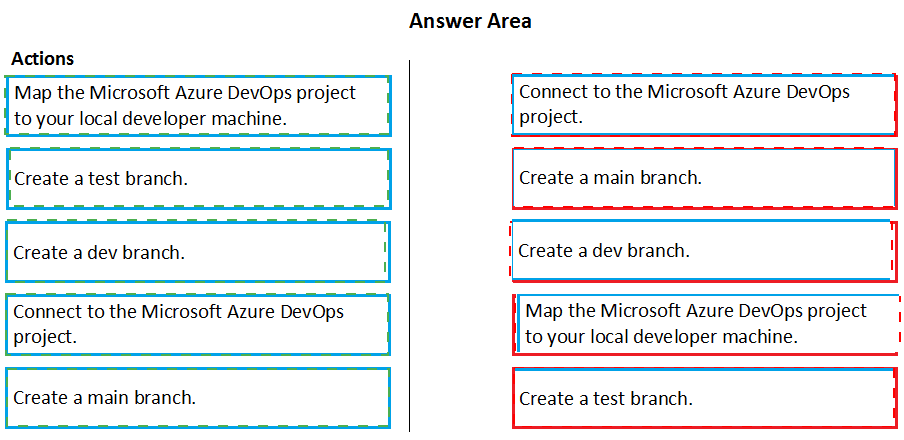
This question outlines the initial setup steps for a new development project using Azure DevOps (or Team Foundation Version Control - TFVC) with Dynamics 365 in Visual Studio's Team Explorer. The goal is to establish the core source control structure to enable team collaboration. There are two valid sequences because the creation of the core main branch and the initial connection to the Azure DevOps project can logically occur in either order before the mapping step.
Two Possible Correct Sequences:
Sequence 1: (Project-First)
Connect to the Microsoft Azure DevOps project.
First, you must connect Visual Studio's Team Explorer to the remote Azure DevOps project that hosts the repository (either Git or TFVC). This establishes the link to the team's central code storage.
Create a main branch.
In the connected project/repository, you create the primary integration branch, typically named main (or master). This serves as the source of truth for stable, integrated code.
Map the Microsoft Azure DevOps project to your local developer machine.
This step (specific to TFVC) creates a local workspace mapping, downloading the code from the main branch to your machine. For Git, the equivalent step is cloning the repository.
Create a dev branch.
From the main branch in your local workspace, you create a dev (or development) branch for integrating ongoing work from feature branches before merging to main.
Create a test branch.
From the dev or main branch, you create a test branch used for stabilization and testing of release candidates.
Sequence 2: (Branch-First in Repo)
Create a main branch. (Assumes you are already connected or are working in the web portal).
Connect to the Microsoft Azure DevOps project.
Map the Microsoft Azure DevOps project to your local developer machine.
Create a dev branch.
Create a test branch.
The logic is the same: the permanent main branch must exist as the source before mapping and creating child branches.
Why This is Correct:
Both sequences establish the critical trunk (main) before any local mapping occurs, ensuring the local workspace is based on the correct source. The dev and test branches are created last, as they are supporting branches derived from main. The key is that main exists and is mapped before creating the other branches locally.
Incorrect Concept:
Creating dev or test branches before connecting to the project or creating/mapping main is illogical. You cannot create team branches in a vacuum; they must be branched from an existing source in the central repository.
A company uses Dynamics 365 Finance.
The company requires you to create a custom service.
You need to create request and response classes for the custom service.
Which class attribute should you use?
A. DataContract
B. DalaEventHandler
C. DataCollection
Explanation:
This question tests knowledge of creating a custom service contract in Dynamics 365 Finance and Operations using X++. When building services (like services exposed via OData), you define the structure of the data being sent (request) and received (response) using Data Contract classes. These classes are decorated with attributes to define their serialization behavior for service communication.
Correct Option:
A. DataContract
The [DataContract] attribute is applied at the class level to designate a class as a data contract. This tells the runtime that instances of this class can be serialized and deserialized (e.g., to/from JSON or XML) when used as parameters or return types in a service operation. It is the fundamental attribute for defining service request and response structures.
Incorrect Options:
B. DataEventHandler
This is not a valid X++ attribute. It seems to be a misspelling or confusion with the [DataEventHandler] attribute, which is used to decorate a method that should handle a specific delegate method call (like OnInserting, OnDeleting on tables). It has nothing to do with defining service contracts.
C. DataCollection
This is not a standard X++ class attribute used for service contracts. It might refer to a generic .NET collection type (like List or Collection), but in X++, you would use specific types like List or Array within your DataContract class to represent collections of data. The attribute to define the overall class structure is [DataContract].
Reference:
Reference: Microsoft Learn - "Data contracts" in the Dynamics 365 documentation. The [DataContract] attribute is explicitly used to mark classes that define the structure of data exchanged with services. Individual fields within the class are then decorated with [DataMember] attributes to mark them for serialization.
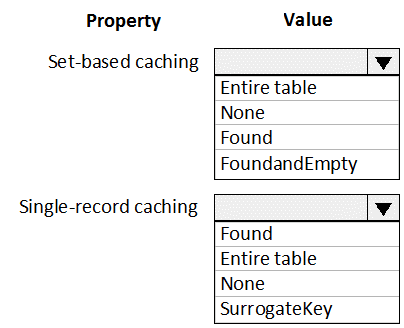
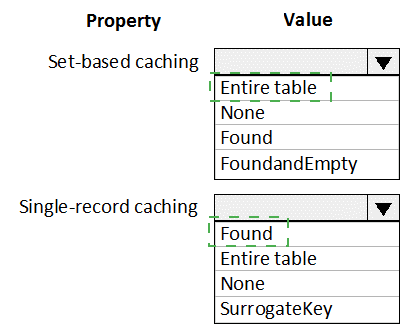
You are a Dynamics 365 Finance and Operations developer.
Users are experiencing slower load times for the All Customers form.
You need to update caching for CustTable to improve data retrieval times.
How should you configure CacheLookup properties? To answer, select the appropriate
options in the answer area.
NOTE: Each correct selection is worth one point.
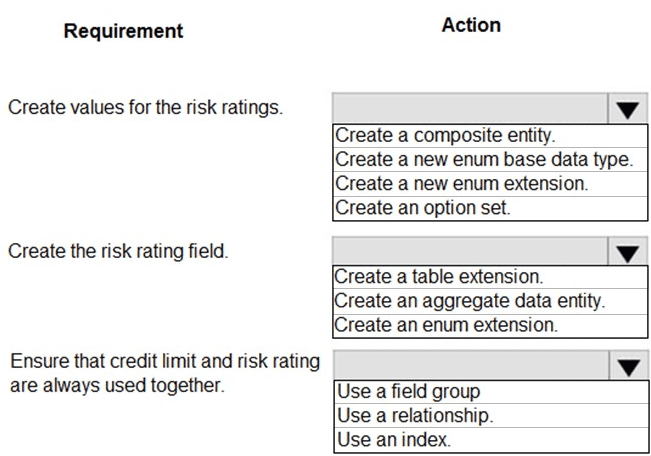
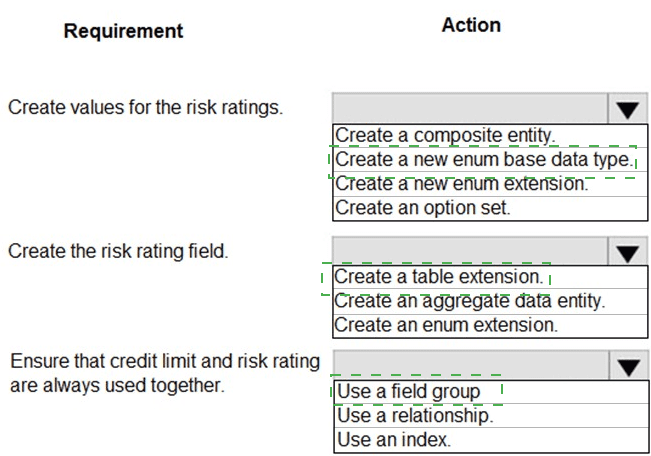
A company is implementing Dynamics 365 Finance. Vendors receive a risk rating that is
determined by their on-time delivery performance as well as their credit rating.
You need to implement the following risk rating functionality:
The risk rating must accompany the credit rating when the credit rating is used.
The risk rating must be able to be used in other areas of the solution to determine
processing outcomes.
The risk rating must consist of the following values:
1 = Good
2 = Medium
3 = Risky
The risk rating must be displayed in the Miscellaneous Details tab below the Credit
Rating and Credit Limit fields in the Vendor form.
What should you do? To answer, select the appropriate options in the answer area.
NOTE: Each correct selection is worth one point.
| Page 1 out of 6 Pages |