
Topic 3: Adventure Works Cycles
You need to meet the operational requirements for VendorB.
What should you do? To answer, select the appropriate options in the area.
NOTE: Each correct selection is worth one point.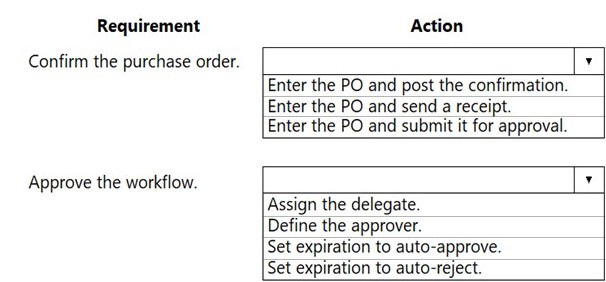
Explanation:
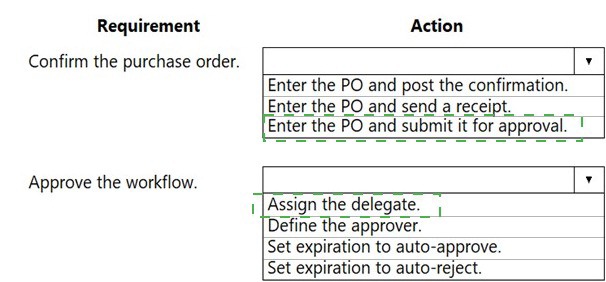
The operational requirement involves two distinct processes: formally confirming a finalized purchase order with the vendor, and setting up the internal workflow approval process for new POs before they are sent. These are standard procurement steps for vendor management and internal control.
Correct Option:
Confirm the purchase order → Enter the PO and post the confirmation:
This is the correct action to officially confirm a PO with the vendor. After entering the PO details, you post the confirmation, which generates a formal purchase order document that can be sent to Vendor B. This legally commits to the purchase.
Approve the workflow → Define the approver:
Before a PO can be confirmed, it must typically go through an internal approval workflow. The foundational step in setting up this workflow is to define the approver(s)—the person or role authorized to approve purchase orders based on amount, item, or other criteria.
Incorrect Option:
Other actions for confirming the PO:
Enter the PO and send a receipt: A receipt (Product receipt) is for recording goods arrival, not for confirming the order to the vendor.
Enter the PO and submit it for approval: This is part of the internal workflow process that happens before confirmation, not the confirmation action itself.
Other actions for approving the workflow:
Assign the delegate:
This is for setting up a backup approver, which is a secondary step after the primary approver is defined.
Set expiration to auto-approve/auto-reject:
These are specific timing rules for unattended workflow items, not the primary action to establish the approval process. They configure what happens if the defined approver doesn't act.
Reference:
Microsoft Learn: "Purchase order confirmations" and "Set up purchase order approval." Posting a purchase order confirmation formally sends it to the vendor. Setting up approval workflows involves defining workflow elements such as the participants (approvers) who must review and approve documents before they progress.
You are a functional consultant for a company named Contoso Entertainment System USA
(USMF).
From sales order number 000720, you need to ensure that a product named Projector Television is delivered directly to a customer.
To complete this task, sign in to Dynamics 365 portal.
Steps to Set Up Direct Delivery for Sales Order 000720
Open the Sales Order:
Go to Accounts receivable > Orders > All sales orders.
Find and open Sales Order 000720.
Ensure the Item is Setup for Direct Delivery:
On the sales order lines, select the Projector Television item.
Open the Line details FastTab.
Go to the Setup tab.
Verify that the Direct delivery checkbox is selected. If it is not, check it.
This action changes the fulfillment method for this line from "Warehouse" to "Direct delivery."
Link to a Purchase Order (Key Step):
While still in the Line details for the Projector Television line, go to the Purchase order tab in the lower pane.
Click Create purchase order.
In the Create purchase order dialog:
Select the appropriate Site and Warehouse (often a virtual warehouse for drop shipments).
Confirm the Vendor who will ship directly to your customer.
Click OK. This generates a purchase order linked to the sales order.
Process the Purchase Order for Direct Delivery:
The system will open the new purchase order.
On the purchase order header, go to the Delivery FastTab.
Ensure the Delivery address is the customer's address from sales order 000720 (this should auto-populate).
Process the purchase order as usual:
Confirm the PO.
When the vendor ships, post a Product receipt (this updates the sales order line to "Received").
Post the vendor Invoice.
Invoice the Customer:
Return to Sales Order 000720.
You will see the line is now marked as "Invoiced" from the purchase side.
You can now generate and post the customer invoice from the sales order.
Important Notes:
The Direct delivery checkbox must be checked before you create the linked purchase order.
Inventory is never recorded in your warehouse for a direct-delivered item.
The vendor should send the shipping notification (ASN) to you, and you may need to update the shipping information on the sales order for the customer.
A company needs to create new items that can be company owned or vendor owned.
You need to create and set up the items so that they can be used as company owned or consignment. What should you do?
A. Assign a non-stock service item model group
B. Assign a moving average costing inventory model
C. Activate batch dimension and assign a standard costing inventory model
D. Activate owner dimension and assign a standard costing inventory model
Explanation:
To manage items that can be either company-owned or vendor-owned (consignment), the system must track ownership as a distinct property of the physical inventory. This is done by activating the Owner inventory dimension. A standard costing model is appropriate for consignment as it provides a stable, predefined cost for valuation, regardless of ownership changes.
Correct Option:
D. Activate owner dimension and assign a standard costing inventory model:
Activate Owner Dimension:
The Owner dimension is a storage dimension that must be activated for the item to track whether inventory is owned by your company or by a vendor (consignment stock). This is the mandatory setup for using consignment.
Assign a Standard Costing Inventory Model:
Consignment inventory is often valued at a standard cost agreed upon with the vendor. The standard cost model maintains a fixed cost, which is suitable because the cost of the goods doesn't change until ownership transfers upon consumption.
Incorrect Option:
A. Assign a non-stock service item model group:
This is for intangible services, not physical inventory items. It does not track ownership or inventory dimensions and cannot be used for consignment goods.
B. Assign a moving average costing inventory model:
Moving average continuously recalculates cost based on purchases. This is not suitable for consignment, as vendor-owned stock should not affect the company's average cost until ownership is transferred (consumption). The cost should remain fixed per the consignment agreement.
C. Activate batch dimension and assign a standard costing inventory model:
While standard costing is correct, activating the Batch dimension is for tracking lot numbers, not ownership. The Owner dimension is the specific, required dimension to enable the consignment functionality.
Reference:
Microsoft Learn: "Set up consignment inventory" and "Inventory dimensions." To use consignment, you must enable the Owner inventory dimension at the product level (in the Product dimension groups). Consignment items are typically associated with a standard cost inventory model to reflect the pre-agreed price with the vendor.
You are a functional consultant for a company named Contoso Entertainment System USA (USMF). You need to copy the bill of materials (BOM) of item number T0012 to a new BOM.
To complete this task, sign in to Dynamics 365 portal.
Steps to Copy a Bill of Materials (BOM)
1. Find the Existing BOM for Item T0012
Go to Product information management > Bills of materials and formulas > Bills of materials.
In the Item number field, search for and select T0012.
The existing BOM for T0012 will appear. Note its BOM ID and version.
2. Copy the BOM to Create a New One
With the BOM for T0012 open, click on the BOM tab in the Action Pane.
Select BOM > Copy.
Alternatively, you can use the New button to create a blank BOM and manually copy lines, but the Copy function is more efficient.
3. Configure the New Copied BOM
In the Copy BOM dialog:
Original BOM ID: This should auto-fill with the BOM ID of T0012.
New BOM ID: Enter a new unique identifier for the copied BOM (e.g., T0012-Copy).
New item number: If you want to associate this copied BOM with a different finished good item, select that item here. If you are keeping it for T0012 or a variant, you can leave it blank or specify the new item.
Site: Select the relevant site.
Copy BOM lines: Ensure this is Yes.
Click OK.
4. Review and Activate the New BOM
The system will create the new BOM as a draft.
Open the new BOM (search by its new BOM ID).
Review all lines, quantities, and settings.
Approve the BOM (BOM > Approve).
Activate the BOM (BOM > Activate) to make it available for use.
Key Points:
The Copy function replicates all BOM lines, configurations, and quantities.
You can modify the new BOM after copying without affecting the original T0012 BOM.
Ensure the new BOM is Approved and Activated before using it in production orders.
A vendor is offering a rebate program on bottles of wine that have purchase orders placed within a month. There is a V5.00 rebate on the purchase of 10-100 bottles and a $6.00 rebate for the purchase of 101-200 bottles. Customers can purchase wine by the bottle or by the case. Discounts apply to all varieties of wine sold by the vendor.
You need to create a vendor rebate agreement to ensure that the correct rebate amount is claimed at the end of the month,
Solution: On the rebate agreement, in the unit of measure rebate option, select exact
match.
Does the solution meet the goal?
A. Yes
B. No
Explanation:
The vendor rebate is based on total purchased quantity ranges (10-100 bottles, 101-200 bottles), not on a specific unit of measure like "Case" vs. "Bottle." The rebate must calculate the total number of bottles purchased, regardless of whether they were ordered as individual bottles or in cases. Selecting "Exact match" in the Unit of measure rebate option would require purchases to be in the same UOM as the rebate agreement (e.g., only "Bottle") to qualify, preventing case purchases from being counted correctly.
Correct Option:
B. No:
The "Exact match" option is incorrect for this scenario. It would fail to aggregate purchases made in different units (bottles and cases) into a single total bottle count for rebate tier evaluation.
Incorrect Option:
A. Yes:
This is incorrect because "Exact match" restricts the rebate calculation to purchases in the specific unit defined in the agreement. Since purchases can be made in both bottles and cases, you must use a converted match option (like "Convert to unit") to ensure all purchases are converted to a common unit (e.g., "Bottle") for accurate tier calculation.
Reference:
Microsoft Learn: "Set up vendor rebate agreements." The Unit of measure rebate option determines how quantities are matched. For rebates based on total quantity across different purchase UOMs, you should select "Convert to unit" to convert all purchases to a single base unit (e.g., each/bottle) before applying quantity tiers. "Exact match" would not meet the requirement.
Note: This question is part of a series of questions that present the same scenario. Each question in the series contains a unique solution that might meet the stated goals. Some question sets might have more than one correct solution, while others might not have a correct solution.
After you answer a question in this section, you will NOT be able to return to it. As a result, these questions will not appear in the review screen.
A company plans to simplify interactions between purchasing department employees and vendors.
You need to ensure that employees are redirected to a vendor's online store to select items for inclusion on purchase requisitions.
SOLUTION: Create a retail product catalog.
A. Yes
B. No
Explanation:
A Retail product catalog is designed for Business-to-Consumer (B2C) scenarios, allowing end customers to browse and purchase items on an e-commerce site. It is not the correct tool for procurement processes where employees create purchase requisitions based on a vendor's catalog. The purchasing department requires a Procurement catalog that integrates with the vendor's product data and allows for requisitioning within the internal system.
Correct Option:
B. No:
A retail product catalog does not meet the goal. The correct solution involves setting up a procurement catalog (also called a vendor catalog) using the Catalog management module. This allows vendors to publish their catalogs, and employees to browse and add items directly to purchase requisitions from within Dynamics 365.
Incorrect Option:
A. Yes:
This is incorrect because a retail catalog is part of the Commerce module for selling to consumers, not for internal procurement workflows. It lacks integration with purchase requisition creation and approval processes.
Reference:
Microsoft Learn: "Procurement catalogs" documentation. To enable employees to select items from a vendor's online store for requisitions, you must configure vendor catalogs within the procurement catalog framework. This allows external catalogs to be imported or accessed, and items to be added directly to a purchase requisition line.
Note: This question is part of a series of questions that present the same scenario. Each
question in the series contains a unique solution that might meet the stated goals. Some
question sets might have more than one correct solution, while others might not have a
correct solution.
After you answer a question in this section, you will NOT be able to return to it. As a result,
these questions will not appear in the review screen.
A company is implementing inventory management in Dynamics 365 for Finance and
Operations.
The company needs to block inventory and ensure that physical inventory will not be
reserved by other outbound transactions.
You need to select the appropriate option to block the inventory in the system.
Solution: Select the full blocking option in the item sampling page.
Does the solution meet the goal?
A.
Yes
B.
No
No
Answer: B
Explanation: References:
https://docs.microsoft.com/en-us/dynamics365/unified-operations/supplychain/
inventory/inventory-blocking
A company operates a chain of retail coffee shops and a distribution center. Each coffee
shop and the distribution center are distinct warehouses.
Cups and lids are replenished from a single distribution center.
You need to configure store replenishment for coffee cup lids.
Which three actions should you perform? Each correct answer presents part of the
solution.
NOTE: Each correct selection is worth one point.
A.
Set the coverage plan by dimension for warehouse on the Storage dimension group.
B.
Set the minimum item coverage to the safety stock quantity. Set the maximum to the
maximum quantity of stock to reorder above the safety stock quantity
C.
Set the minimum item coverage to the safety stock quantity. Set the maximum item
coverage to 0.
D.
Create a coverage group assignment for the item.
E.
Set the minimum item coverage to 0. Set the maximum item coverage to the number of
lids to keep on hand
Set the coverage plan by dimension for warehouse on the Storage dimension group.
Set the minimum item coverage to the safety stock quantity. Set the maximum to the
maximum quantity of stock to reorder above the safety stock quantity
Create a coverage group assignment for the item.
You are the inventory manager at a large distribution company.
You notice item P0001 has been running out regularly and the on-hand count seems to
differ from what is in Dynamics 365 for Finance and Operations. You want cycle count work
to be automatically created when the quantity drops below 10 pieces, which is about once
a week.
You need to appropriately configure warehouse management to generate cycle count work.
What should you do?
A.
Create a cycle count plan for item P0001 to run when the quantity is below 10.
B.
Create a cycle count threshold that is percentage based that will generate work when
inventory drops
below 10% for item P0001.
C.
Create a cycle count threshold that is quantity based and specify 10 for the quantity.
Add P0001 as a selected item.
D.
Create a cycle count plan for item P0001. Generate a batch job that runs once a week.
Create a cycle count threshold that is quantity based and specify 10 for the quantity.
Add P0001 as a selected item.
Reference:
https://docs.microsoft.com/en-us/dynamics365/unified-operations/supplychain/
warehousing/cycle-counting
Note: This question is part of a series of questions that present the same scenario. Each
question in the series contains a unique solution that might meet the stated goals. Somequestion sets might have more than one correct solution, while others might not have a
correct solution.
After you answer a question in this section, you will NOT be able to return to it. As a result,
these questions will not appear in the review screen.
A company is implementing inventory management in Dynamics 365 for Finance and
Operations.
The company needs to block inventory and ensure that physical inventory will not be
reserved by other outbound transactions.
You need to select the appropriate option to block the inventory in the system.
Solution: Select the full blocking option in the item sampling page.
Does the solution meet the goal?
A.
Yes
B.
No
No
A company uses Dynamics 365 for Finance and Operations.
You just implement commission groups to match commission rates to products.
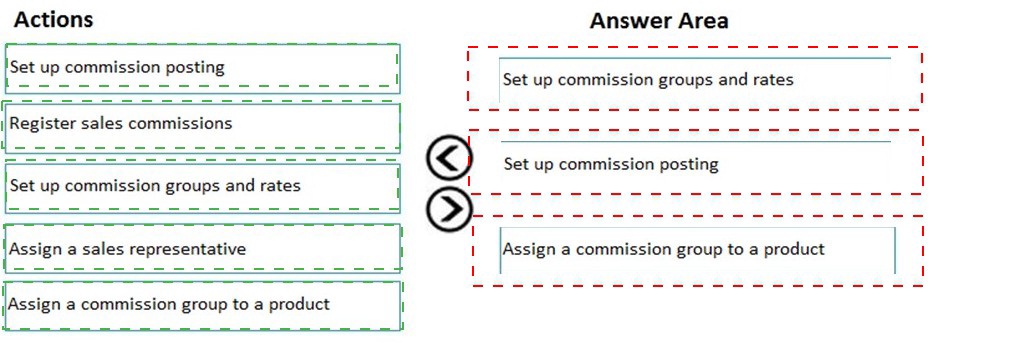
You need to configure commission tracking.
Which three actions should you perform in sequence? To answer, move the appropriate
actions from the list of actions to the answer area and arrange them in the correct order.
NOTE: More than one order of answer choices is correct. You will receive credit for any of
the correct orders you select.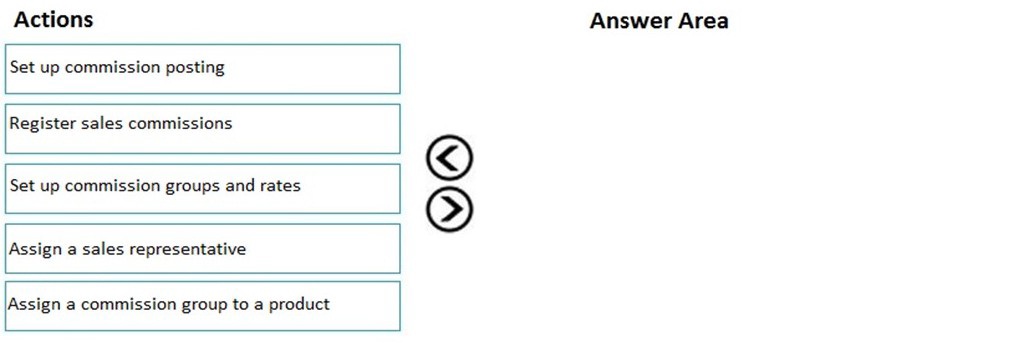
Note: This question is part of a series of questions that present the same scenario. Each
question in the series contains a unique solution that might meet the stated goals. Some
question sets might have more than one correct solution, while others might not have a
correct solution.
After you answer a question In this section, you will NOT be able to return to it. As a result,
these questions will not appear in the review/ screen.
A company plans to simplify interactions between purchasing department employees and
vendors.
You need to ensure that employees are redirected to a vendor's online store to select items
for inclusion on purchase requisitions.
Solution: Create a procurement catalog.
Does the solution meet the goal?
A.
Yes
B.
No
No
Explanation: References:
https://docs.microsoft.com/en-us/dynamics365/supply-chain/procurement/set-up-externalcatalog-
for-punchout
| Page 3 out of 34 Pages |
| Previous |