
Topic 6: Misc. Questions
A company is using vendors to produce components for its products.
Journal types are not configured to support vendor invoices-
You need to identify and configure journals to use for vendor invoices.
Which journal types should you use? To answer, select the appropriate options in the
answer area,
NOTE: Each correct selection is worth one point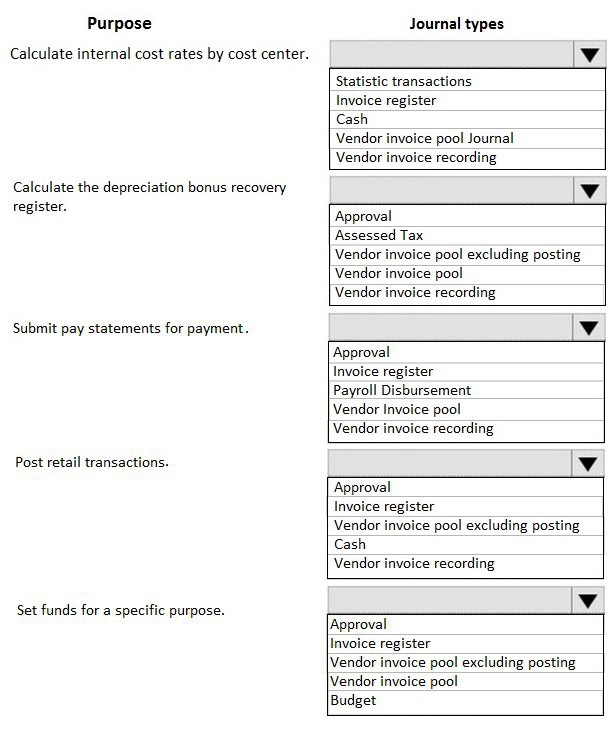
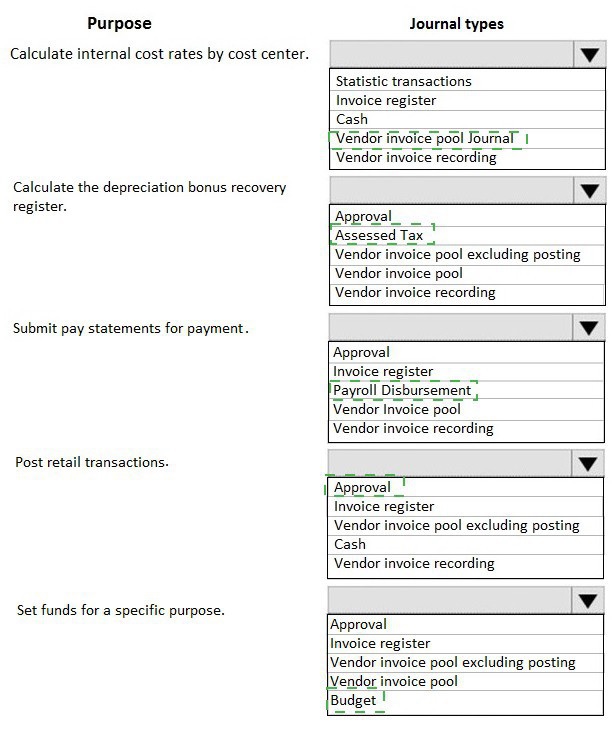
Explanation:
For processing vendor invoices, especially in a production context, you typically use a workflow that involves recording/approval first, followed by final posting. The relevant journal types form this sequence: Invoice register (for initial recording and accruals), Vendor invoice pool (for holding invoices pending approval), and Vendor invoice recording (for the final posting to the general ledger after matching).
Correct Journal Type Reasoning:
The question asks to "identify and configure journals to use for vendor invoices." The core vendor invoice journal types are:
Invoice register:
Used to initially record vendor invoices for accrual purposes. It posts to an interim accrued liabilities account before the invoice is matched and finally approved.
Vendor invoice pool / Vendor invoice pool excluding posting:
This journal type is used in the approval workflow. Invoices are held here for review and matching before they are released for final posting. "Excluding posting" holds them without any GL impact until released.
Vendor invoice recording:
This is the journal type used for the final posting of the vendor invoice to the general ledger, after all matching and approvals are complete. It creates the definitive accounts payable liability.
Incorrect Journal Type Reasoning:
Approval, Cash, Payroll Disbursement, Budget, Statistic transactions, Assessed Tax:
These journal types serve other specific purposes (budgeting, cash disbursements, payroll, statistical entries) and are not the standard journals for processing accounts payable vendor invoices for goods received.
The other listed "Purposes" (Calculate internal cost rates, etc.) are distractors for different business processes.
Reference:
Microsoft Learn, "Journal types (form)": The documentation lists the purpose of each journal type. Invoice register, Vendor invoice pool, and Vendor invoice recording are explicitly defined for the vendor invoice process, supporting the record -> approve/match -> post workflow.
A client has multiple legal entities set up in Dynamics 365 for Finance and Operations. All
companies and data reside in Finance and Operations,
The client currently uses a separate reporting tool to perform their financial consolidation and eliminations. They want to use Finance and Operations instead.
You need to configure the system and correctly perform eliminations.
Solution: Select Consolidate online in Finance and Operations. Include eliminations during the process or as a proposal. Setup the transactions to post in the legal entity configured for consolidations.
Does the solution meet the goal?
A. Yes
B. No
Explanation:
The core issue is that the client's data all resides within a single Finance and Operations instance. The Consolidate online feature is designed to consolidate data from different systems or separate databases (including other Finance instances) into a designated consolidation company within the same system. However, for performing intercompany eliminations, the system requires intercompany transactions to be specifically identified using intercompany accounting setups, which is not the primary function of the online consolidation tool.
Correct Option:
B. No
Detailed Analysis:
What the solution does correctly:
Using Consolidate online is appropriate for aggregating financial balances from multiple legal entities into a holding company within Finance & Operations. It can also propose elimination entries.
Why the solution does NOT meet the goal:
The critical missing step is the configuration of intercompany relationships and accounts. For eliminations to post automatically (not just as a proposal), you must first:
Set up intercompany accounting (identifying the legal entities that trade with each other).
Configure elimination rules that specify the main accounts to use for posting elimination journal entries (like an intercompany profit elimination account).
Without this prior configuration, the consolidation process cannot correctly post elimination transactions, even if they are included as a proposal. The solution describes the execution step but omits the essential setup step.
Reference:
Microsoft Learn, "Consolidate online" and "Elimination rules": The documentation clarifies that while you can generate elimination proposals during online consolidation, for the system to post eliminations, you must predefine elimination rules and a elimination legal entity. The solution incorrectly assumes the process will work without this foundational configuration.
A client has one legal entity and the following four dimensions configured: Business Unit, Cost Center, Department, and Division.
You need to configure the client's system to run the trial balance inquiry in the General ledger module so that it displays the trial balance two ways:
• Include the main account and all four dimensions.
• Include the main account and only the business unit and cost center dimensions.
What should you configure?
A. two account structures
B. all financial dimensions by using the group dimension functionality
C. two financial dimension sets
D. two derived financial dimension hierarchies
Explanation:
The requirement is to view the trial balance with different combinations of dimensions without changing the underlying account structure. The trial balance inquiry allows users to select a Financial Dimension Set to filter and group the data displayed. Configuring different sets enables this flexible reporting.
Correct Option:
C. two financial dimension sets
Detailed Analysis:
Financial Dimension Sets are precisely designed for this purpose. You can create multiple sets, each containing a different selection of active dimensions.
Set 1: Include Main Account, Business Unit, Cost Center, Department, Division.
Set 2: Include Main Account, Business Unit, Cost Center.
When running the Trial Balance inquiry, the user can choose which set to apply. The report will then display columns and allow filtering/grouping based only on the dimensions in the selected set, meeting both reporting requirements.
Incorrect Option:
A. two account structures:
Account structures are used to validate which dimension combinations are allowed when posting transactions. They are restrictive and mandatory for posting. You cannot have two different active account structures for the same ledger; you can only use one for validation. They do not control reporting visibility in inquiries.
B. all financial dimensions by using the group dimension functionality:
"Group dimensions" are used for consolidating or grouping dimension values in financial reports, not for selecting a subset of dimensions to display in the trial balance inquiry layout.
D. two derived financial dimension hierarchies:
Derived hierarchies are used to automatically populate one dimension value based on the value selected in another dimension (e.g., selecting a Cost Center automatically populates a Department). They control data entry dependency, not reporting visibility.
Reference:
Microsoft Learn, "Financial dimension sets for ledgers": The documentation states that financial dimension sets "determine which financial dimensions are displayed for an account in different modules" and that you can create different sets for different purposes, such as budgeting, reporting, or specific inquiries like the trial balance.
You are setting up the Accounts payable module and vendor invoice policies for an organization.
You need to set up vendor invoice policies that run when vendor invoices are posted in the system.
In which two ways can you set up the policies? Each correct answer presents a complete solution.
NOTE: Each correct selection is worth one point.
A. Set up invoice matching validation for vendor invoice policy.
B. Configure the vendor invoice workflow to run the policies.
C. Run the policies when you post a vendor invoice by using the Vendor invoice page and when you open the Vendor invoice policy violations page.
D. Apply the policies to invoices that were created in the invoice register or invoice journal.
Explanation:
Vendor invoice policies are rules that check for violations (like duplicate invoices, price/quantity variances). They can be configured to run automatically as part of the invoice approval workflow, or they can be run manually on-demand for specific invoices during the posting process.
Correct Option:
B. Configure the vendor invoice workflow to run the policies.
This is the primary method for automated enforcement. You add a "Vendor invoice policy" step to the workflow configuration. When an invoice is submitted, the workflow automatically runs the policy checks. Invoices with violations are returned to the preparer, while clean invoices proceed.
C. Run the policies when you post a vendor invoice by using the Vendor invoice page and when you open the Vendor invoice policy violations page.
This is the manual, on-demand method. On the Vendor invoice page, a user can click "Policy" -> "Check for policy violations" before posting. Alternatively, the Vendor invoice policy violations page is a central workspace to review and manage all detected violations.
Incorrect Option:
A. Set up invoice matching validation for vendor invoice policy.
Invoice matching (2-way or 3-way) is a separate, parallel control mechanism. It is configured in purchasing policies and procurement parameters, not within "vendor invoice policies." Matching validation is not a way to set up the policies themselves; it's a different type of validation.
D. Apply the policies to invoices that were created in the invoice register or invoice journal.
This is not a method of setting up or running the policies. It describes the scope of invoices to which policies can be applied (all vendor invoices, regardless of source journal), but it does not answer how you set them up to run.
Reference:
Microsoft Learn, "Vendor invoice policies overview": The documentation explains that policies can be integrated into workflows for automatic checking and that users can manually check for violations from the Vendor invoice page or review them in the Vendor invoice policy violations workspace.
A client wants to ensure that transactions posted to the General Ledger have the correct
combination of account number and dimensions.
The Services Industry P&L Account Structure has the following information: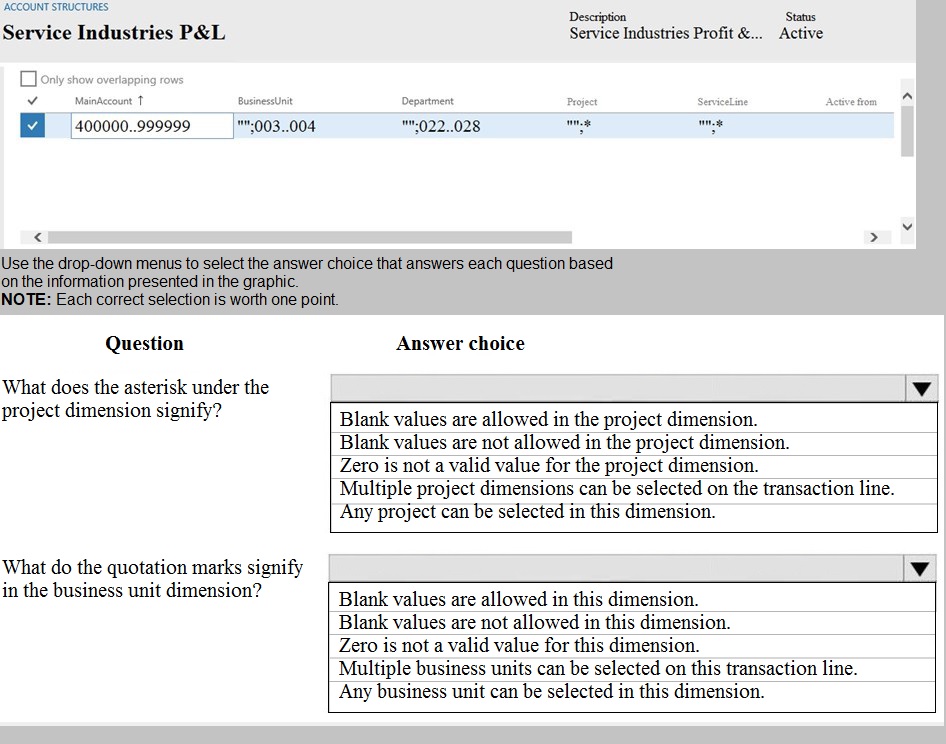
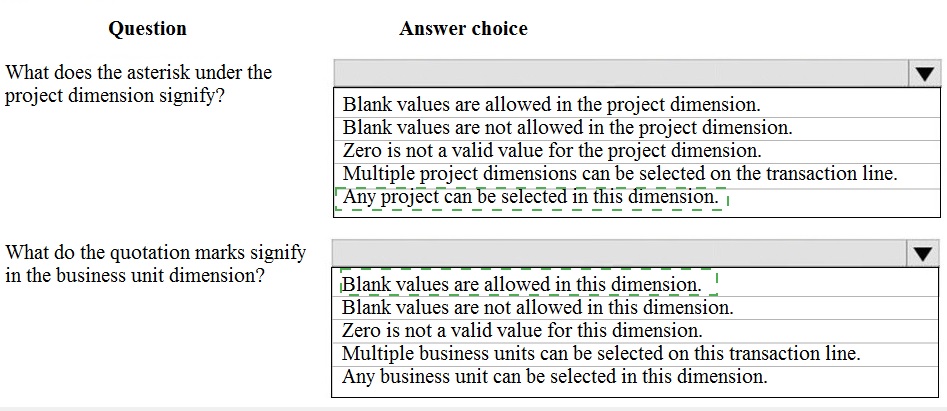
Explanation:
In the Account Structure configuration, special symbols in the dimension columns define validation rules for how those dimensions must be populated on a transaction line.
Correct Symbol Reasoning:
Asterisk (*) under Project Dimension:
The asterisk * is the standard symbol in an account structure to indicate that the dimension is Optional. This means transactions can be posted with a blank value for the Project dimension. It "allows blank values."
Quotation Marks (" ") around Business Unit values:
When dimension values are enclosed in double quotation marks in the account structure (e.g., "003.004"), it signifies a Fixed or Restricted value. However, the key is that multiple specific values are listed (003.004, 022.028, etc.). This means the Business Unit dimension is not "Any," but must be one of the listed values. Since the question's answer choices do not specify "must be one of the listed values," the most accurate available choice is "Any business unit can be selected in this dimension," which is technically true from a selection list perspective, but it's more precise to say it's restricted to the list. Given the options, this is the best fit as it contrasts with a blank or fixed single value.
(A more precise answer not listed would be: "Only the specified business unit values in the list are allowed.")
Incorrect Option Reasoning for Asterisk (*):
"Blank values are not allowed" is incorrect; that would be indicated by a blank cell (mandatory) or a specific value.
"Zero is not a valid value" is not represented by an asterisk.
"Multiple... can be selected" refers to allowing multiple values on one line, which is a different setting.
"Any... can be selected" is typically denoted by a blank cell or a wildcard, not an asterisk in this context.
Incorrect Option Reasoning for Quotation Marks (" "):
"Blank values are allowed/not allowed" is not indicated by quotes.
"Zero is not a valid value" is unrelated to quotes.
"Multiple... can be selected" is a different setting.
Reference:
Microsoft Learn, "Configure account structures": The documentation explains the symbols in account structure lines. An asterisk (*) means the dimension is optional. Quotation marks around values indicate that the transaction must use one of those specific dimension values from the list provided in the structure.
A company is preparing to complete a year-end close process.
You need to configure the Dynamics 365 for Finance and Operations General ledger module.
Which three configurations must you use? Each correct answer presents part of the solution.
NOTE: Each correct selection is worth one point.
A. Configure the Fiscal year close parameters
B. Configure the ledger calendar for the new fiscal year
C. Configure the transfer balance
D. Validate the main account type
E. Create the next fiscal year
Explanation:
The year-end close is a critical, multi-step process. To prepare the system, you must ensure the new fiscal period is ready, the closing parameters are defined, and the accounts are correctly categorized for balance transfers.
Correct Option:
A. Configure the Fiscal year close parameters:
This is a mandatory setup step. These parameters define critical rules for the close, such as which main accounts will have their balances transferred (like retained earnings), which closing sheet to use, and whether to create closing transactions during the transfer.
D. Validate the main account type:
This is a crucial preparatory task. You must verify that main accounts are correctly assigned to Balance sheet or Profit and loss types. Only Profit and loss (income statement) accounts have their balances transferred to retained earnings during the close. Incorrect account types will cause the closing process to fail or produce incorrect financial statements.
E. Create the next fiscal year:
Before you can close a fiscal year, you must open the next fiscal year in the system. The closing process generates transactions (like the transfer of profit/loss) that are dated in the new fiscal year. If the new year is not created and its periods are not open, the closing entries cannot be posted.
Incorrect Option:
B. Configure the ledger calendar for the new fiscal year:
While related, this is part of creating the next fiscal year (Step E). It is not a separate, distinct configuration that must be done in addition to creating the year. Creating the fiscal year inherently involves defining its calendar periods.
C. Configure the transfer balance:
This is vague and not a standard configuration step. The transfer of balances from profit and loss accounts to retained earnings is the result of running the year-end close process after the parameters (A) are configured. It is not a configuration you set up manually beforehand.
Reference:
Microsoft Learn, "Year-end close": The documented prerequisites include: 1) Verify main accounts (correct account type, especially for the retained earnings account), 2) Set up fiscal calendars (create the next year), and 3) Configure year-end close templates and parameters to define how the closing transactions are generated.
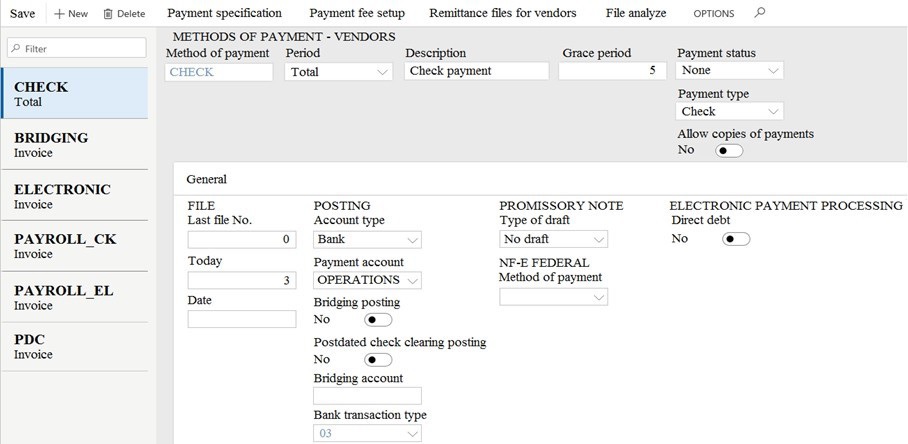
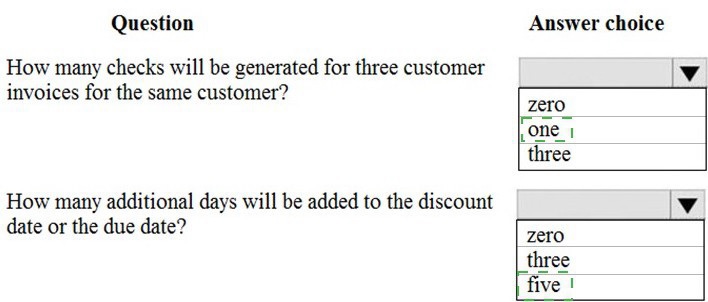
You are asked to configure the method of payments for vendors.
You are viewing an Accounts payable method of payment.
Use the drop-down menus to select the answer choice that answers each question based
on the information presented in the graphic.
NOTE: Each correct selection is worth one point.
You are a functional consultant for Contoso Entertainment System USA (USMF).
You need to apply a constant currency exchange rate to calculate the reporting currency
value of fixed assets.
To complete this task, sign in to the Dynamics 365 portal.
Answer: See explanation below.
Explanation:
The currency Translation Type needs to be set to Current. This option uses the last rate
on or before the period specified in the report regardless of what the exchange rate was at
the time of purchase for each asset.
Navigate to General Ledger > Chart of Accounts > Accounts > Main Accounts.
Select the Financial Reporting account.
In the Reporting currency exchange rate type, select Current from the drop-down
list.
Click Save to save the changes.
Question No : 32 CORRECT TEXT - (Topic 4)
Microsoft MB-310 : Practice Test
34
D18912E1457D5D1DDCBD40AB3BF70D5D
A customer uses the sales tax functionality in Dynamics 365 Finance.
The customer reports that when a sales order is created, sales tax does not calculate on
the line.
You need to determine why sales tax is not calculated.
What are two possible reasons? Each correct answer presents a complete solution.
NOTE: Each correct selection is worth one point.
A.
The sales tax group is populated on the line, but the item sales tax group is missing.
B.
The sales tax settlement account is not configured correctly.
C.
The sales tax authority is not set up for the correct jurisdiction.
D.
The sales tax code and item sales tax code are selected, but the sales tax group is not
associated to both
codes.
E.
The sales tax group and item sales tax group are selected, but the sales tax code is not
associated with
both groups.
The sales tax group is populated on the line, but the item sales tax group is missing.
The sales tax group and item sales tax group are selected, but the sales tax code is not
associated with
both groups.
Reference:
https://docs.microsoft.com/en-us/dynamics365/finance/general-ledger/indirect-taxesoverview
https://docs.microsoft.com/en-us/dynamics365/finance/general-ledger/tasks/set-up-salestax-
groups-itemsalestax-
groups
You are a functional consultant for Contoso Entertainment System USA (USMF).
You need to create a report that contains the sales tax settlements for the state of
California during the quarter that began on January 1, 2017. To validate you results, save
the file in Microsoft Excel format to the Downloads\Report folder.
To complete this task, sign in to the Dynamics 365 portal.
Answer: See explanation below.
Explanation:
Navigate to Tax > Declarations > Report sales tax for settlement period.
Enter the ‘From’ date.
Select the settlement period (Quarter).
Click ‘OK’.
Select Yes in the Create electronic tax document field.
Select the Downloads\Report folder and file format.
Click ‘OK’.
A company plans to create a new allocation rule for electric utilities expenses. The
allocation rule must meet the following requirements:
* Distribute overhead utility expense to each department.
* Define how and in what proportion the source amounts must be distributed on various
destination lines.
You need to configure the allocation rule. Which allocation method should you use?
A.
AFied percentage
B.
Equally
C.
Basis
D.
Fixed weight
Basis
Explanation: References:
https://docs.microsoft.com/en-us/dynamics365/unified-operations/financials/generalledger/
ledger-allocation-rules
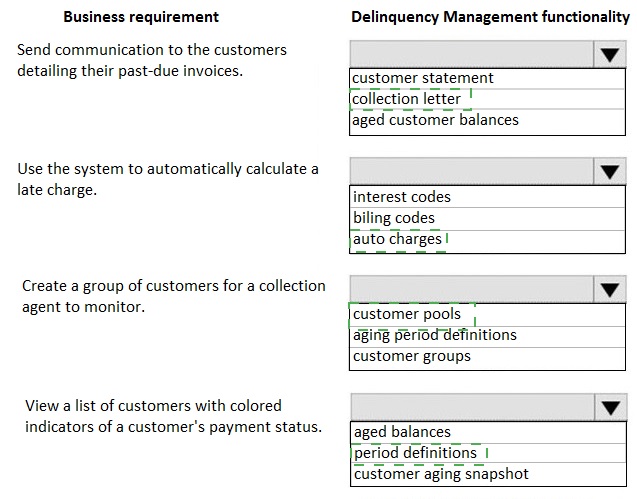
A company has delinquent customers.
You need to configure Dynamics 365 for Finance and Operations to meet the following
requirements:
• Send communication to the customers detailing their past-due invoices.
• Use the system to automatically calculate a late charges,
• Create a group of customers for a collection agent to monitor.
• View a list of customers with colored indicators of a customer's payment status.
You need to associate the correct system functionality to manage delinquent customers
based on these business requirements.
| Page 3 out of 19 Pages |
| Previous |