
You manage an SD-WAN topology. You will soon deploy 50 new branches.
Which three tasks can you do in advance to simplify this deployment? (Choose three.)
A. Update the DHCP server configuration.
B. Create model devices.
C. Create a ZTP template.
D. Define metadata variables value for each device.
E. Create policy blueprint.
Explanation:
In large SD-WAN deployments, preparing configuration elements in advance greatly reduces provisioning time and prevents inconsistencies across branches. Fortinet’s SD-WAN automation framework allows pre-building reusable configuration sets—such as model devices, ZTP templates, and policy blueprints—which can be applied to new branch devices as soon as they come online. This ensures consistent policy enforcement, reduces manual intervention, and simplifies onboarding during rapid or large-scale branch rollouts.
Correct Options:
B. Create model devices.
Pre-creating model devices allows you to define hardware models and expected configuration profiles before the physical units arrive. When the real device connects to FortiManager, it automatically maps to the model device and inherits its baseline settings. This significantly speeds up onboarding and ensures uniform deployment across all new branches.
C. Create a ZTP template.
Zero-Touch Provisioning (ZTP) templates allow new devices to automatically pull their configuration from FortiManager during first boot. Preparing this template in advance reduces manual configuration and ensures that every newly deployed branch follows the same standardized SD-WAN configuration. This is essential when scaling to dozens of new sites.
E. Create policy blueprint.
A policy blueprint allows administrators to define enterprise-wide security and SD-WAN policies ahead of deployment. These can then be applied to multiple devices or groups as they come online. Preparing blueprints ensures consistency across all branches and reduces the need for device-level policy creation during deployment.
Incorrect Options:
A. Update the DHCP server configuration.
While DHCP may be used for addressing in some branch networks, updating DHCP configurations is typically a local network task and not part of SD-WAN pre-deployment automation. It does not significantly simplify SD-WAN onboarding, nor is it required for ZTP or FortiManager-based provisioning of new branches.
D. Define metadata variables value for each device.
Meta fields and variables are useful for automation, but defining values before the devices exist is not practical. Metadata is typically assigned once a device is added or discovered. Pre-defining metadata does not simplify deployment for devices that have not yet been onboarded.
Reference:
Fortinet Secure SD-WAN Zero Touch Deployment Guide
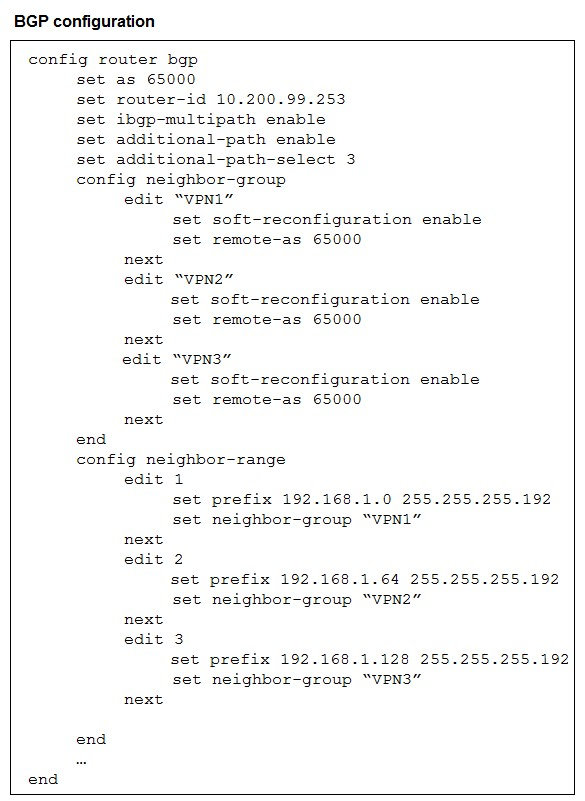
The exhibit shows the BGP configuration on the hub in a hub-and-spoke topology. The
administrator wants BGP to advertise prefixes from spokes to other spokes over the IPsec
overlays, including additional paths. However, when looking at the spoke routing table, the
administrator does not see the prefixes from other spokes and the additional paths.
Which three settings must the administrator configure inside each BGP neighbor group so
spokes can learn the prefixes of other spokes and their additional paths? (Choose three.)
A. Set additional-path to send
B. Set additional-path to forward
C. Enable route-reflector-server
D. Enable route-reflector-client.
E. Set adv-additional-path to the number of additional paths to advertise.
Explanation:
To allow spokes to learn prefixes from other spokes (and receive multiple paths), the hub must both reflect routes and advertise extra paths. Configure the neighbor-group so the hub will accept, store, and re-advertise multiple paths and treat spokes as clients for reflection. Without additional-path send/advertise settings and route-reflector client/server behavior, the hub won’t forward spoke-learned routes or their extra paths to other spokes.
Correct Option:
A. Set additional-path to send
Enabling additional-path send on the hub’s neighbor-group causes the hub to advertise more than one path for a prefix to its neighbors. This is required so spokes receive the extra (non-best) paths learned from other spokes. In FortiOS, you must allow sending additional-paths from the hub for the spokes to see alternate paths and make multipath or path-selection decisions.
D. Enable route-reflector-client
Marking the spoke neighbors as route-reflector clients on the hub lets the hub reflect routes learned from one client to other clients without requiring full-mesh IBGP. In a hub-and-spoke overlay, the hub acts as the reflector and spokes as clients; enabling the client role on the neighbor-group ensures the hub will re-advertise spoke prefixes to other spokes.
E. Set adv-additional-path to the number of additional paths to advertise
You must explicitly configure how many additional paths the hub will advertise (e.g., adv-additional-path 2). This controls the count of non-best paths carried to neighbors; without setting this, additional-path capability may be disabled or limited. Setting an adequate number ensures spokes receive all intended extra paths from other spokes.
Incorrect Option:
B. Set additional-path to forward
The additional-path forward option is not the correct control for advertising additional paths in FortiOS BGP neighbor-groups. FortiOS typically uses additional-path modes such as send/receive (or separate adv-additional-path for count). “Forward” is not the operative action to enable sending/advertised additional paths to neighbors, so it will not cause spokes to learn other spokes’ additional paths.
C. Enable route-reflector-server
Enabling a route-reflector server on a neighbor-group is not the appropriate per-neighbor setting required for spokes to learn each other’s routes. In hub-and-spoke topologies the hub must act as the reflector (server) and the spokes must be configured as clients on the hub’s neighbor-groups. Turning on “server” in the neighbor-group is either not the expected configuration or misapplies roles and will not make the hub reflect client-learned prefixes to other spokes.
Reference:
Fortinet — FortiOS Handbook: BGP (sections on Additional-Paths and Route Reflection)
Which two statements correctly describe what happens when traffic matches the implicit SD-WAN rule? (Choose two.)
A. The session information output displays no SD-WAN service id.
B. Traffic is load balanced using the algorithm set for the v4-ecmp-mode setting.
C. The traffic is distributed, regardless of weight, through all available static routes.
D. Traffic does not match any of the entries in the policy route table.
E. FortiGate flags the session with may_dirty and vwl_def ault.
Explanation: 📚
The implicit SD-WAN rule acts as a default action when incoming traffic fails to match any explicitly defined, custom SD-WAN rules (Performance SLA or Manual). When traffic hits this rule, it bypasses the sophisticated SD-WAN steering logic and typically falls back to standard FortiGate routing mechanisms. This behavior ensures that traffic still passes through the FortiGate, but without the benefits of intelligent path selection.
Correct Options: ✅
A. The session information output displays no SD-WAN service id.
Since the traffic is not processed by any explicit SD-WAN rule or a specific service (like an SLA or manual rule), the session created does not have a designated SD-WAN Service ID. This ID is only assigned when traffic successfully matches an explicit SD-WAN rule entry, indicating that the traffic is actively being managed and steered by the SD-WAN feature.
D. Traffic does not match any of the entries in the policy route table.
The SD-WAN rules are consulted before the standard routing table (which includes the policy route table and the main FIB/static routes). If traffic matches an explicit SD-WAN rule, that rule steers the traffic. If it falls through to the implicit rule, it means the traffic did not match any explicit SD-WAN rule. The routing decision for this traffic is then deferred to the standard routing process, checking the policy route table and then the main forwarding information base (FIB) for the best route.
Incorrect Options: ❌
B. Traffic is load balanced using the algorithm set for the v4-ecmp-mode setting.
The implicit rule is handled by the standard FortiGate routing engine, which typically uses the main routing table (FIB). If multiple equal-cost static routes exist for the destination, ECMP (Equal-Cost Multi-Path) might be used, but this is a standard routing feature, not a guaranteed behavior of the implicit SD-WAN rule itself. The implicit rule's core function is simply to pass the traffic on for regular routing, not to specifically enforce the v4-ecmp-mode SD-WAN setting.
C. The traffic is distributed, regardless of weight, through all available static routes.
Traffic matching the implicit rule will be routed using the best match route in the standard routing table (Policy Routes > FIB). If ECMP is used (due to multiple equal-cost routes), traffic distribution follows the ECMP mechanism (often based on session hash), which is distinct from SD-WAN's load balancing which can consider weights. The implicit rule does not automatically distribute traffic over all static routes; it uses the single best route or an ECMP group if one exists.
E. FortiGate flags the session with may_dirty and vwl_default.
The vwl_default (Virtual WAN Link Default) flag is typically associated with traffic that has been successfully passed to the default action of an SD-WAN member interface because no specific rule matched it. While the session eventually gets routed, the most accurate description of the SD-WAN-specific consequence of matching the implicit rule is the lack of a service ID (Option A) and the failure to match explicit rules (Option D), which is the cause of hitting the implicit rule.
Reference: 📖
This information is typically covered in the Fortinet Secure SD-WAN Administration course material, specifically relating to the SD-WAN Rule Matching Process and the function of the Implicit SD-WAN Rule (Rule ID 0 or the last rule in the table). You can find details in the FortiGate documentation under the SD-WAN sections for rule processing and session information.
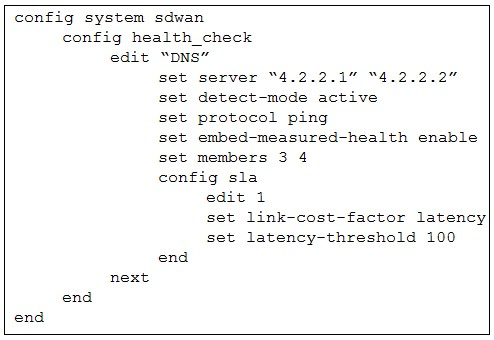
The exhibit shows the health-check configuration on a FortiGate device used as a spoke.
You notice that the hub FortiGate doesn’t prioritize the traffic as expected.
Which two configuration elements should you check on the hub? (Choose two.)
A. The performance SLA has the parameter priority-out-sla configured.
B. This performance SLA uses the same members.
C. The performance SLA uses the same criteria.
D. The performance SLA is configured with set embedded-measure accept.
Explanation:
For a spoke-to-hub SD-WAN scenario to correctly steer traffic according to the defined performance SLA on the spoke, the hub must measure the link quality using exactly the same health-check criteria (protocol, servers, thresholds, etc.) as the spoke. If the hub uses different criteria or does not embed the measured health into the routing protocol, the spoke’s priority rules (link-cost-factor, priority-members, etc.) will not work as expected because the hub’s route costs will not reflect the measured SLA performance.
Correct Option:
C – The performance SLA uses the same criteria
The hub must run a performance SLA health-check with identical parameters (same DNS servers 4.2.2.1/4.2.2.2, protocol ping, latency-threshold 100 ms, same SLA members 3 and 4, etc.) as the spoke. If the hub uses different servers, thresholds, or protocol, the measured link quality differs, and the spoke’s SD-WAN rules that rely on performance SLA (priority-members, lowest-cost, best-quality) cannot steer traffic correctly to the preferred tunnel.
D – The performance SLA is configured with set embed-measured-health accept
On ADVPN hubs, the measured health (SLA status) is only embedded into BGP or OSPF updates when the performance SLA explicitly contains set embed-measured-health accept. Without this setting on the hub’s matching performance SLA, the hub does not advertise the real-time SLA met/violated status to spokes, so spokes cannot apply priority or cost-based steering even if the spoke itself measures the link correctly.
Incorrect Option:
A – The performance SLA has the parameter priority-out-sla configured
The command priority-out-sla does not exist in FortiOS SD-WAN performance SLA configuration. The related commands are priority-members and priority-in-sla (on routes), not on the health-check itself. This option is invalid.
B – This performance SLA uses the same members
While the SLA map ID and member IDs should usually match for clarity, it is not strictly required. What matters is that the hub measures the exact same links (members 3 and 4 in the exhibit) using identical probe targets and thresholds. Having different member IDs but same underlying interfaces and criteria would still work. Therefore, this is not a mandatory condition.
Reference:
FortiOS 7.4 SD-WAN Architecture Guide → “Performance SLA – Link health monitoring” → “ADVPN with SD-WAN link monitoring requirements”
Within the context of SD-WAN, what does SIA correspond to?
A. Remote Breakout
B. Local Breakout
C. Software Internet Access
D. Secure Internet Authorization
Explanation:
In Fortinet's SD-WAN architecture, SIA stands for Secure Internet Access. It is a design pattern where internet-bound traffic from a branch office is sent directly to the internet locally, rather than being backhauled through a central datacenter. This optimizes application performance by reducing latency and conserving WAN bandwidth on the more expensive hub links.
Correct Option:
B. Local Breakout:
This is the correct answer. SIA fundamentally describes the capability for a branch office to break out directly to the internet from its local network. This method, also known as Direct Internet Access (DIA), improves the user experience for cloud and SaaS applications by providing a shorter, more direct path.
Incorrect Options:
A. Remote Breakout:
This is the opposite of what SIA does. "Remote Breakout" would imply sending traffic to a central site (hub) first, which is the traditional backhaul method that SIA is designed to avoid.
C. Software Internet Access:
This is a distractor term and not a recognized acronym or standard concept within the SD-WAN or Fortinet lexicon. It does not accurately describe the SIA functionality.
D. Secure Internet Authorization:
While "Secure" is part of the SIA acronym, "Authorization" is incorrect. SIA focuses on the secure routing and access of internet traffic locally, not on user or device authorization processes.
Reference:
Fortinet NSE 7 SD-WAN 7.4 training materials and the Fortinet Documentation Library frequently describe SIA as the method for enabling local internet breakout at the branch level while maintaining security inspection.
Refer to the exhibits, which show the configuration of an SD-WAN rule and the
corresponding rule status and routing table.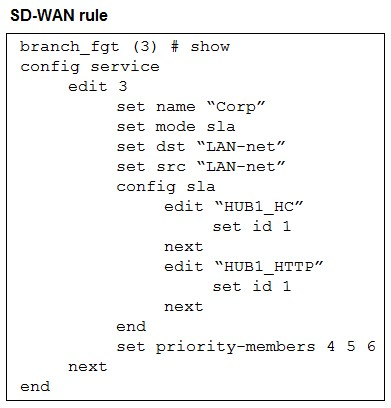
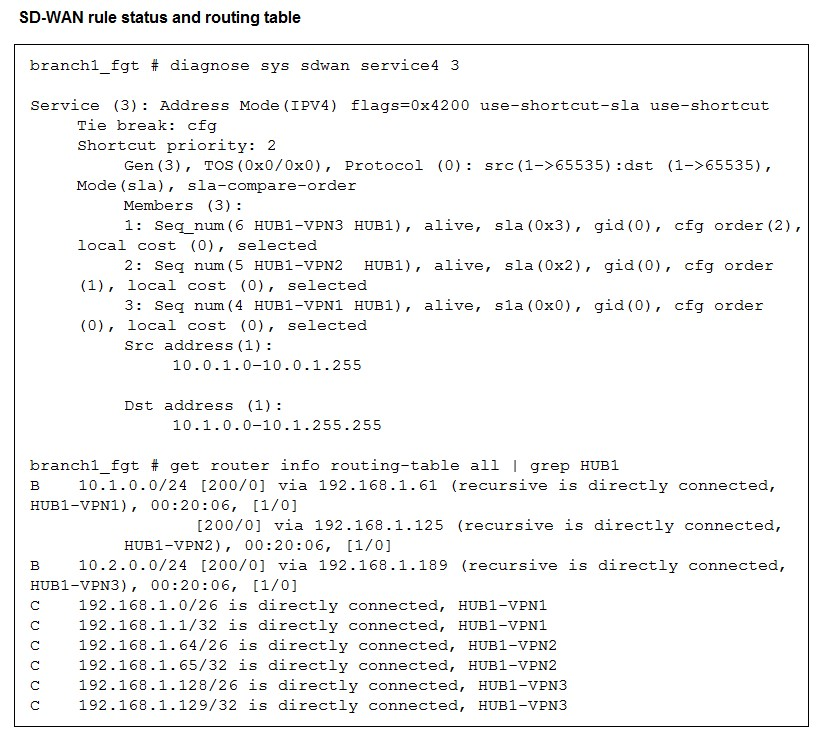
The administrator wants to understand the expected behavior for traffic matching the SDWAN
rule.
Based on the exhibits, what can the administrator expect for traffic matching the SD-WAN
rule?
A. The traffic will be routed over HUB1-VPN3.
B. The traffic will be routed over HUB1-VPN2
C. The traffic will be routed over HUB1-VPN1.
D. The traffic will be load balanced across all three overlays
Explanation:
The SD-WAN rule is in SLA mode with an explicit priority-members list and a shortcut-priority value. That means the SD-WAN engine evaluates members by SLA and then uses the configured priority/shortcut settings to pick which overlay to install for matched traffic. The diagnostics show all three overlays alive, but the shortcut/prioritization chooses the second priority member as the active path for this service.
Correct Option:
B. The traffic will be routed over HUB1-VPN2.
The set priority-members 4 5 6 order combined with shortcut-priority 2 makes the SD-WAN engine select the second priority member as the shortcut path when SLA conditions permit. The diagnostic output shows the member corresponding to HUB1-VPN2 is alive and selected, and the routing table contains an active BGP next-hop via the HUB1-VPN2 address (.125). Therefore traffic matching the rule will use HUB1-VPN2.
Incorrect Options:
A. The traffic will be routed over HUB1-VPN3.
Although HUB1-VPN3 is alive in the member list, it is the third configured priority (cfg order(2)) and not the active shortcut according to shortcut-priority. The diagnostics show it is selected for monitoring, but it is not the chosen shortcut path for this rule, so traffic will not preferentially use HUB1-VPN3.
C. The traffic will be routed over HUB1-VPN1.
HUB1-VPN1 appears in the routing table and is reachable, but the combination of priority-members and shortcut-priority indicates the second member is preferred for shortcut routing. Even though HUB1-VPN1 is available (and may be used as a backup), it is not the active shortcut chosen for this SD-WAN service instance.
D. The traffic will be load balanced across all three overlays.
The SD-WAN configuration is using SLA + explicit priority members, not a round-robin or per-packet load-balancing policy. The diagnostics show a single selected shortcut member (the second priority). Therefore traffic is routed to the chosen overlay (HUB1-VPN2), not equally across all three overlays.
Reference:
Fortinet — FortiOS Handbook, Secure SD-WAN (SD-WAN service modes, priority-members, and shortcut behavior)
Exhibit.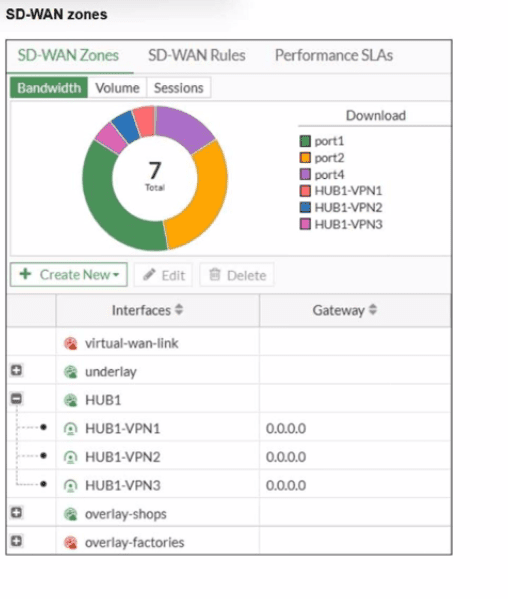
Refer to the exhibit, which shows an SD-WAN zone configuration on the FortiGate GUI.
What can you conclude about the zone and member configuration on this device?
A. The underlay zone contains three members.
B. You can delete the virtual-wan-link zones.
C. The overlay-factories zone contains no member.
D. You can move HUB1-VPN3 from the HUB1 zone to the overlay-shops zone.
Explanation:
The exhibit displays the SD-WAN Zone configuration table. In this table, the column labeled Interfaces shows the members assigned to each zone. Zones with a (+) icon indicate that they can be expanded to show their members. Zones with a (-) icon are currently expanded, revealing the interfaces that belong to them. Zones with no icon are either system-defined or currently have no visible members.
Correct Option:
C. The overlay-factories zone contains no member.
The overlay-factories zone is displayed with a (+) icon, which indicates it is a zone that can be expanded. However, there are no listed interfaces nested directly underneath it, unlike the HUB1 zone. While the (+) icon means it can contain members, the current view and the lack of nested interfaces indicate that no interfaces are currently assigned to this specific zone.
Incorrect Options:
A. The underlay zone contains three members.
The underlay zone is also shown with a (+) icon, but no members are visible below it in the hierarchy. The three visible members (HUB1-VPN1, HUB1-VPN2, and HUB1-VPN3) are nested under the HUB1 zone, not the underlay zone. Therefore, we cannot conclude that the underlay zone has three members based on this exhibit.
B. You can delete the virtual-wan-link zones.
The virtual-wan-link is a system-defined zone that represents the entire SD-WAN group. It is a mandatory, core component of the SD-WAN feature and cannot be deleted. The presence of the red lock icon next to its name visually confirms that this zone is not editable or deletable by the user.
D. You can move HUB1-VPN3 from the HUB1 zone to the overlay-shops zone.
HUB1-VPN3 is an overlay tunnel interface (likely IPsec or similar) and is currently a member of the HUB1 zone. In FortiGate SD-WAN, an interface can only belong to one custom SD-WAN zone at a time. To move it, you would first need to remove it from the HUB1 zone before attempting to add it to the overlay-shops zone. You cannot simply move it while it's actively part of another custom zone.
Reference:
This configuration detail is found in the Fortinet Secure SD-WAN Administration course material, specifically concerning the SD-WAN Zone Configuration and Interface Membership rules within the FortiGate GUI. The non-deletable nature of the virtual-wan-link is a foundational SD-WAN concept.
Refer to the exhibit.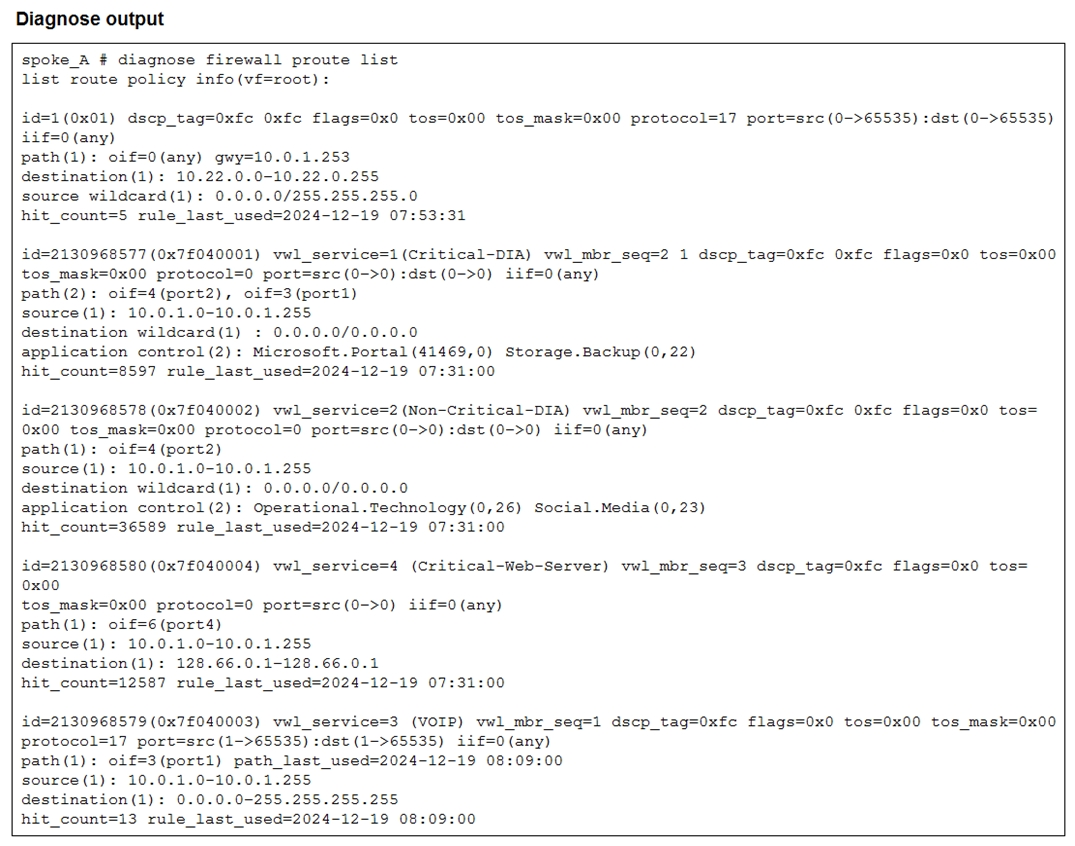
Which two conclusions can you draw from the output shown? (Choose two.)
A. One SD-WAN rule is defined with application categories as the destination.
B. UDP traffic destined to the subnet 10.22.0.0/24 matches a manual SD-WAN rule.
C. One SD-WAN rule allows traffic load balancing.
D. UDP traffic destined to the subnet 10.22.0.0/24 matches a policy route.
Explanation:
The exhibit shows the output of the FortiGate command diagnose firewall proute list, which lists both traditional Policy Routes (PBR) and SD-WAN Rules (which are implemented as policy routes with special internal identifiers). The output reveals an entry that is clearly an SD-WAN rule because it has the destination internet-service-app-ctrl and a very large, non-sequential id value. The second entry shows a standard, low-numbered id that matches a specific destination subnet, which is characteristic of a Policy Route.
Correct Options:
A. One SD-WAN rule is defined with application categories as the destination.
The first entry shown has the destination match criteria: internet-service-app-ctrl. In FortiGate SD-WAN rules, this criterion is used when the traffic is matched based on a specific Application Control Category or an Application/Internet Service Database entry. The large id=1211153920 also confirms it is an internal SD-WAN service rule.
D. UDP traffic destined to the subnet 10.22.0.0/24 matches a policy route.
The second entry has a low id=1 and matches traffic with:
protocol=17 (UDP)
dport=1:65535 (Any port)
dst=10.22.0.0/24 (The destination subnet).
Since the FortiGate route lookup order checks Policy Routes first, and this entry has the characteristics of a Policy Route (low ID, explicit next-hop defined by oif and gateway), traffic matching these criteria will be explicitly handled by this traditional Policy Route before the SD-WAN rules are consulted.
Incorrect Options:
B. UDP traffic destined to the subnet 10.22.0.0/24 matches a manual SD-WAN rule.
The entry matching this traffic is the second one, id=1. The small, sequential ID number identifies it as a traditional Policy Route (PBR), not an SD-WAN rule (which have very large, internal IDs like the first entry). Policy Routes are checked before SD-WAN rules in the routing process.
C. One SD-WAN rule allows traffic load balancing.
The SD-WAN rule (the first entry, id=1211153920) has an oif=virtual-wan-link but also specifies a single gateway=172.16.100.1. In FortiGate SD-WAN, explicitly setting a gateway in the policy route associated with the rule often forces traffic to a specific member, which generally indicates a Manual steering mode or a priority/SLA mode that has selected only one interface, not a generalized load balancing mode across multiple equal links. The output does not definitively confirm a load balancing mode is in use.
Reference:
This output is from the FortiGate CLI command diagnose firewall proute list, which is a key tool for troubleshooting FortiGate routing logic, including the differentiation between traditional Policy Routes (PBR) (low, sequential IDs) and SD-WAN Service Rules (large, internal IDs prefixed by vwl_service). The use of internet-service-app-ctrl as a destination field is a feature of Application-based SD-WAN steering.
You used the HUB IPsec_Recommended and the BRANCH IPsec_Recommended templates to define the overlay topology. Then, you used the SD-WAN template to define the SD- WAN members, rules, and performance SLAs.
You applied the changes to the devices and want to use the FortiManager monitors menu to get a graphical view that shows the status of each SD-WAN member.
Which statement best explains how to obtain this graphical view?
A. Use the SD-WAN monitor template view to get a map view of the branches, hub, and tunnel status, including the SLA pass or missed status.
B. Use the SD-WAN monitor table view to get a donut view and a table view that shows the status of each SD-WAN member, including the SLA pass or missed status.
C. Use the VPN monitor map view to get a map view of the branches, hub, and tunnel status, including the SLA pass or missed status.
D. Use the SD-WAN monitor asset view to get a donut view and a table view that shows the status of each device and the SLA status of each SD-WAN member.
Explanation:
After deploying an SD-WAN configuration via templates on FortiManager, you need the correct monitoring view to see the real-time status of each SD-WAN member interface (like internet, MPLS) and their associated Performance SLA probes. This view is distinct from a physical topology map and focuses on the health and metrics of the individual WAN links.
Correct Option:
B. Use the SD-WAN monitor table view to get a donut view and a table view that shows the status of each SD-WAN member, including the SLA pass or missed status.
This is the precise function of the SD-WAN Table View in FortiManager. It provides a summary "donut" chart for an at-a-glance status and a detailed table listing each member, its state (up/down), latency, jitter, packet loss, and most importantly, whether the configured SLA targets are being met (Pass/Miss).
Incorrect Options:
A. Use the SD-WAN monitor template view to get a map view...
The template view is for managing and deploying configuration templates, not for live monitoring. It does not provide a graphical status of member health or SLA.
C. Use the VPN monitor map view to get a map view...
While the VPN Monitor shows the IPsec tunnel topology and their operational state (up/down), it does not display the specific performance SLA status (latency, jitter, packet loss, pass/miss) for the underlying SD-WAN members.
D. Use the SD-WAN monitor asset view to get a donut view...
The Asset View provides a high-level health summary of the managed devices themselves (e.g., CPU, memory, FortiGuard services), not the detailed status of the individual SD-WAN member interfaces and their SLAs.
Reference:
Fortinet FortiManager 7.4 Administration Guide - "Monitoring SD-WAN" section, which explicitly describes the "SD-WAN Table" view as the tool for monitoring member status and SLA health.
The SD-WAN overlay template helps to prepare SD-WAN deployments. To complete the tasks performed by the SD-WAN overlay template, the administrator must perform some post-run tasks. What are two mandatory post-run tasks that must be performed? (Choose two.)
A. Configure routing through the overlay tunnels created by the SD-WAN overlay template.
B. Create policy packages and assign them to the branch devices.
C. Assign a hub id metadata variable to each hub device.
D. Configure SD-WAN rules
E. Assign an sdwan_id metadata variable to each device (branch and hub)
Explanation:
The FortiManager SD-WAN Overlay Template automates the creation of IPSec tunnels, ADVPN shortcuts, BGP/OSPF on tunnels, and basic zone/objects on branch and hub FortiGates. However, it does not create firewall policies or SD-WAN steering rules. After the template is successfully installed, the administrator must manually create and install policy packages (including firewall policies) and configure SD-WAN rules (steering traffic to the correct members or performance SLAs) to make the overlay fully functional.
Correct Option:
B – Create policy packages and assign them to the branch devices
The overlay template never creates firewall policies. Traffic will be blocked until the administrator creates a policy package (or individual policies) in FortiManager that allows the required traffic and installs it to the branch (and hub) devices. This is always mandatory after running the SD-WAN overlay template.
D – Configure SD-WAN rules
The template does not configure any config system sdwan → config service (SD-WAN rules). Without SD-WAN rules, all traffic continues to use the underlying physical interfaces or default route instead of the overlay tunnels. Defining rules that steer traffic based on application, destination, or performance SLA is mandatory for the SD-WAN overlay to actually steer traffic over the tunnels.
Incorrect Option:
A – Configure routing through the overlay tunnels created by the SD-WAN overlay template
Routing (BGP or OSPF) on the overlay tunnels is automatically configured by the template. No manual post-run routing configuration is required.
C – Assign a hub id metadata variable to each hub device
Hub-id metadata variable is optional and only needed in very specific multi-hub designs that use the hub-id variable in templates. It is not a mandatory post-run task.
E – Assign an sdwan_id metadata variable to each device (branch and hub)
The SD-WAN overlay template requires the sdwan_id metadata variable before it is run. It is a pre-requisite, not a post-run task. The template will fail to install if sdwan_id is missing.
Reference:
FortiManager 7.4 Administration Guide → SD-WAN Templates → “SD-WAN overlay template” → “Post-installation tasks”
What are three key routing principles of SD-WAN? (Choose three.)
A. Directly connected routes have precedence over SD-WAN rules.
B. Policy routes have precedence over SD-WAN rules.
C. SD-WAN rules are skipped if the best route to the destination is a static route
D. SD-WAN rules are skipped if the best route to the destination is not an SD-WAN member.
E. SD-WAN members are skipped if they do not have a valid route to the destination.
Explanation:
Fortinet SD-WAN integrates with the device's routing table to make intelligent path selection decisions. The key principles define the order of operation, ensuring that routing fundamentals are respected before SD-WAN rules are applied. This prevents routing loops and ensures traffic uses the correct path as defined by the broader network policy.
Correct Option:
B. Policy routes have precedence over SD-WAN rules.
Policy-based routing (PBR) is a very specific, high-priority directive. If a PBR policy matches the traffic, it will be enforced, and the SD-WAN rule engine will not be consulted for that traffic flow.
D. SD-WAN rules are skipped if the best route to the destination is not an SD-WAN member.
The SD-WAN rule engine only activates if the routing table's best path for a packet points to an interface that is a configured SD-WAN member. If the best route is a physical interface or VPN tunnel not in the SD-WAN zone, the packet is sent directly.
E. SD-WAN members are skipped if they do not have a valid route to the destination.
Before using an SD-WAN member, the FortiGate performs a route lookup from the perspective of that member's interface. If that lookup fails to find a route to the destination, that member is considered invalid and is skipped for that session.
Incorrect Options:
A. Directly connected routes have precedence over SD-WAN rules.
This is incorrect because the routing table itself is always consulted first. If the best route is a directly connected network, the packet is sent directly out that interface. The SD-WAN rule logic does not override this fundamental routing principle; it works within it.
C. SD-WAN rules are skipped if the best route to the destination is a static route.
This is a misleading and incorrect generalization. SD-WAN rules are only skipped if that static route points to a non-SD-WAN interface. If the static route points to an SD-WAN member interface (e.g., port1), then the SD-WAN rule engine will actively process the traffic for that route.
Reference:
Fortinet NSE 7 SD-WAN 7.4 Study Guide and the FortiOS Handbook on SD-WAN, which detail the path selection logic and the hierarchy where SD-WAN rules are evaluated after the routing decision but can override the egress interface based on performance and policy.
An administrator is configuring SD-WAN to load balance their network traffic. Which two things should they consider when setting up SD-WAN? (Choose two.)
A. You can select the outbandwidth hash mode with all strategies that allow load balancing.
B. Only the manual and best-quality strategies allow SD-WAN load balancing.
C. When applicable. FortiGate load balances the traffic through all members that meet the SLA target.
D. SD-WAN load balancing is possible only using the best quality and lowest cost (SLA) strategies.
Explanation:
SD-WAN load balancing on FortiGate is a flexible system that allows traffic distribution across multiple WAN links. The primary strategy for this is Maximize Bandwidth (SLA) (or the load-balance mode in CLI). When this strategy is used, the FortiGate first filters the available links based on SLA targets, and then uses a hashing algorithm to distribute the traffic across the remaining qualified links.
Correct Options:
A. You can select the outbandwidth hash mode with all strategies that allow load balancing.
Outbandwidth is one of the available hash modes (algorithms) used by the FortiGate to decide which interface to select for a new session when in a load balancing strategy. This hash mode chooses the link with the most available outbound bandwidth based on the configured interface speed. All strategies designed for load balancing (primarily Maximize Bandwidth (SLA), and Load Balancing enabled under Lowest Cost (SLA) or Manual mode) support the use of bandwidth-aware hash modes like outbandwidth (along with inbandwidth and bibandwidth).
C. When applicable, FortiGate load balances the traffic through all members that meet the SLA target.
This is the core behavior of the Maximize Bandwidth (SLA) strategy. The FortiGate first checks the required Performance SLA targets (e.g., latency, jitter, packet loss). Any SD-WAN member that successfully meets those targets is considered eligible. The rule then uses its configured load-balancing hash mode (like Round Robin, Source-IP, or Outbandwidth) to distribute the traffic among all the eligible members, thus maximizing the total available bandwidth.
Incorrect Options:
B. Only the manual and best-quality strategies allow SD-WAN load balancing.
This is incorrect. The main strategy for load balancing is Maximize Bandwidth (SLA). While Manual strategy can be configured to enable load balancing via CLI (set mode load-balance), the Best Quality (SLA) strategy is designed for single-path selection—it picks only the one link with the absolute best measured quality metric (e.g., lowest latency), not for distributing traffic across multiple links.
D. SD-WAN load balancing is possible only using the best quality and lowest cost (SLA) strategies.
This is incorrect. The Best Quality (SLA) strategy focuses on selecting the single best link, not load balancing. While load balancing can be enabled on the Lowest Cost (SLA) strategy (by setting load-balance enable in the CLI), the dedicated strategy for load balancing is Maximize Bandwidth (SLA).
Reference:
This information is derived from the Fortinet Secure SD-WAN Administration course material, specifically detailing the SD-WAN Rule Strategies and available Load Balancing Hash Modes in FortiOS.
| Page 1 out of 6 Pages |