
During FortiSASE provisioning, how many security points of presence (POPs) need to be configured by the FortiSASE administrator?
A. 3
B. 4
C. 2
D. 1
Summary:
FortiSASE is a cloud-native service with a global network of Security PoPs. A key administrative task during initial setup is to define which of these PoPs will be responsible for inspecting and securing your organization's traffic. The configuration requires selecting a primary and a secondary PoP to ensure high availability and redundancy.
Correct Option:
C. 2
The FortiSASE administrator must configure a minimum of two Security PoPs: a Primary PoP and a Secondary (backup) PoP. This configuration provides automatic failover. If the Primary PoP becomes unreachable or experiences an issue, user sessions will automatically and seamlessly fail over to the Secondary PoP, ensuring continuous security and connectivity without manual intervention.
Incorrect Option:
A. 3:
While an administrator can configure more than two PoPs for geographic redundancy, it is not the mandatory minimum. The provisioning process requires at least one primary and one secondary.
B. 4:
Configuring four PoPs is possible for large or globally distributed organizations, but it is far beyond the required minimum and is not necessary for basic provisioning.
D. 1:
Configuring only a single PoP would create a single point of failure. If that one PoP becomes unavailable, all secured remote access would be lost. High availability, a core benefit of SASE, requires at least two.
Reference:
Fortinet Documentation Library: FortiSASE Administration Guide - Configuring Security PoPs
When viewing the daily summary report generated by FortiSASE. the administrator notices that the report contains very little data. What is a possible explanation for this almost empty report?
A. Digital experience monitoring is not configured.
B. Log allowed traffic is set to Security Events for all policies.
C. The web filter security profile is not set to Monitor
D. There are no security profile group applied to all policies.
Summary:
Daily summary reports in FortiSASE are generated from the logs of traffic that has passed through its security policies. If these reports are nearly empty, it indicates that logging for the vast majority of traffic is not enabled. The most common cause is a global logging setting that instructs the system only to record security incidents (like blocked connections or detected threats) and to ignore all traffic that was permitted.
Correct Option:
B. Log allowed traffic is set to Security Events for all policies.
This setting is the most direct explanation. When "Log Allowed Traffic" is configured as "Security Events," FortiSASE only generates a log entry when a security profile (such as Antivirus, IPS, or Web Filter) detects and blocks a threat. All other permitted traffic, which constitutes the majority of network activity, is not logged. Without these logs, the daily summary report has very little data to display, as it relies on log data to generate statistics and charts.
Incorrect Option:
A. Digital experience monitoring is not configured.
While DEM provides valuable performance metrics, its absence would not cause the main security summary report to be empty. The daily summary report is primarily based on security and traffic logs, not DEM synthetic tests.
C. The web filter security profile is not set to Monitor.
If the web filter is set to "Block" instead of "Monitor," it would still generate logs for the blocked connections. In fact, a "Block" action might generate more security event logs. The setting itself does not disable the logging of allowed web traffic; that is controlled by the global "Log Allowed Traffic" setting.
D. There are no security profile group applied to all policies.
While this is a poor security practice, it would not result in an empty report. Without security profiles, traffic would still be allowed and would be logged if the "Log Allowed Traffic" setting was enabled for "All Sessions." The lack of profiles would mean fewer security events, but the report would still show basic traffic data.
Reference:
Fortinet Documentation Library: FortiSASE Administration Guide - Logging and Reporting (This covers the log settings that directly feed into report generation).
A FortiSASE administrator is configuring a Secure Private Access (SPA) solution to share endpoint information with a corporate FortiGate.
Which three configuration actions will achieve this solution? (Choose three.)
A. Add the FortiGate IP address in the secure private access configuration on FortiSASE.
B. Use the FortiClient EMS cloud connector on the corporate FortiGate to connect to FortiSASE
C. Register FortiGate and FortiSASE under the same FortiCloud account.
D. Authorize the corporate FortiGate on FortiSASE as a ZTNA access proxy.
E. Apply the FortiSASE zero trust network access (ZTNA) license on the corporate FortiGate.
Summary:
This scenario describes integrating FortiSASE with an on-premises FortiGate for a unified Secure Private Access (SPA) and ZTNA solution. The goal is to allow the on-premises FortiGate to see the rich endpoint context (like ZTNA tags from FortiClient) collected by FortiSASE. This enables the FortiGate to make intelligent access decisions for users connecting to internal applications, creating a seamless hybrid security posture.
Correct Option:
A. Add the FortiGate IP address in the secure private access configuration on FortiSASE.
This is a necessary step to establish a trusted connection. The FortiSASE cloud must be explicitly configured to know the IP address of the on-premises FortiGate that it will be sharing endpoint information with. This defines the destination for the ZTNA tag data.
C. Register FortiGate and FortiSASE under the same FortiCloud account.
This is a foundational requirement for the integration. Sharing a common FortiCloud account provides a unified management and trust domain. It allows the two products to recognize each other as part of the same organization and securely exchange information.
D. Authorize the corporate FortiGate on FortiSASE as a ZTNA access proxy.
This action formally registers the on-premises FortiGate with FortiSASE in the specific role of a ZTNA Access Proxy. This tells FortiSASE, "Send the endpoint context information for my users to this specific FortiGate device so it can enforce ZTNA rules for accessing internal applications."
Incorrect Option:
B. Use the FortiClient EMS cloud connector on the corporate FortiGate to connect to FortiSASE
This is incorrect. The "EMS Cloud Connector" is a feature for connecting a FortiGate to a FortiClient EMS server, not to FortiSASE. The integration between FortiGate and FortiSASE is done natively through the FortiCloud account and the SPA/ZTP configuration, not via an EMS connector
E. Apply the FortiSASE zero trust network access (ZTNA) license on the corporate FortiGate.
This is incorrect and not a valid procedure. FortiSASE and FortiGate are licensed separately. A FortiSASE license cannot be applied to a physical FortiGate appliance. The FortiGate requires its own valid license and contract to enable ZTNA features.
Reference:
Fortinet Documentation Library: FortiSASE Administration Guide - Configuring Secure Private Access
Refer to the exhibits.
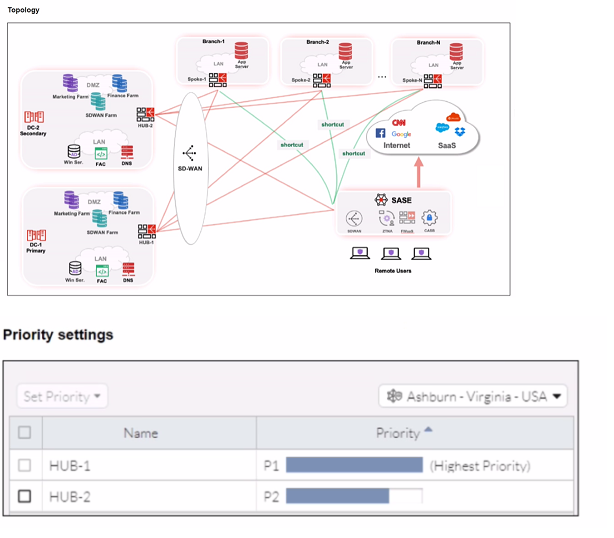
When remote users connected to FortiSASE require access to internal resources on
Branch-2. how will traffic be routed?
A. FortiSASE will use the SD-WAN capability and determine that traffic will be directed to HUB-2. which will then route traffic to Branch-2.
B. FortiSASE will use the AD VPN protocol and determine that traffic will be directed to Branch-2 directly, using a static route
C. FortiSASE will use the SD-WAN capability and determine that traffic will be directed to HUB-1, which will then route traffic to Branch-2.
D. FortiSASE will use the AD VPN protocol and determine that traffic will be directed to Branch-2 directly, using a dynamic route
Summary:
The exhibit shows the SD-WAN "Set Priority" table for the Ashburn location. HUB-1 is configured as the highest priority (P1) path. FortiSASE uses SD-WAN rules and performance metrics to make routing decisions. For traffic destined for internal resources, it will select the highest-priority available path to enter the corporate network, which in this case is via HUB-1. Once inside the corporate network, internal routing will direct the traffic to Branch-2.
Correct Option:
C. FortiSASE will use the SD-WAN capability and determine that traffic will be directed to HUB-1, which will then route traffic to Branch-2.
The SD-WAN rule explicitly defines HUB-1 as the highest priority (P1) path for the Ashburn location. FortiSASE's SD-WAN logic will direct all traffic destined for the internal corporate network through this preferred, high-priority tunnel. Once the traffic reaches HUB-1 (the central datacenter or hub), the internal network's routing protocols (like OSPF or BGP) will take over to deliver the traffic to the final destination at Branch-2.
Incorrect Option:
A. FortiSASE will use the SD-WAN capability and determine that traffic will be directed to HUB-2. which will then route traffic to Branch-2.
This is incorrect because HUB-2 is configured as a lower priority (P2) path. SD-WAN will only use HUB-2 if the P1 path (HUB-1) is down or experiencing performance degradation that violates its SLA.
B. FortiSASE will use the AD VPN protocol and determine that traffic will be directed to Branch-2 directly, using a static route
While AD-VPN can facilitate direct spoke-to-spoke tunnels, the exhibit only shows a priority-based SD-WAN rule between FortiSASE and the hubs (HUB-1 and HUB-2). There is no information indicating a direct AD-VPN tunnel is established between FortiSASE (the client) and Branch-2. The routing decision is based on the configured SD-WAN priority, not a static route.
D. FortiSASE will use the AD VPN protocol and determine that traffic will be directed to Branch-2 directly, using a dynamic route
Similar to option B, this is incorrect. The configuration shown is an SD-WAN priority rule, not an AD-VPN dynamic routing setup for a direct branch connection. The primary path is through HUB-1.
Reference:
Fortinet Documentation Library: FortiSASE Administration Guide - SD-WAN (This covers how priority-based SD-WAN rules steer traffic).
You are designing a new network for Company X and one of the new cybersecurity policy requirements is that all remote user endpoints must always be connected and protected.Which FortiSASE component facilitates this always-on security measure?
A. site-based deployment
B. thin-branch SASE extension
C. unified FortiClient
D. inline-CASB
Summary:
The requirement for "always-on" protection means the security enforcement must be active before a user logs into their device and must persist regardless of network location (on-premises, public Wi-Fi, home). This requires a persistent security agent on the endpoint itself that can maintain a continuous connection to the FortiSASE cloud for policy enforcement, which is the core function of the unified FortiClient agent.
Correct Option:
C. unified FortiClient
The unified FortiClient agent is the component that facilitates always-on security. It can be configured to start automatically with the operating system, establishing a connection to FortiSASE before user login. It runs continuously in the background, ensuring that all network traffic from the endpoint is routed through FortiSASE's security stack for inspection and policy enforcement, regardless of the user's physical location or network connection.
Incorrect Option:
A. site-based deployment
This refers to extending SASE security to a physical branch office location using a device like a FortiGate. It does not provide direct, always-on protection for individual remote user endpoints, which is the focus of the question.
B. thin-branch SASE extension
This is a specific type of site-based deployment for small offices. Like option A, it secures a location's entire network traffic but is not the mechanism for ensuring individual, roaming endpoints are always protected.
D. inline-CASB
Inline-CASB is a security feature that provides deep visibility and control for SaaS application traffic. It is a component within the FortiSASE cloud that inspects traffic, but it is not the endpoint component that facilitates the "always-on" connection. The agent (FortiClient) is what brings the traffic to the inline-CASB.
Reference:
Fortinet Documentation Library: FortiSASE Solution Guide - Unified Agent (This covers the FortiClient agent's role in providing continuous security).
Which two components are part of onboarding a secure web gateway (SWG) endpoint?
(Choose two)
A. FortiSASE CA certificate
B. proxy auto-configuration (PAC) file
C. FortiSASE invitation code
D. FortiClient installer
Summary:
Onboarding an endpoint for Secure Web Gateway (SWG) involves configuring the device to route its web traffic through the FortiSASE cloud for security inspection. This can be achieved through two primary methods: manually configuring the device's proxy settings using a PAC file, or deploying the FortiClient agent which automatically handles the traffic steering and provides additional security features.
Correct Option:
B. proxy auto-configuration (PAC) file
A PAC file is a JavaScript file that instructs a web browser on when to use a proxy server. For clientless SWG access, the administrator provides this file to users. The browser uses the PAC file to automatically determine that traffic destined for the internet should be sent to the FortiSASE SWG proxy, while internal traffic can be sent directly.
D. FortiClient installer
The FortiClient installer is used for agent-based SWG deployment. When installed and configured with the FortiSASE connection details, FortiClient automatically routes all web traffic from the endpoint through the FortiSASE cloud. This method is more seamless for the user and provides a persistent, always-on connection.
Incorrect Option:
A. FortiSASE CA certificate
While the FortiSASE CA certificate is critically important for SSL inspection to function without causing certificate warnings in the browser, it is not a component used to onboard the endpoint. It is a prerequisite for deep inspection after the traffic is already being routed to FortiSASE.
C. FortiSASE invitation code
An invitation code is used for onboarding users and endpoints specifically for Zero Trust Network Access (ZTNA) to specific applications. It is not the mechanism used for general Secure Web Gateway (SWG) onboarding, which relies on a PAC file or the FortiClient agent for traffic steering.
Reference:
Fortinet Documentation Library: FortiSASE Administration Guide - Onboarding Endpoints (This covers both the PAC file and FortiClient methods for directing traffic to FortiSASE).
Refer to the exhibit.

In the user connection monitor, the FortiSASE administrator notices the user name is showing random characters. Which configuration change must the administrator make to get proper user information?
A. Turn off log anonymization on FortiSASE.
B. Add more endpoint licenses on FortiSASE.
C. Configure the username using FortiSASE naming convention.
D. Change the deployment type from SWG to VPN.
Summary:
The exhibit shows a user connection monitor where the username is displayed as a string of random characters ("Pstb6450a1975af"). This is a classic symptom of log anonymization being enabled. This security feature is designed to protect user privacy in logs by replacing actual usernames with pseudonyms or hashes, which prevents an administrator from identifying the specific user associated with a session.
Correct Option:
A. Turn off log anonymization on FortiSASE.
The random character string is a pseudonym generated by the log anonymization feature. To display the actual, readable usernames in the connection monitor and logs, the administrator must disable this feature in the FortiSASE global settings. This will stop the system from obfuscating user identities and will allow real names to appear for monitoring and troubleshooting purposes.
Incorrect Option:
B. Add more endpoint licenses on FortiSASE.
A lack of licenses would prevent users from connecting altogether or would be indicated by a license violation warning. It has no bearing on how usernames are displayed in the logs once a user is connected.
C. Configure the username using FortiSASE naming convention.
Usernames are typically defined in the identity provider (like Active Directory or Azure AD) that FortiSASE integrates with. FortiSASE does not impose its own naming convention that would cause a username to appear as a random hash if not followed. The obfuscation is a direct result of an anonymization setting.
D. Change the deployment type from SWG to VPN.
The deployment type (SWG or VPN) determines how users connect and what resources they access, but it does not control the fundamental logging format for usernames. The log anonymization feature applies globally across all deployment types within FortiSASE.
Reference:
Fortinet Documentation Library: FortiSASE Administration Guide - Log Anonymization (This document explains the feature that masks user identities in logs).
Refer to the exhibits.
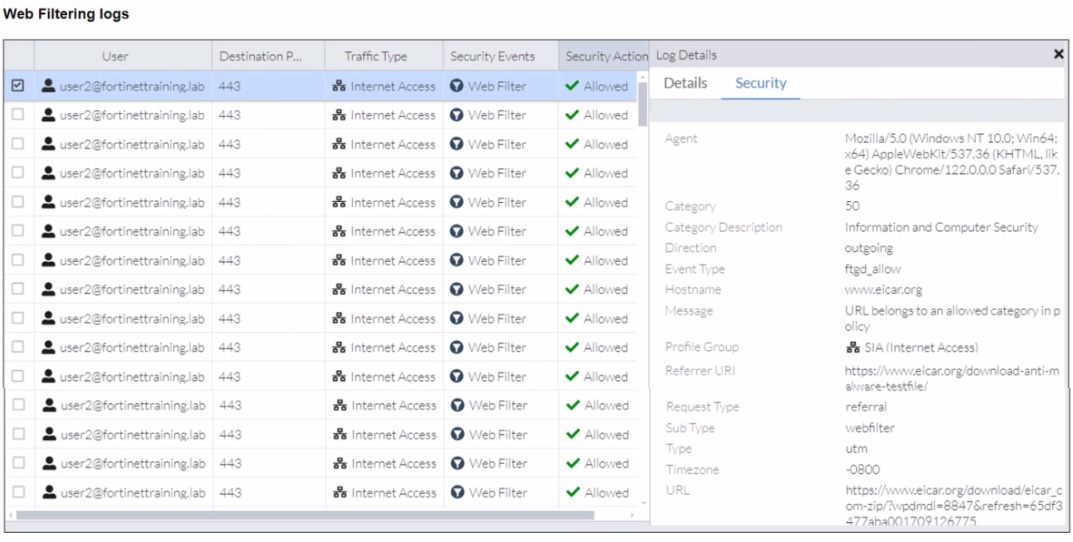
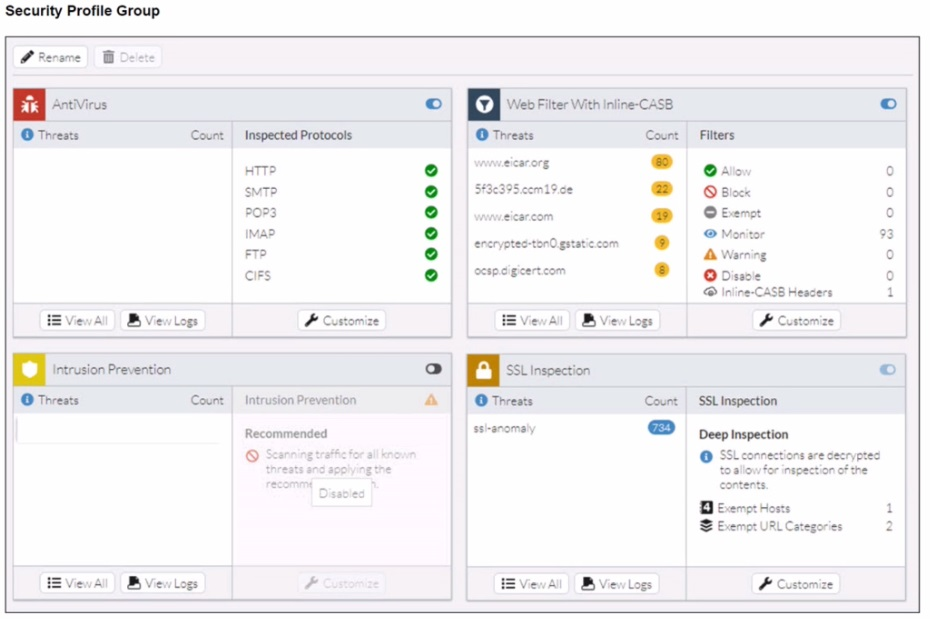
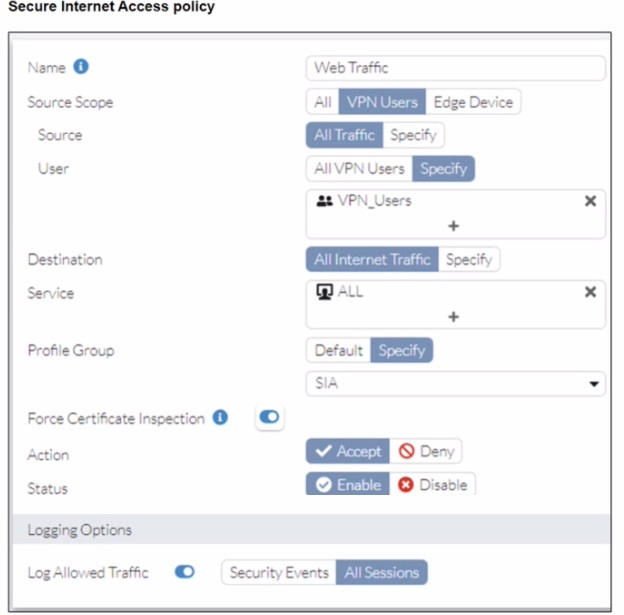
A FortiSASE administrator has configured an antivirus profile in the security profile group and applied it to the internet access policy. Remote users are still able to download the eicar.com-zip file from https://eicar.org. Traffic logs show traffic is allowed by the policy.
Which configuration on FortiSASE is allowing users to perform the download?
A. Web filter is allowing the traffic.
B. IPS is disabled in the security profile group.
C. The HTTPS protocol is not enabled in the antivirus profile.
D. Force certificate inspection is enabled in the policy.
Summary:
The EICAR test file is a known threat that should be blocked by the Antivirus profile. However, the logs show the download from www.eicar.org was allowed. The key detail is that the traffic is HTTPS. For Antivirus to scan the content of an encrypted HTTPS connection, it must first be decrypted. The configuration preventing this is found in the "Secure Internet Access policy" exhibit.
Correct Option:
C. The HTTPS protocol is not enabled in the antivirus profile.
The "Security Profile Group" exhibit shows the "Inspected Protocols" for Antivirus. The list includes HTTP, SMTP, POP3, etc., but notably does not include HTTPS. For Antivirus to scan and block a file download from an HTTPS website, the HTTPS protocol must be explicitly selected for inspection. Since it is not, the encrypted traffic passes through without being scanned by the antivirus engine, allowing the download.
Incorrect Option:
A. Web filter is allowing the traffic.
The Web Filter did allow the traffic, but this is a symptom, not the root cause. The Web Filter correctly allowed the "Information and Computer Security" category. The failure lies with the Antivirus profile, which is responsible for detecting and blocking the malicious file inside the allowed web traffic.
B. IPS is disabled in the security profile group.
The IPS profile is set to "Recommended," which means it is active. Furthermore, the EICAR file is primarily a test for Antivirus, not IPS. While some IPS signatures might detect it, the primary and intended method of blocking it is via the Antivirus profile.
D. Force certificate inspection is enabled in the policy.
The policy exhibit shows that "Force Certificate Inspection" is not enabled (the checkbox is empty). Even if it were, "Certificate Inspection" is a basic inspection mode that does not decrypt traffic. It only validates the server certificate. Blocking the file requires Deep Inspection, which is configured in the SSL Inspection profile, not the policy action.
Reference:
Fortinet Documentation Library: FortiGate Administration Guide - Antivirus (This explains how antivirus profiles require the correct protocols to be selected for inspection, which is a core concept shared with FortiSASE).
When accessing the FortiSASE portal for the first time, an administrator must select data center locations for which three FortiSASE components? (Choose three.)
A. Endpoint management
B. Points of presence
C. SD-WAN hub
D. Logging
E. Authentication
Summary:
During the initial setup of FortiSASE, the administrator must choose the primary geographic regions for core service components. This is a foundational step that determines where critical functions like user authentication, security processing, and log storage will be physically hosted, impacting performance and compliance.
Correct Option:
B. Points of presence:
The administrator must select primary and secondary Security PoPs. These are the locations where user traffic will be routed for security inspection (SWG, CASB, etc.). This choice directly impacts latency and performance for users.
D. Logging:
A location for log storage and reporting must be selected. This determines the geographic region where all traffic, threat, and event logs generated by FortiSASE will be stored and processed for reports.
E. Authentication:
The administrator must choose a region for the identity and access management (IAM) service. This component handles user authentication requests, and its location can affect login times and must align with data residency requirements.
Incorrect Option:
A. Endpoint management:
Endpoint management for FortiSASE is handled by the unified FortiClient agent and its connection to the FortiSASE cloud. The administrator does not select a separate, specific data center location for this component during the initial portal setup; it is inherent to the PoP and service selection.
C. SD-WAN hub:
While FortiSASE uses SD-WAN technology to connect to customer hubs, the SD-WAN hub itself refers to the customer's on-premises FortiGate device. The customer hub location is not selected within the FortiSASE portal; it is a pre-existing part of the customer's network that is registered with FortiSASE.
Reference:
Fortinet Documentation Library: FortiSASE Administration Guide - Initial Configuration (This guide outlines the initial setup steps, including selecting regions for core services).
Which secure internet access (SIA) use case minimizes individual endpoint configuration?
A. Site-based remote user internet access
B. Agentless remote user internet access
C. SIA for SSL VPN remote users
D. SIA using ZTNA
Summary:
The question asks for the use case that reduces the need to configure each endpoint individually. This points toward a solution that does not require installing and managing a dedicated security agent on every device. A clientless or agentless approach achieves this by leveraging standard browser capabilities for secure access.
Correct Option:
B. Agentless remote user internet access
This use case minimizes endpoint configuration because it does not require installing the FortiClient agent. Users typically access security by configuring their browser or operating system to use the FortiSASE Secure Web Gateway (SWG) as a proxy, often via a Proxy Auto-Configuration (PAC) file. This method centralizes the configuration management on FortiSASE, with minimal setup required on the endpoint itself.
Incorrect Option:
A. Site-based remote user internet access
This refers to securing an entire remote site (like a branch office) by connecting a FortiGate to FortiSASE. It secures the site's traffic but does not specifically address the configuration burden of individual, roaming endpoints.
C. SIA for SSL VPN remote users
This use case involves users connecting via a traditional SSL VPN, which often requires a VPN client (like FortiClient) to be installed and configured on the endpoint. This increases, rather than minimizes, the individual endpoint configuration.
D. SIA using ZTNA
Zero Trust Network Access (ZTNA) for application access typically requires the FortiClient agent to be installed on the endpoint to assess device posture (ZTNA tags) and establish secure, granular tunnels. This is an agent-based model, not an agentless one.
Reference:
Fortinet Documentation Library: FortiSASE Solution Guide - Clientless Access (This document describes the agentless access method, which aligns with minimizing endpoint configuration).
How does FortiSASE hide user information when viewing and analyzing logs?
A. By hashing data using Blowfish
B. By hashing data using salt
C. By encrypting data using Secure Hash Algorithm 256-bit (SHA-256)
D. By encrypting data using advanced encryption standard (AES)
Explanation:
FortiSASE offers a Log Anonymization feature to protect personally identifiable user information (like usernames) in logs, dashboards, and reports. This process is accomplished by hashing the user data rather than simply encrypting it. Specifically, FortiSASE employs a secure hashing method that includes the use of a salt. The salt is a random value added to the input (the username) before it is hashed. This prevents identical usernames from generating the same hash, significantly increasing security and preventing the use of rainbow tables for reverse-lookup.
Correct Option:
B. By hashing data using salt
FortiSASE uses a security best practice of salting the input (the username) before running it through a cryptographic hash function.
Hashing (an irreversible one-way process) converts the original username into a fixed-length string of characters, effectively hiding the actual identity.
The salt ensures that even if two users have the same name, the resulting hash in the log will be different, adding an essential layer of protection against attacks that rely on pre-calculated hash values.
Incorrect Option:
A. By hashing data using Blowfish
Blowfish is a symmetric-key block cipher used for encryption, not primarily for one-way logging hashes, though it can be used for password hashing. Fortinet uses a standard salting mechanism with a cryptographic hash, not this specific algorithm for log anonymization.
C. By encrypting data using Secure Hash Algorithm 256-bit (SHA-256)
SHA-256 is a modern, strong hashing algorithm, and it is likely the hash function used. However, the option states "By encrypting data", which is incorrect terminology. Hashing is a one-way transformation, not an encryption (which is a two-way, reversible process). The use of salt is the crucial additional detail for log anonymization.
D. By encrypting data using advanced encryption standard (AES)
AES is the industry standard for symmetric-key encryption, a two-way process that is easily reversible with the correct key. The purpose of log anonymization is to make the user data irreversible for privacy, thus encryption is the wrong method.
Reference:
Fortinet FortiSASE Administration Guide – Analytics and Logging sections, which discuss the Log Anonymization feature and the methodology used to protect user data (hashing with salt).
Which policy type is used to control traffic between the FortiClient endpoint to FortiSASE for secure internet access?
A. VPN policy
B. thin edge policy
C. private access policy
D. secure web gateway (SWG) policy
Explanation:
Traffic from a FortiClient endpoint to FortiSASE for Secure Internet Access (SIA) is transported over a ZTNA-based or SSL-based VPN tunnel. Before FortiSASE can apply SWG or other security policies, the client-to-cloud tunnel must first be established. This connection is governed by a VPN policy, which controls and secures the initial traffic flow from the endpoint into the SASE fabric.
Correct Option:
A – VPN policy
A VPN policy governs how FortiClient endpoints authenticate and tunnel traffic to FortiSASE. This policy defines encryption, tunnel behavior, and permitted endpoint connectivity. Without a VPN policy, the endpoint cannot send traffic to the SASE cloud for inspection. Therefore, it is the correct policy type for controlling endpoint-to-FortiSASE traffic in an SIA deployment.
Incorrect Options:
B. Thin edge policy
Thin edge policies are used for branch devices or thin-edge CPE deployments, not for remote endpoints connecting via FortiClient. These policies manage traffic from site devices toward FortiSASE, not individual remote users, so they do not apply to SIA endpoint traffic.
C. Private access policy
Private access policies are used for ZTNA/zero-trust access to internal private applications hosted in data centers or clouds. They are not used for public internet-bound Secure Web Gateway (SWG) traffic and do not control endpoint-to-SASE internet access.
D. Secure web gateway (SWG) policy
SWG policies apply after the endpoint traffic reaches FortiSASE. They control inspection and filtering of internet-bound traffic, not the initial client-to-FortiSASE tunnel. They cannot manage or establish the endpoint’s connectivity channel, making them incorrect for this question.
Reference:
Fortinet Documentation – FortiSASE Secure Internet Access Architecture → Endpoint Onboarding Using FortiClient VPN Policies.
| Page 1 out of 5 Pages |