
An administrator has configured the following settings:
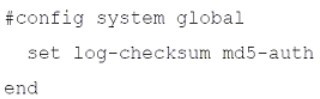
What is the purpose of executing these commands?
A. To record the hash value and authentication code of log files.
B. To encrypt log transfer between FortiAnalyzer and other devices.
C. To create the secure channel used by the OFTP process.
D. To verify the integrity of the log files received.
Summary
The log-checksum setting on a FortiAnalyzer is a critical feature for ensuring data integrity. When enabled, it instructs the FortiAnalyzer to calculate a cryptographic hash (in this case, using MD5) for log files it receives. This hash acts as a digital fingerprint, allowing the system to detect any corruption or tampering with the log data after it has been received and stored.
Correct Option
D. To verify the integrity of the log files received.
This is correct. The primary purpose of the set log-checksum command is integrity verification. By calculating and storing an MD5 hash for log files, the FortiAnalyzer can later re-calculate the hash of the same file and compare it to the stored value. If the hashes match, the log file is intact and has not been altered. If they differ, it indicates the file has been corrupted.
Incorrect Option
A. To record the hash value and authentication code of log files.
This is partially descriptive but misleading. The command does record a hash value (the MD5 checksum). However, it does not record an "authentication code" in the sense of a digital signature for source verification; it is purely for internal integrity checking after the logs have been received and stored.
B. To encrypt log transfer between FortiAnalyzer and other devices.
This is incorrect. The log-checksum command has no bearing on encryption during transmission. Log transfer encryption is handled by the protocol itself, such as the use of OFTP over TLS/SSL. The checksum is calculated on the log file after it has been received and is used for storage integrity, not transfer security.
C. To create the secure channel used by the OFTP process.
This is incorrect. The secure channel for OFTP (Over FortiAnalyzer Transfer Protocol) is established using SSL/TLS certificates and encryption protocols, which are configured under different system settings (e.g., set ssl-protocol, set oftp-ssl-protocol). The log-checksum is a separate feature that operates on the log files themselves, independent of the transport channel.
Reference
Fortinet Documentation Library: global (The CLI Reference for config system global lists the log-checksum option and its purpose).
Which statement when you are upgrading the firmware on an HA cluster made up of three FortiAnalyzer devices is true?
A. You can perform the firmware upgrade using only a console connection.
B. All FortiAnalyzer devices will be upgraded at the same time.
C. Enabling uninterruptible-upgrade prevents normal operations from being interrupted during the upgrade.
D. First, upgrade the secondary devices, and then upgrade the primary device.
Summary
Upgrading a High Availability (HA) cluster requires a specific procedure to maintain service availability and prevent a complete outage. The process is sequential, not simultaneous, to ensure one device remains operational to handle logs and management traffic while the other is being upgraded. The correct order of operations is critical for a successful, non-disruptive upgrade.
Correct Option
D. First, upgrade the secondary devices, and then upgrade the primary device.
This is correct. The standard procedure is to upgrade the secondary (subordinate) units first, one at a time. After a secondary unit reboots with the new firmware, it rejoins the cluster. Once all secondary units are successfully upgraded and the cluster is stable, you then manually fail over to a secondary unit and upgrade the original primary. This method ensures that a functioning unit is always available to serve as the active primary, minimizing service interruption.
Incorrect Option
A. You can perform the firmware upgrade using only a console connection.
This is incorrect. While a console connection can be used, it is not the only method and is often not the primary one. FortiAnalyzer firmware upgrades are typically performed through the web-based manager (GUI) by uploading the firmware image file. The CLI can also be used, but a direct console cable is not a strict requirement if network management access is available.
B. All FortiAnalyzer devices will be upgraded at the same time.
This is incorrect. Upgrading all cluster members simultaneously would cause a complete service outage, as all devices would reboot at once. The core principle of an HA upgrade is a rolling or sequential update, where devices are upgraded one after the other to preserve continuous operation.
C. Enabling uninterruptible-upgrade prevents normal operations from being interrupted during the upgrade.
This is misleading. The uninterruptible-upgrade feature helps automate the failover process during the upgrade of a single unit, but it does not prevent all interruption. When a unit is rebooting, there is a brief period of failover. The feature makes this failover smoother and more automatic, but "normal operations" are still technically interrupted for a brief moment during the switchover. The core service remains available, but the upgrade process itself involves managed interruptions for each device.
Reference
Fortinet Documentation Library: Upgrading a cluster
Which statement describes a dataset in FortiAnalyzer?
A. They determine what data is retrieved from the database.
B. They provide the layout used for reports.
C. They are used to set the data included in templates.
D. They define the chart types to be used in reports.
Summary
In FortiAnalyzer reporting, a Dataset is a fundamental building block that defines the specific log data to be analyzed. It acts as a database query, specifying the tables, fields, and filters used to select a subset of information from the vast amount of stored logs. All charts and layouts in a report are built upon the data retrieved by a dataset.
Correct Option
A. They determine what data is retrieved from the database.
This is correct. A dataset is essentially a structured query. It defines the source log tables (e.g., traffic, virus, webfilter), the specific fields to include, and any filters or conditions (e.g., time range, specific IP address) that must be met. When a report is run, the dataset executes this "query" against the SQL database to retrieve the precise set of records for the report to use.
Incorrect Option
B. They provide the layout used for reports.
This is incorrect. The layout is provided by the Report Template. The template determines the structure, formatting, and arrangement of elements (like charts, text, and logos) on the page. The dataset feeds the data into this pre-defined layout.
C. They are used to set the data included in templates.
This is incorrect and reverses the relationship. A Report Template contains or references one or more datasets. The dataset defines the data, and the template uses that dataset to populate its charts and tables. You do not use a dataset to configure a template; you configure a template to use specific datasets.
D. They define the chart types to be used in reports.
This is incorrect. The chart type (e.g., pie chart, bar graph, line chart) is defined within the Chart object itself when you are building a report widget. The dataset is the source of the data for that chart, but it does not dictate how that data will be visualized.
Reference
Fortinet Documentation Library: Datasets
An administrator has moved FortiGate A from the root ADOM to ADOM1.
Which two statements are true regarding logs? (Choose two.)
A. Analytics logs will be moved to ADOM1 from the root ADOM automatically.
B. Archived logs will be moved to ADOM1 from the root ADOM automatically.
C. Logs will be presented in both ADOMs immediately after the move.
D. Analytics logs will be moved to ADOM1 from the root ADOM after you rebuild the ADOM1 SQL database.
Summary
When a managed device, like a FortiGate, is moved between ADOMs (Administrative Domains) on a FortiAnalyzer, the handling of its existing logs is a critical process. Analytics logs (used for reporting and FortiView) are stored in an SQL database, while archived logs (raw log files) are stored in the file system. Their migration is not instantaneous and requires a specific administrative action.
Correct Option
B. Archived logs will be moved to ADOM1 from the root ADOM automatically.
This is correct. Archived logs, which are the original, compressed log files, are automatically moved to the file system storage of the destination ADOM (ADOM1) when the device is moved. This process is handled by the system in the background.
D. Analytics logs will be moved to ADOM1 from the root ADOM after you rebuild the ADOM1 SQL database.
This is correct. Analytics logs are indexed in an SQL database specific to each ADOM. Simply moving the device does not transfer this SQL data. To make the historical analytics data available in the new ADOM, an administrator must manually initiate a "Rebuild" of the ADOM1 SQL database. This process migrates and re-indexes the analytics logs from the root ADOM into ADOM1's database.
Incorrect Option
A. Analytics logs will be moved to ADOM1 from the root ADOM automatically.
This is incorrect. The movement of analytics logs is not automatic. It requires the manual step of rebuilding the SQL database for the target ADOM (ADOM1). Without this step, the historical data will not appear in the reports and FortiView of the new ADOM.
C. Logs will be presented in both ADOMs immediately after the move.
This is incorrect. After the move, the device will only be associated with ADOM1. New logs will be processed there. The historical logs will no longer be visible in the root ADOM, and they will only become visible in ADOM1 after the SQL database rebuild is complete. They are not simultaneously present in both.
Reference
Fortinet Documentation Library: Moving a device to a different ADOM (This document outlines the process and explicitly states the need to rebuild the database for analytics logs).
Which two elements are contained in a system backup created on FortiAnalyzer? (Choose two.)
A. System information
B. Logs from registered devices
C. Report information
D. Database snapshot
Summary
A FortiAnalyzer system backup is designed to save the device's configuration and operational data to allow for restoration after a failure or for cloning to a new unit. It is crucial to understand that this backup is not a full archive of all collected logs, but rather a snapshot of the system itself, its settings, and the metadata required to manage logs and reports.
Correct Option
A. System information
This is correct. The system backup includes all core configuration settings of the FortiAnalyzer itself. This encompasses network settings, admin accounts and profiles, ADOM configurations, HA settings, system certificates, and other global parameters that define how the FortiAnalyzer operates.
C. Report information
This is correct. The backup contains the definitions and layouts for reports. This includes report templates, datasets, and scheduled report settings. However, it is important to note that it contains the report structure and queries, not the historical log data that populates them when run.
Incorrect Option
B. Logs from registered devices
This is incorrect. A standard system backup does not include the actual log data (analytics or archives) collected from registered FortiGate devices. The primary purpose of the backup is configuration recovery, not log retention. Logs must be protected and migrated using separate methods, such as log forwarding to another FortiAnalyzer or using the built-in log migration tools.
D. Database snapshot
This is incorrect. The system backup does not contain a full snapshot of the SQL database. The SQL database holds all the analytics and log data, which is a massive and constantly changing dataset. Including this in a configuration backup would be impractical. The backup may contain database schemas or metadata about the database structure, but not the actual log data within it.
Reference
Fortinet Documentation Library: Backup and Restore (This section details what is included in a configuration backup file).
Refer to the exhibits.
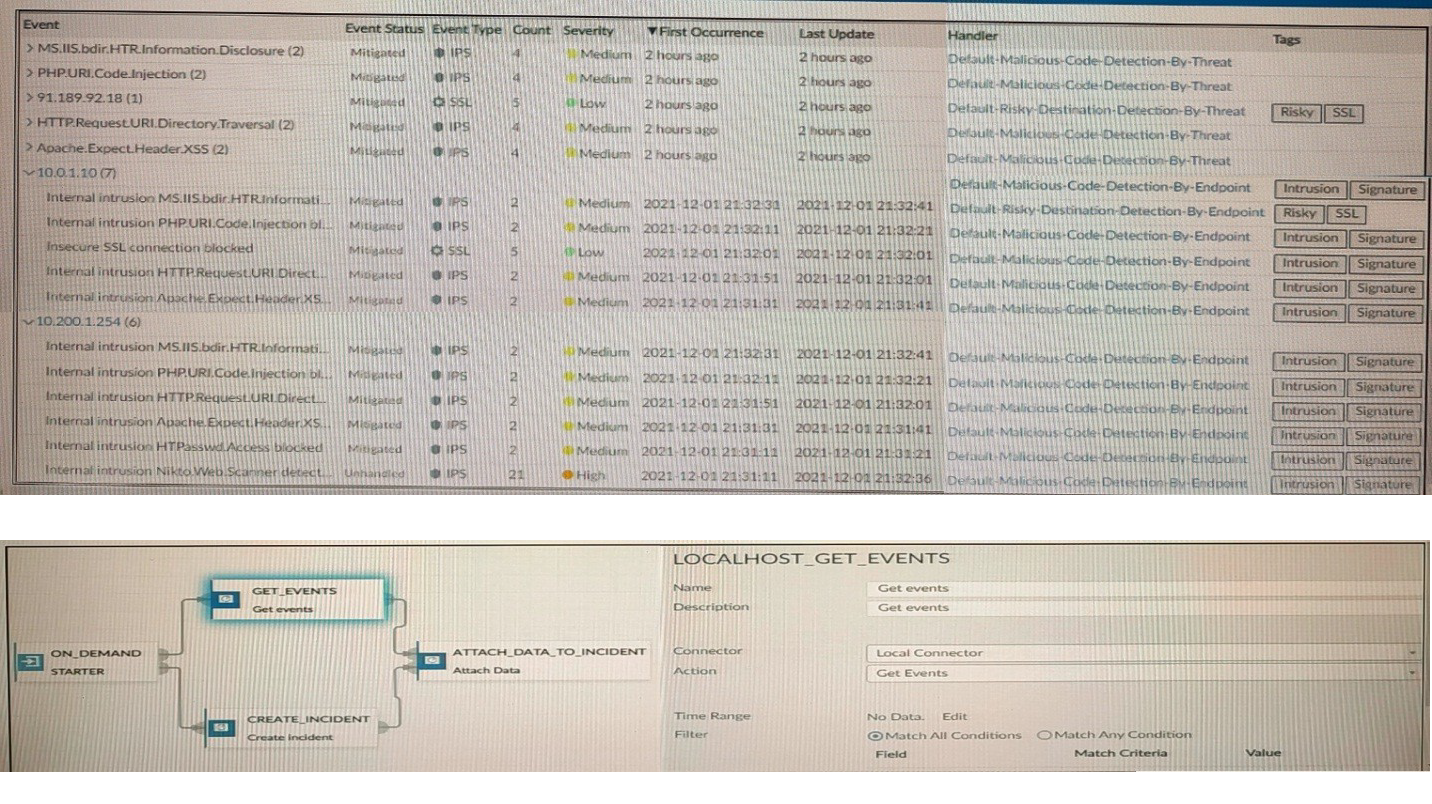
How many events will be added to the incident created after running this playbook?
A. Ten events will be added.
B. No events will be added.
C. Five events will be added.
D. Thirteen events will be added.
Summary:
The exhibit displays an Event Handler listing 13 events (10 unique from the top summary and 3 distinct from the bottom list) with statuses Mitigated or Unmitigated, all tagged with "Malicious Code Detection by Endpoint" or similar. The playbook uses an On Demand starter, Get Events action via Local connector (LOCALHOST GET EVENTS), Attach Data to Incident connector with Match All Conditions selected, and a filter with Time Range but no specified Field, Match Criteria, or Value. This configuration retrieves all 13 events within the time range and attaches them to the created incident, as the absence of additional filter criteria means all available events match the "all conditions" logic (effectively no restrictive conditions).
Correct Option:
D. Thirteen events will be added.
The Event Handler shows 13 total events: 10 unique from the summary view (with counts like (2) indicating grouped but attachable instances) and 3 distinct in the detailed list, all within a recent time frame. With Match All Conditions selected but no explicit filter fields or values defined, the Get Events action fetches all events from the handler without restriction, and the Attach Data to Incident connector includes every matching event (all 13) in the incident for comprehensive logging and analysis.
Incorrect Option:
A. Ten events will be added.
This overlooks the 3 additional distinct events in the bottom detailed list (e.g., Internal intrusion MS-ISAPI), which are separate from the 10 summarized above. The playbook's lack of restrictive filters ensures all 13 are retrieved and attached, not just the top summary count; grouping in the UI does not limit attachment in playbook actions.
B. No events will be added.
The configuration explicitly uses Get Events from the Local connector tied to the Event Handler, which contains active events. Even with Match All Conditions, the empty filter (no Field/Value) acts as a universal match, ensuring events are fetched and attached; failure would require misconfiguration like invalid time range, which is not indicated here.
C. Five events will be added.
No basis for limiting to five exists in the exhibit; the handler lists 13 total, and the playbook's filter is non-restrictive. This might confuse the (2) counts in some event names as exclusions, but all instances are included in attachment, making five an arbitrary undercount.
Reference:
https://docs.fortinet.com/document/fortianalyzer/7.4.1/administration-guide/500000/creating-incidents
https://docs.fortinet.com/document/fortianalyzer/7.4.1/administration-guide/978383/playbooks
What is Log Insert Lag Time on FortiAnalyzer?
A. The number of times in the logs where end users experienced slowness while accessing resources.
B. The amount of lag time that occurs when the administrator is rebuilding the ADOM database.
C. The amount of time that passes between the time a log was received and when it was indexed on FortiAnalyzer.
D. The amount of time FortiAnalyzer takes to receive logs from a registered device
Summary
Log Insert Lag Time is a key performance metric in FortiAnalyzer that measures the efficiency of the internal log processing pipeline. It specifically tracks the delay between a log being accepted by the system and it being fully processed and indexed into the SQL database, making it available for searching, reporting, and analysis within FortiView.
Correct Option
C. The amount of time that passes between the time a log was received and when it was indexed on FortiAnalyzer.
This is correct. The process involves two main stages: first, the log is received and queued ("Receive Time"), and second, it is parsed, processed, and inserted into the SQL database ("Insert Time"). The Log Insert Lag Time is the difference between these two timestamps. A high lag time indicates the indexing engine is falling behind, often due to high log volume or system resource constraints.
Incorrect Option
A. The number of times in the logs where end users experienced slowness while accessing resources.
This is incorrect. This describes a performance issue experienced by users on the network, which might be recorded in application or traffic logs. Log Insert Lag is a metric internal to the FortiAnalyzer's performance, not a measure of user experience or network latency.
B. The amount of lag time that occurs when the administrator is rebuilding the ADOM database.
This is incorrect. Rebuilding an ADOM database is a separate, heavy administrative task. While it may cause high insert lag during the rebuild, "Log Insert Lag Time" is a continuous, real-time metric for normal operations, not a specific measure for the duration of a rebuild job.
D. The amount of time FortiAnalyzer takes to receive logs from a registered device.
This is incorrect. This describes network latency or transfer delay between the FortiGate and the FortiAnalyzer. The Log Insert Lag Time metric begins after the log has been successfully received by the FortiAnalyzer and is concerned with internal processing, not network transfer.
Reference
Fortinet Documentation Library: Performance Monitor (The official documentation on performance metrics covers the meaning of Insert Lag and other key indicators).
What are offline logs on FortiAnalyzer?
A. Compressed logs, also known as archive logs
B. Logs that are indexed and stored in the SQL database
C. Any logs collected from offline devices after they boot up
D. Real-time logs that are not yet indexed
Summary
On FortiAnalyzer, logs are processed and stored in two primary formats to balance performance and long-term retention. "Offline logs" refer to the long-term storage format where logs are compressed and archived in their original binary form. These are distinct from the logs that are actively indexed for immediate analysis and reporting.
Correct Option
A. Compressed logs, also known as archive logs
This is correct. Offline logs are synonymous with archive logs. After logs are received and indexed into the SQL database for analytics, they are compressed and moved to long-term storage in the file system. These archived/offline logs are not immediately searchable through the GUI but are retained for compliance, forensic purposes, and can be restored to the database if needed for historical analysis.
Incorrect Option
B. Logs that are indexed and stored in the SQL database
This is incorrect. Logs that are indexed and stored in the SQL database are referred to as Analytics logs or online logs. These are the logs used for FortiView, reports, and charts. Offline logs are the compressed version of these, stored after the indexing process is complete.
C. Any logs collected from offline devices after they boot up
This is incorrect. This describes a different scenario known as log buffering and forwarding. When a FortiGate device cannot connect to the FortiAnalyzer, it may buffer logs locally and forward them once the connection is restored. These logs, once received, are processed normally into analytics and archive logs; they are not defined by the term "offline logs."
D. Real-time logs that are not yet indexed
This is incorrect. Logs that have been received but are waiting to be processed and inserted into the SQL database reside in a queue. They are often referred to as "logs in the insert buffer" or unindexed logs. Once indexed, they become analytics logs, and later they are compressed into offline/archive logs.
Reference
Fortinet Documentation Library: Log storage and archiving (This section explains the lifecycle of logs, including the distinction between analytics and archive/offline logs).
What are analytics logs on FortiAnalyzer?
A. Log type Traffic logs.
B. Logs that roll over when the log file reaches a specific size.
C. Logs that are indexed and stored in the SQL.
D. Raw logs that are compressed and saved to a log file.
Summary
FortiAnalyzer processes logs in two primary stages to optimize for both real-time analysis and long-term storage. Analytics logs represent the processed and indexed data that is immediately available for interactive queries, reporting, and visualizations. They are the "working set" of logs that power the FortiAnalyzer's analytical features.
Correct Option
C. Logs that are indexed and stored in the SQL.
This is correct. Analytics logs are the logs that have been parsed, processed, and inserted into the FortiAnalyzer's SQL database. This indexing is what makes them searchable and allows for the fast generation of charts, reports, and the data displayed in FortiView widgets. They are the foundation for all analytical operations on the platform.
Incorrect Option
A. Log type Traffic logs.
This is incorrect. "Traffic logs" is a specific category or type of log content generated by a FortiGate. Both analytics logs and archive logs can contain traffic log data. "Analytics logs" refers to the state of the log (indexed in SQL), not its content type (e.g., traffic, threat, webfilter).
B. Logs that roll over when the log file reaches a specific size.
This is incorrect. This behavior describes raw log file management, which is characteristic of archive logs (also called offline logs). Analytics logs are stored in a structured SQL database, not in individual files that roll over based on size.
D. Raw logs that are compressed and saved to a log file.
This is incorrect. This is the exact definition of archive logs or offline logs. Analytics logs are the opposite; they are the uncompressed, parsed, and indexed version of the raw logs, stored in a database for quick access, not compressed in files.
Reference
Fortinet Documentation Library: Log storage and archiving (This document explains the difference between analytics logs (in the database) and archive logs (compressed files)).
How do you restrict an administrator’s access to a subset of your organization’s ADOMs?
A. Set the ADOM mode to Advanced
B. Assign the ADOMs to the administrator’s account
C. Configure trusted hosts
D. Assign the default Super_User administrator profile
Summary
FortiAnalyzer uses Administrative Domains (ADOMs) to logically separate the management and data of different departments or customers. To limit an administrator's scope, you must explicitly grant them permissions only to the specific ADOMs they are authorized to manage. This is a fundamental access control mechanism within the FortiAnalyzer user management system.
Correct Option
B. Assign the ADOMs to the administrator’s account
This is correct. When creating or editing a local administrator account, there is a specific section to define ADOM permissions. You can select individual ADOMs from a list and assign a role/profile (like Read Only, Read Write, or custom profiles) for each one. An administrator will only see and have access to the ADOMs that have been explicitly assigned to their account.
Incorrect Option
A. Set the ADOM mode to Advanced
This is incorrect. The ADOM mode (Normal vs. Advanced) determines whether devices can be shared between ADOMs. It is a global setting that affects ADOM behavior, not a tool for restricting an individual administrator's access to a subset of ADOMs.
C. Configure trusted hosts
This is incorrect. Trusted hosts restrict where an administrator can log in from (based on source IP address), not what they can access (which ADOMs) after they have successfully authenticated.
D. Assign the default Super_User administrator profile
This is incorrect. Assigning the Super_User profile grants an administrator full permissions across all ADOMs and the global system settings. This is the opposite of restricting access to a subset; it provides unlimited access.
Reference
Fortinet Documentation Library: Administrators (This section details how to create an administrator and assign specific ADOM permissions to their account).
What remote authentication servers can you configure to validate your FortiAnalyzer administrator logons? (Choose three)
A. RADIUS
B. Local
C. LDAP
D. PKI
E. TACACS+
Summary
FortiAnalyzer supports multiple authentication methods to verify administrator logins, providing flexibility for integrating with existing enterprise security systems. Beyond local user accounts, it can leverage industry-standard remote authentication servers to centralize credential management and enforce stronger security policies like multi-factor authentication.
Correct Option
A. RADIUS
This is correct. RADIUS (Remote Authentication Dial-In User Service) is a widely supported networking protocol that provides centralized Authentication, Authorization, and Accounting (AAA) management. FortiAnalyzer can be configured as a RADIUS client to forward administrator login requests to a RADIUS server for validation.
C. LDAP
This is correct. LDAP (Lightweight Directory Access Protocol) is used to communicate with directory services like Microsoft Active Directory. FortiAnalyzer can authenticate administrators by binding to an LDAP server, allowing organizations to use their existing domain user accounts and groups for access control.
E. TACACS+
This is correct. TACACS+ (Terminal Access Controller Access-Control System Plus) is another AAA protocol, often used specifically for network device administration. FortiAnalyzer supports TACACS+ as a remote authentication method, which can provide more detailed authorization control and accounting logs compared to RADIUS.
Incorrect Option
B. Local
This is incorrect. "Local" refers to user accounts and passwords that are stored directly on the FortiAnalyzer's internal database. This is not a remote authentication server; it is the default, built-in authentication method. The question specifically asks for remote authentication servers.
D. PKI
This is incorrect. PKI (Public Key Infrastructure) is used for certificate-based authentication, often for IPsec or SSL-VPNs. While FortiAnalyzer uses certificates for securing communication channels (e.g., OFTP), it does not use administrator PKI certificates as a method for logging into the web-based manager or CLI as a remote authentication server type. Administrator authentication is handled by Local, RADIUS, LDAP, and TACACS+.
Reference
Fortinet Documentation Library: Remote authentication servers (This section details the configuration of RADIUS, LDAP, and TACACS+ servers for administrator authentication).
What is the best approach to handle a hard disk failure on a FortiAnalyzer that supports hardware RAID?
A. There is no need to do anything because the disk will self-recover.
B. Run execute format disk to format and restart the FortiAnalyzer device.
C. Perform a hot swap of the disk.
D. Shut down FortiAnalyzer and replace the disk.
Summary
FortiAnalyzer devices that support hardware RAID (typically RAID 1) are designed for fault tolerance. If a hard disk fails, the system can continue operating using the remaining good disk(s) without interruption. The correct procedure leverages this capability by allowing the administrator to replace the faulty component while the system is still running, minimizing downtime.
Correct Option
C. Perform a hot swap of the disk.
This is correct. For a FortiAnalyzer with supported hardware RAID, the best practice is to perform a hot swap. This means identifying the failed disk (often indicated by an LED), physically removing it from the bay while the unit is powered on, and inserting a new, compatible disk. The hardware RAID controller will automatically begin rebuilding the data from the healthy disk onto the new one, all without requiring a system shutdown.
Incorrect Option
A. There is no need to do anything because the disk will self-recover.
This is incorrect. A physically failed disk cannot repair itself. While the RAID array will maintain operations, the failed disk must be replaced to restore fault tolerance. Leaving a failed disk in place leaves the system vulnerable; if the remaining good disk fails, data loss and system outage will occur.
B. Run execute format disk to format and restart the FortiAnalyzer device.
This is incorrect and dangerous. The execute format command is used for initial setup or major troubleshooting and will erase all data on the specified disk. Running this command on a working disk in a degraded RAID array would destroy the only remaining copy of the data, resulting in a complete data loss.
D. Shut down FortiAnalyzer and replace the disk.
This is not the best approach for a device that supports hot-swapping. Shutting down the FortiAnalyzer causes unnecessary service interruption for all log collection and reporting. The hot-swap capability is specifically designed to avoid this downtime, making a shutdown an outdated and disruptive procedure when a hot swap is available.
Reference
Fortinet Documentation Library: Replacing a failed hard disk (This guide outlines the hot-swap procedure for replacing a failed disk in a supported appliance).
| Page 1 out of 14 Pages |