
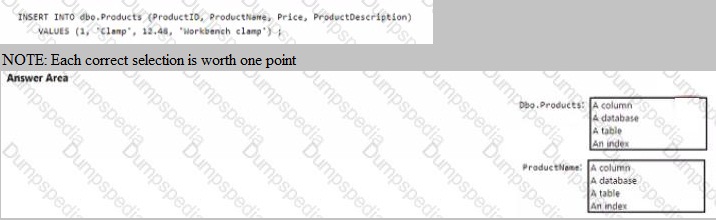
You have the following SQL query.
Explanation:
This question tests understanding of basic SQL Data Manipulation Language (DML) syntax and relational database object hierarchy. The INSERT INTO statement clearly shows the target object and the specific fields within it that are being populated with the provided values.
Correct Option:
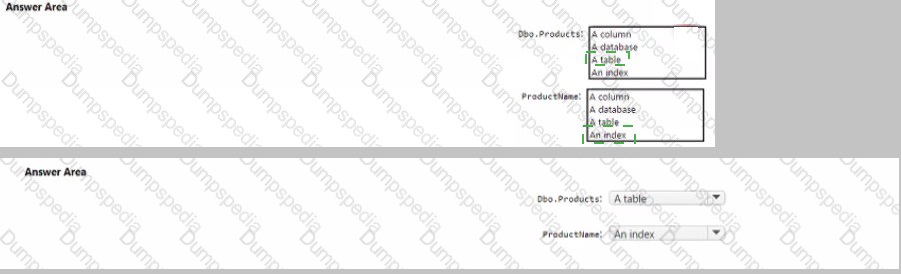
Dbo.Products:
This refers to a table. In the INSERT INTO dbo.Products clause, Products is the name of the table, and dbo is the schema (database owner) to which it belongs. The statement is inserting a new row into this table.
ProductName:
This refers to a column. In the parenthesized list (ProductID, ProductName, Price, ProductDescription), each item is a column name belonging to the dbo.Products table. The value 'Clamp' from the VALUES clause will be inserted into the ProductName column for the new row.
Incorrect Option:
Dbo.Products as a Database, Column, or Index:
dbo.Products cannot be a database because the INSERT INTO statement operates on tables within a database. It is not a column, as columns are listed inside the parentheses after the table name. It is not an index, as an index is a supporting structure for a table and cannot be the direct target of an INSERT operation.
ProductName as a Database, Table, or Index:
ProductName is specifically listed as a member of the column list, defining where a single data value goes. It is not a higher-level object like a database or table, and it is not an index, which is a separate database object built on one or more columns to improve query performance.
Reference:
Microsoft Learn: "Describe data roles and services - Describe database objects". The module explains the hierarchy (database -> tables -> columns) and the purpose of common T-SQL statements like INSERT.
For each of the following statements, select Yes if the statement is true. Otherwise, select No.
NOTE: Each correct selection is worth one point.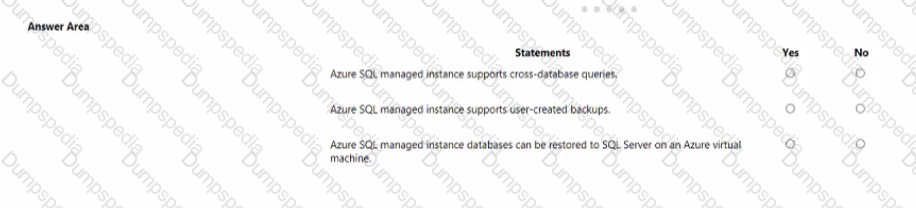
Explanation:
This question tests specific capabilities of Azure SQL Managed Instance, a Platform-as-a-Service offering designed for near-complete compatibility with on-premises SQL Server. It assesses knowledge of its cross-database query support, backup management, and migration/restore paths.
Correct Option:
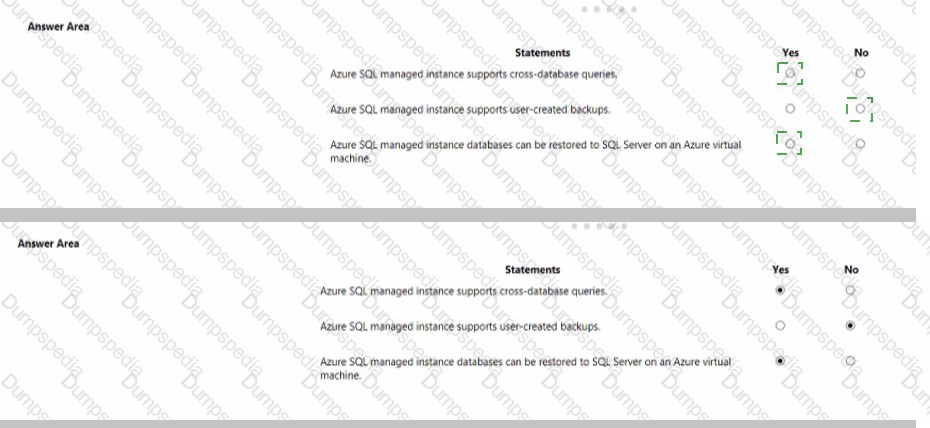
First Statement, Select "Yes":
Azure SQL Managed Instance does support cross-database queries within the same managed instance using three-part naming (Database.Schema.Table). This is a key feature that distinguishes it from single Azure SQL Databases, which generally do not support this.
Second Statement, Select "Yes":
Azure SQL Managed Instance supports user-created backups via the COPY_ONLY backup option. While the service provides automated backups, users can initiate their own backup operations for purposes like migrating a database to an on-premises server or creating a special restore point.
Third Statement, Select "Yes":
This is a true and important feature for lift-and-shift scenarios. A database backed up in Azure SQL Managed Instance can be restored to SQL Server running on an Azure Virtual Machine (or even to an on-premises SQL Server), provided the target SQL Server version is compatible. This enables hybrid cloud strategies.
Incorrect Option:
There is no "No" selection for any statement, as all three are true capabilities of Azure SQL Managed Instance. Selecting "No" for any would be incorrect based on the service's documented features, which are designed for high compatibility with SQL Server.
Reference:
Microsoft Learn: "Describe relational workloads on Azure - Describe Azure SQL Managed Instance". The documentation highlights cross-database queries, backup to URL (which enables user-created backups), and database restore to SQL Server on VM as core features supporting SQL Server compatibility and hybrid cloud architectures.
When provisioning an Azure Cosmos DB account, which feature provides redundancy within an Azure region?
A. multi-master replication
B. Availability Zones
C. automatic failover
D. the strong consistency level
Explanation:
This question tests knowledge of Azure Cosmos DB high-availability features and their scope. It asks specifically for the feature that provides data redundancy within a single Azure region, protecting against failures at a zonal level (like a datacenter outage) rather than across regions.
Correct Option:
B. Availability Zones:
This is the correct answer. Enabling Availability Zones when provisioning an Azure Cosmos DB account replicates your data synchronously across multiple physically separate datacenters (zones) within the same Azure region. This provides high availability and resilience to zonal failures without adding the latency of cross-region replication.
Incorrect Option:
A. Multi-master replication:
This feature enables multiple write regions (across different Azure regions) by allowing writes to be accepted in more than one region. It is for global scale and write availability across regions, not specifically for intra-region redundancy.
C. Automatic failover:
This is a behavior or outcome enabled by a configuration (like enabling multiple regions or Availability Zones). It is the process that happens when a failure is detected, not the underlying feature providing the redundancy itself. The redundancy that allows failover within a region is provided by Availability Zones.
D. The strong consistency level:
This is a data consistency model that guarantees read operations return the most recent version of data. It relates to data correctness and freshness across replicas, not to the physical redundancy or high-availability architecture of the infrastructure itself.
Reference:
Microsoft Learn: "Describe Azure Cosmos DB - High availability with Azure Cosmos DB". The documentation states: "For intra-region high availability, configure Azure Cosmos DB to span multiple availability zones within a given region."
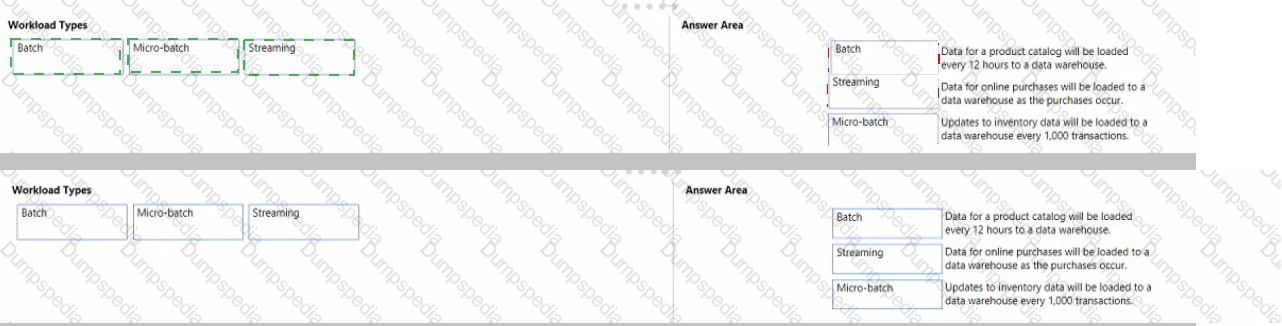
Match the types of workloads the appropriate scenario.
To answer, drag the appropriate workload type from the column on the left to its scenario on the right. Each workload type may be used once, more than once or not at all.
NOTE: Each correct match is worth one point.

Explanation:
This question tests knowledge of data processing workload patterns: batch, micro-batch, and streaming. The key differentiators are the latency and trigger for data processing—whether it's scheduled for large volumes, triggered by size/time thresholds, or processed in real-time per event.
Correct Option:
Data for a product catalog will be loaded every 12 hours to a data warehouse. → Batch:
This is a classic batch processing scenario. The load operates on a fixed, long-term schedule (every 12 hours), processing a large, finite set of data (the full catalog) that has accumulated since the last run. High latency is acceptable.
Data for online purchases will be loaded to a data warehouse as the purchases occur. → Streaming:
This is a streaming workload. The requirement "as the purchases occur" indicates real-time or near-real-time processing of individual events (purchases) with minimal latency. Each transaction is processed immediately upon creation.
Updates to inventory data will be loaded to a data warehouse every 1,000 transactions. → Micro-batch:
This describes a micro-batch pattern. Processing is not per single event (streaming) nor on a long time schedule (batch). Instead, it's triggered by a size threshold (1,000 transactions), processing small "batches" of events more frequently than traditional batch jobs, offering a balance between latency and throughput.
Incorrect Option:
There are no unmatched or incorrect pairings if the above matches are made. Swapping any of these would be incorrect. For example, matching "every 12 hours" to streaming is wrong because streaming implies continuous, event-by-event processing, not a 12-hour delay. Matching "as the purchases occur" to batch is wrong because batch implies a significant delay, not immediate loading.
Reference:
Microsoft Learn: "Describe types of data workloads - Describe batch and streaming data". The module defines batch processing for large datasets on a schedule, streaming for real-time processing of event streams, and micro-batch as a hybrid approach that processes data in small, frequent batches.
You need to develop a solution to provide data to executives. the solution must provide an interactive graphic interface, depict various key performance indications, and support data exploration by using drill down.
What should you use in Microsoft Power BI?
A. a dashboard
B. Microsoft Power Apps
C. a dataflow
D. a report
Explanation:
This question tests the ability to choose the correct Power BI artifact based on specific functional requirements. The key requirements are an interactive graphical interface depicting KPIs, and supporting data exploration using drill-down. This describes a self-service analytics tool where users can interact with visuals.
Correct Option:
D. a report:
A Power BI report is the correct choice. It is a multi-page, interactive canvas built from datasets. Reports are specifically designed to provide interactive visualizations (charts, graphs, KPIs) and support extensive exploration features, including drill-down, slicing, filtering, and cross-highlighting between visuals. This directly fulfills all stated requirements.
Incorrect Option:
A. a dashboard:
A Power BI dashboard is a single-page canvas that displays visualizations and KPIs pinned from underlying reports. While it provides a high-level view, its interactivity is limited. You cannot perform in-depth exploration like drill-down on a dashboard; you typically click a tile to navigate to the underlying report for interaction.
B. Microsoft Power Apps:
Power Apps is a separate service for building custom business applications with little to no code. It is not a Power BI artifact for data visualization and exploration. While it can embed Power BI visuals, it is not the primary tool for creating interactive KPI dashboards with drill-down.
C. a dataflow:
A dataflow is a Power BI service feature for data preparation and transformation. It is used to clean, model, and load data into a data store (like Azure Data Lake Storage or the Power BI datamart). It is a backend ETL (Extract, Transform, Load) tool, not a front-end presentation layer for interactive visuals.
Reference:
Microsoft Learn: "Describe self-service analytics - Describe Power BI - Dashboards and reports in Power BI". The documentation clarifies that reports are interactive, support drill-through and drill-down, and are where data exploration primarily occurs, while dashboards are for monitoring and are less interactive.
You have an application that runs on Windows and requires across to a mapped drive.
Which Azure service should you use?
A. Azure Cosmos DB
B. Azure Table storage
C. Azure Files
D. Azure Blob Storage
Explanation:
This question tests knowledge of Azure storage services that provide server message block (SMB) protocol access, specifically the ability to be mapped as a network drive on a Windows machine. The requirement for a "mapped drive" directly points to a file share service.
Correct Option:
C. Azure Files:
This is the correct answer. Azure Files offers fully managed file shares in the cloud accessible via the industry-standard SMB protocol. These shares can be mapped as a network drive (e.g., Z:\) on a Windows machine, providing the exact functionality described in the requirement.
Incorrect Option:
A. Azure Cosmos DB:
This is a globally distributed, multi-model database service (NoSQL, MongoDB, etc.). It is accessed via database-specific APIs (SQL, MongoDB wire protocol, etc.) and cannot be mapped as a network drive.
B. Azure Table storage:
This is a NoSQL key-value store for semi-structured data. It is accessed via a REST API or SDKs, not through SMB file share protocols, and cannot be mounted as a drive.
D. Azure Blob Storage:
This is an object storage service designed for massive amounts of unstructured data (like text, images, videos). While it can be mounted as a network drive using third-party tools or the Azure Storage Explorer, this is not its native, primary access method. Its native access is via REST API. Azure Files is the native, managed Azure service specifically built for SMB file share scenarios.
Reference:
Microsoft Learn: "Describe data storage on Azure - Describe Azure Files". The documentation states that Azure Files can be used to replace or supplement traditional on-premises file servers and that Azure file shares can be mounted concurrently by cloud or on-premises deployments of Windows, Linux, and macOS.
To complete the sentence, select the appropriate option in the answer area.
Explanation:
This question tests the distinction between ETL (Extract, Transform, Load) and ELT (Extract, Load, Transform) data integration patterns. The key difference is where and when the transformation occurs. ELT loads raw data directly into the target system first, leveraging its power to perform transformations.
Correct Option:
The correct completion is: does not require; does not require; requires; does not require.
An ELT process:
does not require a data pipeline that includes a transformation engine (like SSIS), because transformations happen later within the target.
does not require a separate transformation engine, for the same reason.
requires a target data store powerful enough to transform data (e.g., a cloud data warehouse like Azure Synapse Analytics or Snowflake).
does not require data that is fully processed before being loaded, as it loads raw data and transforms it after loading.
Incorrect Option:
The opposite answers would describe the ETL pattern. ETL does require a pipeline/engine for transformation before loading, does not require the target to be powerful (it just stores final data), and does require data to be fully processed before loading. Choosing these options for an ELT process would be incorrect.
Reference:
Microsoft Learn: "Describe data ingestion and processing - Describe data processing with Azure Data Factory". The module contrasts ETL and ELT, explaining that in ELT, data is first loaded into the target data store and then transformed using the processing capabilities of the target store.
What is a benefit of the Azure Cosmos DB Table API as compared to Azure Table storage?
A. supports partitioning
B. provides resiliency if art Azure region fads
C. provides a higher storage capacity
D. supports a multi-master model
Explanation:
This question tests the understanding of the differences between Azure Table storage (a standalone service) and the Azure Cosmos DB Table API (a capability within the globally distributed Cosmos DB service). The key advantage is access to Cosmos DB's enterprise-grade, global features.
Correct Option:
D. supports a multi-master model:
This is the correct and most significant benefit. The Azure Cosmos DB Table API provides all the core capabilities of Cosmos DB, including multi-master replication, which allows writes to be accepted in multiple Azure regions with low latency. This enables global write scalability and high availability. Azure Table storage does not support this; it is a single-region service.
Incorrect Option:
A. supports partitioning:
Both Azure Table storage and the Cosmos DB Table API support partitioning (using a PartitionKey for scalability). This is not a differentiating benefit; it is a common feature.
B. provides resiliency if an Azure region fails:
While true that Cosmos DB offers this via its global distribution, the more precise and distinct benefit is the multi-master capability that enables this resiliency with write access. The option is somewhat vague, but the specific, direct benefit is the underlying multi-master model.
C. provides a higher storage capacity:
Both services offer massive, scalable storage. The storage capacity is not the primary differentiator. The key advantage of Cosmos DB is its guaranteed low latency, global distribution, and comprehensive SLAs, not merely a higher storage limit.
Reference:
Microsoft Learn: "Describe Azure Cosmos DB - Choose an API in Azure Cosmos DB". The documentation for the Table API states it is "built on Azure Cosmos DB" and inherits its benefits, including "turnkey global distribution" and "multi-region replication," which encompass the multi-master capability.
You need to create an Azure Storage account.
Data in the account must replica outside the Azure region automatically.
Which two types of replica can you us for the storage account? Each correct answer presents a complete solution.
NOTE: Each correct selection is worth one pint.
A.
read-access geo-redundant storage (RA_GRS)
B.
zone-redundant storage (ZRS)
C.
geo-redundant storage (GRS)
D.
locally-redundant storage (LRS)
read-access geo-redundant storage (RA_GRS)
geo-redundant storage (GRS)
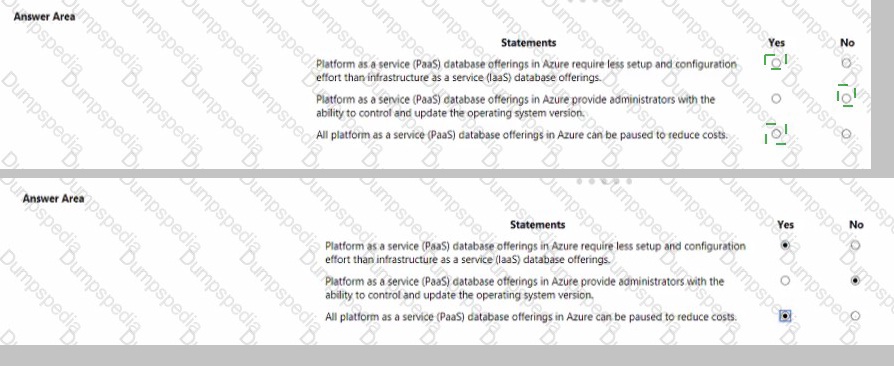
For each of the following statements. select Yes if the statement is true. Otherwise, select No.
NOTE Each correct selection is worth one point.
Your company needs to design a database that shows how changes traffic in one area of a network affect other
components on the network.
Which type of data store should you use?
A.
Key/value
B.
Graph
C.
Document
D.
columnar
Graph
To complete the sentence, select the appropriate option in the answer area.

| Page 2 out of 9 Pages |
| Previous |