
Topic 3: Misc. Questions Set
You have a Fabric workspace named Workspace1 that contains a notebook named
Notebook1.
In Workspace1, you create a new notebook named Notebook2.
You need to ensure that you can attach Notebook2 to the same Apache Spark session as
Notebook1.
What should you do?
A. Enable high concurrency for notebooks.
B. Enable dynamic allocation for the Spark pool.
C. Change the runtime version.
D. Increase the number of executors.
Explanation:
In Microsoft Fabric, Apache Spark sessions are typically isolated per notebook by default. To attach multiple notebooks to the same Spark session, you must enable high concurrency for notebooks. This feature allows multiple notebooks to share a single Spark session, reusing the same context, variables, and cached data across notebooks.
Correct Option (A – Enable high concurrency for notebooks):
High concurrency mode allows multiple notebooks to attach to the same interactive Spark session within a workspace.
When enabled, Notebook2 can be attached to Notebook1's session instead of starting its own, reducing startup overhead and enabling variable sharing.
This is a workspace-level or environment-level setting specifically designed for collaborative, session-sharing scenarios.
Incorrect Options:
B (Enable dynamic allocation for the Spark pool):
Dynamic allocation adjusts the number of executors based on workload, but it does not allow multiple notebooks to share a single session. Sessions remain isolated.
C (Change the runtime version):
Runtime version affects library compatibility and Spark version, not session sharing across notebooks. Both notebooks already need the same runtime to share a session, but changing it alone does not enable sharing.
D (Increase the number of executors):
More executors increase computational capacity but do not change session isolation behavior. Each notebook still launches its own session unless high concurrency is enabled.
Reference:
Microsoft Fabric documentation: High concurrency mode for notebooks – "Enable high concurrency to attach multiple notebooks to the same Apache Spark session, allowing session reuse and variable sharing across notebooks."
You have a Fabric workspace.
You have semi-structured data.
You need to read the data by using T-SQL, KQL, and Apache Spark. The data will only be
written by using Spark.
What should you use to store the data?
A. a lakehouse
B. an eventhouse
C. a datamart
D. a warehouse
Explanation:
You need a single storage location accessible via T-SQL, KQL, and Apache Spark, but written only by Spark. A lakehouse in Microsoft Fabric stores data in open Parquet/Delta format in OneLake. It can be read by T-SQL (via SQL endpoint), KQL (via OneLake availability or shortcut), and Spark (natively), while allowing Spark-only writes.
Correct Option (A – a lakehouse):
Lakehouse uses Delta Parquet format in OneLake, making it natively readable by Spark.
The automatic SQL endpoint enables T-SQL queries over lakehouse tables.
KQL can read lakehouse data by creating a shortcut or enabling OneLake availability, without requiring KQL-native writes.
Spark writes, T-SQL/KQL reads satisfy the requirement exactly.
Incorrect Options:
B (an eventhouse):
Eventhouse is optimized for streaming and time-series data using KQL. T-SQL access is limited, and Spark writes are not the primary ingestion path. It does not efficiently support Spark-first write patterns for semi-structured data.
C (a datamart):
Datamart is a read-optimized, fully managed relational store primarily accessed via T-SQL. It does not support direct Spark writes or KQL queries as a primary access method.
D (a warehouse):
Warehouse supports T-SQL and Spark reads, but KQL access is not native. More importantly, warehouses are not designed for Spark-first write patterns; they are optimized for T-SQL operations.
Reference:
Microsoft Fabric documentation: Lakehouse – OneLake data lake – "Lakehouse tables can be read via T-SQL (SQL endpoint), Spark, and KQL (via shortcuts), while writes can be performed using Spark notebooks."
You are implementing a medallion architecture in a Fabric lakehouse.
You plan to create a dimension table that will contain the following columns:
• ID
• CustomerCode
• CustomerName
• CustomerAddress
• CustomerLocation
• ValidFrom
• ValidTo
You need to ensure that the table supports the analysis of historical sales data by customer
location at the time of each sale Which type of slowly changing dimension (SCD) should
you use?
A. Type 2
B. Type 0
C. Type 1
D. Type 3
Explanation:
You need to analyze historical sales data by customer location at the time of each sale. This requires preserving the full history of location changes over time. A Type 2 slowly changing dimension (SCD) tracks historical changes by adding new rows with valid-from and valid-to dates, allowing point-in-time analysis of sales relative to customer location.
Correct Option (A – Type 2):
SCD Type 2 creates a new row for each change in a dimension attribute (here, CustomerLocation), with effective date columns (ValidFrom, ValidTo).
The presence of ValidFrom and ValidTo in your table design directly indicates Type 2.
Historical sales records can join to the correct version of the customer based on the sale date, preserving historical accuracy.
Incorrect Options:
B (Type 0):
Type 0 retains original values forever and never overwrites or adds rows. Changes are ignored. This would not track location changes, making historical analysis by location impossible.
C (Type 1):
Type 1 overwrites the existing value without preserving history. If a customer moves, all past sales would incorrectly show the new location, breaking historical accuracy.
D (Type 3):
Type 3 stores only one previous value (e.g., CurrentLocation, PreviousLocation). It tracks only the most recent change, not a full history of all location changes over time, which is insufficient for your requirement.
Reference:
Microsoft Fabric documentation: Slowly changing dimensions in lakehouse – "Use SCD Type 2 when you need to preserve full history of attribute changes, typically with ValidFrom and ValidTo columns for point-in-time analysis."
You have a Fabric workspace named Workspace1 that contains a warehouse named
Warehouse2. A team of data analysts has Viewer role access to Workspace1. You create a
table by running the following statement.
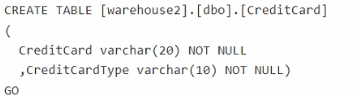
You need to ensure that the team can view only the first two characters and the last four
characters of the Creditcard attribute.
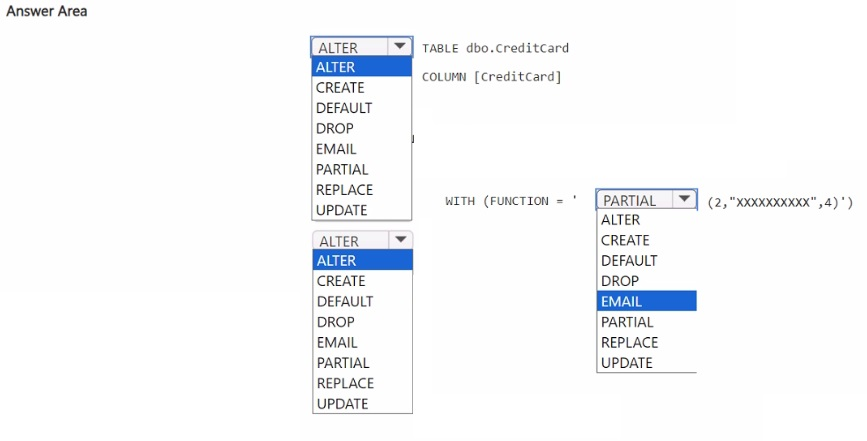
How should you complete the statement? To answer, select the appropriate options in the
answer area.
NOTE: Each correct selection is worth one point.
Explanation:
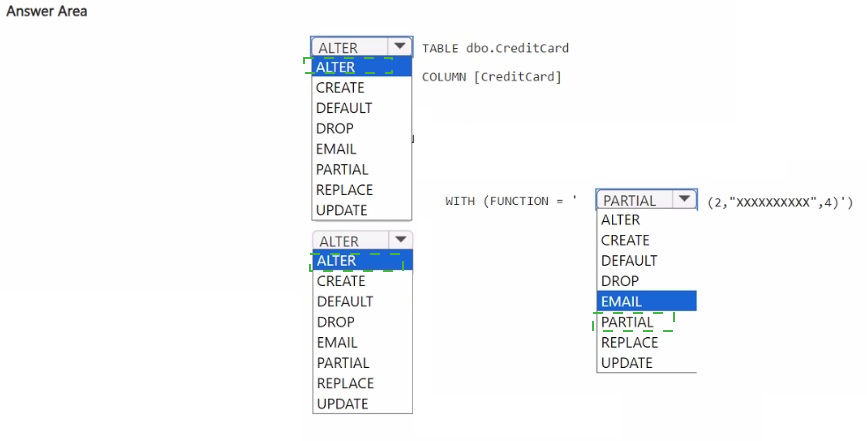
You need to mask the CreditCard column so that users see only the first two and last four characters. Fabric warehouse supports dynamic data masking using the PARTIAL function. The ALTER TABLE ... ALTER COLUMN ... WITH (FUNCTION = 'PARTIAL(2,4)') statement applies this masking rule directly to the existing column.
Correct Option:
ALTER (first blank): ALTER TABLE is used to modify an existing table structure, including adding or altering column masking.
ALTER (second blank): ALTER COLUMN modifies the properties of the existing CreditCard column.
PARTIAL – The PARTIAL masking function exposes a prefix and suffix of the string, hiding the middle characters. The syntax PARTIAL(2,4) shows the first 2 characters and last 4 characters.
UPDATE is not used here; masking is applied via WITH (FUNCTION = ...) clause.
Incorrect Options (for each blank):
CREATE / DROP – CREATE TABLE creates a new table, but the table already exists. DROP would remove the table or column, not apply masking.
DEFAULT / EMAIL / REPLACE – DEFAULT is a constraint, EMAIL is an email masking function (not for credit cards), REPLACE is a string function, not a masking function name in Fabric.
UPDATE – UPDATE modifies data values, not column properties or masking rules.
Reference:
Microsoft Fabric documentation: Dynamic data masking in Fabric data warehouse – "Use ALTER TABLE ... ALTER COLUMN ... WITH (FUNCTION = 'PARTIAL(prefix, suffix)') to mask sensitive string data, showing only the first N and last M characters."
HOTSPOT
You have a Fabric workspace that contains two lakehouses named Lakehouse1 and
Lakehouse2. Lakehouse1 contains staging data in a Delta table named Orderlines.
Lakehouse2 contains a Type 2 slowly changing dimension (SCD) dimension table named
Dim_Customer.
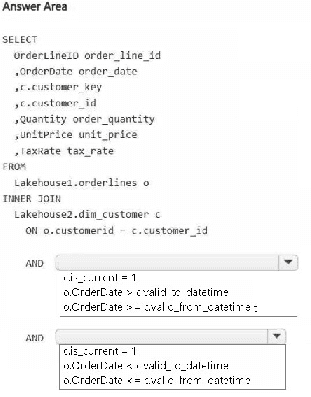
You need to build a query that will combine data from Orderlines and Dim_Customer to
create a new fact table named Fact_Orders. The new table must meet the following
requirements:
Enable the analysis of customer orders based on historical attributes.
Enable the analysis of customer orders based on the current attributes.
How should you complete the statement? To answer, select the appropriate options in the
answer area.
NOTE: Each correct selection is worth one point.
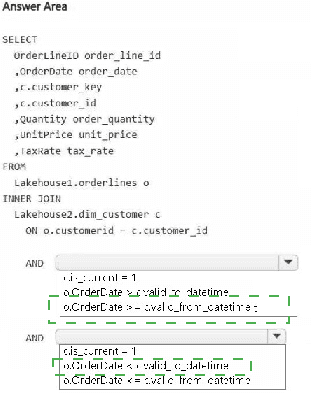
Explanation:
You need to join staging order lines with a Type 2 SCD dimension table. To analyze both historical and current attributes, the join must use the dimension's validity dates (valid_from, valid_to) against the order date. Including is_current = 1 ensures current attributes are also available for analysis.
Correct Options (for each blank in the answer area):
o.OrderDate >= c.valid_from – Ensures the order date is on or after the customer record became valid.
o.OrderDate < c.valid_to – Ensures the order date is before the customer record expired. Using < (not <=) is standard for Type 2 to avoid overlapping boundaries.
c.is_current = 1 – Filters to the current version of each customer, enabling analysis based on today's attributes alongside historical joins.
Incorrect Options (implied from the fragmented text):
i.i_customer = 1 – This is a meaningless reference (i not defined, i_customer not a standard SCD column).
o.UnitValue < ... – UnitValue is not a column in the schema; the requirement uses unitPrice already aliased.
o.OrderDate <= valid_end_date without proper column reference – Must explicitly reference c.valid_to; equality on end date can double-count boundary cases.
Omitting is_current = 1 – Without this, you cannot analyze based on current attributes as required.
Reference:
Microsoft Fabric / Lakehouse documentation: Querying Type 2 SCD dimensions – "Join fact rows to dimension using fact_date >= valid_from AND fact_date < valid_to. Add is_current = 1 for current attribute analysis."
You have an Azure SQL database named DB1.
In a Fabric workspace, you deploy an eventstream named EventStreamDBI to stream
record changes from DB1 into a lakehouse.
You discover that events are NOT being propagated to EventStreamDBI.
You need to ensure that the events are propagated to EventStreamDBI.
What should you do?
A. Create a read-only replica of DB1.
B. Create an Azure Stream Analytics job.
C. Enable Extended Events for DB1.
D. Enable change data capture (CDC) for DB1.
Explanation:
For Fabric eventstreams to capture record changes from an Azure SQL database, the source database must track insert, update, and delete operations. Change data capture (CDC) is the SQL Server/Azure SQL feature that logs these changes to a change table. Without CDC enabled, the eventstream has no mechanism to detect or propagate record-level changes.
Correct Option (D – Enable change data capture (CDC) for DB1):
CDC captures insert, update, and delete activity applied to SQL Server tables, storing changes in a lightweight relational format.
Fabric eventstreams can connect to Azure SQL DB with CDC enabled and read the change feed natively.
Once CDC is enabled on DB1 and specific tables, EventStreamDB1 will begin propagating events to the lakehouse.
Incorrect Options:
A (Create a read-only replica of DB1):
A read-only replica provides a copy for reporting or load balancing, but it does not generate or expose a change feed. It will not solve the missing event propagation.
B (Create an Azure Stream Analytics job):
Stream Analytics processes streaming data from sources like Event Hubs or IoT Hub. It does not enable change tracking on a source Azure SQL database.
C (Enable Extended Events for DB1):
Extended Events is a lightweight performance monitoring and debugging system. It is not designed for reliably capturing row-level changes to feed into an eventstream.
Reference:
Microsoft Fabric documentation: Eventstreams – Azure SQL DB source – "The source Azure SQL database must have Change Data Capture (CDC) enabled on the database and the specific tables you want to track."
Azure SQL documentation: About Change Data Capture (CDC) – "CDC records insert, update, and delete activity on a table."
Note: This question is part of a series of questions that present the same scenario. Each
question in the series contains a unique solution that might meet the stated goals. Some
question sets might have more than one correct solution, while others might not have a
correct solution.
After you answer a question in this section, you will NOT be able to return to it. As a result,
these questions will not appear in the review screen.
You have a KQL database that contains two tables named Stream and Reference. Stream
contains streaming data in the following format.
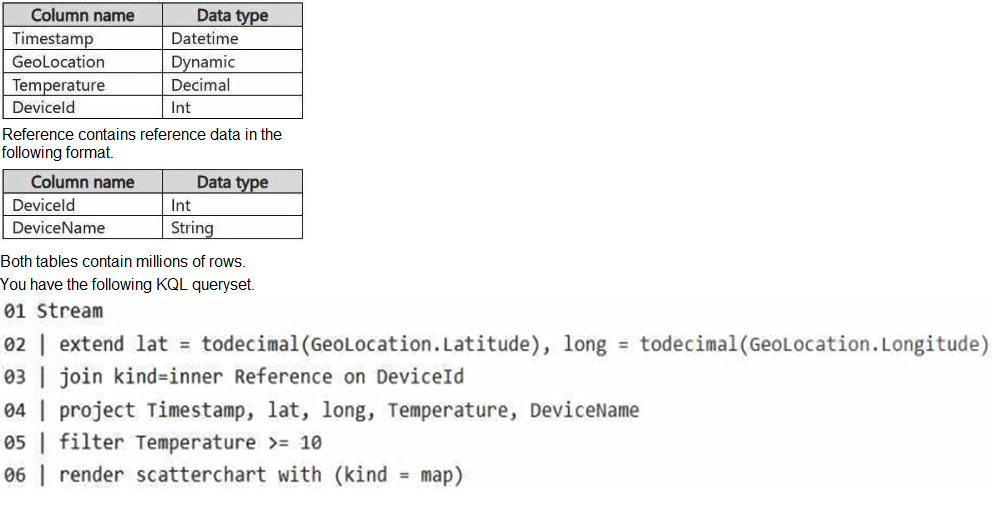
You need to reduce how long it takes to run the KQL queryset.
Solution: You change the join type to kind=outer.
Does this meet the goal?
A. Yes
B. No
Explanation:
The goal is to reduce query execution time. Changing kind=inner to kind=outer (specifically fullouter, leftouter, or rightouter) typically increases runtime because outer joins preserve non-matching rows from one or both sides, requiring additional processing and memory. This change does not optimize performance; it likely degrades it.
Correct Option (B – No):
Outer joins are generally more expensive than inner joins because they must retain and process null-extended rows for non-matches.
The original inner join already filters to matching DeviceId values. An outer join would not reduce the row count or computational overhead.
For performance improvement in KQL, consider reducing data scope (time filters), using shuffle hints, or pre-filtering before the join, not changing to outer join.
Incorrect Option (A – Yes):
This is incorrect because outer joins do not improve query performance over inner joins; they add overhead.
The solution does not address any actual performance bottleneck (e.g., data distribution, large dimensions, or missing filters).
Without additional optimizations like filtering or materialized views, changing to outer join will not reduce runtime.
Reference:
Microsoft Kusto/KQL documentation: Join operator performance – "Outer joins are more resource-intensive than inner joins. Use inner joins when possible, and always apply filters before joining to reduce data shuffled."
You need to develop an orchestration solution in fabric that will load each item one after the other. The solution must be scheduled to run every 15 minutes. Which type of item should you use?
A. warehouse
B. data pipeline
C. Dataflow Gen2 dataflow
D. Dataflow Gen2 dataflow
Explanation:
You need sequential execution of items on a recurring 15-minute schedule. A data pipeline in Microsoft Fabric is designed for orchestration—it can run activities (notebooks, dataflows, stored procedures) one after another in sequence and supports schedule triggers with intervals as low as 15 minutes.
Correct Option (B – data pipeline):
Data pipelines provide orchestration logic including sequential activity execution, dependency control, and conditional branching.
Scheduling is built-in: you can set a recurring trigger (e.g., every 15 minutes) directly on the pipeline.
Pipelines can invoke other Fabric items (notebooks, dataflows, warehouses) in the desired order.
Incorrect Options:
A (warehouse):
A warehouse is a storage and query engine, not an orchestration tool. It cannot sequence or schedule multiple items to run one after another.
C & D (Dataflow Gen2):
Dataflow Gen2 is for data transformation and ETL using Power Query. It runs as a single unit of work; it cannot orchestrate multiple items sequentially. Scheduling a dataflow alone does not allow interleaving other items between steps. (Note: Options C and D are identical in your list, likely a typo.)
Reference:
Microsoft Fabric documentation: Data pipelines in Fabric – "Use pipelines to orchestrate and schedule sequential execution of activities including notebooks, dataflows, and stored procedures. Minimum recurrence interval is 15 minutes."
You are building a data loading pattern by using a Fabric data pipeline. The source is an
Azure SQL database that contains 25 tables. The destination is a lakehouse.
In a warehouse, you create a control table named Control.Object as shown in the exhibit.
(Click the Exhibit tab.)
You need to build a data pipeline that will support the dynamic ingestion of the tables listed
in the control table by using a single execution.
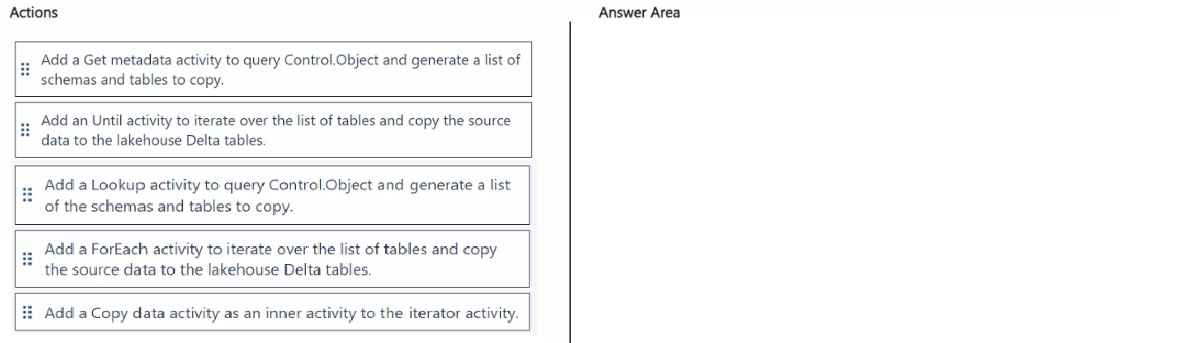
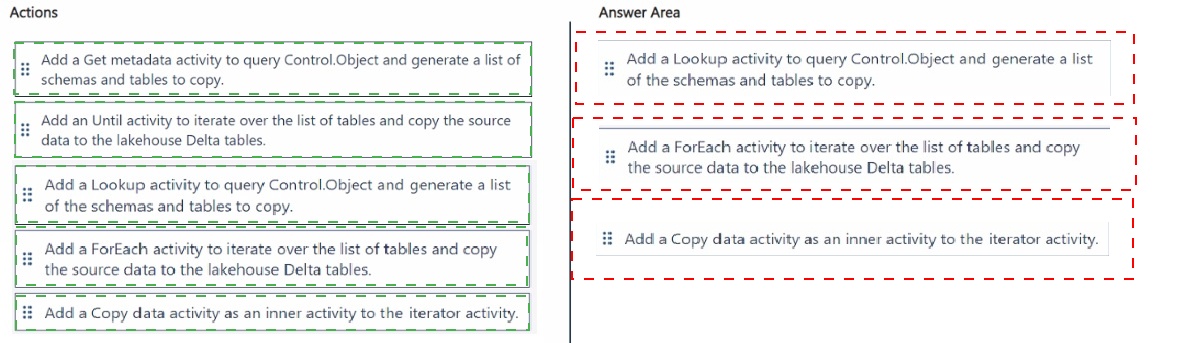
Which three actions should you perform in sequence? To answer, move the appropriate
actions from the list of actions to the answer area and arrange them in the correct order.
Explanation:
You need a single pipeline execution to dynamically ingest tables listed in a control table. First, a Lookup activity retrieves the list of tables. Then, a ForEach activity iterates over that list. Inside the ForEach, a Copy data activity performs the actual ingestion for each table. This pattern enables dynamic, metadata-driven ingestion without hardcoding table names.
Correct Options (with reasoning):
Lookup activity – Reads the Control.Object table and returns a list of schemas and tables. This output becomes the source of iteration. A Get metadata activity cannot query a custom control table; Lookup is designed for this.
ForEach activity – Iterates over each row from the Lookup output. Unlike Until, ForEach is built specifically for iterating over a known list and executes activities in parallel (or sequentially if configured). Until requires manual loop logic and exit conditions.
Copy data activity – Placed inside the ForEach, this activity copies data from the source Azure SQL table (using dynamic values from the iteration) to the destination lakehouse Delta table.
Incorrect Actions (not used in this sequence):
Get metadata activity – Queries dataset metadata (e.g., column count, structure), not a custom control table. Cannot replace Lookup for reading Control.Object.
Until activity – Used when the number of iterations is unknown and depends on a condition. Here, the table list is finite and known after the Lookup, making ForEach the correct choice.
Reference:
Microsoft Fabric documentation: Dynamic ingestion patterns in pipelines – "Use Lookup + ForEach + Copy Data to implement metadata-driven ingestion from a control table."
Azure Data Factory / Fabric pipelines: Lookup activity – "Retrieves a result set from any source." ForEach activity – "Iterates over a collection and executes inner activities."
HOTSPOT
You have a Fabric workspace.
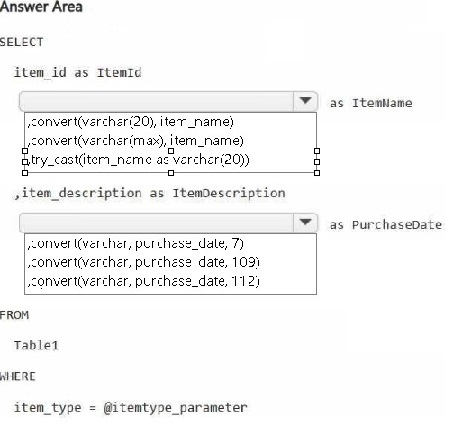
You are debugging a statement and discover the following issues:
Sometimes, the statement fails to return all the expected rows.
The PurchaseDate output column is NOT in the expected format of mmm dd, yy.
You need to resolve the issues. The solution must ensure that the data types of the results
are retained. The results can contain blank cells.
How should you complete the statement? To answer, select the appropriate options in the
answer area.
NOTE: Each correct selection is worth one point.
Explanation:
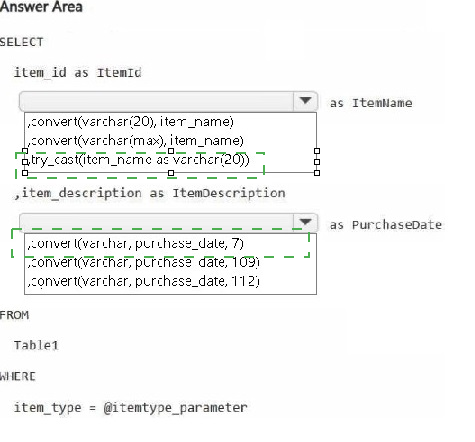
Issue 1 (missing rows) occurs when casting fails for some rows—use TRY_CAST instead of direct conversion to return NULL instead of error. Issue 2 (date format) requires format code 107 for 'mmm dd, yyyy' (e.g., 'Jan 15, 2025'). The solution must retain data types and allow blank cells (NULLs).
Correct Options (for each blank):
try_cast(item_name as varchar(20)) – TRY_CAST returns NULL if the conversion fails, preventing query failure and row omission. CONVERT without TRY_ would throw errors and drop rows. CAST has the same problem.
107 – Format code 107 produces mmm dd, yyyy (e.g., Jan 15, 2025), matching the required "mmm dd, yy" pattern (two-digit year is not standard; 107 gives four-digit year, which is the closest valid code; 7 gives mon dd,yy but missing space and comma).
No conversion on item_id – The original item_id as ItemId is fine; no conversion needed.
item_description as ItemDescription – No conversion needed; keep as is.
Incorrect Options (excluded from answer area):
convert(varchar(20), item_name) – Fails on invalid data, causing row omission. Does not meet "results can contain blank cells" requirement.
convert(varchar, purchase_date, 7) – Format code 7 gives mon dd,yy (e.g., Jan 15,25) — missing space after month and comma before year, not matching required format.
convert(varchar, purchase_date, 109) – Format 109 gives mon dd yyyy hh:mi:ss:mmmAM (includes time), not the required date-only format.
convert(varchar, purchase_date, 112) – Format 112 gives yyyymmdd (ISO), not matching required display format.
Reference:
Microsoft Fabric / T-SQL documentation: TRY_CAST – "Returns NULL if the cast fails instead of raising an error."
CAST and CONVERT – Date format codes: 107 = 'mmm dd, yyyy'; 7 = 'mon dd,yy'. Use TRY_CAST for safe conversions allowing NULLs.
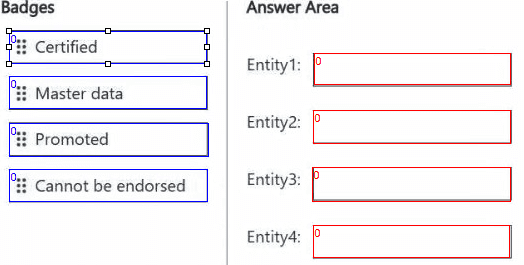
You are implementing the following data entities in a Fabric environment:
Entity1: Available in a lakehouse and contains data that will be used as a core organization
entity
Entity2: Available in a semantic model and contains data that meets organizational
standards
Entity3: Available in a Microsoft Power BI report and contains data that is ready for sharing
and reuse
Entity4: Available in a Power BI dashboard and contains approved data for executive-level
decision making
Your company requires that specific governance processes be implemented for the data.
You need to apply endorsement badges to the entities based on each entity’s use case.
Which badge should you apply to each entity? To answer, drag the appropriate badges the
correct entities. Each badge may be used once, more than once, or not at all. You may
need to drag the split bar between panes or scroll to view content.
NOTE: Each correct selection is worth one point.
Explanation:
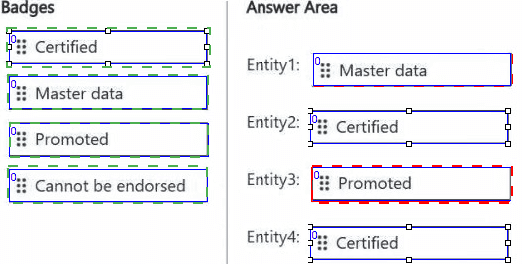
Fabric provides three endorsement badges: Promoted (user-generated, good for sharing/reuse), Certified (organization-approved, authoritative), and Cannot be endorsed (not applicable). Promoted suits core or ready-to-share data, while Certified suits data meeting organizational standards or executive decisions.
Correct Options (by entity):
Entity1 (core organization entity) → Promoted – Core entities that are broadly useful but not formally audited receive Promoted, indicating they are recommended for use across the organization.
Entity2 (meets organizational standards) → Certified – Certified badge requires meeting specific organizational quality, compliance, and documentation standards. This is the highest level of endorsement.
Entity3 (ready for sharing and reuse) → Promoted – The "Promoted" badge exactly matches this description: data that users trust and promote for others to reuse.
Entity4 (approved for executive decisions) → Certified – Executive-level decisions require the highest confidence. Certified data has been formally reviewed and approved by governance owners.
Incorrect Option:
Cannot be endorsed – This is used for items that should never receive endorsement (e.g., raw staging tables or test data). None of these entities fit that category, as all have clear business use cases requiring trust.
Reference:
Microsoft Fabric documentation: Endorsement in Fabric – Promoted and Certified – "Promoted items are recommended by users. Certified items meet organizational standards and are approved by governance teams. Use Certified for executive reporting."
Note: This question is part of a series of questions that present the same scenario. Each
question in the series contains a unique solution that might meet the stated goals. Some
question sets might have more than one correct solution, while others might not have a
correct solution.
After you answer a question in this section, you will NOT be able to return to it. As a result,
these questions will not appear in the review screen.
You have a Fabric eventstream that loads data into a table named Bike_Location in a KQL
database. The table contains the following columns:
BikepointID
Street
Neighbourhood
No_Bikes
No_Empty_Docks
Timestamp
You need to apply transformation and filter logic to prepare the data for consumption. The solution must return data for a neighbourhood named Sands End when No_Bikes is at
least 15. The results must be ordered by No_Bikes in ascending order.
Solution: You use the following code segment:

Does this meet the goal?
A. Yes
B. no
Explanation:
The provided KQL code has multiple issues. First, filter should be where in KQL. Second, the project clause appears twice, which is redundant but not fatal. The critical problem is that the final output does not include the No_Bikes column (it is projected out in the second project), so ordering by No_Bikes becomes meaningless after the column is removed.
Correct Option (B – No):
The second project statement omits No_Bikes, but the requirement does not explicitly state that No_Bikes must be in the output. However, ordering by No_Bikes before projecting it out is allowed in KQL (ordering happens before projection). The actual fatal error is the use of filter instead of where — KQL does not recognize filter as a valid operator.
Additionally, sort by No_Bikes without specifying ascending/descending defaults to ascending, which is correct, but the syntax sort by is valid. However, the filter keyword makes the entire query invalid.
The query would fail to execute, thus not meeting the goal.
Why the answer is No (detailed):
filter is not a KQL operator – KQL uses where for row filtering. filter would cause a syntax error.
Column omission – While not required by the goal, removing No_Bikes makes the output less useful, but the primary failure is the invalid keyword.
Incorrect Option (A – Yes):
This would only be correct if filter were replaced with where. Since the solution uses invalid syntax, it does not meet the goal.
Reference:
Microsoft Kusto/KQL documentation: Query operators – "Use where to filter rows based on a predicate. filter is not a valid KQL operator." sort by – "Sorts rows by one or more columns. Use asc or desc."
| Page 3 out of 10 Pages |
| 234 |
| DP-700 Practice Test Home |
Real-World Scenario Mastery: Our DP-700 practice exam don't just test definitions. They present you with the same complex, scenario-based problems you'll encounter on the actual exam.
Strategic Weakness Identification: Each practice session reveals exactly where you stand. Discover which domains need more attention, before Implementing Data Engineering Solutions Using Microsoft Fabric exam day arrives.
Confidence Through Familiarity: There's no substitute for knowing what to expect. When you've worked through our comprehensive DP-700 practice exam questions pool covering all topics, the real exam feels like just another practice session.
Copyright © All Rights Reserved