
Topic 1: Litware
Existing Environment Network Environment The manufacturing and research datacenters connect to the primary datacenter by using a VPN. The primary datacenter has an ExpressRoute connection that uses both Microsoft peering and private peering. The private peering connects to an Azure virtual network named HubVNet. Identity Environment Litware has a hybrid Azure Active Directory (Azure AD) deployment that uses a domain named litwareinc.com. All Azure subscriptions are associated to the litwareinc.com Azure AD tenant. Database Environment The sales department has the following database workload: An on-premises named SERVER1 hosts an instance of Microsoft SQL Server 2012 and two 1-TB databases. A logical server named SalesSrv01A contains a geo-replicated Azure SQL database named SalesSQLDb1. SalesSQLDb1 is in an elastic pool named SalesSQLDb1Pool. SalesSQLDb1 uses database firewall rules and contained database users. An application named SalesSQLDb1App1 uses SalesSQLDb1. The manufacturing office contains two on-premises SQL Server 2016 servers named SERVER2 and SERVER3. The servers are nodes in the same Always On availability group. The availability group contains a database named ManufacturingSQLDb1 Database administrators have two Azure virtual machines in HubVnet named VM1 and VM2 that run Windows Server 2019 and are used to manage all the Azure databases. Licensing Agreement Litware is a Microsoft Volume Licensing customer that has License Mobility through Software Assurance. Current Problems SalesSQLDb1 experiences performance issues that are likely due to out-of-date statistics and frequent blocking queries. Requirements Planned Changes Litware plans to implement the following changes: Implement 30 new databases in Azure, which will be used by time-sensitive manufacturing apps that have varying usage patterns. Each database will be approximately 20 GB. Create a new Azure SQL database named ResearchDB1 on a logical server named ResearchSrv01. ResearchDB1 will contain Personally Identifiable Information (PII) data. Develop an app named ResearchApp1 that will be used by the research department to populate and access ResearchDB1. Migrate ManufacturingSQLDb1 to the Azure virtual machine platform. Migrate the SERVER1 databases to the Azure SQL Database platform. Technical Requirements Litware identifies the following technical requirements: Maintenance tasks must be automated. The 30 new databases must scale automatically. The use of an on-premises infrastructure must be minimized. Azure Hybrid Use Benefits must be leveraged for Azure SQL Database deployments. All SQL Server and Azure SQL Database metrics related to CPU and storage usage and limits must be analyzed by using Azure built-in functionality. Security and Compliance Requirements Litware identifies the following security and compliance requirements: Store encryption keys in Azure Key Vault. Retain backups of the PII data for two months. Encrypt the PII data at rest, in transit, and in use. Use the principle of least privilege whenever possible. Authenticate database users by using Active Directory credentials. Protect Azure SQL Database instances by using database-level firewall rules. Ensure that all databases hosted in Azure are accessible from VM1 and VM2 without relying on public endpoints. Business Requirements Litware identifies the following business requirements: Meet an SLA of 99.99% availability for all Azure deployments. Minimize downtime during the migration of the SERVER1 databases. Use the Azure Hybrid Use Benefits when migrating workloads to Azure. Once all requirements are met, minimize costs whenever possible.
You need to implement statistics maintenance for SalesSQLDb1. The solution must meet the technical requirements.
Which four actions should you perform in sequence? To answer, move the appropriate actions from the list of actions to the answer area and arrange them in the correct order.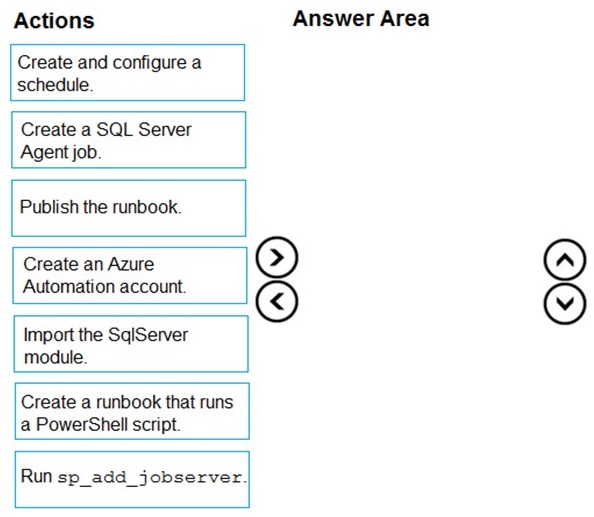
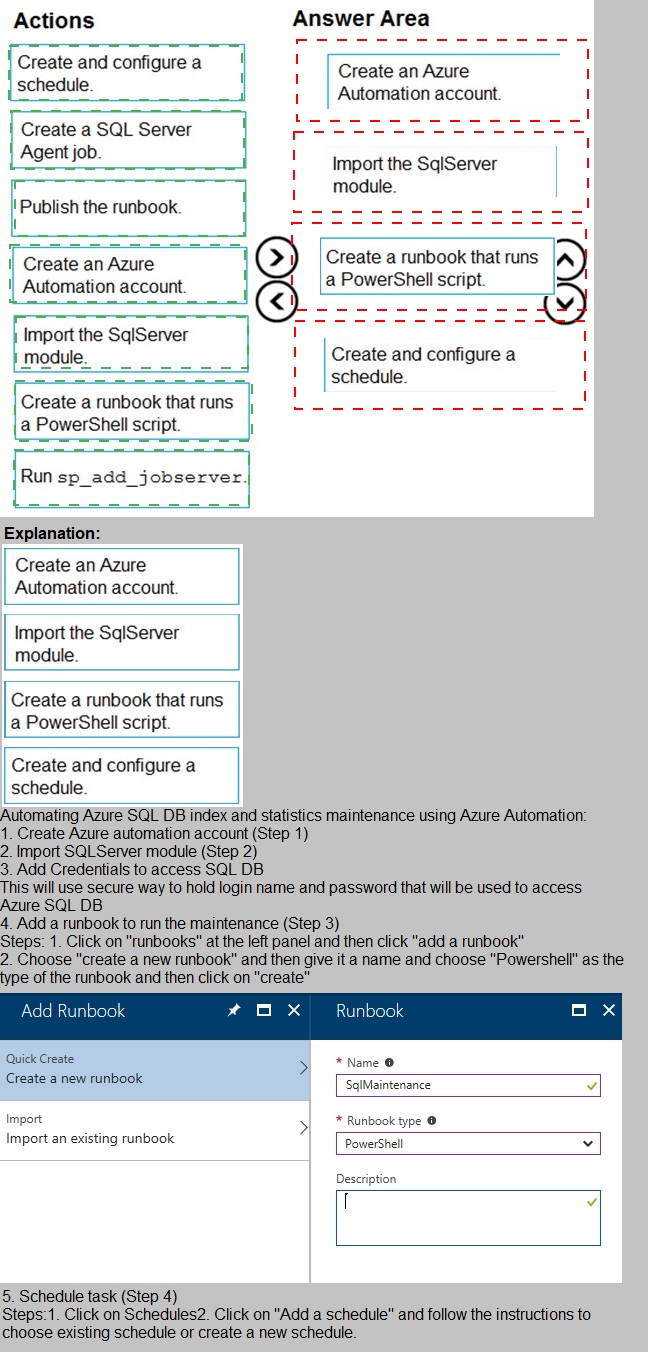
Correct Sequence:
Create an Azure Automation account.
This is the foundational service that will host and execute the automation job. You must create this account first to have a container for the runbooks, modules, and schedules.
Import the SqlServer module.
The runbook script will require PowerShell cmdlets to interact with SQL Server (e.g., Invoke-SqlCmd). The SqlServer module must be imported into the Automation account before the runbook that depends on it can be authored or run successfully.
Create a runbook that runs a PowerShell script.
The core maintenance logic (e.g., UPDATE STATISTICS commands) is defined here. You create a PowerShell runbook within the Automation account and author the script that will perform the statistics update on SalesSQLDb1.
Create and configure a schedule.
To meet the requirement for automated, regular execution, you create a schedule (e.g., weekly) within the Automation account. You then link this schedule to the published runbook to trigger it automatically.
Incorrect/Unused Actions:
Create a SQL Server Agent job.
This is an on-premises or SQL Server Managed Instance feature. The use of Azure Automation and runbooks indicates the target is likely Azure SQL Database, which does not have SQL Server Agent. This action is not part of an Azure Automation-based solution.
Publish the runbook.
While a necessary step in real life, the "Create a runbook" action in this context implies the final, editable version. In this high-level sequencing task, creating the runbook encompasses the essential step. "Publish" is often an implied sub-step after creation and before linking to a schedule.
Run sp_add_jobserver.
This is a SQL Server system stored procedure used to target a job to a specific server instance. It is not applicable in an Azure Automation context and is not used with PowerShell runbooks targeting Azure SQL Database.
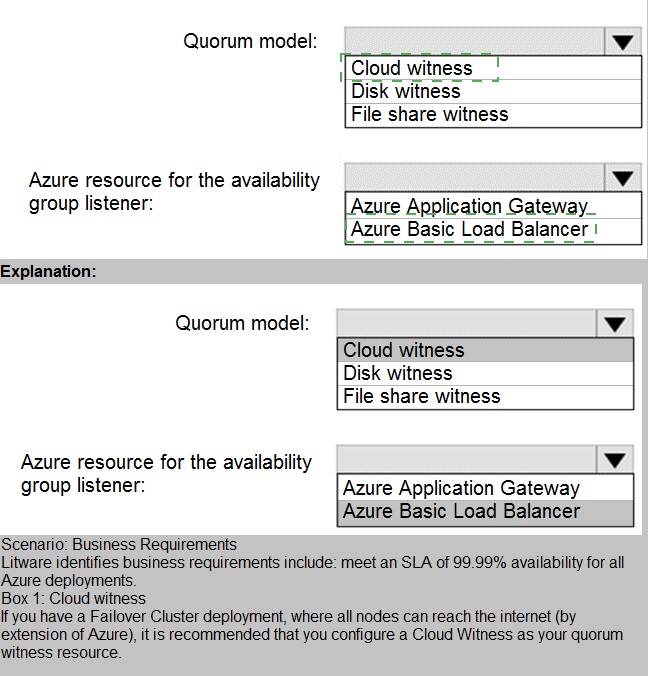
You need to recommend a configuration for ManufacturingSQLDb1 after the migration to Azure. The solution must meet the business requirements.
What should you include in the recommendation? To answer, select the appropriate options in the answer area.
NOTE: Each correct selection is worth one point.
Correct Selections:
Quorum model: Cloud witness
For Azure-based SQL Server VMs in an availability group, the cloud witness is the recommended and most Azure-native quorum solution. It uses an Azure Storage blob as a tie-breaking vote, offering high availability without the management overhead of a file share witness or the infrastructure requirement of a disk witness.
Azure resource for the availability group listener: Azure Internal Load Balancer (Inferred as "Azure Basic Load Balancer" in the list)
An Azure Internal Load Balancer is the standard and required component to direct client connection requests to the current primary replica of an availability group listener in the same virtual network. Azure Application Gateway is an HTTP(S) load balancer for web traffic and is not used for SQL Server availability group listeners.
Incorrect Options:
Quorum model: Disk witness & File share witness
A disk witness requires a shared disk cluster, which is complex in Azure. A file share witness requires a separate, highly available file server (like a Windows Server Failover Cluster file share), adding unnecessary infrastructure and management compared to the simple, resilient cloud witness.
Azure resource for the availability group listener: Azure Application Gateway
Azure Application Gateway is a web traffic load balancer (Layer 7) that manages HTTP/HTTPS requests. It is not designed or capable of handling the direct TCP traffic and probe port requirements of a SQL Server Always On availability group listener.
Reference:
Microsoft Docs - Configure a cloud witness for a Failover Cluster
You are planning the migration of the SERVER1 databases. The solution must meet the business requirements.
What should you include in the migration plan? To answer, select the appropriate options in the answer area.
NOTE: Each correct selection is worth one point.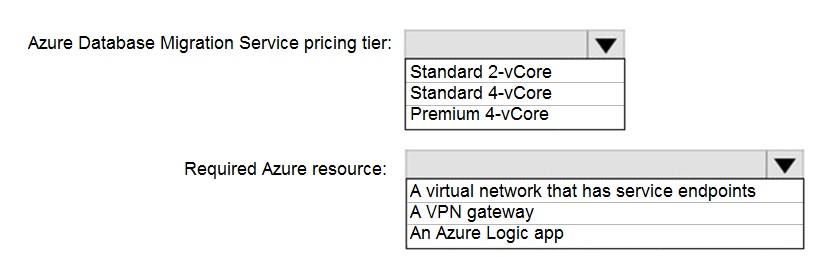
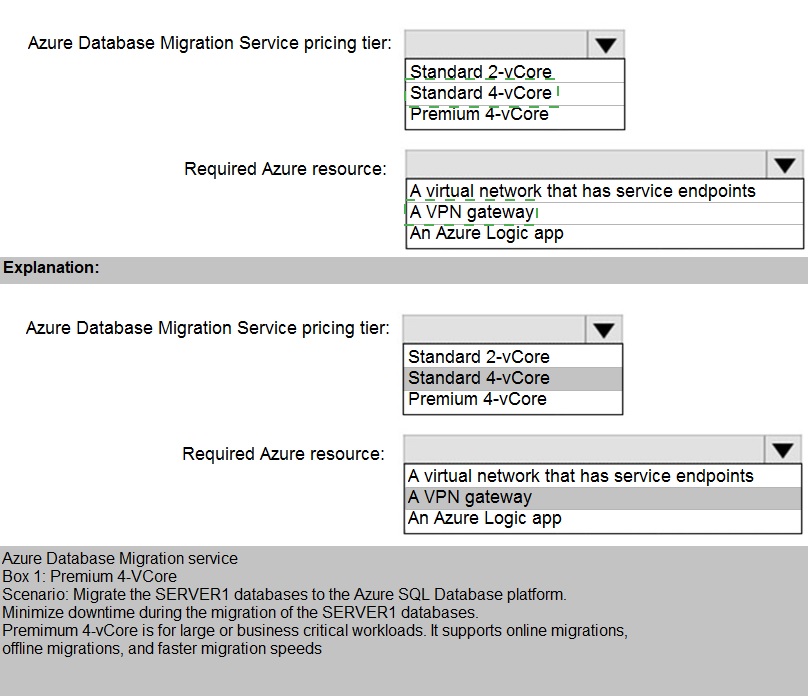
Correct Selections:
Azure Database Migration Service pricing tier: Premium 4-vCore
The Premium tier of DMS is required for online migrations, which minimize downtime. Business requirements often mandate minimal disruption during a cutover. The Standard tier only supports offline migrations, which incur significant downtime. The 4-vCore size provides adequate capacity for migrating multiple databases concurrently from a server like SERVER1.
Required Azure resource: A virtual network that has service endpoints
For DMS to connect to the target Azure SQL Database, the DMS instance must be deployed into an Azure Virtual Network (VNet). Service endpoints, specifically for Microsoft.Sql, are typically configured on this VNet's subnet to allow secure, direct connectivity to the target database service.
Incorrect Options:
Azure Database Migration Service pricing tier: Standard 2-vCore or Standard 4-vCore
The Standard pricing tier only supports offline migrations. This would result in considerable application downtime during the cutover, which is likely unacceptable for business requirements that prioritize minimal disruption.
Required Azure resource: A VPN gateway
A VPN gateway is used for establishing a site-to-site VPN connection between on-premises networks and Azure. DMS primarily uses it for connecting to an on-premises source server. The question's context focuses on the "Required Azure resource," implying the core infrastructure in Azure for the migration to function, which is the VNet for DMS deployment and target connectivity.
Required Azure resource: An Azure Logic app
Azure Logic Apps are for workflow automation and orchestration. They are not a required infrastructure component for the DMS migration process itself. DMS handles the data movement directly.
You need to recommend the appropriate purchasing model and deployment option for the 30 new databases. The solution must meet the technical requirements and the business requirements.
What should you recommend? To answer, select the appropriate options in the answer area.
NOTE: Each correct selection is worth one point.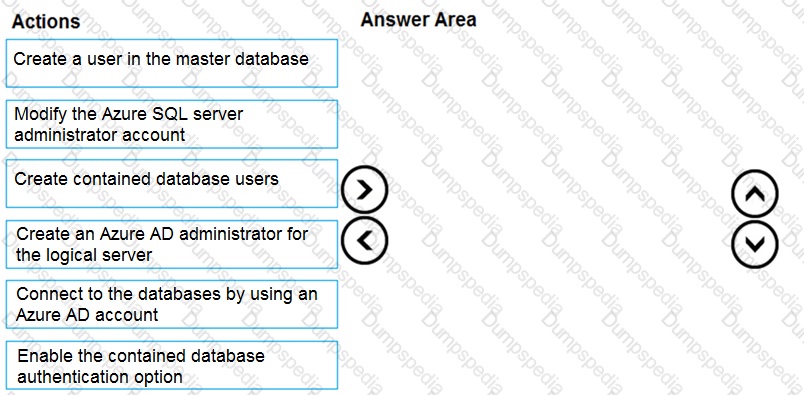
Explanation:
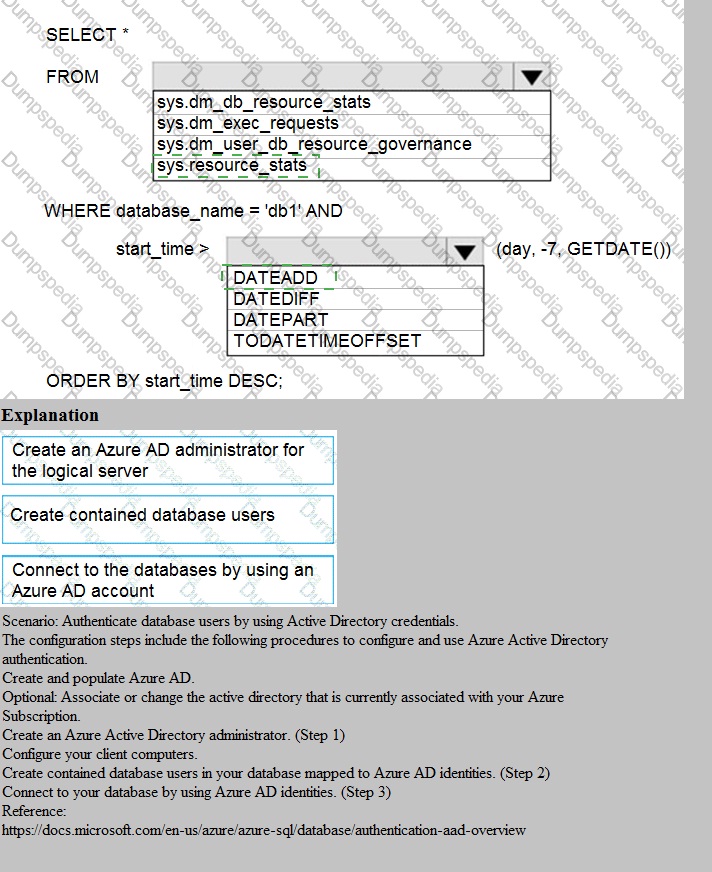
This question focuses on the process of configuring Azure Active Directory (Azure AD) authentication for Azure SQL Database. To enable Azure AD identities to access the database, you must establish an administrative link between the Azure AD tenant and the logical SQL Server. Unlike traditional SQL logins, Azure AD integration relies on a central identity provider, requiring a specific sequence of administrative actions to grant access to individual databases while maintaining security and portability.
Correct Option:
Step 1: Create an Azure AD administrator for the logical server: This is the foundational step. Only an Azure AD admin can provision Azure AD-based users in the database.
Step 2: Connect to the databases by using an Azure AD account: You must authenticate as the Azure AD admin to have the permissions necessary to create subsequent users.
Step 3: Create contained database users: Using the CREATE USER ... FROM EXTERNAL PROVIDER syntax creates users mapped to Azure AD identities without requiring logins in the master database.
Incorrect Option:
Create a user in the master database:
While possible, it is not a requirement for contained database users and adds management overhead for multi-database environments.
Enable the contained database authentication option:
This is a requirement for SQL Server on-premises or in VMs, but it is enabled by default and managed automatically in Azure SQL Database.
Modify the Azure SQL server administrator account:
This refers to the SQL Auth "server admin" created during deployment, which cannot manage Azure AD identities.
Reference:
Microsoft Learn: Configure and manage Azure AD authentication with Azure SQL
You need to identify the cause of the performance issues on SalesSQLDb1.
Which two dynamic management views should you use? Each correct answer presents part of the solution.
NOTE: Each correct selection is worth one point.
A. sys.dm_pdw_nodes_tran_locks
B. sys.dm_exec_compute_node_errors
C. sys.dm_exec_requests
D. sys.dm_cdc_errors
E. sys.dm_pdw_nodes_os_wait_stats
F. sys.dm_tran_locks
Explanation:
The question asks to identify the cause of performance issues on SalesSQLDb1. The specific views listed indicate this is an Azure Synapse Analytics dedicated SQL pool (formerly SQL DW), not a regular Azure SQL Database. Performance troubleshooting in Synapse requires using the specific DMVs that report distributed node-level activity, as the workload is spread across multiple compute nodes.
Correct Options:
A. sys.dm_pdw_nodes_tran_locks:
This view returns lock information for each node in the dedicated SQL pool. Identifying blocking scenarios requires analyzing locks across all compute nodes, which is exactly what this distributed, per-node version of sys.dm_tran_locks provides. Blocking is a common root cause of performance issues.
E. sys.dm_pdw_nodes_os_wait_stats:
This view returns wait statistics for each compute node. It is the primary tool for identifying resource bottlenecks (e.g., CPU, memory, I/O) or concurrency waits across the distributed system. High wait times on specific wait types pinpoint the root cause of slowdowns.
Incorrect Options:
B. sys.dm_exec_compute_node_errors:
This view is for examining errors that occurred on compute nodes, not for general performance diagnostics. While errors can impact performance, this DMV is too specific and not a primary tool for identifying common performance bottlenecks like waits or blocking.
C. sys.dm_exec_requests:
This view exists in dedicated SQL pools but shows requests at the control node level. For deep performance analysis, you need the node-level detail provided by the pdw_nodes_ DMVs (like sys.dm_pdw_nodes_exec_requests) to see what's happening on each compute node.
D. sys.dm_cdc_errors:
This view is related to Change Data Capture (CDC) errors. It is not a general performance troubleshooting DMV. Unless CDC is explicitly implicated in the issue, this view is irrelevant to broad performance diagnostics.
F. sys.dm_tran_locks:
This is the instance-scoped locks view for a regular SQL Server or Azure SQL Database. For Azure Synapse dedicated SQL pools, you must use the distributed, per-node version (sys.dm_pdw_nodes_tran_locks) to get accurate lock information across all compute nodes.
Reference:
Microsoft Docs - System views dedicated to Azure Synapse SQL pools
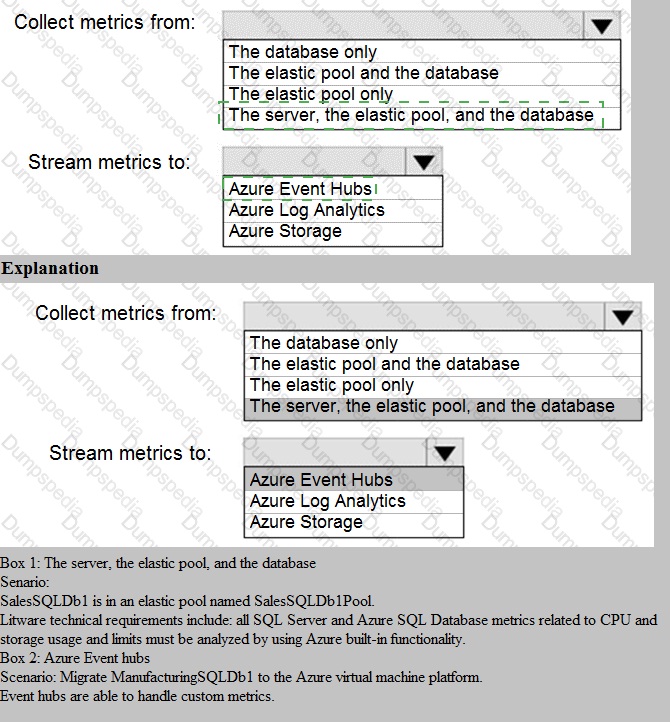
You need to implement the monitoring of SalesSQLDb1. The solution must meet the technical requirements.
How should you collect and stream metrics? To answer, select the appropriate options in the answer area.
NOTE: Each correct selection is worth one point..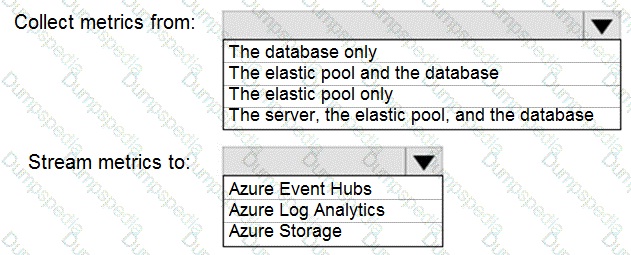
Explanation:
The question requires implementing monitoring for a specific database (SalesSQLDb1) within an Azure SQL Database service. The technical requirements dictate the scope of what to monitor and the destination for streaming that data. The correct selections must align with standard monitoring practices for granular insight and centralized analysis.
Correct Selections:
Collect metrics from: The elastic pool and the database
To get a complete performance picture, you must monitor both the database (for individual workload metrics like DTU/CPU, data IO, log IO) and the elastic pool (for aggregate resource utilization like eDTU and storage across all pooled databases). Monitoring just the database would miss pool-level constraints, while monitoring just the pool would miss per-database issues.
Stream metrics to: Azure Log Analytics
Azure Log Analytics is the primary Azure Monitor destination for collecting and analyzing diagnostic logs and metrics. Streaming to Log Analytics allows you to use Kusto Query Language (KQL) for complex analysis, create dashboards, and set up alerts—meeting typical technical requirements for centralized monitoring and reporting. It is the standard choice for operational intelligence.
Incorrect Options:
Collect metrics from:
The database only:
This omits critical pool-level metrics (e.g., total eDTU%, storage), which are essential for identifying if the pool itself is a resource bottleneck affecting all databases within it.
The elastic pool only:
This provides no visibility into the specific performance of SalesSQLDb1, making it impossible to diagnose issues isolated to that single database.
The server, the elastic pool, and the database: The logical server level provides primarily administrative logs (like SQL Security Audit Logs), not core performance metrics (DTU, CPU, IO). Performance metrics are emitted at the database and elastic pool levels.
Stream metrics to:
Azure Event Hubs:
This is for streaming data to third-party SIEM tools or custom applications for real-time processing, not for the primary storage and analysis within the Azure monitoring ecosystem. It's an additional step, not the primary destination.
Azure Storage:
This is for archival of diagnostic data. While durable and cheap, it is not suitable for interactive querying, analysis, or alerting. Data in storage is not readily accessible for the dashboards and alert rules typically required.
Reference:
Microsoft Docs - Azure SQL Database metrics and diagnostics logging
You need to configure user authentication for the SERVER1 databases. The solution must meet the security and compliance requirements.
Which three actions should you perform in sequence? To answer, move the appropriate actions from the list of actions to the answer area and arrange them in the correct order.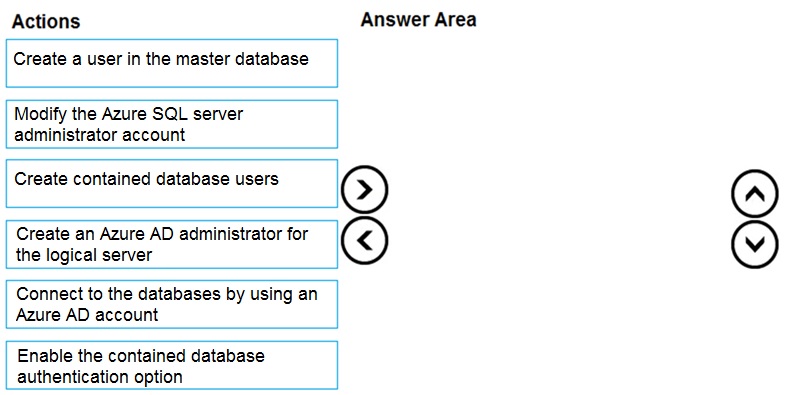
Explanation:
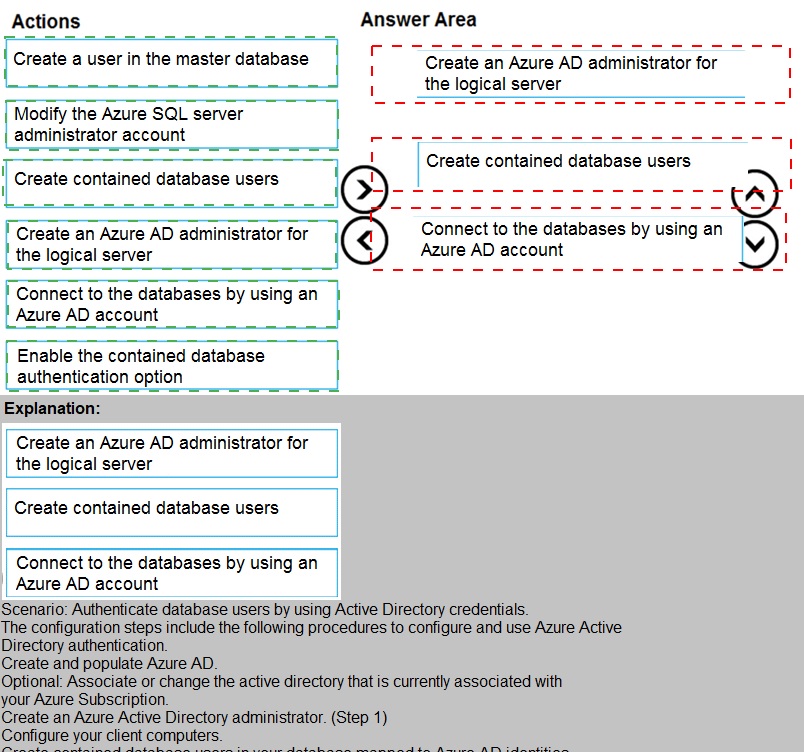
The security requirement is to use Azure Active Directory (Azure AD) authentication and ensure that database users are not tied to the logical server's logins (likely for portability and separation of concerns). The correct sequence must first establish Azure AD connectivity at the server level, then enable the specific database-level feature that supports users independent of server logins (contained databases), and finally create the users themselves using the Azure AD identity.
Correct Sequence:
Create an Azure AD administrator for the logical server.
This is the foundational step. You must first grant an Azure AD user or group the Active Directory admin role on the Azure SQL logical server. This enables Azure AD authentication for the entire server and is a prerequisite for any subsequent Azure AD-based connections or user creation.
Enable the contained database authentication option.
To meet the requirement for database users not mapped to server-level logins, you must configure the database as a contained database. This is done by setting the CONTAINMENT property of the user database to PARTIAL. This setting allows the creation of contained database users, including those authenticated by Azure AD.
Create contained database users.
With Azure AD enabled on the server and containment activated on the database, you can now create the specific users inside each user database. These users will be authenticated directly via Azure AD (e.g., CREATE USER [user@domain.com] FROM EXTERNAL PROVIDER;), fulfilling the requirement and eliminating dependencies on server-level logins.
Incorrect/Unused Actions:
Create a user in the master database:
This creates a server-level login mapped to a user in the master database, which is the traditional model. The requirement is for database users not tied to the server, so this contradicts the goal of using contained database users.
Modify the Azure SQL server administrator account:
This refers to changing the traditional SQL Server authentication administrator account. The requirement is to use Azure AD authentication, so modifying the SQL login is irrelevant and does not progress the solution.
Connect to the databases by using an Azure AD account:
While this is the outcome of the configuration, it is not a configuration action itself. It is the step a user takes after the authentication system is properly set up.
Reference:
Microsoft Docs - Configure and manage Azure AD authentication with Azure SQL
What should you do after a failover of SalesSQLDb1 to ensure that the database remains accessible to SalesSQLDb1App1?
A. Configure SalesSQLDb1 as writable.
B. Update the connection strings of SalesSQLDb1App1.
C. Update the firewall rules of SalesSQLDb1.
D. Update the users in SalesSQLDb1.
Explanation:
This question involves a failover scenario, most likely using Geo-Replication or an Auto-Failover Group for Azure SQL Database. After a failover, the database becomes the new primary in a different Azure region. The key challenge is that network access rules are configured per logical server. The new primary server in the secondary region has its own firewall rules, which likely differ from the original primary server.
Correct Option:
C. Update the firewall rules of SalesSQLDb1.
Firewall rules in Azure SQL Database are configured at the logical server level. After a failover to the secondary region, the client application SalesSQLDb1App1 must connect to a different logical server (the secondary server). The IP firewall rules on this new target server must be updated to allow inbound connections from the application's IP address(es) or configured with the appropriate virtual network rules. Without this, the application will be blocked.
Incorrect Options:
A. Configure SalesSQLDb1 as writable.
In a standard Azure SQL Database failover (using active geo-replication or failover groups), the process automatically promotes the secondary database to a read-write primary. No manual "make writable" action is required. The failover operation itself handles this.
B. Update the connection strings of SalesSQLDb1App1.
This is a critical step, but it is typically handled automatically if you are using the Failover Group Listener endpoint. The technical requirement is to ensure accessibility after a failover, and the question emphasizes a specific obstacle. While updating the connection string to point to the new server is necessary if using direct server endpoints, the primary post-failover task that can be missed is reconfiguring firewall access on the new server, as the listener endpoint's DNS update is automatic.
D. Update the users in SalesSQLDb1.
User logins and permissions are contained within the database if using contained database users or are replicated to the secondary server if using server-level logins synchronized via the dbmanager process in failover groups. User access is maintained during a failover and does not require a manual update as a standard post-failover step.
Reference:
Microsoft Docs - Active Geo-Replication - Connect to a geo-replicated database after failover
You need to implement authentication for ResearchDB1. The solution must meet the security and compliance requirements.
What should you run as part of the implementation?
A. CREATE LOGIN and the FROM WINDOWS clause
B. CREATE USER and the FROM CERTIFICATE clause
C. CREATE USER and the FROM LOGIN clause
D. CREATE USER and the ASYMMETRIC KEY clause
E. CREATE USER and the FROM EXTERNAL PROVIDER clause
Explanation:
The security and compliance requirement is to use Azure Active Directory (Azure AD) authentication. The question specifically asks for authentication for ResearchDB1, an Azure SQL Database. Therefore, the implementation must create a database user that is authenticated directly by Azure AD, not by traditional SQL Server logins.
Correct Option:
E. CREATE USER and the FROM EXTERNAL PROVIDER clause
This is the correct T-SQL syntax for creating a contained database user that is authenticated by Azure AD in Azure SQL Database. The FROM EXTERNAL PROVIDER clause specifies that the user's identity is managed externally by Azure AD. This directly meets the requirement to use Azure AD authentication and is the modern, recommended approach for Azure SQL Database.
Incorrect Options:
A. CREATE LOGIN and the FROM WINDOWS clause
This syntax is used for creating a server-level login mapped to a Windows domain account (on-premises Active Directory). It is not used for Azure AD authentication in Azure SQL Database. Furthermore, creating a login is part of the traditional model, whereas the requirement often aligns with contained database users.
B. CREATE USER and the FROM CERTIFICATE clause
This creates a database user mapped to a certificate. It is used for highly specific security scenarios like module signing or authentication between services, not for end-user authentication via Azure AD.
C. CREATE USER and the FROM LOGIN clause
This creates a traditional database user mapped to an existing server-level SQL login (created with CREATE LOGIN). This enforces SQL Server authentication, not Azure AD authentication. This model requires managing logins in the master database.
D. CREATE USER and the ASYMMETRIC KEY clause
Similar to certificate-based users, this creates a user mapped to an asymmetric key. It is used for specialized purposes like code module signing, not for authenticating human users or applications via Azure AD.
Reference:
Microsoft Docs - CREATE USER (Transact-SQL) - Azure AD Syntax
Which audit log destination should you use to meet the monitoring requirements?
A. Azure Storage
B. Azure Event Hubs
C. Azure Log Analytics
Explanation:
The monitoring requirements (implied but standard in DP-300) typically include long-term retention of logs for compliance (e.g., 8+ years), the ability to perform complex queries for analysis and alerting, and integration with dashboards. Azure SQL Database auditing can write to multiple destinations, each serving a different primary purpose. The correct choice must support the operational analysis and long-term investigative needs of a monitoring solution.
Correct Option:
C. Azure Log Analytics
Azure Log Analytics is the optimal destination for meeting operational monitoring and compliance requirements. It provides a centralized repository where audit logs can be stored for extended periods (retention configurable up to 2 years by default, with archiving options). Most importantly, it enables powerful querying using Kusto Query Language (KQL) for real-time analysis, custom alert creation, and integration with Azure Workbooks and dashboards.
Incorrect Options:
A. Azure Storage
Azure Storage is a low-cost destination suitable for long-term archival of audit logs, especially when retention requirements exceed what Log Analytics offers. However, it is not designed for interactive analysis or alerting. Querying data in storage is slow and complex, making it poor for day-to-day monitoring and investigations.
B. Azure Event Hubs
Azure Event Hubs is a streaming destination. It is used to pipe audit logs in real-time to third-party Security Information and Event Management (SIEM) tools like Splunk or IBM QRadar, or to custom applications. While excellent for real-time ingestion, Event Hubs itself does not store data for querying or analysis—it's a pass-through mechanism.
Reference:
Microsoft Docs - Analyze audit logs in Azure Monitor logs
What should you implement to meet the disaster recovery requirements for the PaaS solution?
A. Availability Zones
B. failover groups
C. Always On availability groups
D. geo-replication
Explanation:
The question specifies a PaaS solution (Platform-as-a-Service), which means Azure SQL Database. The disaster recovery (DR) requirement is for a managed, automated solution with a recovery point objective (RPO) and recovery time objective (RTO). The correct choice must be a feature native to Azure SQL Database that provides geo-redundancy and automated failover without requiring infrastructure management.
Correct Option:
B. Failover groups
Auto-failover groups are the primary disaster recovery solution for Azure SQL Database. They provide automatic failover to a secondary database in a paired region in case of a regional outage. This fully managed PaaS feature includes a read-write listener endpoint that applications connect to, and DNS is updated automatically during a failover, meeting strict RPO/RTO requirements.
Incorrect Options:
A. Availability Zones
Availability Zones protect against zone-level failures within a single Azure region (like a datacenter outage). It is a high availability (HA), not a disaster recovery (DR), solution. DR requires geographic separation to protect against a regional disaster, which Availability Zones do not provide.
C. Always On availability groups
Always On availability groups is an IaaS (Infrastructure-as-a-Service) feature used with SQL Server on Azure Virtual Machines. It requires manual setup and management of a Windows Server Failover Cluster, replicas, and a listener. It is not a native PaaS service for Azure SQL Database.
D. Geo-replication
Active geo-replication provides a manually initiated failover to a readable secondary in another region. While it offers geographic redundancy, it does not provide automatic failover. Failover groups build on top of geo-replication but add critical automation and a global listener.
Reference:
Microsoft Docs - Auto-failover groups overview
You are evaluating the role assignments.
For each of the following statements, select Yes if the statement is true. Otherwise, select No.
NOTE: Each correct selection is worth one point.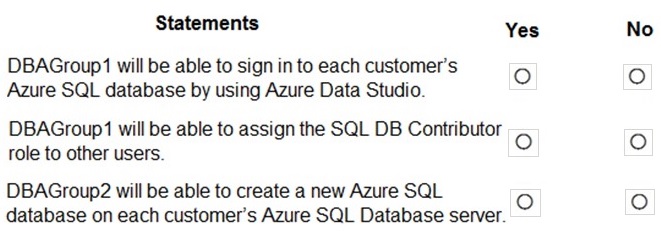
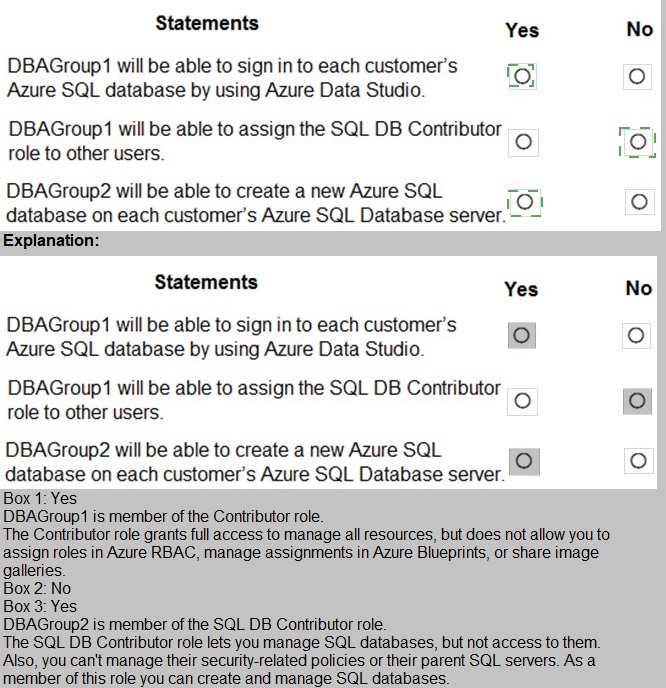
Explanation:
We are evaluating permissions granted by the SQL DB Contributor built-in Azure role. This role is assigned at the Azure Resource Manager (ARM) scope (subscription, resource group, or individual database/server) and governs administrative control over the Azure SQL Database resource itself, not data plane access within the database.
Statement 1: DBAGroup1 will be able to sign in to each customer’s Azure SQL database by using Azure Data Studio.
Selection: No
The SQL DB Contributor role only grants ARM-level permissions to manage the database resource (e.g., scale it, configure backups, modify firewall rules). It does not grant any login permissions or SQL-level access inside the database. To sign in via Azure Data Studio, a user needs to be created as a SQL login/user within the database, which is a separate process managed through SQL authentication or Azure AD.
Statement 2: DBAGroup1 will be able to assign the SQL DB Contributor role to other users.
Selection: No
The SQL DB Contributor role is not an Azure RBAC role that includes the Microsoft.Authorization/roleAssignments/write permission. To assign roles to others, a user needs a role with higher privileges, such as Owner or User Access Administrator at the relevant scope. A Contributor cannot delegate permissions they possess.
Statement 3: DBAGroup2 will be able to create a new Azure SQL database on each customer’s Azure SQL Database server.
Selection: Yes
The SQL DB Contributor role includes the Microsoft.Sql/servers/databases/write permission. This allows the principal to perform create, update, and delete operations on databases within the assigned scope (e.g., at the server or resource group level). Therefore, DBAGroup2 can create new databases on the servers where they have this role assignment.
Reference:
Microsoft Docs - Azure built-in roles - SQL DB Contributor
| Page 1 out of 28 Pages |