
Topic 3, Mix Questions
You use Azure Stream Analytics to receive Twitter data from Azure Event Hubs and to output the data to an Azure Blob storage account.
You need to output the count of tweets during the last five minutes every five minutes.
Each tweet must only be counted once.
Which windowing function should you use?
A. a five-minute Session window
B. a five-minute Sliding window
C. a five-minute Tumbling window
D. a five-minute Hopping window that has one-minute hop
Explanation:
This scenario describes a classic Type 2 Slowly Changing Dimension (SCD). The requirement is to track attribute value changes over time and preserve history by adding new rows when data changes. This allows analysts to see the complete historical state of a dimension member, which is essential for accurate historical reporting.
Correct Option:
C) Type 2
Type 2 SCD handles changes by adding a new row for the dimension member with the new attribute values, while keeping the old row(s) with the previous values. To differentiate between versions, it typically includes:
Surrogate Key: A unique key for each row (different from the business key).
Effective Date/Time Columns: (e.g., StartDate, EndDate) to indicate the period when that row version was valid.
Current Flag: A column (e.g., IsCurrent) to easily identify the active version.
This perfectly matches the described behavior: "track the value... over time and preserve the history... by adding new rows."
Incorrect Options:
A) Type 0:
The dimension is static. No changes are allowed; the original data is retained forever. This does not track changes.
B) Type 1:
Overwrites the old attribute value with the new one. This does not preserve history; it only keeps the most current data, losing the historical state.
D) Type 3:
Adds new columns to store a limited history (typically only the previous value alongside the current value). It does not add new rows and only tracks a limited history (usually just one change), not the full history over time.
Reference:
Standard data warehousing concepts on Slowly Changing Dimensions (SCD) types, where Type 2 is defined as the method that preserves full history by adding new rows and using effective dates.
What should you recommend to prevent users outside the Litware on-premises network from accessing the analytical data store?
A. a server-level virtual network rule
B. a database-level virtual network rule
C. a database-level firewall IP rule
D. a server-level firewall IP rule
Explanation:
The goal is to restrict access to the analytical data store (likely Azure Synapse SQL pool) only to users within the Litware on-premises network, blocking all other external access. This is a network-level security requirement.
Correct Answer:
A) a server-level virtual network rule
A server-level virtual network rule integrates with Azure Virtual Network (VNet) service endpoints. You can configure the Synapse workspace (or the associated logical SQL server) to only accept connections from a specific subnet within an Azure VNet.
To allow on-premises users, you would establish a site-to-site VPN or ExpressRoute connection between the Litware on-premises network and that specific Azure VNet/subnet. This makes the on-premises network appear as an extension of the Azure VNet. The virtual network rule then effectively grants access only to traffic originating from that connected on-premises network, denying all other public internet traffic.
Incorrect Options:
B) a database-level virtual network rule:
Virtual network rules are configured at the server level (the logical SQL server for Synapse), not at the individual database level. Database-level security uses different mechanisms (like users and permissions).
C) a database-level firewall IP rule:
Firewall rules (IP rules) are also managed at the server level, not per database. More importantly, using an IP rule for a dynamic on-premises network is impractical, as the public IP address range for the on-premises users may be large, change, or be shared (e.g., behind a NAT), making it difficult and insecure to manage via individual IP addresses.
D) a server-level firewall IP rule:
While this is at the correct level (server), using IP firewall rules would require knowing and allowing the specific public IP ranges of the on-premises network. This is less secure and manageable than a VNet rule, which leverages the private network connection (VPN/ExpressRoute) and provides a more robust and scalable network isolation model.
Reference:
Microsoft documentation on Virtual network service endpoints and rules for Azure Synapse Analytics, which explains how to use server-level VNet rules to restrict access to your server from only a specific subnet within a virtual network, effectively blocking public internet access.
You have an Azure subscription that contains a logical Microsoft SQL server named Server1. Server1 hosts an Azure Synapse Analytics SQL dedicated pool named Pool1.
You need to recommend a Transparent Data Encryption (TDE) solution for Server1. The solution must meet the following requirements:
Track the usage of encryption keys.
Maintain the access of client apps to Pool1 in the event of an Azure datacenter outage that affects the availability of the encryption keys.
What should you include in the recommendation? To answer, select the appropriate options in the answer area.
NOTE: Each correct selection is worth one point.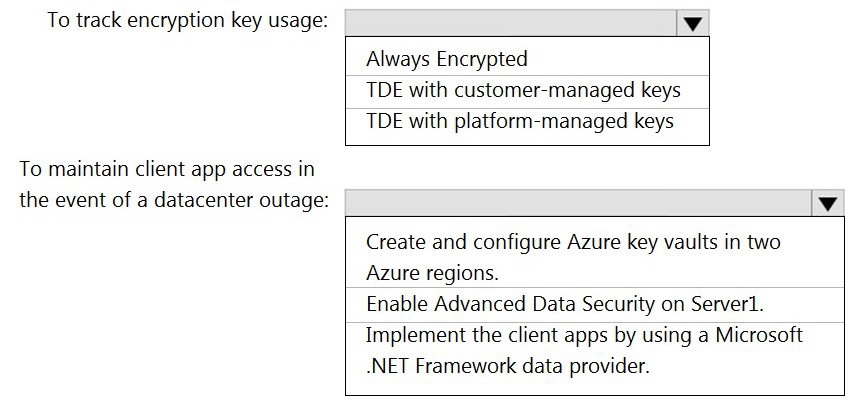
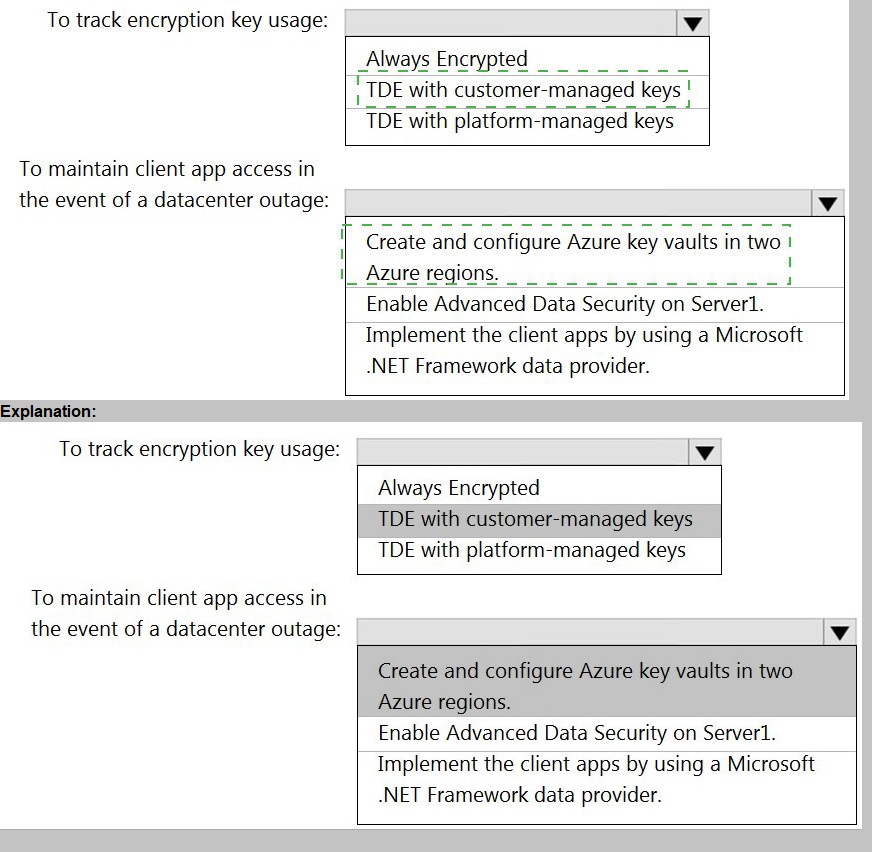
Explanation:
The requirement is for a Transparent Data Encryption (TDE) solution that provides auditability of key usage (tracking) and high availability for key access during a regional outage. Standard TDE with a service-managed key offers no audit trail and is region-specific.
Correct Options:
To track encryption key usage: TDE with customer-managed keys
TDE with customer-managed keys (CMK) uses an encryption key (the TDE protector) that you create and manage in your own Azure Key Vault. This setup provides detailed audit logs in Azure Key Vault, allowing you to track every time the key is accessed (e.g., for encryption/decryption operations). You can monitor who accessed the key and when, fulfilling the tracking requirement.
To maintain client app access in the event of a datacenter outage: Create and configure Azure key vaults in two Azure regions.
To ensure the TDE protector (customer-managed key) remains available during a regional datacenter outage, you must implement geo-redundancy for the key. The solution is to create a second Azure Key Vault in a paired Azure region and configure the key vaults with geo-replication (using Key Vault's soft delete and purge protection features) or by manually storing a copy of the same key in the secondary vault. This ensures that if the primary region's key vault is unavailable, the TDE protector can be accessed from the secondary region, maintaining client app access to the encrypted database.
Incorrect Options:
Always Encrypted:
This is a client-side encryption technology that encrypts specific columns within applications, not Transparent Data Encryption (TDE) at the storage level for the entire database. It does not meet the requirement for a TDE solution.
TDE with platform-managed keys:
This uses a service-managed certificate where Microsoft handles the key. You cannot track the usage of this key, as it is not accessible or auditable by the customer, violating the first requirement.
Enable Advanced Data Security on Server1:
This is a security package that includes vulnerability assessment and threat detection, not a TDE key management or high-availability feature.
Implement the client apps by using a Microsoft .NET Framework data provider: This is a generic development approach and does not address the TDE key availability during a regional outage. Key availability is an infrastructure/configuration concern, not an application code concern.
Reference:
Microsoft documentation on Transparent Data Encryption with customer-managed keys (Bring Your Own Key) and Key Vault availability and redundancy, which explains how using a customer-managed key in Key Vault enables auditing and how geo-replicated key vaults support disaster recovery scenarios.
You have an Azure Storage account and a data warehouse in Azure Synapse Analytics in the UK South region.
You need to copy blob data from the storage account to the data warehouse by using Azure Data Factory. The solution must meet the following requirements:
Ensure that the data remains in the UK South region at all times.
Minimize administrative effort.
Which type of integration runtime should you use?
A. Azure integration runtime
B. Azure-SSIS integration runtime
C. Self-hosted integration runtime
Explanation:
The requirement is to copy data within the same Azure region (UK South) between two Azure services (Storage and Synapse). The solution must keep data within the region and minimize administrative overhead.
Correct Option:
A) Azure integration runtime
The Azure Integration Runtime is a fully managed, serverless compute resource provided by Azure Data Factory. It runs within Azure's public cloud regions.
When you use the Azure IR for a copy activity between two Azure services in the same region, ADF ensures the data transfer occurs over the Azure backbone network within that region, meeting the data residency requirement.
It requires no infrastructure provisioning or management (no VMs, no software to install), minimizing administrative effort to zero.
Incorrect Options:
B) Azure-SSIS integration runtime:
This is a dedicated cluster for running SQL Server Integration Services (SSIS) packages. It is overkill for a simple copy operation, requires more administrative setup (selecting VM size, managing the cluster), and is typically used for migrating existing SSIS workloads, not for native ADF copy activities.
C) Self-hosted integration runtime:
This is an agent you install and manage on-premises or on a VM. It is used to access private networks (on-premises or VNet-isolated resources). Since both source and sink are public Azure PaaS services in the same region, there is no need for a self-hosted IR. Using it would add unnecessary administrative overhead (installing, updating, monitoring the IR node) and would likely route data through the self-hosted node, potentially increasing latency and not simplifying administration.
Reference:
Microsoft documentation on Azure integration runtime, which is the default and managed runtime for data movement between Azure data stores within the same region.
You need to output files from Azure Data Factory.
Which file format should you use for each type of output? To answer, select the appropriate options in the answer area.
NOTE: Each correct selection is worth one point.
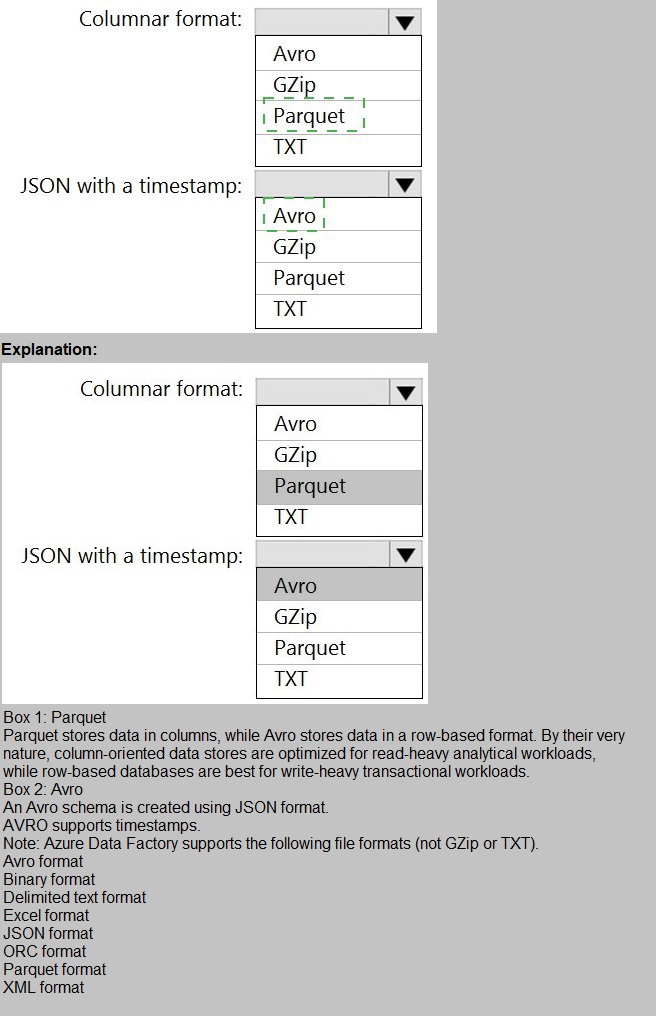
Explanation:
This question asks for the appropriate file format for two different output requirements in Azure Data Factory: one for a columnar analytical format and one for storing JSON data that includes a timestamp.
Correct Options:
Columnar format: Parquet
Parquet is an open-source, columnar storage file format optimized for analytical querying. It provides efficient compression and encoding schemes, allowing analytical engines (like Synapse, Databricks, or serverless SQL pools) to read only the necessary columns, significantly improving query performance and reducing storage costs. It is the standard columnar format for big data and analytics in Azure.
JSON with a timestamp: Avro
Avro is a row-based file format that stores data in a compact binary format and relies on a schema defined in JSON for the data structure. It is ideal for scenarios where you need to preserve the schema along with the data, and it natively supports complex data types (like records, arrays, maps). Storing JSON data (which is inherently semi-structured) in Avro allows you to include the schema (including a timestamp field) with each file, ensuring reliable serialization and deserialization.
Incorrect Options:
GZip:
This is a compression algorithm (like ZIP or Snappy), not a file format itself. You can apply GZip compression to files of various formats (e.g., Parquet, Avro, CSV, JSON) to reduce their size.
TXT:
This typically refers to plain text formats like CSV or delimited text files. While it can store JSON as raw text (one JSON object per line), it does not offer the schema enforcement, built-in type support, or efficient processing benefits of a format like Avro for JSON data. For columnar analytics, TXT is highly inefficient.
Avro for Columnar Format:
While Avro is efficient for serialization and schema evolution, it is a row-based format, not a columnar format. Columnar formats like Parquet are far superior for analytical queries that scan specific columns.
Parquet for JSON with a timestamp:
Parquet can store nested data (like JSON structures), but it requires a predefined, flattened schema and is less ideal for preserving the exact JSON document structure with flexibility compared to Avro. Avro is generally the preferred choice for persisting JSON data in its native form with schema.
Reference:
Microsoft documentation on Supported file formats in Azure Data Factory, which describes the characteristics and use cases for Parquet (analytical columnar storage) and Avro (schema-based serialization for complex data).
You are designing an enterprise data warehouse in Azure Synapse Analytics that will contain a table named Customers. Customers will contain credit card information.
You need to recommend a solution to provide salespeople with the ability to view all the entries in Customers.
The solution must prevent all the salespeople from viewing or inferring the credit card information.
What should you include in the recommendation?
A. data masking
B. Always Encrypted
C. column-level security
D. row-level security
Explanation:
The requirement is to allow salespeople to view all entries (rows) in the Customers table but to prevent them from seeing or inferring the sensitive credit card column. This is a classic data masking scenario, where the data is presented but the sensitive parts are obfuscated for unauthorized users.
Correct Option:
A) data masking (Dynamic Data Masking)
Dynamic Data Masking (DDM) is a feature that obfuscates sensitive data in query results based on the user's permissions. You can define a masking rule on the credit card column (e.g., showing only the last four digits: XXXX-XXXX-XXXX-1234).
Salespeople would run SELECT * FROM Customers and see all rows, but the credit card column values would be masked. They cannot "unmask" the data or infer the full number from the masked output. This meets both requirements: full row visibility and column-level data protection.
Incorrect Options:
B) Always Encrypted:
This technology encrypts data at rest and in transit, and decryption only happens within the client application using a certificate or key stored locally. It prevents the database engine (and thus any user querying via the database, including salespeople) from seeing the plaintext data. However, salespeople would not be able to see any part of the encrypted column at all (not even masked data), which might break functionality if they need to see a masked version or if the application doesn't handle the decryption for them. It is overkill and not designed for selective visibility within the same query interface.
C) Column-level security:
This entirely prevents access to the column. You would DENY SELECT on the credit card column for the salespeople role. If they run SELECT *, they would get a permission error on that column (unless you use a workaround like a view). It does not allow them to see a masked version; it blocks access completely. The requirement is to prevent viewing or inferring the information, not necessarily to block all access to the column's existence, but column-level security is more about strict access denial than controlled obfuscation.
D) Row-level security (RLS):
RLS filters rows based on a security predicate. The requirement is to see all rows but mask a column, not to filter rows. RLS does not address column-level data obfuscation.
Reference:
Microsoft documentation on Dynamic Data Masking, which describes how to mask sensitive data in query results to prevent unauthorized access while allowing users to see other columns and all rows.
You need to design an Azure Synapse Analytics dedicated SQL pool that meets the following requirements:
Can return an employee record from a given point in time.
Maintains the latest employee information.
Minimizes query complexity.
How should you model the employee data?
A.
as a temporal table
B.
as a SQL graph table
C.
as a degenerate dimension table
D.
as a Type 2 slowly changing dimension (SCD) table
as a Type 2 slowly changing dimension (SCD) table
Explanation:
A Type 2 SCD supports versioning of dimension members. Often the source system
doesn't store versions, so the data warehouse load process detects and manages changes
in a dimension table. In this case, the dimension table must use a surrogate key to provide
a unique reference to a version of the dimension member. It also includes columns that
define the date range validity of the version (for example, StartDate and EndDate) and
possibly a flag column (for example, IsCurrent) to easily filter by current dimension
members.
Reference:
https://docs.microsoft.com/en-us/learn/modules/populate-slowly-changing-dimensionsazure-
synapse-analytics-pipelines/3-choose-between-dimension-types
You have an Azure Synapse Analytics serverless SQL pool named Pool1 and an Azure
Data Lake Storage Gen2 account named storage1. The AllowedBlobpublicAccess porperty
is disabled for storage1.
You need to create an external data source that can be used by Azure Active Directory
(Azure AD) users to access storage1 from Pool1.
What should you create first?
A.
an external resource pool
B.
a remote service binding
C.
database scoped credentials
D.
an external library
database scoped credentials
Note: This question is part of a series of questions that present the same scenario.
Each question in the series contains a unique solution that might meet the stated
goals. Some question sets might have more than one correct solution, while others
might not have a correct solution.
After you answer a question in this section, you will NOT be able to return to it. As a
result, these questions will not appear in the review screen.
You plan to create an Azure Databricks workspace that has a tiered structure. The
workspace will contain the following three workloads:
A workload for data engineers who will use Python and SQL.
A workload for jobs that will run notebooks that use Python, Scala, and SOL.
A workload that data scientists will use to perform ad hoc analysis in Scala and R.
The enterprise architecture team at your company identifies the following standards for
Databricks environments:
The data engineers must share a cluster.
The job cluster will be managed by using a request process whereby data
scientists and data engineers provide packaged notebooks for deployment to the
cluster.
All the data scientists must be assigned their own cluster that terminates
automatically after 120 minutes of inactivity. Currently, there are three data
scientists.
You need to create the Databricks clusters for the workloads.
Solution: You create a High Concurrency cluster for each data scientist, a High
Concurrency cluster for the data engineers, and a Standard cluster for the jobs.
Does this meet the goal?
A.
Yes
B.
No
No
Explanation:
Need a High Concurrency cluster for the jobs.
Standard clusters are recommended for a single user. Standard can run workloads
developed in any language:
Python, R, Scala, and SQL.
A high concurrency cluster is a managed cloud resource. The key benefits of high
concurrency clusters are that
they provide Apache Spark-native fine-grained sharing for maximum resource utilization
and minimum query
latencies.
Reference:
https://docs.azuredatabricks.net/clusters/configure.html
You plan to implement an Azure Data Lake Storage Gen2 container that will contain CSV
files. The size of the files will vary based on the number of events that occur per hour.
File sizes range from 4.KB to 5 GB.
You need to ensure that the files stored in the container are optimized for batch processing.
What should you do?
A.
Compress the files.
B.
Merge the files.
C.
Convert the files to JSON
D.
Convert the files to Avro.
Convert the files to Avro.
Note: This question is part of a series of questions that present the same scenario. Each question in the series contains a unique solution that might meet the stated goals. Some
question sets might have more than one correct solution, while others might not have a
correct solution.
After you answer a question in this scenario, you will NOT be able to return to it. As a
result, these questions will not appear in the review screen.
You have an Azure Storage account that contains 100 GB of files. The files contain text
and numerical values. 75% of the rows contain description data that has an average length
of 1.1 MB.
You plan to copy the data from the storage account to an Azure SQL data warehouse.
You need to prepare the files to ensure that the data copies quickly.
Solution: You modify the files to ensure that each row is more than 1 MB.
Does this meet the goal?
A.
Yes
B.
No
No
Explanation:
Instead modify the files to ensure that each row is less than 1 MB.
References:
https://docs.microsoft.com/en-us/azure/sql-data-warehouse/guidance-for-loading-data
You plan to implement an Azure Data Lake Gen2 storage account.
You need to ensure that the data lake will remain available if a data center fails in the primary Azure region.
The solution must minimize costs.
Which type of replication should you use for the storage account?
A.
geo-redundant storage (GRS)
B.
zone-redundant storage (ZRS)
C.
locally-redundant storage (LRS)
D.
geo-zone-redundant storage (GZRS)
geo-redundant storage (GRS)
Explanation:
Geo-redundant storage (GRS) copies your data synchronously three times within a single
physical location in the primary region using LRS. It then copies your data asynchronously
to a single physical location in the secondary region.
Reference:
https://docs.microsoft.com/en-us/azure/storage/common/storage-redundancy
| Page 3 out of 18 Pages |
| Previous |