
Topic 3, Mix Questions
You have a C# application that process data from an Azure IoT hub and performs complex
transformations.
You need to replace the application with a real-time solution. The solution must reuse as much code as possible from the existing application
A. Azure Databricks
B. Azure Event Grid
C. Azure Stream Analytics
D. Azure Data Factory
Explanation:
The scenario involves replacing a custom C# application performing real-time transformations on IoT hub data. The key requirement is reusing as much existing code as possible. This implies the solution should allow integration of the existing C# logic without a complete rewrite.
Correct Option:
C) Azure Stream Analytics
Azure Stream Analytics (ASA) supports user-defined functions (UDFs) written in C# (specifically, .NET Standard). You can encapsulate the complex transformation logic from the existing C# application into one or more UDFs and call them directly from the ASA job's SQL-like query.
This allows you to reuse the core business logic while letting ASA manage the scalable, serverless streaming infrastructure, event ingestion from IoT Hub, and reliable output.
Incorrect Options:
A) Azure Databricks:
While Databricks with Structured Streaming can process real-time data and supports code in multiple languages (including C# via .NET for Apache Spark), it requires a more significant rewrite and migration to a Spark environment. It is less seamless for directly reusing existing C# application code as UDFs within a streaming query compared to ASA.
B) Azure Event Grid:
This is an event routing service, not a data transformation engine. It routes events based on topics to various subscribers but cannot perform complex data transformations or execute custom C# code. It does not meet the processing requirement.
D) Azure Data Factory:
ADF is primarily an orchestration and batch data integration service. While it can invoke custom activities (like Azure Batch or Databricks), it is not designed for low-latency, real-time stream processing of IoT hub data. Its data flows are for batch transformations, not continuous real-time streams.
Reference:
Microsoft documentation on User-defined functions in Azure Stream Analytics using C# for custom transformation logic within a Stream Analytics job.
You build an Azure Data Factory pipeline to move data from an Azure Data Lake Storage Gen2 container to a database in an Azure Synapse Analytics dedicated SQL pool.
Data in the container is stored in the following folder structure.
/in/{YYYY}/{MM}/{DD}/{HH}/{mm}
The earliest folder is /in/2021/01/01/00/00. The latest folder is /in/2021/01/15/01/45.
You need to configure a pipeline trigger to meet the following requirements:
Existing data must be loaded.
Data must be loaded every 30 minutes.
Late-arriving data of up to two minutes must he included in the load for the time at which the data should have arrived.
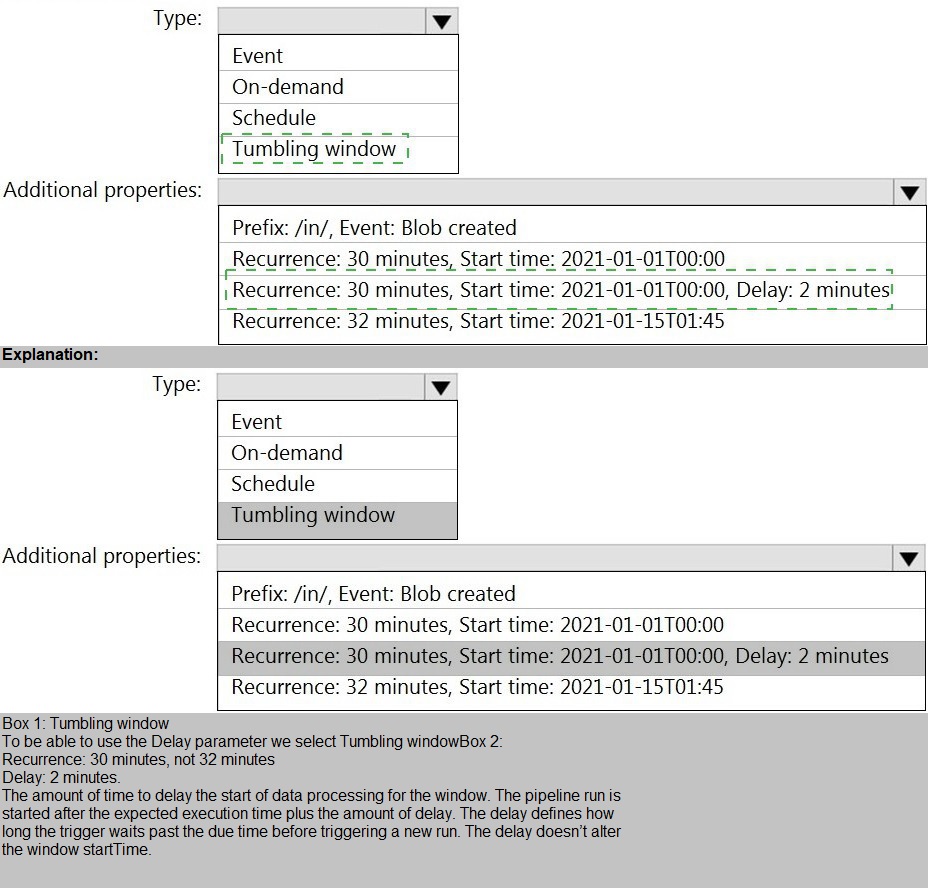
How should you configure the pipeline trigger? To answer, select the appropriate options in the answer area.
NOTE: Each correct selection is worth one point.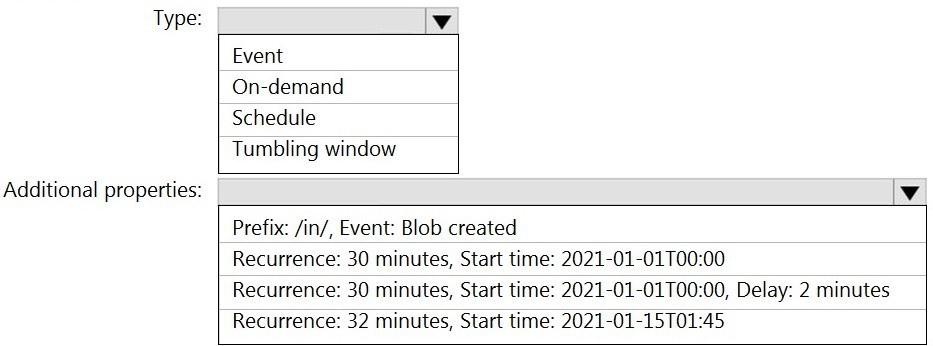
Explanation:
The scenario involves replacing a custom C# application performing real-time transformations on IoT hub data. The key requirement is reusing as much existing code as possible. This implies the solution should allow integration of the existing C# logic without a complete rewrite.
Correct Option:
C) Azure Stream Analytics
Azure Stream Analytics (ASA) supports user-defined functions (UDFs) written in C# (specifically, .NET Standard). You can encapsulate the complex transformation logic from the existing C# application into one or more UDFs and call them directly from the ASA job's SQL-like query.
This allows you to reuse the core business logic while letting ASA manage the scalable, serverless streaming infrastructure, event ingestion from IoT Hub, and reliable output.
Incorrect Options:
A) Azure Databricks:
While Databricks with Structured Streaming can process real-time data and supports code in multiple languages (including C# via .NET for Apache Spark), it requires a more significant rewrite and migration to a Spark environment. It is less seamless for directly reusing existing C# application code as UDFs within a streaming query compared to ASA.
B) Azure Event Grid:
This is an event routing service, not a data transformation engine. It routes events based on topics to various subscribers but cannot perform complex data transformations or execute custom C# code. It does not meet the processing requirement.
D) Azure Data Factory:
ADF is primarily an orchestration and batch data integration service. While it can invoke custom activities (like Azure Batch or Databricks), it is not designed for low-latency, real-time stream processing of IoT hub data. Its data flows are for batch transformations, not continuous real-time streams.
Reference:
Microsoft documentation on User-defined functions in Azure Stream Analytics using C# for custom transformation logic within a Stream Analytics job.
You are designing the folder structure for an Azure Data Lake Storage Gen2 container.
Users will query data by using a variety of services including Azure Databricks and Azure Synapse Analytics serverless SQL pools. The data will be secured by subject area. Most queries will include data from the current year or current month.
Which folder structure should you recommend to support fast queries and simplified folder security?
A. /{SubjectArea}/{DataSource}/{DD}/{MM}/{YYYY}/{FileData}_{YYYY}_{MM}_{DD}.csv
B. /{DD}/{MM}/{YYYY}/{SubjectArea}/{DataSource}/{FileData}_{YYYY}_{MM}_{DD}.csv
C. /{YYYY}/{MM}/{DD}/{SubjectArea}/{DataSource}/{FileData}_{YYYY}_{MM}_{DD}.csv
D. /{SubjectArea}/{DataSource}/{YYYY}/{MM}/{DD}/{FileData}_{YYYY}_{MM}_{DD}.csv
Explanation:
The folder structure must optimize for two goals: fast queries (most queries filter by current year/month) and simplified folder security (data is secured by SubjectArea). In ADLS Gen2, partition pruning (skipping irrelevant folders) and access control are heavily influenced by the hierarchy's top levels.
Correct Option:
D) /{SubjectArea}/{YYYY}/{MM}/{DD}/...
Simplified Security:
Placing SubjectArea at the top allows you to assign Azure RBAC or ACL permissions at the SubjectArea folder level. Users/groups can be granted access to an entire subject area in one assignment, which is simple and effective.
Fast Queries:
Placing YYYY and MM immediately after SubjectArea enables efficient partition pruning. Since most queries filter by current year/month, services like Synapse serverless SQL and Databricks can immediately skip all folders for other years and months, scanning only the relevant day folders within the targeted year/month. This structure balances security granularity at the top with the most common query filters next.
Incorrect Options:
A) /{SubjectArea}/{DataSource}/{DD}/{MM}/{YYYY}/:
While security by SubjectArea is good, placing the day (DD) before year and month is inefficient. A query for "current month" would need to scan all day folders across all years and months to find the matching MM and YYYY, defeating partition pruning.
B) /{DD}/{MM}/{YYYY}/{SubjectArea}/...:
This puts the time granularity first, which is good for queries but terrible for security. To secure by SubjectArea, you would need to apply permissions deep within the hierarchy across hundreds of date folders, making security management a complex, recurring nightmare.
C) /{YYYY}/{MM}/{DD}/{SubjectArea}/...:
This optimizes for query speed (date first) but again makes security by SubjectArea very complex. Permissions would need to be replicated across every date partition folder structure, which is not scalable or simplified.
Reference:
Best practices for organizing data lakes and partitioning strategies in ADLS Gen2, which recommend placing security or tenant isolation attributes at higher levels in the hierarchy and placing the most frequently filtered attributes next to optimize query performance.
You are creating an Azure Data Factory data flow that will ingest data from a CSV file, cast columns to specified types of data, and insert the data into a table in an Azure Synapse Analytic dedicated SQL pool. The CSV file contains three columns named username, comment, and date.
The data flow already contains the following:
A source transformation.
A Derived Column transformation to set the appropriate types of data.
A sink transformation to land the data in the pool.
You need to ensure that the data flow meets the following requirements:
All valid rows must be written to the destination table.
Truncation errors in the comment column must be avoided proactively.
Any rows containing comment values that will cause truncation errors upon insert must be written to a file in blob storage.
Which two actions should you perform? Each correct answer presents part of the solution.
NOTE: Each correct selection is worth one point.
A. To the data flow, add a sink transformation to write the rows to a file in blob storage.
B. To the data flow, add a Conditional Split transformation to separate the rows that will cause truncation errors.
C. To the data flow, add a filter transformation to filter out rows that will cause truncation errors.
D. Add a select transformation to select only the rows that will cause truncation errors.
Explanation:
The data flow must proactively prevent truncation errors on the comment column when inserting into the Synapse table, while ensuring all valid rows are written. This requires identifying rows where the comment length exceeds the destination column's size and routing them to a separate error file, not filtering them out entirely.
Correct Options:
A) To the data flow, add a sink transformation to write the rows to a file in blob storage.
This action provides the destination for the error rows. After rows that would cause truncation are identified and split into a separate stream, a second sink transformation (to Blob Storage) is needed to write those rows to a file as required.
B) To the data flow, add a Conditional Split transformation to separate the rows that will cause truncation errors.
This is the core logic to proactively check for truncation. In the Conditional Split transformation, you define a condition using an expression like length(comment) >
Incorrect Options:
C) Add a filter transformation to filter out rows that will cause truncation errors.
A Filter transformation removes rows from the data flow that do not meet the condition. This would discard the error rows instead of writing them to the required blob storage file, violating the requirement to capture them.
D) Add a select transformation to select only the rows that will cause truncation errors.
A Select transformation is for renaming, reordering, or dropping columns, not for selecting rows based on a condition. It cannot separate or route rows to different streams.
Reference:
Azure Data Factory data flow transformations documentation, specifically Conditional Split for routing rows based on conditions and Sink transformations for writing to multiple destinations.
You have a table named SalesFact in an enterprise data warehouse in Azure Synapse Analytics. SalesFact contains sales data from the past 36 months and has the following characteristics:
Is partitioned by month
Contains one billion rows
Has clustered columnstore indexes
At the beginning of each month, you need to remove data from SalesFact that is older than 36 months as quickly as possible.
Which three actions should you perform in sequence in a stored procedure? To answer, move the appropriate actions from the list of actions to the answer area and arrange them in the correct order.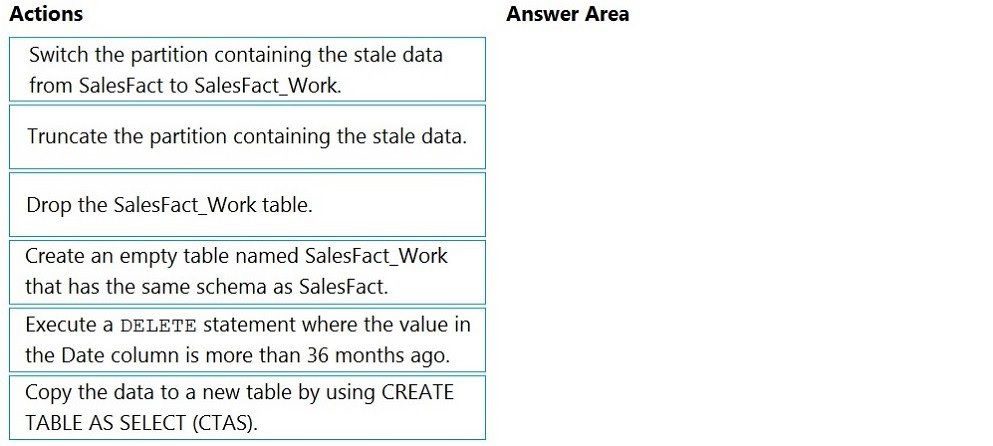
Explanation:
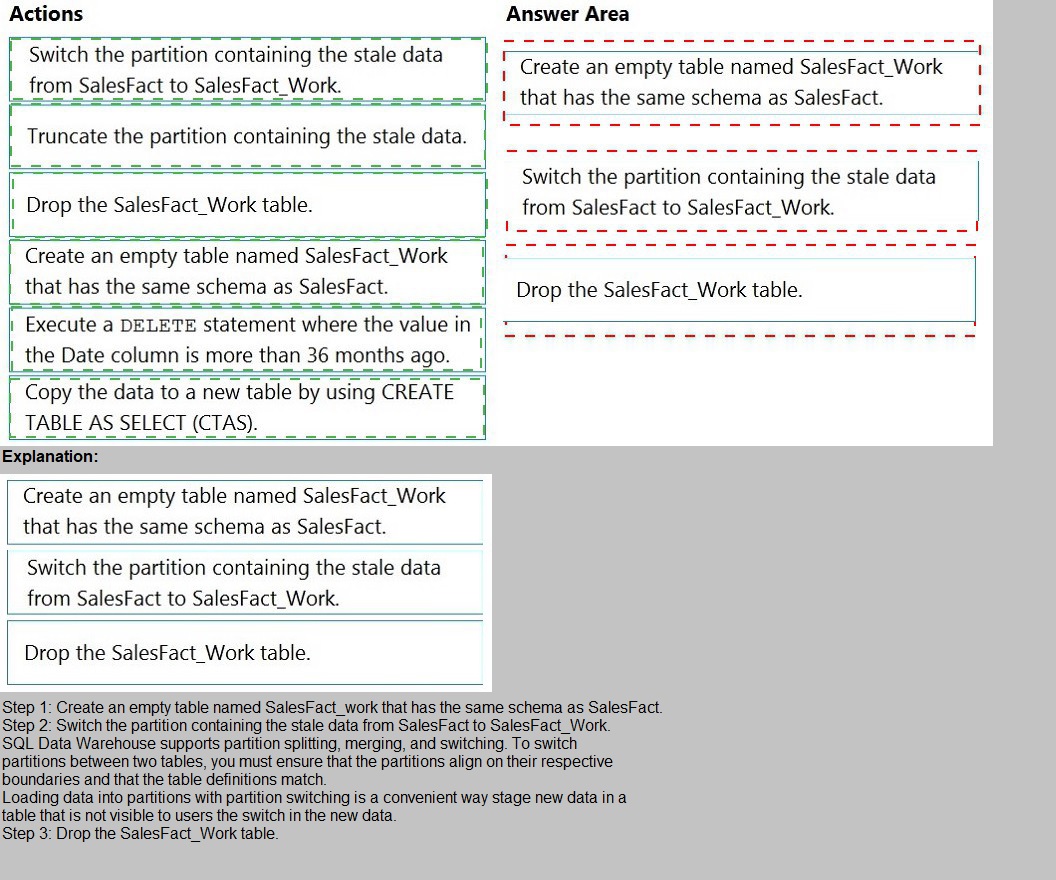
The requirement is to quickly remove old data (older than 36 months) from a very large, partitioned fact table at the start of each month. The table uses a Clustered Columnstore Index (CCI) and is partitioned by month. The fastest method for data removal in a dedicated SQL pool is partition switching, which is a metadata-only operation, rather than a slow, resource-intensive row-by-row DELETE.
Correct Sequence of Actions:
Create an empty table named SalesFact_Work that has the same schema as SalesFact.
This creates a staging table with the identical structure (same columns, indexes, distribution, and partition scheme) to receive the partition that will be "switched out" for deletion.
Switch the partition containing the stale data from SalesFact to SalesFact_Work.
This is the core operation. The ALTER TABLE...SWITCH PARTITION command is a metadata-only operation that instantly reassigns the partition containing the old data (e.g., data from 37 months ago) from the main SalesFact table to the empty SalesFact_Work table. This removes the data from SalesFact instantly without deleting any rows.
Truncate the partition containing the stale data.
After the partition has been switched to SalesFact_Work, you can now safely TRUNCATE TABLE SalesFact_Work (or truncate that specific partition if partitioned). Truncation is also very fast and efficiently deallocates the storage for the old data. Alternatively, you could simply Drop the SalesFact_Work table as the next step, which has the same effect.
(A valid alternative final step is Drop the SalesFact_Work table instead of truncating it. Both achieve the goal of permanently removing the old data. The exam often accepts either as the final step.)
Why Other Actions Are Incorrect:
Execute a DELETE statement where the value in the Date column is more than 36 months ago:
This would perform a row-by-row delete on a billion-row table with a CCI, which is extremely slow, resource-intensive, and causes massive transaction log growth and index fragmentation. It violates the "as quickly as possible" requirement.
Copy the data to a new table by using CREATE TABLE AS SELECT (CTAS):
This is a method for creating a new table with a subset of data, not for removing data from an existing table. It is inefficient for this specific deletion task.
Reference:
Microsoft documentation on Table partitioning and Partition switching in Azure Synapse Analytics dedicated SQL pools, which recommends using partition switching for efficient data deletion and archival scenarios.
You have a self-hosted integration runtime in Azure Data Factory.
The current status of the integration runtime has the following configurations:
Status: Running
Type: Self-Hosted
Version: 4.4.7292.1
Running / Registered Node(s): 1/1
High Availability Enabled: False
Linked Count: 0
Queue Length: 0
Average Queue Duration. 0.00s
The integration runtime has the following node details:
Name: X-M
Status: Running
Version: 4.4.7292.1
Available Memory: 7697MB
CPU Utilization: 6%
Network (In/Out): 1.21KBps/0.83KBps
Concurrent Jobs (Running/Limit): 2/14
Role: Dispatcher/Worker
Credential Status: In Sync
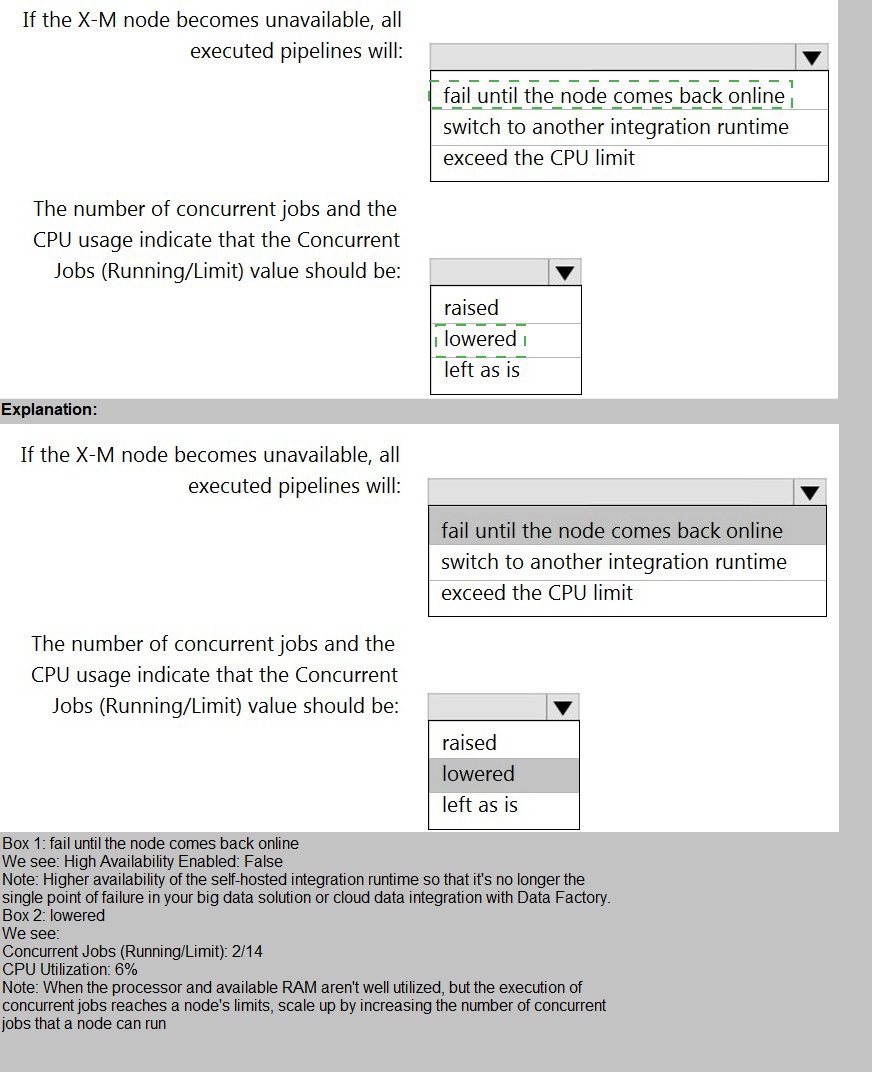
Use the drop-down menus to select the answer choice that completes each statement
based on the information presented.
NOTE: Each correct selection is worth one point

Explanation:
This question analyzes the configuration and performance metrics of a self-hosted integration runtime (SHIR). The first part assesses the impact of a single-node failure given the current high-availability (HA) setting. The second part evaluates if the configured limit for concurrent jobs needs adjustment based on the observed CPU utilization.
Correct Answers:
If the X-M node becomes unavailable, all executed pipelines will: fail until the node comes back online
The SHIR configuration shows High Availability Enabled: False and Running / Registered Node(s): 1/1. This means there is only one node, and no failover is configured. Therefore, if this single node becomes unavailable, there is no other node to take over the workload. Any pipelines executing on or waiting for this IR will fail and will not resume until this specific node is back online.
The number of concurrent jobs and the CPU usage indicate that the Concurrent Jobs (Running/Limit) value should be: raised
The node details show:
CPU Utilization: 6% (very low)
Concurrent Jobs (Running/Limit): 2/14 (only 2 jobs are running against a limit of 14)
This indicates the node is severely underutilized. The limit of 14 concurrent jobs is not being approached, and the CPU has ample capacity to handle more work. Therefore, to improve throughput and resource utilization, the Concurrent Jobs limit can be safely increased (e.g., to 20 or higher based on available memory) to allow more data movement activities to run in parallel.
Why Other Options Are Incorrect:
For the first statement:
switch to another integration runtime: This would only happen if High Availability was enabled and another healthy node was registered. The configuration explicitly shows HA is disabled and only one node exists.
exceed the CPU limit: CPU limit is not the failure mode here. The node becoming unavailable means it is offline, not overloaded.
For the second statement:
lowered / left as is:
Lowering the limit would further reduce throughput for no reason, as the CPU is at 6%. Leaving it as is would accept underutilization. The metrics clearly show capacity for increasing the limit to improve performance.
Reference:
Microsoft documentation on Self-hosted integration runtime high availability and scalability, explaining the impact of single-node configurations and how to scale by adjusting the concurrent jobs limit based on resource utilization (CPU/Memory).
You are designing an Azure Synapse Analytics dedicated SQL pool.
You need to ensure that you can audit access to Personally Identifiable information (PII).
What should you include in the solution?
A. dynamic data masking
B. row-level security (RLS)
C. sensitivity classifications
D. column-level security
Explanation:
The question specifies the need to audit access to Personally Identifiable Information (PII). This means the solution must be able to log and track who accessed sensitive PII columns and when. While protection mechanisms like masking or security can restrict access, they do not inherently provide detailed audit logs of access attempts.
Correct Option:
D) column-level security.
Column-level security in Azure Synapse Analytics is a feature that restricts column access based on user permissions using the GRANT and DENY statements on specific columns.
Crucially, when you implement column-level security, any attempt to access a protected column (whether successful or denied) generates detailed audit events. These audit logs can be captured by Azure SQL Auditing and sent to Log Analytics, Storage, or Event Hubs. This provides the necessary audit trail of who tried to access PII data, fulfilling the audit requirement.
Incorrect Options:
A) Dynamic data masking (DDM):
DDM masks data at the query result level for unauthorized users, but it does not log access attempts. An unauthorized user querying a masked column sees masked data, and no audit event is generated for that query. It is a data protection tool, not an auditing tool.
B) Row-level security (RLS):
RLS filters rows a user can see based on a security predicate. Like DDM, it is a data access restriction mechanism. While it can be combined with auditing, RLS itself does not inherently create specific audit logs for access to PII columns; it audits row access attempts in a more general sense.
C) Sensitivity classifications:
This is a labeling and reporting feature. You can tag columns with labels like "Confidential" or "PII" using the built-in classification in Azure Synapse. This is excellent for discovering and reporting on where PII exists, and it can generate reports on access. However, the core auditing capability (logging specific access events) is provided by SQL Auditing, which is enhanced by sensitivity labels but fundamentally implemented via auditing policies. The most direct feature for auditing column access is column-level security, as it integrates directly with the permission system that auditing monitors.
Reference:
Microsoft documentation on Column-level security and Auditing for Azure Synapse Analytics, which explains how implementing column permissions enables detailed audit logging of data access.
You are planning a streaming data solution that will use Azure Databricks. The solution will stream sales transaction data from an online store. The solution has the following specifications:
* The output data will contain items purchased, quantity, line total sales amount, and line total tax amount.
* Line total sales amount and line total tax amount will be aggregated in Databricks.
* Sales transactions will never be updated. Instead, new rows will be added to adjust a sale.
You need to recommend an output mode for the dataset that will be processed by using Structured Streaming. The solution must minimize duplicate data.
What should you recommend?
A. Append
B. Update
C. Complete
Explanation:
The requirement is to output aggregated results (total sales and tax amounts) using Structured Streaming in Databricks, while minimizing duplicate data. A key constraint is that sales transactions are never updated; instead, new rows are added to adjust a sale. This means the aggregation must be recomputed to include these correcting rows, and the output must reflect the complete, updated result.
Correct Option:
C) Complete
Complete output mode writes the entire updated result table (all aggregated results) to the sink every trigger interval. This is necessary for stateful aggregations (like sum()) over a stream where the result can change because new data (correcting rows) affects past aggregates.
By outputting the full set of correct aggregates each time, it ensures there is no duplicate data in the sense of having multiple, partial, or outdated records for the same aggregation key. The sink receives the single, definitive current total.
Incorrect Options:
A) Append:
Append mode only outputs new rows added to the result table since the last trigger. This is for operations where existing result rows never change (like simple selects). For aggregations that can be updated by new data (like adding a correcting transaction), Append mode is not supported and would cause errors, as the aggregation results need to be updated, not just appended.
B) Update:
Update mode outputs only rows that have changed since the last trigger (either new or updated). While this seems efficient, the scenario states sales transactions will never be updated. This likely refers to the source raw data. However, the aggregated results (the sums) will be updated as new correcting rows arrive. Therefore, Update mode could be a valid choice if the sink supports upserts (like a Delta table). However, the instruction to "minimize duplicate data" and the exam's typical interpretation for persistent sinks like data lakes favor Complete mode when the sink is a file-based store (which cannot handle individual row updates), ensuring a single, consistent snapshot of results without duplicate or partial records.
Reference:
Apache Spark Structured Streaming documentation on Output Modes, which defines Complete mode for aggregations where the sink receives the entire updated result set each time, ensuring correctness for queries with state.
You have an Azure Synapse Analytics dedicated SQL pool.
You need to ensure that data in the pool is encrypted at rest. The solution must NOT require modifying applications that query the data.
What should you do?
A. Enable encryption at rest for the Azure Data Lake Storage Gen2 account.
B. Enable Transparent Data Encryption (TDE) for the pool.
C. Use a customer-managed key to enable double encryption for the Azure Synapse workspace.
D. Create an Azure key vault in the Azure subscription grant access to the pool.
Explanation:
The requirement is to encrypt data at rest in a dedicated SQL pool transparently, with no changes required to the applications that query the data. This describes a scenario where encryption should be automatic and seamless for any client.
Correct Option:
B) Enable Transparent Data Encryption (TDE) for the pool.
Transparent Data Encryption (TDE) performs real-time encryption and decryption of the database files (data and log files) at rest for the dedicated SQL pool. It uses a service-managed certificate (the default) or a customer-managed key stored in Azure Key Vault.
The key characteristic is its transparency. Encryption and decryption are handled by the Synapse engine at the storage layer. Applications querying the data connect and operate normally with no code changes, as the encryption/decryption process is completely hidden from them.
Incorrect Options:
A) Enable encryption at rest for the Azure Data Lake Storage Gen2 account:
ADLS Gen2 encryption protects data stored in the data lake, not the data stored within the relational storage of the dedicated SQL pool. The pool uses its own storage separate from the linked ADLS account.
C) Use a customer-managed key to enable double encryption for the Azure Synapse workspace:
While you can use a customer-managed key with TDE (which is a form of double encryption when combined with infrastructure encryption), this action itself is part of configuring TDE. The core solution is enabling TDE. The question's primary goal is enabling encryption at rest transparently, which is the definition of TDE.
D) Create an Azure key vault in the Azure subscription grant access to the pool:
This is a step involved in configuring TDE with a customer-managed key, but by itself, it does not enable encryption. Granting access does not encrypt the data; it merely sets up the key store. The essential action is enabling TDE, which can then utilize the key vault.
Reference:
Microsoft documentation on Transparent Data Encryption (TDE) for Azure Synapse Analytics, which explains that TDE helps protect data at rest without requiring changes to existing applications.
You have files and folders in Azure Data Lake Storage Gen2 for an Azure Synapse workspace as shown in the following exhibit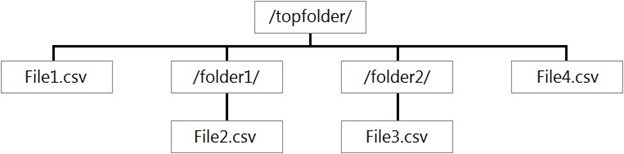
You create an external table named ExtTable that has LOCATION='/topfolder/'.
When you query ExtTable by using an Azure Synapse Analytics serverless SQL pool,
which files are returned?
A. File2.csv and File3.csv only
B. File1.csv and File4.csv only
C. File1.csv, File2.csv, File3.csv, and File4.csv
D. File1.csv only
Explanation:
In Azure Synapse serverless SQL pool, when you create an external table with a LOCATION path, the query engine by default recursively reads all files within that folder and its subfolders. The table definition acts as a logical layer over the entire folder hierarchy starting at the specified path.
Correct Option:
C) File1.csv, File2.csv, File3.csv, and File4.csv
The external table ExtTable is defined with LOCATION='/topfolder/'. This points to the root folder shown.
The serverless SQL pool will scan recursively from /topfolder/, including:
/topfolder/File1.csv (directly in the root)
/topfolder/folder1/File2.csv (in subfolder folder1)
/topfolder/folder2/File3.csv and File4.csv (in subfolder folder2)
Therefore, a SELECT * FROM ExtTable query will return data from all four CSV files, combining their contents (assuming compatible schemas).
Incorrect Options:
A) File2.csv and File3.csv only:
This would happen if the LOCATION was set to a specific subfolder like /topfolder/folder1/, or if non-recursive reading was somehow enforced (which is not the default).
B) File1.csv and File4.csv only:
There is no rule that selects only the first file in the root and the last file in a subfolder. This is arbitrary and not how the recursive scan works.
D) File1.csv only:
This would occur if the external table's LOCATION was set to a specific file (e.g., LOCATION='/topfolder/File1.csv') or if the engine only read files directly in the specified folder non-recursively. The default behavior for a folder location is recursive.
Reference:
Microsoft documentation on CREATE EXTERNAL TABLE in serverless SQL pool, which states that when LOCATION is a folder, the query will read all files in that folder and its subfolders by default.
You have an Azure subscription that contains the following resources:
* An Azure Active Directory (Azure AD) tenant that contains a security group named Group1.
* An Azure Synapse Analytics SQL pool named Pool1.
You need to control the access of Group1 to specific columns and rows in a table in Pool1 Which Transact-SQL commands should you use? To answer, select the appropriate options in the answer area.
NOTE: Each appropriate options in the answer area.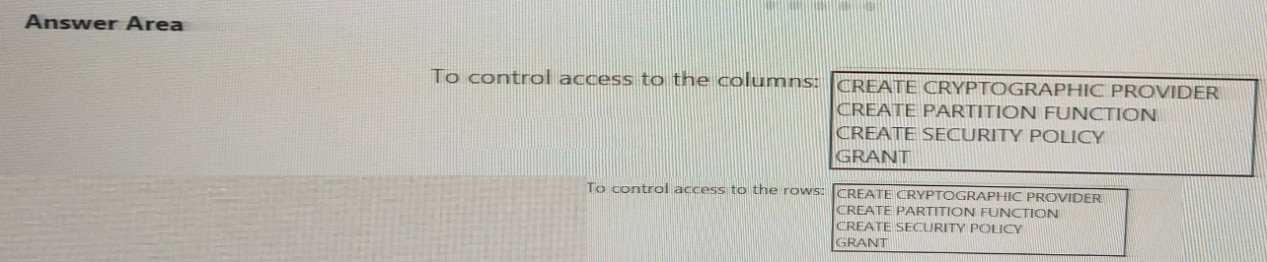
Explanation:
This question asks for the specific Transact-SQL commands to implement column-level security and row-level security (RLS) in an Azure Synapse Analytics dedicated SQL pool. These are two distinct security features that control data access at different granularities.
Correct Options:
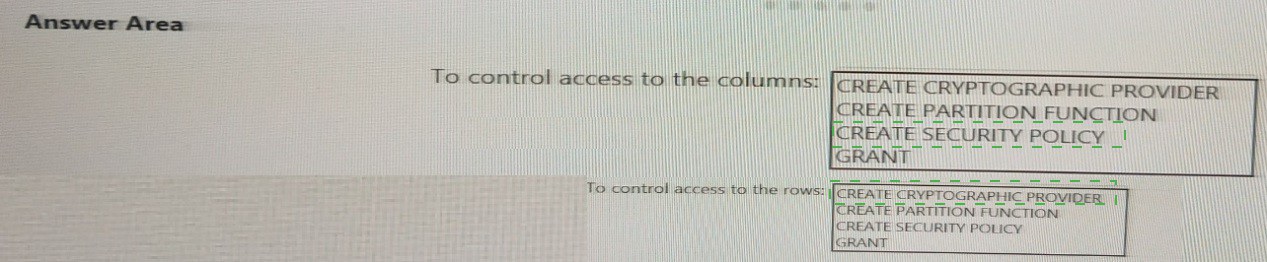
To control access to the columns: GRANT
Column-level security is implemented using standard Data Control Language (DCL) commands: GRANT, DENY, and REVOKE on specific columns. For example: GRANT SELECT ON TableName (Column1, Column2) TO Group1; grants read access only to those columns. This is the precise T-SQL command to manage column permissions.
To control access to the rows: CREATE SECURITY POLICY
Row-Level Security (RLS) is implemented by first creating an inline table-valued function (predicate function) that defines the filter logic (e.g., WHERE UserName = USER_NAME()). Then, you bind this function to the target table using the CREATE SECURITY POLICY T-SQL statement. This command activates the row filtering for the specified user or group.
Incorrect Options:
CREATE CRYPTOGRAPHIC PROVIDER:
This command is related to Always Encrypted with secure enclaves or Extensible Key Management (EKM), which is used for encrypting column data, not for directly controlling access to rows or columns via permissions.
CREATE PARTITION FUNCTION:
This command is used for table partitioning to split a large table into smaller, manageable pieces based on a column's value range. It is a data management and performance feature, not a security feature for controlling user access.
Reference:
Microsoft documentation on Column-level security (using GRANT on columns) and Row-Level Security (using CREATE SECURITY POLICY to apply a security predicate) in Azure Synapse Analytics.
You are designing a dimension table for a data warehouse. The table will track the value of the dimension attributes over time and preserve the history of the data by adding new rows as the data changes.
Which type of slowly changing dimension (SCD) should use?
A. Type 0
B. Type 1
C. Type 2
D. Type 3
Explanation:
This scenario describes a classic Type 2 Slowly Changing Dimension (SCD). The requirement is to track attribute value changes over time and preserve history by adding new rows when data changes. This allows analysts to see the complete historical state of a dimension member, which is essential for accurate historical reporting.
Correct Option:
C) Type 2
Type 2 SCD handles changes by adding a new row for the dimension member with the new attribute values, while keeping the old row(s) with the previous values. To differentiate between versions, it typically includes:
Surrogate Key: A unique key for each row (different from the business key).
Effective Date/Time Columns: (e.g., StartDate, EndDate) to indicate the period when that row version was valid.
Current Flag: A column (e.g., IsCurrent) to easily identify the active version.
This perfectly matches the described behavior: "track the value... over time and preserve the history... by adding new rows."
Incorrect Options:
A) Type 0:
The dimension is static. No changes are allowed; the original data is retained forever. This does not track changes.
B) Type 1:
Overwrites the old attribute value with the new one. This does not preserve history; it only keeps the most current data, losing the historical state.
D) Type 3:
Adds new columns to store a limited history (typically only the previous value alongside the current value). It does not add new rows and only tracks a limited history (usually just one change), not the full history over time.
Reference:
Standard data warehousing concepts on Slowly Changing Dimensions (SCD) types, where Type 2 is defined as the method that preserves full history by adding new rows and using effective dates.
| Page 2 out of 18 Pages |
| Previous |