
Why do employees use the Career Worksheet?Note: There are 2 correct answers to this question.
A. To view required competencies for each role
B. To understand the required efforts to move to the future role
C. To display the required position code description
D. To display the expected rating of the record compared to the future rating
Explanation:
The Career Worksheet is the central employee-facing tool in Career Development Planning (CDP) for career exploration and gap analysis. It serves as a bridge between a user's current state and their desired future state.
A. To view required competencies for each role (Correct):
The Career Worksheet pulls data from the Job Profile Builder (JPB) or Job Description Manager (JDM). When an employee adds a "Target Role," the worksheet automatically lists all competencies mapped to that role. This allows the employee to see exactly what skills are expected for a promotion or lateral move.
B. To understand the required efforts to move to the future role (Correct):
By identifying gaps in competencies and suggesting "Learning Activities" or "Development Goals" directly from the worksheet, the tool helps employees quantify the effort needed. It shows them what they lack and provides a path (the "effort") to bridge those gaps through specific development actions.
C. To display the required position code description (Incorrect):
While position codes exist in the system (specifically in Employee Central or Position Management), the Career Worksheet focuses on Job Roles and Competencies, not technical database descriptions or position codes.
D. To display the expected rating of the record compared to the future rating (Incorrect):
This is slightly misworded. While it compares a current rating to a target rating (the "Expected Rating" for the role), it does not compare a "record" to a "future rating." The worksheet's primary function is gap analysis, not just displaying rating records.
References
SAP SuccessFactors CDP Implementation Guide: Section on "Career Worksheet Features."
What can be removed with Program Archiving for Mentoring?Note: There are 2 correct answers to this question.
A. The data from the mentoring reports
B. Only completed programs
C. The program from the admin view
D. Both in-progress and completed programs
Explanation:
Program Archiving in Mentoring allows administrators to remove programs from their active administrative view, regardless of the program's status.
C. The program from the admin view
– When you archive a mentoring program, it is removed from the default "Manage Mentoring Programs" view in Admin Center. This helps declutter the interface by hiding programs that are no longer actively managed, while still retaining the underlying data for reporting purposes.
D. Both in-progress and completed programs
– Program Archiving is not restricted to only completed programs. Administrators have the flexibility to archive programs that are in-progress as well as those that are finished. This allows for cleaning up the admin view even for active programs that may no longer need direct oversight.
Why Other Options Are Incorrect
A. The data from the mentoring reports
– Archiving a program removes it from the admin view but does not delete the underlying data. The program's data remains available in mentoring reports and analytics, ensuring historical records are preserved.
B. Only completed programs
– This is incorrect because archiving is not limited to completed programs. Administrators can archive programs with any status, including "Not Started" and "In-progress."
References
SAP Help Portal: "Archive Mentoring Programs"
SAP Knowledge Base Article 2535471 - Mentoring Program Status Definitions
Your customer wants to add a new value to the Development Goal Status field.What are the methods to add it?Note: There are 2 correct answers to this question.
A. Add the value to the status field in the Development Plan XML file.
B. Add a custom field in Manage Templates.
C. Add the value to the picklist in Picklist Center.
D. Add the value to the status field in Manage Templates
What actions must you take to integrate a Learning Management System with Career Development Planning?Note: There are 3 correct answer to this question.
A. Enable External Learning User.
B. Enable integration with SAP SuccessFactors Learning.
C. Enable the mentoring program.
D. Enable the transcript feature.
E. Provide a unique learning URI.
Your customer wants to include competencies in the development plan template.What are some possible data sources?Note: There are 3 correct answer to this question.
A. Exclude Hidden Role
B. Competencies from Form
C. Competencies from Goal
D. Specific Library
E. Multiple Category
Your customer wants to be able to import learning activities with development goals.Which of the following should you consider?Note: There are 2 correct answers to this question.
A. You can add a learning activity to the LMS catalog.
B. You can import a custom learning activity.
C. You can import learning activities to non-completed goals.
D. You can update a custom learning activity from the LMS catalog.
What can you see with the Mentoring Program Details icon?Note: There are 2 correct answers to this question.
A. The number of mentors who are currently unavailable
B. The number of mentees who were approved by their managers
C. The number of mentees and the number of mentors who signed up
D. The number of mentees and the number of mentors who declined
You have launched a new open enrollment program for mentors.What options are available to end users during the enrollment process?Note: There are 2 correct answers to this question.
A. Define the key dates for the mentoring program.
B. Set preferences for the maximum number of mentees.
C. Add localizations for mentoring program text.
D. Utilize the Save Later button when interrupted.
Your customer wants to use a calculated expected rating for a competency.What information must you provide?Note: There are 3 correct answer to this question.
A. Normalized score
B. Highest score
C. Lowest score
D. Expected score
E. Medium score
Based on this screenshot, what will a user see after clicking on Expected Rating %?Note:
There are 3 correct answer to this question.
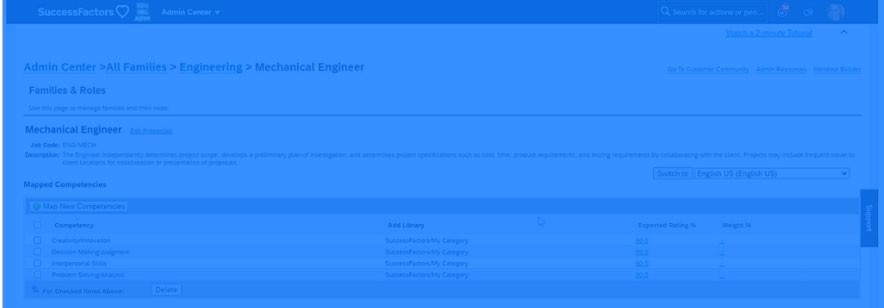
A. A button labeled Compute
B. A field labeled Highest Score
C. A button labeled Import Overall Scores
D. A button labeled Download
E. A field labeled Lowest Score
What is the maximum number of mentoring requests that a mentor can receive at a time for an open enrollment or unsupervised program?
A. 20
B. 50
C. 100
D. 200
Your customer wants to capture the competency rating from the Role Readiness form launched within the Career Worksheet.What competencies are rated?Note: There are 2 correct answers to this question.
A. Competencies associated with the current role
B. Competencies from Interview Assessment
C. Competencies from Learning Management
D. Competencies associated with the future role
| Page 2 out of 7 Pages |
| Previous |