
What report requires that worksheets have been launched before it will show results?
A. Business goal performance
B. Bonus payout
C. Employee history gaps
D. Employee history overlaps
Explanation:
The Bonus Payout Report is an operational report that displays calculated bonus amounts after the Variable Pay worksheets have been processed (i.e., launched and completed through their workflow). This report relies on finalized data from the worksheet calculations — including individual performance ratings, business goal achievements, proration, adjustments, and approved payouts — which only become available once worksheets have been launched and fully processed.
Why other options are incorrect:
A. Business goal performance:
This report shows goal ratings and achievements from Goal Management and does not depend on Variable Pay worksheet processing. It can be run as soon as goals are completed in the performance module.
C. Employee history gaps / D. Employee history overlaps:
These are data validation reports that analyze the employee history data file for consistency issues (e.g., missing assignments or conflicting dates). They are run before worksheet launch — often during the data preparation phase — to ensure clean eligibility data.
Reference:
SAP SuccessFactors Variable Pay Administration Guide — “Running the Bonus Payout Report.”
The documentation confirms that this report requires worksheets to be in a launched or processed state to reflect calculated payout results. Pre-launch, there are no calculated payout values to report.
Your customer wants to ensure that no employee's bonus exceeds 200% of their bonus target. How can this be achieved?
A. Use bonus plan caps.
B. Use guidelines where the maximum is set to 200%.
C. Use a bonus plan multiplier of 200%.
D. Use gates on business goals.
Explanation:
A bonus plan cap is a hard limit set at the Variable Pay program or template level that restricts the final calculated payout so it cannot exceed a specified percentage of the target bonus. Setting a cap at 200% would ensure that no employee’s final bonus exceeds 200% of their individual bonus target amount, regardless of performance ratings, goal achievements, or multipliers.
Why other options are incorrect:
B. Use guidelines where the maximum is set to 200%:
Guidelines are used in Compensation (Merit, Base, Stock) to suggest salary adjustments within a range, but they are not used to enforce hard limits on bonus payouts in Variable Pay.
C. Use a bonus plan multiplier of 200%:
A bonus plan multiplier is applied to the target bonus as part of the calculation (e.g., a multiplier based on company performance). Using “200%” as a multiplier would actually set the bonus to 200% of target, not cap it. This would increase payouts rather than limit them.
D. Use gates on business goals:
Gates define threshold levels of performance that must be met before any bonus is paid (e.g., “must achieve at least 70% on goals to receive any bonus”). Gates do not enforce an upper limit on the payout amount.
Reference:
SAP SuccessFactors Variable Pay Implementation Guide — “Setting Bonus Caps.”
The documentation explains that caps can be configured at the plan or individual level to restrict the maximum payout percentage. This is the standard method to enforce an upper ceiling on bonus calculations.
The employee history data file import process was completed but returned with errors. Given the information in the screenshot, which column is causing the error message?
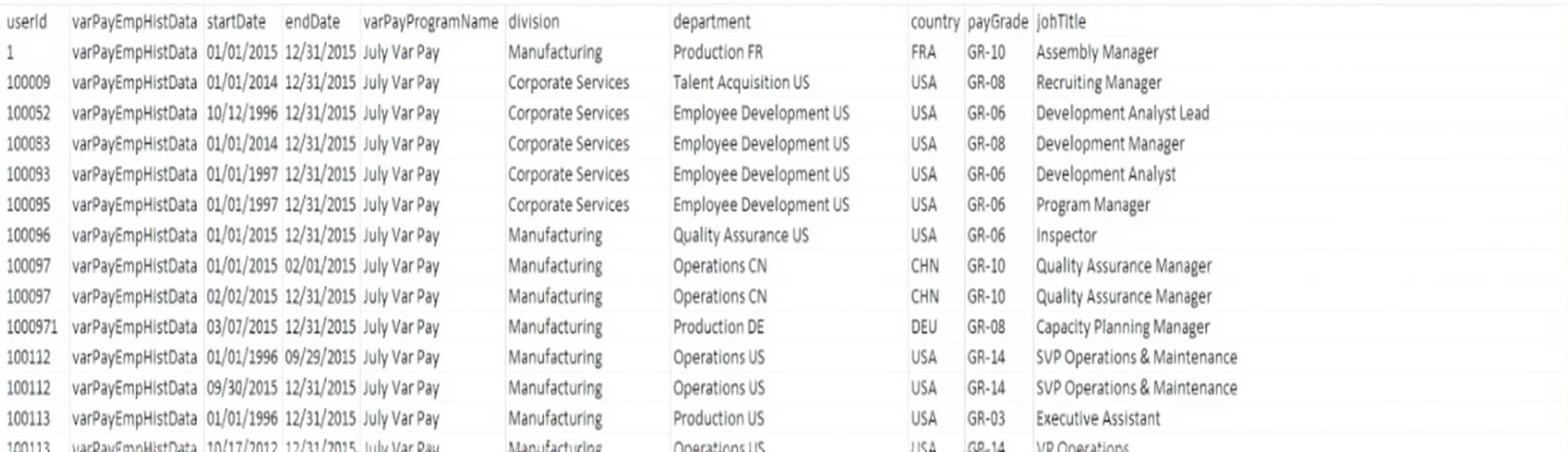
A. The country column shows a code rather than a label.
B. The basis column is using commas.
C. The endDate column is in mm/dd/yyyy format.
D. The tgtPct column is using decimals.
Your customer wants to use business goals in a Variable Pay program. Which actions are needed? Note: There are 3 correct answers to this question.
A. Reference the Plan ID in the business goal data file.
B. Reference the Plan ID in the Bonus Plan file.
C. Upload the Business Goal XML template in Provisioning.
D. Assign the Business Goal template to the Variable Pay program.
E. Update eligibility rules to include a bonus plan
What does the Enable Guideline Optimization setting do? Note: There are 2 correct answers to this question.
A. It helps render the worksheet faster when there are more than 1,000 guideline formulas.
B. It changes the guidelines so they are updated on the form immediately.
C. It requires relaunching the form when guidelines are changed during mid-cycle.
D. It locks the guideline rule settings so they are un-editable after form launch.
You are implementing an Employee Central-integrated Variable Pay template. The employee has 3 assignment records pulled from Employee Central, each with start and end dates within the bonus period, resulting in NO gaps or overlaps. What is the impact of the 3 assignment records on the payout?
A. The last record is considered when the employee's bonus payout is calculated and the bonus is increased by 3X the target.
B. Each record is considered when the employee's bonus payout is calculated and the bonus is prorated based on the dates of each record.
C. The first record is considered when the employee's bonus payout is calculated and the bonus is increased by 3X the target.
D. Each record is considered when the employee's bonus payout is calculated and the bonus is increased by 3X the target.
What task can you complete in Configure Label Names and Visibility?
A. Change field groups.
B. Relabel employee history fields.
C. Create custom fields.
D. Deactivate form sections.
Where do you set the display order of the business goals?
A. Bonus plan file
B. Business goals file
C. Business goal weights file
D. Design Worksheet
In which file do you specify the relationship between bonus plan and business goals?
A. Business goal template
B. Business goals data file
C. Bonus plan data file
D. Weights and mappings data file
Which of the following data files are linked by legacy eligibility rules? Note: There are 2 correct answers to this question.
A. Business goals data file
B. Bonus plan data file
C. User data file
D. Employee history data file
Which tools can employees use to see the final payout amount awarded to them? Note: There are 3 correct answers to this question.
A. Personal Compensation Statement Notification
B. Bonus Assignment Statement
C. Combined Rewards Statement
D. Variable Pay Rewards Statement
E. Variable Pay Individual View
A public sector company would like to pay one business goal according to the following guidelines: If the company makes profits, employees get 100% of their target payout. If the company loses $50,000, employees get 50% of their target payout. If the company loses $100,000 or more, nobody receives a payout. Finance provides administrators with the final amount on February 1 every year. How should your customer create this interpolated business goal?
A. Load metrics as: performanceMin=-100,000, performanceTarget=-50,000, performanceMax=0
B. Load metrics as: performanceMin= 0, performanceTarget= 50, performanceMax= 100
C. Use the Direct Payout function type and load 100,000 as achievement.
D. Use the Direct Payout function type and load 40,000 as achievement.
| Page 2 out of 7 Pages |
| Previous |