
The employee is changing their marital status. Once the workflow is approved, themanager
gets a notification via e-mail that this change has been processed. The manager then goes
into the system and checks the workflow, but notices that they can see more fields than the
ones for which they should receive a notification (Name, Marital Status, and Nationality)
Why is that?
A. The manager has transactions pending approval permission for Personal Information.
B. There is a rule that sets up the visibility for the fields in Personal Information and this applies when checking the workflow.
C. In the workflow, Respect Permissions was set to No for the notification line to the manager.
D. The manager's approver context is set to Source
Explanation:
The visibility of data in a workflow request is controlled by the "Respect Permission" field on the Workflow configuration object. This setting is crucial for ensuring that sensitive data is only seen by authorized users during the approval process.
Logic of "Respect Permission":
If set to "Yes": The system checks the RBP of the person viewing the workflow. If a manager does not have permission to view a specific field (like "Nationality") in their RBP role, they will not see it in the workflow details.
If set to "No" (Default): The system bypasses the viewer's RBP. Any participant in the workflow (Approvers, Contributors, or those receiving CC notifications) can see all fields involved in that transaction, regardless of their standard profile permissions.
In this scenario, because the manager can see more fields than intended when checking the approved change, it indicates that the "Respect Permission" setting for the notification/step involving the manager was not enabled. Consequently, the manager is granted "full visibility" of the Personal Information record being processed.
Why Other Options Are Not Correct:
Option A (Transactions Pending Approval):
This permission allows a user to see the "Pending Requests" link on a profile, but it does not control field-level visibility within the workflow details page itself.
Option B (Visibility Rule):
While Business Rules can set field visibility to "View" or "Edit," they are typically used for UI behavior during data entry. Field visibility in the workflow UI specifically relies on the "Respect Permission" setting to bridge the gap between the transaction and RBP.
Option D (Approver Context):
The "Context" (Source vs. Target) determines which manager (the old one or the new one) should receive the request during a change of manager. It does not dictate which specific fields are visible to that manager.
References:
SAP Help Portal - Creating a Workflow: States that "Respect Permission" specifies the permission of participants to view the workflow's fields. If set to No, participants can view all fields.
You have updated several position departments using Import and Export data, but the
incumbent's data still shows the previous information for the department hris-field.
What are some possible causes for this data inconsistency? Note: There are 2correct
answers to this question.
A. The technicalParameters value has NOT been set to SYNC in the position records.
B. The technicalParameters column with a value of SYNC has NOT been included in the import file.
C. The business rule to sync datachanges sets the Position Department to be equal to Job Information.Department.
D. The business rule to sync data changes sets the Job Information.Department to be equal to Job Information.Position.Department.
Explanation
The synchronization between a Position and an Incumbent's Job Information is a critical automation feature. When using the "Import and Export Data" tool, the system requires precise configuration to maintain data consistency:
The technicalParameters Trigger (B):
By default, manual imports of Position records (MDF objects) do not trigger the synchronization to Job Information. To force the system to run the sync logic during an import, you must add a column named technicalParameters to your CSV file and enter the value SYNC for every row you want to update for the incumbent. If this column is missing or empty, the Position will update, but the employee's record will remain unchanged.
The Business Rule Logic (C):
Even if the sync is triggered, it relies on a specific Business Rule (usually assigned in Position Management Settings > Synchronization). If this rule is incorrectly configured—for example, by setting the Position's Department based on the Job Information's Department (the wrong direction)—the incumbent's data will not update correctly. The rule must follow the direction: Set Job Information.Department to be equal to Position.Department.
Why Other Options Are Not Correct:
Option A (Value in the record):
The technicalParameters field is a transient field used specifically for the import process. It is not a persistent value that you "set" inside the position record itself via the UI; it is an instruction passed during the data load.
Option D (Incorrect Syntax):
While this looks similar to the correct logic, the syntax Job Information.Department = Job Information.Position.Department is redundant. The sync rule specifically maps the Position Object's fields directly to the Job Information's fields. Option C highlights the common "backward" configuration error that consultants often face during implementation.
References:
SAP Help Portal - Setting Up Position-to-Job Information Synchronization: Explains that for imports, the technicalParameters column with the value SYNC is mandatory to trigger follow-up processes.
Fields in the termination screen are configured in which hris-element?
A. Personal Information
B. Employment Information
C. Compensation Information
D. Job Information
Manager A initiated a job code change for Employee X with an effectivity date of January 15. Another manager initiated the same request, but for January 30. What happens to the workflows triggered by both transactions?
A. The system will reject both workflows.
B. The system will cancel the second workflow.
C. The system will cancel the first workflow.
D. The system will allow both workflows to continue.
Which fields must be enabled for the HRIS element payComponentNonRecurring? Note: There are 3correct answers to this question.
A. value
B. pay-component-code
C. pay-date
D. frequency
E. is-target
Which of the following processes in Position Management are controlled from Position
Management Settings?
Note: There are 3 correct answers to this question.
A. Follow Up Activity in Position
B. Move Position with Supervisor on Job Information change
C. Automated Daily Hierarchy Adaptation
D. To Be Hired Status Adaptation
E. Synchronize Position Matrix Relationships to Job Relationships of Incumbents
In which of the following HRIS elements do you assign workflow derivation rules for new hires?
A. Job Information
B. Personal Information
C. Biographical Information
D. Compensation Information
An HR admin/Global Mobility person must create a transfer for an employee. The
employee will be moving from Position A in Team A to Position B in Team B. Both
managers will have to approve the transfer.
How do you configure a two-step workflow so that the approval goes first to the current
manager and second to the future manager?
A. By selecting in Step 1. Position Relationship - Parent Parent Position - Source
•By selecting in Step 2: Position Relationship - Parent Position - Target
B. By selecting in Step 1: Role - Manager - Source
•By selecting in Slep 2. Role-Manager Manager - Target
C. By selecting in Step 1.Role-Manager - Source
•By selecting in Step 2: Role - Manager - Target
D. By selecting in Step 1: Role - Self-Source
•By selecting in Step 2. Role- Manager - Target
Due to confidentiality reasons, when the HR Business Partner (maintained in Job
Relationship) is creating a change in salary for an employee, this action will need to be
approved by the manager of the HR Business Partner creating the request.
How do you define this in the workflow when filling in the Approver Type, Approver Role,
Context, and Relationship to Approver? Refer to the screenshot to answer the question
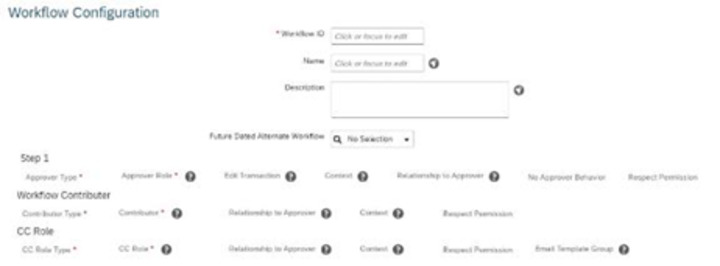
A. By selecting in Step 1:Role - Self-Source - Initiator
B. By selecting in Step 1: Role - Employee HR - Source - Employee
C. By selecting in Step 1: Role - Employee HR-Source- Initiator
D. By selecting in Step 1: Role - Manager - Source - Initiator
Which of the following can you use to explore released APIs?
A. SAP Application Interface Framework
B. SAP Integration Suite
C. SAP Business Accelerator Hub
An employee will be changing their nationality information on their own
How do you build the IF condition in the business rule so they can do this?
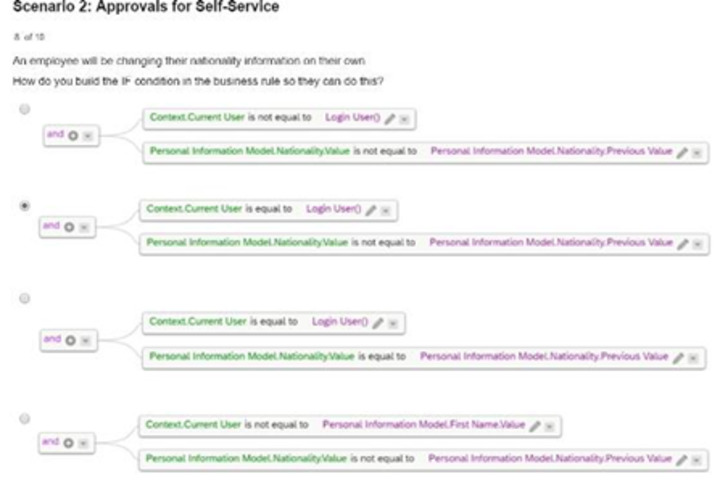
A. Option A
B. Option B
C. Option C
D. Option D
What does SAP SuccessFactors recommend when you create custom associations between foundation objects (FO)?
A. All custom associations should be built between an MDF FO and another MDF FO.
B. All custom associations should be built as one-to-one.
C. All custom associations should be built as one-to-many.
D. All custom associations should bebuilt between an XML FO and another XML FO.
| Page 2 out of 7 Pages |
| Previous |