
Topic 1: Exam Pool A
This question requires that you evaluate the underlined text to determine if it is correct.
From Azure Monitor, you can view which user turned off a specific virtual machine during
the last 14 days.
Instructions: Review the underlined text. If it makes the statement correct, select “No
change is needed”. If the statement is incorrect, select the answer choice that makes the
statement correct.
A. No change is needed
B. Azure Event Hubs
C. Azure Activity Log
D. Azure Service Health
Summary:
To identify which user turned off a virtual machine in the last 14 days, you must use the Azure Activity Log, which records all control plane operations (e.g., start/stop VM) with user identity, timestamp, and resource details. Azure Monitor visualizes this data, but the source is the Activity Log, retained for 90 days and queryable for 14-day events.
Correct Option:
C. Azure Activity Log
Captures administrative actions like "Deallocate VM" with user principal name and timestamp.
Retained for 90 days; supports filtering by operation, user, and time range in Azure Monitor.
Essential for auditing and compliance tracking of resource state changes.
Incorrect Option:
A. No change is needed
Incorrect; Azure Monitor is a platform, not the log source. The actual data comes from Activity Log.
Viewing user actions requires querying the Activity Log specifically.
B. Azure Event Hubs
Streams real-time data but does not store historical administrative actions or user identities.
Used for telemetry ingestion, not auditing VM power operations.
D. Azure Service Health
Reports Azure service incidents and health status, not user-initiated VM stop actions.
Focuses on platform reliability, not resource management events.
Reference:
https://learn.microsoft.com/en-us/azure/azure-monitor/essentials/activity-log
https://learn.microsoft.com/en-us/azure/azure-monitor/essentials/platform-logs-overview
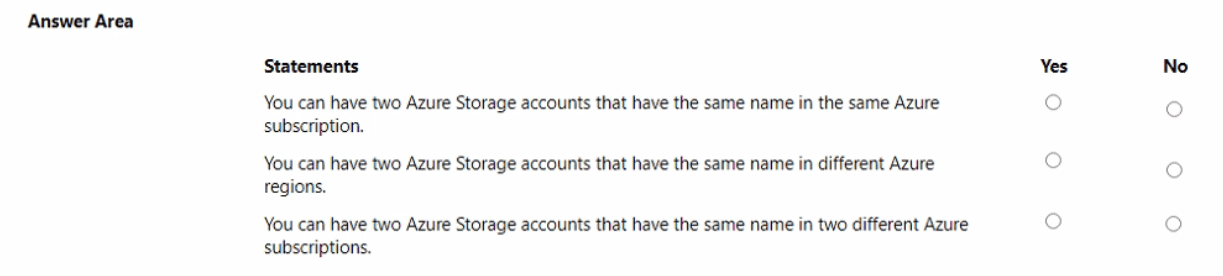
For each of the following statements, select Yes if the statement is true. Otherwise, select
No.
NOTE: Each correct selection is worth one point.
Summary
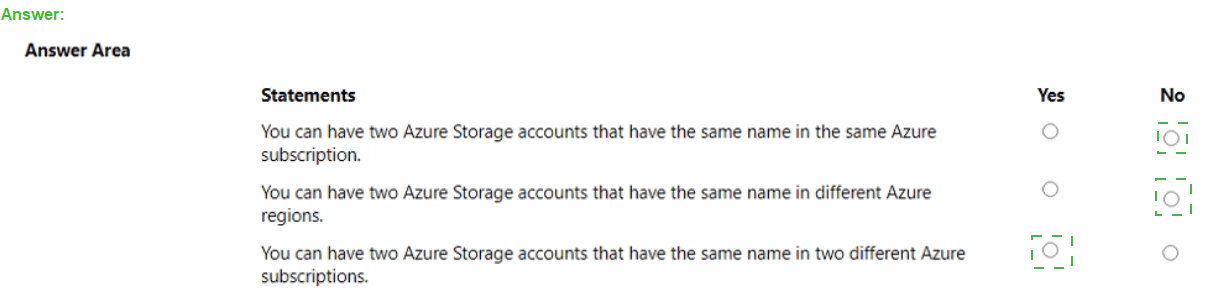
This question tests your understanding of the uniqueness and scope of Azure Storage account names. A storage account name must be globally unique across all of Azure because it forms part of the URL used to access the data (e.g., https://[name].blob.core.windows.net). This global uniqueness requirement dictates the rules for naming across subscriptions and regions.
Statement 1: You can have two Azure Storage accounts that have the same name in the same Azure subscription.
Answer: No
Explanation: This is false. The storage account name must be globally unique. If a name is already taken by any customer in any subscription worldwide, it cannot be used again. It is therefore impossible to have two storage accounts with the same name, even within the same subscription.
Statement 2: You can have two Azure Storage accounts that have the same name in different Azure regions.
Answer: No
Explanation: This is false. The global uniqueness rule applies regardless of the Azure region. The DNS name for the storage account endpoint must be unique to route traffic correctly. A storage account named mystorage123 in West US would occupy the DNS name mystorage123.blob.core.windows.net, preventing anyone else from using mystorage123 in any other region, including East US.
Statement 3: You can have two Azure Storage accounts that have the same name in two different Azure subscriptions.
Answer: No
Explanation: This is also false. The scope for the unique name is global, not per subscription. When you create a storage account, Azure checks the name against a central registry of all existing storage account names. A name used in one subscription is permanently reserved and cannot be used in a different subscription.
Reference
Microsoft Learn: Create a storage account - The documentation states: "The storage account name must be unique across Azure... The name must be between 3 and 24 characters in length and may contain numbers and lowercase letters only."
Note: This question is part of a series of questions that present the same scenario. Each
question in the series contains a unique solution that might meet the stated goals. Some
question sets might have more than one correct solution, while others might not have a
correct solution.
After you answer a question in this section, you will NOT be able to return to it. As a result,
these questions will not appear in the review screen.
Your company plans to purchase Azure.
The company’s support policy states that the Azure environment must provide an option to
access support engineers by phone or email.
You need to recommend which support plan meets the support policy requirement.
Solution: Recommend a Professional Direct support plan.
Does this meet the goal?
A. Yes
B. No
Summary:
The question asks for a support plan that provides access to support engineers by phone or email. The Professional Direct support plan is a high-tier plan that offers 24/7 technical support with fast response times, including phone support. However, the key requirement is the option for phone or email support, which is available in lower-tier plans as well. The Professional Direct plan meets this specific requirement, but it may be overkill if this is the only requirement.
Correct Option:
A. Yes:
Explanation:
The Professional Direct support plan is a premium offering that includes 24/7 access to support engineers via phone and email, along with additional features like a dedicated Technical Account Manager and operational support. Since the policy requirement is solely about access to support engineers by phone or email, the Professional Direct plan satisfies this goal.
While lower-tier plans (e.g., Developer, Standard) also provide phone/email support, the question only asks if the recommended solution meets the goal. The Professional Direct plan does meet the stated requirement, even though it may not be the most cost-effective option.
Reference:
Microsoft Learn: Compare Azure support plans - This documentation confirms that Professional Direct includes "24/7 technical support via phone and email."
You have an Azure environment that contains 10 virtual networks and 100 virtual
machines.
You need to limit the inbound traffic to all the Azure virtual networks.
What should you create?
A. one Azure firewall
B. 10 Azure ExpressRoute circuits
C. 10 virtual network gateways
D. one application security group (ASG)
Summary:
This question is about centrally controlling and limiting inbound traffic to multiple virtual networks in Azure. The requirement is for a single, centralized solution that can enforce network security rules across all 10 virtual networks, rather than managing security per network or per VM.
Correct Option:
A. one Azure Firewall:
Explanation:
Azure Firewall is a managed, cloud-native network security service. You can deploy it in a central virtual network and use Azure Route Tables to force inbound (and outbound) traffic from all 10 virtual networks through this single firewall. This creates a unified security perimeter, often called a hub-spoke topology, allowing you to define and manage application and network rules in one place to limit traffic effectively.
Incorrect Options:
B. 10 Azure ExpressRoute circuits:
ExpressRoute is for creating private connections from on-premises networks to Azure, not for filtering or limiting inbound traffic. It does not provide any traffic inspection or filtering capabilities.
C. 10 virtual network gateways:
These are used for specific traffic patterns like connecting virtual networks to on-premises networks (Site-to-Site VPN) or other virtual networks (VNet Peering). They are not designed as central policy enforcement points for limiting general inbound traffic.
D. one application security group (ASG):
ASGs are used to group VMs and apply network security group (NSG) rules to that group. An ASG operates at the level of individual network interfaces/VMs and is not a centralized network appliance capable of managing traffic across multiple virtual networks. It cannot serve as a central choke point.
Reference
Microsoft Learn: What is Azure Firewall? - "Azure Firewall is a cloud-native and intelligent network firewall security service that provides best-in-class threat protection for your cloud workloads running in Azure." It is used to centrally govern traffic across multiple VNets.
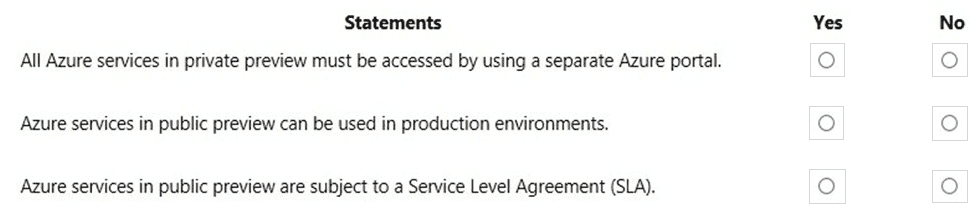
For each of the following statements, select Yes if the statement is true. Otherwise, select
No.
NOTE: Each correct selection is worth one point.
Summary
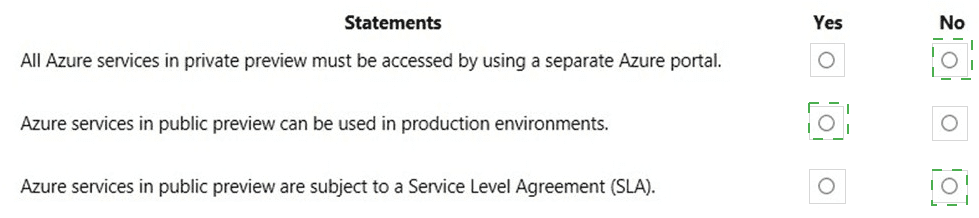
This question tests your understanding of the terms and conditions for Azure services in private and public preview. Key characteristics include how they are accessed, their suitability for production, and the service guarantees provided by Microsoft during the preview phase.
Statement 1: All Azure services in private preview must be accessed by using a separate Azure portal.
Answer: No
Explanation: This statement is false. While private preview features are restricted to a specific set of invited customers, they are typically accessed and managed through the standard Azure portal. There is not a separate, dedicated portal for private preview services. Access is controlled by Microsoft granting permissions to a user's existing Azure account and subscription.
Statement 2: Azure services in public preview can be used in production environments.
Answer: No
Explanation: This statement is false. Microsoft explicitly advises against using public preview services for production workloads. These services are made available for testing and feedback and may contain bugs, have limited functionality, and can undergo significant changes before becoming generally available (GA). They are not considered stable or reliable enough for critical production environments.
Statement 3: Azure services in public preview are subject to a Service Level Agreement (SLA).
Answer: No
Explanation: This statement is false. A key distinction of services in public preview is that they are not covered by a financially backed SLA. The documentation for preview features clearly states this. Formal SLAs, which guarantee specific uptime and performance, are only introduced when a service becomes Generally Available (GA).
Reference
Microsoft Learn: Azure preview terms - "Previews are made available to you on the condition that you agree to the terms of use... Previews are excluded from Azure service level agreements."
Select the answer that correctly completes the sentence.

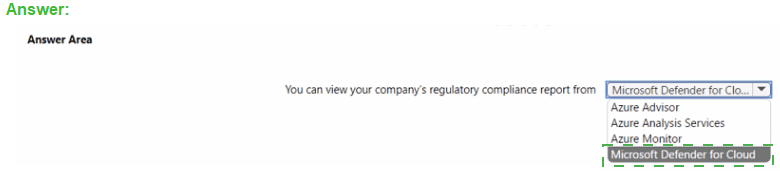
Summary:
This question tests your knowledge of which Azure service provides regulatory compliance reporting. This feature involves continuously assessing your Azure environment against specific legal and industry standards (like NIST, ISO, PCI DSS) and providing a detailed report on your compliance posture.
Correct Option:
Microsoft Defender for Cloud:
This is the correct answer. Microsoft Defender for Cloud includes a Regulatory Compliance dashboard. This dashboard allows you to view your compliance status against a wide range of built-in compliance standards and industry benchmarks. It provides a detailed report showing how your resources are performing against the controls of each standard, helping you track and meet your compliance requirements.
Incorrect Option:
Azure Advisor:
This service provides personalized best practice recommendations for cost, security, reliability, and performance. It does not provide a comprehensive regulatory compliance report against external standards.
Azure Analysis Services:
This is an enterprise-grade data modeling engine used for semantic data models and analytics. It is unrelated to security or compliance reporting.
Azure Monitor:
This is a service for collecting, analyzing, and acting on telemetry and log data from your applications and infrastructure. While you could use logs for compliance auditing, it does not provide a pre-built, standardized regulatory compliance report like the one in Defender for Cloud.
Reference:
Microsoft Learn: Regulatory compliance dashboard in Microsoft Defender for Cloud - The documentation states: "The regulatory compliance dashboard in Microsoft Defender for Cloud provides insights into your compliance posture based on how you're meeting specific compliance controls and requirements."
For each of the following statements, select Yes if the statement is true. Otherwise, select
No.
NOTE: Each correct selection is worth one point.
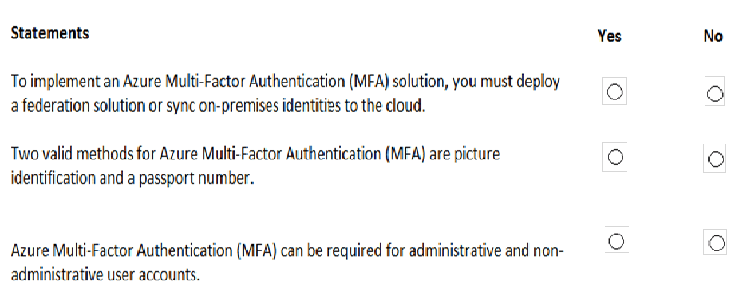
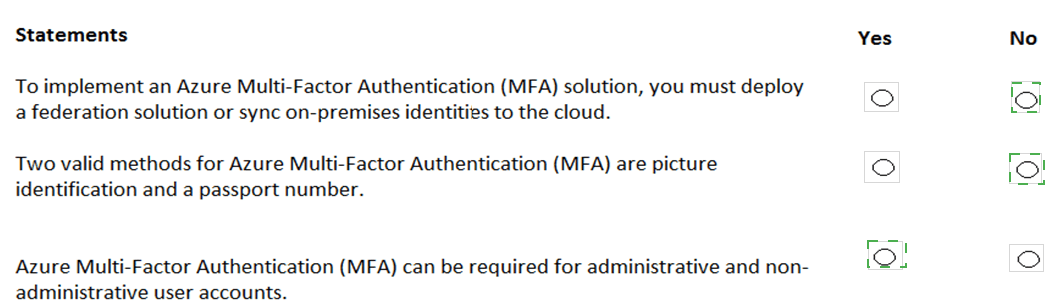
Summary
This question tests your understanding of Azure Multi-Factor Authentication's deployment requirements, supported verification methods, and scope of application. MFA is a core security feature that adds a layer of authentication beyond just a password, but it has specific prerequisites and capabilities.
Statement 1: To implement an Azure Multi-Factor Authentication (MFA) solution, you must deploy a federation solution or sync on-premises identities to the cloud.
Answer: No
Explanation: This statement is false. Azure MFA can be applied to both cloud-only identities (Azure AD users created and managed entirely in the cloud) and hybrid identities that are synced from an on-premises Active Directory. While federation or identity sync is required for specific scenarios like enabling MFA for on-premises applications, it is not a mandatory prerequisite for implementing MFA itself for cloud resources. You can enable and enforce MFA for users that exist only in Azure AD.
Statement 2: Two valid methods for Azure Multi-Factor Authentication (MFA) are picture identification and a passport number.
Answer: No
Explanation: This statement is false. Azure MFA verification methods are based on something you know (a password/PIN), something you have (a phone, a hardware key, the Microsoft Authenticator app), or something you are (biometrics). Picture identification and a passport number are static forms of identification and are not supported as dynamic, verifiable methods in the Azure MFA service. Valid methods include the Microsoft Authenticator app (with push notification, one-time code, or phone sign-in), SMS or voice call, FIDO2 security keys, and OATH hardware tokens.
Statement 3: Azure Multi-Factor Authentication (MFA) can be required for administrative and non-administrative user accounts.
Answer: Yes
Explanation: This statement is true. A key principle of zero-trust security is that any identity can be a target. Therefore, Azure MFA can be enabled and enforced for any user account, regardless of its administrative privileges. While it is a critical best practice to require MFA for all administrative roles, Conditional Access policies can also be configured to require MFA for non-administrative users, specific applications, or based on risk and location signals.
Reference:
Microsoft Learn: Plan an Azure AD Multi-Factor Authentication deployment
Microsoft Learn: Azure AD Multi-Factor Authentication methods
For each of the following statements, select Yes if the statement is true. Otherwise, select
No.
NOTE: Each correct selection is worth one point.
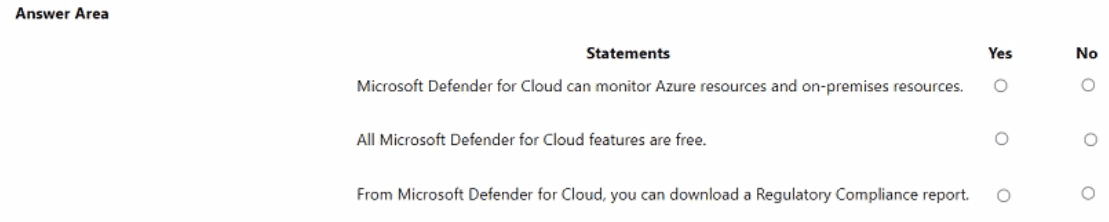
Summary
This question tests your knowledge of the scope, pricing, and key features of Microsoft Defender for Cloud. It's important to understand that it is a hybrid cloud security tool, operates on a freemium model, and provides specialized compliance reporting.
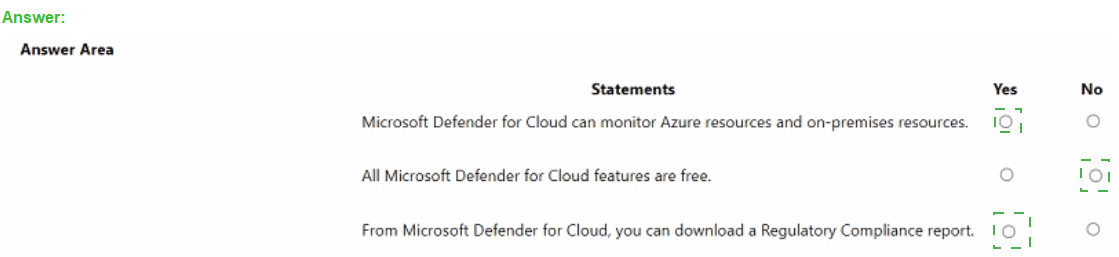
Statement 1: Microsoft Defender for Cloud can monitor Azure resources and on-premises resources.
Answer: Yes
Explanation: This statement is true. Microsoft Defender for Cloud is a hybrid cloud security solution. It can natively monitor Azure resources. Furthermore, by using the Azure Arc service, you can onboard on-premises servers and virtual machines, as well as multi-cloud resources (from AWS or GCP), into Defender for Cloud, allowing for a unified security management posture across your entire estate.
Statement 2: All Microsoft Defender for Cloud features are free.
Answer: No
Explanation: This statement is false. Defender for Cloud operates on a freemium model. It offers a Free tier that includes foundational security assessments and policies. However, the advanced threat protection features, collectively known as Microsoft Defender for Cloud, are part of a paid tier. This includes features like Just-in-time VM access, adaptive application controls, and advanced threat detection for compute, data, and networking services.
Statement 3: From Microsoft Defender for Cloud, you can download a Regulatory Compliance report.
Answer: Yes
Explanation: This statement is true. The Regulatory Compliance dashboard in Defender for Cloud allows you to track your compliance with various built-in standards like ISO 27001, NIST SP 800-53, and PCI DSS. This dashboard includes a feature to download summary reports in PDF or CSV format, which can be shared with auditors or management to demonstrate your current compliance posture.
Reference
Microsoft Learn: What is Microsoft Defender for Cloud? - Covers hybrid capabilities.
Microsoft Learn: Microsoft Defender for Cloud pricing - Details the free and paid tiers.
Microsoft Learn: Customize the set of standards in your regulatory compliance dashboard - Mentions the ability to download compliance reports.
Note: This question is part of a series of questions that present the same scenario. Each
question in the series contains a unique solution that might meet the stated goals. Some
question sets might have more than one correct solution, while others might not have a
correct solution.
After you answer a question in this section, you will NOT be able to return to it. As a result,
these
questions will not appear in the review screen.
You plan to deploy several Azure virtual machines.
You need to ensure that the services running on the virtual machines are available if a
single data center fails.
Solution: You deploy the virtual machines to two or more resource groups.
Does this meet the goal?
A. Yes
B. No
Explanation:
The goal is to ensure service availability during a data center failure, which requires protection against a physical location outage. Deploying virtual machines across multiple resource groups does not inherently place them in different physical data centers. Resource groups are logical organizational containers for managing resources in Azure, not a unit of deployment or resiliency for availability. High availability against a data center failure requires deploying resources across separate physical locations, such as different Azure regions or availability zones within a region.
Correct Option:
B. No:
Resource groups are management boundaries for organizing resources like VMs, storage, and networks. They have no bearing on the physical deployment or redundancy of the VMs. Creating multiple resource groups does not guarantee or configure deployment across different data centers (Availability Zones) or regions. To meet the goal, you must use features like Availability Zones (for zonal resilience within a region) or deploy to multiple regions (for regional resilience).
Incorrect Option:
A. Yes:
This is incorrect because it misinterprets the purpose of a resource group. The solution describes a configuration change at the management and organizational layer, not at the physical compute or resiliency layer. The VMs could still all be deployed within the same single data center, making them susceptible to its failure.
Reference:
Ensure business continuity with Azure reliability
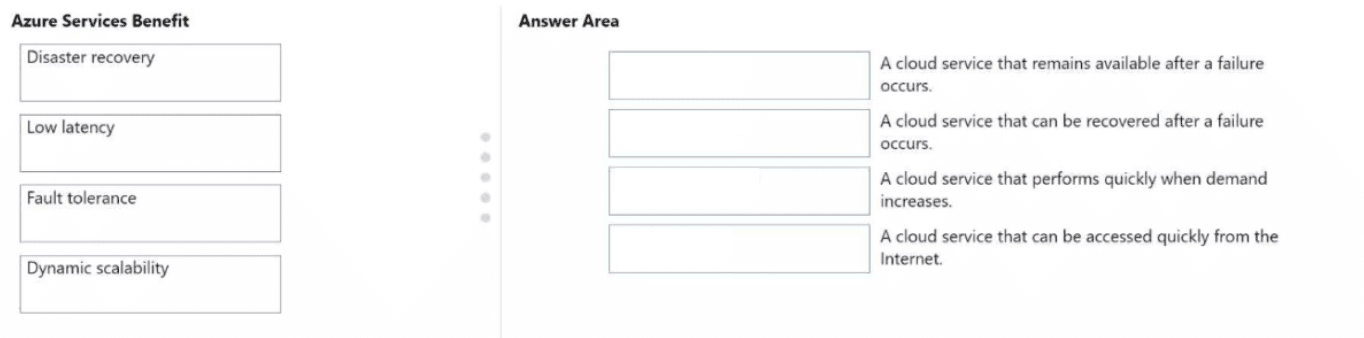
Match the Azure services benefits to the correct descriptions.
Instructions: To answer, drag the appropriate benefit from the column on the left to its
description on the right Each benefit may be used once, more than once, or not at all.
NOTE: Each correct match is worth one point.
Explanation:
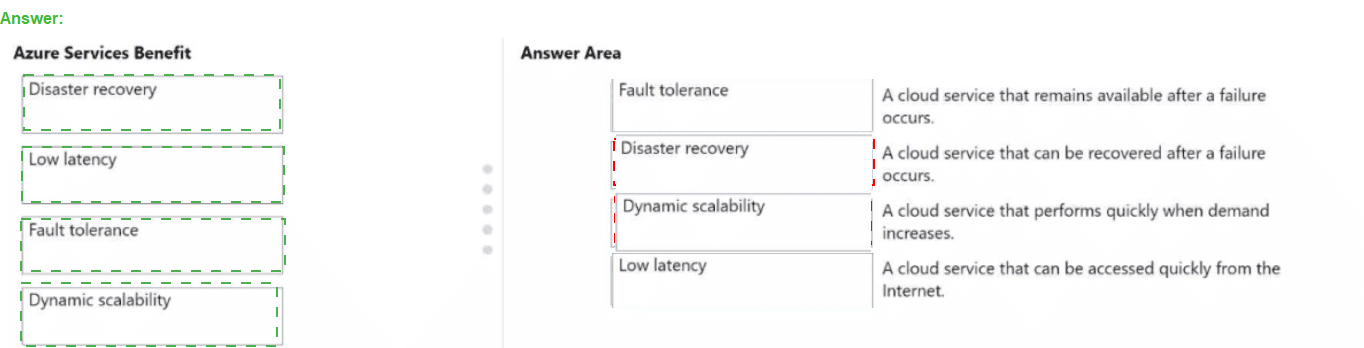
Azure services provide distinct benefits to ensure business continuity and performance. Fault tolerance is proactive, ensuring a service stays up during minor failures, while disaster recovery is reactive, focusing on restoration after a total outage. Dynamic scalability (often linked with elasticity) automates resource adjustments based on load, and low latency focuses on the speed of data delivery by reducing the physical distance between the server and the user.
Correct Option:
Fault Tolerance:
Focuses on zero downtime by using redundant components (like multiple servers in a cluster) so that if one fails, the others seamlessly take over.
Disaster Recovery:
Involves strategies like backing up data and replicating applications to secondary regions to restore operations quickly after a major disruption.
Dynamic Scalability:
Automatically adds or removes compute resources (CPU, RAM, or instances) to match changing workloads, ensuring performance doesn't degrade during traffic spikes.
Low Latency:
Reduces the time it takes for data to travel between the user and the cloud service, typically achieved by deploying resources in regions closer to the end-user.
Incorrect Option:
High Availability:
While similar to fault tolerance, it refers to the overall uptime percentage of a service rather than the specific mechanism of surviving a component failure.
Agility:
This refers to the speed at which you can allocate or deallocate new resources to respond to business changes, rather than the automatic scaling of existing ones.
Predictability:
This benefit focuses on being able to forecast costs or performance levels accurately, rather than the physical speed or recovery of the service itself.
Reference:
Microsoft Learn: Describe the benefits of cloud computing
Note: This question is part of a series of questions that present the same scenario. Each
question in the series contains a unique solution that might meet the stated goals. Some
question sets might have
more than one correct solution, while others might not have a correct solution.
After you answer a question in this section, you will NOT be able to return to it. As a result,
these
questions will not appear in the review screen.
Your company plans to migrate all its data and resources to Azure.
The company’s migration plan states that only platform as a service (PaaS) solutions must
be used in Azure.
You need to deploy an Azure environment that supports the planned migration.
Solution: You create an Azure App Service and Azure virtual machines that have Microsoft
SQL Server.
installed.
Does this meet the goal?
A. Yes
B. No
Explanation:
The migration plan mandates the exclusive use of Platform as a Service (PaaS) solutions. PaaS provides a managed platform where Azure handles the underlying infrastructure (servers, storage, networking) and runtime, allowing you to focus on application and data management. The proposed solution includes Azure virtual machines, which are an Infrastructure as a Service (IaaS) offering. In IaaS, you manage the operating system, middleware, and applications on the rented virtualized hardware, which violates the PaaS-only requirement.
Correct Option:
B. No:
The solution does not meet the goal because it includes Azure Virtual Machines. Virtual Machines are a core IaaS offering, requiring customer management of the OS and installed software (like SQL Server). The presence of any IaaS resource contradicts the requirement to use only PaaS solutions.
Incorrect Option:
A. Yes:
This is incorrect. While Azure App Service is a valid PaaS offering for web applications, the inclusion of Azure Virtual Machines invalidates the entire solution against the "only PaaS" constraint. The goal requires the entire deployed environment to be PaaS-based.
Reference:
Microsoft Learn: Compare Azure IaaS, PaaS, and SaaS (Clearly defines Virtual Machines as IaaS and services like App Service as PaaS).
You have a resource group named RG1.
You plan to create virtual networks and app services in RG1.
You need to prevent the creation of virtual machines only in RG1.
What should you use?
A. a lock
B. an Azure role
C. a tag
D. an Azure policy
Explanation:
To prevent the creation of a specific resource type (virtual machines) within a specific scope (the RG1 resource group), you need an enforcement mechanism that can evaluate and deny non-compliant deployment requests. An Azure Policy can be assigned to the RG1 scope with a "Deny" effect, configured with a rule that blocks VM creation. This proactively enforces the rule at deployment time. Locks prevent accidental deletion or changes to existing resources but cannot block the creation of new resource types.
Correct Option:
D. an Azure Policy:
Azure Policy is the correct governance tool for enforcing organizational standards and compliance. You can create a custom policy definition that denies the creation of the Microsoft.Compute/virtualMachines resource type and assign this policy to the RG1 resource group. This will prevent any new VMs from being deployed in RG1, while allowing other specified resources like virtual networks and app services.
Incorrect Options:
A. a lock:
A lock (Delete or Read-only) is applied to existing resources to protect them from modification or deletion. It cannot be applied to a resource group to block the creation of a new, specific resource type within it.
B. an Azure role:
Azure roles (RBAC) manage permissions for users, groups, or applications. They control what actions a principal can perform (e.g., read, write) on existing resources but are not designed to filter which resource types can be created based on technical rules.
C. a tag:
Tags are metadata labels used for logical organization, cost management, or operational grouping. They have no enforcement capability and cannot prevent resource creation.
Reference:
Azure Policy definition structure - Deny effect
| Page 2 out of 42 Pages |
| Previous |