
Topic 3: Misc. Questions
Your network contains an Active Directory Domain Services (AD DS) domain. The domain
contains two servers named Server1 and Server2 that run Windows Server.
You need to ensure that you can use the Computer Management console to manage
Server2. The solution must use the principle of least privilege.
Which two Windows Defender Firewall with Advanced Security rules should you enable on
Server2? Each correct answer presents part of the solution.
NOTE: Each correct selection is worth one point.
A. the COM+ Network Access (DCOM-ln) rule
B. all the rules in the Remote Event Log Management group
C. the Windows Management Instrumentation (WMI-ln) rule
D. the COM+ Remote Administration (DCOM-ln) rule
E. the Windows Management Instrumentation (DCOM-ln) rule
Explanation:
This question tests the specific firewall rules required to allow remote management using the Computer Management console (compmgmt.msc) against another server. The Computer Management console uses a combination of DCOM (Distributed Component Object Model) for core connectivity and specific protocols for its snap-ins like Event Viewer. The principle of least privilege means enabling only the rules necessary for this tool to function.
Correct Options:
A. the COM+ Network Access (DCOM-In) rule:
This is a fundamental requirement. The Computer Management console establishes its initial remote connection using DCOM (Distributed Component Object Model). This rule allows the incoming DCOM communication on Server2 that is necessary for the management console from Server1 to connect and launch the remote management session.
B. all the rules in the Remote Event Log Management group:
The Computer Management console includes the Event Viewer snap-in. To remotely view and manage event logs on Server2, the firewall must allow the specific RPC and named pipe traffic used by the Event Log service. Enabling the pre-defined group of rules for Remote Event Log Management grants the minimum necessary permissions for this component to work.
Incorrect Options:
C. the Windows Management Instrumentation (WMI-In) rule:
While WMI is used for many remote management tasks (and by tools like PowerShell Remoting), the primary connectivity for the Computer Management console's core interface is based on DCOM, not WMI. You might need WMI for some specific actions, but it is not the primary rule required for basic connectivity and Event Viewer functionality, which the question emphasizes.
D. the COM+ Remote Administration (DCOM-In) rule:
This rule is more specific to remote administration of the COM+ catalog and services, not for the general DCOM connectivity used by standard MMC snap-ins like Computer Management. The broader COM+ Network Access (DCOM-In) rule is the correct one for this scenario.
E. the Windows Management Instrumentation (DCOM-In) rule:
This rule allows DCOM calls specifically to the WMI service. Similar to option C, it is too specific and not the primary rule needed for the initial Computer Management console connection, which uses standard DCOM, not WMI-specific DCOM.
Reference:
Microsoft Learn and TechNet documentation for remote administration firewall requirements. The common guidance for enabling MMC-based remote management (like Computer Management) specifies enabling: COM+ Network Access (DCOM-In) and the Remote Event Log Management rules. For example, see "How to configure Windows Firewall for Remote Management" which lists these specific rules for MMC connectivity.
Your network contains a single-domain Active Directory Domain Services (AD DS) forest
named contoso.com. The functional level of the forest is Windows Server 2012 R2. All
domain controllers run Windows Server 2012 R2.
Sysvol replicates by using the File Replication Service (FRS).
You plan to replace the existing domain controllers with new domain controllers that will run
Windows Server 2022.
You need to ensure that you can add the first domain controller that runs Windows Server
2022.
Solution; You raise the domain and forest functional levels.
Does this meet the goal?
A. Yes
B. No
Explanation:
The solution does not meet the goal. While raising the functional levels is a prerequisite for adding a Windows Server 2022 domain controller, it is not the only or first requirement. The critical, blocking issue is that SYSVOL is still replicating via FRS. Windows Server 2016 and later domain controllers require SYSVOL replication to use Distributed File System Replication (DFS-R). Adding a 2022 DC to a domain still using FRS will fail. The FRS-to-DFS-R migration must be completed before introducing newer domain controllers.
Correct Option:
B. No:
Raising the functional levels alone is insufficient. You must first migrate SYSVOL replication from FRS to DFS-R. After a successful migration, you must then raise the forest and domain functional levels to at least Windows Server 2016 (a 2022 DC can join a domain/forest at 2016 level or higher). Only then can you add the first Windows Server 2022 domain controller.
Incorrect Option:
A. Yes:
This would be incorrect because it ignores the SYSVOL replication method, which is a hard requirement. The installation of a Windows Server 2022 domain controller will check for and enforce DFS-R for SYSVOL, and will fail if FRS is detected.
Reference:
Microsoft Learn: Migrate SYSVOL replication to DFS Replication. The documentation states: "Domain controllers that are running Windows Server 2016 or later versions require DFS Replication for SYSVOL replication." The official upgrade path is: 1) Ensure all DCs are at least Windows Server 2008 R2 or later, 2) Migrate from FRS to DFS-R, 3) Raise functional levels, 4) Introduce newer domain controllers.
Note: This question is part of a series of questions that present the same scenario.
Each question in the series contains a unique solution that might meet the stated
goals. Some question sets might have more than one correct solution, while others
might not have a correct solution.
After you answer a question in this section, you will NOT be able to return to it. As a result, these questions will not appear in the review screen.
Your network contains a single-domain Active Directory Domain Services (AD DS) forest
named contoso.com. The functional level of the forest is Windows Server 2012 R2. All
domain controllers run Windows Server 2012 R2.
Sysvol replicates by using the File Replication Service (FRS).
You plan to replace the existing domain controllers with new domain controllers that will run
Windows Server 2022.
You need to ensure that you can add the first domain controller that runs Windows Server
2022.
Solution: You run the Active Directory Migration Tool (ADMT).
Does this meet the goal?
A. Yes
B. No
Explanation:
The solution does not meet the goal. The Active Directory Migration Tool (ADMT) is used for migrating users, groups, and computers between different Active Directory forests or domains. The scenario describes an in-place upgrade or replacement of domain controllers within the same forest and domain (contoso.com). ADMT is irrelevant to this task. The blocking issue preventing the addition of a Windows Server 2022 DC is the SYSVOL replication method (FRS), not a need to migrate objects to a new forest.
Correct Option:
B. No:
Running ADMT does not address the core problem. The correct preparation steps are: 1) Migrate SYSVOL replication from FRS to DFS-R (a mandatory step for Windows Server 2016+ DCs), 2) Raise the forest and domain functional levels to at least Windows Server 2016, and then 3) Add the new Windows Server 2022 domain controller. ADMT plays no role in this process.
Incorrect Option:
A. Yes:
This would only be correct if the goal was to migrate objects to a new, separate forest/domain that already uses DFS-R and has a higher functional level. The scenario explicitly states the plan is to "replace the existing domain controllers," implying an in-place upgrade within the same forest, not a migration to a new forest.
Reference:
Microsoft Learn: Migrate SYSVOL replication to DFS Replication and Active Directory Migration Tool overview. The documentation clearly states the requirement for DFS-R for newer OS domain controllers and describes ADMT as a cross-forest migration tool.
You have an Azure virtual machine named VM1 that runs Windows Server.
The operating system on VM1 fails to start due to a disk error.
You need to resolve the error.
Which four commands should you run in sequence in Azure Cloud Shell? To answer, move
the appropriate commands from the list of commands to the answer area and arrange them
in the correct order.


Step-by-Step Explanation:
az extension add
This is the first step. You need to ensure the vm-repair extension is installed for the Azure CLI in your Cloud Shell environment. This extension provides the specialized repair commands (az vm repair ...).
az vm repair create
This is the core command that creates the rescue VM. It automatically:
Creates a new temporary rescue VM in the same resource group/location
Attaches the problematic OS disk from VM1 as a data disk to this rescue VM.
Provides you with connection details to the rescue VM.
This step isolates the faulty disk for offline repair.
az vm repair run
After connecting to the rescue VM via RDP, you manually diagnose and fix the disk issue (e.g., using CHKDSK, editing BCD, etc.). The az vm repair run command is used to execute a repair script on the rescue VM. While often you'd fix it manually, this command in the sequence represents the execution of the automated or custom repair action on the attached disk.
az vm repair restore
This is the final cleanup and restore command. Once the disk is repaired, this command:
Swaps the repaired OS disk back to the original VM (VM1).
Deletes the temporary rescue VM and its associated resources.
This returns VM1 to an operational state with the fixed disk.
Why the other command is not used:
az vm disk:
This command group is for managing managed disks (creating, updating, attaching). It is not part of the automated repair workflow, which is handled by the higher-level vm-repair commands.
Reference:
Microsoft Learn: Repair a Windows VM by using the Azure Virtual Machine repair commands. The documented workflow is: 1. Install the extension. 2. Create a repair VM. 3. Repair the OS disk (manually or via script). 4. Swap the repaired OS disk back.
You have an Azure virtual machine named VM1 that runs Windows Server.
You need to encrypt the contents of the disks on VM1 by using Azure Disk Encryption.
What is a prerequisite for implementing Azure Disk Encryption?
A. Customer Lockbox for Microsoft Azure
B. an Azure key vault
C. a BitLocker recovery key
D. data-link layer encryption in Azure
Explanation:
Azure Disk Encryption (ADE) uses industry-standard BitLocker (for Windows) or DM-Crypt (for Linux) to encrypt the OS and data disks of Azure VMs. However, the encryption keys and secrets (like the BitLocker encryption key) are not stored locally on the VM; they are safeguarded in an Azure service to ensure security, manageability, and recovery.
Correct Option:
B. an Azure key vault:
This is the absolute prerequisite. Azure Disk Encryption requires an Azure Key Vault to generate, store, and manage the disk encryption keys and secrets. The Key Vault must be located in the same Azure subscription and region as VM1. During the encryption process, the BitLocker encryption keys are written to the Key Vault as secrets, and optionally, a Key Encryption Key (KEK) can be used for an additional layer of security.
Incorrect Options:
A. Customer Lockbox for Microsoft Azure:
This is a service for controlling Microsoft support engineer access to your data during a support request. It is unrelated to disk encryption.
C. a BitLocker recovery key:
While BitLocker itself uses a recovery key, this is an artifact created during the encryption process and is stored in the Azure Key Vault. It is not a prerequisite you need to provide beforehand; ADE handles its generation and storage.
D. data-link layer encryption in Azure:
This refers to encryption at the networking layer (e.g., MACsec) for data in transit between Azure datacenters. It is not related to encrypting virtual machine disks at rest.
Reference:
Microsoft Learn: Azure Disk Encryption for Windows VMs. The prerequisites list includes: "An Azure Key Vault in the same subscription and region as the VM." The overview also states: "Azure Disk Encryption uses Azure Key Vault to help you control and manage the disk-encryption keys and secrets."
You have a server named Server1 that runs Windows Server.
You need to ensure that only specific applications can modify the data in protected folders
on Server1.
Solution: From App & browser control, you configure the Reputation-based protection.
Does this meet the goal?
A. Yes
B. No
Explanation:
This solution does not meet the goal. "Reputation-based protection" under App & browser control in Windows Security (which includes features like SmartScreen) is designed to block or warn users about downloading and running potentially malicious apps and files from the web based on their reputation. It does not control which specific, already-installed applications can modify files in protected folders.
Correct Option:
B. No:
The feature required to meet this goal is Controlled folder access, which is part of Microsoft Defender Exploit Guard. Controlled folder access allows you to define a list of protected folders and specify which applications are permitted to make changes to files within those folders. This is a precise, application-centric control. Reputation-based protection is a different, cloud-based filter for unknown files from the internet.
Incorrect Option:
A. Yes:
This would only be correct if the solution involved enabling and configuring Controlled folder access within the Virus & threat protection settings, and then creating allow/block rules for specific applications.
Reference:
Microsoft Learn: Protect important folders with Controlled folder access. The documentation states: "Controlled folder access helps protect your valuable data from malicious apps and threats...You can add applications to the allowed list." In contrast, "Reputation-based protection" settings are documented under Protect your device with Windows Security and relate to web-based threats.
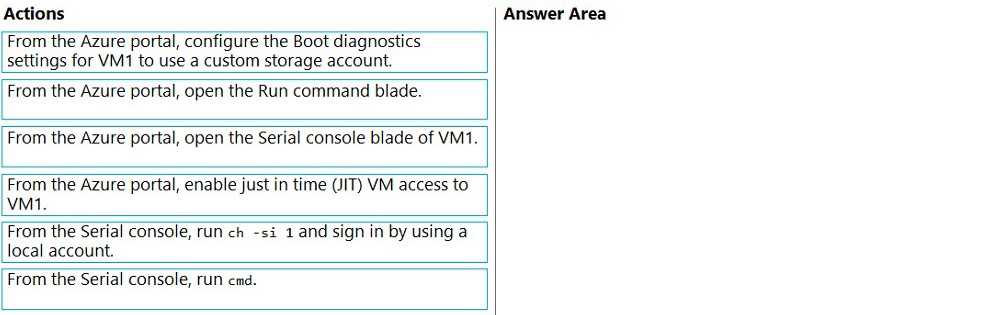
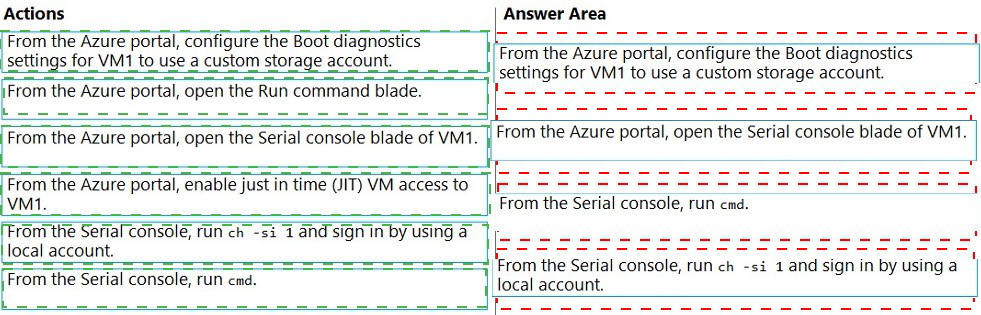
You have an Azure virtual machine named VM1 that runs Windows Server. VM1 has boot
diagnostics configured to use a managed storage account.
You are troubleshooting connectivity issue on VM1.
You need to run a PowerShell cmdlet on VM1 by using the Azure Serial Console.
Which four actions should you perform in sequence? To answer, move the appropriate
actions from the list of actions to the answer area and arrange them in the correct order.
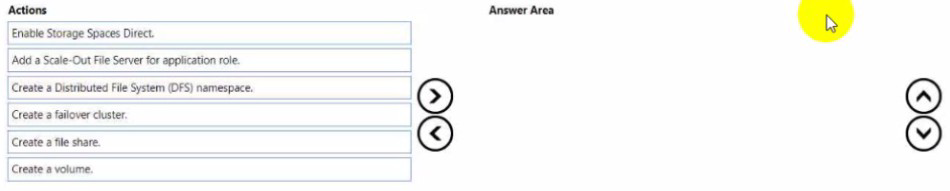
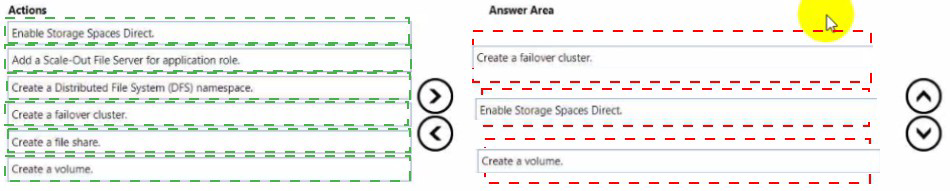
You need to create a Hyper-V hyper-converged cluster that stores virtual machines by
using Storage Spaces Owed
Which three actions should you perform in sequence? To answer, move the appropriate
anions from the list of actions to the answer area and arrange them in the correct order.
\
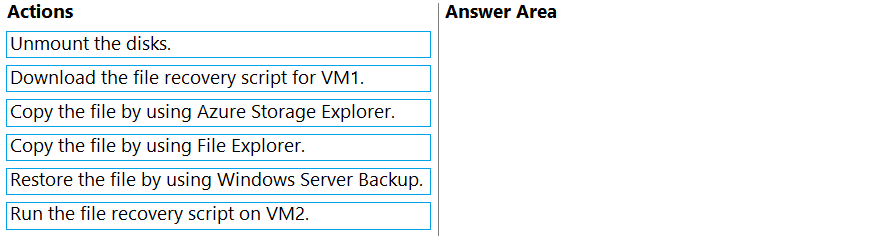
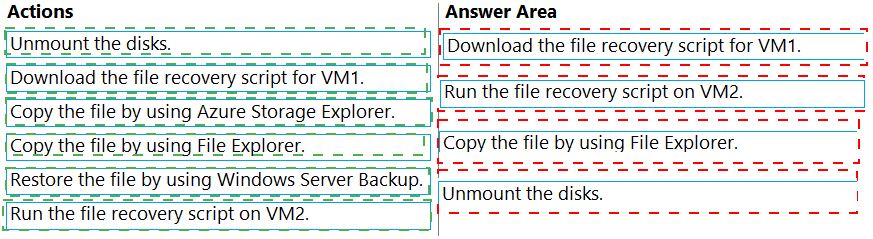
You have two Azure virtual machines named VM1 and VM2. VM1 is backed up to an Azure
Recovery Services vault daily and retains backups for 30 days.
You need to restore an individual file named C:\Data\Important.docx from VM1 to VM2. The
solution must minimize administrative effort.
Which four actions should you perform in sequence? To answer, move the appropriate
actions from the list of actions to the answer area and arrange them in the correct order.
You have an Azure virtual machine named VM1.
You enable Microsoft Defender SmartScreen on VM1.
You need to ensure that the SmartScreen messages displayed to users are logged.
What should you do?
A. From a command prompt, run WinRM quickconfig.
B. From the local Group Policy, modify the Advanced Audit Policy Configuration settings.
C. From Event Viewer, enable the Debug log.
D. From the Windows Security app. configure the Virus & threat protection settings.
You need to use a comma-separated value (CSV) file to import server inventory to Azure Migrate. Which fields are mandatory for each entry in the CSV file?
A. Server name. Cores, OS Name, and Memory (in MB)
B. Server name, IP addresses. Disk 1 size (in GB), and CPU utilization percentage
C. Server name, IP addresses, OS version, and Number of disks
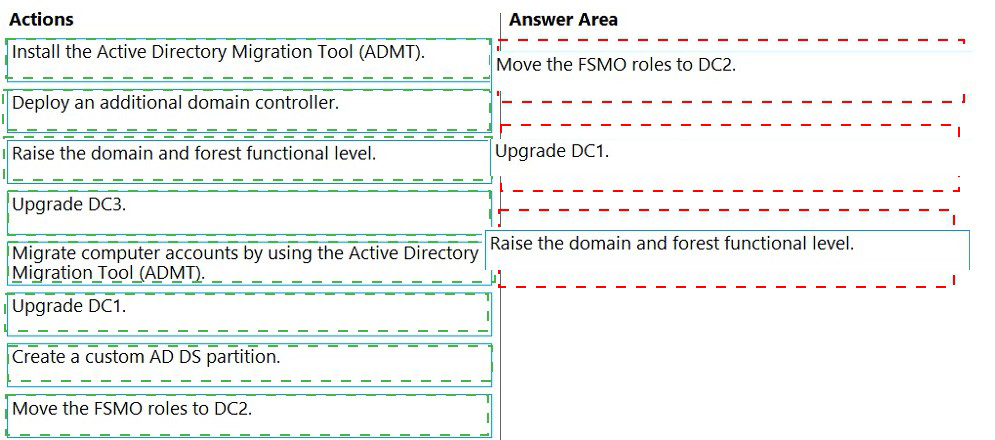
Your network contains an Active Directory Domain Services (AD DS) domain named
contoso.com. The functional level of the forest and the domain is Windows Server 2012
R2. The domain contains the domain controllers shown in the following table.
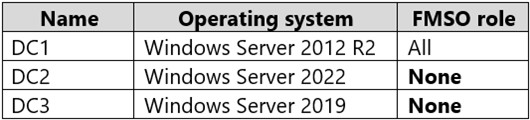
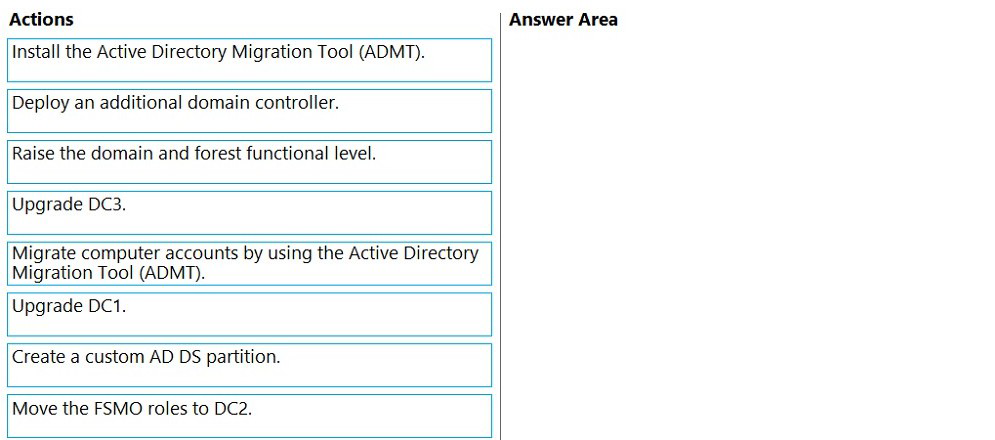
You need to raise the forest functional level to Windows Server 2016. The solution must
meet the following requirements:
Ensure that there are three domain controllers after you raises the level.
Minimize how long the FSMO roles are unavailable.
Which three actions should you perform in sequence? To answer, move the appropriate
actions from the list of actions to the answer area and arrange them in the correct order.
| Page 3 out of 13 Pages |
| Previous |