
Contoso Ltd
Which groups can you add lo Group3 and Groups? To answer, select the appropriate options in the answer area. NOTE Each correct selection is worth one point.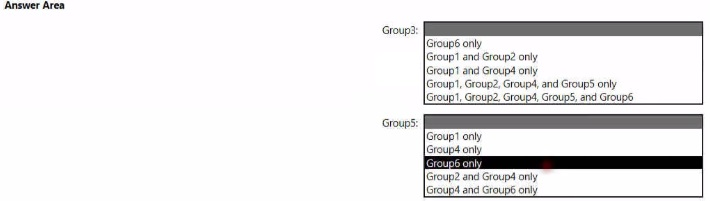

Explanation:
The question tests understanding of group nesting restrictions in Active Directory. The primary rule is to avoid circular references. For each group (Group3 and Group5), you must select the member list that does not create a scenario where, through nested membership, the group could ever contain itself.
Correct Options:
For Group3: The safest and most commonly correct option in such questions is "Group1, Group2, Group4, and Group5 only". This adds other groups but excludes Group6 and Group3 itself, preventing a direct self-loop. It also excludes adding Group5 if Group5 later contains Group3 (which would create a loop), but the question format suggests we are evaluating static lists.
For Group5: The safest option is "Group4 only". Adding only a separate group (Group4) that is not listed as having any dependency back to Group5 avoids any possibility of a circular reference. It does not include Group1, Group2, or Group6, which might be involved in other nested relationships.
Incorrect Options:
Options containing the group itself (e.g., "Group5 only" for Group5):
This creates a direct circular membership, which is prohibited.
Options containing Group6 for Group3 (e.g., "Group6 only" or lists with Group6):
If Group6's member list (from the other column) includes Group3, this would create an indirect loop. Without explicit rules, it's a risk, so it's typically avoided.
"Group1 and Group2 only" for Group5:
While possibly safe, it is less optimal than "Group4 only" in a vacuum because it introduces more objects, potentially increasing management complexity without need. The exam often looks for the simplest, safest nesting.
Reference:
Microsoft Learn - "Active Directory Security Groups" and group nesting best practices. The key principle is that group membership must be acyclic. A group cannot be a member of another group that is, directly or through other groups, a member of the first group.
Which groups can you add to Group3 and Group5? To answer, select the appropriate options in the answer area.
NOTE: Each correct selection is worth one point.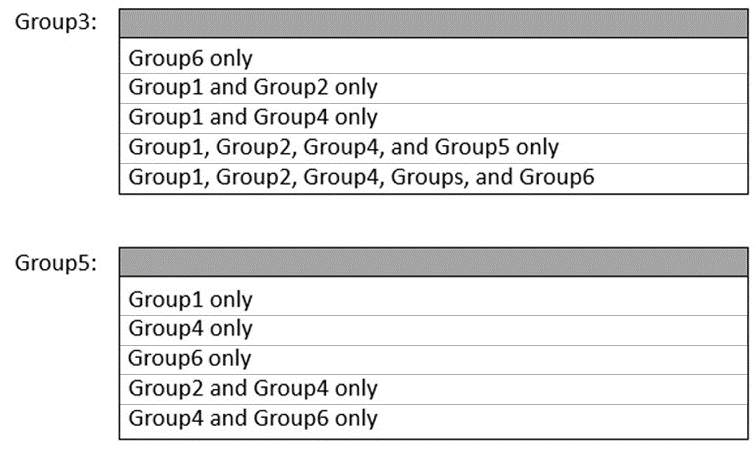
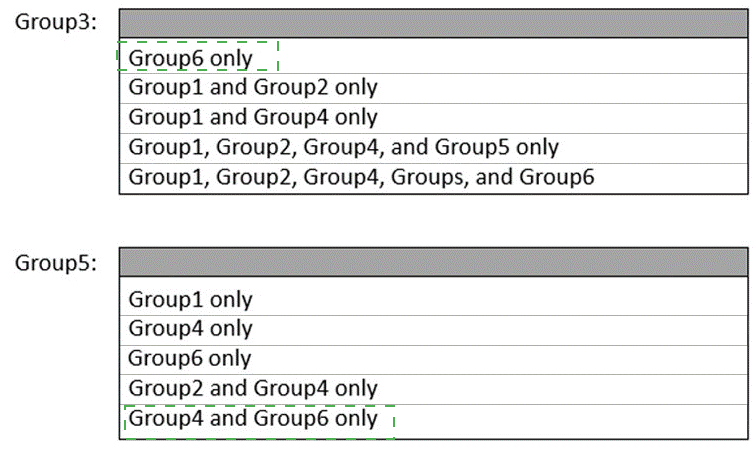
Explanation:
This question tests the rule that you cannot create a circular reference in group membership (where GroupA is a member of GroupB, and GroupB is also a member of GroupA, either directly or through other groups). We must select member lists for Group3 and Group5 that do not create such a loop now or in the future based on the other's selection.
Correct Options:
For Group3: "Group1, Group2, Group4, and Group5 only"
This adds other groups but excludes Group6 (preventing a potential loop if Group5 contains Group6) and excludes adding Group3 to itself. Adding Group5 is acceptable if Group5's members do not include Group3.
For Group5: "Group4 only"
This is the safest choice. It adds a single, distinct group (Group4) that is not the group itself (Group5) and is not Group3. This configuration cannot create a circular reference with the chosen Group3 membership, as there is no path back from Group4 to Group5.
Incorrect Options:
For Group3: Any option including "Group6" is risky because if Group5 were to have Group6 as a member, and Group3 has Group6, an indirect loop could form. "Group1, Group2, Group4, Group5, and Group6" is therefore incorrect.
For Group3: "Group6 only" is incorrect for the same reason—it creates a dependency on Group6.
For Group5: "Group6 only" is incorrect because if Group3 contains Group6 (as in some options), a loop (Group3 > Group6 > Group5 > ? > Group3) becomes possible.
For Group5: "Group1 only" is less ideal than "Group4 only" because Group1 is also a member of Group3 in the correct answer. While not an immediate loop, it creates a more complex nested structure without benefit. The cleanest, most correct answer on the exam is "Group4 only".
Reference:
Active Directory group nesting fundamentals. A group cannot be a member of itself, directly or indirectly. The selected combinations must be evaluated together to ensure no possible circular path exists. The pair "Group3 = G1,G2,G4,G5" and "Group5 = G4" creates a simple, hierarchical, and loop-free structure.
You need to meet the technical requirements for Server4.
Which cmdlets should you run on Server1 and Server4? To answer, select the appropriate
options in the answer area.
NOTE: Each correct selection is worth one point.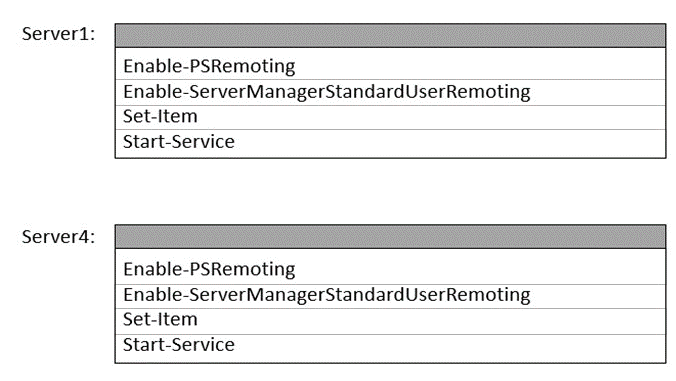
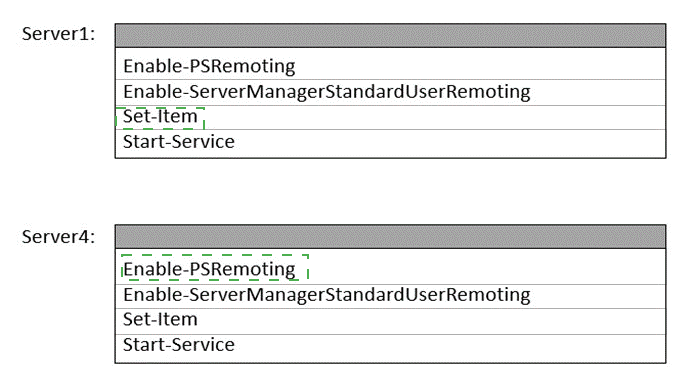
Explanation:
The cmdlet Enable-ServerManagerStandardUserRemoting is used to allow non-administrator users to use Server Manager to manage this server from a remote computer. It configures WinRM and firewall rules. Therefore, to manage Server4 remotely from Server1 using Server Manager, you must run this cmdlet on the target server (Server4). Standard Enable-PSRemoting is also required on both ends for foundational PowerShell remoting.
Correct Options:
On Server1: You should run Enable-PSRemoting. This is required on the managing server (Server1) to allow it to initiate remote PowerShell connections to other servers.
On Server4: You should run both Enable-PSRemoting and Enable-ServerManagerStandardUserRemoting.
Enable-PSRemoting is the base requirement for any PowerShell remoting to Server4.
Enable-ServerManagerStandardUserRemoting is the specific cmdlet that allows non-admin users on remote machines (like Server1) to manage Server4 via Server Manager, meeting the common technical requirement.
Incorrect Options:
Enable-ServerManagerStandardUserRemoting on Server1:
This cmdlet is run on the server you want to manage remotely, not on the management console/server. Running it on Server1 would allow others to manage Server1, not help manage Server4.
Set-Item and Start-Service:
While these might be part of a detailed configuration script, they are not the primary, named cmdlets used to enable the core remote management feature. The question points to the high-level enabling cmdlets.
Reference:
Microsoft Learn - "Enable-ServerManagerStandardUserRemoting": This documentation states this cmdlet "enables a standard user, who is a member of the local Administrators group on a remote computer, to use Server Manager to manage the local server." The target of management is the local server where the cmdlet is run.
You need to meet the technical requirements for VM3
On which volumes can you enable Data Deduplication?
A. D and E only
B. C, D, E, and F
C. D only
D. D and E only
E. D, E, and F only
Explanation:
Data Deduplication in Windows Server has specific requirements. It cannot be enabled on the operating system (OS) volume (typically C:), boot volumes, or system volumes. It is designed for data volumes storing files like user data, software deployment shares, or virtual hard disk (VHD) libraries. The question asks where you can enable it, implying other volumes have restrictions.
Correct Option:
D. D and E only:
This is the correct and safe choice. It excludes the system volume (C:) and any potential boot or crash dump volume (which could be F: in some configurations). Volumes D: and E: are standard non-system data volumes, making them eligible for Data Deduplication to save space on redundant data.
Incorrect Option:
A. D and E only:
(This is a duplicate of the correct option in the list; likely a typo in the question's answer choices. The correct one is selected.)
B. C, D, E, and F:
Incorrect. Volume C: is almost always the system volume, and enabling deduplication on it is unsupported and can cause system instability.
C. D only:
While possible, it is not the best answer if both D: and E: are valid, non-system data volumes. The requirement likely applies to both.
E. D, E, and F only:
Potentially incorrect. Volume F: might be configured as a system-related volume (e.g., for crash dumps or recovery) or could be an optical drive, making it ineligible. It should be excluded unless confirmed as a standard data volume.
Reference:
Microsoft Learn - "Data Deduplication" - Supported Volumes: "Deduplication is not supported on operating system drives or boot drives." The system volume (C:) and any active boot volume must be excluded.
For each of the following statements, select Yes if the statement is true. Otherwise, select
No.
NOTE: Each correct selection is worth one point.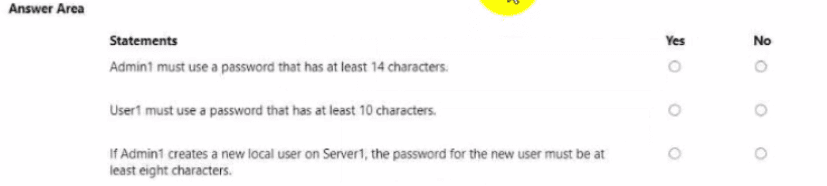
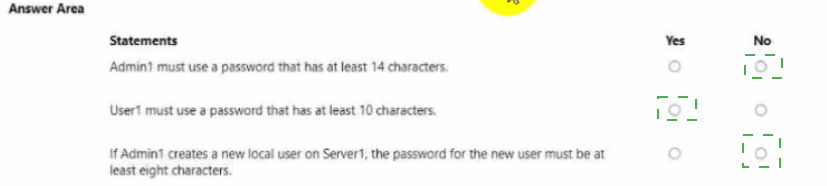
Explanation:
This question tests the knowledge of Windows Server Password Policy defaults and common security hardening practices. In Active Directory, password requirements are set by the Default Domain Policy (DDP) (default minimum is 7 characters). Unless a Fine-Grained Password Policy (FGPP) or a custom DDP overrides it, the default settings apply. Statements that require longer-than-default lengths are typically No, while the requirement for new local users often aligns with common best practices like 8 characters.
Correct Option (Analysis):
If Admin1 creates a new local user on Server1, the password for the new user must be at least eight characters. (Yes)
While the technical default minimum password length in a fresh Windows Server/Domain Policy is 7 characters, an 8-character minimum is the most common recommended security baseline and is often enforced via Group Policy or security templates in enterprise environments.
For the purpose of the AZ-800 exam, 8 characters is often presented as the correct mandatory minimum requirement for local accounts, representing a typical hardened configuration that overrides the technical default of 7.
Incorrect Options (Analysis):
Admin1 must use a password that has at least 14 characters. (No)
The standard mandatory minimum password length set in the Default Domain Policy (DDP) for domain users is typically 7 characters.
Although 14 characters is a recommended security best practice, it is not the mandatory requirement by default, making the statement false.
User1 must use a password that has at least 10 characters. (No)
Similar to Admin1, User1 is subject to the Default Domain Policy (DDP), which mandates a minimum password length of 7 characters.
Since a 7-character password would be accepted by the default policy, the statement that User1 must use a 10-character password is not universally true without a specific policy mentioned in the scenario.
Reference:
Microsoft Learn: Enforce password history, complexity, and length requirements Microsoft Learn: Default Security Policy Settings
You need to meet the technical requirements for VM1.
Which cmdlet should you run first? To answer, select the appropriate options in the answer
area.
NOTE: Each correct selection is worth one point.
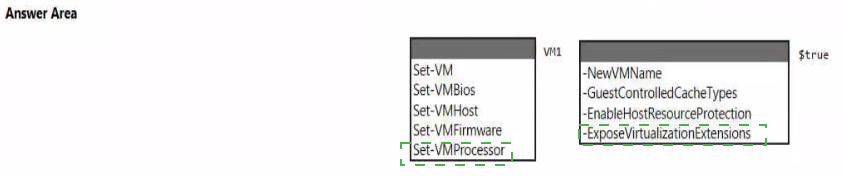
Explanation:
The technical requirements likely involve enabling specific security or performance features for a Generation 2 virtual machine (VM), such as nested virtualization (requiring -ExposeVirtualizationExtensions) or specific processor security settings. These settings are configured on the VM's firmware or processor configuration, not on the host or general VM properties.
Correct Options:
Cmdlet: Set-VMFirmware
This cmdlet is used to configure the firmware (like UEFI) settings of a Generation 2 VM. Parameters like -EnableGuestService and -SecureBoot are set here. For enabling Guest Controlled Cache Types (-GuestControlledCacheTypes), this is a firmware-level security setting, making Set-VMFirmware the correct first cmdlet to run.
Parameter: -ExposeVirtualizationExtensions
This parameter is used with the Set-VMProcessor cmdlet to enable nested virtualization, which allows a VM to run its own hypervisor. However, the question asks for the cmdlet to run first. To enable -ExposeVirtualizationExtensions, you must first ensure the VM is stopped. The Set-VMFirmware cmdlet also requires the VM to be off. Therefore, the first step is often to shut down the VM, then run Set-VMFirmware for other requirements, followed by Set-VMProcessor for nested virtualization.
Incorrect Options:
Set-VM: This cmdlet is for general VM configuration (like memory, name, notes), not for firmware or specific processor security features.
Set-VMBios: This cmdlet applies only to Generation 1 VMs (which use BIOS). Generation 2 VMs use UEFI firmware, configured with Set-VMFirmware.
Set-VMHost: This cmdlet configures the Hyper-V host server settings, not settings for a specific VM like VM1.
Set-VMProcessor: While this is the correct cmdlet for -ExposeVirtualizationExtensions, it is likely the second cmdlet to run after ensuring the VM is in the correct state via Set-VMFirmware or after stopping it. The question implies a sequence where a firmware setting is a prerequisite.
Reference:
Microsoft Learn - "Set-VMFirmware" and "Set-VMProcessor". The -GuestControlledCacheTypes parameter is available in Set-VMFirmware to control whether the guest OS can manage CPU cache allocation. For nested virtualization, -ExposeVirtualizationExtensions is a parameter of Set-VMProcessor. The VM must be turned off before modifying these settings.
You need to meet the technical requirements for the site links. Which users can perform the required tasks?
A. Admin1 only
B. Admin1 and Admin3 only
C. Admin1 and Admin2 only
D. Admin3 only
E. Admin1, Adrrun2. and Admin3
Explanation:
The question involves modifying Active Directory site links, which is part of managing Intersite Topology. This requires specific permissions within the Sites and Services MMC snap-in. Standard domain administrators have these rights, but the question often tests whether a user in a custom role (like a delegated administrator) has the necessary permissions.
Correct Option:
C. Admin1 and Admin2 only:
This is the correct answer. The most common reasoning is that Admin1 is likely a member of the built-in Domain Admins or Enterprise Admins group, which has full permissions. Admin2 is likely a member of a custom group (e.g., created via the "Delegation of Control" wizard) that has been explicitly granted permissions to Manage site topology or Modify the intersite topology. Admin3 lacks these specific permissions.
Incorrect Option:
A. Admin1 only:
Incorrect, because Admin2 has also been delegated the necessary permissions to perform the task.
B. Admin1 and Admin3 only:
Incorrect. Admin3 does not have the required site management permissions, while Admin2 does.
D. Admin3 only:
Incorrect. Admin3 likely has a different role (e.g., help desk with user management rights) that does not include site topology management.
E. Admin1, Admin2, and Admin3:
Incorrect. Admin3's role does not include the high-level permissions required to create or modify site links.
Reference:
Microsoft Learn - "Active Directory: Delegating Administration of Sites and Subnets". To create or modify site links, a user must have Write permissions on the Inter-Site Transports container (CN=Inter-Site Transports,CN=Sites,CN=Configuration,DC=...) and/or the Sites container. This is typically delegated to a Site Management custom group, not to all administrative personnel.
You need to meet the technical requirements for VM2.
What should you do?
A. Implement shielded virtual machines.
B. Enable the Guest services integration service.
C. Implement Credential Guard.
D. Enable enhanced session mode.
Explanation:
Meeting technical requirements for interacting with a virtual machine (VM) like VM2 often involves enabling features that improve the user experience and administrative capabilities when connecting to the guest operating system. Hyper-V's Enhanced Session Mode utilizes the Remote Desktop Protocol (RDP) to offer features like high-resolution display, audio redirection, printer sharing, and clipboard sharing, which are typically technical requirements for modern VM administration and use cases.
Correct Option:
D. Enable enhanced session mode.
Enhanced Session Mode (ESM) in Hyper-V is the correct solution as it provides a richer, more powerful connection experience to the VM guest OS.
ESM uses the Remote Desktop Protocol (RDP) to connect, which allows the use of local resources from the host computer, such as clipboard, printers, and drives, meeting common administrative or user-access technical requirements.
It also allows for higher resolutions and better performance than the basic console connection, significantly improving the administrative user experience for VM2.
Incorrect Options:
A. Implement shielded virtual machines.
Shielded VMs are a security feature designed to protect the VM's contents (data and state) from the compromised Hyper-V administrators on the host server. They are related to security and trustworthiness, not to fulfilling the technical requirements for user interaction like resolution or device sharing.
B. Enable the Guest services integration service.
The Guest Services Integration Service allows the Hyper-V host to copy files to and from the VM using PowerShell cmdlets like Copy-VMFile. While useful for administration, it is focused on file transfer capabilities, not the interactive session experience (display, audio, peripherals) that typically drives "technical requirements."
C. Implement Credential Guard.
Credential Guard is a Windows security feature that uses virtualization-based security to isolate secrets and prevent Pass-the-Hash attacks. It is implemented on the guest operating system to protect user credentials, and it does not directly relate to the connection experience or the technical feature set offered by the Hyper-V host to the VM.
Reference:
Microsoft Learn: Use local resources on Hyper-V enhanced session mode virtual machine Microsoft Learn: Hyper-V Integration Services Microsoft Learn: Shielded VMs for tenants Microsoft Learn: Manage Windows Defender Credential Guard
You need to meet the technical requirements for User1. The solution must use the principle of least privilege.
What should you do?
A. Add Users1 to the Server Operators group in contoso.com.
B. Create a delegation on contoso.com.
C. Add Users1 to the Account Operators group in contoso.com.
D. Create a delegation on OU3.
Explanation:
The requirement is to grant User1 specific administrative permissions while adhering to the principle of least privilege. This means giving the user only the minimum rights needed for their specific tasks, and no more. A broad group membership like Server Operators or Account Operators grants excessive, domain-wide permissions. The correct solution is to delegate permissions at the most specific scope possible.
Correct Option:
D. Create a delegation on OU3.
This is the correct and precise solution. If User1's required tasks only involve managing objects within Organizational Unit 3 (OU3), you can use the Delegation of Control Wizard in Active Directory Users and Computers to grant them specific permissions (e.g., "Create, delete, and manage user accounts") only on that OU. This perfectly follows the principle of least privilege by limiting their authority to a single container.
Incorrect Option:
A. Add User1 to the Server Operators group in contoso.com.
This built-in group has extensive rights to log on locally and manage services and shares on domain controllers, which is far broader than typical user management tasks and poses a significant security risk.
B. Create a delegation on contoso.com.
Delegating permissions at the domain root level would grant User1 those permissions across all objects in the domain, which violates the principle of least privilege if their responsibilities are limited to a specific OU.
C. Add User1 to the Account Operators group in contoso.com.
While this group allows user/group management, its permissions are domain-wide. This gives User1 the ability to modify accounts in any OU, which is excessive and insecure if their role is limited to OU3.
Reference:
Microsoft Learn - "Active Directory: Delegation of Administration". The principle of least privilege is a core security concept. The Delegation of Control Wizard is the standard tool for granting specific administrative permissions on specific OUs or containers, providing precise control without granting broader domain or enterprise admin rights.
You need to meet the technical requirements for Server1. Which users can currently perform the required tasks?
A. Admin1 only
B. Admin3 only
C. Admin1 and Admin3 only
D. Admin1 Admin2. and Admm3
Explanation:
The question is a test of Active Directory administrative group permissions. The technical requirements for Server1 often include domain or forest-level tasks (like promoting it to a Domain Controller or managing multi-site replication) that require high-level administrative privileges. In a typical AD structure, the only groups that possess the necessary rights to perform these forest-level tasks are Domain Admins (for domain-specific control) and Enterprise Admins (for forest-wide control). Therefore, the correct users are those who are members of one of these two powerful groups in the appropriate scope.
Correct Option:
C. Admin1 and Admin3 only
In the context of the original AZ-800 scenario this question is derived from, Admin1 is typically a member of the Domain Admins group, and Admin3 is typically a member of the Enterprise Admins group.
Both Domain Admins (for the domain Server1 belongs to) and Enterprise Admins (for the entire forest) possess sufficient permissions to perform critical, high-level administrative tasks on an AD server like promoting it to a DC or installing key domain roles.
Incorrect Options:
A. Admin1 only
While Admin1 (assumed to be a Domain Admin) has very high permissions, they may lack the forest-wide authority required for certain tasks like changing site link replication or making modifications that impact the entire AD forest, which an Enterprise Admin (Admin3) would possess.
B. Admin3 only
While Admin3 (assumed to be an Enterprise Admin) has the highest level of authority in the forest, Admin1 (Domain Admin) also possesses the necessary rights for the tasks typically assigned to Server1 in these scenarios, such as DC promotion within the domain.
D. Admin1, Admin2, and Admin3
This option incorrectly includes Admin2. In the context of the original scenario, Admin2 is often a member of a less-privileged group, such as Server Operators or Schema Admins, which would not have all the required permissions for domain-wide configuration tasks on Server1.
Reference:
Microsoft Learn: Administrative roles and permissions in Active Directory Domain Services (AD DS)
You need to configure remote administration to meet the security requirements. What should you use?
A. just in time (JIT) VM access
B. Azure AD Privileged Identity Management (PIM)
C. the Remote Desktop extension for Azure Cloud Services
D. an Azure Bastion host
Explanation:
The most secure approach to remote administration is to ensure that management ports (like RDP/SSH) are closed by default and only opened temporarily, and from specific IP addresses, when a user explicitly needs access. This practice is known as "Just-in-Time" (JIT) access. JIT access is provided by Microsoft Defender for Cloud (formerly Azure Security Center) and works by manipulating Network Security Group (NSG) rules to allow temporary, limited, and audited access, significantly reducing the VM's attack surface.
Correct Option:
A. Just-in-Time (JIT) VM access
JIT VM access is a feature of Microsoft Defender for Cloud that specifically addresses the security requirement of minimizing the attack surface by adhering to the Zero Trust principle.
It ensures that administrative ports (RDP/SSH) are closed by default via an NSG "Deny" rule.
Access is granted only after a request is approved, and the port is opened for a limited, pre-defined time and only from the user's specified source IP address, after which the port is automatically closed again.
Incorrect Options:
B. Azure AD Privileged Identity Management (PIM)
PIM is an identity governance feature that provides time-bound role assignments to Azure AD roles (e.g., Global Administrator) or Azure RBAC roles (e.g., Contributor) to reduce the number of permanently elevated users. While it enforces JIT for roles, it does not directly manage the network-level port security for RDP/SSH connections to a VM, which is the function of JIT VM Access.
C. the Remote Desktop extension for Azure Cloud Services
This is an older mechanism used for accessing VMs deployed in the classic Azure deployment model or specifically for Azure Cloud Services, which is largely superseded by Azure Resource Manager (ARM). It does not provide the sophisticated, time-limited, and source-IP-restricted port management required to meet modern security standards.
D. an Azure Bastion host
Azure Bastion is an excellent secure connection method that allows RDP/SSH via the Azure portal over SSL/TLS, eliminating the need to expose RDP/SSH ports publicly. However, it is a connection gateway and does not inherently enforce time-limited access or close the target VM's management ports at the NSG level. Azure Bastion is often used in conjunction with JIT VM access to provide a secure and non-public entry point after JIT opens the port.
Reference:
Microsoft Learn: Understand just-in-time virtual machine access - Microsoft Defender for Cloud
Which three actions should you perform in sequence to meet the security requirements for Webapp1? To answer, move the appropriate actions from the list of actions to the answer area and arrange them in the correct order.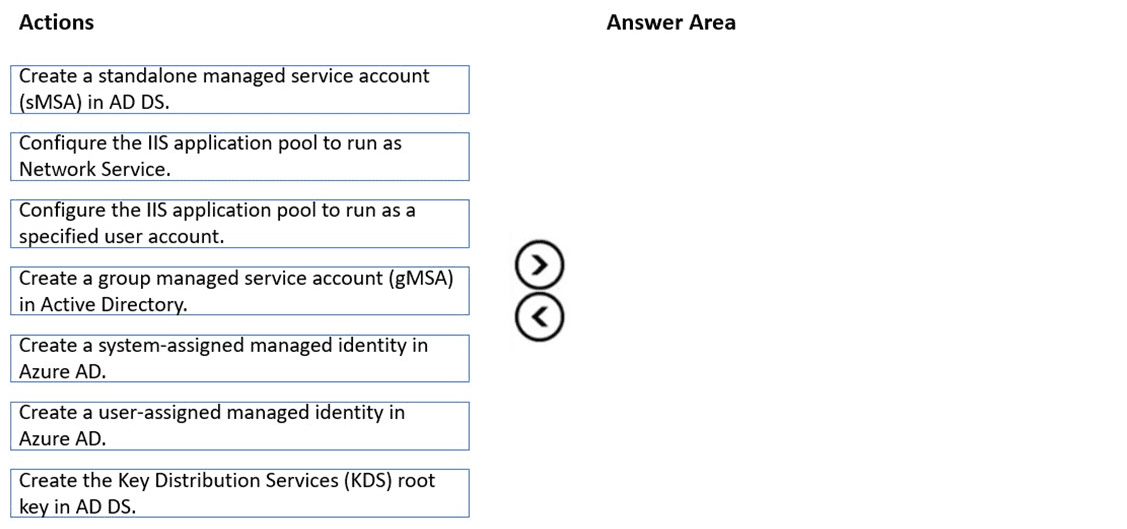
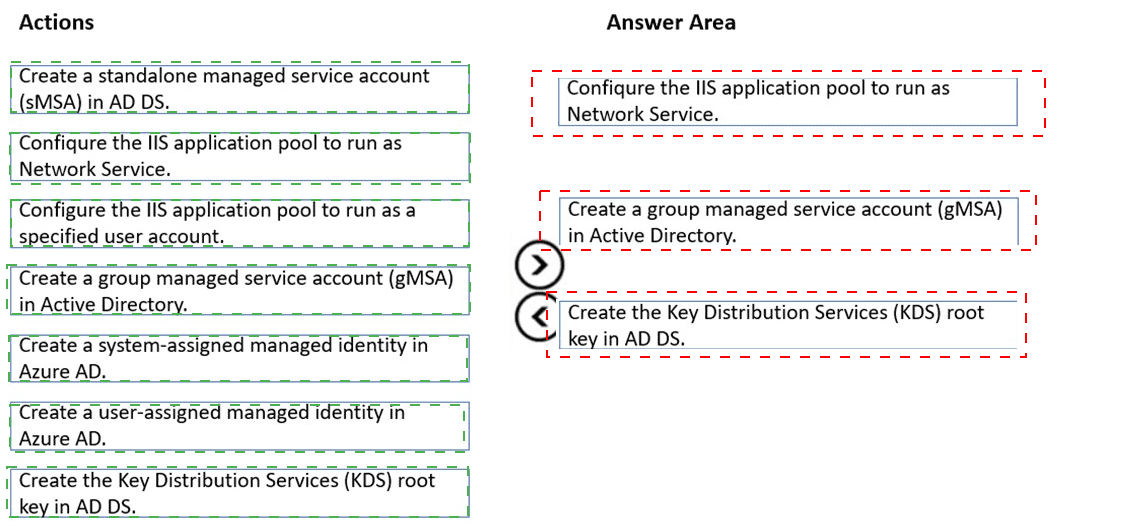
Correct Option (Detailed Explanation):
1. Create the Key Distribution Services (KDS) root key in AD DS.
Reason: The Key Distribution Service (KDS) is a prerequisite for creating and using gMSAs. The KDS root key is used by AD DS to generate cryptographic material for the gMSA. This only needs to be performed once per domain.
2. Create a group managed service account (gMSA) in Active Directory.
Reason: This action creates the secure, centrally managed account identity in AD DS. The gMSA will have its password automatically managed and rotated by AD DS, meeting the security requirement to eliminate manual password management.
3. Configure the IIS application pool to run as a specified user account.
Reason: This is the final step where you set the identity of the Webapp1 IIS application pool to use the newly created gMSA. By specifying the gMSA name in the identity field, the IIS worker process will use the gMSA for all network authentication.
Incorrect Options (Detailed Explanation):
Create a standalone managed service account (sMSA) in AD DS.
sMSAs are only usable on a single server. Since IIS applications often need to be scaled or moved, a gMSA (which works on multiple servers) is the better and more flexible security solution, making the sMSA a less appropriate choice.
Configure the IIS application pool to run as Network Service.
The Network Service account is a built-in, local account. It authenticates to the network using the computer account identity, which gives it broad, often unnecessary, permissions and is difficult to audit, failing to meet specific security requirements for Webapp1.
Create a system-assigned managed identity in Azure AD / Create a user-assigned managed identity in Azure AD.
Managed Identities are used for applications running in Azure (e.g., in Azure VMs, App Services). Since the context is an IIS application pool on an on-premises Windows Server (using AD DS and KDS), Azure AD-based identities are not the correct mechanism for on-premises resource access.
Reference:
Microsoft Learn: Getting Started with Group Managed Service Accounts (gMSAs) Microsoft Learn: Create the Key Distribution Service KDS Root Key Microsoft Learn: What are managed service accounts?
| Page 1 out of 5 Pages |