
Topic 3, Mix Questions
Note: This question is part of a series of questions that present the same scenario. Each question in the series contains a unique solution that might meet the stated goals. Some question sets might have more than one correct solution, while others might not have a correct solution.
After you answer a question in this section, you will NOT be able to return to it. As a result, these questions will not appear in the review screen.
You have an Azure application gateway that has Azure Web Application Firewall (WAF) enabled.
You configure the application gateway to direct traffic to the URL of the application gateway.
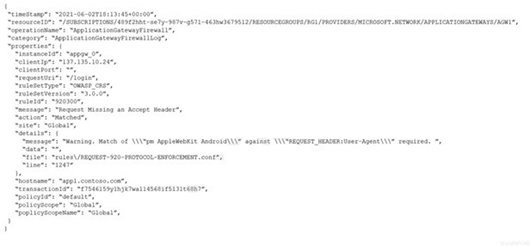
You attempt to access the URL and receive an HTTP 403 error. You view the diagnostics log and discover the following error.
You need to ensure that the URL is accessible through the application gateway.
Solution: You create a WAF policy exclusion for request headers that contain 137.135.10.24.
Does this meet the goal?
A.
Yes
B.
No
No
Explanation:
This question tests troubleshooting WAF-related HTTP 403 Forbidden errors. The JSON log snippet shows a triggered WAF rule (rule ID 920300). The solution proposes an exclusion based on a specific IP in the request headers, which is a misdiagnosis of the actual cause shown in the log.
Correct Option:
B. No.
The solution does not meet the goal. The WAF log indicates rule 920300 was triggered, which is part of the OWASP Core Rule Set (CRS) and typically blocks requests due to missing a User-Agent or Host header, or because the request contains an IP address in the Host header field. The log's details field ("Missing/Empty Host Header") explicitly states the cause. An exclusion for an IP address in a request header would not resolve this specific rule violation.
Incorrect Option:
A. Yes.
This is incorrect. Creating an exclusion for the IP address 137.135.10.24 is not the appropriate fix. The error is caused by the Host header being missing or containing an IP address instead of a hostname. The correct fix would be to ensure the client request includes a valid Host header with the application gateway's domain name, or to create a WAF exclusion for the Host header for the specific rule ID 920300 if using an IP in the Host header is a legitimate requirement.
Reference:
Microsoft Learn - Web Application Firewall (WAF) exclusion lists. The documentation explains that exclusions must be targeted at the correct part of the request (e.g., request header name) and matched to the specific rule ID. Rule 920300 is documented as "Request Missing/Empty Host Header."
You have an Azure subscription that contains the resources shown in the following table.

Subshell contains Three virtual machines that host an app named App1. App1 is accessed by using the SFTP protocol.
From NSG1. you configure an inbound security rule named Rule2 that allows inbound SFTP connections to ASG1.
You need to ensure that the inbound SFTP connections are managed by using ASG1. The solution must minimize administrative effort.
What should you do?
A.
From NSG1. modify the priority of Rule2.
B.
From each virtual machine, associate the network interface to ASG1
C.
From Subnet1 create a subnet delegation.
D.
From ASG1, modify the role assignments.
From each virtual machine, associate the network interface to ASG1
Explanation:
This question tests the implementation of Application Security Groups (ASGs). ASGs are logical groupings of virtual machine NICs that allow NSG rules to target applications rather than specific IPs. For an NSG rule targeting an ASG to be effective, the NICs of the relevant VMs must be associated with that ASG.
Correct Option:
B. From each virtual machine, associate the network interface to ASG1.
This is the direct and necessary action. ASGs function by being attached to the network interfaces (NICs) of virtual machines. Since Rule2 in NSG1 is already configured to allow SFTP traffic to ASG1, traffic will only be permitted to VMs whose NICs are members of ASG1. This approach centralizes management; updating the ASG membership automatically applies the NSG rule without modifying the rule itself.
Incorrect Option:
A. From NSG1, modify the priority of Rule2.
Changing the rule's priority affects its evaluation order relative to other rules but does nothing to link the VMs to the ASG. The rule already targets ASG1, but if no VM NICs are associated with it, the rule has no effect.
C. From Subnet1, create a subnet delegation.
Subnet delegation is used to grant specific Azure services (like Azure NetApp Files or Azure Dedicated HSM) permission to create service-specific resources in the subnet. It has no relation to NSG rules or ASG membership.
D. From ASG1, modify the role assignments.
Role assignments in Azure control access management (RBAC) for creating, modifying, or deleting the ASG resource itself. They do not control which NICs are members of the ASG or how traffic is filtered.
Reference:
Microsoft Learn - Application security groups. The documentation states: "You can define your application's structure by grouping VMs and defining network security policies based on those groups. You can reuse your security policy at scale without manual maintenance of explicit IP addresses... An application security group is associated with a network interface."
You configure a route table named RT1 that has the routes shown in the following table.

You have an Azure virtual network named Vnet1 that has the subnets shown in the following table.

You have the resources shown in the following table.

Vnet1 connects to an ExpressRoute circuit. The on-premises router advertises the following routes:
* 0.0.0.0/0
* 10.0.0.0/16
For each of the following statements, select Yes if the statement is true. Otherwise, select No. NOTE: Each correct selection is worth one point.


Your company has offices in Montreal. Seattle, and Paris. The outbound traffic from each office originates from a specific public IP address.
You create an Azure Front Door instance named FD1 that has Azure Web Application Firewall (WAF) enabled. You configure a WAF policy named Policy! that has a rule named Rule1. Rule1 applies a rate limit of 100 requests for traffic that originates from the office in Montreal.
You need to apply a rate limit of 100 requests for traffic that originates from each office. What should you do?
A.
Modify the conditions of Rule1.
B.
Create two additional associations.
C.
Modify the rule type of Rule1.
D.
Modify the rate limit threshold of Rule1.
Modify the conditions of Rule1.
Explanation:
This question tests the configuration of WAF custom rate limit rules in Azure Front Door. A single rate limit rule can include multiple matching conditions to identify traffic from different sources. The goal is to apply the same limit to traffic originating from three distinct public IPs (one per office), not to create separate rules.
Correct Option:
A. Modify the conditions of Rule1.
This is the correct and most efficient approach. A WAF custom rule's match conditions can include a logical OR group. You can edit Rule1's match condition to include all three public IP addresses (from Montreal, Seattle, and Paris) in a single list. The rate limit of 100 requests will then be applied collectively to traffic matching any of those IPs.
Incorrect Option:
B. Create two additional associations.
Associations link a WAF policy to a Front Door endpoint or domain. The policy (Policy1) is already associated with FD1. Creating more associations would not change which source IPs the rule evaluates; it would just reapply the same policy to the same resources.
C. Modify the rule type of Rule1.
The rule type is correctly set as a "Rate limiting rule." Changing it to a different type (like "Match rule") would remove the rate-limiting functionality entirely, breaking the requirement.
D. Modify the rate limit threshold of Rule1.
Changing the threshold (e.g., from 100 to 300) would adjust the limit's value but would not expand the scope of the rule to include the IP addresses from the Seattle and Paris offices. The rule would still only apply to the Montreal IP.
Reference:
Microsoft Learn - Rate limiting rule with Azure Web Application Firewall on Azure Front Door. The documentation shows that a single rate limit rule's match condition can specify multiple IP addresses, which are evaluated with an OR logic.
Your on-premises network contains an Active Directory Domain Services {AD DS) domain named contoso.com that has an internal certification authority (CA).
You have an Azure subscription.
You deploy an Azure application gateway named AppGwy1 and perform the following actions:
• Configure an HTTP listener.
• Associate a routing rule with the listener.
You need to configure AppGwy1 to perform mutual authentication for requests from domain-joined computers to contoso.com.
Which four actions should you perform in sequence? To answer, move the appropriate actions from the list of actions to the answer area and arrange them in the correct order.


You have an Azure subscription that is linked to an Azure AD tenant named contoso.onmicrosoft.com. The subscription contains the following resources:
• A virtual network named Vnet1
• An App Service plan named ASPI
• An Azure App Service named webapp1
• An Azure private DNS zone named private.contoso.com
• Virtual machines on Vnet1 that cannot communicate outside the virtual network
You need to ensure that the virtual machines on Vnet1 can access webapp1 by using a URL of https:/Avwwprivate.contosocom.
Which two actions should you perform? Each correct answer presents part of the solution. NOTE: Each correct selection is worth one point.
A.
Create a private endpoint for webapp1.
B.
Create a service endpoint for webapp1.
C.
Create a CNAME record that maps www.pnvate.contoso.com to webapp1.privatelink.azurewebsites.net.
D.
Create a CNAME record that maps wwwprivatemntoso.com to webapp1.contoso.onmicrosoft.com.
E.
Register an enterprise application in Azure AD for webapp1.
F.
Create a CNAME record that maps wow.private.contoso.com to webapp 1 private@ntoso.com.
Create a private endpoint for webapp1.
Create a CNAME record that maps wwwprivatemntoso.com to webapp1.contoso.onmicrosoft.com.
Explanation:
This question tests integrating an App Service with a private network using Private Endpoint and Private DNS. The goal is to make the web app accessible from VMs in a locked-down VNet via a custom private domain (www.private.contoso.com). This requires a private endpoint for network connectivity and a DNS record to resolve the custom name to the private endpoint's address.
Correct Option:
A. Create a private endpoint for webapp1.
This is the core networking requirement. A private endpoint creates a private IP address for the App Service within Vnet1. This allows the VMs, which cannot communicate outside the VNet, to reach the App Service via this internal IP, as all traffic stays within the Microsoft backbone.
C. Create a CNAME record that maps www.private.contoso.com to webapp1.privatelink.azurewebsites.net.
This is the correct DNS configuration. After creating the private endpoint, Azure automatically creates an A record in the linked private.contoso.com zone pointing to the private IP. However, to use the friendly name www.private.contoso.com, you must create a CNAME record that aliases it to the Azure-managed privatelink FQDN (webapp1.privatelink.azurewebsites.net), which will then resolve via the linked zone's A record.
Incorrect Option:
B. Create a service endpoint for webapp1.
Service Endpoints extend VNet identity to Azure services over the Microsoft backbone but do not provide private IP addresses. The VMs "cannot communicate outside the virtual network," which means they likely have no outbound internet access, making Service Endpoints ineffective for this connectivity requirement.
D. Create a CNAME record that maps www.private.contoso.com to webapp1.contoso.onmicrosoft.com.
This is incorrect. The contoso.onmicrosoft.com domain is an Azure AD tenant domain, not related to the App Service's public or private DNS. It would not resolve to the private endpoint's IP address.
E. Register an enterprise application in Azure AD for webapp1.
This is related to app identity and authentication (like OAuth), not to private network connectivity or DNS resolution for accessing the app's endpoint.
F. Create a CNAME record that maps www.private.contoso.com to webapp1.private.contoso.com.
This would create a DNS loop, as www.private.contoso.com and webapp1.private.contoso.com are both within the same zone. The correct target is the privatelink subdomain.
Reference:
Microsoft Learn - Use private endpoints for Azure App Service. The documentation details that creating a private endpoint automatically integrates with Azure Private DNS zones and that you can configure custom DNS for the private endpoint FQDN.
You have an Azure application gateway named AppGW1 that balances requests to a web app named App1.
You need to modify the server variables in the response header of App1. What should you configure on AppGW1?
A.
HTTP settings
B.
rewrites
C.
rules
D.
listeners
rewrites
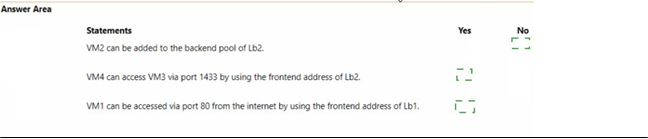
You have an Azure subscription that contains the resource groups shown in the following table.

You have the virtual networks shown in the following table.
Vne1l contains two virtual machines named VM1 and VM2. Vnet2 contains two virtual machines named VM3 and VM4. You have the network security groups (NSGs) shown in the following table that include only default rules.

You have the Azure load balancers shown in the following table.


You have an Azure subscription that contains the resources shown in the following table.

Gateway1 provides access to App1 by using a URL of http://app1.contoso.com. You create a new web app named App2.
You need to configure Gateway1 to enable minimize administrative effort. What should you configure on Gateway1?
A.
a backend pool and a routing
B.
a listener and a routing rule
C.
a listener, a backend pool, and a rule
D.
a listener and a backend pool
a listener and a routing rule
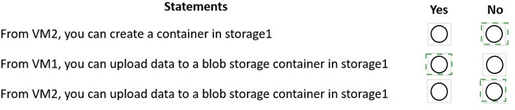
You have an Azure subscription that contains the virtual machines shown in the following table.
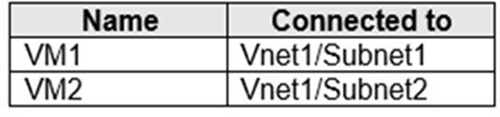
Subnet1 and Subnet2 are associated to a network security group (NSG) named NSG1 that has the following outbound rule:
Priority: 100 Port: Any Protocol: Any Source: Any
Destination: Storage Action: Deny
You create a private endpoint that has the following settings:
Name: Private1
Resource type: Microsoft.Storage/storageAccounts Resource: storage1
Target sub-resource: blob Virtual network: Vnet1 Subnet: Subnet1
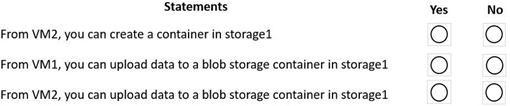
For each of the following statements, select Yes of the statement is true. Otherwise, select No.
NOTE: Each correct selection is worth one point.
You have an Azure application gateway configured for a single website that is available at https://www.contoso.com.
The application gateway contains one backend pool and one rule. The backend pool contains two backend servers. Each backend server has an additional website that is available on port 8080.
You need to ensure that if port 8080 is unavailable on a backend server, all the traffic for https://www.contoso.com is redirected to the other backend server.
What should you do?
A.
Create a health probe.
B.
Add a new rule.
C.
Add a new listener.
D.
Change the port on the listener.
Create a health probe.
You are planning the IP addressing for the subnets in Azure virtual networks. Which type of resource requires IP addresses in the subnets?
A.
internal load balancers
B.
storage account
C.
serviice endpoints
D.
service endpoint policies
internal load balancers
| Page 3 out of 16 Pages |
| Previous |