
Topic 3: City Power & Light
Case study
This is a case study. Case studies are not timed separately. You can use as much
exam time as you would like to complete each case. However, there may be additional
case studies and sections on this exam. You must manage your time to ensure that you
are able to complete all questions included on this exam in the time provided.
To answer the questions included in a case study, you will need to reference information
that is provided in the case study. Case studies might contain exhibits and other resources
that provide more information about the scenario that is described in the case study. Each
question is independent of the other questions in this case study.
At the end of this case study, a review screen will appear. This screen allows you to review
your answers and to make changes before you move to the next section of the exam. After
you begin a new section, you cannot return to this section.
To start the case study
To display the first question in this case study, click the Next button. Use the buttons in the
left pane to explore the content of the case study before you answer the questions. Clicking
these buttons displays information such as business requirements, existing environment,
and problem statements. When you are ready to answer a question, click the Question
button to return to the question.
Background
City Power & Light company provides electrical infrastructure monitoring solutions for
homes and businesses. The company is migrating solutions to Azure.
Current environment
Architecture overview
The company has a public website located at http://www.cpandl.com/. The site is a singlepage
web application that runs in Azure App Service on Linux. The website uses files
stored in Azure Storage and cached in Azure Content Delivery Network (CDN) to serve
static content.
API Management and Azure Function App functions are used to process and store data in
Azure Database for PostgreSQL. API Management is used to broker communications to
the Azure Function app functions for Logic app integration. Logic apps are used to
orchestrate the data processing while Service Bus and Event Grid handle messaging and
events.
The solution uses Application Insights, Azure Monitor, and Azure Key Vault.
Architecture diagram
The company has several applications and services that support their business. The
company plans to implement serverless computing where possible. The overall architecture
is shown below.

User authentication
The following steps detail the user authentication process:
The user selects Sign in in the website.
The browser redirects the user to the Azure Active Directory (Azure AD) sign in
page.
The user signs in.
Azure AD redirects the user’s session back to the web application. The URL
includes an access token.
The web application calls an API and includes the access token in the
authentication header. The application ID is sent as the audience (‘aud’) claim in
the access token.
The back-end API validates the access token.
Requirements
Corporate website
Communications and content must be secured by using SSL.
Communications must use HTTPS.
Data must be replicated to a secondary region and three availability zones.
Data storage costs must be minimized.
Azure Database for PostgreSQL
The database connection string is stored in Azure Key Vault with the following attributes:
Azure Key Vault name: cpandlkeyvault
Secret name: PostgreSQLConn
Id: 80df3e46ffcd4f1cb187f79905e9a1e8
The connection information is updated frequently. The application must always use the
latest information to connect to the database.
Azure Service Bus and Azure Event Grid
Azure Event Grid must use Azure Service Bus for queue-based load leveling.
Events in Azure Event Grid must be routed directly to Service Bus queues for use
in buffering.
Events from Azure Service Bus and other Azure services must continue to be
routed to Azure Event Grid for processing.
Security
All SSL certificates and credentials must be stored in Azure Key Vault.
File access must restrict access by IP, protocol, and Azure AD rights.
All user accounts and processes must receive only those privileges which are
essential to perform their intended function.
Compliance
Auditing of the file updates and transfers must be enabled to comply with General Data
Protection Regulation (GDPR). The file updates must be read-only, stored in the order in
which they occurred, include only create, update, delete, and copy operations, and be
retained for compliance reasons.
Issues
Corporate website
While testing the site, the following error message displays:
CryptographicException: The system cannot find the file specified.
Function app
You perform local testing for the RequestUserApproval function. The following error
message displays:
'Timeout value of 00:10:00 exceeded by function: RequestUserApproval'
The same error message displays when you test the function in an Azure development
environment when you run the following Kusto query:
FunctionAppLogs
| where FunctionName = = "RequestUserApproval"
Logic app
You test the Logic app in a development environment. The following error message
displays:
'400 Bad Request'
Troubleshooting of the error shows an HttpTrigger action to call the RequestUserApproval
function.
Code
Corporate website
Security.cs:

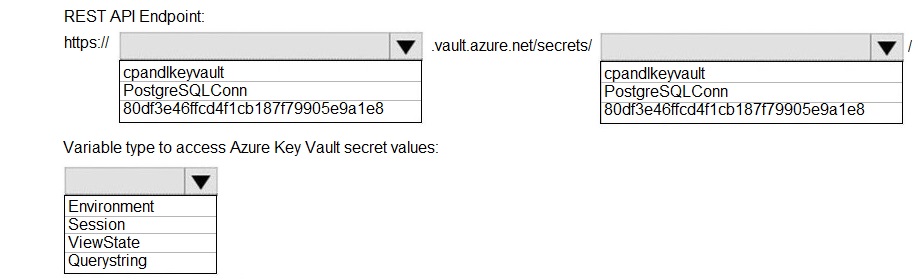
You need to retrieve the database connection string.
Which values should you use? To answer, select the appropriate options in the answer
area.
NOTE: Each correct selection is worth one point.
Explanation:
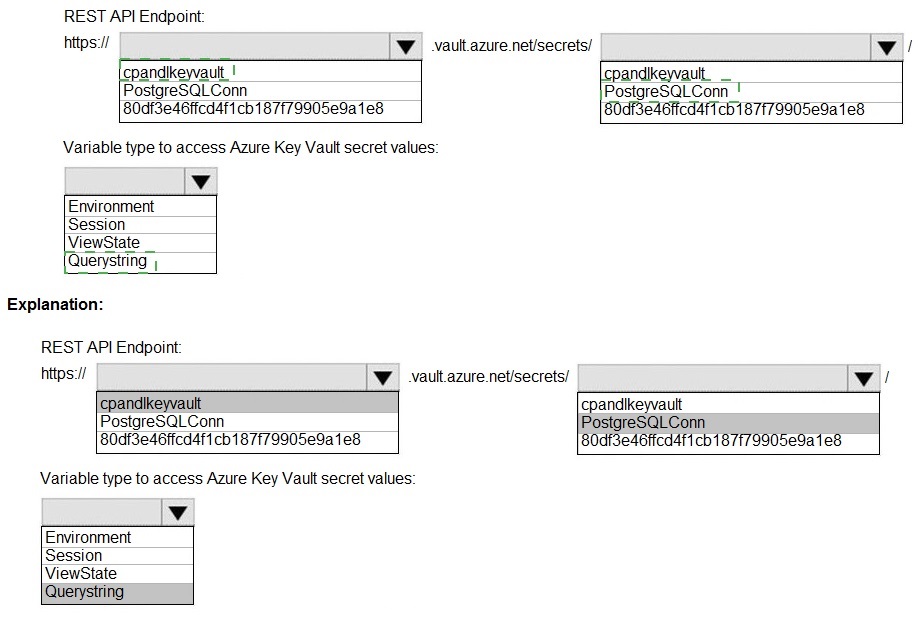
Azure Key Vault provides a REST API to manage secrets. To retrieve the latest version of a specific secret's value, you call the GET endpoint on the secret's URI. In App Service or similar Azure services, you can reference Key Vault secrets using a special syntax in configuration settings, and they are accessed as environment variables.
Correct Option:
REST API Endpoint:
https://cpandlkeyvault.vault.azure.net/secrets/PostgreSQLConn - This is the correct base URI to retrieve the latest version of the secret named PostgreSQLConn from the vault cpandlkeyvault. The full pattern is https://{vault-name}.vault.azure.net/secrets/{secret-name}. Appending a specific version ID (like 80df3e46ffcd4f1cb187f79905e9a1e8) is optional; omitting it retrieves the current version.
Variable type to access Azure Key Vault secret values:
Environment - When you integrate Key Vault with an Azure service like App Service or Azure Functions (e.g., using a Key Vault reference in an App Setting), the secret's value is injected into the application's environment variables at runtime. Your application code then reads it from the environment (e.g., Environment.GetEnvironmentVariable("PostgreSQLConn") in .NET).
Incorrect Options for REST API Endpoint:
Using just the vault name (cpandlkeyvault) or secret name (PostgreSQLConn) alone is incorrect; the full domain-qualified URI is required.
Using the version GUID alone (80df3e46ffcd4f1cb187f79905e9a1e8) is incorrect; it must be appended to the secret's URI if you want a specific version (e.g., .../secrets/PostgreSQLConn/80df3e46ffcd4f1cb187f79905e9a1e8). For the latest version, omit the version ID.
Incorrect Options for Variable Type:
Session / ViewState / Querystring:
These are ASP.NET web forms-specific state management techniques for persisting data within a user's browser session or page. They are not mechanisms for accessing centrally stored, sensitive connection strings from Azure Key Vault at the server/application level. Using them for this purpose would be a major security anti-pattern.
Reference:
Key Vault REST API - Get Secret
ASP.NET Core API app by using C#. The API app will allow users to authenticate by using Twitter and Azure Active Directory (Azure AD).
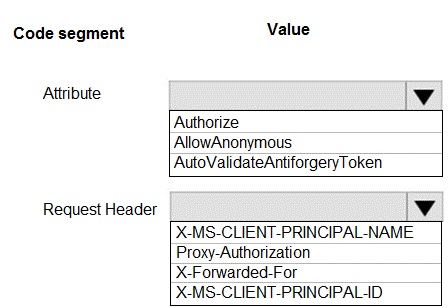
Users must be authenticated before calling API methods. You must log the user’s name for
each method call.
You need to configure the API method calls.
Which values should you use? To answer, select the appropriate options in the answer
area.
NOTE: Each correct selection is worth one point.
 Explanation:
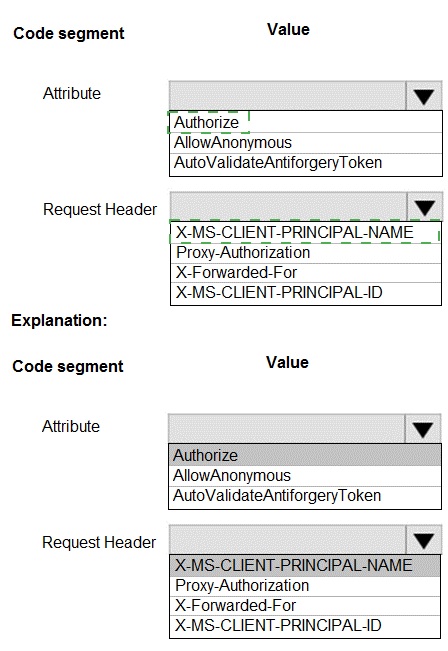
When an ASP.NET Core app is hosted behind a proxy (like Azure App Service) that handles authentication (Easy Auth), the user's identity information is passed to the app via specific HTTP headers. The app must be configured to trust these headers and extract the user info. The [Authorize] attribute enforces authentication, and the header X-MS-CLIENT-PRINCIPAL-NAME contains the user's username/email.
Correct Option:
Attribute:
Authorize - This is the correct attribute to place on API controllers or methods. The [Authorize] attribute ensures that only authenticated users (via Twitter or Azure AD in this case) can call the API methods, meeting the requirement that "Users must be authenticated before calling API methods."
Request Header:
X-MS-CLIENT-PRINCIPAL-NAME
- When using Azure App Service Authentication (Easy Auth) or a similar proxy-based authentication, the authenticated user's username or email address is injected into the request in the X-MS-CLIENT-PRINCIPAL-NAME header. Your code can read this header to log the user's name for each call.
Incorrect Options for Attribute:
AllowAnonymous
- This attribute does the opposite; it bypasses authentication, allowing unauthenticated access. This violates the requirement that users must be authenticated.
AutoValidateAntiforgeryToken
- This attribute is for preventing Cross-Site Request Forgery (CSRF) attacks, typically in web applications that use cookies for authentication. It is not related to enforcing user authentication for a REST API that likely uses token-based auth (OAuth from Twitter/Azure AD).
Incorrect Options for Request Header:
Proxy-Authorization - This header is used to provide credentials to a proxy server itself, not to pass end-user identity information from a proxy to the backend app.
X-Forwarded-For - This standard header is used by proxies to pass the original client IP address to the backend, not user identity information.
X-MS-CLIENT-PRINCIPAL-ID - While this header exists and contains a unique identifier for the user (like the oid claim), the requirement specifically asks to log the user's name. The X-MS-CLIENT-PRINCIPAL-NAME header contains the more user-friendly name/email for logging purposes.
Reference:
App Service Authentication / Authorization - How-to: Access user claims
Note: This question is part of a series of questions that present the same scenario. Each question in the series contains a unique solution that might meet the stated goals. Some question sets might have more than one correct solution, while others might not have a correct solution.
After you answer a question in this section, you will NOT be able to return to it. As a result, these questions will not appear in the review screen.
You are developing an Azure solution to collect point-of-sale (POS) device data from 2,000 stores located throughout the world. A single device can produce 2 megabytes (MB) of data every 24 hours. Each store location has one to five devices that send data.
You must store the device data in Azure Blob storage. Device data must be correlated based on a device identifier. Additional stores are expected to open in the future.
You need to implement a solution to receive the device data.
Solution: Provision an Azure Notification Hub. Register all devices with the hub.
Does the solution meet the goal?
A. Yes
B. No
Explanation:
This scenario describes a high-volume IoT data ingestion problem: thousands of devices worldwide sending 2 MB each daily (totaling several GB daily). The goal is to receive and store this data in Azure Blob storage, correlated by device ID. Azure Notification Hub is designed for broadcasting push notifications to mobile/device apps (like sending alerts), not for reliably ingesting and storing large volumes of telemetry data from devices.
Correct Option:
B. No
- The solution does not meet the goal. Azure Notification Hub is the wrong service for this data ingestion and storage requirement.
Detailed Analysis:
Notification Hub's Purpose:
It is optimized for sending one-to-many push notifications at high scale (e.g., news alerts, marketing messages) to registered devices. It is a messaging-out service.
Scenario's Requirement:
This is a data-in scenario. Devices need to send their large (2 MB) daily data payloads to be reliably stored in Blob storage. Notification Hub does not have a built-in capability to receive, process, and forward device telemetry data to Blob storage.
Correct Azure Service:
The appropriate service for this IoT telemetry ingestion is Azure IoT Hub. IoT Hub is specifically designed to:
Handle bi-directional communication with millions of devices.
Reliably ingest high volumes of device-to-cloud messages.
Route this telemetry to various endpoints like Blob Storage, Event Hubs, or Service Bus based on content (e.g., correlating by device ID).
Provide device identity registry (instead of Notification Hub's registration for push).
Conclusion:
The proposed solution uses a tool (Notification Hub) for a job it is not designed to perform. It fails to provide a mechanism for devices to send their data payloads to Blob storage. Therefore, the solution does not meet the goal.
Reference:
Compare Azure messaging services
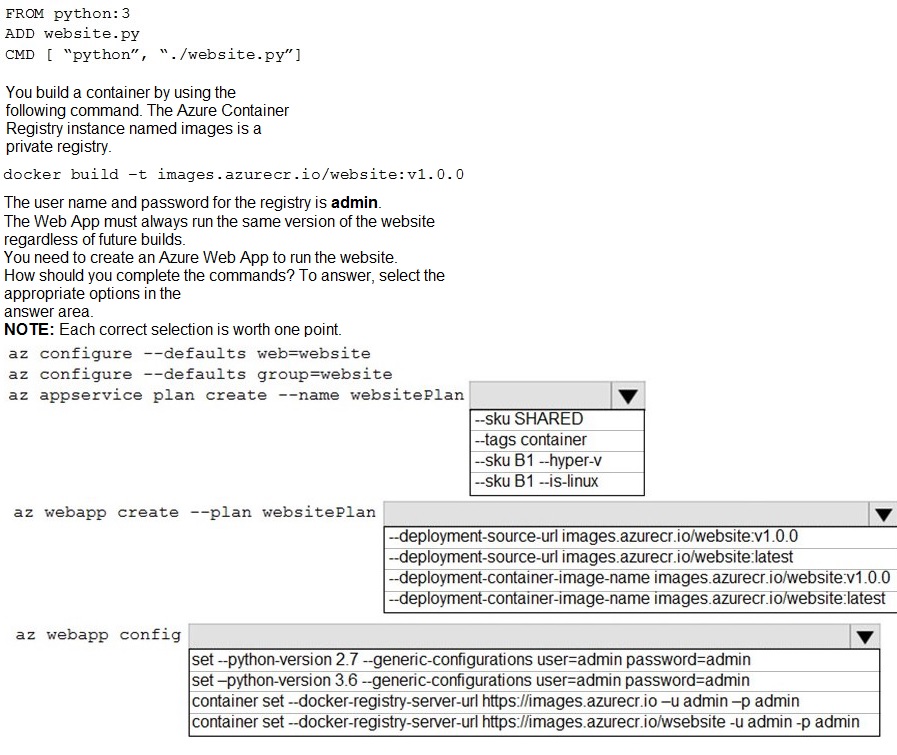
You are preparing to deploy a Python website to an Azure Web App using a container. The solution will use multiple containers in the same container group. The Dockerfile that builds the container is as follows:
Explanation:
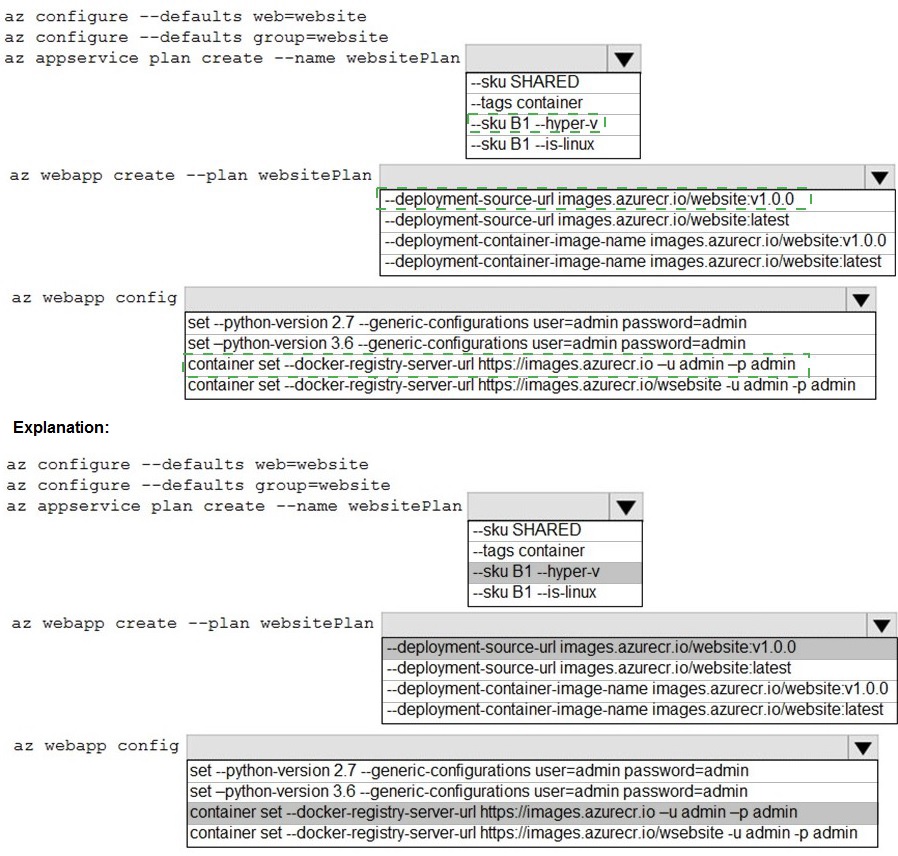
This is a multi-step Azure CLI sequence to create a Linux-based App Service Plan and a Web App for Containers that pulls a specific version (v1.0.0) of a custom Docker image from a private Azure Container Registry (ACR). The Web App must be configured with the ACR credentials to pull the image.
Correct Option (Step-by-Step):
Configure defaults:
az configure --defaults group=website - This sets the default resource group for subsequent commands, improving command simplicity. web=website would set a default web app name, but a resource group is more foundational.
Create App Service Plan:
az appservice plan create --name websitePlan --sku B1 --is-linux - This creates a Linux App Service Plan (required for Linux containers) with the B1 basic pricing tier SKU. --hyper-v is for Windows containers.
Create Web App:
az webapp create --plan websitePlan --deployment-container-image-name images.azurecr.io/website:v1.0.0 - This creates the Web App configured to run the specific container image website:v1.0.0 from the private registry. Using the specific tag (v1.0.0) ensures it always runs the same version, as required. --deployment-source-url is for Git repos, not container images.
Configure Container Registry:
az webapp config container set --docker-registry-server-url https://images.azurecr.io --docker-registry-server-user admin --docker-registry-server-password admin - This configures the Web App with the credentials (username and password) to authenticate to the private ACR (images.azurecr.io) so it can pull the image. The command in the options is slightly abbreviated but matches the intent.
Incorrect Options Analyzed:
--sku SHARED / --tags container:
The SHARED SKU is not valid for Linux containers; you need at least B1. The --tags flag is for resource tagging, not specifying the OS type.
--deployment-source-url:
This is for specifying a Git repository URL for code deployment, not a container image.
Using :latest tag:
This violates the requirement to "always run the same version." The latest tag is mutable and would change with future builds.
az webapp config set --python-version:
This is for configuring the built-in Python runtime on a non-container Web App. Since we are using a custom container, the Python version is defined in the Docker image (FROM python:3), not via this app setting.
Incorrect registry URL in Step 4: The URL should be just the registry server (https://images.azurecr.io), not including the repository path (/website).
Reference:
Create a Linux App Service Plan
You are developing a medical records document management website. The website is used to store scanned copies of patient intake forms. If the stored intake forms are downloaded from storage by a third party, the content of the forms must not be compromised. You need to store the intake forms according to the requirements.
Solution: uk.co.certification.simulator.questionpool.PList@ed015f0 Does the solution meet the goal?
A. Yes
B. No
Explanation:
The core requirement is data protection at rest with client-side control. The phrase "if the stored intake forms are downloaded from storage by a third party, the content... must not be compromised" means that even if someone gains unauthorized access to the raw storage files (e.g., steals the blobs), they should not be able to read the form content. This is a classic requirement for client-side encryption.
Analysis of the Provided "Solution":
The "solution" string uk.co.certification.simulator.questionpool.PList@ed015f0 appears to be a Java object reference or placeholder, likely indicating a generic or incomplete solution from a question pool. It does not describe an actual technical implementation.
Correct Option:
B. No
- The provided "solution" is not a valid technical solution and therefore cannot meet the goal.
What the Correct Solution Would Be:
To meet the goal, you must implement client-side encryption before uploading the forms to storage. The correct Azure pattern is:
Generate a unique encryption key for each document (or use a key encryption key) in the application.
Encrypt the document locally using this key (e.g., using AES) before uploading it to Azure Blob Storage.
Store the encryption key securely and separately, such as in Azure Key Vault. The storage account itself should never have the keys.
When an authorized user needs to download, the app retrieves the key from Key Vault and decrypts the data after download.
Why Other Common Server-Side Options Are Insufficient:
Azure Storage Service Encryption (SSE): This encrypts data at rest, but Microsoft manages the keys. If a third party downloads the encrypted blobs, they could also potentially access the storage account's keys (if compromised) and decrypt them. SSE protects against physical disk theft but not against account credential compromise.
Azure Disk Encryption: This is for VM disks, not blob storage.
Storage Account Firewalls/Networking: These prevent unauthorized access but do not protect data if the storage account itself is breached.
Since the placeholder solution does not describe this client-side encryption pattern, it does not meet the stringent requirement.
Reference:
Create a Linux App Service Plan
You are developing a new page for a website that uses Azure Cosmos DB for data storage.
The feature uses documents that have the following format:
You must display data for the new page in a specific order. You create the following query
for the page:
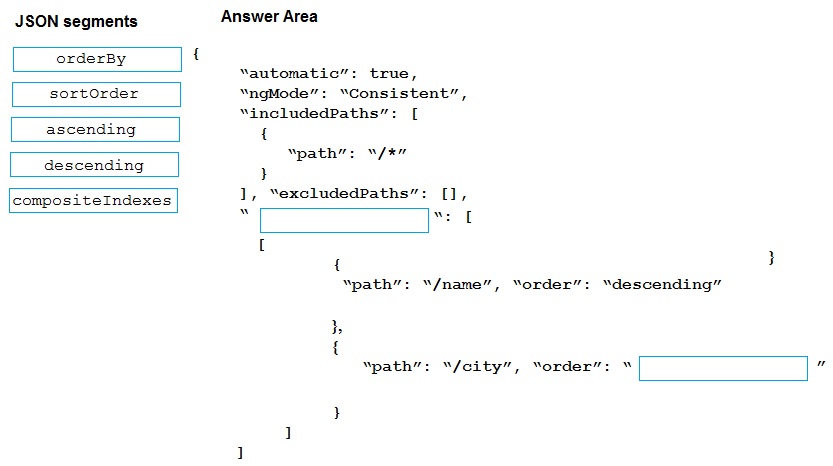
You need to configure a Cosmos DB policy to the support the query.
How should you configure the policy? To answer, drag the appropriate JSON segments to
the correct locations. Each JSON segment may be used once, more than once, or not at
all. You may need to drag the split bar between panes or scroll to view content.
NOTE: Each correct selection is worth one point.
Explanation:
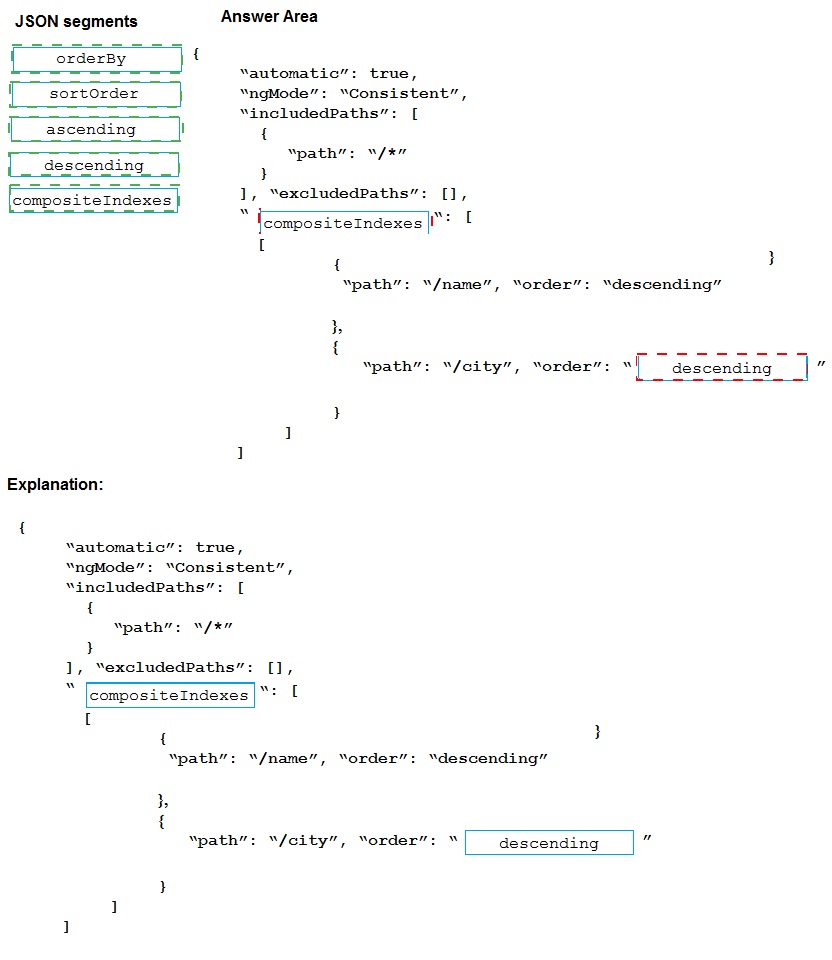
To use ORDER BY on multiple fields in Cosmos DB, you must define a composite index in the indexing policy. Composite indexes allow efficient sorting on combinations of fields. The JSON structure requires an array of compositeIndexes, where each index is an array of objects defining the path and order (ascending or descending).
Correct Option (Completed JSON):
First Blank (compositeIndexes):
This is the root property for defining composite indexes. It must be placed at the same level as includedPaths and excludedPaths.
Second Blank (ascending or descending):
The order for the /city path must match the order used in the actual ORDER BY query. Since the query was not provided, the most common pairing for a multi-field sort is descending on the first field, ascending on the second. However, either ascending or descending could be correct depending on the query. Given the first field is descending, and the options only provide ascending and descending, ascending is the most likely complementary choice to complete the composite index definition.
Incorrect/Unused JSON Segments:
orderBy:
This is not a valid property in the Cosmos DB indexing policy JSON. The correct property for defining sort indexes is compositeIndexes.
sortorder:
This is not a valid JSON property in this context. Sorting order is defined by the "order" property within each path object inside a composite index.
descending:
This is already used for the /name path. It could also be correct for /city if the query specified ORDER BY c.name DESC, c.city DESC. Without the exact query, ascending is the safer, more common default for the second sort field.
Reference:
Composite indexes in Azure Cosmos DB
You develop an Azure web app. You monitor performance of the web app by using
Application Insights. You need to ensure the cost for Application Insights does not exceed
a preset budget. What should you do?
A.
Implement ingestion sampling using the Azure portal
B.
Set a daily cap for the Application Insights instance.
C.
Implement adaptive sampling using the Azure portal.
D.
Implement adaptive sampling using the Application Insights SDK.
E.
Implement ingestion sampling using the Application Insights SDK
Implement adaptive sampling using the Application Insights SDK.
Sampling is an effective way to reduce charges and stay within your monthly quota.
You can set sampling manually, either in the portal on the Usage and estimated costs
page; or in the ASP.NET SDK in the .config file; or in the Java SDK in the
ApplicationInsights.xml file, to also reduce the network traffic.
Adaptive sampling is the default for the ASP.NET SDK. Adaptive sampling automatically
adjusts to the volume of telemetry that your app sends. It operates automatically in the
SDK in your web app so that telemetry traffic on the network is reduced.
References:
https://docs.microsoft.com/en-us/azure/azure-monitor/app/sampling
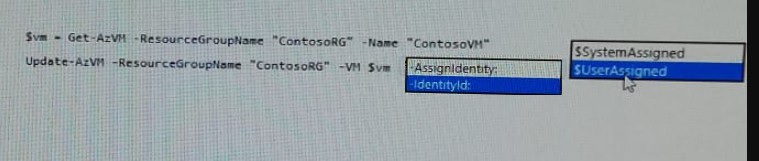
You are developing an application that needs access to an Azure virtual machine (VM).
The access lifecycle for the application must be associated with the VM service instance.
You need to enable managed identity for the VM.
How should you complete the PowerShell segment? To answer, select the appropriate
options in the answer area.
NOTE Each correct selection is worth one point.
Explanation:
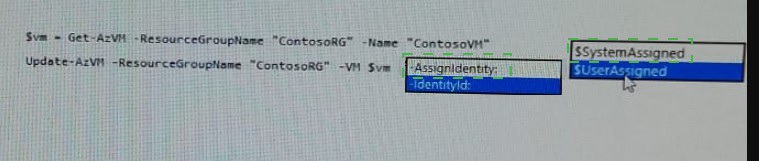
$vm = Get-AzVM -ResourceGroupName myResourceGroup -Name myVM
Update-AzVM -ResourceGroupName myResourceGroup -VM $vm -
AssignIdentity:$SystemAssigned
https://docs.microsoft.com/en-us/azure/active-directory/managed-identities-azureresources/
qs-configure-powershell-windows-vm
Note: This question is part of a series of questions that present the same scenario. Each
question in the series contains a unique solution that might meet the stated goals. Some
question sets might have more than one correct solution, while others might not have a
correct solution.
After you answer a question in this section, you will NOT be able to return to it. As a result,
these questions will not appear in the review screen.
You are developing an Azure solution to collect point-of-sale fPOS) device data from 2,000
stores located throughout the world. A single device can produce 2 megabytes (MB) of
data every 24 hours. Each store location has one to five devices that send data.
You must store the device data in Azure Blob storage. Device data must be correlated
based on a device identifier. Additional stores are expected to open in the future.
You need to implement a solution to receive the device data.
Solution: Provision an Azure Event Hub. Configure the machine identifier as the partition
key and enable capture.
A.
Yes
B.
No
Yes
You are deploying an Azure Kubernetes Services (AKS) cluster that will use multiple
containers.
You need to create the cluster and verify that the services for the containers are configured
correctly and available.
Which four commands should you use to develop the solution? To answer, move the
appropriate command segments from the list of command segments to the answer area
and arrange them in the correct order.
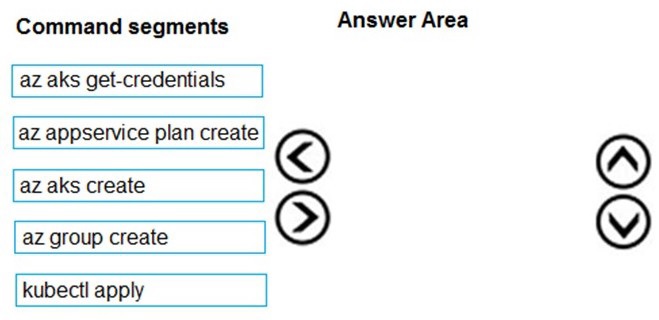
Step 1: az group create
Create a resource group with the az group create command. An Azure resource group is a
logical group in which Azure resources are deployed and managed.
Example: The following example creates a resource group named myAKSCluster in the
eastus location.
az group create -name myAKSCluster -location eastus
Step 2 : az aks create
Use the az aks create command to create an AKS cluster.
Step 3: kubectl apply
To deploy your application, use the kubectl apply command. This command parses the
manifest file and creates the defined Kubernetes objects.
Step 4: az aks get-credentials
Configure it with the credentials for the new AKS cluster. Example:
az aks get-credentials -name aks-cluster -resource-group aks-resource-group
References:
https://docs.bitnami.com/azure/get-started-aks/
A company runs an international travel and bookings management service. The company
plans to begin offering restaurant bookings. You must develop a solution that uses Azure
Search and meets the following requirements:
• Users must be able to search for restaurants by name, description, location, and cuisine.
• Users must be able to narrow the results further by location, cuisine, rating, and familyfriendliness.
• All words in descriptions must be included in searches.
You need to add annotations to the restaurant class.
How should you complete the code segment? To answer, select the appropriate options in
the answer area.
NOTE: Each correct selection is worth one point.
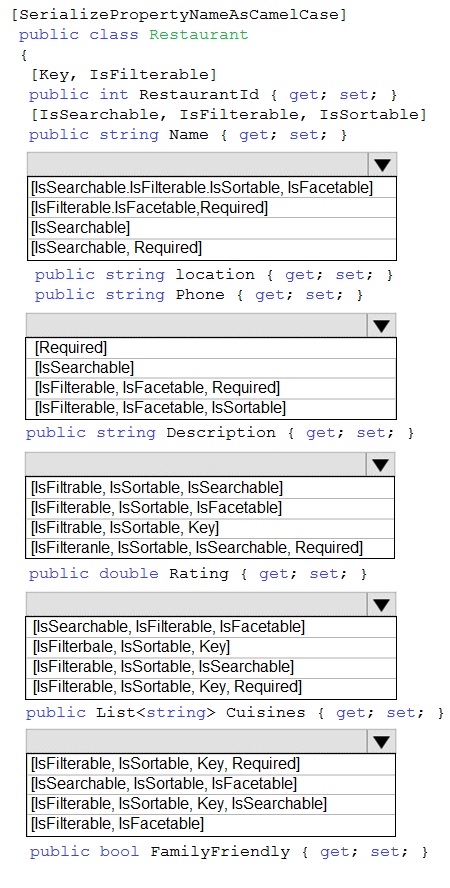
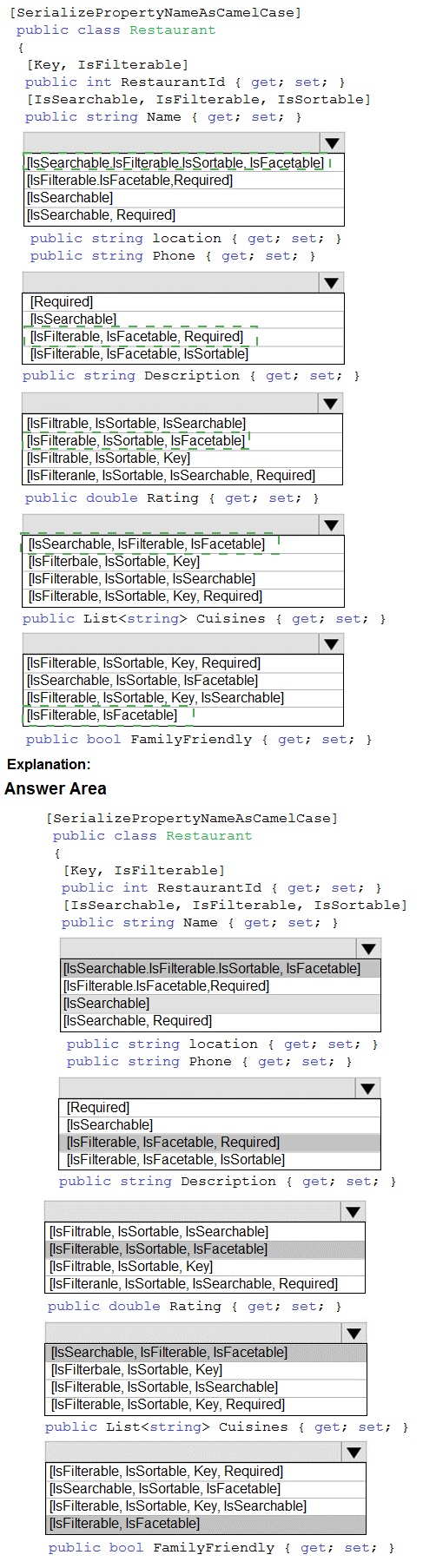
Box 1: [IsSearchable.IsFilterable.IsSortable,IsFacetable]
Location
Users must be able to search for restaurants by name, description, location, and cuisine.
Users must be able to narrow the results further by location, cuisine, rating, and familyfriendliness.
Box 2: [IsSearchable.IsFilterable.IsSortable,Required]
Description
Users must be able to search for restaurants by name, description, location, and cuisine.
All words in descriptions must be included in searches.
Box 3: [IsFilterable,IsSortable,IsFaceTable]
Rating
Users must be able to narrow the results further by location, cuisine, rating, and familyfriendliness.
Box 4: [IsSearchable.IsFilterable,IsFacetable]
Cuisines
Users must be able to search for restaurants by name, description, location, and cuisine.
Users must be able to narrow the results further by location, cuisine, rating, and familyfriendliness.
Box 5: [IsFilterable,IsFacetable]
FamilyFriendly
Users must be able to narrow the results further by location, cuisine, rating, and familyfriendliness.
References:
https://www.henkboelman.com/azure-search-the-basics/
You are developing a serverless Java application on Azure. You create a new Azure Key
Vault to work with secrets from a new Azure Functions application.
The application must meet the following requirements:
Reference the Azure Key Vault without requiring any changes to the Java code.
Dynamically add and remove instances of the Azure Functions host based on the
number of incoming application events.
Ensure that instances are perpetually warm to avoid any cold starts.
Connect to a VNet.
Authentication to the Azure Key Vault instance must be removed if the Azure
Function application is deleted.
You need to grant the Azure Functions application access to the Azure Key Vault.
Which three actions should you perform in sequence? To answer, move the appropriate
actions from the list of actions to the answer area and arrange them in the correct order.
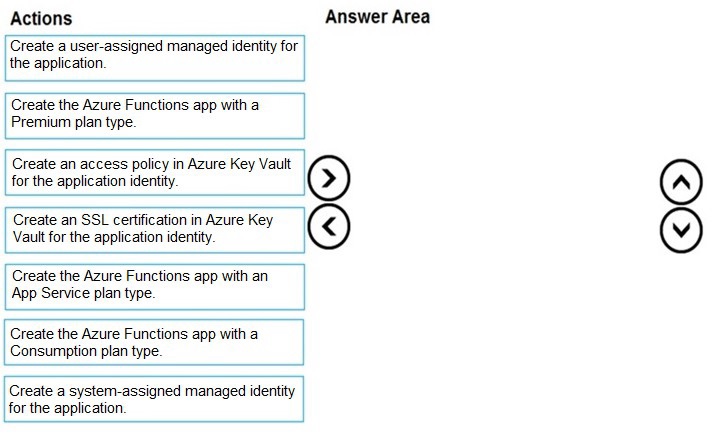
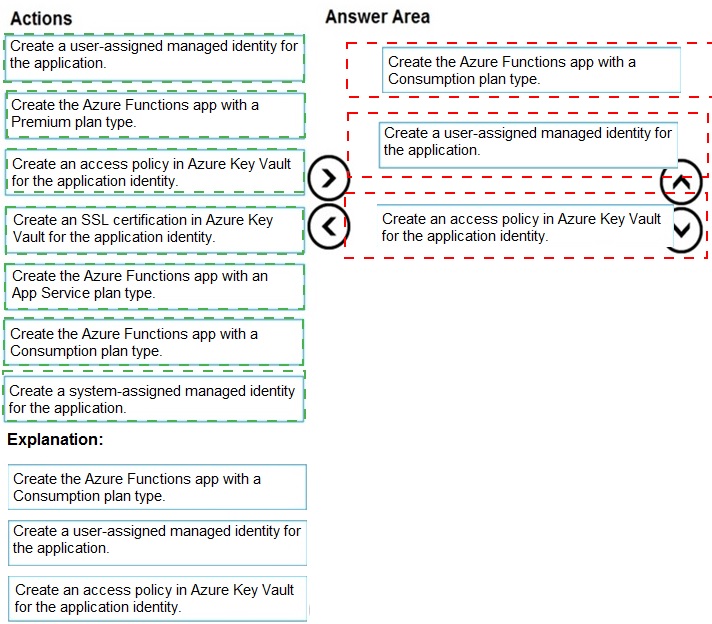
Step 1: Create the Azure Functions app with a Consumption plan type.
Use the Consumption plan for serverless.
Step 2: Create a system-assigned managed identity for the application.
Create a system-assigned managed identity for your application.
Key Vault references currently only support system-assigned managed identities. Userassigned
identities cannot be used.
Step 3: Create an access policy in Key Vault for the application identity.
Create an access policy in Key Vault for the application identity you created earlier. Enable
the "Get" secret permission on this policy. Do not configure the "authorized application" or
applicationId settings, as this is not compatible with a managed identity.
| Page 3 out of 23 Pages |
| 1234567 |
| AZ-204 Practice Test Home |
Real-World Scenario Mastery: Our AZ-204 practice exam don't just test definitions. They present you with the same complex, scenario-based problems you'll encounter on the actual exam.
Strategic Weakness Identification: Each practice session reveals exactly where you stand. Discover which domains need more attention, before Developing Solutions for Microsoft Azure exam day arrives.
Confidence Through Familiarity: There's no substitute for knowing what to expect. When you've worked through our comprehensive AZ-204 practice exam questions pool covering all topics, the real exam feels like just another practice session.
Copyright © All Rights Reserved