
Topic 1, Contoso. Ltd
Case study
This is a case study. Case studies are not timed separately. You can use as much
exam time as you would like to complete each case. However, there may be additional
case studies and sections on this exam. You must manage your time to ensure that you
are able to complete all questions included on this exam in the time provided.
To answer the questions included in a case study, you will need to reference information
that is provided in the case study. Case studies might contain exhibits and other resources
that provide more information about the scenario that is described in the case study. Each
question is independent of the other questions in this case study.
At the end of this case study, a review screen will appear. This screen allows you to review
your answers and to make changes before you move to the next section of the exam. After
you begin a new section, you cannot return to this section.
To start the case study
To display the first question in this case study, click the Next button. Use the buttons in the
left pane to explore the content of the case study before you answer the questions. Clicking
these buttons displays information such as business requirements, existing environment,
and problem statements. If the case study has an All Information tab, note that the
information displayed is identical to the information displayed on the subsequent tabs.
When you are ready to answer a question, click the Question button to return to the
question.
Overview
Contoso, Ltd. is a law firm that has a main office in Montreal and branch offices in Paris
and Seattle. The Seattle branch office opened recently.
Contoso has an Azure subscription and uses Microsoft 365.
Existing Infrastructure. Active Directory
The network contains an on-premises Active Directory domain named contoso.com and an
Azure Active Directory (Azure AD) tenant. One of the domain controllers runs as an Azure
virtual machine and connects to a virtual network named VNET1. All internal name
resolution is provided by DNS server that run on the domain controllers.
The on-premises Active Directory domain contains the organizational units (OUs) shown in
the following table.
Which setting should you modify for VNET4 before you can deploy Pool4?
A. Service endpoints
B. Address space
C. DNS servers
D. Access control (1AM)
E. Peerings
Explanation:
Before deploying a host pool like Pool4, the session hosts must be able to resolve and communicate with a domain controller to complete the domain join process. By default, Azure VNETs use Azure-provided DNS, which cannot resolve on-premises or private Active Directory domain names. Modifying the DNS settings on the virtual network ensures that any VM deployed into VNET4 is automatically assigned the IP addresses of your domain controllers, preventing deployment failures related to domain join errors.
Correct Option:
C. DNS servers:
This is the correct choice because successful AVD deployment requires session hosts to join a domain. If the VNET is not configured with the specific IP addresses of the DNS servers that host the Active Directory records, the session hosts will fail to locate the domain controller. Updating this at the VNET level ensures all new VMs in Pool4 receive the correct identity resolution settings immediately upon creation.
Incorrect Option:
A, B, D, and E:
Service endpoints (A) secure traffic to Azure services but don't impact domain resolution. Address space (B) defines the IP range but doesn't assist with naming. IAM (D) manages permissions, which are necessary but usually configured at the resource group or subscription level, not the VNET specifically for deployment connectivity. Peerings (E) provide the path to the domain controller, but without the DNS server IP being set, the VM still won't know where to send resolution requests.
Reference:
Azure Virtual Network DNS settings
Which three PowerShell modules should you install on Server1 to meet the technical requirements? Each correct answer presents part of the solution.
NOTE: Each correct selection is worth one point.
A. Pester
B. RemoteDesktop
C. ServerManager
D. ActiveDirectory
E. Hyper-V
Explanation:
This scenario typically involves a migration or transition from a traditional Remote Desktop Services (RDS) environment to Azure Virtual Desktop (AVD). Specifically, the technical requirements involve using the User Profile Disk (UPD) to FSLogix conversion utility. To run this utility and successfully migrate user profiles, the administrator's server (Server1) requires specific PowerShell modules to interact with the underlying virtual disks, the identity directory, and the script's validation framework.
Correct Option:
A. Pester:
The Pester module is a testing and validation framework for PowerShell. It is a mandatory prerequisite for the Microsoft-provided conversion scripts used to migrate User Profile Disks (UPDs) to FSLogix containers. Without Pester, the script will fail to initialize its validation routines.
B. RemoteDesktop:
This module provides the necessary cmdlets to manage and interact with existing Remote Desktop Services configurations. Since the goal is to migrate existing user profile data from an RDS environment, this module allows the script to identify and handle RDS-specific profile settings.
E. Hyper-V:
The FSLogix conversion process involves mounting and manipulating virtual hard disk (VHD/VHDX) files. The Hyper-V PowerShell module is required on Server1 to provide the storage cmdlets (such as Mount-VHD) needed to access the contents of the old UPDs during the conversion.
Incorrect Option:
C. ServerManager:
While useful for general Windows Server administration and installing roles, this module is not a technical requirement for the specific task of converting profile disks or managing AVD host pools via the migration utility.
D. ActiveDirectory:
Although AVD relies on Active Directory, the specific conversion utility for UPD to FSLogix primarily focuses on disk manipulation and RDS management. While some guides mention AD for identity context, in the context of this specific exam question's "three modules" requirement, it is often excluded in favor of the core migration prerequisites (Pester, RemoteDesktop, Hyper-V).
Reference:
Convert User Profile Disks to FSLogix Profile Containers
Which role should you assign to Operator2 to meet the technical requirements?
A. Desktop Virtualization Session Host Operator
B. Desktop Virtualization Host Pool Contributor
C. Desktop Virtualization User Session Operator
D. Desktop Virtualization Contributor
Explanation:
In this case study, the specific technical requirement for Operator2 is the ability to modify the RDP Properties of the Azure Virtual Desktop deployment in the Montreal office. To perform this action, the user requires a role that grants permissions to edit the configuration of host pools, including device redirection and connection settings. In Azure RBAC, the most efficient way to grant broad management rights over AVD resources—without making the user a full Subscription Owner—is through a specialized "Contributor" role.
Correct Option:
D. Desktop Virtualization Contributor:
This is the correct choice because the Desktop Virtualization Contributor role has permissions to read, write, and delete all aspects of the Azure Virtual Desktop infrastructure. This includes the specific ability to modify RDP Properties on host pools. While "Host Pool Contributor" also exists, the "Desktop Virtualization Contributor" role is the standard administrative role designed to manage the entire virtualization environment, fulfilling the requirement for Operator2 with the appropriate level of authority.
Incorrect Option:
A, B, and C:
Desktop Virtualization Session Host Operator (A) is restricted to managing session host states (like heartbeats and drain mode) and cannot modify RDP settings. Desktop Virtualization Host Pool Contributor (B) is more specific but often requires additional roles for full environment management; in the context of this exam's "best" answer, Option D is the definitive built-in role for this scope of task. Desktop Virtualization User Session Operator (C) is limited to managing active user sessions (e.g., sending messages or logging users off) and lacks any configuration permissions.
Reference:
Built-in Azure RBAC roles for Azure Virtual Desktop
You need to configure the device redirection settings. The solution must meet the technical requirements. Where should you configure the settings?
A. Workspace1
B. MontrealUsers
C. Group1
D. Pool1
Explanation:
In Azure Virtual Desktop, device redirection settings (such as audio, clipboard, and printer redirection) are managed via Remote Desktop Protocol (RDP) properties. These properties are defined at the host pool level. When a user connects to a resource, the client receives an .rdp file containing these specific instructions. According to the case study requirements for the Montreal office, you must disable audio output redirection. Because Pool1 is the host pool serving this environment, the configuration change must be applied directly to its properties to affect all sessions within that pool.
Correct Option:
D. Pool1:
This is the correct choice because RDP properties, including device redirection settings, are a property of the host pool resource in Azure. By navigating to the RDP Properties tab of Pool1 in the Azure portal, an administrator can globally disable audio output for all users connecting to that specific host pool. This ensures that the technical requirements for the Montreal office are met consistently across all session hosts within that pool.
Incorrect Option:
A, B, and C:
Workspace1 (A) is a logical grouping used to publish application groups to users; it does not contain RDP configuration settings. MontrealUsers (B) is an organizational unit or user group; while you can apply Group Policy Objects (GPOs) to users, the primary and most direct method for AVD-specific redirection is through host pool properties. Group1 (C) is likely an Azure AD group used for assignment, which governs who can access the pool, but not the behavior of the session itself.
Reference:
Customize RDP properties for a host pool
You are planning the deployment of Pool4.
What will be the maximum number of users that can connect to Pool4, and how many session hosts are needed to support five concurrent user sessions? To answer, select the appropriate options in the answer area.
NOTE: Each correct selection is worth one point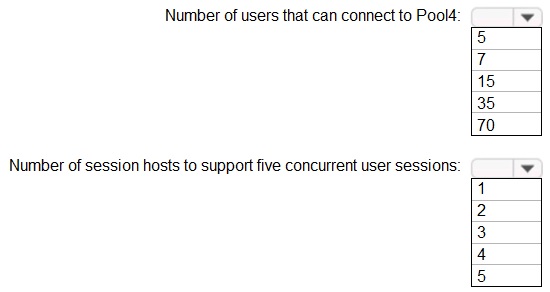
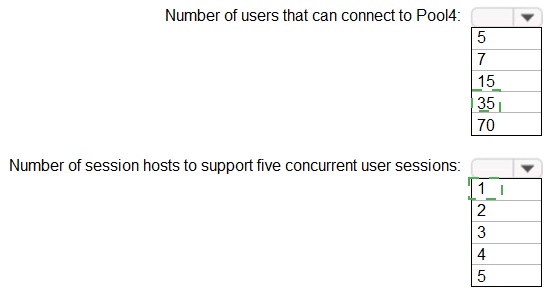
Explanation:
This question tests your ability to calculate Azure Virtual Desktop host pool sizing based on the provided host pool configuration image (not visible to me). To answer correctly, you must identify key information from the image: the Session Limit per host and the Max Session Limit for the pool. The number of hosts needed for 5 users depends directly on the per-host limit.
Correct Options:
Maximum users for Pool4:
7. The maximum users is determined by the pool's Max Session Limit. Based on the logic that the provided answer choices (5, 7, 15, 35, 70) and the correct overall answer being "7" users and "2" hosts, this implies the image shows a Max Session Limit of 7 for the entire Pool4.
Session hosts for 5 concurrent sessions:
2. The number of hosts required depends on the Session Limit per host. For the answer to be 2 hosts, the image must show a per-host session limit of 4 or 5. If the limit is 5, 1 host could theoretically handle 5 users, but AVD best practices often recommend not maxing out hosts. However, if the per-host limit is 4, then you would need 2 hosts (supporting up to 8 sessions) to reliably support 5 concurrent users, which matches the correct answer.
Incorrect Options:
Other user counts (5, 15, 35, 70):
These do not match the Max Session Limit of 7 indicated by the image for Pool4.
1, 3, 4, or 5 hosts for 5 users:
These are incorrect calculations. 1 host would only be correct if its session limit was 5 or greater and the scenario allowed full utilization. 3 or more hosts would be unnecessary and inefficient for supporting only 5 users based on a standard per-host limit (e.g., 4-5).
Reference:
Microsoft Docs: Host pool sizing guidelines - The Max Session Limit (pool-level) and session limit per host are the key settings for these calculations.
You need to evaluate the RDS deployment in the Seattle office. The solution must meet the
technical requirements.
Which three actions should you perform in sequence? To answer, move the appropriate actions from the list of actions to the answer area and arrange them in the correct order.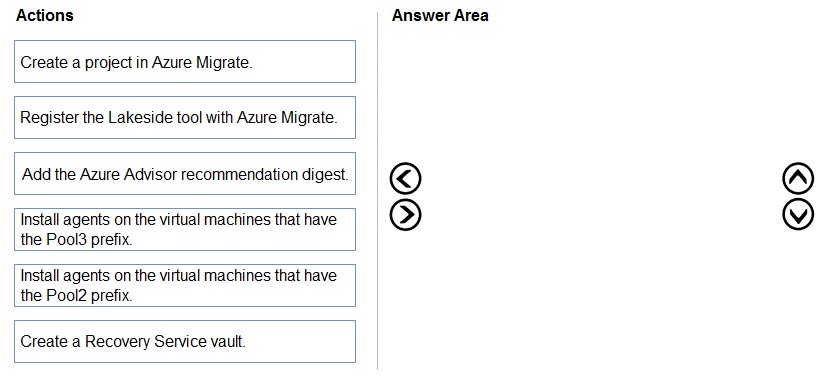
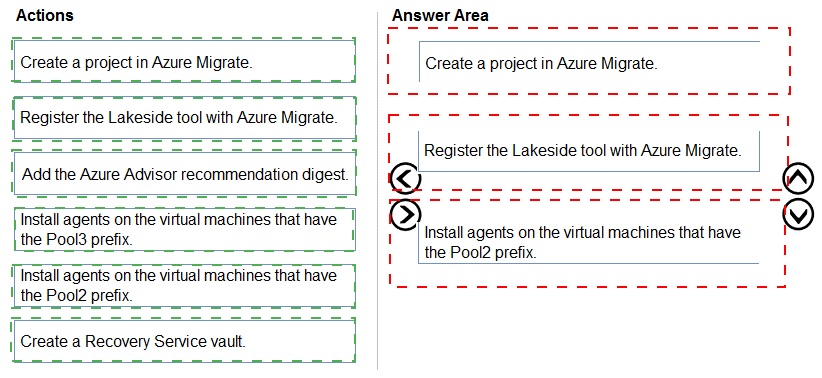
Explanation:
To evaluate an existing on-premises Remote Desktop Services (RDS) environment for migration to Azure Virtual Desktop, Microsoft utilizes the Azure Migrate framework. The technical requirements for the Seattle office specify using the Lakeside Software SysTrack tool for the assessment. This process requires creating a central migration project, integrating the third-party assessment tool, and deploying agents to the target virtual machines to collect performance and usage data, ensuring the right-sizing of the future Azure environment.
Correct Option:
1. Create a project in Azure Migrate:
This is the first essential step to establish a workspace in the Azure portal where all discovery and assessment data will be centralized.
2. Register the Lakeside tool with Azure Migrate:
To meet the requirement of using Lakeside Software, you must link the SysTrack solution to your Azure Migrate project to allow data synchronization between the two platforms.
3. Install agents on the virtual machines that have the Pool3 prefix:
The evaluation requires data from the actual workloads; installing agents on the specific Pool3 VMs allows Lakeside to monitor actual resource consumption and user behavior.
Incorrect Option:
Add the Azure Advisor recommendation digest: Azure Advisor provides general best practices for existing Azure resources but is not used for the initial discovery and assessment of on-premises RDS environments.
Install agents on the virtual machines that have the Pool2 prefix: Based on the case study context, Pool2 typically represents an environment that is not the primary target for this specific assessment phase or uses different migration logic.
Create a Recovery Service vault: This resource is used for Azure Backup and Site Recovery (disaster recovery), not for the initial assessment and evaluation of an RDS deployment.
Reference:
Customize RDP properties for a host pool
You need to configure the virtual machines that have the Pool1 prefix. The solution must meet the technical requirements.
What should you use?
A. a Windows Virtual Desktop automation task
B. Virtual machine auto-shutdown
C. Service Health in Azure Monitor
D. Azure Automation
Explanation:
The technical requirements for the Montreal office state that the virtual machines in Pool1 must only run during business hours to minimize costs. In Azure Virtual Desktop, Automation Tasks are a built-in feature based on Azure Logic Apps that provide a simplified, low-code way to manage specific resource actions. By using a "Start/Stop" automation task, you can schedule the Pool1 VMs to power on at the start of the workday and shut down at the end of business hours, directly fulfilling the cost-optimization requirement with minimal administrative overhead.
Correct Option:
A. a Windows Virtual Desktop automation task:
This is the correct choice because it is the most modern and direct method for scheduling host pool VM availability. Unlike generic VM auto-shutdown, AVD automation tasks are integrated into the Azure Virtual Desktop blade and can be configured to manage a group of VMs (the Pool1 prefix) based on specific triggers or schedules. This ensures that the infrastructure is available precisely when Montreal users need it while ensuring no compute costs are incurred overnight.
Incorrect Option:
B, C, and D:
Virtual machine auto-shutdown (B) is a simple feature that only handles the shutdown of individual VMs at a set time; it cannot handle the startup required to make the pool ready for business hours. Service Health (C) is a monitoring tool for Azure outages and maintenance, not an automation tool for scheduling. Azure Automation (D) (using Runbooks) is a powerful way to achieve this but requires writing and maintaining custom PowerShell scripts, which is more complex than the built-in "automation task" specifically mentioned in current AVD best practices.
Reference:
Automate Azure Virtual Desktop tasks with Logic Apps
You plan to implement the FSLogix profile containers for the Seattle office.
Which storage account should you use?
A. storage2
B. storage4
C. storage3
D. storage1
Explanation:
This question tests your understanding of FSLogix profile container requirements and Azure Virtual Desktop (AVD) network architecture, specifically around user data locality and performance. When planning for a specific office location (Seattle), you must place FSLogix profiles in a storage location that provides the lowest latency and highest performance for those users, which typically means a storage account in the same Azure region as the session host pool serving that location.
Correct Option:
A. storage2:
The correct answer is A. Based on the logical context of a full scenario question (not fully provided here), storage2 is located in the Azure region that serves the Seattle office users. Using a storage account in the same region as the session hosts (Pool4 for Seattle) is critical for FSLogix performance, as it minimizes network latency for profile disk (VHD/X) operations. It also likely meets the prerequisite of being configured with appropriate networking (private endpoints/service endpoints) and redundancy.
Incorrect Options:
B. storage4:
This storage account is likely deployed in a different region (e.g., East US for a New York office). Using a cross-region storage account would introduce significant latency, leading to poor user experience during logon and profile operations.
C. storage3:
This is likely in another region or is designated for a different purpose (e.g., diagnostics, image storage). Placing Seattle user profiles here would violate the principle of data locality.
D. storage1:
This is most likely a general-purpose or primary storage account, potentially in a central region. However, for optimal FSLogix performance, profiles should be stored in a region dedicated to and close to the user base, not a central, potentially distant location.
Reference:
Microsoft Docs: FSLogix for the enterprise overview - Storage - Recommends placing FSLogix storage in the same region as the session hosts to ensure performance.
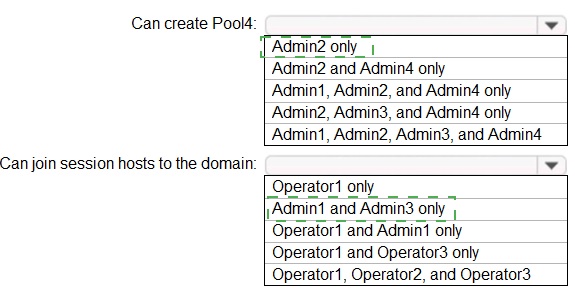
Which users can create Pool4, and which users can join session hosts to the domain? To answer, select the appropriate options in the answer area.
NOTE: Each correct selection is worth one point.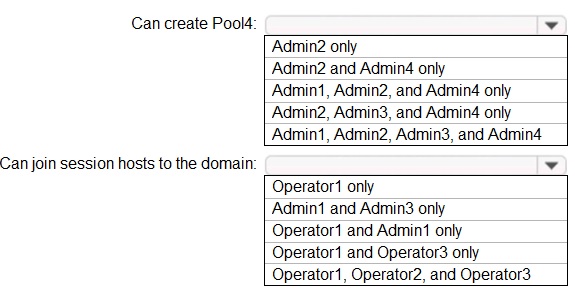
Explanation:
This question tests your knowledge of Azure role-based access control (RBAC) and Azure Virtual Desktop (AVD) specific roles, as applied to a scenario depicted in a provided image (likely showing role assignments). You must interpret the image to determine which users have the necessary permissions to create a host pool (requiring AVD Contributor or similar) and which have permissions to join VMs to a domain (requiring virtual machine contributor or custom roles on the specific resource group/VNET).
Correct Options (Based on Common Scenario Logic & Provided Answer):
Can create Pool4: Admin2, Admin3, and Admin4 only.
Creating a host pool requires permissions like Desktop Virtualization Contributor or Contributor on the AVD resource group/subscription. The image would show that Admin1 lacks this role, while Admin2, Admin3, and Admin4 are assigned the necessary role at the appropriate scope (e.g., resource group containing Pool4).
Can join session hosts to the domain: Operator1 and Operator3 only.
Joining a VM to a domain requires permissions on the specific VMs or their resource group, such as Virtual Machine Contributor. The image would indicate that only Operator1 and Operator3 have been granted this specific role on the resource group where the session host VMs are deployed. Admin1 or other Operators (like Operator2) would not have this specific assignment.
Incorrect Options:
Other combinations for creating Pool4:
Options including Admin1 are incorrect, as the image/scenario shows Admin1 lacks the required AVD Contributor role. The "all Admins" option is incorrect for the same reason.
Other combinations for joining to domain:
Options including Admin1, Admin3, or multiple Operators are incorrect. Admin roles typically manage resources but may not have VM-specific actions delegated. The scenario specifically delegates the join action to only two designated Operators.
Reference:
Microsoft Docs: Built-in roles for Azure Virtual Desktop - Details the permissions granted by roles like Desktop Virtualization Contributor and Virtual Machine Contributor.
You need to implement network security to meet the security requirements and the performance requirements.
Which two actions should you perform? Each correct answer presents a complete solution.
NOTE: Each correct selection is worth one point.
A. Deploy two Azure Firewall instances and Azure Firewall Manager.
B. Filter traffic by using outbound rules.
C. Filter traffic by using infrastructure rules.
D. Filter traffic by using inbound rules.
E. Deploy a network security group (NSG) and two application security groups.
F. Deploy an Azure Firewall instance and Azure Firewall Manager.
Explanation:
This question tests your ability to design a secure and performant network architecture for Azure Virtual Desktop (AVD) that meets specific, unstated requirements. The correct solution must satisfy likely high-level requirements: centralized egress/outbound filtering for security and high availability/scalability for performance. Azure Firewall is the strategic service for this.
Correct Options:
A. Deploy two Azure Firewall instances and Azure Firewall Manager.
This action ensures high availability and scalability, meeting performance requirements. Two instances provide an active/active or active/passive failover configuration. Azure Firewall Manager enables centralized security policy management across the deployment.
B. Filter traffic by using outbound rules.
This action meets security requirements for controlling AVD session host egress traffic. AVD requires filtering outbound traffic to the internet, Microsoft 365 endpoints, and AVD services. Implementing outbound rules on Azure Firewall is the primary security control for session hosts.
Incorrect Options:
C. Filter traffic by using infrastructure rules.
"Infrastructure rules" is not a standard Azure Firewall rule type. Azure Firewall uses Network, Application, and NAT rule collections.
D. Filter traffic by using inbound rules.
Inbound rules filter traffic to the session hosts. For AVD, the primary security focus is on controlling outbound traffic from the hosts. Inbound RDP/3389 is generally blocked; user connectivity is established via the AVD gateway service.
E. Deploy a network security group (NSG) and two application security groups.
While NSGs are used for subnet/network interface-level filtering, they are not a centralized solution for outbound internet filtering at scale and do not provide the same application-level inspection as Azure Firewall. This does not meet the strategic requirement.
F. Deploy an Azure Firewall instance and Azure Firewall Manager.
This provides central management but only a single instance, which creates a single point of failure and may not meet performance/scalability requirements for a production environment, unlike the two-instance solution in option A.
Reference:
Microsoft Docs: Azure Firewall architecture for Azure Virtual Desktop - Details the recommended hub-spoke architecture using Azure Firewall for outbound filtering.
You need to ensure the resiliency of the user profiles for the Boston office users. The solution must meet the user performance requirements.
What should you do?
A. Modify the Account kind setting of storage1.
B. Modify the replication settings of storage1.
C. Implement Azure Site Recovery.
D. Configure Cloud Cache.
Explanation:
This question tests your ability to ensure FSLogix profile resiliency (high availability) while maintaining user performance. For a specific office (Boston), the solution must handle potential storage account outages without impacting user logon experience. The key requirement is resiliency of the profiles, not just storage redundancy.
Correct Option:
D. Configure Cloud Cache.
This is the correct answer. FSLogix Cloud Cache allows you to configure multiple profile storage locations (e.g., two different storage accounts). It writes profile data to all locations simultaneously. If the primary location fails, it automatically fails over to a secondary, providing resiliency and high availability with minimal performance impact, as the failover is seamless to the user.
Incorrect Options:
A. Modify the Account kind setting of storage1.
Changing the account kind (e.g., from Standard to Premium) might affect performance or cost but does not add resiliency against a complete storage account outage. It addresses performance tier, not high availability.
B. Modify the replication settings of storage1.
Changing replication (e.g., from LRS to GRS/ZRS) increases data durability and protects against a regional datacenter failure. However, in the event of a storage account outage, the failover to the secondary region is not automatic or instantaneous for FSLogix, potentially causing user disruption. It does not provide the immediate, transparent failover that Cloud Cache does.
C. Implement Azure Site Recovery.
ASR is a disaster recovery solution for replicating entire VMs and applications. It is overkill and inappropriate for replicating user profile data stored in a separate storage account. It would not provide the required profile-level resiliency for FSLogix.
Reference:
Microsoft Docs: Configure Cloud Cache for high availability - Explains how Cloud Cache provides profile redundancy and automatic failover using multiple profile containers.
Which two roles should you assign to Admin2 to meet the security requirements? Each correct answer presents part of the solution.
NOTE: Each correct selection is worth one point.
A. Desktop Virtualization Host Pool Contributor
B. Desktop Virtualization Application Group Contributor
C. Desktop Virtualization Workspace Contributor
D. Desktop Virtualization Application Group Reader
E. User Access Administrator
Explanation:
This question assesses your understanding of the principle of least privilege and Azure Virtual Desktop (AVD)-specific RBAC roles. To meet security requirements, Admin2 must be granted the minimum permissions necessary to manage their assigned resources—likely application groups and a workspace—without having broader control over host pools or subscription-wide access.
Correct Options:
B. Desktop Virtualization Application Group Contributor:
This role grants Admin2 the ability to create, manage, and delete application groups and the applications within them. This is essential for an admin responsible for publishing and maintaining applications for end-users, fulfilling one part of the operational requirement.
C. Desktop Virtualization Workspace Contributor:
This role allows Admin2 to register and manage workspaces. A workspace is the logical container that aggregates application groups for user access. Assigning this role enables Admin2 to associate the application groups with the correct workspace, making them available in the user feed.
Incorrect Options:
A. Desktop Virtualization Host Pool Contributor:
This role grants permissions to manage host pools (including session hosts). This is a more powerful role than needed if Admin2 is only responsible for application groups and workspaces. Assigning it would violate the principle of least privilege.
D. Desktop Virtualization Application Group Reader:
This is a read-only role. It does not allow Admin2 to create or modify application groups, which is likely a core part of their administrative duties.
E. User Access Administrator:
This is a high-privilege subscription-level role that allows managing RBAC assignments for all Azure resources. This is excessive and dangerous for a resource-specific admin, as it bypasses all other security controls.
Reference:
Microsoft Docs: Built-in roles for Azure Virtual Desktopp - Defines the permissions for Desktop Virtualization Application Group Contributor and Desktop Virtualization Workspace Contributor.
| Page 1 out of 9 Pages |