
Topic 2: Misc. Questions
You have an on-premises SAP NetWeaver deployment that uses Windows Server 2016 and Microsoft SQL Server 2016. You need to migrate the deployment to an Azure virtual machine that runs Windows Server 2016 and has Microsoft SQL Server 2019 installed. Which migration method should you use?
A. heterogeneous SAP classical migration
B. classical SAP Database Migration Option (DMO)
C. lift-and-shift
D. Azure Migrate
Explanation:
You are performing a homogeneous migration for the OS (Windows Server 2016 to Windows Server 2016) but a heterogeneous database migration (SQL Server 2016 to SQL Server 2019, which is a different version of the same DB platform). Crucially, the SAP NetWeaver application layer will also be relocated. The standard SAP tool for migrating the database and the application server together during a database upgrade/change is the Database Migration Option (DMO).
Correct Option:
B. Classical SAP Database Migration Option (DMO) is the correct answer.
SAP DMO is the primary SAP tool designed for combined system and database migrations. It allows you to upgrade the database (in this case, from SQL 2016 to 2019) and move the entire SAP system to a new target location (Azure VM) in a single maintenance window. It uses the SUM (Software Update Manager) tool to orchestrate the process, migrating the ABAP/Java stack and converting/transferring the database data.
Incorrect Option:
A. Heterogeneous SAP classical migration:
This typically refers to using SWPM (Software Provisioning Manager) with export/import (R3load) for a full system copy, often for a true heterogeneous DB change (e.g., Oracle to HANA). It is more complex and would also work, but DMO is the more streamlined and recommended tool for this specific SQL Server version upgrade within a migration.
C. Lift-and-shift:
This implies using a tool like Azure Site Recovery (ASR) to replicate the VMs. This would fail because it would copy the existing SQL Server 2016 installation to Azure. It would not upgrade the database to SQL Server 2019, which is a requirement stated in the question.
D. Azure Migrate:
This is a central hub for discovery, assessment, and infrastructure migration. While it can orchestrate the server replication (via Azure Site Recovery) or database migration (via Database Migration Service), it is not the specific SAP tool that performs the application-consistent database upgrade and system move. DMO is the SAP-native tool that fulfills the requirement.
Reference:
SAP Note 2630416 (DMO of SAP NetWeaver-based systems) describes DMO as the method for performing a database migration (including version upgrades) combined with a system relocation to a new host, which is the exact scenario. The Microsoft SAP on Azure migration guide lists DMO as a key method for database upgrades during a migration to Azure.
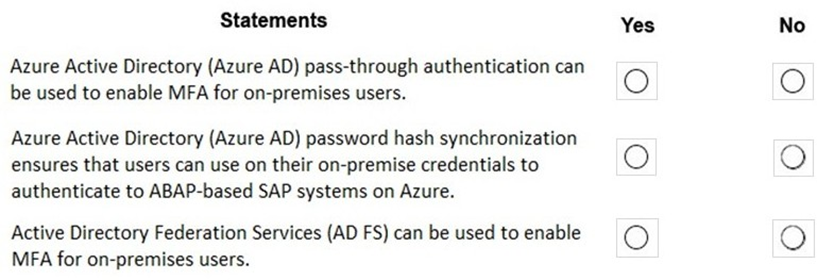
Your on-premises network contains SAP and non-SAP applications. You have JAVA-based SAP systems that use SPNEGO for single-sign on (SSO) authentication. Your external portal uses multi-factor authentication (MFA) to authenticate users. You plan to extend the on-premises authentication features to Azure and to migrate the SAP applications to Azure. For each of the following statements, select Yes if the statement is true. Otherwise, select No. NOTE: Each correct selection is worth one point.
Explanation:
This question assesses whether specific Azure AD hybrid identity methods can enable Multi-Factor Authentication (MFA) for on-premises users and whether they are valid for SAP ABAP authentication. The key is understanding that MFA is a feature of Azure AD, not of traditional on-premises Active Directory. Therefore, authentication methods that funnel user logins through Azure AD can leverage its MFA capabilities.
Correct Option:
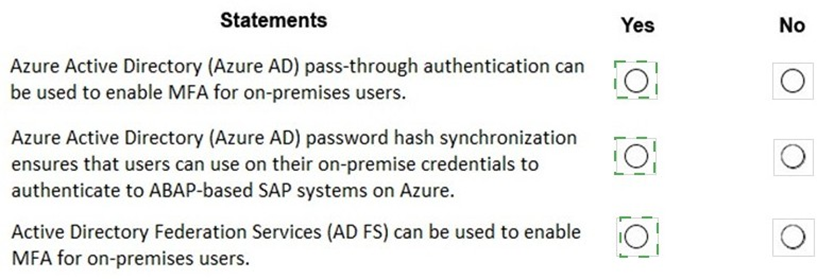
Statement 1 (Azure AD pass-through authentication can be used to enable MFA for on-premises users.): Yes.
This is true. Azure AD Pass-Through Authentication (PTA) validates passwords against on-premises AD, but the authentication request is processed by Azure AD. Since the user is authenticating to Azure AD (even though the password is verified on-premises), you can apply Azure AD Conditional Access policies, including requiring MFA, to that login event. PTA is a supported method for enabling cloud MFA.
Statement 2 (Azure AD password hash synchronization ensures that users can use their on-premise credentials to authenticate to ABAP-based SAP systems on Azure.): No.
This is false and repeats the key concept from the earlier question. Password hash sync populates Azure AD with credential hashes for authentication to Azure AD services only (Microsoft 365, Azure portal, other SaaS apps). ABAP-based SAP systems do not natively use Azure AD for SAP GUI logon authentication. They require direct Kerberos/SPNEGO or SAP logon ticket validation against an Active Directory domain controller accessible from the Azure VNet.
Statement 3 (Active Directory Federation Services (AD FS) can be used to enable MFA for on-premises users.): Yes.
This is true. AD FS can be configured with additional authentication providers (e.g., Azure MFA server, third-party MFA) to require a second factor during the federation process. When a user attempts to access a cloud application (federated via AD FS), the authentication request can be routed through AD FS, which can then trigger the configured MFA before issuing a token.
Incorrect Option:
Incorrect for Statement 1:
Selecting "No" would misunderstand the architecture. With PTA, the user signs into Azure AD, which is the entity that can enforce MFA before allowing the PTA agent to validate the password on-premises.
Incorrect for Statement 2:
Selecting "Yes" is the most common error, conflating Azure AD authentication with SAP application authentication. They are separate identity planes.
Incorrect for Statement 3:
Selecting "No" would ignore AD FS's extensible claims pipeline, which is commonly used to integrate on-premises MFA solutions for federated applications.
Reference:
Microsoft Learn, "Azure AD Multi-Factor Authentication," documents that MFA can be applied to users authenticating via Password Hash Synchronization, Pass-Through Authentication, and Federation (AD FS). For SAP ABAP systems, the documentation on identity integration clarifies that native Azure AD authentication methods are not used for SAP GUI; domain join and Kerberos are required.
You plan to deploy an SAP landscape on Azure that will use SAP HANA on Azure (Large Instances). You need to ensure that outbound traffic from the application tier can flow network virtual appliances (NVAs)only to the database tier. What should you use?
A. network virtual appliances (NVAs)
B. network security groups (NSGs)
C. application security groups
D. Azure Firewall
Explanation:
The requirement is to enforce a micro-segmentation rule where traffic from all VMs in the "application tier" is allowed only to the "database tier," and must flow through Network Virtual Appliances (NVAs) for inspection. The key is to create a rule that automatically applies to any VM based on its application role, not its specific IP address, and to direct that traffic through a specific network path (the NVA). This requires a combination of two features.
Correct Option:
C. Application Security Groups (ASGs) are a critical component of the solution, but alone they are not sufficient.
Analysis: ASGs allow you to group VMs by their application role (e.g., "SAP-AppServers", "SAP-HANA-DB"). You can then use these ASGs as the source or destination in Network Security Group (NSG) rules. This fulfills the "ensure traffic can flow... only to the database tier" part in a scalable, IP-agnostic way.
However, forcing traffic through an NVA requires User-Defined Routes (UDRs). A UDR on the application tier's subnet with a next-hop to the NVA's IP would direct all traffic (including that destined for the DB tier) to the NVA first.
Therefore, the complete solution requires B (NSGs with ASGs) and A (UDRs directing traffic to NVAs). Since the question asks for a single answer and Application Security Groups are the specific feature that enables the identity-based rule for the application tier, it is the best choice among the options, though the full implementation requires NSGs and UDRs as well.
Incorrect Option:
A. Network Virtual Appliances (NVAs):
NVAs are the device that inspects the traffic, but they do not, by themselves, ensure that all outbound app tier traffic flows through them. That enforcement is done via User-Defined Routes (UDRs) applied to the subnet.
B. Network Security Groups (NSGs):
NSGs are for allow/deny traffic rules (stateful firewall). While you need NSGs to create the allow rule from the app tier ASG to the DB tier ASG, NSGs cannot force traffic to take a specific route through an NVA. Route enforcement is the function of UDRs.
D. Azure Firewall:
This is a managed NVA and could serve as the central inspection point. However, similar to option A, simply deploying Azure Firewall does not ensure traffic is routed through it; you still need UDRs. Furthermore, it is not the specific feature that enables grouping VMs by application role for rule creation.
Reference:
Microsoft Learn, "Best practices for network security," recommends using Application Security Groups to define fine-grained network security policies based on workloads, combined with User-Defined Routes for forced tunneling and traffic inspection scenarios—exactly the pattern for a secure SAP tiered architecture.
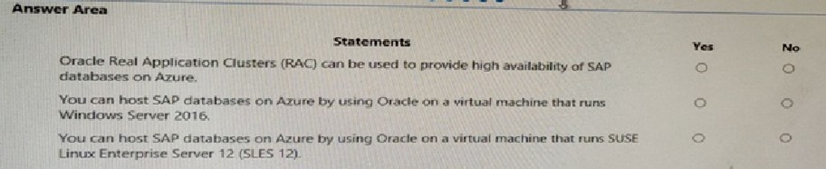
For each of the following statements, select Yes if the stamen is true. Otherwise, select No. NOTE: Each correct selection is worth one point.
Explanation:
These statements evaluate the SAP-certified configurations for running SAP with Oracle Database on Azure. Certification by SAP is strict, and only specific OS/database combinations listed in the SAP Product Availability Matrix (PAM) and corresponding Microsoft documentation are supported for production.
Correct Option:
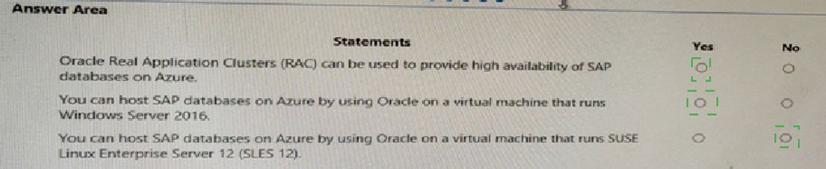
Statement 1 (Oracle Real Application Clusters (RAC) can be used...): No.
Oracle RAC is NOT certified or supported for SAP workloads on Azure. The certified high-availability solution for Oracle on Azure VMs is Oracle Data Guard for disaster recovery, combined with Azure Availability Sets or Zones for local VM-level fault tolerance. RAC's shared-disk architecture has dependencies on specific cluster filesystems and network latency that are not supported in the Azure IaaS environment for SAP.
Statement 2 (You can host SAP databases... using Oracle on a VM that runs Windows Server 2016.): No.
This is a critical certification fact. SAP does NOT certify or support the Oracle Database on the Windows Server operating system for deployments on Azure Virtual Machines. The only certified OS platforms for Oracle Database with SAP on Azure are SUSE Linux Enterprise Server (SLES) and Red Hat Enterprise Linux (RHEL).
Statement 3 (You can host SAP databases... using Oracle on a VM that runs SLES 12.): Yes.
This is true and is the primary certified configuration. SUSE Linux Enterprise Server (SLES) is a fully SAP-certified and supported operating system for running the Oracle Database with SAP NetWeaver (like SAP ECC or S/4HANA) on Azure VMs. Specific versions (like SLES 12 SPx) are listed in the SAP PAM.
Incorrect Option:
Incorrect for Statement 1:
Selecting "Yes" would incorrectly assume that all on-premises Oracle HA technologies are portable to Azure. RAC is explicitly excluded from SAP support on Azure.
Incorrect for Statement 2:
Selecting "Yes" is a common mistake. While Windows + SQL Server is a dominant SAP-on-Azure combination, the Oracle database is certified only on Linux in the Azure IaaS environment.
Incorrect for Statement 3:
Selecting "No" would contradict the official SAP and Microsoft documentation, which explicitly lists SLES and RHEL as the supported OSes for Oracle with SAP on Azure.
Reference:
The SAP Note 1380654 (SAP support in Azure) and the SAP Product Availability Matrix (PAM) under the database section for Oracle list the supported operating systems. The Microsoft Learn document "Oracle database deployments for SAP workload on Azure" explicitly states that Oracle Database is supported only on SUSE Linux Enterprise Server and Red Hat Enterprise Linux and that Oracle RAC is not supported.
You plan to deploy an SAP environment on Azure that will use Azure Availability Zones. Which load balancing solution supports the deployment?
A. Azure Basic Load Balancer
B. Azure Standard Load Balancer
C. Azure Application Gateway v1 SKU
Explanation:
The question asks for the load balancing solution that supports deployment with Azure Availability Zones. Availability Zones are physically separate datacenters within an Azure region. To distribute traffic across VMs or instances located in different zones, the load balancer must have the intelligence and architectural capability to be zone-redundant or to have frontend IPs pinned to specific zones.
Correct Option:
B. Azure Standard Load Balancer is the correct and only viable answer.
The Azure Standard Load Balancer is the minimum required load balancer SKU that supports Availability Zones. It can be configured with a zone-redundant frontend, meaning its public or internal IP address is served from all zones simultaneously, providing resilience even if one zone fails. This is essential for creating a cross-zone, highly available SAP architecture (e.g., for ASCS/SCS instances or application servers).
Incorrect Option:
A. Azure Basic Load Balancer:
The Basic SKU does NOT support Availability Zones. It is a legacy product with significant limitations, including no zone redundancy, no support for VNet peering across regions, and limited backend pool flexibility. It is not suitable for any production SAP deployment, especially one leveraging zones.
C. Azure Application Gateway v1 SKU:
While Application Gateway v2 SKU supports zones, the v1 SKU does not. More fundamentally, Application Gateway is a Layer 7 (HTTP/HTTPS) web traffic load balancer used for SAP Fiori front-ends or web services. It is not the correct load balancer for the core SAP application protocols (like SAP GUI over DIAG, RFC, or Enqueue Server communication), which require a Layer 4 (Transport Layer) load balancer—the Azure Standard Load Balancer.
Reference:
Microsoft Learn, "High availability of SAP NetWeaver on Azure VMs," explicitly states: "Use Azure Standard Load Balancer for creating the cluster configuration for SAP ASCS/SCS and the database. The Basic Load Balancer has limitations that don't work with multiple virtual IP addresses, which are required for multiple SAP systems." The documentation for Standard Load Balancer details its zone-redundant and zonal deployment options.
You have an SAP production landscape that uses SAP HANA databases. You configure a metric alert for the primary HANA server as shown in the following exhibit.



Explanation:
You are configuring an alert on the host-level "Percentage CPU" metric provided by the Azure platform. This metric measures the total CPU utilization of the virtual machine from the hypervisor's perspective. For a critical workload like SAP HANA, which has its own detailed health and performance metrics, relying solely on this infrastructure-level metric is insufficient for guaranteeing database availability and performance.
Correct Option (Inferred):
This alert does not monitor the actual SAP HANA database service health or its internal performance counters.
The Percentage CPU platform metric is a generic infrastructure health indicator. A HANA VM can have low host CPU usage while the HANA database service itself is down, frozen, or experiencing critical internal issues (e.g., out of memory, locked tables, full log volume). Therefore, this alert alone cannot reliably determine HANA database availability.
For true SAP HANA availability monitoring, you must also configure alerts on HANA-specific metrics collected by the Azure Enhanced Monitoring Extension for SAP. Key metrics include:
HANA Availability
HANA System Replication Status
HANA Memory Utilization
HANA Volume Usage
Incorrect Option (Inferred):
Assuming this CPU alert is sufficient for HANA high-availability failover decisions.
Automating a failover based solely on high host CPU could trigger unnecessary and disruptive failovers during legitimate processing peaks (e.g., batch jobs).Conversely, it would miss failures where the HANA service stops but the VM OS and CPU remain idle.
Reference:
Microsoft Learn, "Monitoring from the Azure host side for SAP on Azure," explains the two-tier monitoring approach:
Azure Platform Alerts: For infrastructure (VM, disk, network) issues.
SAP Host Agent & Enhanced Monitoring: For SAP application and database-specific health, which is mandatory for operational insight and correct alerting.
You need direct connectivity from an on-premises network to SAP HANA (Large Instances). The solution must meet the following requirements: Minimize administrative effort. Provide the highest level of resiliency.
What should you use?
A.
ExpressRoute Global Reach
B.
Linux IPTables
C.
ExpressRoute
D.
NGINX as a reverse proxy
ExpressRoute
Explanation:
https://docs.microsoft.com/en-us/azure/virtual-machines/workloads/sap/hana-network- architecture
Express Route Global Reach Microsoft introduced a new functionality called ExpressRoute Global Reach. Global Reach can be used for HANA Large Instances in two scenarios: Enable direct access from on-premises to your HANA Large Instance units deployed in different regions Enable direct communication between your HANA Large Instance units deployed in different regions Direct Access from on-premises In the Azure regions where Global Reach is offered, you can request enabling the Global Reach functionality for your ExpressRoute circuit that connects your on-premises network to the Azure virtual network that connects to your HANA Large Instance units as well.
You have an SAP Cloud Platform subscription and an Azure Active Directory (Azure AD) tenant. You need to ensure that Azure AD users can access SAP Cloud App by using their Azure AD credentials. What should you configure?
A.
Active Directory Domain Services (AD DS)
B.
SAP Cloud Platform Identity Authentication
C.
A conditional access policy
D.
SAP Cloud Connector
Active Directory Domain Services (AD DS)
Explanation:
When you integrate SAP Cloud Platform Identity Authentication with Azure AD, you can: Control in Azure AD who has access to SAP Cloud Platform Identity Authentication.
Enable your users to be automatically signed-in to SAP Cloud Platform Identity Authentication with their Azure AD accounts.
Manage your accounts in one central location - the Azure portal.
You deploy an SAP environment on Azure. You need to ensure that incoming requests are distributed evenly across the application servers. What should you use?
A.
SAP Web Dispatcher
B.
SAP Solution Manager
C.
SAP Control
D.
Azure Monitor
SAP Web Dispatcher
Explanation:
The SAP Web Dispatcher (SWD) component is used as a load balancer for SAP traffic among the SAP application servers.
A customer enterprise SAP environment plans to migrate to Azure. The environment uses servers that runs Windows Server 2016 and Microsoft SQL Server. The environment is critical and requires a comprehensive business continuity and disaster recovery (BCDRJ strategy that minimizes the recovery point objective (RPO) and the recovery time objective (RTO). The customer wants a resilient environment that has a secondary site that is at least 250 Kilometers away. You need to recommend a solution for the customer.
Which two solutions should you recommend? Each correct answer presents part ot the solution. NOTE; Each correct selection Is worth one point.
A.
an internal load balancer to route Internet traffic
B.
warm standby virtual machines in Azure Availability Zones.
C.
warn standby virtual machines in paired regions
D.
Warm standby virtual machine an Azure Availability Set that uses geo-redundant storage (GRS)
E.
Azure Traffic Manager to route incoming traffic.
an internal load balancer to route Internet traffic
warn standby virtual machines in paired regions
Explanation: References:
https://docs.microsoft.com/en-us/azure/virtual-machines/workloads/sap/sap-hana- availability-one-region
You have an SAP production landscape on-premises and an SAP development landscape on Azure. You deploy a network virtual appliance to act as a firewall between the Azure subnet and the on-premises network. Solution: You configure a user-defined route table. Does this meet the goal?
A.
Yes
B.
No
No
You plan to migrate an on-premises SAP environment to Azure. You need to identity whether any SAP application servers host multiple SAP system identifiers (SlDs). What should you do?
A.
Run SAP HAN A sizing report.
B.
From the SAP EarlyWatch Alert report, compare the physical host names to the virtual host names.
C.
Run the SAP Report from ABAPMeter.
D.
From the SAP EarlyWatch Alert report, compare the services to the reference objects
Run the SAP Report from ABAPMeter.
| Page 3 out of 19 Pages |
| Previous |