
Topic 6: Misc. Questions
Your network contains an on-premises Active Directory Domain Services (AD DS) domain named contoso.com. The domain contains the servers shown in the following table.<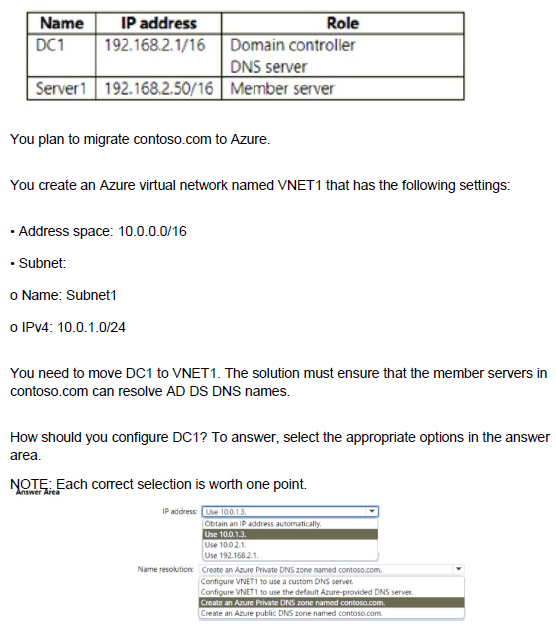
Explanation:
When migrating a domain controller to Azure, you need to assign it a static IP address within the virtual network's address space and configure name resolution so that on-premises member servers can resolve AD DS DNS names. The domain controller must also act as a DNS server for the domain.
Correct Options:
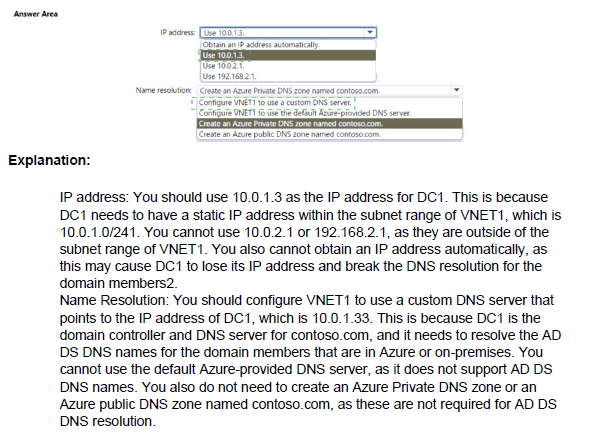
IP address: Use 10.0.1.3
Domain controllers require static IP addresses to ensure consistent DNS resolution for domain members. The IP address 10.0.1.3 is within the Subnet1 range (10.0.1.0/24) and is available for assignment. Using a static IP ensures that other servers can reliably locate the domain controller for authentication and DNS queries.
Name resolution: Configure VNET1 to use a custom DNS server
Since DC1 will function as a DNS server for contoso.com, you must configure VNET1's DNS settings to use DC1's IP address (10.0.1.3) as a custom DNS server. This ensures that virtual machines in VNET1 can resolve AD DS domain names using the domain controller. The default Azure DNS cannot resolve on-premises AD DS names.
Incorrect Options:
IP address:
Obtain an IP address automatically: Domain controllers must have static IPs; dynamic assignment can cause DNS registration issues and service disruption.
Use 10.0.2.1: This IP is outside Subnet1 range (10.0.1.0/24) and cannot be assigned to a NIC in Subnet1.
Use 192.168.2.1: This is the on-premises IP and is not routable within VNET1's address space.
Name resolution:
Configure VNET1 to use the default Azure-provided DNS server: Azure DNS cannot resolve on-premises AD DS domain names.
Create an Azure Private DNS zone named contoso.com: While useful for custom DNS records, this does not replace the need for AD-integrated DNS provided by DC1.
Create an Azure public DNS zone named contoso.com: Public zones are for internet-facing resolution, not internal AD DS name resolution.
Reference:
Microsoft Learn: Deploy Active Directory Domain Services in Azure
Microsoft Learn: Change DNS servers for an Azure virtual network
You have an Azure AD tenant that is linked to the subscriptions shown in the following table.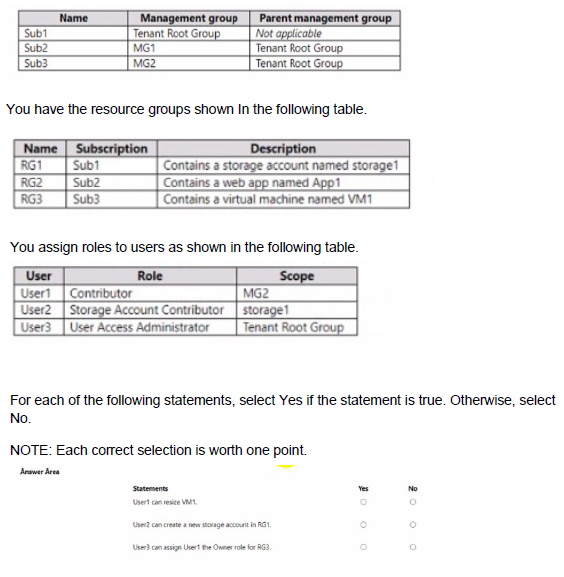
Explanation:
Azure RBAC permissions are inherited based on the scope of role assignments. Understanding the hierarchy of management groups, subscriptions, and resource groups is essential to determine what actions each user can perform.
Correct Answers:
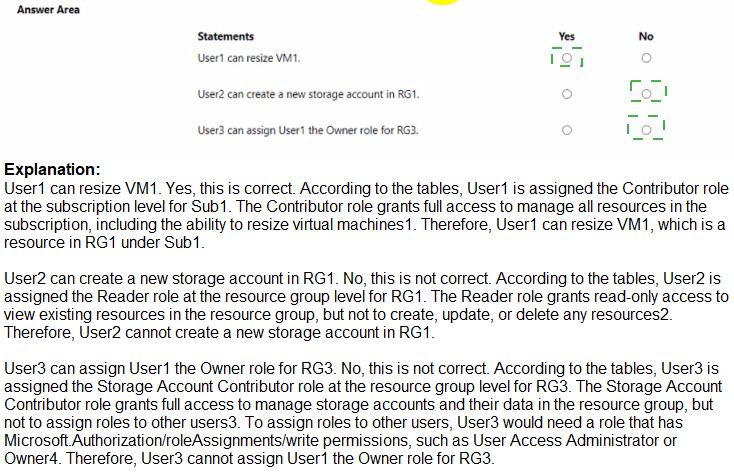
Statement 1: User1 can resize VM1.
Answer: Yes
User1 has the Contributor role assigned at MG2 scope. MG2 contains Sub3, which contains RG3, which contains VM1. Contributor role at MG2 grants full management permissions for all resources within MG2, including the ability to resize virtual machines in RG3.
Statement 2: User2 can create a new storage account in RG1.
Answer: No
User2 has Storage Account Contributor role assigned at the storage1 resource scope only. This role grants permissions to manage storage1 specifically, but does not allow creating new storage accounts in RG1. Creating a new storage account would require Contributor or Owner permissions at the RG1 scope or higher.
Statement 3: User3 can assign User1 the Owner role for RG3.
Answer: Yes
User3 has User Access Administrator role assigned at the Tenant Root Group scope. This role allows managing access to Azure resources at any scope within the tenant, including assigning Owner role for RG3 to User1. User Access Administrator can delegate administrative access across all subscriptions and management groups.
Reference:
Microsoft Learn: Azure RBAC scopes
Microsoft Learn: Azure built-in roles
Microsoft Learn: Inherited permissions in management groups
You have an Azure subscription named Subscroption1.
In Subscription1, you create an alert rule named Alert1.
The Alert1 action group is configured as shown in the following exhibit.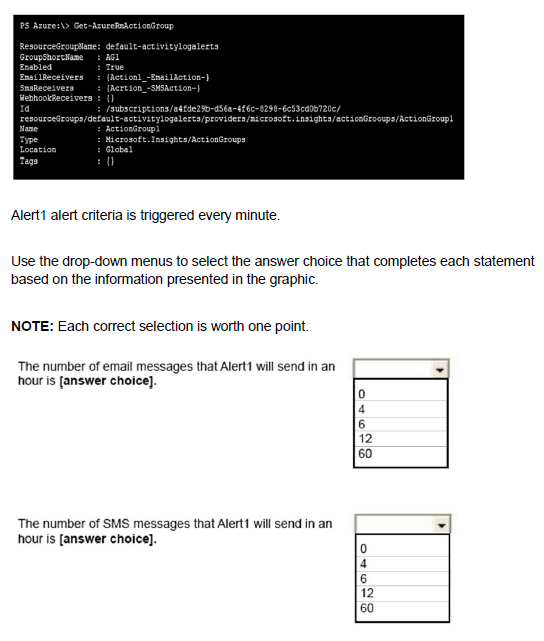
Explanation:
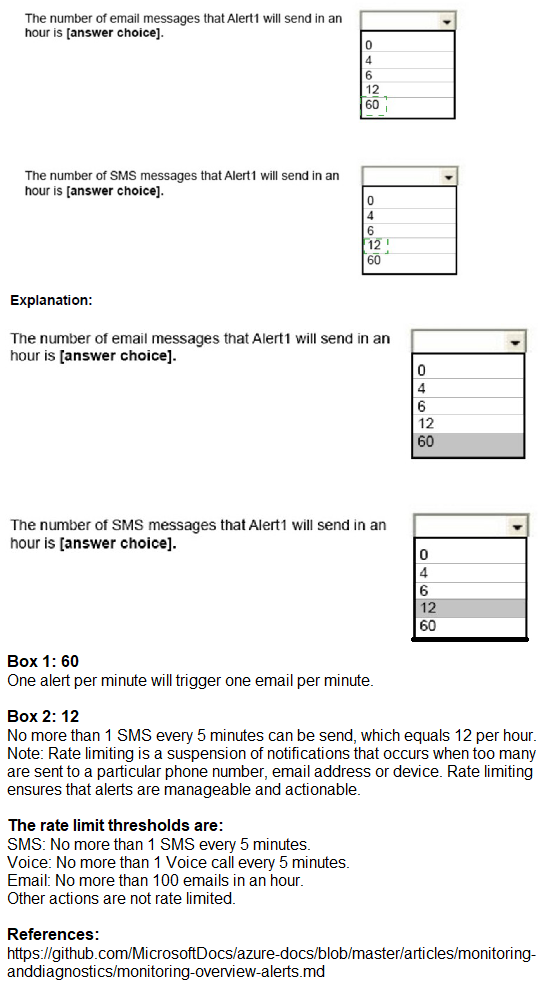
Azure Monitor alerts have built-in throttling and rate limiting for notifications to prevent notification floods. Email and SMS actions are subject to throttling regardless of how frequently the alert condition is met. The exhibit shows Alert1 is triggered every minute, but notifications will be limited.
Correct Answers:
First statement: The number of email messages that Alert1 will send in an hour is 4.
Answer: 4
Azure Monitor throttles email notifications to send no more than one email every 15 minutes per action group. With Alert1 triggering every minute, the email receiver will receive at most 4 emails per hour (60 minutes / 15 minutes = 4). Additional alerts within the 15-minute window do not generate new emails.
Second statement: The number of SMS messages that Alert1 will send in an hour is 4.
Answer: 4
SMS notifications have the same throttling behavior as email - one SMS every 15 minutes per action group. Even though the alert fires every minute, SMS receivers will receive at most 4 messages per hour. This prevents overwhelming recipients with repeated notifications.
Incorrect Options:
60: This would be the number of alert firings per hour, but throttling prevents 60 notifications.
12: This would be one notification every 5 minutes, which is not the throttling interval.
6: This would be one notification every 10 minutes, also incorrect.
0: Notifications will be sent, just throttled to 4 per hour.
Reference:
Microsoft Learn: Action groups in Azure Monitor
Microsoft Learn: Rate limiting for voice, SMS, emails, and webhooks
You have an Azure subscription that contains the users shown in the following table.
The groups are configured as shown in the following table.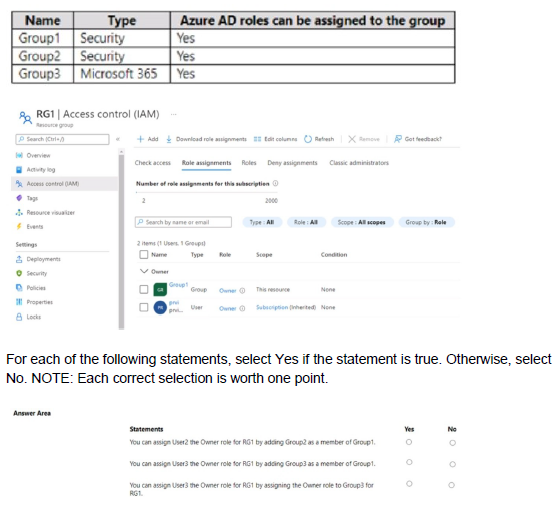
Explanation:
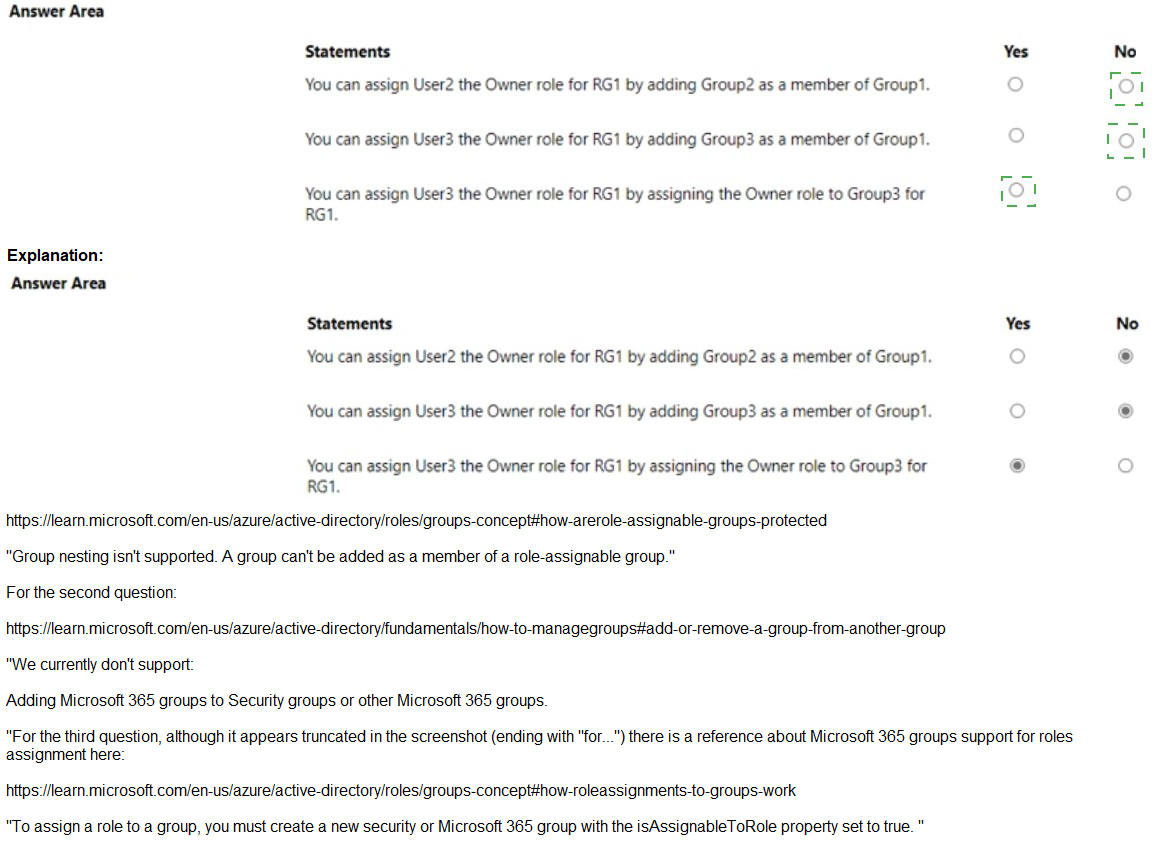
The image shows the Access control (IAM) blade for RG1. To assign the Owner role for RG1 to a user, you must either directly assign the role to the user or to a group that contains the user. Nested group memberships do not automatically inherit role assignments in Azure RBAC.
Correct Answers:
Statement 1: You can assign User2 the Owner role for RG1 by adding Group2 as a member of Group1.
Answer: No
User2 is a member of Group2. If you add Group2 as a member of Group1, User2 becomes a member of Group1 through nested group membership. However, Azure RBAC does not support nested groups for role assignments. If you assign the Owner role to Group1, members of Group2 (including User2) will not inherit the role because Azure RBAC only evaluates direct group memberships, not nested memberships.
Statement 2: You can assign User3 the Owner role for RG1 by adding Group3 as a member of Group1.
Answer: No
User3 is a member of Group3. Adding Group3 to Group1 creates nested group membership. As with Statement 1, Azure RBAC does not recognize nested group memberships for role assignments. User3 would not inherit any role assigned to Group1 because the membership is indirect.
Statement 3: You can assign User4 the Owner role for RG1 by assigning the Owner role to Group3 for RG1.
Answer: Yes
User4 is a direct member of Group3. If you assign the Owner role to Group3 at the RG1 scope, User4 will inherit the Owner role because the membership is direct. Azure RBAC supports assigning roles to groups, and members of those groups receive the permissions directly.
Reference:
Microsoft Learn: Understand Azure role assignments
Microsoft Learn: Organize Azure resources with management groups
Microsoft Learn: Azure built-in roles - Owner
You have an Azure subscription named Sub1 that contains two users named User1 and User2.
You need to assign role-based access control (RBAC) roles to User1 and User2. The users must be able to perform the following tasks in Sub1:
• User1 must view the data in any storage account.
• User2 must assign users the Contributor role for storage accounts.
The solution must use the principle of least privilege.
Which RBAC role should you assign to each user? To answer, drag the appropriate roles to the correct users. Each role may be used once, more than once, or not at all.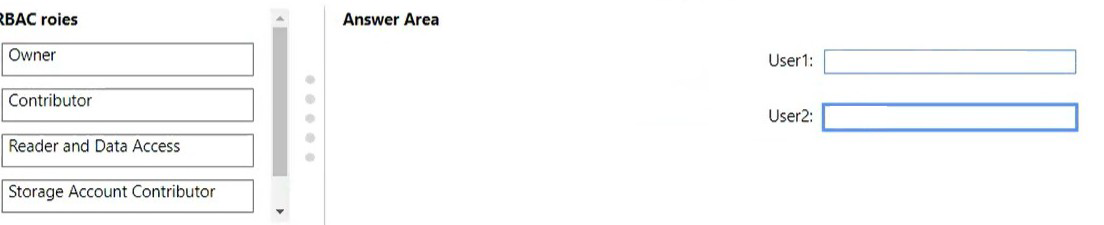
Explanation:
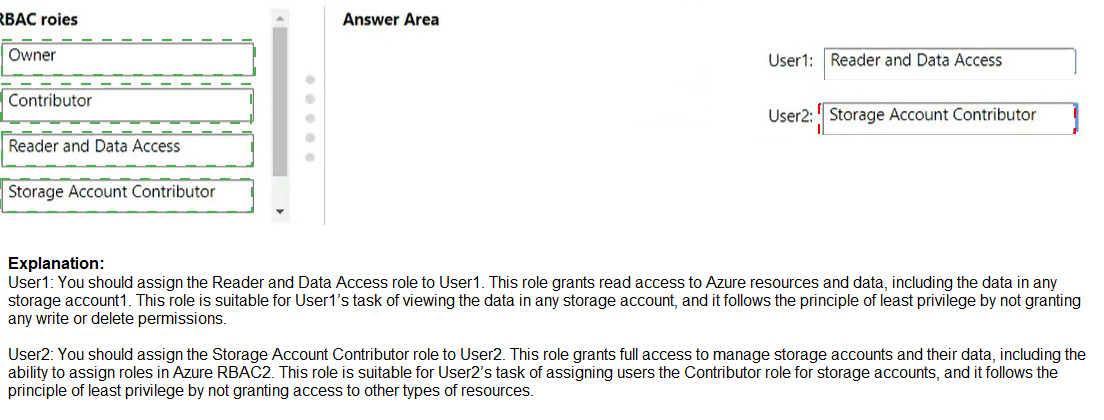
The principle of least privilege requires assigning only the permissions necessary for users to perform their tasks. User1 needs read-only access to storage account data, while User2 needs permissions to assign Contributor role specifically for storage accounts, not full administrative rights.
Correct Answers:
User1: Reader and Data Access
The Reader and Data Access role provides read-only access to storage account data, including viewing blobs, files, queues, and tables. This role combines the Reader role (for viewing storage account properties) with data read permissions, exactly matching User1's requirement to view data in any storage account while following least privilege.
User2: Owner
User2 needs to assign the Contributor role to other users for storage accounts. Only the Owner role includes the Microsoft.Authorization/roleAssignments/write permission required to create role assignments. While this grants more permissions than just assigning Contributor, no other built-in role can delegate role assignment capability specifically for storage accounts.
Incorrect Options:
Contributor: This role allows full management of storage accounts but cannot assign roles to others. It does not meet User2's requirement to assign the Contributor role to other users.
Storage Account Contributor: This role allows full management of the storage account itself but does not include permissions to assign RBAC roles to other users. It would not enable User2 to delegate Contributor access.
Reference:
Microsoft Learn: Azure built-in roles
Microsoft Learn: Reader and Data Access role
Microsoft Learn: Owner role
You have the App Service plans shown in the following table.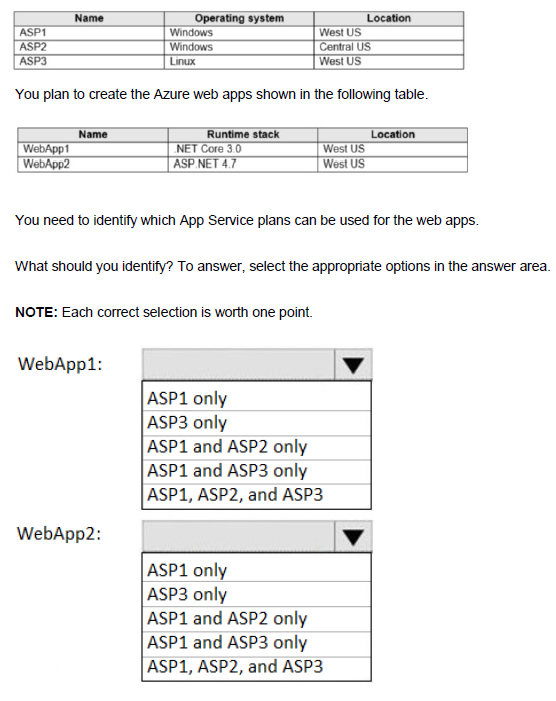
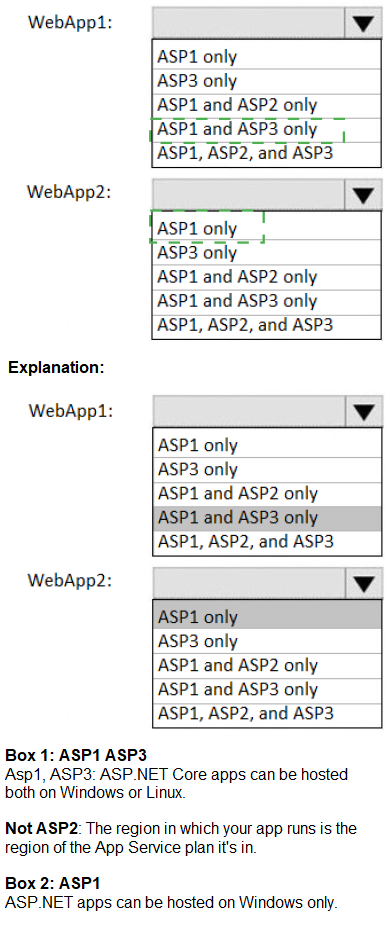
Explanation:
App Service plans define the region and operating system for web apps deployed to them. A web app must be created in an App Service plan that matches both the region and the operating system required by the web app's runtime stack. WebApp1 uses .NET Core 3.0 (Linux-compatible) and WebApp2 uses ASP.NET 4.7 (Windows-only).
Correct Answers:
WebApp1: ASP1 and ASP3 only
WebApp1 uses .NET Core 3.0, which can run on both Windows and Linux. However, it must match the region. WebApp1 is located in West US, so it can use ASP1 (Windows, West US) or ASP3 (Linux, West US). ASP2 is in Central US, which does not match the required region.
WebApp2: ASP1 only
WebApp2 uses ASP.NET 4.7, which requires a Windows operating system. WebApp2 is located in West US, so it can only use ASP1 (Windows, West US). ASP3 is Linux-based and cannot run ASP.NET 4.7. ASP2 is in the wrong region (Central US).
Incorrect Options:
WebApp1:
ASP1 only: Incorrect because .NET Core can also run on Linux (ASP3).
ASP3 only: Incorrect because .NET Core can run on Windows (ASP1).
ASP1 and ASP2 only: Incorrect because ASP2 is in wrong region.
ASP1, ASP2, and ASP3: Incorrect because ASP2 is in wrong region.
WebApp2:
ASP3 only: Incorrect because ASP3 is Linux and cannot run ASP.NET 4.7.
ASP1 and ASP2 only: Incorrect because ASP2 is in wrong region.
ASP1 and ASP3 only: Incorrect because ASP3 is Linux.
ASP1, ASP2, and ASP3: Incorrect because ASP2 wrong region, ASP3 wrong OS.
Reference:
Microsoft Learn: App Service plan overview
Microsoft Learn: Operating system and runtime stack support in App Service
You have an Azure subscription mat contains a virtual machine named VM1 and an Azure function named App1. You need to create an alert rule that will run App1 if VM1 stops. What should you create for the alert rule?
A. a security group that has dynamic device membership
B. an action group
C. an application security group
D. an application group
Explanation:
To trigger an Azure function automatically when a virtual machine stops, you need an alert rule that monitors VM1's status and an action group that defines what happens when the alert fires. Action groups can trigger Azure functions as a response to alerts.
Correct Option:
B. an action group
An action group is a collection of notification preferences and actions that are triggered when an alert fires. You can configure an action group to run an Azure function (App1) as an action type. When VM1 stops and meets the alert condition, the action group executes the function automatically.
Incorrect Options:
A. a security group that has dynamic device membership
Dynamic device membership groups are used in Microsoft Entra ID for managing device access and compliance policies. They cannot trigger Azure functions based on VM status changes.
C. an application security group
Application security groups are used to group virtual machines for network security policy configuration, such as in network security groups. They do not provide alerting or automation capabilities.
D. an application group
Application groups are typically associated with Azure Virtual Desktop for managing user sessions and applications. They are not used for creating alerts or triggering functions based on VM status.
Reference:
Microsoft Learn: Action groups in Azure Monitor
Microsoft Learn: Create and manage action groups in the Azure portal
You deploy an Azure Kubernetes Service (AKS) cluster that has the network profile shown in the following exhibit.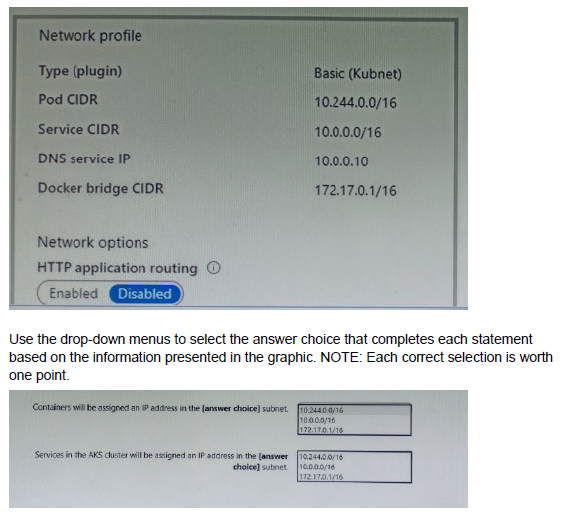
Explanation:
In Azure Kubernetes Service (AKS), the network profile defines how IP addresses are assigned to pods, services, and nodes. With the Basic (kubenet) networking plugin: pods receive IP addresses from the pod CIDR range, services (ClusterIP, LoadBalancer, etc.) receive IPs from the service CIDR range, and nodes (the underlying VMs) get IPs from the subnet where the AKS cluster is deployed. The Docker bridge CIDR is used internally for container communication on each node but is not assigned to pods or services. The exhibit shows pod CIDR = 10.244.0.0/16, service CIDR = 10.0.0.0/16, and the subnet is 10.244.0.0/16 (listed under Network options as 10.244.0.0/16). This means pods share the same address space as the node subnet in kubenet mode.
Correct Option:
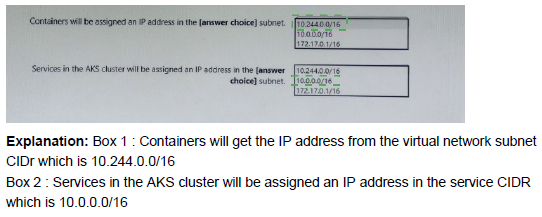
Containers will be assigned IP address in the (answer choice) subnet. 10.244.0.0/16
In Basic (kubenet) networking, containers (pods) are assigned IP addresses directly from the pod CIDR range, which in this configuration is 10.244.0.0/16. This is the same range as the AKS node subnet (listed under Network options), meaning pods and nodes share the same subnet address space.
Services in this cluster will be assigned IP address in the (answer choice) subnet. 10.0.0.0/16
Kubernetes services (ClusterIP type) are assigned virtual IPs from the dedicated service CIDR range, which is configured as 10.0.0.0/16 in this cluster. This range is separate from the pod and node subnet to avoid overlap and routing conflicts.
Containers in the AKS cluster will be assigned IP address in the (answer choice) subnet. 10.244.0.0/16
Same as the first statement: pods (containers) receive IPs from the pod CIDR of 10.244.0.0/16, which matches the node subnet range in this kubenet configuration.
Incorrect Option:
172.17.0.0/16 (Docker bridge CIDR) — This is the internal bridge network used by Docker/containerd on each node for container-to-container communication within the same pod or node. It is never assigned to pods, services, or cluster-wide resources in AKS.
10.0.0.0/16 (service CIDR) — This range is reserved exclusively for Kubernetes services (ClusterIP addresses), not for pod/container IPs.
Any mix-up between pod CIDR and service CIDR would cause incorrect routing or IP conflicts in the cluster.
Reference:
Azure Kubernetes Service networking concepts
Configure Azure CNI networking in AKS
You have an Azure subscription named Subscription1. Subscription1 contains a virtual machine named VM1.
You install and configure a web server and a DNS server on VM1.
VM1 has the effective network security rules shown in the following exhibit.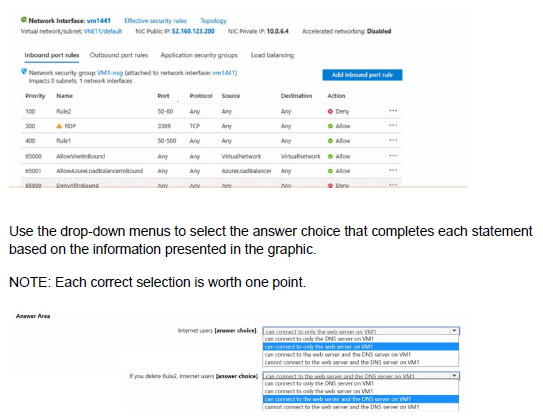
Explanation:
The exhibit shows the effective security rules for VM1's network interface. Network security group (NSG) rules are evaluated in priority order, with lower numbers processed first. The effective action is determined by the first rule that matches the traffic. The question tests understanding of NSG rule evaluation and the impact of rule removal.
Correct Answers:
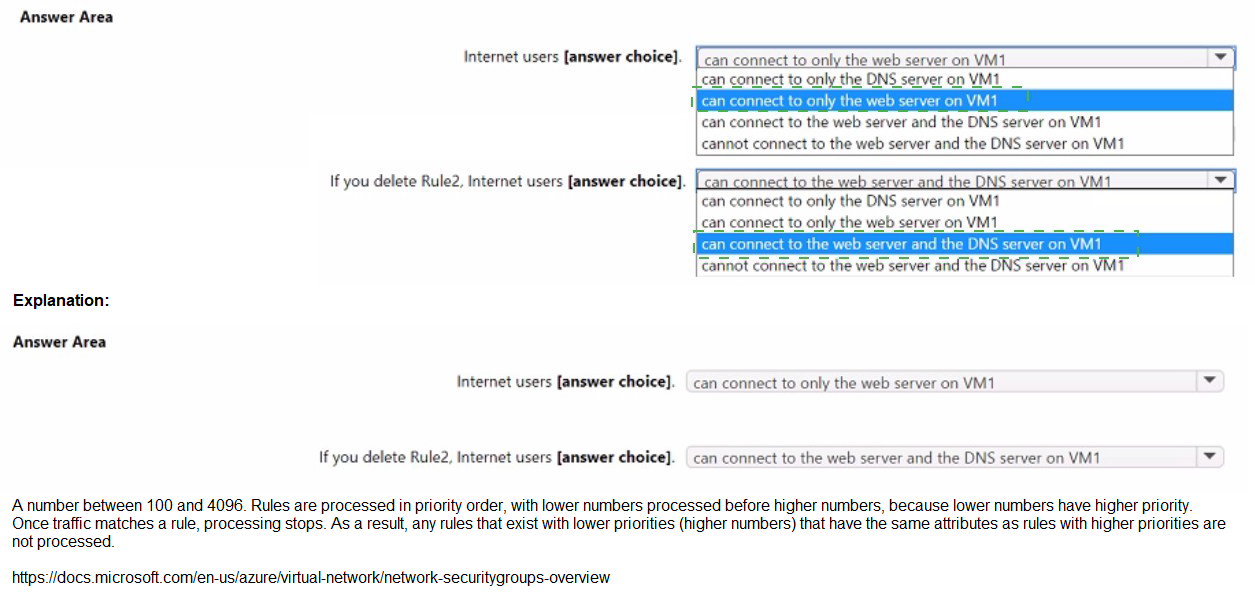
First statement: Internet users [answer choices]
Answer: Can connect to only the DNS server on VM1
Rule2 (priority 100) denies traffic on ports 50-60. Rule1 (priority 400) allows traffic on ports 50-500. However, because Rule2 has a lower priority number (100) than Rule1 (400), Rule2 is evaluated first and denies traffic on ports 50-60. DNS uses port 53, which falls within the denied range (50-60), so DNS traffic is blocked. RDP (priority 300) allows port 3389, so RDP is allowed, but the question asks about web server and DNS server. Web server typically uses port 80/443, which is within the allowed range of Rule1 (50-500) and not denied by Rule2 (50-60 only), so web traffic is allowed. Therefore, internet users can connect to the web server (port 80) but cannot connect to the DNS server (port 53 is denied).
Second statement: If you delete Rule2, Internet users [answer choices]
Answer: Can connect to the web server and the DNS server on VM1
If Rule2 is deleted, Rule1 (priority 400) becomes the only rule governing ports 50-500. Rule1 allows traffic on ports 50-500 from any source to any destination. DNS port 53 now falls under Rule1's allowed range, so DNS traffic is permitted. Web server traffic (port 80) remains allowed. Therefore, internet users can connect to both the web server and the DNS server.
Reference:
Microsoft Learn: How network security groups filter network traffic
Microsoft Learn: Network security group rules evaluation
Note: This question is part of a series of questions that present the same scenario. Each question in the series contains a unique solution that might meet the stated goals. Some question sets might have more than one correct solution, while others might not have a correct solution.
After you answer a question in this section, you will NOT be able to return to it. As a result, these questions will not appear in the review screen.
You need to ensure that an Azure Active Directory (Azure AD) user named Admin1 is assigned the required role to enable Traffic Analytics for an Azure subscription.
Solution: You assign the Traffic Manager Contributor role at the subscription level to Admin1
A. Yes
B. No
Explanation:
Traffic Analytics in Azure Network Watcher requires specific permissions to enable and manage. The Traffic Manager Contributor role is designed for managing Traffic Manager profiles, not for configuring Traffic Analytics or Network Watcher features.
Correct Option:
B. No
The Traffic Manager Contributor role does not grant the necessary permissions to enable Traffic Analytics. To configure Traffic Analytics, Admin1 needs roles that provide access to Network Watcher, storage accounts, and Log Analytics workspaces, such as Network Contributor, Log Analytics Contributor, or a custom role with appropriate permissions.
Incorrect Options:
A. Yes
This option is incorrect because the Traffic Manager Contributor role is specific to Azure Traffic Manager, not Traffic Analytics. Assigning this role would not give Admin1 the required permissions to enable Traffic Analytics for the subscription.
Reference:
Microsoft Learn: Azure built-in roles - Traffic Manager Contributor
Microsoft Learn: Traffic Analytics permissions and prerequisites
You have an Azure subscription that contains a storage account. The account stores website data.
You need to ensure that inbound user traffic uses the Microsoft point-of-presence (POP) closest to the user's location.
What should you configure?
A. load balancing
B. private endpoints
C. Azure Firewall rules
D. Routing preference
Explanation:
Routing preference in Azure Storage allows you to choose how network traffic routes from clients to your storage account. By setting routing preference to "Microsoft network," traffic uses the Microsoft global network infrastructure, entering at the closest Microsoft POP and traversing Microsoft's backbone network.
Correct Option:
D. Routing preference
Routing preference controls the path that network traffic takes from clients to Azure Storage. When set to "Microsoft network," traffic is routed through Microsoft's wide area network, entering at the closest Microsoft POP to the user. This optimizes performance by reducing latency and using Microsoft's backbone network instead of the public internet.
Incorrect Options:
A. load balancing
Load balancing distributes traffic across multiple resources for high availability and scalability. It does not control the network path or ensure traffic enters at the closest Microsoft POP to the user.
B. private endpoints
Private endpoints provide secure connectivity to Azure Storage over a private IP address within a virtual network. They do not influence routing preference or ensure traffic enters at the closest Microsoft POP.
C. Azure Firewall rules
Azure Firewall rules control inbound and outbound traffic filtering based on policies. They do not affect routing paths or optimize traffic entry points for user proximity.
Reference:
Microsoft Learn: Network routing preference in Azure Storage
Microsoft Learn: Configure network routing preference for a storage account
You sign up for Azure Active Directory (Azure AD) Premium.
You need to add a user named admin1@contoso.com as an administrator on all the computers that will be joined to the Azure AD domain.
What should you configure in Azure AD?
A. Device settings from the Devices blade.
B. General settings from the Groups blade.
C. User settings from the Users blade
D. Providers from the MFA Server blade
Explanation:
To add a user as an administrator on all Azure AD joined computers, you need to configure device settings. Azure AD allows you to designate additional local administrators on all devices joined to Azure AD through the device settings configuration.
Correct Option:
A. Device settings from the Devices blade.
In Azure AD, under the Devices blade, you can configure device settings that include specifying additional local administrators on all Azure AD joined devices. By adding admin1@contoso.com to this setting, the user will be added to the local administrators group on every computer that joins the Azure AD domain.
Incorrect Options:
B. General settings from the Groups blade.
Groups settings manage group creation policies, expiration, and naming policies. They do not control local administrator assignments on Azure AD joined devices.
C. User settings from the Users blade.
User settings control user portal permissions, external collaboration, and application registration. They do not include configuration for device administrator assignments.
D. Providers from the MFA Server blade.
MFA Server settings are used for on-premises multi-factor authentication configurations. They have no relation to assigning local administrators on Azure AD joined devices.
Reference:
Microsoft Learn: Manage local administrators on Azure AD joined devices
Microsoft Learn: Configure device settings in Azure AD
| Page 9 out of 38 Pages |
| 34567891011121314 |
| AZ-104 Practice Test Home |
Real-World Scenario Mastery: Our AZ-104 practice exam don't just test definitions. They present you with the same complex, scenario-based problems you'll encounter on the actual exam.
Strategic Weakness Identification: Each practice session reveals exactly where you stand. Discover which domains need more attention, before Microsoft Azure Administrator exam day arrives.
Confidence Through Familiarity: There's no substitute for knowing what to expect. When you've worked through our comprehensive AZ-104 practice exam questions pool covering all topics, the real exam feels like just another practice session.
Copyright © All Rights Reserved