
Topic 6: Misc. Questions
You have an Azure subscription that contains a storage account named storage1. The storage 1 account contains a container named containet1.
You create a blob lifecycle rule named rule1.
You need to configure rule1 to automatically move blobs that were NOT updated for 45 days Irom container! to the Cool access tier.
How should you complete the rule? To answer, select Ihe appropriate options in the answer area.
NOTE: Each correct answer is worth one point.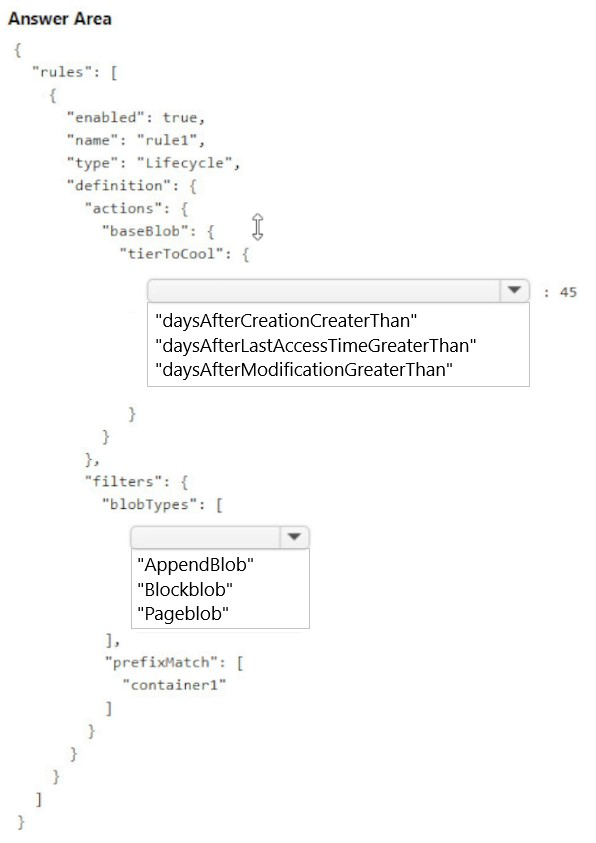
Explanation:
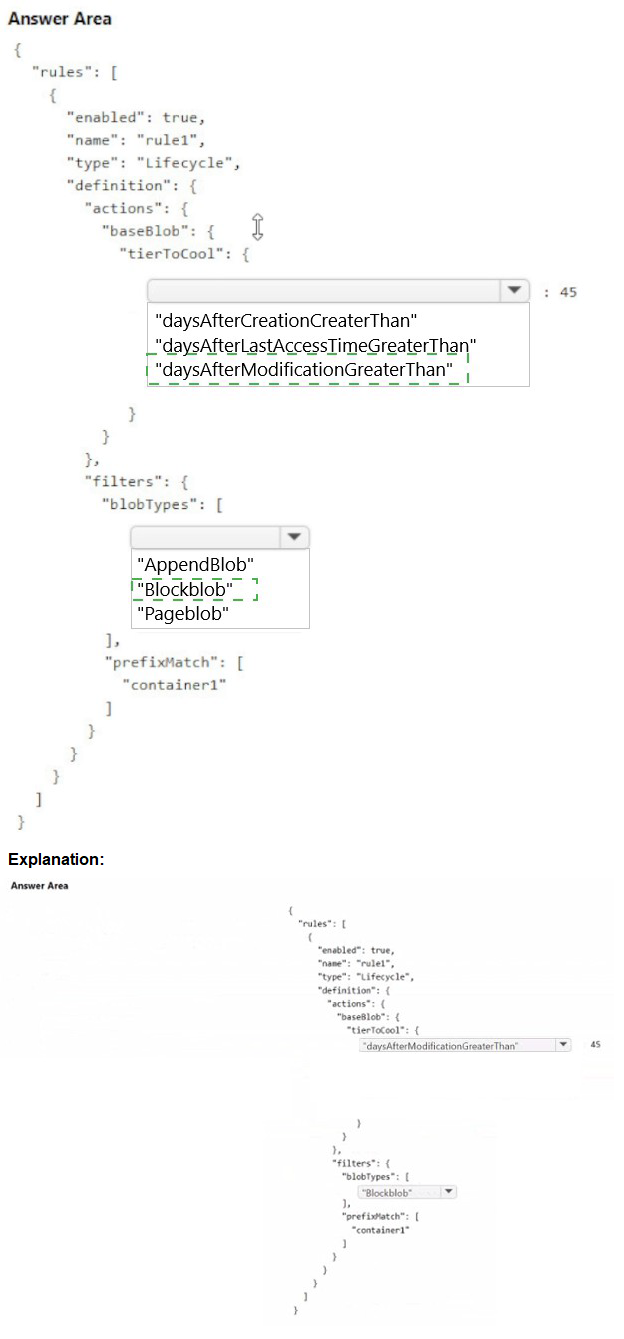
To move blobs that have not been updated for 45 days to the Cool access tier, you need to configure a lifecycle management rule that uses the appropriate time-based condition. The condition should be based on the last modification time of the blobs, which reflects when they were last updated.
Correct Options:
definition.actions.baseBlob.tierToCool: daysAfterModificationGreaterThan
The "daysAfterModificationGreaterThan" property specifies the number of days after the blob was last modified to perform the action. Since the requirement is to move blobs not updated for 45 days, this is the correct condition to use. It tracks the last write operation on the blob.
definition.filters.blobTypes: BlockBlob
Block blobs are the most common type used for general-purpose storage and support tiering between Hot, Cool, Cold, and Archive tiers. Append blobs and page blobs have different use cases and limitations; page blobs cannot be tiered to Cool, and lifecycle rules primarily target block blobs for tiering operations.
Incorrect Options:
daysAfterCreationGreaterThan
This option is incorrect because it triggers actions based on when the blob was created, not when it was last updated. If a blob is frequently updated, this condition would not accurately reflect the "not updated for 45 days" requirement.
daysAfterLastAccessTimeGreaterThan
This option requires enabling last access time tracking, which is an optional feature and not enabled by default. Without this feature enabled, the condition cannot be evaluated. The requirement specifically states "not updated," which refers to modification time.
AppendBlob / Pageblob
Append blobs are optimized for append operations and are typically not tiered. Page blobs are used for VHD files and do not support tiering to Cool access tier. Therefore, these blob types cannot be included in a rule for moving to Cool tier.
Reference:
Microsoft Learn: Configure a lifecycle management policy
Microsoft Learn: Access tiers for blob data
You have an Azure subscription that contains the resources shown in the following table.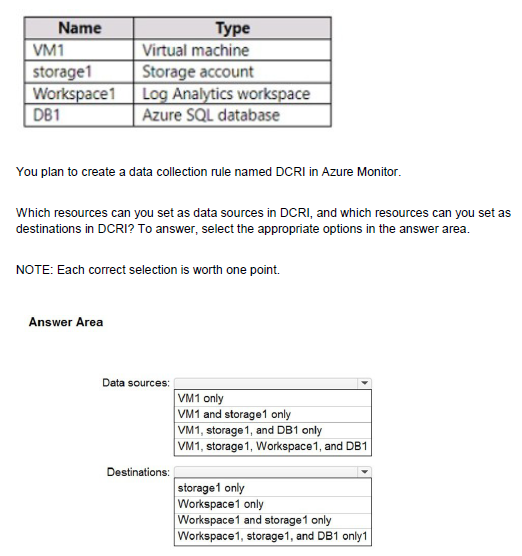
Explanation:
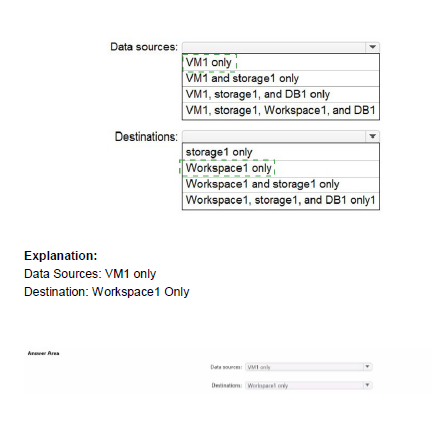
Data Collection Rules (DCRs) in Azure Monitor define how monitoring data is collected and where it should be sent. DCRs can collect data from supported resources like virtual machines (using Azure Monitor Agent) and can send that data to supported destinations like Log Analytics workspaces and Azure Storage accounts for analysis and retention.
Correct Options:
Data sources: VM1 only
Data Collection Rules collect telemetry data from resources that generate monitoring data. Virtual machines (VM1) are supported data sources because they can run the Azure Monitor Agent to collect performance, event logs, and custom data. Storage accounts (storage1) and Azure SQL databases (DB1) cannot act as data sources for DCRs; they have their own diagnostic settings for sending metrics and logs. Log Analytics workspaces (Workspace1) are destinations, not sources.
Destinations: Workspace1 and storage1 only
Data Collection Rules can send collected data to multiple destinations. Log Analytics workspaces (Workspace1) are primary destinations for storing and analyzing log data. Azure Storage accounts (storage1) can also be destinations for archiving raw data. Azure SQL databases (DB1) cannot be configured as destinations for DCRs because they are not designed to receive monitoring data from Azure Monitor agents.
Incorrect Options:
Data sources options:
VM1, storage1, and DB1 only / VM1, storage1, Workspace1, and DB1: These are incorrect because only VM1 can be a data source. Storage accounts and databases use diagnostic settings, not DCRs, to export their platform logs and metrics. Workspace1 is a destination, not a source.
Destinations options:
storage1 only: This is incomplete because Log Analytics workspaces are also valid destinations.
Workspace1 only: This is incomplete because storage accounts are also valid destinations.
Workspace1, storage1, and DB1 only: This is incorrect because DB1 cannot be a destination for DCRs.
Reference:
Microsoft Learn: Data collection rules in Azure Monitor
Microsoft Learn: Sources and destinations in data collection rules
You have an Azure subscription that contains the resources shown in the following table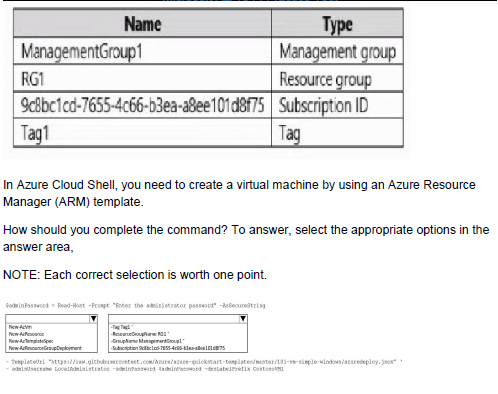
Explanation:
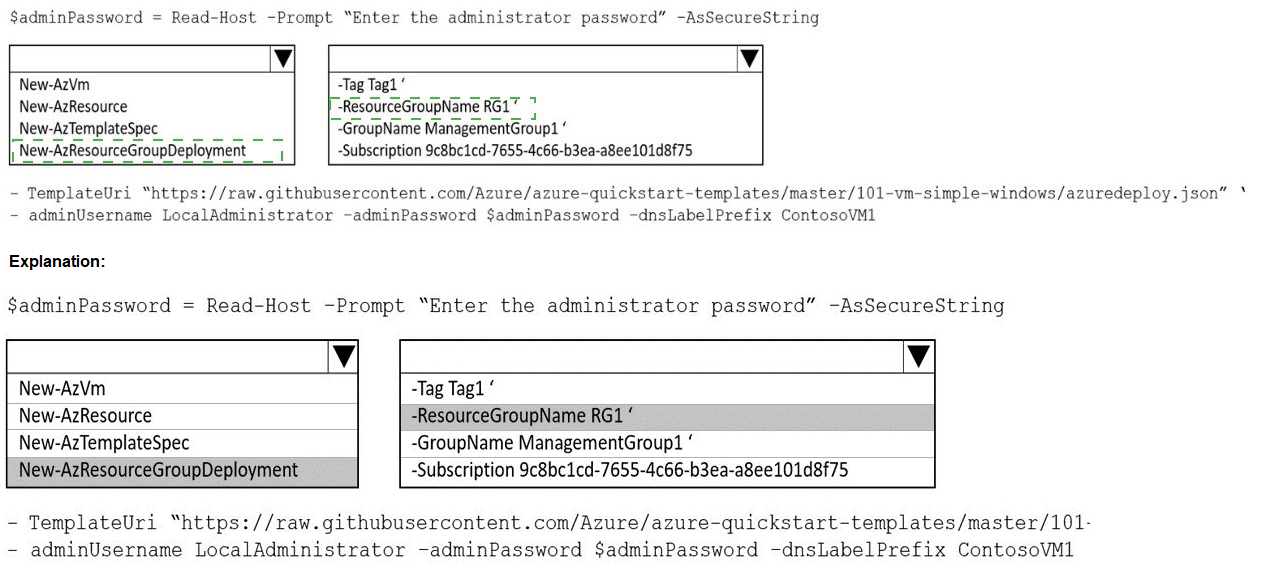
To deploy a virtual machine using an ARM template in Azure Cloud Shell, you need to specify the deployment scope and provide the required parameters. The command must identify the target resource group and the template file to execute the deployment successfully.
Correct Options:
First selection: az deployment group create
The "az deployment group create" command is used to deploy resources to a resource group scope. Since virtual machines are typically deployed to a resource group (RG1 in this case), this is the correct command. Other deployment scopes include subscription ("az deployment sub create") and management group ("az deployment mg create") levels.
Second selection: --resource-group RG1
The "--resource-group" parameter specifies the target resource group where the virtual machine will be deployed. Based on the exhibit, RG1 is the available resource group. You must provide the resource group name to tell Azure where to create the VM resources defined in the template.
Incorrect Options:
az deployment sub create / az deployment mg create / az deployment tenant create
These commands deploy templates at subscription, management group, or tenant scope, which are used for deploying organization-wide policies or role assignments, not for creating resource-level resources like virtual machines.
--management-group ManagementGroup1 / --subscription 9c8bc1cd-7655-4c66-b3ea-a8ee101d8f75
While these parameters are valid for other deployment scopes, they are incorrect here because the deployment is at resource group scope. The subscription ID is implied when you specify the resource group, and management group scope is too broad for VM deployment.
Reference:
Microsoft Learn: Deploy resources with ARM templates and Azure CLI
Microsoft Learn: ARM template deployment modes
You have an Azure subscription that contains the resources shown in the following table.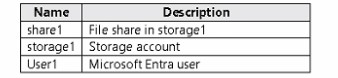
You need to assign User1 the Storage File Data SMB Share Contributor role for share1.
What should you do first?
A. Enable identity-based data access for the file shares instorage1.
B. Modify the security profile for the file shares in storage1.
C. Configure Access control (1AM) for share 1.
D. Select Default to Azure Active Directory authorization in the Azure portal for storage1.
Explanation:
To assign a specific Azure RBAC role like "Storage File Data SMB Share Contributor" for an individual file share (share1), you must navigate to that resource's Access control (IAM) blade. Role assignments are applied at the scope of the resource itself. Assigning the role at the share level ensures that the permission applies only to that specific file share.
Correct Option:
C. Configure Access control (IAM) for share 1.
To assign User1 the Storage File Data SMB Share Contributor role specifically for share1, you must first go to the Access control (IAM) blade of share1 itself. From there, you can add a role assignment, select the appropriate role, and choose User1 as the member. This grants User1 the necessary SMB share-level permissions to access share1.
Incorrect Options:
A. Enable identity-based data access for the file shares in storage1.
Identity-based authentication must be enabled at the storage account level before you can assign RBAC roles for data access. However, this is a prerequisite that should already be configured. The question asks what to do first to assign the role, which is to navigate to the share's IAM blade and create the assignment.
B. Modify the security profile for the file shares in storage1.
There is no specific "security profile" for file shares that needs modification before assigning RBAC roles. RBAC assignments are configured through IAM, not through a separate security profile setting.
D. Select Default to Azure Active Directory authorization in the Azure portal for storage1.
This option refers to enabling Azure AD authentication for the storage account, which is necessary for identity-based access. However, this is a storage account-level setting that should be configured before assigning share-level permissions, but the immediate first step to assign the role is to access the share's IAM blade.
Reference:
Microsoft Learn: Assign share-level permissions to an identity
Microsoft Learn: Overview of Azure Files identity-based authentication
You need to create an Azure Storage account named storage1. The solution must meet the following requirements:
• Support Azure Data Lake Storage.
• Minimize costs for infrequently accessed data.
• Automatically replicate data to a secondary Azure region.
Which three options should you configure for storage1? Each correct answer presents part of the solution.
NOTE: Each correct answer is worth one point.
A. the Cool access tier
B. the Hot access tier
C. hierarchical namespace
D. zone-redundant storage (ZRS)
E. geo-redundant storage (GRS)
Explanation:
To create a storage account that supports Azure Data Lake Storage, minimizes costs for infrequently accessed data, and automatically replicates to a secondary region, you need to configure specific account settings. Azure Data Lake Storage requires the hierarchical namespace feature. Cost minimization for infrequent access is achieved through the Cool tier. Cross-region replication requires geo-redundant storage.
Correct Options:
A. the Cool access tier
The Cool access tier is designed for data that is infrequently accessed and stored for at least 30 days. It offers lower storage costs compared to the Hot tier, making it ideal for minimizing costs when data is not accessed frequently. This meets the requirement to minimize costs for infrequently accessed data.
C. hierarchical namespace
Enabling the hierarchical namespace feature is mandatory for Azure Data Lake Storage. This feature organizes files into a directory hierarchy for efficient data access and management. Without enabling this setting during storage account creation, you cannot use Data Lake Storage capabilities.
E. geo-redundant storage (GRS)
GRS replicates your data to a paired secondary region that is hundreds of miles away from the primary region. This ensures that if the primary region experiences an outage, your data remains available in the secondary region. This meets the requirement for automatic replication to a secondary Azure region.
Incorrect Options:
B. the Hot access tier
The Hot access tier is optimized for frequently accessed data and has higher storage costs than the Cool tier. While it could be used, it does not meet the requirement to minimize costs for infrequently accessed data.
D. zone-redundant storage (ZRS)
ZRS replicates data synchronously across three availability zones within a single region. While it provides high availability within a region, it does not replicate data to a secondary region, failing to meet the cross-region replication requirement.
Reference:
Microsoft Learn: Create a storage account for Azure Data Lake Storage
Microsoft Learn: Azure Storage redundancy
Microsoft Learn: Hot, Cool, Cold, and Archive access tiers for blob data
You have an Azure subscription that has offices in the East US and West US Azure regions.
You plan to create the storage account shown in the following exhibit.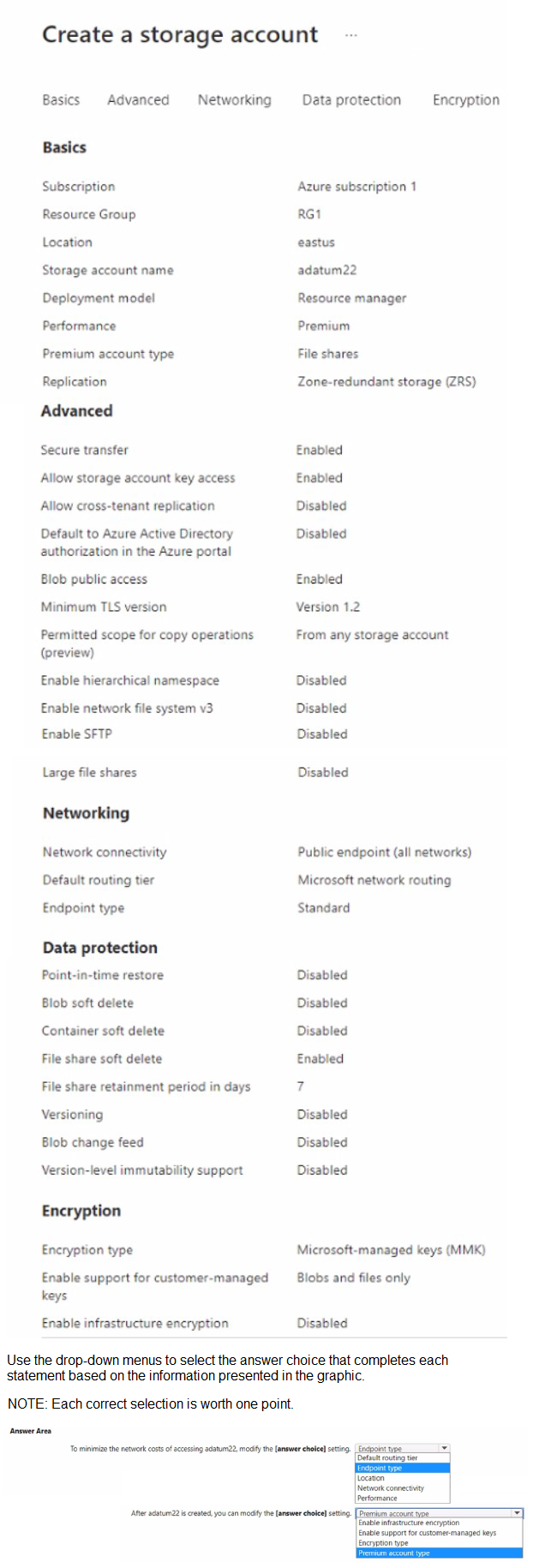
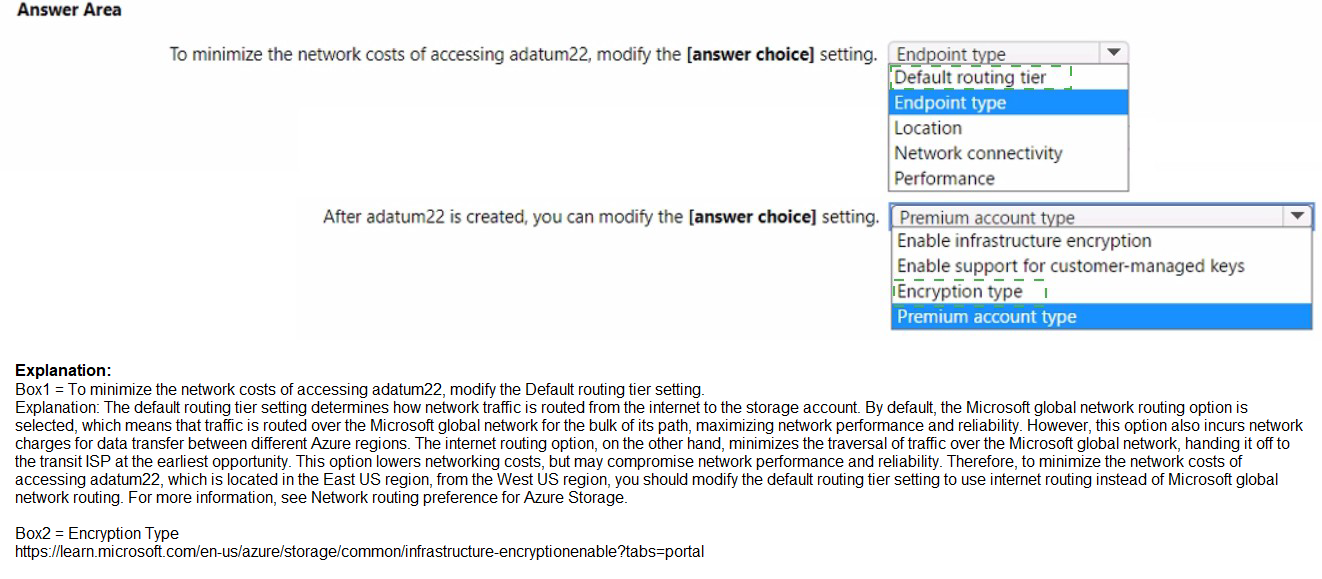
Explanation:
The exhibit shows a storage account named adatum22 configured with Premium performance for file shares and ZRS replication. To minimize network costs when accessing the storage account, you need to optimize routing. Additionally, some settings can only be configured during storage account creation and cannot be modified after creation.
Correct Options:
First statement: Default routing tier
The Default routing tier setting determines how traffic is routed between clients and your storage account. Selecting "Microsoft network routing" uses the Microsoft global network infrastructure, which provides optimal performance and lower latency compared to internet routing. This minimizes network costs by keeping traffic within Microsoft's backbone network.
Second statement: Enable infrastructure encryption
Infrastructure encryption adds an extra layer of encryption at the infrastructure level, encrypting data twice. This setting can only be enabled during storage account creation and cannot be modified after the account is created. The exhibit shows this setting is currently disabled and cannot be changed later.
Incorrect Options:
First statement:
Location: This determines the physical region where the storage account resides and cannot be changed after creation.
Network connectivity: This controls public or private access, not network cost optimization.
Blob change feed / Version-level immutability support: These are data protection features, not related to network costs.
Second statement:
Premium account type: This is selected during creation and cannot be changed later.
Enable support for customer-managed keys: This can be enabled after creation.
Encryption type: This can be changed from Microsoft-managed to customer-managed keys after creation.
Reference:
Microsoft Learn: Configure Azure Storage firewalls and virtual networks
Microsoft Learn: Infrastructure encryption for double encryption of data
You have an app named App1 that runs on an Azure web app named webapp1.The developers at your company upload an update of App1 to a Git repository named GUI.Webapp1 has the deployment slots shown in the following table.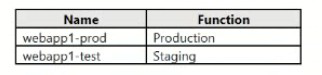
You need to ensure that the App1 update is tested before the update is made available to users.Which two actions should you perform? Each correct answer presents part of the solution.NOTE: Each correct selection is worth one point.
A. Swap the slots
B. Deploy the App1 update to webapp1-prod, and then test the update
C. Stop webapp1-prod
D. Deploy the App1 update to webapp1-test, and then test the update
E. Stop webapp1-test
Explanation:
To ensure the App1 update is tested before being made available to users, you should use deployment slots. Deployment slots allow you to deploy a new version of your application to a staging slot (webapp1-test), validate it there without affecting production traffic, and then swap the slots to make the tested version the production application.
Correct Options:
D. Deploy the App1 update to webapp1-test, and then test the update
The webapp1-test slot is a staging environment that does not receive production user traffic. Deploying the update to this slot first allows developers to thoroughly test the new version in an isolated environment that mirrors the production configuration, ensuring any issues are caught before exposing the update to end users.
A. Swap the slots
After successfully testing the update in the webapp1-test slot, swapping the slots exchanges the content and configuration between webapp1-test and webapp1-prod. This makes the tested version the production application (webapp1-prod) and moves the previous production version to the test slot for potential rollback if needed.
Incorrect Options:
B. Deploy the App1 update to webapp1-prod, and then test the update
Deploying directly to the production slot (webapp1-prod) would immediately expose the update to users before testing, violating the requirement to test first. This approach risks user-facing issues and downtime.
C. Stop webapp1-prod
Stopping the production slot would cause downtime for users. This is unnecessary and disruptive when deployment slots provide a zero-downtime deployment strategy.
E. Stop webapp1-test
Stopping the test slot would prevent testing from occurring. The test slot must be running to deploy the update and validate its functionality.
Reference:
Microsoft Learn: Set up staging environments in Azure App Service
Microsoft Learn: Swap deployment slots in Azure App Service
You have the Azure virtual networks shown in the following table.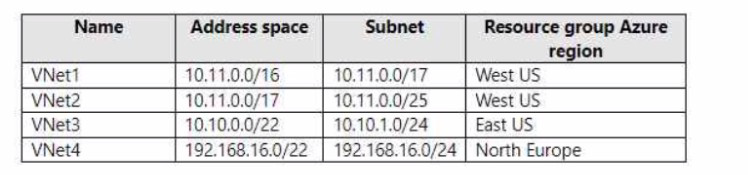
To which virtual networks can you establish a peering connection from VNet1?
A. VNet2, VNet3, and VNet4
B. VNet2only
C. VNet3 and VNet4 only
D. VNet2 and VNet3 only
Explanation:
Virtual network peering in Azure allows connecting virtual networks, but they must have non-overlapping IP address spaces. VNet1 has address space 10.11.0.0/16. You can peer VNet1 with any virtual network that does not have an overlapping address range, regardless of region.
Correct Options:
C. VNet3 and VNet4 only
VNet3 has address space 10.10.0.0/22, which does not overlap with VNet1's 10.11.0.0/16. VNet4 has address space 192.168.16.0/22, which also does not overlap with VNet1. Both VNet3 and VNet4 can be peered with VNet1 because their address spaces are distinct and non-overlapping.
Incorrect Options:
A. VNet2, VNet3, and VNet4
This option is incorrect because VNet2 has address space 10.11.0.0/17, which overlaps with VNet1's 10.11.0.0/16. Overlapping address spaces prevent peering because Azure cannot route traffic correctly between networks with conflicting IP ranges.
B. VNet2 only
VNet2 cannot be peered with VNet1 due to overlapping address spaces. This option is completely incorrect.
D. VNet2 and VNet3 only
This option is incorrect because VNet2 cannot be peered due to overlap. While VNet3 can be peered, including VNet2 makes this answer invalid.
Reference:
Microsoft Learn: Virtual network peering
Microsoft Learn: Create, change, or delete a virtual network peering
You have the Azure virtual machines shown in the following table.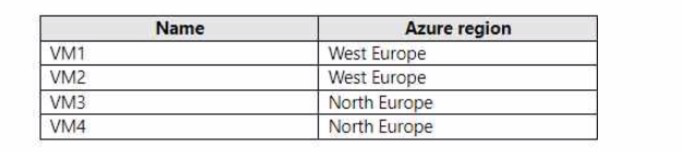
You have a Recovery Services vault that protects VM1 and VM2.
A. Create a new Recovery Services vault.
B. Configure the extensions for VM3 and VM4.
C. Create a storage account.
D. Create a new backup policy.
Explanation:
Recovery Services vaults are regional resources, and each vault can only protect virtual machines located in the same region as the vault. Since the existing vault protects VM1 and VM2 in West Europe, it cannot protect VM3 and VM4 in North Europe because they are in a different region.
Correct Option:
A. Create a new Recovery Services vault.
You must first create a new Recovery Services vault in the North Europe region to protect VM3 and VM4. Recovery Services vaults are region-specific, meaning a vault in West Europe cannot protect resources in North Europe. After creating the new vault in North Europe, you can then configure backup for VM3 and VM4.
Incorrect Options:
B. Configure the extensions for VM3 and VM4.
The backup extension for Azure VMs is automatically installed when you enable backup in a Recovery Services vault. You cannot configure extensions before you have a vault in the correct region to associate with the VMs.
C. Create a storage account.
Recovery Services vaults automatically manage their own storage for backup data. You do not need to create a separate storage account. The vault uses Azure-managed storage accounts internally for storing backup data.
D. Create a new backup policy.
While you may eventually create a custom backup policy, you must first have a Recovery Services vault in the North Europe region. Backup policies are defined within a vault and cannot be created without a vault.
Reference:
Microsoft Learn: Create a Recovery Services vault
Microsoft Learn: Azure Backup support matrix for Azure VM backup
You have an Azure subscription.
You plan to deploy a storage account named storage' by using the following Azure Resource Manager (ARM) template.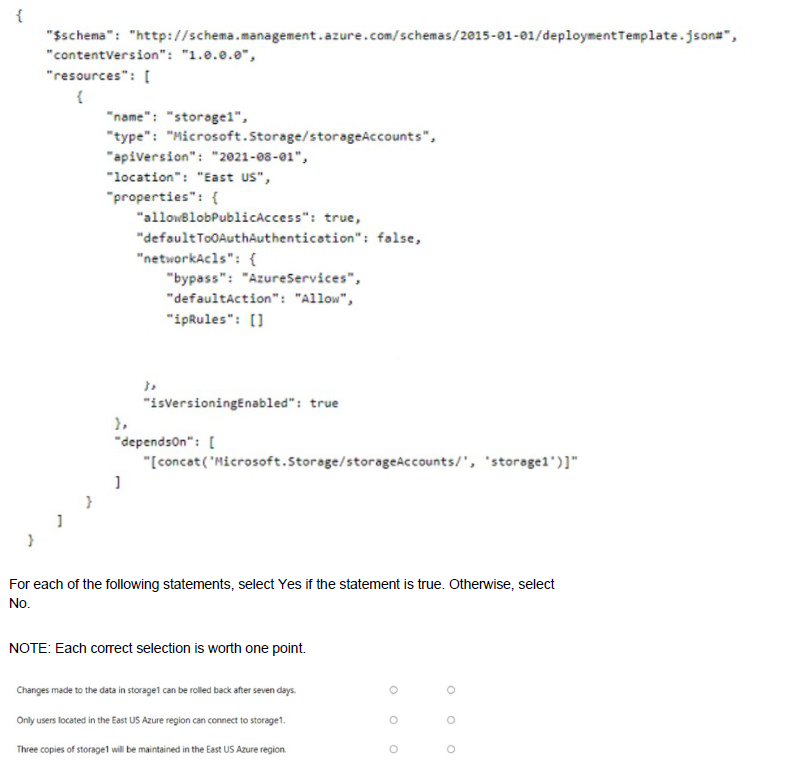
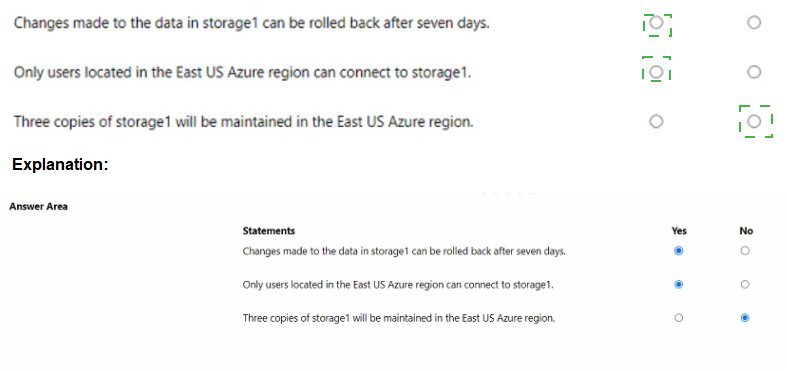
Explanation:
The ARM template shows a storage account named storage1 being deployed in East US with specific configurations. The template includes settings for blob public access, OAuth authentication, and network ACLs, but does not specify replication type or versioning settings correctly.
Correct Answers:
Statement 1: Changes made to the data in storage1 can be rolled back after seven days.
Answer: No
The template shows "isVersioningEnabled": true, but versioning is a property of blob service, not the storage account itself. Additionally, versioning alone does not enable point-in-time restore, which requires a separate configuration. The template does not enable point-in-time restore or set a retention period. Without these, you cannot roll back changes.
Statement 2: Only users located in the East US Azure region can connect to storage1.
Answer: No
The networkAcls configuration shows "defaultAction": "Allow" and empty ipRules, meaning all networks can access the storage account. There is no restriction to East US region users. The location "East US" only specifies where the storage account is deployed, not connectivity restrictions.
Statement 3: Three copies of storage1 will be maintained in the East US Azure region.
Answer: Yes
Azure Storage automatically maintains multiple copies of your data to ensure durability. Even without specifying replication in the template, the default replication for new storage accounts is locally redundant storage (LRS), which maintains three synchronous copies within a single data center in the East US region.
Reference:
Microsoft Learn: Azure Storage redundancy
Microsoft Learn: Configure Azure Storage firewalls and virtual networks
Microsoft Learn: Point-in-time restore for block blobs
You plan to create an Azure Storage account named storage1 that will contain a file share named share1.
You need to ensure that share! can support SMB Multichannel. The solution must minimize costs.
How should you configure storage1?
A. Standard performance with locally-redundant storage (IRS)
B. Premium performance with locally-redundant storage (LRS)
C. Standard performance with zone-redundant storage (ZRS)
Explanation:
SMB Multichannel is a feature that allows multiple network connections to be established between an SMB client and an SMB server, improving performance through increased throughput and network fault tolerance. For Azure Files, SMB Multichannel is only supported on premium file shares, not standard file shares.
Correct Option:
B. Premium performance with locally-redundant storage (LRS)
SMB Multichannel is exclusively supported on premium file shares backed by SSDs, which provide consistent high performance and low latency. Locally-redundant storage (LRS) is the most cost-effective replication option within premium tier. This configuration enables SMB Multichannel while minimizing costs compared to other premium replication options like ZRS.
Incorrect Options:
A. Standard performance with locally-redundant storage (LRS)
Standard performance file shares do not support SMB Multichannel. This feature is only available on premium file shares. While standard tier is cheaper, it does not meet the requirement to support SMB Multichannel.
C. Standard performance with zone-redundant storage (ZRS)
Standard performance file shares, regardless of replication type, do not support SMB Multichannel. ZRS provides higher availability than LRS but still cannot enable SMB Multichannel because it is a premium-only feature.
Reference:
Microsoft Learn: SMB Multichannel performance in Azure Files
Microsoft Learn: Planning for an Azure Files deployment
You have an Azure subscription that contains a storage account named storage1. The subscription is linked to an Azure Active Directory (Azure AD) tenant named contoso.com that syncs to an on-premises Active Directory domain.
The domain contains the security principals shown in the following table.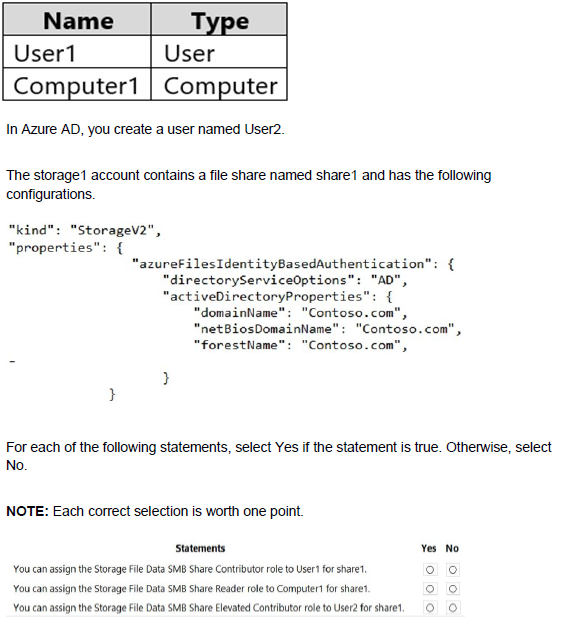
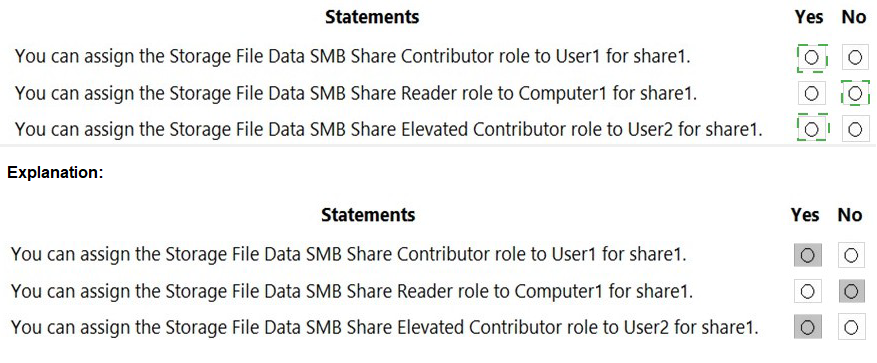
Explanation:
The storage account is configured with identity-based authentication using Active Directory (AD), meaning on-premises AD credentials are used for SMB access to Azure Files. Azure AD users (User2) cannot directly access file shares when AD authentication is enabled because the authentication flows through the on-premises AD domain.
Correct Answers:
Statement 1: You can assign the Storage File Data SMB Share Contributor role to User1 for share1.
Answer: Yes
User1 is an on-premises Active Directory user that syncs to Azure AD. When directoryServiceOptions is set to "AD", Azure Files authenticates against the on-premises AD domain. User1's synced identity in Azure AD can be assigned Azure RBAC roles, and the permissions will be respected when User1 accesses the share using their on-premises credentials.
Statement 2: You can assign the Storage File Data SMB Share Reader role to Computer1 for share1.
Answer: No
Computer accounts from on-premises Active Directory cannot be assigned Azure RBAC roles. Azure RBAC roles are designed for security principals (users, groups, service principals) in Azure AD. Computer accounts are not supported objects for role assignments in Azure.
Statement 3: You can assign the Storage File Data SMB Share Elevated Contributor role to User2 for share1.
Answer: No
User2 is created directly in Azure AD and does not exist in the on-premises AD domain. Since directoryServiceOptions is set to "AD" (not "AADDS" or "AADKERBEROS"), Azure Files authenticates against the on-premises AD domain only. User2 cannot access the share using Azure AD credentials because the storage account is configured for on-premises AD authentication.
Reference:
Microsoft Learn: Overview of Azure Files identity-based authentication
Microsoft Learn: Assign share-level permissions to an identity
Microsoft Learn: SMB access to Azure Files using on-premises AD DS
| Page 8 out of 38 Pages |
| 2345678910111213 |
| AZ-104 Practice Test Home |
Real-World Scenario Mastery: Our AZ-104 practice exam don't just test definitions. They present you with the same complex, scenario-based problems you'll encounter on the actual exam.
Strategic Weakness Identification: Each practice session reveals exactly where you stand. Discover which domains need more attention, before Microsoft Azure Administrator exam day arrives.
Confidence Through Familiarity: There's no substitute for knowing what to expect. When you've worked through our comprehensive AZ-104 practice exam questions pool covering all topics, the real exam feels like just another practice session.
Copyright © All Rights Reserved