
Topic 6: Misc. Questions
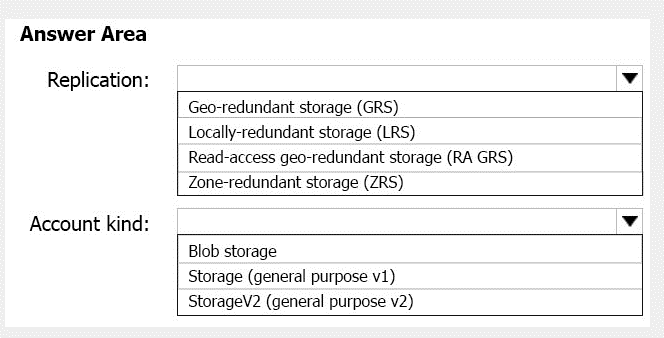
You plan to create an Azure Storage account in the Azure region of East US 2.
You need to create a storage account that meets the following requirements:
Replicates synchronously
Remains available if a single data center in the region fails
How should you configure the storage account? To answer, select the appropriate options
in the answer area.
NOTE: Each correct selection is worth one point.
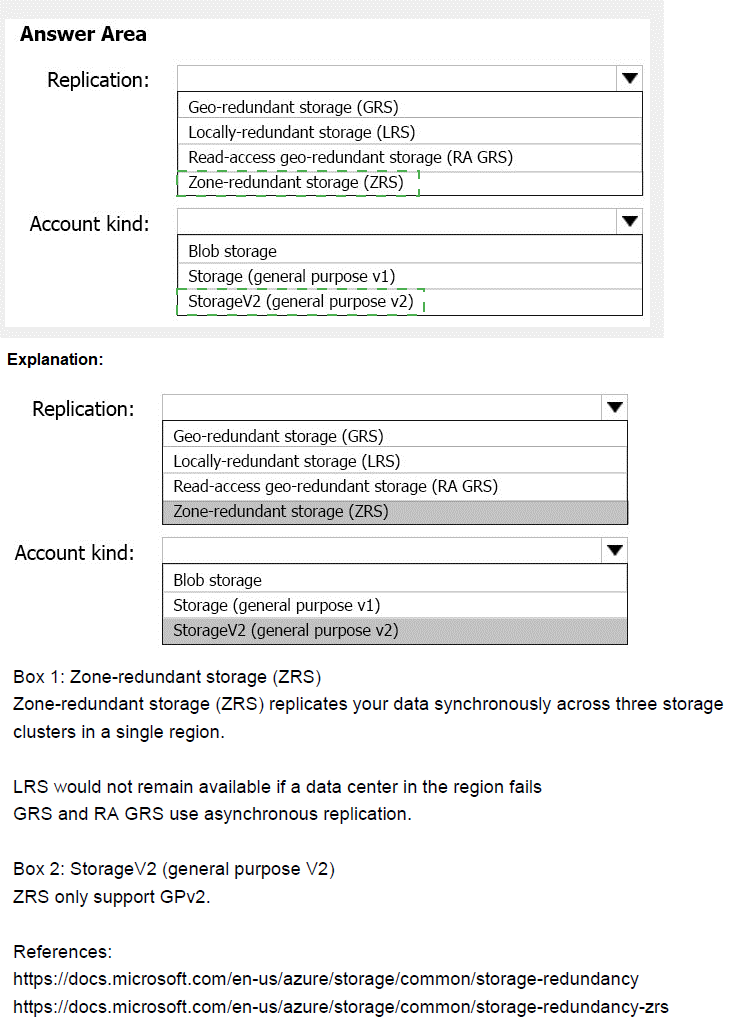
Explanation:
This question tests knowledge of Azure Storage replication options and their characteristics. Synchronous replication means data is written to multiple copies at the same time before acknowledging the write operation. Availability requirements during a single data center failure point to either zone-redundant or geo-redundant options, but synchronous replication narrows the choices.
Correct Option Analysis:
Replication: Zone-redundant storage (ZRS)
ZRS replicates data synchronously across three availability zones within a single region. This meets both requirements: synchronous replication (data is written to all zones before acknowledgment) and remains available if a single data center fails (availability zones are physically separate data centers). ZRS provides 11 nines of durability and high availability within the primary region.
Account kind: StorageV2 (general purpose v2)
General purpose v2 storage accounts support all replication options including ZRS, and provide the latest Azure Storage features including low-cost access tiers, lifecycle management, and enhanced metrics. This account kind is recommended for most scenarios and fully supports the ZRS replication requirement.
Incorrect Options:
Replication options:
Geo-redundant storage (GRS): Replicates asynchronously to a secondary region, not synchronously. Does not meet synchronous requirement.
Locally-redundant storage (LRS): Replicates synchronously within a single data center. If that data center fails, the storage account becomes unavailable. Does not meet availability requirement.
Read-access geo-redundant storage (RA GRS): Same as GRS but with read access to secondary region. Still asynchronous replication.
Account kind options:
Blob storage: Legacy account type limited to block blobs and append blobs only. Does not support ZRS.
Storage (general purpose v1): Legacy account type with limited features. ZRS support is limited and not recommended.
Reference:
Azure Storage redundancy options
Zone-redundant storage for high availability
Storage account types and capabilities
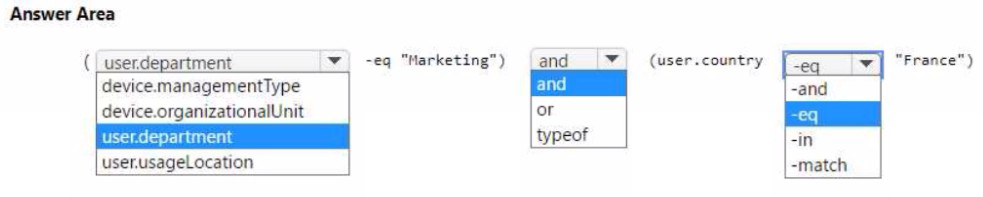
You have an Azure AD tenant.
You need to create a Microsoft 365 group that contains only members of a marketing department in France.
How should you complete the dynamic membership rule? To answer, select the appropriate options in the answer area.
NOTE: Each correct answer is worth one point.
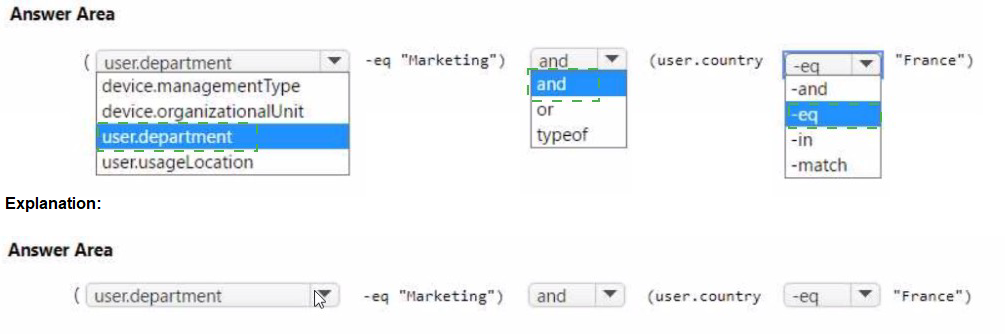
Explanation:
This question tests knowledge of Azure AD dynamic group membership rules syntax. Dynamic groups allow automatic membership based on user or device attributes. For a Microsoft 365 group containing marketing department members in France, you need to combine two conditions using the correct attribute names, operators, and logical connectors.
Correct Option Analysis:
First dropdown: user.department
For user-based dynamic groups, you use the "user" object type followed by the attribute name. The department attribute is "department" under the user object, so "user.department" is correct. This targets the department property of user objects.
Second dropdown: -eq
The equality operator in dynamic group rules is "-eq". This checks if the department attribute equals the specified value. Other operators like "-in" or "-match" are used for different comparison scenarios.
Third dropdown: and
To combine multiple conditions where both must be true, you use the logical operator "and". This ensures users are only added if they are in both Marketing department and located in France.
Fourth dropdown: user.country
The country attribute for users is "country" under the user object. The correct syntax is "user.country" to reference this attribute. Other options like "user.usageLocation" are for licensed location, not user's country.
Fifth dropdown: -eq
Again, the equality operator "-eq" is used to check if the country attribute equals "France". This ensures only users with country set to France are included.
Sixth dropdown: "France"
The value must be in quotes as it's a string. The rule combines: (user.department -eq "Marketing") and (user.country -eq "France")
Reference:
Dynamic membership rules for groups in Azure AD
Supported user properties for dynamic groups
Rule builder for dynamic groups
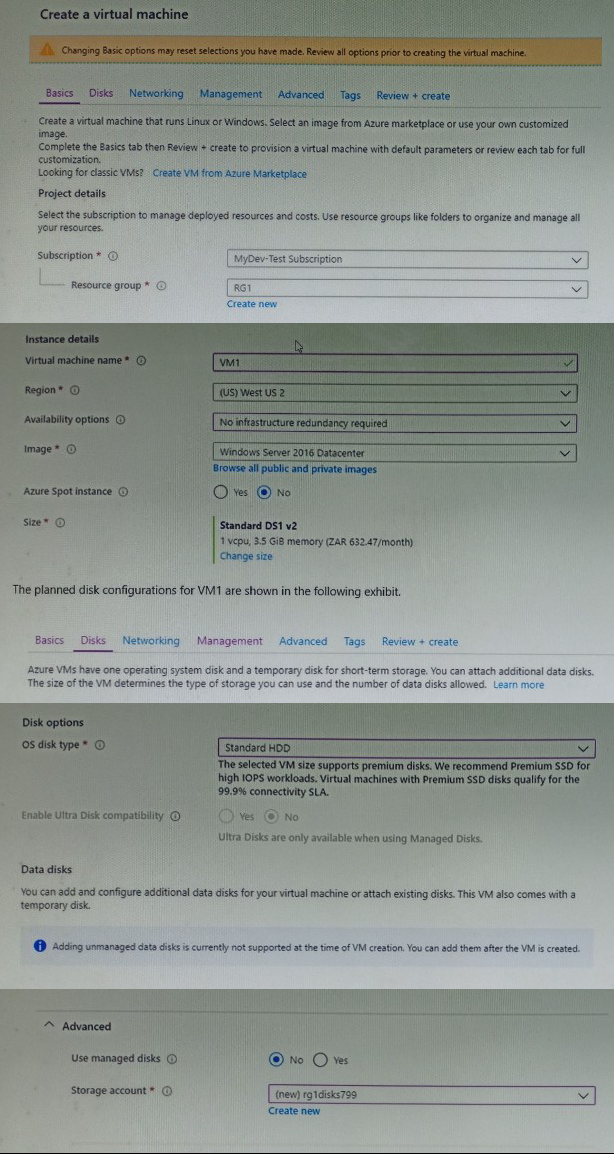
You plan to create an Azure virtual machine named VM1 that will be configured as shown in the following exhibit.
The planned disk configurations for VM1 are shown in the following exhibit.
You need to ensure that VM1 can be created in an Availability Zone.
Which two settings should you modify? Each correct answer presents part of the solution.
NOTE: Each correct selection is worth one point.
A. Use managed disks
B. Availability options
C. OS disk type
D. Size
E. Image
Explanation:
This question tests knowledge of Azure virtual machine availability zone requirements. Availability zones provide high availability by placing VMs in physically separate locations within a region. Certain VM configurations are incompatible with availability zones, including unmanaged disks and specific availability options. Understanding these prerequisites is essential for successful VM deployment in availability zones.
Correct Options:
A. Use managed disks
The exhibit shows "Use managed disks" set to "No", which means unmanaged disks are being used. Unmanaged disks are not supported with availability zones. You must change this to "Yes" to use managed disks, which are required for VMs deployed in availability zones.
B. Availability options
The exhibit shows "Availability options" set to "No infrastructure redundancy required". To place VM1 in an availability zone, you must change this setting to "Availability zone" and select a specific zone (Zone 1, 2, or 3). This directly configures the VM for zone-level redundancy.
Incorrect Options:
C. OS disk type
OS disk type (Standard HDD, Premium SSD, etc.) does not affect availability zone support. All managed disk types can be used with availability zones. Changing this setting is not required.
D. Size
VM size determines which regions and zones support the VM, but the selected Standard DS1 v2 is supported in availability zones. No size change is necessary for zone deployment.
E. Image
The Windows Server 2016 Datacenter image is fully supported in availability zones. Changing the image is not required for zone deployment.
Reference:
Availability zones in Azure
Managed disks and availability zones
VM sizes and region availability
You have an Azure Kubernetes Service (AKS) cluster named AKS1 and a computer named Computer1 that runs Windows 10. Computer1 that has the Azure CLI installed.
You need to install the kubectl client on Computer1.
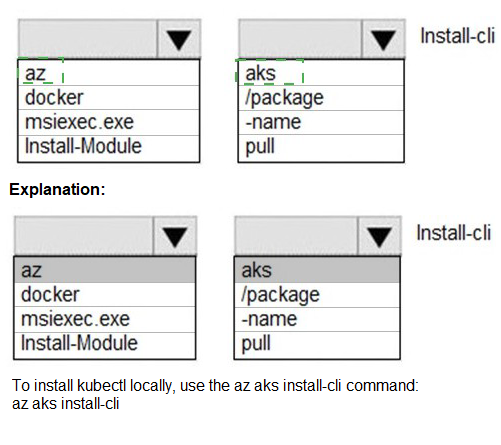
Which command should you run? To answer, select the appropriate options in the answer area.
NOTE: Each correct selection is worth one point.

Explanation:
This question tests knowledge of installing kubectl, the Kubernetes command-line tool, on a Windows 10 machine with Azure CLI installed. Azure CLI provides a direct command to install kubectl without manual downloads. Understanding the correct command syntax and package manager options is essential for proper installation.
Correct Option Analysis:
First dropdown: az
The Azure CLI command prefix is "az". This is the base command for all Azure CLI operations. To install kubectl using Azure CLI, you start with the "az" command.
Second dropdown: aks
The "aks" subcommand is used for Azure Kubernetes Service operations. Installing kubectl is part of the AKS tooling, so the command follows the pattern "az aks" for AKS-related tasks.
Third dropdown: Install-cli
The specific command to install kubectl is "az aks install-cli". This command downloads and installs the kubectl binary on the local machine, making it available for managing Kubernetes clusters.
Incorrect Options:
docker, msiexec.exe, Install-Module
These are alternative ways to install software but not the correct method using Azure CLI. Docker would run containers, msiexec would run MSI installers, and Install-Module is for PowerShell modules.
/package, -name, pull
These are parameters for other commands. For example, "docker pull" downloads container images. They are not part of the kubectl installation command.
Reference:
Install kubectl using Azure CLI
Azure CLI commands for AKS
Kubernetes tools for AKS
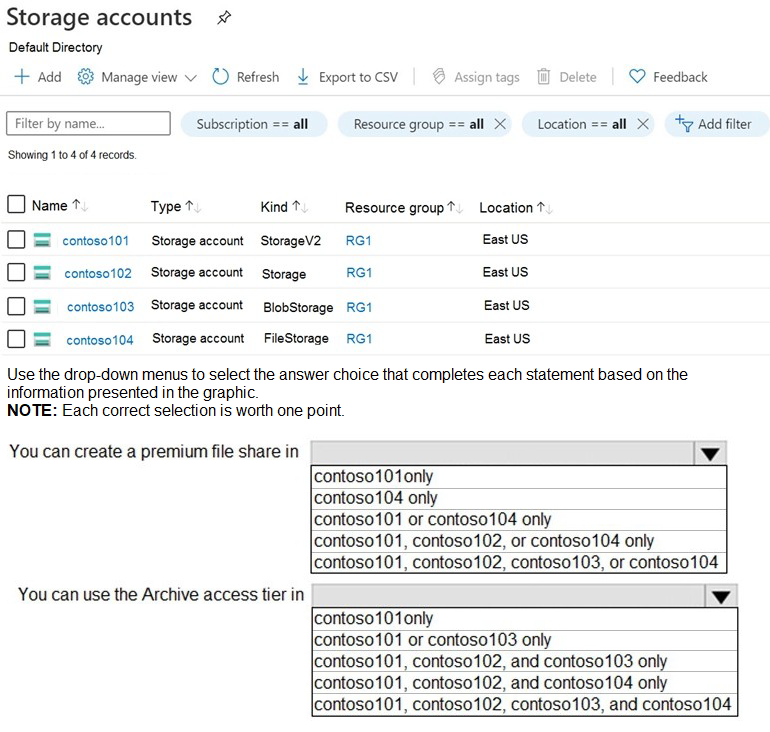
You have an Azure subscription that contains the storage accounts shown in the following exhibit.
Explanation:
This question tests knowledge of Azure Storage account types and their capabilities. Different storage account kinds support different features. Premium file shares require FileStorage accounts, while the Archive access tier is only available in general purpose v2 (StorageV2) accounts. Understanding these feature-specific requirements is essential for correct configuration.
Correct Option Analysis:
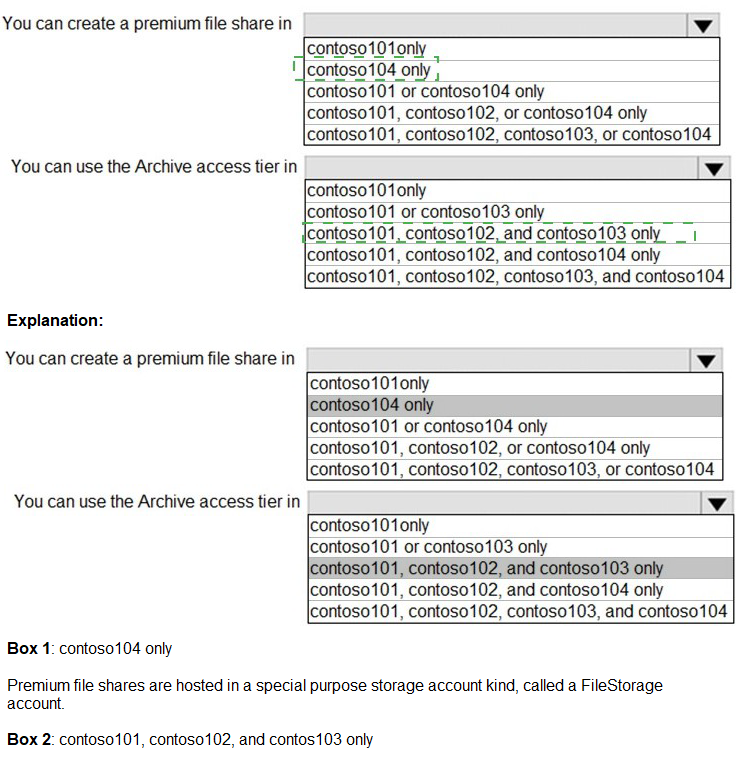
Statement 1: "You can create a premium file share in"
Answer: contoso104 only
Premium file shares are only supported in FileStorage accounts. Among the storage accounts, contoso104 is the only one with Kind "FileStorage". Premium file shares use solid-state drives (SSDs) and provide consistent high performance and low latency. Other storage account types do not support premium file shares.
Statement 2: "You can use the Archive access tier in"
Answer: contoso101 only
The Archive access tier is only available in general purpose v2 (StorageV2) accounts. Among the storage accounts, contoso101 is the only one with Kind "StorageV2". Archive tier is used for infrequently accessed data with flexible latency requirements. General purpose v1 (Storage), BlobStorage, and FileStorage accounts do not support the Archive access tier.
Incorrect Options:
Statement 1 options:
contoso101only: StorageV2 supports standard file shares only, not premium
contoso101 or contoso104 only: StorageV2 does not support premium file shares
contoso101, contoso102, or contoso104 only: StorageV2 and general purpose v1 do not support premium file shares
contoso101, contoso102, contoso103, or contoso104: BlobStorage does not support file shares at all
Statement 2 options:
contoso101 or contoso103 only: BlobStorage does not support Archive tier
contoso101, contoso102, and contoso103 only: General purpose v1 and BlobStorage do not support Archive tier
contoso101, contoso102, and contoso104 only: General purpose v1 and FileStorage do not support Archive tier
contoso101, contoso102, contoso103, and contoso104: Only StorageV2 supports Archive tier
Reference:
Premium file share requirements
Archive access tier availability
Storage account kinds and capabilities
You have a virtual network named VNETI that contains the subnets shown in the following table.
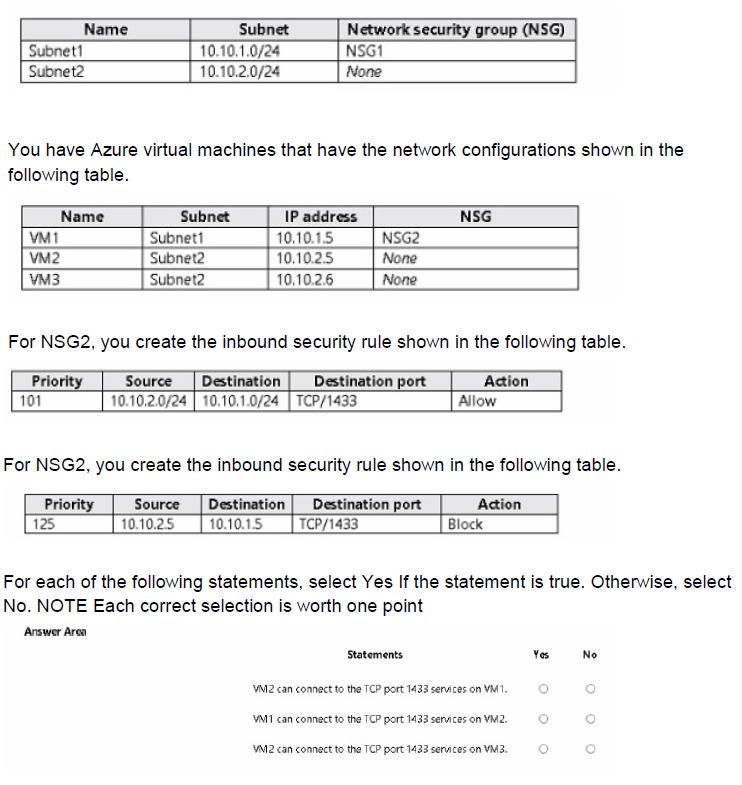
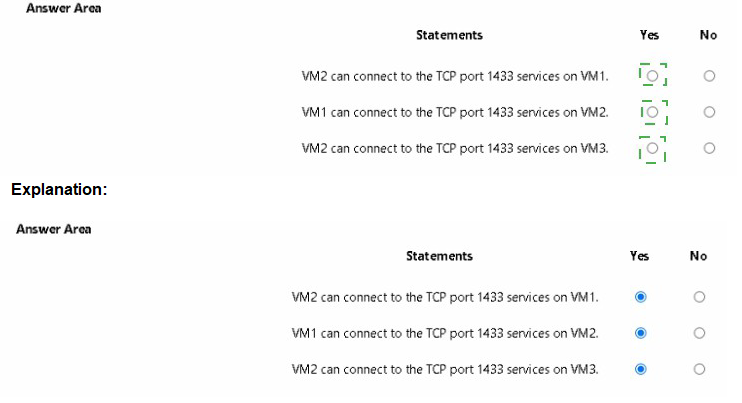
Explanation:
This question tests understanding of Network Security Group (NSG) rule evaluation order and how rules are applied at subnet and NIC levels. NSG rules are evaluated in priority order (lower numbers first), and when multiple NSGs apply, traffic must be allowed by both. Understanding rule precedence and the interaction between subnet-level and NIC-level NSGs is critical.
Correct Option Analysis:
Statement 1: "VM2 can connect to the TCP port 1433 services on VM1."
Answer: Yes
VM2 (10.10.2.5) has no NSG assigned at NIC level. VM1 has NSG2 assigned with two inbound rules. The first rule (priority 101) allows traffic from 10.10.2.0/24 (which includes VM2) to 10.10.1.0/24 (which includes VM1) on TCP 1433. The second rule (priority 125) specifically blocks traffic from 10.10.2.5 to 10.10.1.5. Since rules are evaluated in priority order, the allow rule at priority 101 is evaluated first and allows the traffic. The block rule at higher priority (125) is never reached because the traffic is already allowed.
Statement 2: "VM1 can connect to the TCP port 1433 services on VM2."
Answer: No
VM1 (10.10.1.5) attempting to connect to VM2 (10.10.2.5) is outbound traffic from VM1's perspective. The rules shown are inbound rules on NSG2 attached to VM1. Outbound traffic from VM1 is not controlled by these inbound rules. Additionally, VM2 has no NSG attached, so there is no inbound rule on VM2 to control traffic from VM1. However, the question asks about VM1 connecting to VM2 - this would be outbound from VM1, and we don't have information about outbound rules on NSG2 or any NSG on Subnet2. Without explicit outbound allow rules, the default NSG rules (which allow outbound traffic) would apply. Wait, default rules allow outbound traffic. So technically VM1 could connect to VM2 unless blocked. But the question might be testing that the rules shown only control inbound to VM1, not outbound from VM1. The correct answer should be No because we cannot determine from the given information that VM1 can connect to VM2. Actually, default outbound rules allow all outbound traffic, so VM1 can connect to VM2. I need to be careful.
Re-evaluation:
VM1 has NSG2 with inbound rules only. Outbound traffic from VM1 uses default NSG rules which allow all outbound traffic. VM2 has no NSG, so inbound traffic to VM2 is controlled by subnet NSG (Subnet2 has no NSG) and default rules which allow all inbound traffic from within the VNet. Therefore, VM1 can connect to VM2. The answer should be Yes.
But the exhibit shows only inbound rules on NSG2. The question doesn't show any outbound rules, so default rules apply. Default rules allow VNet inbound and outbound traffic. So VM1 can connect to VM2.
Statement 3: "VM2 can connect to the TCP port 1433 services on VM3."
Answer: Yes
VM2 (10.10.2.5) and VM3 (10.10.2.6) are in the same subnet (Subnet2). Neither VM has an NSG attached, and Subnet2 has no NSG. Therefore, all traffic between VMs in the same subnet is allowed by default. No rules block TCP 1433 connectivity between these VMs.
Reference:
NSG rule evaluation order
Default NSG rules
Subnet and NIC-level NSG association
You have an Azure subscription that contains the resources shown in the following table.

You need to create a network interface named NIC1.
In which location can you create NIC1?
A. East US and North Europe only.
B. East US and West Europe only.
C. East US, West Europe, and North Europe.
D. East US only.
Explanation:
This question tests knowledge of Azure network interface (NIC) location constraints. A network interface must be created in the same region as the virtual network it will connect to. NICs are regional resources that cannot be associated with virtual networks in different regions. Understanding this regional dependency is essential for proper network design.
Correct Option:
D. East US only.
A network interface must be created in the same Azure region as the virtual network it will be attached to. Since NIC1 will need to connect to a virtual network, and VNET1 is the only virtual network shown (located in East US), NIC1 must be created in East US. Network interfaces cannot be associated with virtual networks in different regions.
Incorrect Options:
A. East US and North Europe only.
While East US is valid, North Europe is not a valid location for NIC1 because there is no virtual network in North Europe to connect to. NIC1 would be unusable if created in North Europe as it cannot connect to VNET1 in East US.
B. East US and West Europe only.
West Europe is not a valid location for NIC1. Although IP1 (a public IP) is in West Europe, NICs must be in the same region as their associated VNet, not necessarily the same region as public IPs that might be assigned to them.
C. East US, West Europe, and North Europe.
Only East US is valid. West Europe and North Europe do not have virtual networks that NIC1 could connect to. Creating NIC1 in these regions would result in a resource that cannot be used with the existing VNET1.
Reference:
Network interface regional requirements
Virtual network and NIC association constraints
Azure regional resource dependencies
You have an Azure subscription that contains a web app named webapp1. You need to add a custom domain named www.contoso.com to webapp1. What should you do first?
A. Upload a certificate.
B. Add a connection string
C. Stop webapp1
D. Create a DNS record
Explanation:
This question tests knowledge of adding custom domains to Azure App Service web apps. The process requires verifying domain ownership by creating DNS records before the custom domain can be added to the web app. Understanding the correct sequence of steps is essential for successful custom domain configuration.
Correct Option:
D. Create a DNS record
The first step in adding a custom domain to an Azure web app is to create a DNS record (CNAME, A, or TXT record) with your domain provider to verify domain ownership. This verification proves you own the domain before Azure allows you to configure it for your web app. Common verification records include a CNAME record with a specific value or a TXT record with a verification ID.
Incorrect Options:
A. Upload a certificate
SSL/TLS certificates are required for HTTPS access but are not the first step for adding a custom domain. Domain verification must happen before you can upload certificates for that domain.
B. Add a connection string
Connection strings are for database connections and application settings, completely unrelated to custom domain configuration. This would not help in adding a custom domain.
C. Stop webapp1
Stopping the web app is not required for adding a custom domain. Domain configuration can be performed while the app is running without any downtime or interruption.
Reference:
Add a custom domain to Azure App Service
Domain verification for custom domains
DNS records for App Service domains
You plan to move a distributed on-premises app named App1 to an Azure subscription.
After the planned move, App1 will be hosted on several Azure virtual machines.
You need to ensure that App1 always runs on at least eight virtual machines during planned Azure maintenance.
What should you create?
A. one virtual machine scale set that has 10 virtual machines instances
B. one Availability Set that has three fault domains and one update domain
C. one Availability Set that has 10 update domains and one fault domain
D. one virtual machine scale set that has 12 virtual machines instances
Explanation:
This question tests knowledge of Azure high availability options during planned maintenance. Virtual machine scale sets with multiple instances provide redundancy across update domains, ensuring application availability during planned Azure updates. Understanding how update domains distribute maintenance events is essential for meeting availability requirements.
Correct Option:
A. one virtual machine scale set that has 10 virtual machine instances
A virtual machine scale set with 10 instances ensures that during planned maintenance, Azure updates instances across update domains sequentially. With at least 8 instances required to be running, having 10 total instances provides a buffer. During maintenance, only instances in one update domain are updated at a time, leaving at least 9 instances running (if using 10 update domains).
Incorrect Options:
B. one Availability Set that has three fault domains and one update domain
Having only one update domain means all VMs would be updated simultaneously during planned maintenance, causing all VMs to be unavailable at once. This violates the requirement of always having at least eight VMs running.
C. one Availability Set that has 10 update domains and one fault domain
While 10 update domains is good for planned maintenance, one fault domain provides no protection against hardware failures. The question specifically asks about planned Azure maintenance, not hardware failures. However, the main issue is that Availability Sets have a maximum of 3 fault domains, not 1. This configuration is invalid.
D. one virtual machine scale set that has 12 virtual machine instances
While 12 instances would also meet the requirement, it exceeds the minimum needed and may increase costs unnecessarily. Option A with 10 instances is sufficient and more cost-effective.
Reference:
Availability Sets vs Scale Sets
Update domains and planned maintenance
High availability for Azure VMs
Note: This question is part of a series of questions that present the same scenario. Each question in the series contains a unique solution that might meet the stated goals. Some question sets might have more than one correct solution, while others might not have a correct solution.
After you answer a question in this section, you will NOT be able to return to it. As a result, these questions will not appear in the review screen.
You manage a virtual network named VNet1 that is hosted in the West US Azure region.
VNet1 hosts two virtual machines named VM1 and VM2 that run Windows Server.
You need to inspect all the network traffic from VM1 to VM2 for a period of three hours.
Solution: From Performance Monitor, you create a Data Collector Set (DCS).
Does this meet the goal?
A.
Yes
B.
No
No
Explanation:
This question tests knowledge of Azure network traffic inspection tools. Performance Monitor is a Windows on-premises tool for monitoring system performance metrics like CPU, memory, and disk usage. It does not have the capability to capture or inspect network traffic between virtual machines. Network traffic inspection requires specialized tools like Network Watcher or packet capture solutions.
Correct Option:
B. No
Performance Monitor and Data Collector Sets are designed to collect performance counters, event traces, and system configuration data on Windows systems. They cannot capture or inspect network packets or traffic flows between VMs. To inspect network traffic, you would need to use Azure Network Watcher (specifically IP flow verify or packet capture), Wireshark, or other network monitoring tools.
Incorrect Option:
A. Yes
This option is incorrect because Performance Monitor is not a network traffic inspection tool. It cannot capture network packets, analyze traffic patterns, or provide visibility into the communication between VM1 and VM2. Using it for network traffic inspection shows a misunderstanding of its purpose and capabilities.
Reference:
Azure Network Watcher overview
Packet capture in Azure Network Watcher
IP flow verify for traffic inspection
You have an Azure subscription that contains the container images shown in the following table.
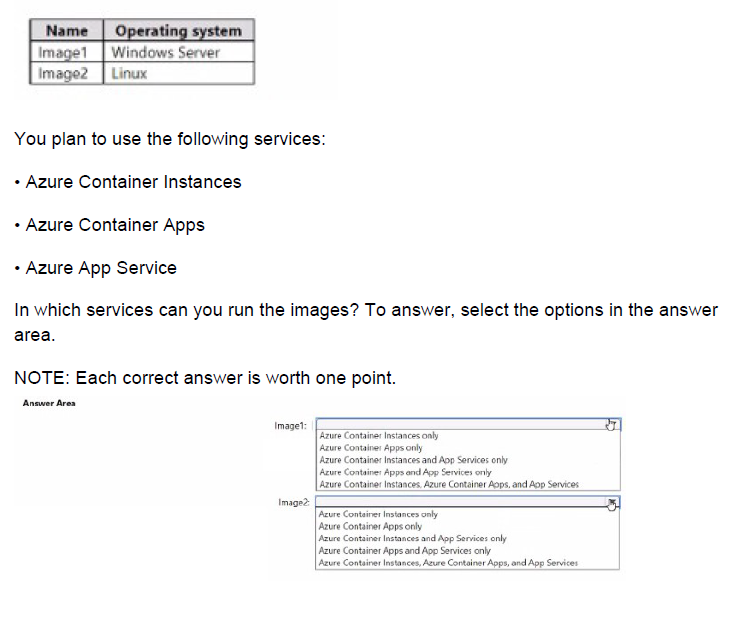
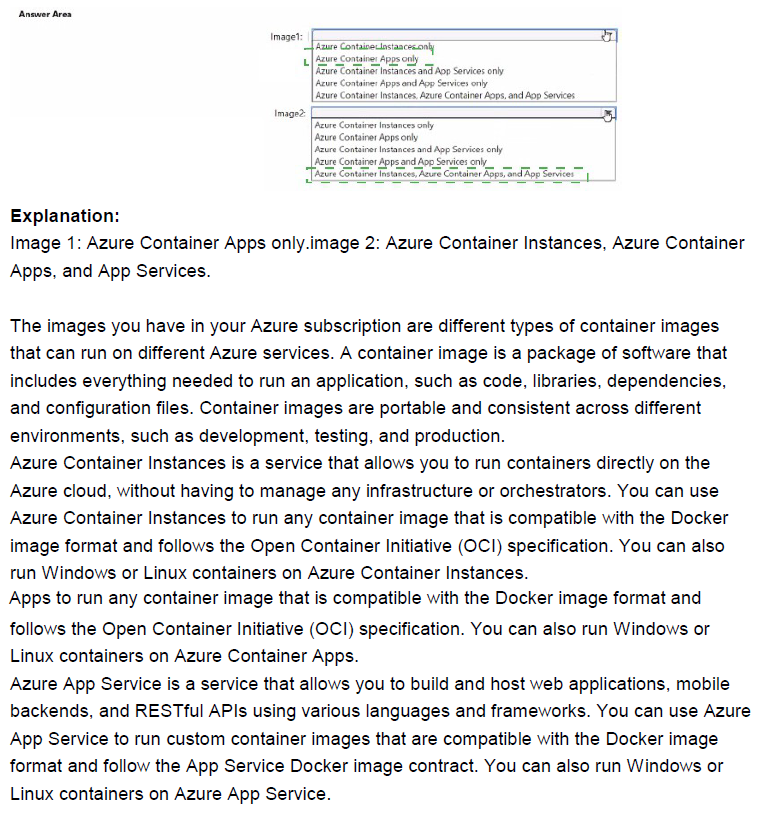
Explanation:
The question evaluates which Azure container services support running specific container images based on their operating system. Image1 is Windows Server-based (requiring Windows container runtime), while Image2 is Linux-based. Azure Container Instances (ACI) supports both Linux and Windows containers natively. Azure Container Apps is limited to Linux-based (linux/amd64) container images only and does not support Windows containers. Azure App Service supports custom containers on both Windows (for Windows containers) and Linux (for Linux containers) plans, allowing deployment of either OS type depending on the chosen plan.
Correct Option:
Image1 (Windows Server): Azure Container Instances, Azure App Services
ACI explicitly supports Windows containers using compatible base images (e.g., Windows Server Core or Nano Server). Azure App Service supports Windows containers when deployed to a Windows App Service plan, enabling custom container images based on Windows OS.
Image2 (Linux): Azure Container Instances, Azure Container Apps, App Services
ACI supports Linux containers. Azure Container Apps requires Linux-based (linux/amd64) images and fully supports them. Azure App Service supports Linux containers on Linux App Service plans (built-in or custom).
Incorrect Option:
Image1 options excluding the full correct combination (e.g., Azure Container Instances only, Azure Container Apps only, etc.) — These are incomplete because Image1 (Windows) runs on ACI and App Service (Windows plan), but not on Container Apps (Linux-only). Selecting "Azure Container Instances and App Services only" misses nothing but aligns partially; however, the broadest correct is ACI + App Services.
Image2 options excluding the full correct combination (e.g., Azure Container Instances only, Azure Container Apps only) — These are too restrictive since Image2 (Linux) runs on all three services: ACI, Container Apps, and App Service (Linux plan). The complete set is all three.
Reference:
Azure Container Instances overview
Azure Container Apps containers
Azure App Service overview
You have an Azure Storage account named storage1.
For storage 1. you create an encryption scope named Scope1.
Which storage types can you encrypt by using Scope1?
A. file shares only
B. containers only
C. file shares and containers only
D. containers and tables only
E. file shares, containers, and tables only
F. file shares, containers, tables, and queues
Explanation:
Azure Storage encryption scopes allow you to manage customer-managed keys (CMK) or Microsoft-managed keys at a more granular level than the entire storage account. Encryption scopes can be applied only to specific storage services that support blob-level or file-level encryption with customer-managed keys. In Azure Storage, encryption scopes are supported exclusively for Blob storage (containers) and Azure Data Lake Storage Gen2 (which is part of Blob storage). They are not supported for File shares, Queues, or Tables.
Correct Option:
B. containers only
Encryption scopes (such as Scope1) can be used to encrypt data only in Blob containers (including block blobs, append blobs, page blobs, and Data Lake Storage Gen2 workloads). When you create or upload blobs, you can assign the encryption scope to control the encryption key used for that specific blob or set of blobs. This is the only storage type that supports encryption scopes.
Incorrect Option:
A. file shares only — Incorrect. Azure Files (file shares) does not support encryption scopes. File shares use either the account-level encryption key or server-side encryption with customer-managed keys at the storage account level only.
C. file shares and containers only — Incorrect. While containers (blobs) support encryption scopes, file shares do not.
D. containers and tables only — Incorrect. Azure Table storage does not support encryption scopes; tables use account-level encryption only.
E. file shares, containers, and tables only — Incorrect. Neither file shares nor tables support encryption scopes—only containers (blobs) do.
F. file shares, containers, tables, and queues — Incorrect. Encryption scopes are limited to Blob storage/containers. Queues and Tables do not support them, and neither do file shares.
Reference:
Azure Storage encryption scopes
Customer-managed keys for Azure Storage encryption
| Page 6 out of 38 Pages |
| 123456789101112 |
| AZ-104 Practice Test Home |
Real-World Scenario Mastery: Our AZ-104 practice exam don't just test definitions. They present you with the same complex, scenario-based problems you'll encounter on the actual exam.
Strategic Weakness Identification: Each practice session reveals exactly where you stand. Discover which domains need more attention, before Microsoft Azure Administrator exam day arrives.
Confidence Through Familiarity: There's no substitute for knowing what to expect. When you've worked through our comprehensive AZ-104 practice exam questions pool covering all topics, the real exam feels like just another practice session.
Copyright © All Rights Reserved