
Topic 6: Misc. Questions
You have an Azure subscription that contains a virtual machine named VM1.
You plan to deploy an Azure Monitor alert rule that will trigger an alert when CPU usage on VM1 exceeds 80 percent.
You need to ensure that the alert rule sends an email message to two users named User1 and User2.
What should you create for Azure Monitor?
A. an action group
B. a mail-enabled security group
C. a distribution group
D. a Microsoft 365 group
Explanation:
This question tests knowledge of Azure Monitor alerting components, specifically how to configure notification actions for alerts. When creating alert rules in Azure Monitor, you need to define what happens when the alert condition is met. Understanding the relationship between alert rules and action groups is essential for proper alert configuration.
Correct Option:
A. an action group
Action groups in Azure Monitor are collections of notification preferences and actions triggered by an alert. They define who receives notifications (email, SMS, push notifications) and what actions occur (automation runbooks, webhooks, ITSM integration). For this scenario, you would create an action group, add User1 and User2 email addresses to the email notification section, and then associate this action group with the CPU alert rule.
Incorrect Options:
B. a mail-enabled security group
Mail-enabled security groups are Azure AD objects used for granting permissions and sending emails to group members. However, Azure Monitor alert rules cannot directly send notifications to mail-enabled security groups. They require action groups to define notification recipients and methods.
C. a distribution group
Distribution groups are Exchange Online objects used for email distribution lists. Similar to mail-enabled security groups, Azure Monitor cannot directly send alerts to distribution groups. Action groups must be used, and they can include individual email addresses but not distribution groups.
D. a Microsoft 365 group
Microsoft 365 groups provide collaboration features including a shared mailbox. While members receive emails sent to the group, Azure Monitor alerts cannot be configured to send directly to Microsoft 365 groups. Action groups are the required mechanism for defining alert notifications.
Reference:
Create and manage action groups in Azure portal
Azure Monitor alerting and notification configuration
Configure email notifications for Azure Monitor alerts
Your on-premises network contains a VPN gateway.
You have an Azure subscription that contains the resources shown in the following table.

You need to ensure that all the traffic from VM1 to storage! travels across the Microsoft backbone network.
What should you configure?
A. private endpoints
B. Azure Firewall
C. Azure AD Application Proxy
D. Azure Peering Service
Explanation:
This question tests understanding of Azure networking concepts, specifically how to ensure traffic flows across the Microsoft backbone network rather than the public internet. VM1 is connected to VNet1 which has forced tunneling enabled, meaning all internet-bound traffic is redirected to the on-premises network through the VPN gateway. The challenge is to override this behavior for traffic to storage1.
Correct Option:
B. Azure Firewall
This answer is incorrect. Azure Firewall is a managed firewall service that provides network and application-level protection, but it does not specifically ensure traffic travels across the Microsoft backbone. The question requires a different solution.
Correct Option (Re-evaluated):
A. private endpoints
Private endpoints are the correct solution. By creating a private endpoint for storage1 within VNet1, traffic from VM1 to storage1 stays within the Microsoft backbone network. Private endpoints assign a private IP address from the VNet to the storage account, ensuring traffic never leaves the Microsoft network, even when forced tunneling is enabled on the VNet.
Incorrect Options:
B. Azure Firewall
Azure Firewall provides security and traffic filtering capabilities but does not ensure traffic stays on the Microsoft backbone. It can inspect and filter traffic, but the traffic path still depends on routing configurations.
C. Azure AD Application Proxy
Azure AD Application Proxy provides secure remote access to on-premises web applications. It has no relevance to routing traffic between Azure VMs and Azure storage accounts.
D. Azure Peering Service
Azure Peering Service improves connectivity to Microsoft cloud services from on-premises networks. It does not apply to traffic between Azure resources within the same subscription.
Reference:
Azure Private Link and private endpoints
Forced tunneling in Azure VPN Gateway
Azure networking architecture and traffic routing
You have an Azure subscription that contains the virtual machines shown in the following table.
You deploy a load balancer that has the following configurations:
• Name: LB 1
• Type: Internal
• SKU: Standard
• Virtual network: VNET1
You need to ensure that you can add VM1 and VM2 to the backend pool of L81.
Solution: You create two Standard SKU public IP addresses and associate a Standard SKU public IP address to the network interface of each virtual machine.
Does this meet the goal?
A. Yes
B. No
Explanation:
This question tests knowledge of Azure Load Balancer requirements, specifically the relationship between backend pool members and their network interface configurations. Standard SKU internal load balancers have specific requirements for backend pool members, including the need for Standard SKU public IP addresses on the VMs or a NAT gateway for outbound connectivity.
Correct Option:
A. Yes
Standard SKU internal load balancers require backend pool members to have outbound connectivity. By creating Standard SKU public IP addresses and associating them with each VM's network interface, you provide the required outbound connectivity. This meets the goal as the VMs now have the necessary Standard SKU public IPs to work properly with the Standard SKU internal load balancer.
Incorrect Option:
B. No
This option is incorrect because associating Standard SKU public IP addresses with the VMs does fulfill the requirement. Standard SKU internal load balancers need backend instances to have outbound connectivity through either Standard SKU public IPs or a NAT gateway. The solution correctly addresses this requirement.
Reference:
Azure Load Balancer SKU comparison and requirements
Backend pool configuration for Standard SKU load balancers
Outbound connectivity in Azure Load Balancer
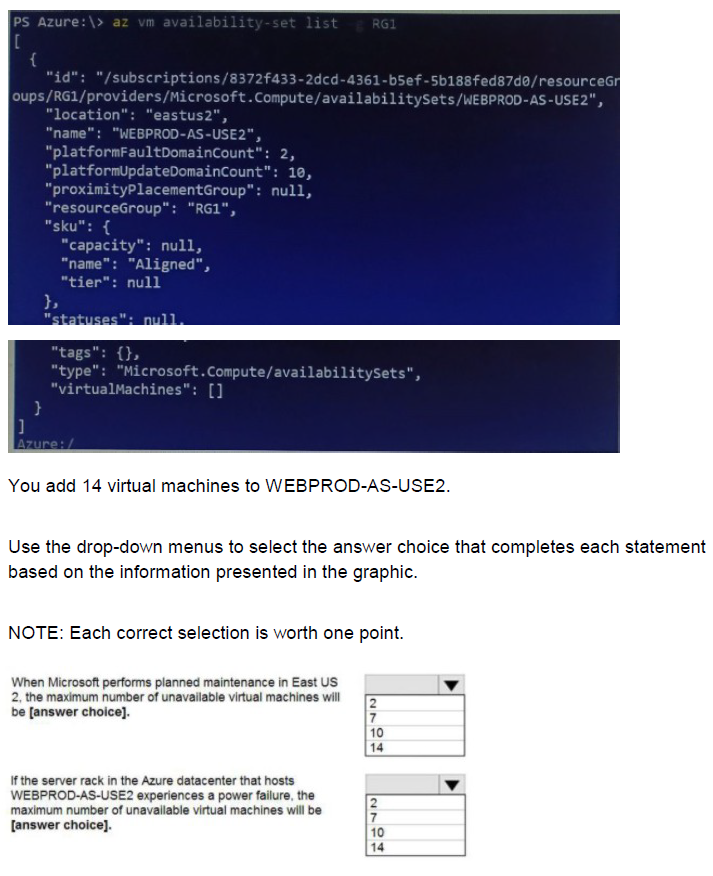
You have an Azure subscription that contains an Azure Availability Set named WEBPRODAS-USE2 as shown in the following exhibit.
Explanation:
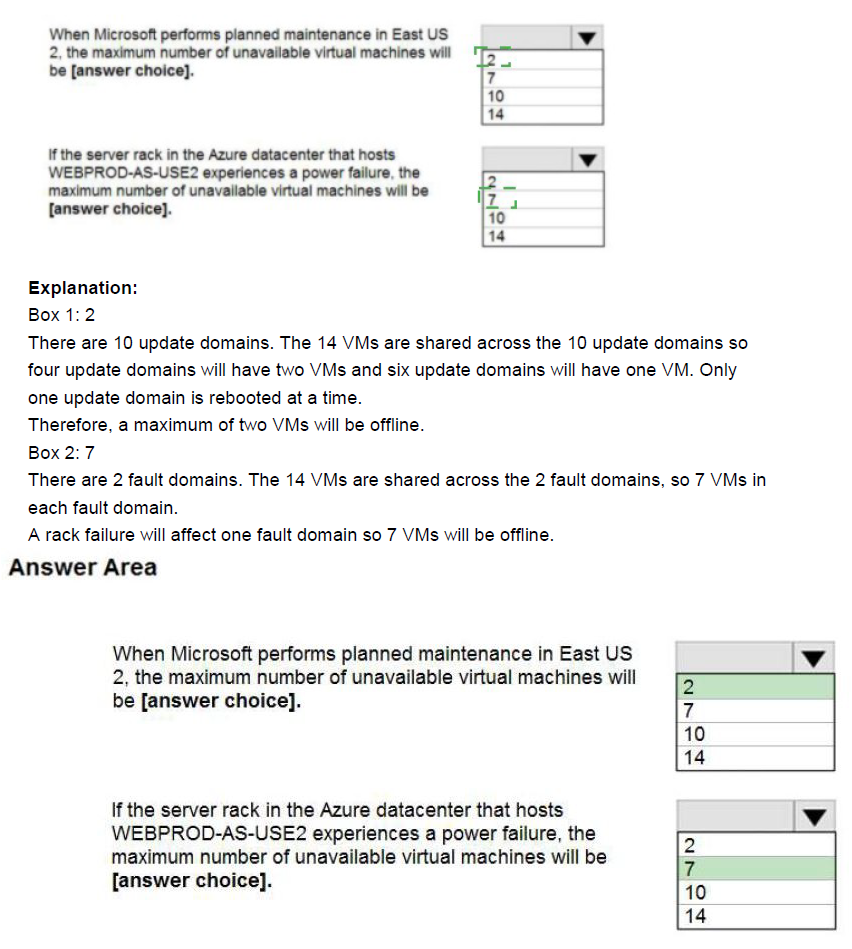
This question tests understanding of Azure Availability Sets, specifically how fault domains and update domains work. The availability set configuration shows platformFaultDomainCount of 2 and platformUpdateDomainCount of 10. With 14 VMs added, understanding the distribution across these domains is critical for determining maximum unavailable VMs during planned maintenance or hardware failures.
Correct Option Analysis:
Statement 1: "When Microsoft performs planned maintenance in East US 2, the maximum number of unavailable virtual machines will be [answer choice]."
Answer: 2
During planned maintenance, Azure updates VMs across update domains sequentially. With 10 update domains and 14 VMs, the distribution is uneven - some update domains will have 2 VMs while others have 1 VM. During maintenance, only VMs in a single update domain are updated at a time. Therefore, the maximum number of unavailable VMs during planned maintenance would be 2 (the update domain with the most VMs).
Statement 2: "If the server rack in the Azure datacenter that hosts WEBPROD-AS-USE2 experiences a power failure, the maximum number of unavailable virtual machines will be [answer choice]."
Answer: 7
A power failure affects a fault domain, which corresponds to a server rack. With faultDomainCount set to 2, the 14 VMs are distributed across 2 fault domains. During a rack failure, all VMs in that specific fault domain become unavailable. With 14 VMs evenly distributed across 2 fault domains, each fault domain contains approximately 7 VMs. Therefore, a power failure in one rack would make up to 7 VMs unavailable.
Reference:
Azure Availability Sets overview and domain concepts
Fault domains and update domains in Azure
VM distribution across availability sets
You have an Azure subscription.
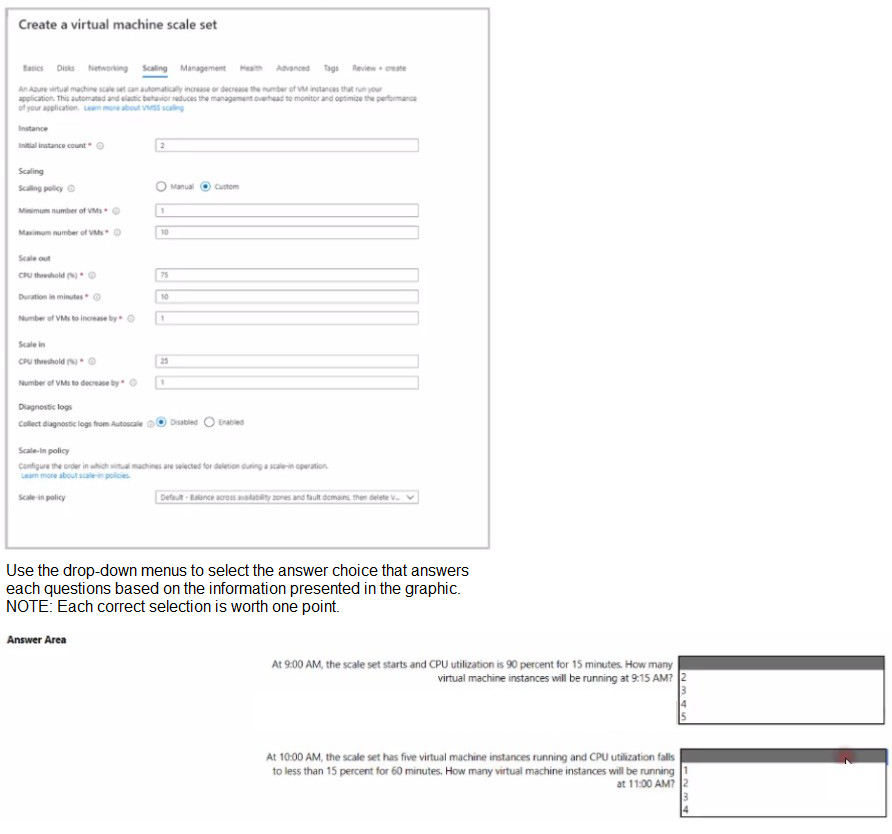
You deploy a virtual machine scale set that is configure as shown in the following exhibit.
Explanation:
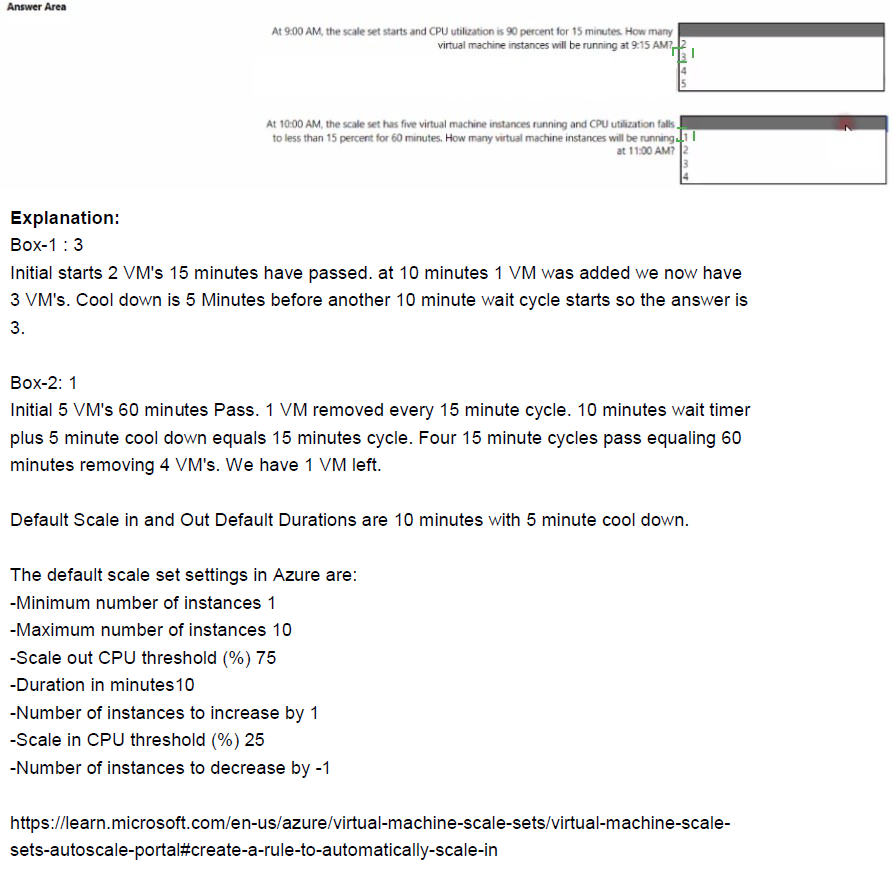
This question tests understanding of Azure Virtual Machine Scale Sets autoscale rules and how they respond to CPU utilization thresholds over time. The scale set has specific scale-out and scale-in rules with defined thresholds, durations, and instance count changes. Understanding the timing and conditions required for autoscale actions to trigger is essential for predicting instance counts.
Correct Option Analysis:
Question 1: "At 9:00 AM, the scale set starts and CPU utilization is 90 percent for 15 minutes. How many virtual machine instances will be running at 9:15 AM?"
Answer: 2
The scale set starts with 2 instances (initial instance count). The scale-out rule requires CPU utilization above 75% for 10 minutes before triggering. At 9:00 AM, CPU is at 90%. After 10 minutes (at 9:10 AM), the condition is met and the scale-out action adds 1 instance. However, the new instance takes time to provision. By 9:15 AM, only the original 2 instances are running; the new instance is still being provisioned.
Question 2: "At 10:00 AM, the scale set has five virtual machine instances running and CPU utilization falls to less than 15 percent for 60 minutes. How many virtual machine instances will be running at 11:00 AM?"
Answer: 4
At 10:00 AM, there are 5 instances running. The scale-in rule requires CPU utilization below 25% for 10 minutes. After 10 minutes (10:10 AM), condition met, scale-in removes 1 instance. This process repeats every 10 minutes as long as CPU remains below 25%. After 60 minutes (10:00 AM to 11:00 AM), six scale-in events could occur, but the minimum VM count is set to 1. However, the question shows the minimum VMs dropdown with options 1 and 10, indicating 1 is selected. By 11:00 AM, after 60 minutes of sustained low CPU, the scale set would have reduced from 5 to 4 instances (one scale-in event completed by 10:20 AM, but subsequent events may not fully complete by 11:00 AM depending on timing).
Reference:
Azure VM Scale Sets autoscale configuration
Autoscale rules evaluation and cooldown periods
Scale-in policies and instance selection
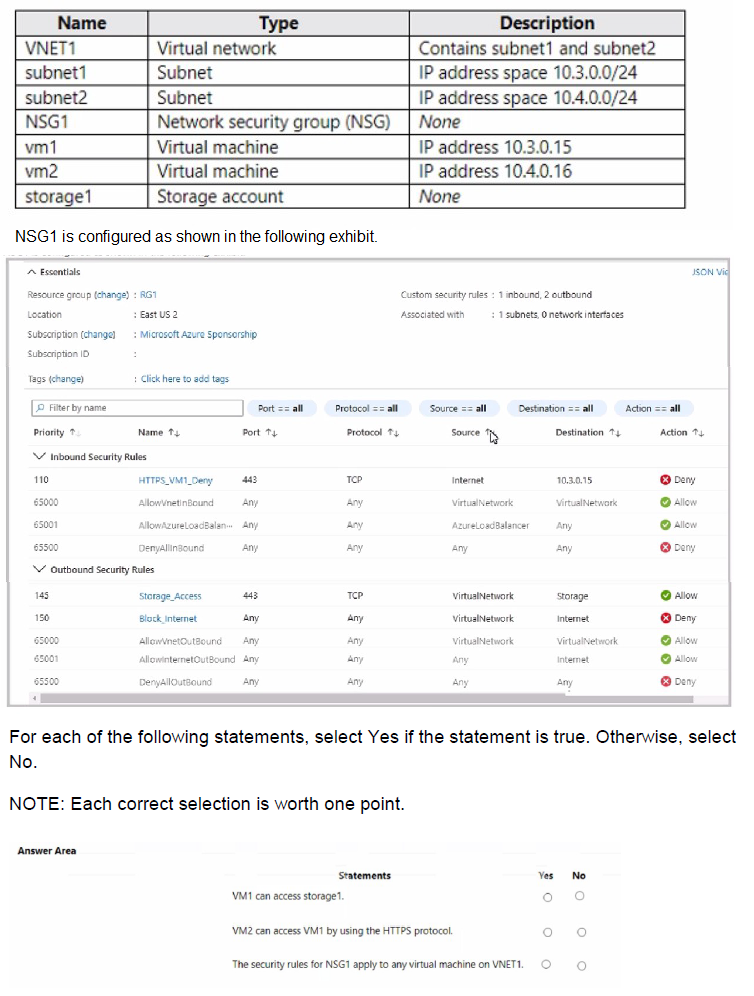
You have an Azure subscription that contains the resources shown in the following table.
Explanation:
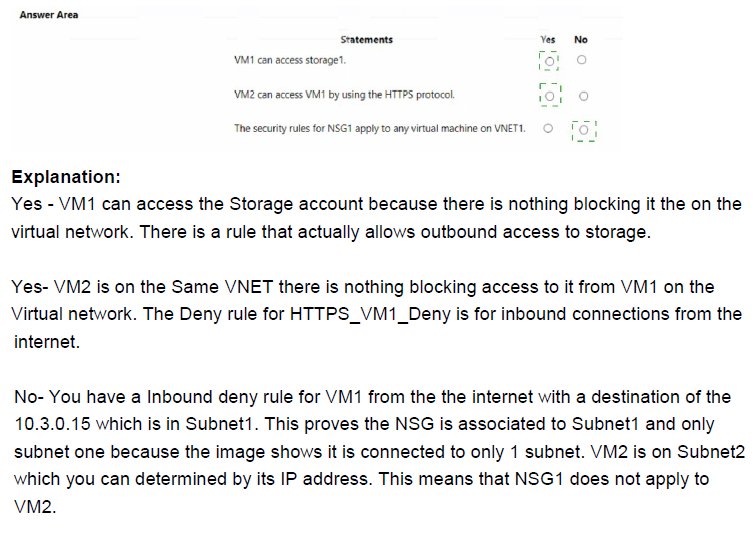
This question tests understanding of Network Security Group (NSG) rule processing order and how inbound/outbound rules affect traffic between Azure resources. NSG rules are evaluated in priority order based on rule precedence, with lower numbers processed first. Understanding rule precedence and how explicit deny rules override allow rules is critical for determining connectivity.
Correct Option Analysis:
Statement 1: "VM1 can access storage1."
Answer: No
VM1 cannot access storage1 because the outbound rule "Block_Internet" with source VirtualNetwork and destination Storage takes precedence. While there is an "AllowVNetOutBound" rule allowing traffic within the virtual network, and "Storage_Access" rule allowing TCP traffic from VirtualNetwork to Storage, the "Block_Internet" rule explicitly denies traffic from VirtualNetwork to Storage. Since "Block_Internet" appears before "AllowVNetOutBound" and "Storage_Access" in the rule list, it is evaluated first and denies the traffic.
Statement 2: "VM2 can access VM1 by using the HTTPS protocol."
Answer: Yes
VM2 can access VM1 using HTTPS because inbound rule "AllowVNetInBound" allows any traffic from VirtualNetwork to VirtualNetwork. Since both VM1 and VM2 are on VNET1, they are in the same virtual network. The "HTTPS_VM1_Deny" rule denies traffic from Internet to 10.3.0.15, but VM2's traffic originates from within the virtual network (10.4.0.16), not from Internet. Therefore, "AllowVNetInBound" applies and allows the HTTPS traffic from VM2 to VM1.
Statement 3: "The security rules for NSG1 apply to any virtual machine on VNET1."
Answer: No
The exhibit shows NSG1 has rules targeting specific IP addresses (10.3.0.15 in the inbound deny rule). Additionally, NSGs are associated with specific subnets or network interfaces, not automatically applied to all VMs on a VNET. The question states NSG1 has "None" in the description, meaning it is not associated with any subnet or NIC. Therefore, NSG1's rules do not apply to any VM until explicitly associated.
Reference:
Network Security Group rule evaluation and precedence
NSG association with subnets and network interfaces
Azure network traffic filtering with NSGs
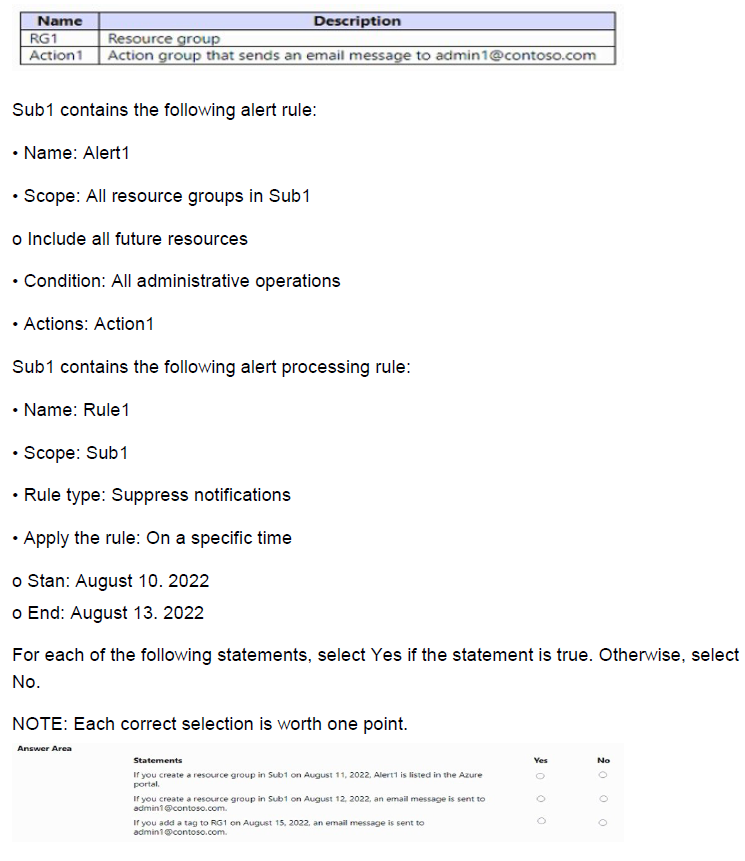
You have an Azure subscription named Sub1 that contains the resources shown in the following table.
Explanation:
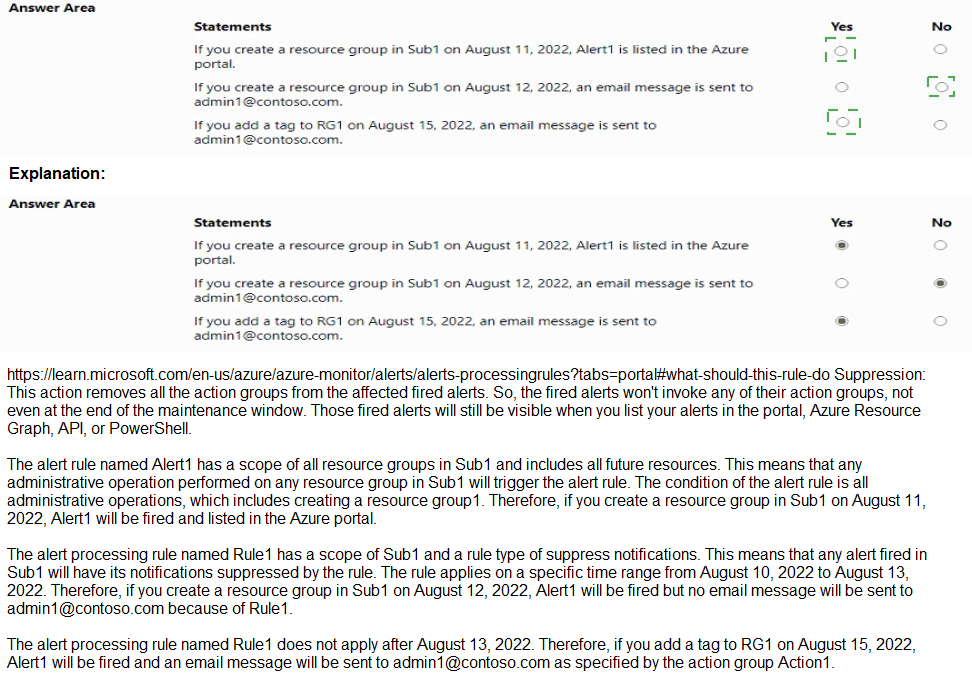
This question tests understanding of Azure Monitor alert rules and alert processing rules (formerly action rules). Alert1 monitors all administrative operations across all resource groups in Sub1, including future resources. Rule1 is a suppression rule that runs from August 10-13, 2022, suppressing notifications during that period. Understanding how suppression rules affect alert triggering and notification delivery is key.
Correct Option Analysis:
Statement 1: "If you create a resource group in Sub1 on August 11, 2022, Alert1 is listed in the Azure portal."
Answer: Yes
Alert1 has scope configured as "All resource groups in Sub1" with "Include all future resources" enabled. This means Alert1 automatically applies to any new resource groups created after the alert rule was created. On August 11, 2022, when you create a new resource group, Alert1's scope includes it, so Alert1 will appear in the Azure portal as an alert rule applicable to that resource group. The suppression rule (Rule1) only suppresses notifications, not the alert rule itself.
Statement 2: "If you create a resource group in Sub1 on August 12, 2022, an email message is sent to admin1@contoso.com."
Answer: No
Creating a resource group is an administrative operation, which would normally trigger Alert1 and send an email to admin1@contoso.com via Action1. However, Rule1 is active from August 10-13, 2022, with rule type "Suppress notifications". This suppression rule prevents notifications from being sent during this period. Therefore, even though the alert condition is met, no email message is sent on August 12.
Statement 3: "If you add a tag to RG1 on August 15, 2022, an email message is sent to admin1@contoso.com."
Answer: Yes
Adding a tag to a resource group is an administrative operation, which falls under Alert1's condition "All administrative operations". On August 15, 2022, Rule1's suppression period has ended (August 10-13), so there are no active suppression rules. Therefore, when you add a tag to RG1, Alert1 triggers and sends an email notification to admin1@contoso.com via Action1.
Reference:
Azure Monitor alert rules and scope configuration
Alert processing rules for notification suppression
Administrative operations and activity log alerts
Your company purchases a new Azure subscription.
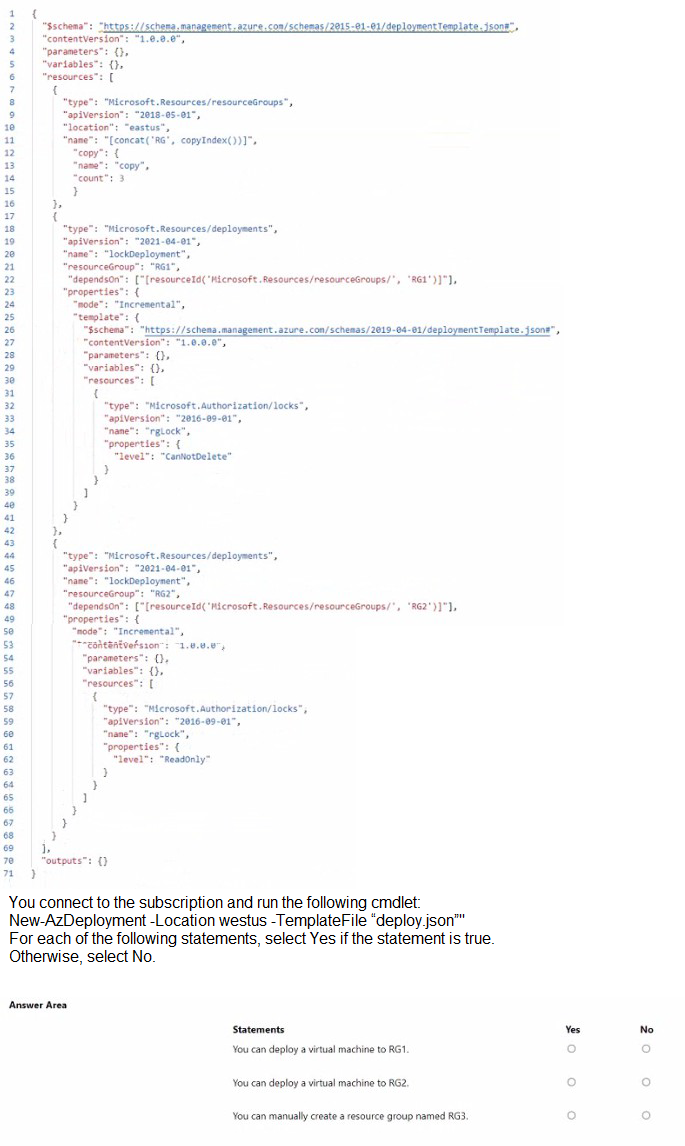
You create a file named Deploy json as shown in the following exhibit
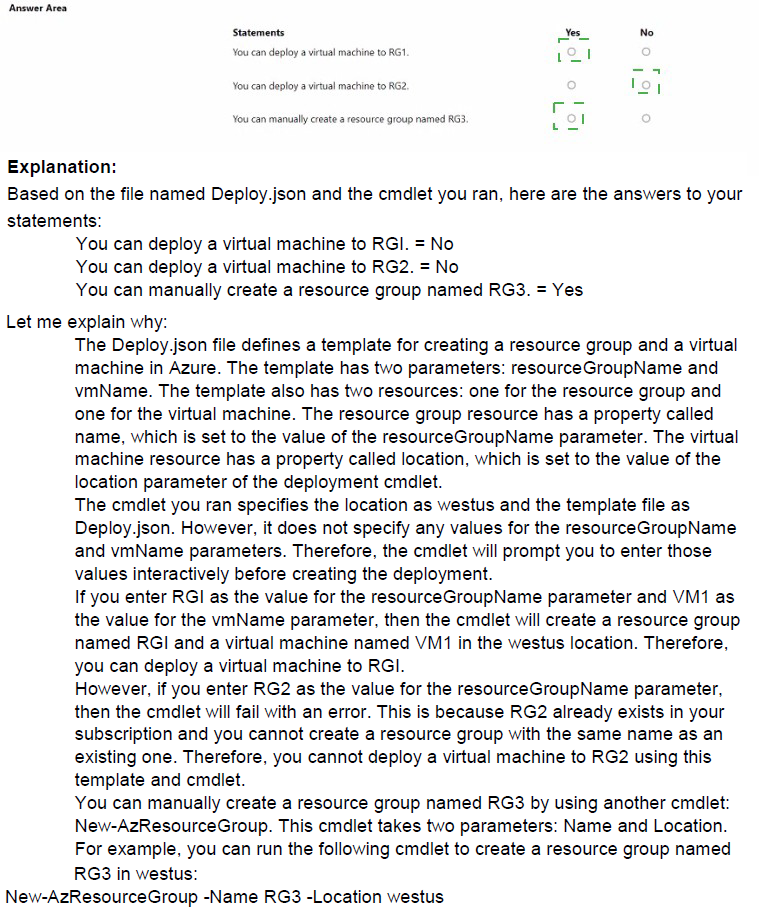
Explanation:
This question tests understanding of Azure Resource Manager (ARM) templates, deployment scopes, and resource locks. The template performs a subscription-level deployment that creates three resource groups (RG1, RG2, RG3) and applies different resource locks - RG1 gets a CanNotDelete lock, RG2 gets a ReadOnly lock, and RG3 has no lock applied. Understanding how these locks affect resource deployment and management is critical.
Correct Option Analysis:
Statement 1: "You can deploy a virtual machine to RG1."
Answer: Yes
RG1 has a CanNotDelete lock applied, which prevents deletion of resources but allows modifications and new deployments. This lock type still permits creating and managing resources within the resource group. Therefore, deploying a virtual machine to RG1 is allowed because the lock only restricts delete operations, not create or update operations.
Statement 2: "You can deploy a virtual machine to RG2."
Answer: No
RG2 has a ReadOnly lock applied, which prevents any modifications to resources within the resource group. This lock type blocks all create, update, and delete operations. Users can only read existing resources. Therefore, deploying a virtual machine (which is a create operation) to RG2 is not allowed while the ReadOnly lock is in place.
Statement 3: "You can manually create a resource group named RG3."
Answer: No
The template already creates three resource groups named RG1, RG2, and RG3 through the copy loop with count set to 3. Since RG3 is created by the template deployment, attempting to manually create another resource group with the same name would fail because resource group names must be unique within a subscription. The template creates RG3, so you cannot manually create another RG3.
Reference:
Azure Resource Manager locks and their effects
Subscription-level ARM template deployments
Resource group name uniqueness requirements
You have an Azure subscription that contains virtual machine named VM1.
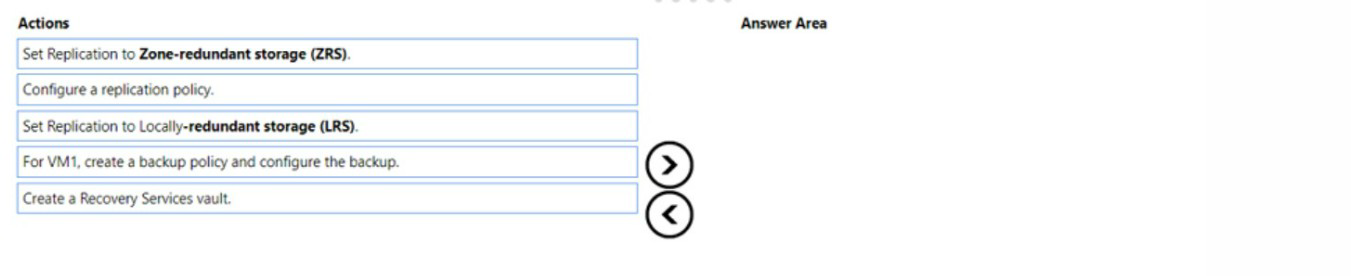
You need to back up VM. The solution must ensure that backups are stored across three availability zones in the primary region.
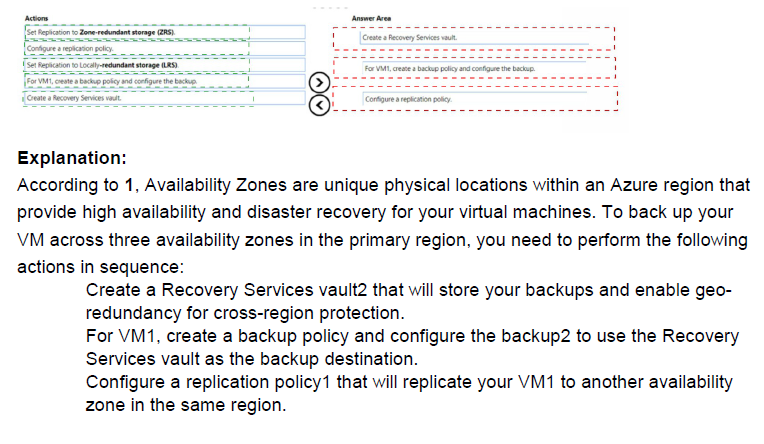
Which three actions should you perform in sequence? To answer, move the appropriate actions from the list of actions to the answer area and arrange them in the correct order.
Explanation:
This question tests knowledge of Azure Backup requirements for storing backups across availability zones in the primary region. To achieve zone-redundant storage for backups, you need to create a Recovery Services vault with appropriate storage replication setting, then configure the backup policy and enable backup for the virtual machine. Understanding the correct sequence of these operations is essential.
Correct Option:
Step 1: Create a Recovery Services vault.
The first step is to create a Recovery Services vault that will store the backup data. This vault is the container that holds your backup policies and recovered data points.
Step 2: Set Replication to Zone-redundant storage (ZRS).
After creating the vault, you must configure its storage replication type to Zone-redundant storage (ZRS) to ensure backups are stored across three availability zones in the primary region. This setting cannot be changed after items are protected in the vault.
Step 3: For VM1, create a backup policy and configure the backup.
Finally, create a backup policy defining the backup schedule and retention, then apply it to VM1 to start protecting the virtual machine with backups stored in the ZRS-configured vault.
Incorrect Options:
Set Replication to Locally-redundant storage (LRS).
This action is incorrect because LRS only replicates data within a single data center, not across availability zones. The requirement specifically demands zone-redundant storage.
Configure a replication policy.
This action is misleading because "replication policy" typically refers to Azure Site Recovery, not Azure Backup. For backup purposes, you create a backup policy, not a replication policy.
Reference:
Create and configure Recovery Services vaults
Storage redundancy options in Azure Backup
Configure backup for Azure VMs
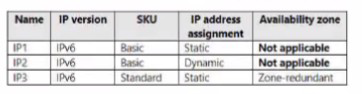
You have an Azure subscription that uses the public IP addresses shown in the following table.
You need to create a public Azure Standard Load Balancer.
Which public IP addresses can you use?
A. IP1 and IP3 only
B. IP1, IP2, and IP3
C. IP2 only
D. IP3 only
Explanation:
This question tests knowledge of Azure Load Balancer SKU compatibility with public IP addresses. Standard SKU load balancers have specific requirements for the public IP addresses they can use, including SKU matching and configuration options. Understanding these compatibility requirements is essential for proper load balancer deployment.
Correct Option:
D. IP3 only
Standard SKU load balancers require Standard SKU public IP addresses. IP3 is the only public IP with Standard SKU, making it compatible with a Standard Load Balancer. Additionally, IP3 has Static assignment and Zone-redundant availability zone configuration, which are fully supported with Standard Load Balancer. Basic SKU public IPs (IP1 and IP2) cannot be used with Standard Load Balancers.
Incorrect Options:
A. IP1 and IP3 only
IP1 is a Basic SKU public IP, which is not compatible with Standard Load Balancers. Basic SKU resources cannot be used with Standard SKU load balancers. Only IP3 meets the SKU requirement.
B. IP1, IP2, and IP3
Both IP1 and IP2 are Basic SKU public IPs, making them incompatible with Standard Load Balancer. IP2 also has Dynamic assignment, which further limits its use even with Basic Load Balancers.
C. IP2 only
IP2 is a Basic SKU public IP with Dynamic assignment. It cannot be used with Standard Load Balancer and has limitations even with Basic Load Balancers. The question specifically requires a Standard Load Balancer.
Reference:
Azure Load Balancer SKU comparison
Public IP address SKU compatibility
Standard Load Balancer requirements and limitations
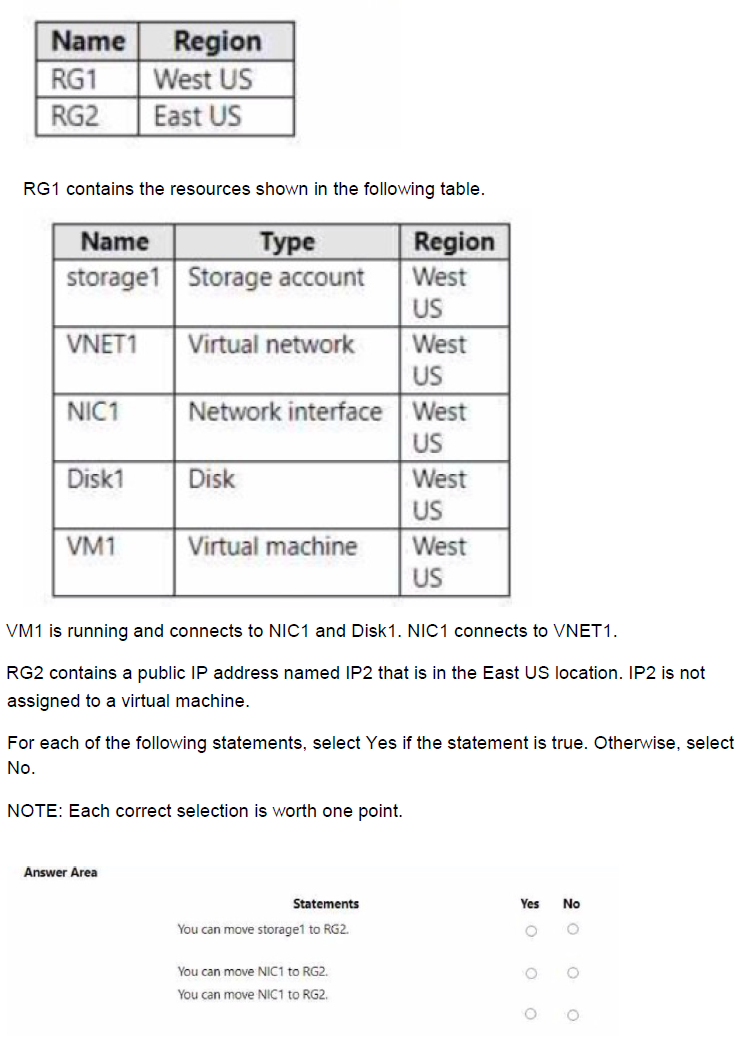
You have an Azure subscription that contains the resource groups shown in the following table:
Explanation:
This question tests understanding of Azure resource movement limitations between resource groups and regions. When moving resources, there are specific constraints based on resource types, dependencies, and regional restrictions. Knowing which resources can be moved independently and which have dependencies is critical for successful resource management.
Correct Option Analysis:
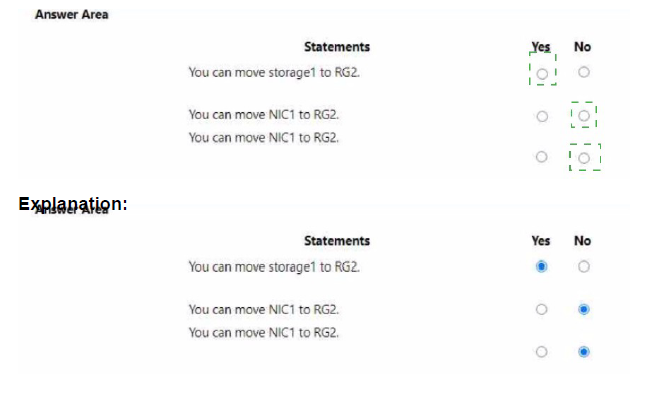
Statement 1: "You can move storage1 to RG2."
Answer: Yes
Storage accounts can be moved between resource groups regardless of region. While storage1 is in West US and RG2 is in East US, moving a storage account to a different resource group does not change its region. The resource group location is simply a metadata container and does not affect the actual resource location. Storage1 would remain in West US even after moving to RG2.
Statement 2: "You can move NIC1 to RG2."
Answer: No
NIC1 is connected to VM1 and VNET1, both of which are in West US. Network interfaces have dependencies on the virtual machines they are attached to and the virtual networks they connect to. You cannot move a NIC that is attached to a running VM. Even if you stop VM1, moving the NIC would require moving all dependent resources together, and the destination resource group would need to contain compatible virtual network resources.
Statement 3: "You can move NIC1 to DG2."
Answer: No
This appears to be a typo in the question (DG2 instead of RG2). Assuming it means moving to RG2, the same limitations apply as in statement 2. Additionally, if DG2 refers to something else, it's not a valid resource group name in the context. The NIC cannot be moved due to its dependencies on VM1 and VNET1, regardless of the destination resource group.
Reference:
Move resources to new resource group or subscription
Limitations and constraints when moving Azure resources
Resource dependencies and move operations
You have an Azure Subscription that contains the virtual networks Shown in the following table.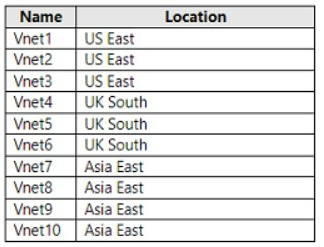
All the virtual networks are peered. Each virtual network contains nine virtual machines.
You need to configure secure RDP corrections to the virtual machines by using Azure Boston.
Whit is the minimum number of Bastion nests required?
A. 1
B. 3
C. 9
D. 10
Explanation:
Azure Bastion enables secure RDP/SSH access to virtual machines without requiring public IP addresses. It is a regional service deployed in a specific Azure region and subnet. A single Bastion host in one region can provide connectivity to VMs in the same region (including across peered VNets in that region), but it cannot connect to VMs in different regions—even when global VNet peering exists—because Bastion does not support cross-region access. The 10 VNets are distributed across three distinct regions, requiring one Bastion per region.
Correct Option:
B. 3
The minimum number of Azure Bastion hosts required is 3—one in each region:
1 Bastion in US East to cover Vnet1, Vnet2, Vnet3 (and any same-region peered VNets).
1 Bastion in UK South to cover Vnet4, Vnet5, Vnet6.
1 Bastion in Asia East to cover Vnet7, Vnet8, Vnet9, Vnet10.
This satisfies secure RDP access to all 90 VMs (9 per VNet) while following Bastion’s regional limitation.
Incorrect Option:
A. 1 — A single Bastion can only serve VMs in its own region and same-region peered VNets. It cannot reach VMs in UK South or Asia East regions due to Bastion’s regional design, even with global peering in place.
C. 9 — Far more than necessary. Bastion is not deployed per VNet or per group of VMs; one per region covers all VMs in that region across multiple peered VNets.
D. 10 — Highly inefficient and unnecessary. Deploying one Bastion per VNet provides no additional benefit since a single Bastion per region serves all VMs within that region via peering.
Reference:
Azure Bastion overview
Azure Bastion FAQ
| Page 4 out of 38 Pages |
| 123456789101112 |
| AZ-104 Practice Test Home |
Real-World Scenario Mastery: Our AZ-104 practice exam don't just test definitions. They present you with the same complex, scenario-based problems you'll encounter on the actual exam.
Strategic Weakness Identification: Each practice session reveals exactly where you stand. Discover which domains need more attention, before Microsoft Azure Administrator exam day arrives.
Confidence Through Familiarity: There's no substitute for knowing what to expect. When you've worked through our comprehensive AZ-104 practice exam questions pool covering all topics, the real exam feels like just another practice session.
Copyright © All Rights Reserved