
Topic 6: Misc. Questions
You have several Azure virtual machines on a virtual network named VNet1.
You configure an Azure Storage account as shown in the following exhibit.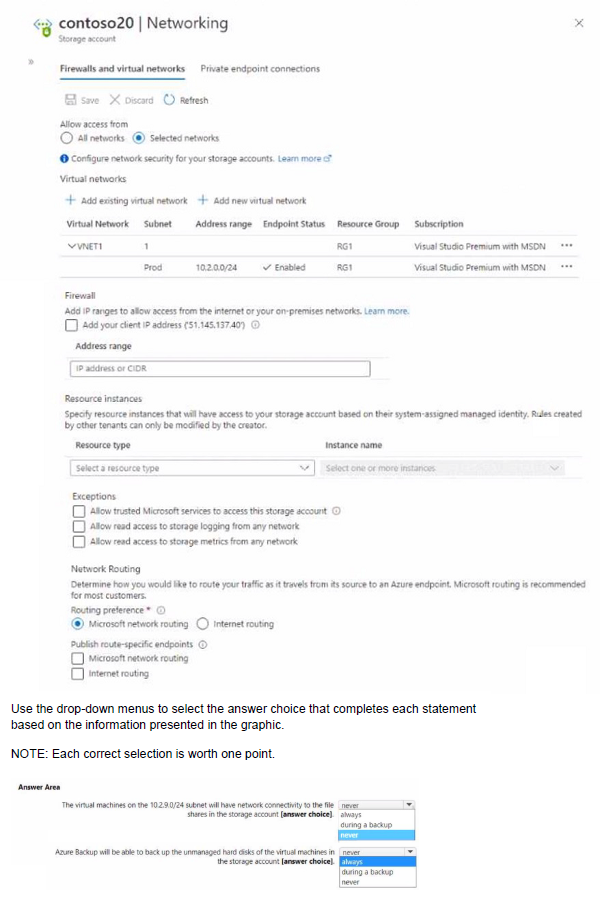
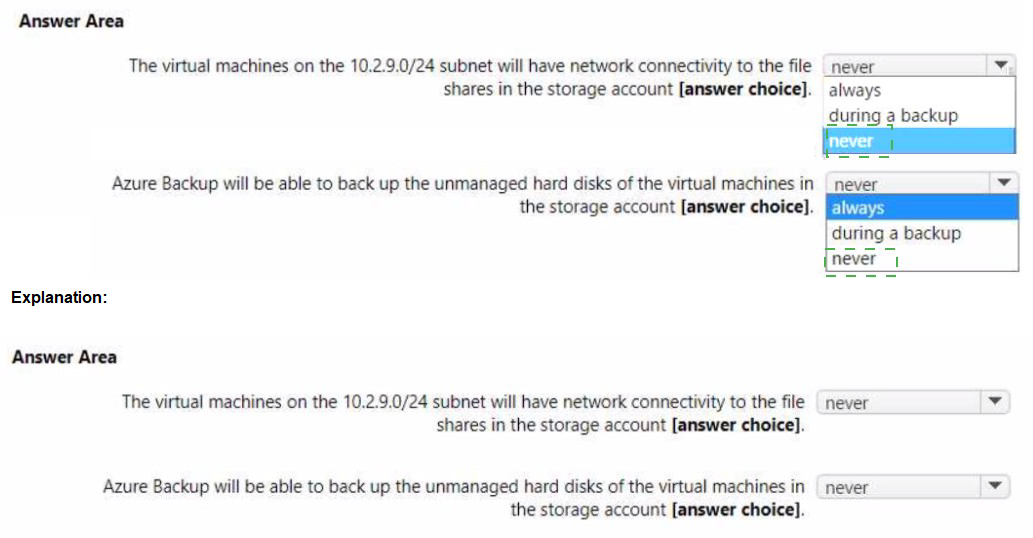
Explanation:
The exhibit shows a storage account configured with selected networks, allowing access from VNET1/Prod subnet (10.2.0.0/24). Other subnets, including 10.2.9.0/24, are not allowed. The "Allow trusted Microsoft services" exception is enabled, which includes Azure Backup.
Correct Answers:
First statement: The virtual machines on the 10.2.9.0/24 subnet will have network connectivity to the file shares in the storage account [answer choice].
Answer: Not allowed
The storage account is configured to allow access only from selected networks. The only virtual network listed is VNET1 with subnet Prod (10.2.0.0/24). The 10.2.9.0/24 subnet is not explicitly allowed, so virtual machines in that subnet cannot access the file shares.
Second statement: Azure Backup will be able to back up the unmanaged hard disks of the virtual machines in the storage account [answer choice].
Answer: Allowed
The "Exceptions" section includes "Allow trusted Microsoft services to access this storage account". Azure Backup is a trusted Microsoft service, so it can access the storage account for backup operations even though the storage account is configured with selected networks.
Reference:
Microsoft Learn: Configure Azure Storage firewalls and virtual networks
Microsoft Learn: Grant access to trusted Azure services
You have an Azure Kubernetes Service (AKS) cluster named AKS1.
You need to configure cluster autoscaler for AKS1.
Which two tools should you use? Each correct answer presents a complete solution,
NOTE: Each correct selection is worth one point.
A. the set-AzAKs cmdlet
B. the Azure portal
C. The az aks command
D. the kubect1 command
E. the set Azure cmdlet
Explanation:
Cluster autoscaler in AKS automatically adjusts the number of agent nodes based on resource demands. It can be enabled and configured through the Azure portal or Azure CLI, which are the primary management tools for AKS clusters.
Correct Options:
B. the Azure portal
The Azure portal provides a graphical interface to enable and configure cluster autoscaler for AKS clusters. You can navigate to the cluster's Node pools settings and enable autoscaler with minimum and maximum node counts.
C. The az aks command
The Azure CLI command az aks update or az aks nodepool update with the --enable-cluster-autoscaler parameter can enable and configure cluster autoscaler. This is the command-line method for managing AKS cluster autoscaling.
Incorrect Options:
A. the set-AzAKs cmdlet
There is no set-AzAKs cmdlet. The correct PowerShell module for AKS is Az.Aks with cmdlets like Set-AzAksCluster.
D. the kubect1 command
kubectl is used for managing workloads and resources within the Kubernetes cluster, not for configuring cluster-level infrastructure features like autoscaler. Autoscaler configuration is done at the AKS cluster level, not inside Kubernetes.
E. the set Azure cmdlet
This is not a valid Azure cmdlet. There is no generic set Azure command.
Reference:
Microsoft Learn: Cluster autoscaler in AKS
Microsoft Learn: Enable cluster autoscaler in AKS
Note: This question is part of a series of questions that present the same scenario. Each question in the series contains a unique solution that might meet the stated goals. Some question sets might have more than one correct solution, while others might not have a correct solution.
After you answer a question in this section, you will NOT be able to return to it. As a result, these questions will not appear in the review screen.
You have an Azure virtual machine named VM1. VM1 was deployed by using a custom Azure Resource Manager template named ARM1.json.
You receive a notification that VM1 will be affected by maintenance.
You need to move VM1 to a different host immediately.
Solution: From the Overview blade, you move the virtual machine to a different resource
group.
Does this meet the goal?
A. Yes
B. No
Explanation:
Moving a virtual machine to a different resource group does not change its physical host or location. It only changes the management container and does not affect the underlying infrastructure where the VM runs.
Correct Option:
B. No
Moving VM1 to a different resource group does not move the virtual machine to a different host. The VM remains on the same physical host in the same datacenter. This action does not address the maintenance notification requirement to move the VM to a different host immediately.
Incorrect Options:
A. Yes
This option is incorrect because resource group moves are for changing management and billing ownership, not for relocating VMs to different physical hosts. The VM continues running on the same infrastructure.
Reference:
Microsoft Learn: Move resources to a new resource group or subscription
Microsoft Learn: Redeploy virtual machine to new Azure host node
You have two Azure subscriptions named Sub1 and Sub2.
Sub! contains a virtual machine named VM1 and a storage account named storage1.
VM1 is associated to the resources shown in the following table.
You need to move VM1 to Sub2.
Which resources should you move to Sub2?
A. VM1, Disk1. and Netlnt1 only
B. VM1. Disk1. and VNet1 only
C. VM1. Disk1. and storage1 only
D. VM1. Disk1. Netlnt1, and VNet1
Explanation:
When moving a virtual machine to a different subscription, all dependent resources that are tightly coupled with the VM must also be moved. This includes the VM itself, its disks, network interfaces, and the virtual network it is connected to.
Correct Options:
D. VM1, Disk1, NetInt1, and VNet1
To successfully move VM1 to Sub2, you must move all resources that are directly dependent on each other:
VM1: The virtual machine itself
Disk1: The OS and data disks attached to VM1
NetInt1: The network interface that connects VM1 to the virtual network
VNet1: The virtual network that VM1 is connected to (required for network connectivity)
Incorrect Options:
A. VM1, Disk1, and NetInt1 only
This omits VNet1. The network interface cannot exist without its virtual network. After the move, NetInt1 would have no VNet to connect to, causing deployment failure.
B. VM1, Disk1, and VNet1 only
This omits NetInt1. The VM cannot function without a network interface to connect to the virtual network.
C. VM1, Disk1, and storage1 only
storage1 is not directly dependent on VM1 and does not need to be moved. The VM's disks (Disk1) are separate from the storage account storage1. Including storage1 is unnecessary and omitting required networking resources.
Reference:
Microsoft Learn: Move resources to a new resource group or subscription
Microsoft Learn: Validate your move request for virtual machines
You have an Azure subscription named Subscription1 that contains virtual network named VNet1. VNet1 is in a resource group named RG1. A user named User1 has the following roles for Subscription1:
• Reader
• Security Admin
• Security Reader
You need to ensure that User1 can assign the Reader role for VNet1 to other users. What should you do?
A. Remove User1 from the Security Reader and Reader roles for Subscription1.
B. Assign User1 the Owner role for VNet1.
C. Remove User1 from the Security Reader role for Subscription1. Assign User1 the Contributor role for RG1.
D. Remove User1 from the Security Reader and Reader roles for Subscription1. Assign User1 the Contributor role for Subscription1
Explanation:
To assign the Reader role for VNet1 to other users, User1 needs permissions to create role assignments at the VNet1 scope. The Owner role at the VNet1 scope includes Microsoft.Authorization/roleAssignments/write permission, which is required to assign roles.
Correct Option:
B. Assign User1 the Owner role for VNet1.
The Owner role at the VNet1 scope grants full permissions on VNet1, including the ability to assign roles to other users. This allows User1 to assign the Reader role for VNet1 to other users while following least privilege by scoping to VNet1 only.
Incorrect Options:
A. Remove User1 from the Security Reader and Reader roles for Subscription1.
Removing roles does not grant new permissions. This action would only reduce User1's existing access without providing the ability to assign roles.
C. Remove User1 from the Security Reader role for Subscription1. Assign User1 the Contributor role for RG1.
Contributor at RG1 scope does not include role assignment permissions. User1 still cannot assign roles to others.
D. Remove User1 from the Security Reader and Reader roles for Subscription1. Assign User1 the Contributor role for Subscription1.
Contributor at subscription scope still does not include role assignment permissions. Only Owner and User Access Administrator can assign roles.
Reference:
Microsoft Learn: Azure built-in roles - Owner
Microsoft Learn: Azure role-based access control (RBAC) permissions
You have an Azure subscription That contains a Recovery Services vault named Vault1.
You need to enable multi-user authorization (MAU) for Vaultl.
Which resource should you create first?
A. a managed identity
B. a resource guard
C. an administrative unit
D. a custom Azure role
Explanation:
Multi-user authorization (MUA) for Azure Backup requires a resource guard as a prerequisite. The resource guard is a separate resource that acts as a protector for critical operations, requiring approval from another user before allowing changes to backup policies or vault configuration.
Correct Option:
B. a resource guard
To enable multi-user authorization for a Recovery Services vault, you must first create a resource guard in the same region as the vault. The resource guard is then associated with the vault to require additional authorization for critical operations.
Incorrect Options:
A. a managed identity
Managed identities are used for authentication to Azure services but are not specifically required for multi-user authorization. The resource guard handles the authorization mechanism.
C. an administrative unit
Administrative units are used in Azure AD to delegate administrative permissions over specific groups of users. They are not used for multi-user authorization in Recovery Services vaults.
D. a custom Azure role
Custom roles define permissions but do not provide the multi-user authorization mechanism. The resource guard is the specific resource designed for this purpose.
Reference:
Microsoft Learn: Multi-user authorization using Resource Guard
Microsoft Learn: Configure multi-user authorization for Backup vault
You create a Recovery Services vault backup policy named Policy1 as shown in the following exhibit.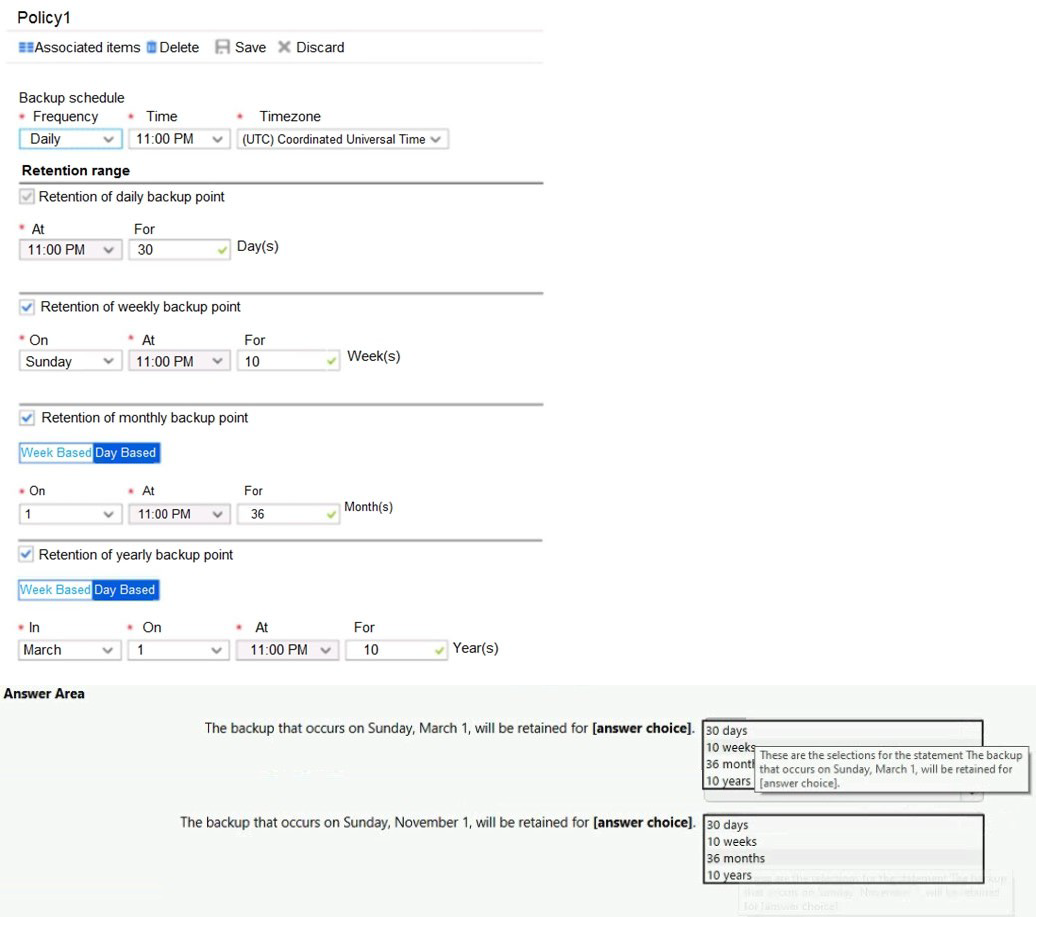
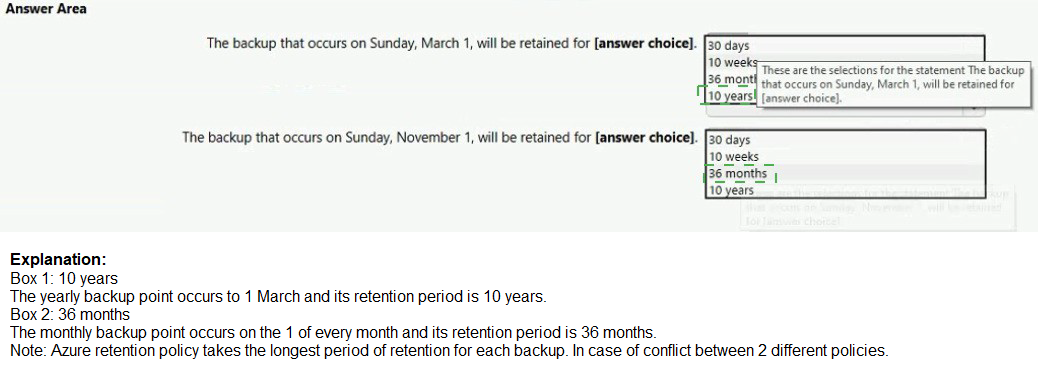
Explanation:
The backup policy shown has daily backups at 11:00 PM with retention of 30 days, weekly backups on Sunday at 11:00 PM with retention of 10 weeks, monthly backups on the 1st of each month with retention of 36 months, and yearly backups on January 1st with retention of 10 years.
Correct Option:
The backup that occurs on Sunday, March 1, will be retained for 36 months.
Sunday, March 1 is the first day of the month. The policy shows monthly backups are configured with retention of 36 months. Since March 1 is both a Sunday (weekly) and the first day of the month (monthly), this backup point will be retained according to the longest applicable retention period, which is 36 months.
Incorrect Options:
30 days: This would apply if only the daily retention applied, but the backup qualifies for longer retention as a monthly backup.
10 weeks: This would apply if only the weekly retention applied, but the monthly retention is longer.
10 years: This would apply if the backup were on January 1, not March 1.
Reference:
Microsoft Learn: Azure Backup policy for virtual machines
Microsoft Learn: Backup and restore point retention
You have an Azure subscription that contains the resource groups shown in the following table.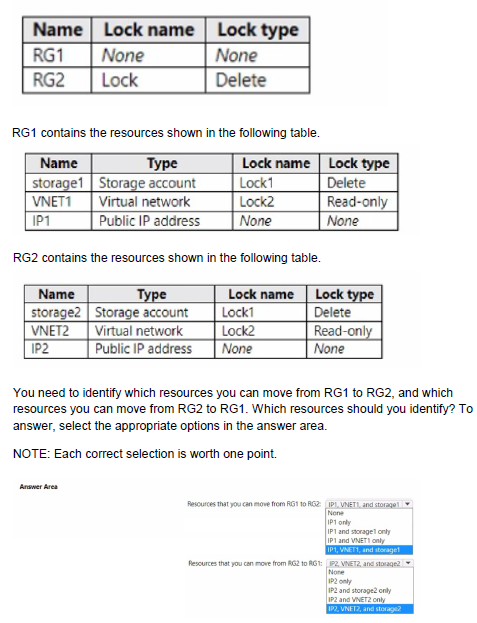
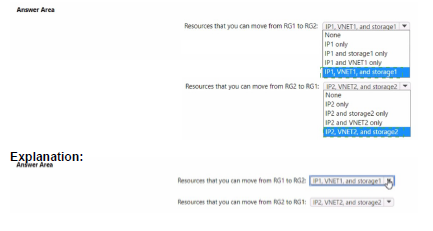
Explanation:
Resource locks affect the ability to move resources between resource groups. A Delete lock prevents deletion but does not prevent moving. A Read-only lock prevents any modifications, including moving the resource. Resources with Read-only locks cannot be moved.
Correct Answers:
Resources that you can move from RG1 to RG2: IP1 only
In RG1:
storage1 has Delete lock (Lock1) - can be moved
VNET1 has Read-only lock (Lock2) - cannot be moved
IP1 has no lock - can be moved
Therefore, IP1 and storage1 can be moved, but VNET1 cannot. The answer option "IP1 and storage1 only" is correct.
Resources that you can move from RG2 to RG1: IP2 only
In RG2:
storage2 has Delete lock (Lock1) - can be moved
VNET2 has Read-only lock (Lock2) - cannot be moved
IP2 has no lock - can be moved
Therefore, IP2 and storage2 can be moved, but VNET2 cannot. The answer option "IP2 and storage2 only" is correct.
Reference:
Microsoft Learn: Move resources to a new resource group or subscription
Microsoft Learn: Protect your resources with a lock
You have an Azure Resource Manager that is used to deploy an Azure virtual machine.
Template1 contains the following text: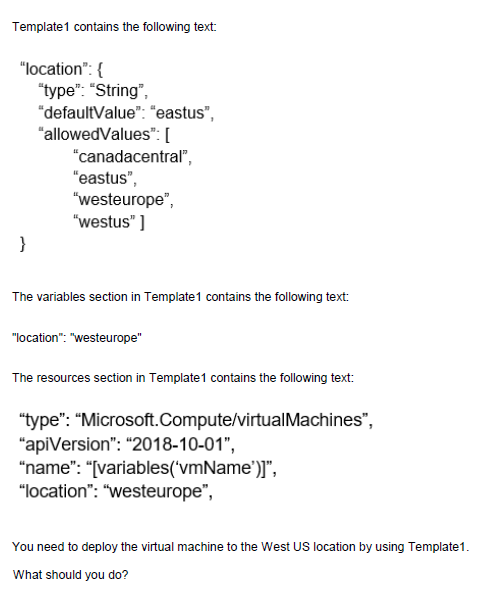
A. Modify the location in the resource section to westus
B. Select West US during the deployment
C. Modify the location in the variables section to westus
Explanation:
The template has a parameter "location" with allowed values including westus, but the resources section hardcodes the location to "westeurope". Parameter values are ignored when the resource location is hardcoded.
Correct Option:
A. Modify the location in the resource section to westus
To deploy the virtual machine to West US, you must change the hardcoded location in the resources section from "westeurope" to "westus". The parameter definition and variables are not used because the resource location is explicitly set.
Incorrect Options:
B. Select West US during the deployment
Selecting West US during deployment would not override the hardcoded "westeurope" in the resources section. The template ignores the parameter value for location.
C. Modify the location in the variables section to westus
Changing the variable to westus still would not affect the deployment because the resources section hardcodes "westeurope" directly, not referencing the variable.
Reference:
Microsoft Learn: ARM template structure and syntax
Microsoft Learn: Resource location in ARM templates
Peering for VNET2 is configured as shown in the following exhibit.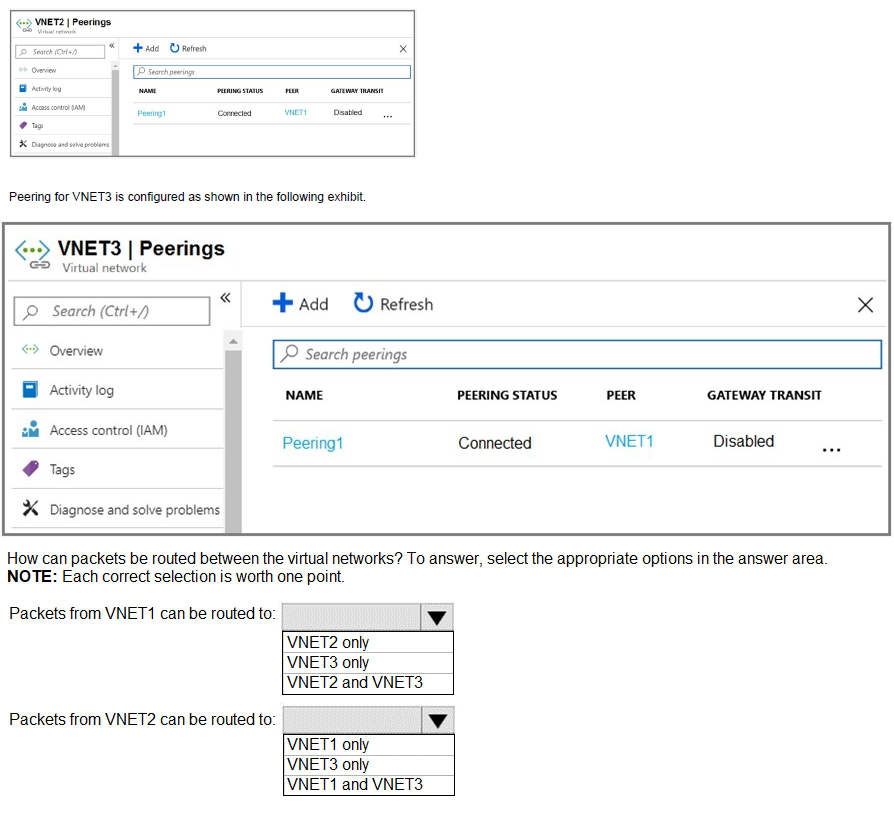
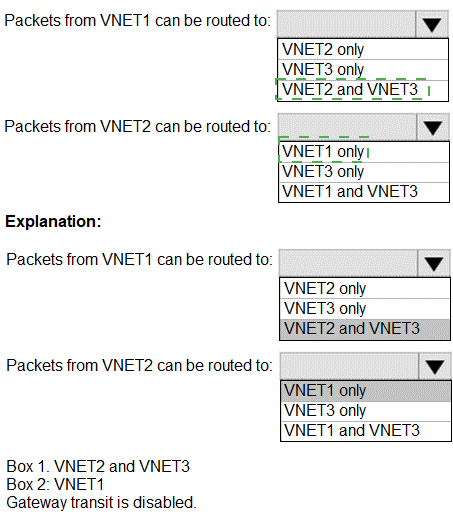
Explanation:
Virtual network peering is not transitive. If VNET1 is peered with VNET3, and VNET2 is peered with VNET3, but VNET1 and VNET2 are not directly peered, they cannot communicate with each other through VNET3 unless gateway transit is enabled.
Correct Answers:
Packets from VNET1 can be routed to: VNET3 only
VNET1 is peered with VNET3 (Peering1 shows connection to VNET1). Without direct peering between VNET1 and VNET2, and with gateway transit disabled, VNET1 can only route packets to VNET3.
Packets from VNET2 can be routed to: VNET3 only
Based on the VNET2 peering configuration (not shown but implied), VNET2 is peered with VNET3. Without peering between VNET2 and VNET1, and no gateway transit, VNET2 can only route packets to VNET3.
Reference:
Microsoft Learn: Virtual network peering
Microsoft Learn: Hub-spoke network topology in Azure
You have an Azure Storage accounts as shown in the following exhibit.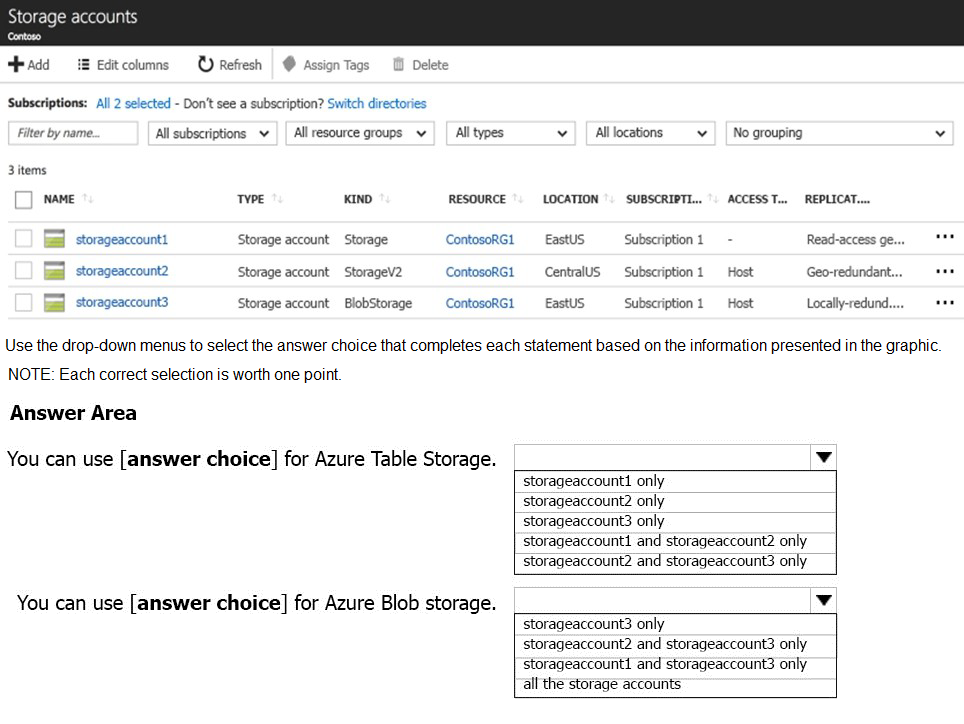
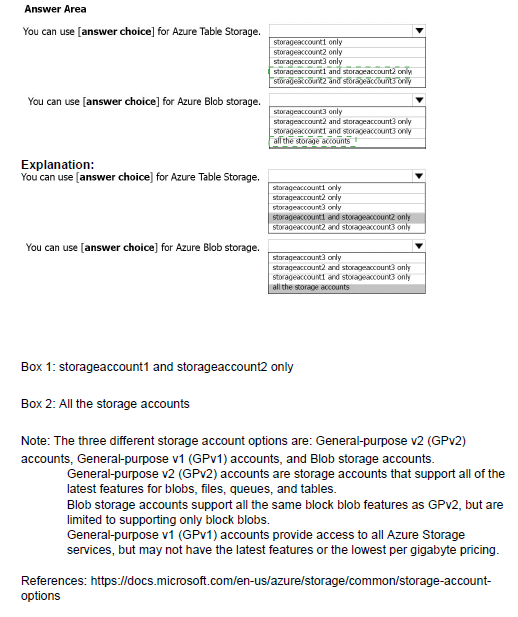
Explanation:
Different storage account types support different Azure Storage services. Storage accounts (old kind) support blobs, files, queues, and tables. StorageV2 supports all services. BlobStorage supports only blobs.
Correct Answers:
You can use [answer choice] for Azure Table Storage: storageaccount1 and storageaccount2 only
Table storage is supported in Storage accounts (storageaccount1) and StorageV2 accounts (storageaccount2). BlobStorage accounts (storageaccount3) do not support tables.
You can use [answer choice] for Azure Blob storage: all the storage accounts
All storage account types support blob storage:
storageaccount1 (Storage - old kind) supports blobs
storageaccount2 (StorageV2) supports blobs
storageaccount3 (BlobStorage) is specifically for blobs
Reference:
Microsoft Learn: Types of storage accounts
Microsoft Learn: Storage account overview
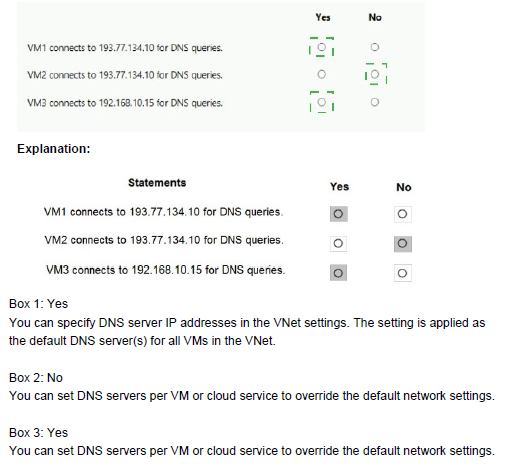
You have an Azure subscription that contains the Azure virtual machines shown in the following table.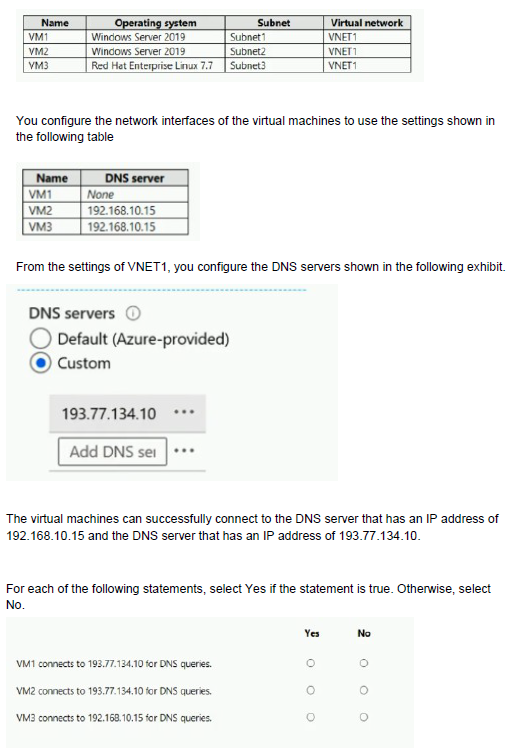
Explanation:
DNS server settings for Azure VMs are determined by a hierarchy: network interface-level DNS settings override virtual network-level DNS settings. VMs inherit DNS settings from VNET1 unless they have custom DNS configured at the network interface level.
Correct Answers:
Statement 1: VM1 connects to 193.77.134.10 for DNS queries.
Answer: Yes
VM1 has no DNS server configured at the network interface level (None). Therefore, it inherits the DNS settings from VNET1, which is configured with custom DNS server 193.77.134.10.
Statement 2: VM2 connects to 193.77.134.10 for DNS queries.
Answer: No
VM2 has a custom DNS server (192.168.10.15) configured at the network interface level. Network interface settings override virtual network settings, so VM2 uses 192.168.10.15, not 193.77.134.10.
Statement 3: VM3 connects to 192.168.10.15 for DNS queries.
Answer: Yes
VM3 has a custom DNS server (192.168.10.15) configured at the network interface level. This overrides the VNET1 DNS settings, so VM3 uses 192.168.10.15 for DNS queries.
Reference:
Microsoft Learn: Name resolution for resources in Azure virtual networks
Microsoft Learn: Change DNS servers for a virtual machine
| Page 17 out of 38 Pages |
| 111213141516171819202122 |
| AZ-104 Practice Test Home |
Real-World Scenario Mastery: Our AZ-104 practice exam don't just test definitions. They present you with the same complex, scenario-based problems you'll encounter on the actual exam.
Strategic Weakness Identification: Each practice session reveals exactly where you stand. Discover which domains need more attention, before Microsoft Azure Administrator exam day arrives.
Confidence Through Familiarity: There's no substitute for knowing what to expect. When you've worked through our comprehensive AZ-104 practice exam questions pool covering all topics, the real exam feels like just another practice session.
Copyright © All Rights Reserved