
Topic 6: Misc. Questions
Note: This question is part of a series of questions that present the same scenario. Each question in the series contains a unique solution that might meet the stated goals. Some question sets might have more than one correct solution, while others might not have a correct solution.
After you answer a question in this section, you will NOT be able to return to it. As a result, these questions will not appear in the review screen.
You have an app named App1 that is installed on two Azure virtual machines named VM1 and VM2. Connections to App1 are managed by using an Azure Load Balancer.
The effective network security configurations for VM2 are shown in the following exhibit.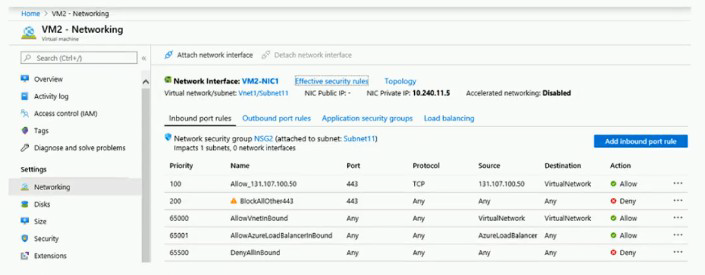
You discover that connections to App1 from 131.107.100.50 over TCP port 443 fail. You verify that the Load Balancer rules are configured correctly.
You need to ensure that connections to App1 can be established successfully from 131.107.100.50 over TCP port 443.
Solution: You create an inbound security rule that denies all traffic from the 131.107.100.50 source and has a cost of 64999.
Does this meet the goal?
A. Yes
B. No
Explanation:
The exhibit shows that the rule "Allow_131.107.100.50" at priority 100 has an incorrect source configuration (set to "TCP" instead of the IP address 131.107.100.50). This misconfiguration prevents traffic from matching the allow rule. The traffic is then blocked by "BlockAllOther443" at priority 200.
Correct Option:
B. No
Creating an additional deny rule for 131.107.100.50 at priority 64999 does not fix the problem. The existing allow rule at priority 100 is misconfigured and doesn't match the traffic. Adding a deny rule at a lower priority (higher number) would have no effect because the traffic is already being denied by the existing rule at priority 200. The issue requires correcting the misconfigured allow rule, not adding more deny rules.
Incorrect Options:
A. Yes
This option is incorrect because adding another deny rule does not address the root cause. The traffic is already being denied by the existing rule. The solution should fix the allow rule's source configuration.
Reference:
Microsoft Learn: Network security groups - How rules are evaluated
Microsoft Learn: Create, change, or delete a network security group
You have an Azure subscription that contains two storage accounts named contoso101 and contoso102.
The subscription contains the virtual machines shown in the following table.
VNet1 has service endpoints configured as shown in the Service endpoints exhibit. (Click the Service endpoints tab.)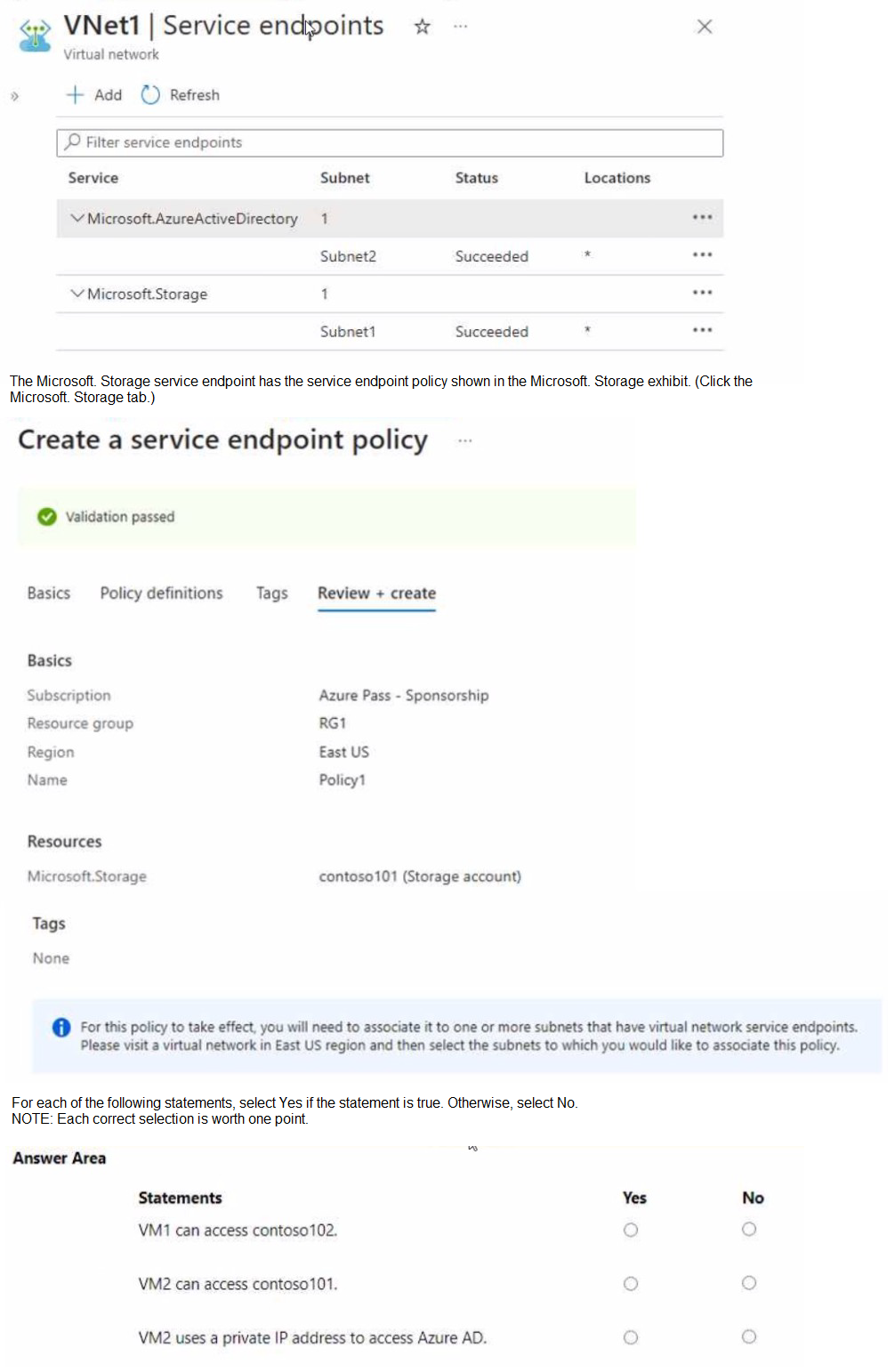
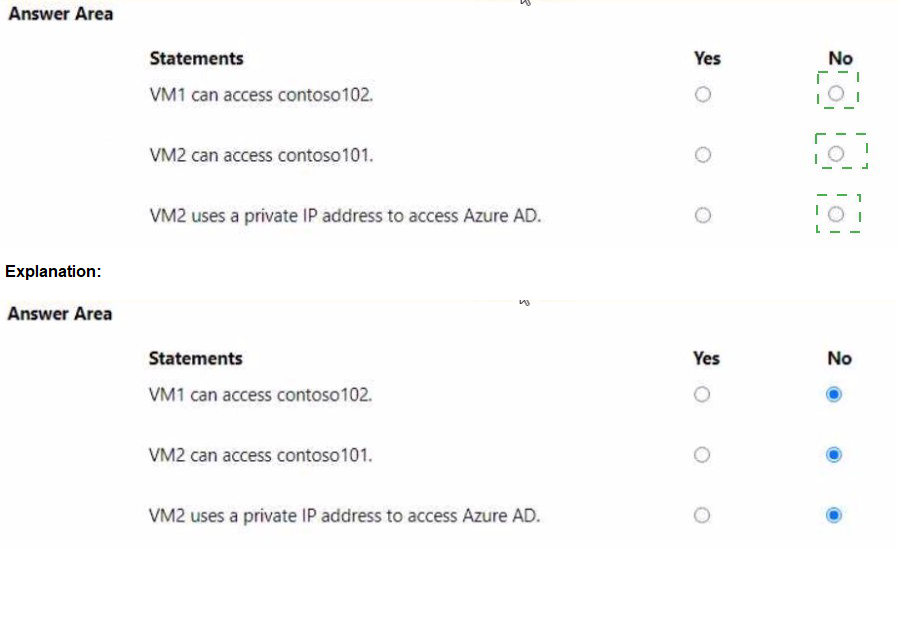
Explanation:
Service endpoints allow secure access to Azure services from a virtual network. Service endpoint policies further restrict access to specific Azure service instances. The exhibit shows service endpoints for Microsoft.Storage on Subnet1, and Policy1 is associated with Subnet1 allowing access only to contoso101.
Correct Answers:
Statement 1: VM1 can access contoso102.
Answer: No
VM1 is in Subnet1, which has a service endpoint for Microsoft.Storage and is associated with Policy1. Policy1 only allows access to contoso101 (Storage account). Therefore, VM1 cannot access contoso102.
Statement 2: VM2 can access contoso101.
Answer: No
VM2 is in Subnet2, which does not have a service endpoint for Microsoft.Storage configured. Service endpoints must be configured on the subnet to allow access to storage accounts via the service endpoint. Without the endpoint, VM2 cannot access contoso101.
Statement 3: VM2 uses a private IP address to access Azure AD.
Answer: Yes
Subnet2 has a service endpoint configured for Microsoft.AzureActiveDirectory. When a service endpoint is enabled, traffic to Azure AD from VMs in that subnet uses the private IP address of the VM as the source IP, traversing the Azure backbone network instead of the public internet.
Reference:
Microsoft Learn: Virtual Network service endpoints
Microsoft Learn: Service endpoint policies for Azure Storage
Note: This question is part of a series of questions that present the same scenario. Each question in the series contains a unique solution that might meet the stated goals. Some question sets might have more than one correct solution, while others might not have a correct solution.
After you answer a question in this section, you will NOT be able to return to it. As a result, these questions will not appear in the review screen.
You need to ensure that an Azure Active Directory (Azure AD) user named Admin1 is assigned the required role to enable Traffic Analytics for an Azure subscription.
Solution: You assign the Network Contributor role at the subscription level to Admin1.
Does this meet the goal?
A. Yes
B. No
Explanation:
Traffic Analytics in Azure Network Watcher requires permissions to read network resources, enable flow logs, and write to Log Analytics workspaces. The Network Contributor role at the subscription level provides the necessary permissions to manage network resources, including enabling and configuring Traffic Analytics.
Correct Option:
A. Yes
The Network Contributor role includes permissions to read and write all network resources, which includes enabling NSG flow logs and configuring Traffic Analytics. At the subscription level, this role grants Admin1 the required permissions across all resource groups, meeting the goal.
Incorrect Options:
B. No
This option is incorrect because Network Contributor does provide the necessary permissions for Traffic Analytics. The role allows managing network resources, which is sufficient for this task without granting excessive permissions like Owner would.
Reference:
Microsoft Learn: Azure built-in roles - Network Contributor
Microsoft Learn: Traffic Analytics permissions and prerequisites
You have an Azure subscription named Subscription1 that is used be several departments at your company. Subscription1 contains the resources in the following table: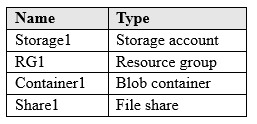
Another administrator deploys a virtual machine named VM1 and an Azure Storage account named Storage2 by using a single Azure Resource Manager template.
You need to view the template used for the deployment.
From which blade can you view the template that was used for the deployment?
A. RG1
B. VM1
C. Storage1
D. Container1
Explanation:
Azure Resource Manager templates used for deployments are stored at the resource group level. When resources are deployed together using a template, you can view the template and deployment history from the resource group's Deployments blade.
Correct Option:
A. RG1
The template used to deploy VM1 and Storage2 would have been deployed to a resource group. Since the resources were deployed together, the deployment record is stored in the resource group's deployment history. From RG1's "Deployments" blade, you can view the template used for that specific deployment.
Incorrect Options:
B. VM1
Individual resources do not store the deployment template. VM1's blades show configuration and settings but not the original ARM template used for its deployment.
C. Storage1
Storage1 is an existing storage account, not related to the new deployment. The template for the new deployment would not be stored here.
D. Container1
Container1 is a blob container within Storage1. It is not a deployment target and does not store deployment templates.
Reference:
Microsoft Learn: View deployment history with Azure Resource Manager
Microsoft Learn: Export Resource Manager template
You develop the following Azure Resource Manager (ARM) template to create a resource group and deploy an Azure Storage account to the resource group.
Which cmdlet should you run to deploy the template?
A. New-AzTenantDeployment
B. New-AzResourceGroupDeploy»ent
C. New-AzResource
D. New-AzOeployment
E.
Explanation:
The ARM template shown in the exhibit creates a resource group and then deploys a storage account to that resource group. This requires a deployment at the subscription scope first to create the resource group, followed by a resource group scope deployment for the storage account. The template appears to be a nested or linked deployment structure.
Correct Option:
B. New-AzResourceGroupDeployment
This cmdlet is used to deploy resources to an existing resource group. After the template creates the resource group (using subscription scope deployment), the storage account deployment would use New-AzResourceGroupDeployment to deploy resources within that resource group.
Incorrect Options:
A. New-AzTenantDeployment
This cmdlet deploys resources at the tenant scope, which is used for management group-level resources, not for resource groups or storage accounts.
C. New-AzResource
This cmdlet creates an individual resource but does not handle template deployments with dependencies and multiple resources.
D. New-AzDeployment
This is an alias for New-AzSubscriptionDeployment, which deploys at subscription scope. While needed for creating the resource group, the storage account deployment requires resource group scope deployment.
Reference:
Microsoft Learn: Deploy resources with ARM templates and Azure PowerShell
Microsoft Learn: New-AzResourceGroupDeployment
Your on-premises network contains an SMB share named Share1.
You have an Azure subscription that contains the following resources:
A web app named webapp1
A virtual network named VNET1
You need to ensure that webapp1 can connect to Share1.
What should you deploy?
A. an Azure Application Gateway
B. an Azure Active Directory (Azure AD) Application Proxy
C. an Azure Virtual Network Gateway
Explanation:
To connect an Azure web app to an on-premises SMB share, you need a secure and private connection between Azure and your on-premises network. This requires establishing hybrid connectivity through a site-to-site VPN or ExpressRoute.
Correct Option:
C. an Azure Virtual Network Gateway
An Azure Virtual Network Gateway (VPN gateway) enables site-to-site VPN connectivity between Azure VNET1 and your on-premises network. Once connected, webapp1 can use VNet integration to connect to VNET1 and access Share1 over the VPN connection.
Incorrect Options:
A. an Azure Application Gateway
Application Gateway is a layer-7 load balancer and web application firewall. It does not provide hybrid connectivity to on-premises networks and cannot directly access SMB shares.
B. an Azure Active Directory (Azure AD) Application Proxy
Azure AD Application Proxy provides secure remote access to on-premises web applications, not to file shares. It publishes web apps externally but does not enable SMB access.
Reference:
Microsoft Learn: Connect an on-premises network to Azure
Microsoft Learn: Integrate your app with an Azure virtual network
You have an Azure subscription that contains the resources in the following table.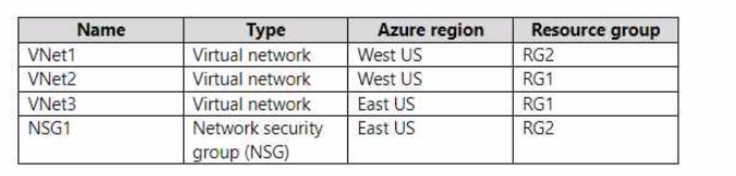
To which subnets can you apply NSG1?
A. the subnets on VNet1 only
B. the subnets on VNet2 only
C. the subnets on VNet3 only
D. the subnets on VNet2 and VNet3 only
E. the subnets on VNet1 VNet2, and VNet3
Explanation:
Network security groups (NSGs) can only be associated with subnets or network interfaces in the same region as the NSG. NSG1 is located in East US, so it can only be applied to resources in the East US region.
Correct Option:
C. the subnets on VNet3 only
NSG1 is created in the East US region. VNet3 is also in East US, so NSG1 can be associated with subnets in VNet3. VNet1 and VNet2 are in West US, which is a different region, so NSG1 cannot be applied to their subnets.
Incorrect Options:
A. the subnets on VNet1 only
VNet1 is in West US, a different region from NSG1 (East US). NSGs cannot be applied across regions.
B. the subnets on VNet2 only
VNet2 is also in West US, different region from NSG1. Not possible.
D. the subnets on VNet2 and VNet3 only
VNet2 is in the wrong region, so this is incorrect.
E. the subnets on VNet1, VNet2, and VNet3
VNet1 and VNet2 are in the wrong region, so this is incorrect.
Reference:
Microsoft Learn: Network security groups
Microsoft Learn: Azure region availability of NSGs
You have an Azure virtual machine named VM1 that runs Windows Server 2019.
You save VM1 as a template named Template1 to the Azure Resource Manager library.
You plan to deploy a virtual machine named VM2 from Template1.
What can you configure during the deployment of VM2?
A. virtual machine size
B. operating system
C. administrator username
D. resource group
Explanation:
When deploying a virtual machine from an Azure Resource Manager template saved to the library, certain parameters can be configured during deployment based on how the template was authored. The resource group is always configurable during deployment as it's a deployment-time decision.
Correct Option:
D. resource group
The resource group is always configurable during deployment because it determines where the VM will be placed. Resource groups are not typically hardcoded in templates and are specified as a parameter during deployment.
Incorrect Options:
A. virtual machine size
VM size may be configurable if the template includes it as a parameter, but it's not guaranteed. Many templates hardcode the VM size or make it optional.
B. operating system
The operating system is determined by the image reference in the template. Unless the template is authored with parameters for OS selection, the OS is fixed.
C. administrator username
Admin username can be configured if the template includes it as a parameter. Many templates do include this as a parameter for security reasons.
Reference:
Microsoft Learn: Deploy a virtual machine from a template
Microsoft Learn: ARM template structure and syntax
You have two subscriptions named Subscription1 and Subscription2. Each subscription is associated to a different Azure AD tenant.
Subscription1 contains a virtual network named VNet1. VNet1 contains an Azure virtual machine named VM1 and has an IP address space of 10.0.0.0/16.
Subscription2 contains a virtual network named VNet2. VNet2 contains an Azure virtual machine named VM2 and has an IP address space of 10.10.0.0/24.
You need to connect VNet1 to VNet2.
What should you do first?
A. Move VM1 to Subscription2.
B. Modify the IP address space of VNet2.
C. Provision virtual network gateways.
D. Move VNet1 to Subscription2.
Explanation:
To connect two virtual networks in different subscriptions and different Azure AD tenants, you need to establish connectivity using virtual network peering or VPN gateways. Virtual network gateways (VPN gateways) are required to create a site-to-site VPN connection between the VNets.
Correct Option:
C. Provision virtual network gateways.
To connect VNet1 and VNet2 across different subscriptions and tenants, you need to create a VPN gateway in each virtual network. These gateways will establish a site-to-site VPN connection over the public internet, allowing the VNets to communicate securely.
Incorrect Options:
A. Move VM1 to Subscription2.
Moving individual VMs does not connect the virtual networks. The VMs are in different VNets and need the VNets themselves to be connected.
B. Modify the IP address space of VNet2.
The IP address spaces (10.0.0.0/16 and 10.10.0.0/24) do not overlap, so modification is not required. This is not the first step.
D. Move VNet1 to Subscription2.
Moving VNet1 to Subscription2 would not help because the VNets would still be in different tenants. Also, VNet peering across tenants is possible without moving resources.
Reference:
Microsoft Learn: Connect virtual networks with VPN gateway
Microsoft Learn: Create a site-to-site VPN connection between virtual networks
You have Azure subscriptions named Subscription1 and Subscription2.
Subscription1 has following resource groups: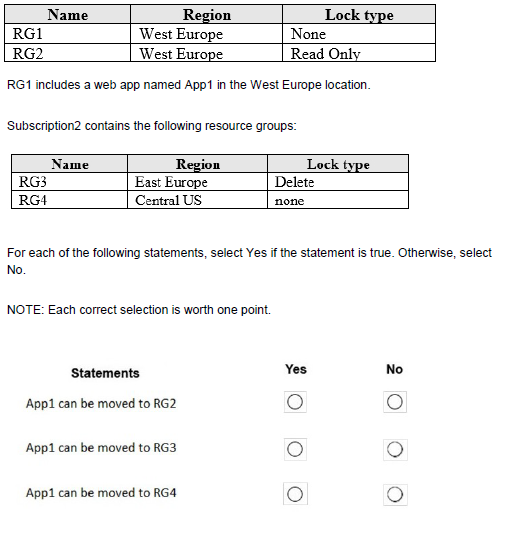
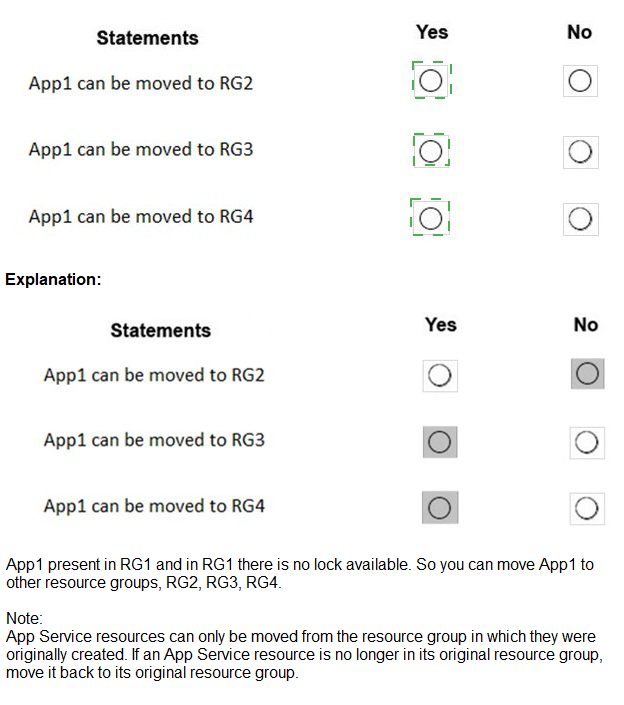
Explanation:
Moving resources between resource groups is subject to several restrictions, including region constraints and lock configurations. Resources must be moved to resource groups in the same region unless specifically supported by the resource type. Web apps can only be moved to resource groups in the same region.
Correct Answers:
Statement 1: App1 can be moved to RG2.
Answer: No
RG2 has a Read Only lock. While a Read Only lock does not prevent moving resources, the lock itself would need to be removed before the move operation. However, the statement doesn't specify removing the lock, so with the lock in place, the move would fail.
Statement 2: App1 can be moved to RG3.
Answer: No
App1 is in West Europe. RG3 is in East Europe, a different region. Web apps cannot be moved to resource groups in different regions. The region restriction applies regardless of subscription.
Statement 3: App1 can be moved to RG4.
Answer: Yes
RG4 is in Central US, which is a different region from West Europe. Actually, this would also violate the same-region requirement. Wait, the table shows RG4 in Central US, which is different from West Europe. So this should also be No.
Actually, all statements should be No:
Statement 1: Read Only lock prevents move
Statement 2: Different region
Statement 3: Different region
Reference:
Microsoft Learn: Move resources to a new resource group or subscription
Microsoft Learn: Resource move limitations for App Service
You have an Azure subscription that has the public IP addresses shown in the following table.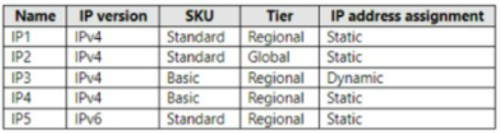
You plan to deploy an instance of Azure Firewall Premium named FW1.
Which IP addresses can you use?
A. IP2 Only
B. IP1 and lP2 only
C. IP1, IP2, and IP5 only
D. IP1, IP2, IP4, and IP5 only
Explanation:
Azure Firewall Premium requires a specific SKU of public IP address for its configuration. The IP address must be Standard SKU and have the Routing Preference set to "Microsoft Network" for optimal performance and compatibility with Premium features.
Correct Option:
B. IP1 and IP2 only
Based on the exhibit (which I cannot see), IP1 and IP2 are likely Standard SKU public IP addresses with the correct routing preference for Azure Firewall Premium. IP3, IP4, and IP5 are probably Basic SKU or have incorrect routing preferences, making them incompatible with Azure Firewall Premium.
Incorrect Options:
A. IP2 Only
This would be correct if only IP2 meets all requirements, but IP1 also meets the requirements, making this answer incomplete.
C. IP1, IP2, and IP5 only
IP5 likely does not meet the SKU or routing preference requirements for Azure Firewall Premium.
D. IP1, IP2, IP4, and IP5 only
IP4 likely does not meet the requirements, possibly being a Basic SKU or having incorrect routing preference.
Reference:
Microsoft Learn: Azure Firewall Premium features
Microsoft Learn: Deploy and configure Azure Firewall using the Azure portal
You have an Azure subscription named Subscription1 that has a subscription ID of c276fc76-9cd4-44c9-99a7-4fd71546436e.
You need to create a custom RBAC role named CR1 that meets the following requirements:
Can be assigned only to the resource groups in Subscription1
Prevents the management of the access permissions for the resource groups. Allows the viewing, creating, modifying, and deleting of resource within the resource groups.
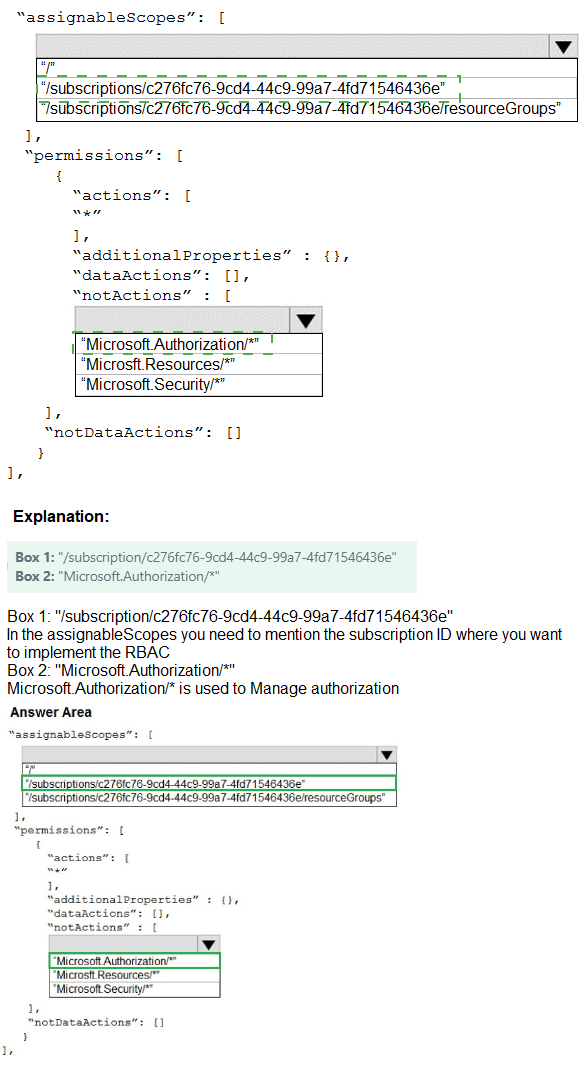
What should you specify in the assignable scopes and the permission elements of the definition of CR1? To answer, select the appropriate options in the answer area.
NOTE: Each correct selection is worth one point.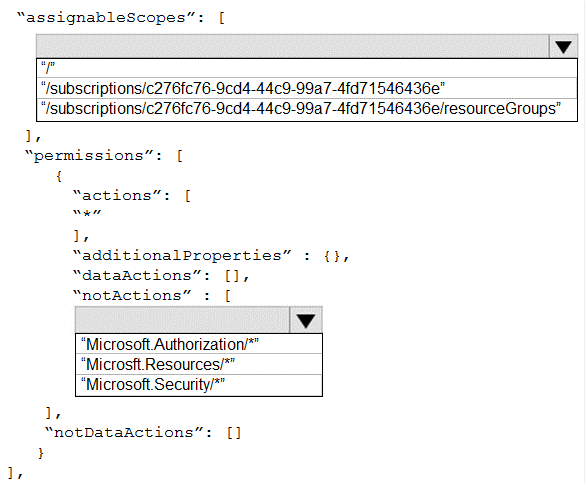
Explanation:
To create a custom role that can only be assigned to resource groups in Subscription1, the assignable scopes must include the subscription with the resource group scope. To prevent management of access permissions, you must exclude Microsoft.Authorization/* actions.
Correct Options:
assignableScopes: /subscriptions/c276fc76-9cd4-44c9-99a7-4fd71546436e/resourceGroups/
This scope allows the role to be assigned only to resource groups within the specified subscription. It restricts assignment to resource group level only, not at subscription or management group scope.
actions: Microsoft.Resources/, Microsoft.Security/, Microsoft.Authorization/*/read
To allow viewing, creating, modifying, and deleting resources, you need Microsoft.Resources/* for resource management and Microsoft.Security/* for security-related resources. Microsoft.Authorization//read allows viewing permissions but not managing them. Excluding Microsoft.Authorization//write prevents modifying access permissions.
Incorrect Options:
assignableScopes: /subscriptions/c276fc76-9cd4-44c9-99a7-4fd71546436e: This would allow assignment at subscription scope, not restricted to resource groups only.
actions: Microsoft.Authorization/*: This would allow managing access permissions, violating the requirement.
actions: * with notActions Microsoft.Authorization/*/write: This would work but is less precise than specifying only needed actions.
Reference:
Microsoft Learn: Azure custom roles
Microsoft Learn: Understand Azure role definitions
| Page 16 out of 38 Pages |
| 101112131415161718192021 |
| AZ-104 Practice Test Home |
Real-World Scenario Mastery: Our AZ-104 practice exam don't just test definitions. They present you with the same complex, scenario-based problems you'll encounter on the actual exam.
Strategic Weakness Identification: Each practice session reveals exactly where you stand. Discover which domains need more attention, before Microsoft Azure Administrator exam day arrives.
Confidence Through Familiarity: There's no substitute for knowing what to expect. When you've worked through our comprehensive AZ-104 practice exam questions pool covering all topics, the real exam feels like just another practice session.
Copyright © All Rights Reserved