
Topic 6: Misc. Questions
You have an Azure subscription named Subscription1.
You have 5 TB of data that you need to transfer to Subscription1.
You plan to use an Azure Import/Export job.
What can you use as the destination of the imported data?
A. Azure Data Lake Store
B. a virtual machine
C. the Azure File Sync Storage Sync Service
D. Azure Blob storage
Explanation:
Azure Import/Export service is designed to physically ship hard drives to an Azure data center for importing or exporting data. The service supports only specific Azure Storage destinations for data import.
Correct Option:
D. Azure Blob storage
Azure Import/Export service supports importing data to Azure Blob storage and Azure Files. It can be used to transfer large amounts of data to blob containers or file shares by shipping drives containing the data.
Incorrect Options:
A. Azure Data Lake Store
Azure Data Lake Store (now part of Azure Storage with hierarchical namespace) can be accessed via blob storage APIs, but Import/Export directly supports blob storage, which can then be used with Data Lake Storage features.
B. a virtual machine
Import/Export cannot directly import data to a virtual machine. Data must first be imported to storage and then accessed by VMs.
C. the Azure File Sync Storage Sync Service
Azure File Sync is for synchronizing files between on-premises servers and Azure Files, not a direct destination for Import/Export jobs.
Reference:
Microsoft Learn: Use Azure Import/Export service to transfer data to Azure Storage
Microsoft Learn: Import/Export supported storage types
You have an Azure subscription named Subscription1 that contains the storage accounts shown in the following table:
You plan to use the Azure Import/Export service to export data from Subscription1.
Which account can be used to export the data.
What should you identify?
A. storage1
B. storage2
C. storage3
D. storage4
Explanation:
Azure Import/Export service supports exporting data only from Azure Blob storage. The service can export blobs from storage accounts to physical drives that are shipped to you. Other storage services like Files, Tables, and Queues are not supported for export.
Correct Option:
D. storage4
storage4 is a BlobStorage account, which is specifically designed for blob data. Azure Import/Export service supports exporting data from blob containers, making storage4 the only valid option for export.
Incorrect Options:
A. storage1
storage1 is a Storage account (old kind) containing File data. Azure Import/Export does not support exporting data from Azure Files. It only supports blob export.
B. storage2
storage2 contains File and Table data. Neither is supported for export by Import/Export service. The service cannot export tables or files.
C. storage3
storage3 contains Queue data. Queue storage is not supported for export by Import/Export service. The service is designed for blob export only.
Reference:
Microsoft Learn: Use Azure Import/Export service to export data from Azure Storage
Microsoft Learn: Import/Export supported storage types
You create an App Service plan named plan1 and an Azure web app named webapp1. You discover that the option to create a staging slot is unavailable. You need to create a staging slot for plan1. What should you do first?
A. From webapp1, modify the Application settings.
B. From webapp1, add a custom domain.
C. From plan1, scale up the App Service plan.
D. From plan1, scale out the App Service plan.
Explanation:
Deployment slots are a feature available only in higher App Service plan tiers. The Basic, Standard, Premium, and Isolated tiers support deployment slots, while the Free and Shared tiers do not. If the option to create a staging slot is unavailable, the App Service plan is likely in a tier that does not support slots.
Correct Option:
C. From plan1, scale up the App Service plan.
Scaling up changes the pricing tier of the App Service plan. To enable deployment slots, you must scale up to at least the Basic tier (which supports 1 staging slot) or higher (Standard supports up to 5, Premium up to 20). This is the first step to make the staging slot option available.
Incorrect Options:
A. From webapp1, modify the Application settings.
Application settings configure environment variables and connection strings for the web app. They do not affect the availability of deployment slots, which is determined by the App Service plan tier.
B. From webapp1, add a custom domain.
Adding a custom domain configures a custom hostname for the web app. This does not enable deployment slots, which require a higher pricing tier.
D. From plan1, scale out the App Service plan.
Scaling out increases the number of instances running in the current tier but does not change the tier itself. If the current tier does not support slots, scaling out will not make slots available.
Reference:
Microsoft Learn: Set up staging environments in Azure App Service
Microsoft Learn: Scale up an app in Azure App Service
You have an Azure subscription that contains the storage accounts shown in the following table.
You plan to use AzCopy to copy a blob from contained directly to share. You need to identify which authentication method to use when you use AzCopy. What should you identify for each account? To answer, drag the appropriate authentication methods to the correct accounts. Each method may be used once, more than once, or not at all. You may need to drag the split bar between panes or scroll to view content.
NOTE: Each correct selection is worth one point.
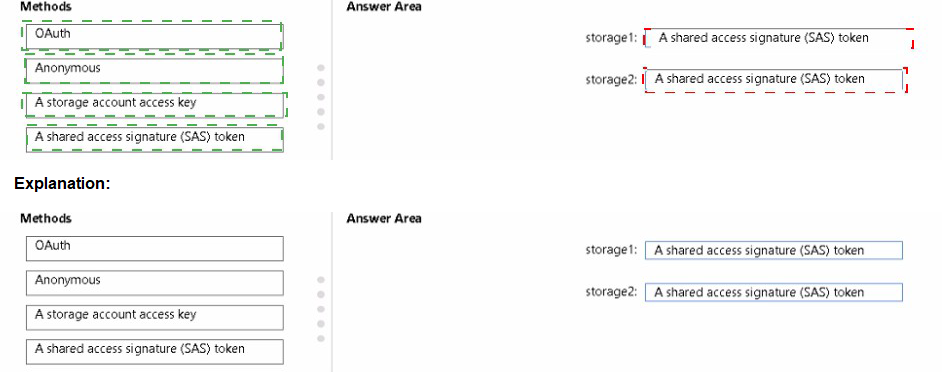
Explanation:
AzCopy supports multiple authentication methods depending on the destination storage type. For copying blobs to blob storage, you can use OAuth (Azure AD) or a SAS token. For copying to file shares, you cannot use OAuth and must use a SAS token or storage account access key.
Correct Options:
storage1: OAuth or SAS token
storage1 is a BlobStorage account used for blob data. AzCopy supports using OAuth (Azure AD authentication) or a SAS token for authorizing access to blob storage. OAuth is preferred for security, but both methods work.
storage2: SAS token
storage2 is a StorageV2 account used for file shares. AzCopy does not support OAuth authentication for Azure Files. To copy data to a file share, you must use a SAS token or a storage account access key. Since the options include SAS token, that is the correct choice.
Incorrect Options:
Anonymous: Anonymous access would need to be enabled on the container/share and is not a secure method for copying data with AzCopy.
Storage account access key: While this works for both blob and file, it is not listed as an option for either? Actually it is an option but SAS token is the better choice for least privilege.
Reference:
Microsoft Learn: Get started with AzCopy
Microsoft Learn: Authorize AzCopy with Azure AD
Microsoft Learn: Authorize AzCopy with SAS tokens
You have an Azure subscription. The subscription contains a storage account named storage1 that has the lifecycle management rules shown in the following table.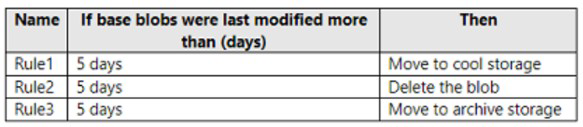
On June 1, you store a blob named File1 in the Hot access tier of storage1. What is the state of File1 on June 7?
A. stored in the Archive access tier
B. stored in the Hot access tier
C. stored in the Cool access tier
D. deleted
Explanation:
Lifecycle management rules are evaluated and executed daily based on the last modification time. The rules shown all trigger at 5 days after last modification. Understanding the order of execution and which rule applies first is critical.
Correct Option:
D. deleted
File1 is stored on June 1. After 5 days (June 6 at the earliest evaluation), multiple rules apply: Rule1 wants to move to Cool, Rule2 wants to delete, and Rule3 wants to move to Archive. When multiple rules apply, the most restrictive action (delete) takes precedence. On June 7, after the 5-day threshold has passed, File1 will be deleted.
Incorrect Options:
A. stored in the Archive access tier
Rule3 would move to Archive after 5 days, but Rule2's delete action takes precedence, so the blob is deleted before it can be moved to Archive.
B. stored in the Hot access tier
The rules are triggered after 5 days, so File1 would not remain in Hot. It would either be moved or deleted.
C. stored in the Cool access tier
Rule1 would move to Cool after 5 days, but Rule2's delete action overrides this, resulting in deletion instead.
Reference:
Microsoft Learn: Configure a lifecycle management policy
Microsoft Learn: Lifecycle management policy rules and actions
You have a Microsoft Entra tenant named contoso.onmicrosoft.com that contains the users shown in the following table.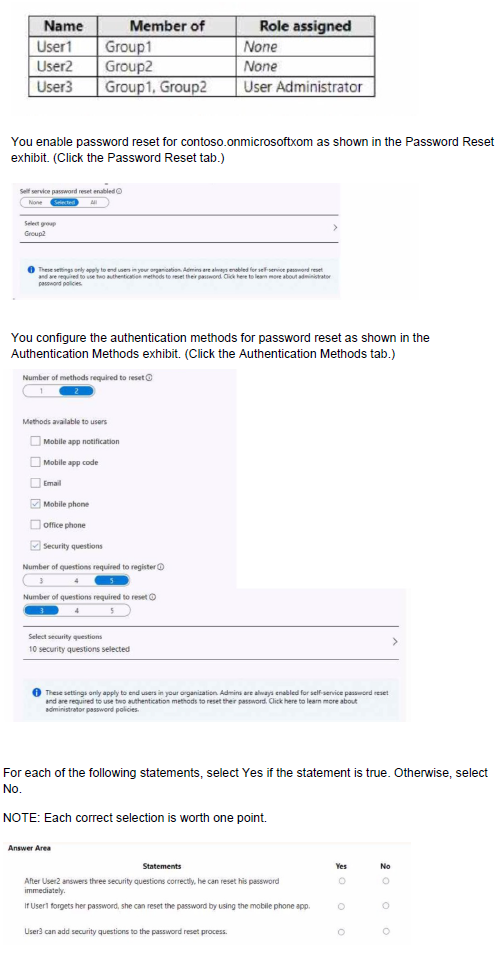
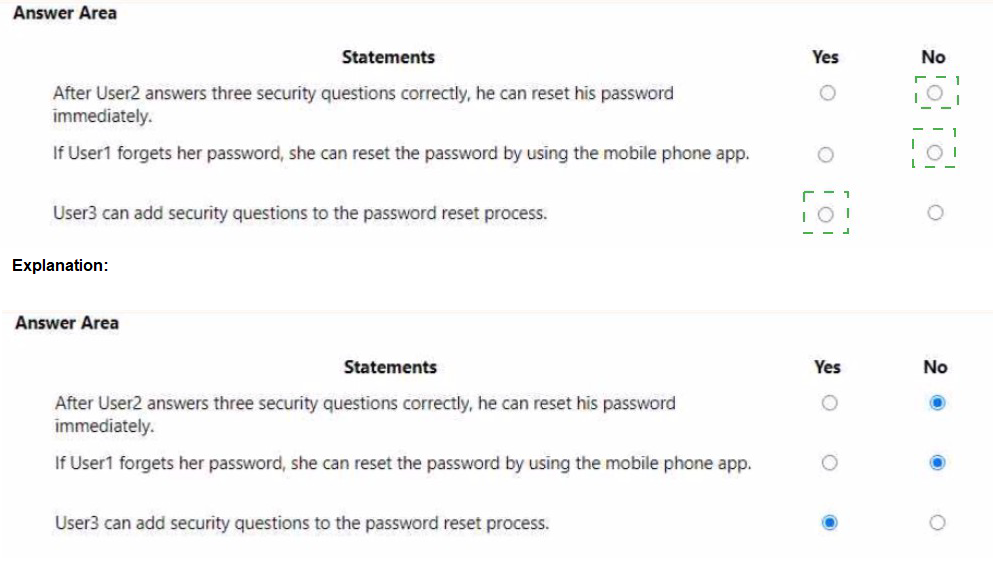
Explanation:
Self-service password reset (SSPR) settings apply to end users only. Administrators have different policies and are always enabled for SSPR with stricter requirements. The reset group determines which users can use SSPR.
Correct Answers:
Statement 1: After User2 answers these security questions correctly, he can reset his password immediately.
Answer: No
The exhibit shows that "Number of methods required to reset" is set to 2. User2 would need to provide two authentication methods, not just security questions. Security questions count as one method. User2 would need an additional method (like mobile phone or email) to reset password.
Statement 2: If User1 forgets her password, she can reset the password by using the mobile phone app.
Answer: No
User1 is a member of Group1 only, but the reset group is set to Group2. Since User1 is not in Group2, she is not enabled for SSPR. Only users in Group2 can reset their own passwords.
Statement 3: User3 can add security questions to the password reset process.
Answer: Yes
User3 has the User Administrator role, which grants permissions to manage user settings including authentication methods. User3 can configure security questions for the password reset process as part of administrative duties.
Reference:
Microsoft Learn: Self-service password reset in Azure AD
Microsoft Learn: Authentication methods in Azure AD
You have an Azure Linux virtual machine that is protected by Azure Backup.
One week ago, two files were deleted from the virtual machine.
You need to reses clients connect n on-premises computer as quickly as possible.
Which four actions should you perform in sequence? To answer, move the appropriate actions from the list of actions to the answer area and arrange them in the correct order.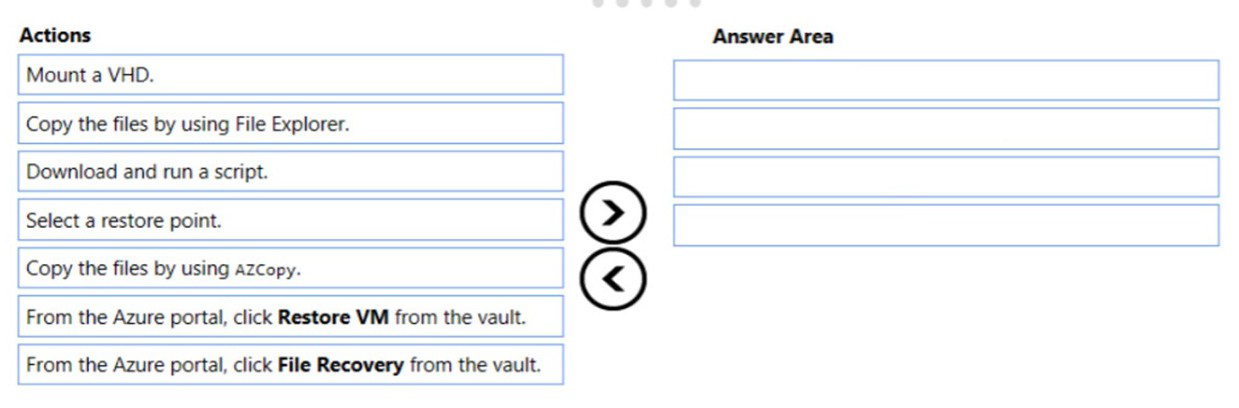
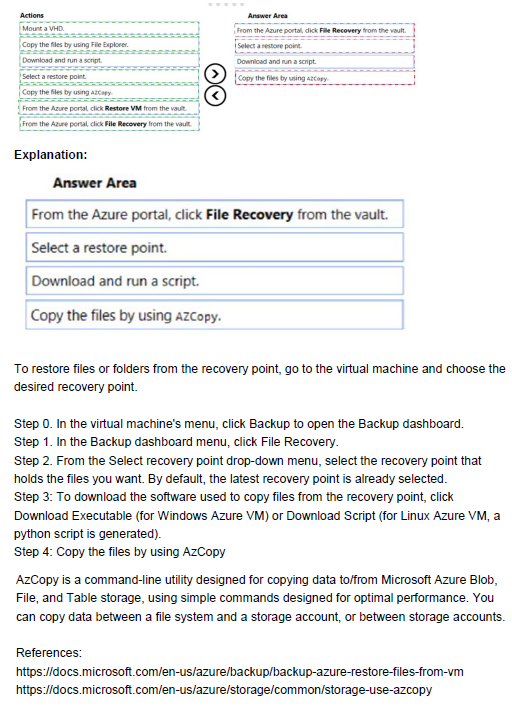
Explanation:
Azure Backup allows file-level recovery for Azure VMs without restoring the entire VM. The File Recovery feature mounts the recovery point as a drive, allowing you to copy specific files. For a Linux VM, this involves mounting the VHD and copying files using appropriate tools.
Correct Order:
1. From the Azure portal, click File Recovery from the vault.
First, navigate to the Recovery Services vault, select the protected VM, and initiate the File Recovery workflow. This prepares a recovery point for mounting.
2. Select a restore point.
Choose the restore point from before the files were deleted (within the last week). This determines which version of the files will be recovered.
3. Download and run a script.
Azure Backup generates a script that mounts the selected recovery point as a disk on the Linux VM. Download and run this script on the VM to make the files accessible.
4. Copy the files by using azcopy or File Explorer.
Once the recovery point is mounted, copy the needed files back to their original location or another desired location. For Linux, azcopy or command-line tools are typically used.
Reference:
Microsoft Learn: Recover files from Azure virtual machine backup
Microsoft Learn: File recovery from Azure VM backup
You need to generate a shared access signature (SAS). The solution must meet the following requirements:
• Ensure that the SAS can only be used to enumerate and download blobs stored in container1.
• Use the principle of least privilege,
Which three settings should you enable? To answer, select the appropriate settings in the answer area.
NOTE: Each correct selection is worth one point.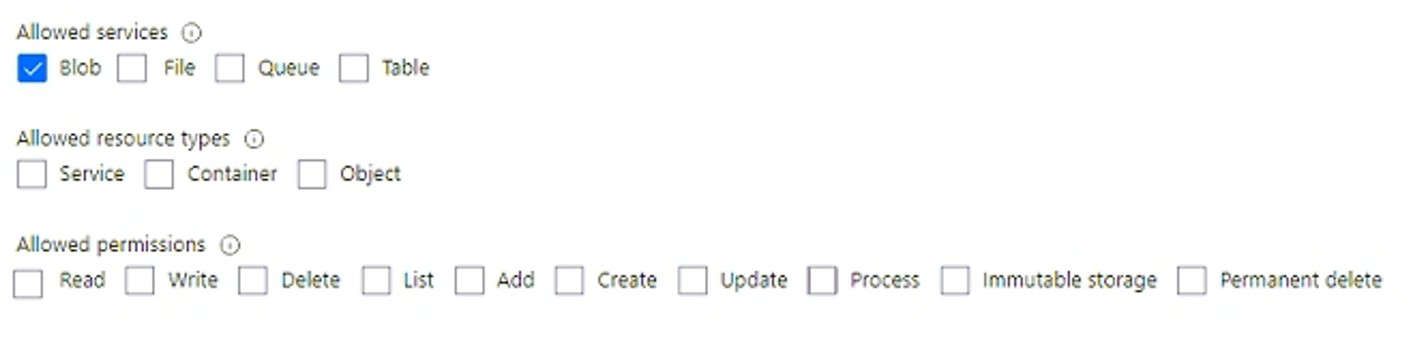
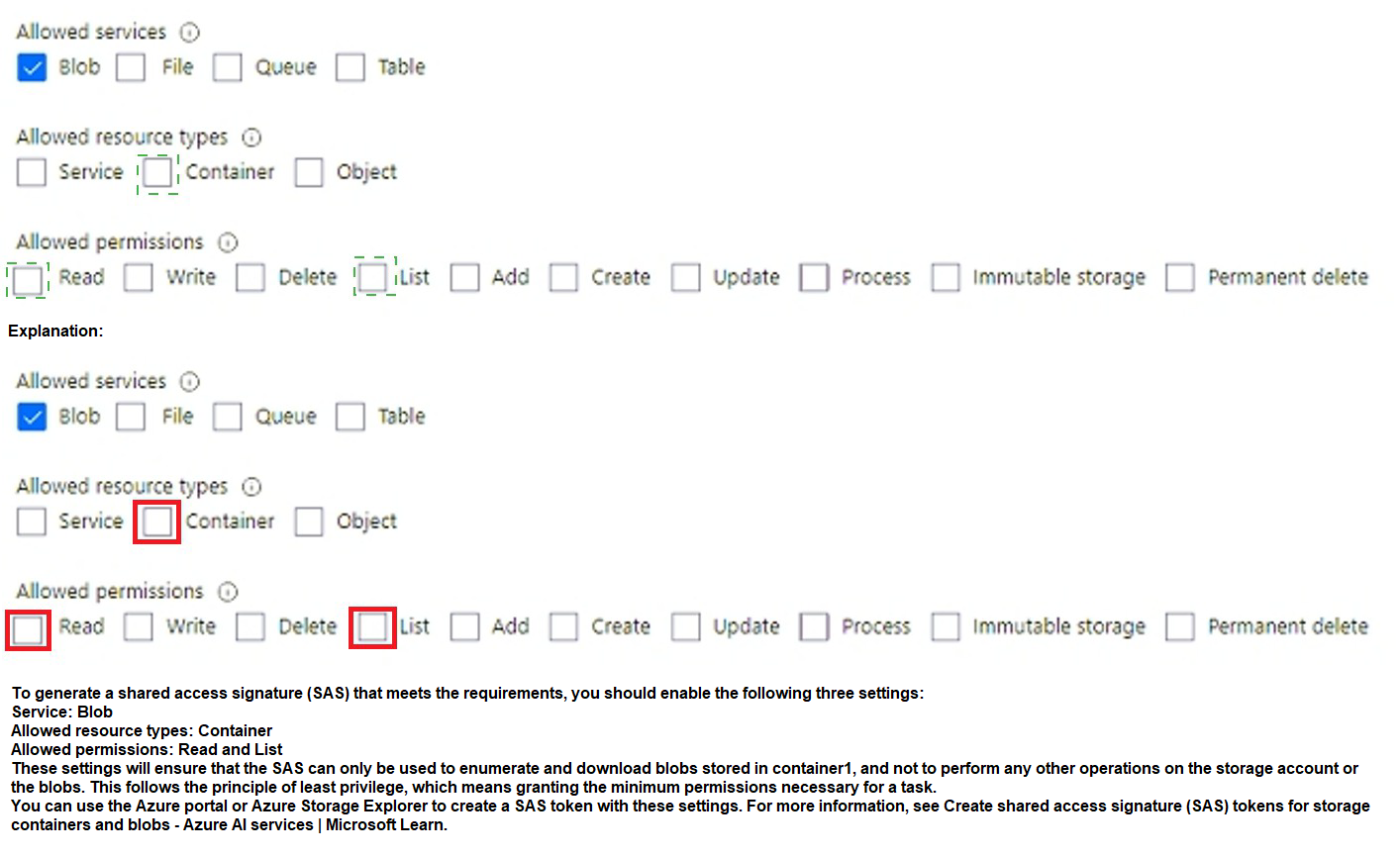
Explanation:
A shared access signature (SAS) allows granting limited permissions to storage resources. To meet the requirements of enumerating and downloading blobs in container1 with least privilege, you need to enable the appropriate service, resource type, and permissions.
Correct Options:
Allowed services: Blob
The requirement specifies working with blobs in container1. Therefore, you must enable Blob service. Other services (File, Queue, Table) are not needed.
Allowed resource types: Container
To enumerate blobs in container1, you need access at the container level. Setting resource type to "Container" allows operations on the container and its blobs. "Object" would only allow access to individual blobs, not enumeration.
Allowed permissions: Read and List
Read: Required to download blobs (read blob data)
List: Required to enumerate blobs in the container
Other permissions like Write, Delete, Add, Create are not needed and would violate least privilege.
Incorrect Options:
Allowed services: File, Queue, Table: These services are not relevant for blob container access.
Allowed resource types: Service, Object: Service level is too broad, Object level would not allow container enumeration.
Allowed permissions: Write, Delete, Add, Create, Update, Process, Immutable storage, Permanent delete: These are unnecessary for the required operations and would grant excessive permissions.
Reference:
Microsoft Learn: Grant limited access to Azure Storage resources using SAS
Microsoft Learn: Create a service SAS for a container or blob
After you answer a question in this section, you will NOT be able to return to it. As a result, these questions will not appear in the review screen.
You have an app named App1 that is installed on two Azure virtual machines named VM1 and VM2. Connections to Appl are managed by using an Azure Load Balancer.
The effective network security configurations for VM2 are shown in the following exhibit.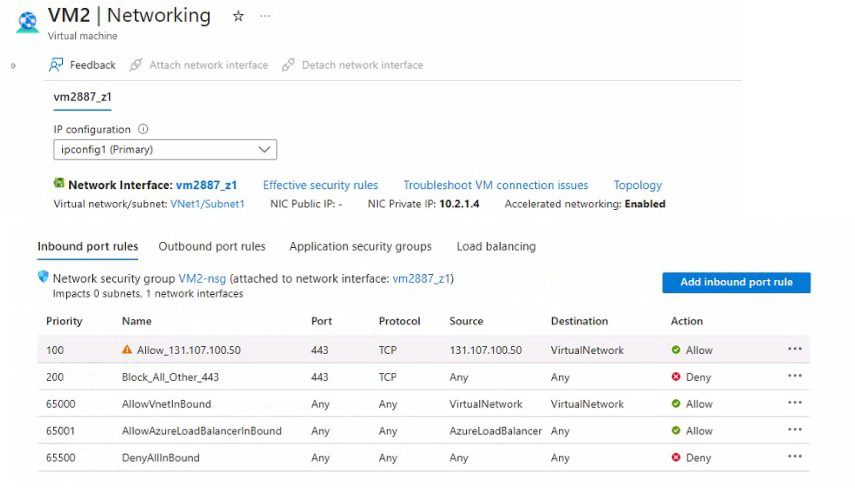
You discover that connections 10 Appl from 131.107.100.50 over TCP port 443 fail.
You verity that the Load Balancer rules are configured correctly.
You need to ensure that connections to Appl can be established successfully from 131.107.100.50 over TCP port 443.
Solution: You create an inbound security rule that allows any traffic from the Azureload Balancer source and has a priority of 150.
Does this meet the goal?
A. Yes
B. No
Explanation:
The exhibit shows that traffic from 131.107.100.50 on port 443 is being blocked by Rule "Block_All_Other_443" at priority 200. However, the existing rule "Allow_131.107.100.50" at priority 100 is incorrectly configured with source "Any" instead of the specific IP address, so it doesn't match the traffic.
Correct Option:
B. No
Creating an inbound security rule allowing traffic from AzureLoadBalancer with priority 150 does not address the problem. The issue is that traffic from 131.107.100.50 is being blocked, not load balancer traffic. The load balancer forwards traffic from 131.107.100.50 to VM2, so the source IP of the packets reaching VM2 is still 131.107.100.50, not the load balancer. A rule allowing AzureLoadBalancer would not match this traffic.
Incorrect Options:
A. Yes
This option is incorrect because the load balancer preserves the original client IP. The NSG on VM2 sees packets with source IP 131.107.100.50, not the load balancer's IP. Allowing AzureLoadBalancer traffic does not permit the client traffic.
Reference:
Microsoft Learn: Network security groups - How rules are evaluated
Microsoft Learn: Load Balancer and NSGs
You have an Azure subscription named Subscription1. Subscription1 contains two Azure virtual machines named VM1 and VM2. VM1 and VM2 run Windows Server 2016.
VM1 is backed up daily by Azure Backup without using the Azure Backup agent.
VM1 is affected by ransomware that encrypts data.
You need to restore the latest backup of VM1.
To which location can you restore the backup? To answer, select the appropriate options in the answer area.
NOTE: Each correct selection is worth one point.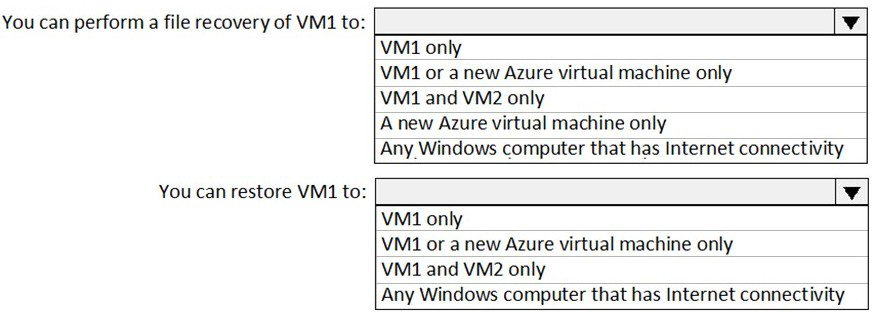
Explanation:
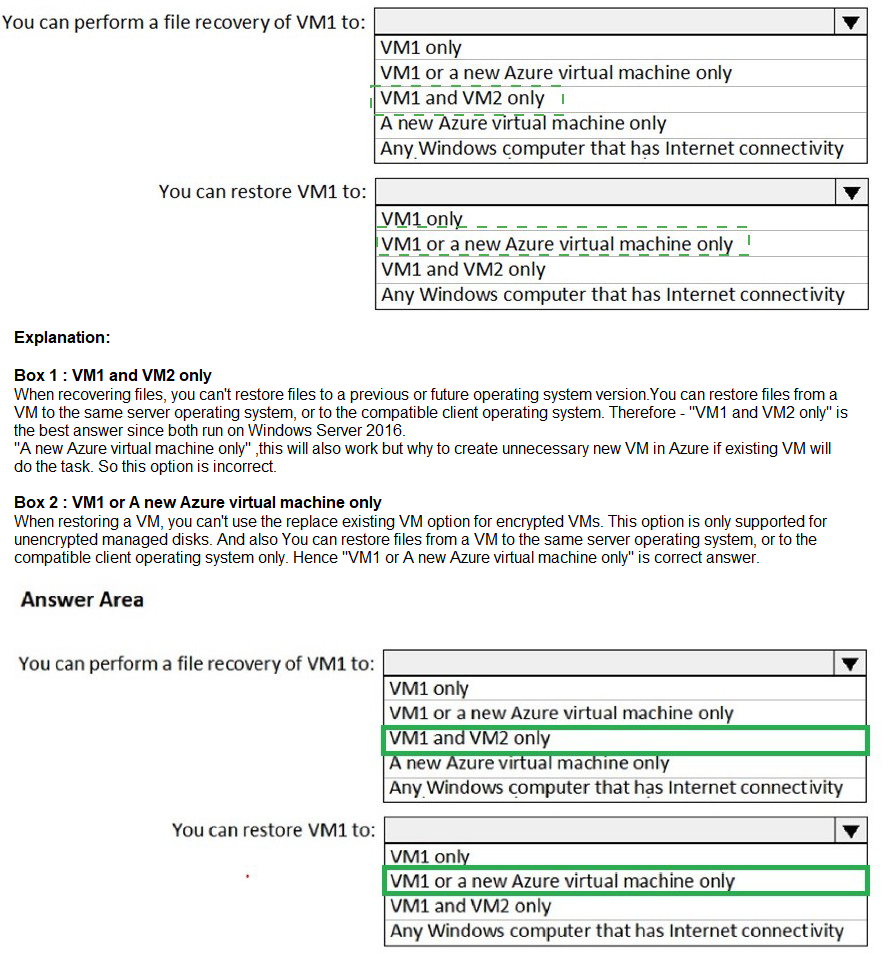
Azure Backup for Azure virtual machines (VM backup) allows restoring a VM to the original VM or to a new VM. File-level recovery can be performed by mounting the recovery point as a drive on any Windows computer with internet connectivity, without restoring the entire VM.
Correct Answers:
You can perform a file recovery of VM1 to: Any Windows computer that has Internet connectivity
Azure Backup's file recovery feature allows you to mount the recovery point as a drive on any Windows computer (on-premises or Azure) that has internet connectivity. You can then copy individual files without restoring the entire VM.
You can restore VM1 to: VM1 or a new Azure virtual machine only
When performing a full VM restore, Azure Backup allows you to restore to the original VM (overwrite) or create a new VM from the recovery point. You cannot restore an Azure VM backup to an on-premises computer or to a different existing VM like VM2.
Reference:
Microsoft Learn: Restore Azure VMs with Azure Backup
Microsoft Learn: Recover files from Azure virtual machine backup
You have an Azure subscription that contains the public load balancers shown in the following table.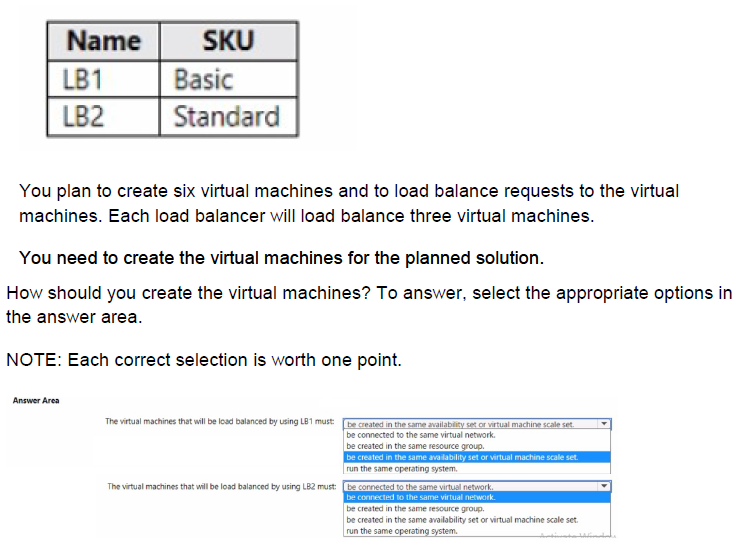
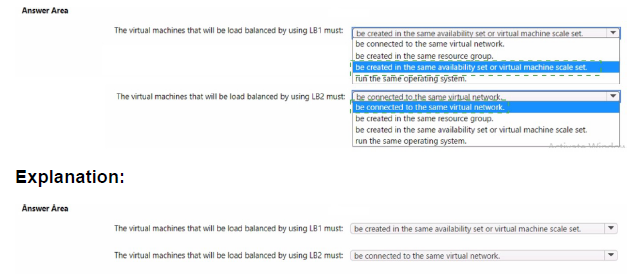
Explanation:
Basic and Standard SKU load balancers have different requirements for backend pool members. Basic Load Balancer requires VMs to be in an availability set or virtual machine scale set. Standard Load Balancer is more flexible, only requiring VMs to be in the same virtual network.
Correct Options:
The virtual machines that will be load balanced by using LB1 must: be created in the same availability set or virtual machine scale set.
Basic SKU load balancers require backend VMs to be part of an availability set or virtual machine scale set. This ensures high availability and proper distribution. VMs cannot be standalone when used with Basic Load Balancer.
The virtual machines that will be load balanced by using LB2 must: be connected to the same virtual network.
Standard SKU load balancers do not require VMs to be in an availability set or scale set. The only requirement is that backend VMs are in the same virtual network. They can be in different subnets, resource groups, or even different availability zones.
Incorrect Options:
LB1:
be connected to the same virtual network: While VMs must be in the same VNet, this is not the primary requirement for Basic LB.
be created in the same resource group: Not required.
run the same operating system: Not required.
LB2:
be created in the same availability set or virtual network: This is incorrect because Standard LB does not require availability sets.
be created in the same resource group: Not required.
be created in the same availability set or virtual machine scale set: Not required for Standard LB.
run the same operating system: Not required.
Reference:
Microsoft Learn: Azure Load Balancer SKU comparison
Microsoft Learn: Load Balancer backend pool management
Note: This question is part of a series of questions that present the same scenario. Each question in the series contains a unique solution that might meet the stated goals. Some question sets might have more than one correct solution, while others might not have a correct solution.
After you answer a question in this section, you will NOT be able to return to it. As a result, these questions will not appear in the review screen.
You have an Azure Active Directory (Azure AD) tenant named contoso.com.
You have a CSV file that contains the names and email addresses of 500 external users.
You need to create a guest user account in contoso.com for each of the 500 external users.
Solution: From Azure AD in the Azure portal, you use the Bulk create user operation.
Does this meet the goal?
A. Yes
B. No
Explanation:
The Bulk create user operation in Azure AD is used to create new internal (member) users within the tenant, not guest users. Guest users require a different process that involves sending invitations and creating accounts that remain in their home directories.
Correct Option:
B. No
The Bulk create user operation creates member users, not guest users. To create guest users in bulk, you need to use the "Bulk invite users" operation, which sends invitations to external users and creates guest accounts when accepted.
Incorrect Options:
A. Yes
This option is incorrect because Bulk create user creates internal users within the tenant, which would incorrectly represent external partners as internal employees.
Reference:
Microsoft Learn: Bulk invite users in Microsoft Entra ID
Microsoft Learn: Bulk create users in Microsoft Entra ID
| Page 15 out of 38 Pages |
| 91011121314151617181920 |
| AZ-104 Practice Test Home |
Real-World Scenario Mastery: Our AZ-104 practice exam don't just test definitions. They present you with the same complex, scenario-based problems you'll encounter on the actual exam.
Strategic Weakness Identification: Each practice session reveals exactly where you stand. Discover which domains need more attention, before Microsoft Azure Administrator exam day arrives.
Confidence Through Familiarity: There's no substitute for knowing what to expect. When you've worked through our comprehensive AZ-104 practice exam questions pool covering all topics, the real exam feels like just another practice session.
Copyright © All Rights Reserved