
Topic 6: Misc. Questions
You are configuring Azure AD authentication for an Azure Storage account named storage1.
You need to ensure that the members of a group named Group1 can upload files by using the Azure portal. The solution must use the principle of least privilege.
Which two roles should you assign to Group1? Each correct answer presents part of the solution.
NOTE: Each correct selection is worth one point.
A. Storage Blob Data Contributor
B. Reader
C. Storage Blob Data Reader
D. Contributor
E. Storage Account Contributor
Explanation:
To upload files to Azure Storage using the Azure portal, users need both permissions to access the storage account in the portal (read access to the storage account resource) and permissions to upload blob data. The principle of least privilege requires combining a reader role for portal access with a data role for blob operations.
Correct Options:
A. Storage Blob Data Contributor
This role grants permissions to read, write, and delete blob containers and data. It allows members of Group1 to upload files to blob storage. This provides the necessary data plane permissions for upload operations.
B. Reader
The Reader role at the storage account scope allows users to view the storage account in the Azure portal, navigate to containers, and see the storage account properties. Without this role, users cannot access the storage account through the portal even if they have data permissions.
Incorrect Options:
C. Storage Blob Data Reader
This role only allows read access to blob data, not upload/write permissions. Group1 members would be unable to upload files with this role.
D. Contributor
The Contributor role at the storage account scope grants full management access to the storage account resource, which is excessive for just uploading files. It violates least privilege by allowing users to modify storage account configuration.
E. Storage Account Contributor
Similar to Contributor, this role allows full management of the storage account but not necessarily data access. It is over-privileged for the upload requirement and does not grant data plane permissions.
Reference:
Microsoft Learn: Use the Azure portal to access blob data
Microsoft Learn: Azure built-in roles for Storage
You have an Azure subscription that contains a user named User1 and the resources shown in the following table.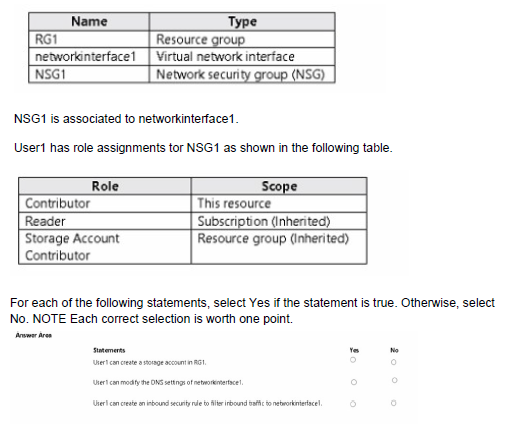
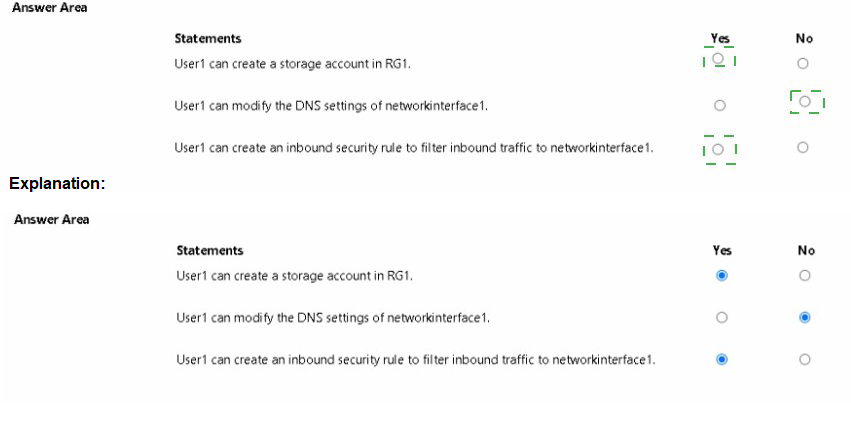
Explanation:
User1 has multiple role assignments at different scopes. The Contributor role at NSG1 scope grants full management of that NSG. The Reader role at subscription scope provides read-only access to all resources. The Storage Account Contributor at RG1 scope grants management of storage accounts in that resource group.
Correct Answers:
Statement 1: User1 can create a storage account in RG1.
Answer: Yes
User1 has Storage Account Contributor role assigned at RG1 scope. This role specifically allows creating and managing storage accounts within that resource group. The inheritance from the resource group scope gives User1 this permission regardless of other role assignments.
Statement 2: User1 can modify the DNS settings of networkinterface1.
Answer: No
User1 has no role assignments that grant write permissions on networkinterface1. The Contributor role is only at NSG1 scope, not on the network interface. Reader role at subscription scope only allows viewing, not modifying. Storage Account Contributor does not apply to network interfaces.
Statement 3: User1 can create an inbound security rule to filter inbound traffic to networkinterface1.
Answer: Yes
User1 has the Contributor role assigned directly to NSG1. This grants full management permissions on that network security group, including the ability to create, modify, and delete security rules within NSG1.
Reference:
Microsoft Learn: Azure built-in roles - Contributor
Microsoft Learn: Azure built-in roles - Storage Account Contributor
Microsoft Learn: Azure role-based access control (RBAC) scope
You have an Azure subscription that contains two virtual machines named VM1 and VM2
You create an Azure load balancer.
You plan to create a load balancing rule that will load balance HTTPS traffic between VM1 and VM2.
Which two additional load balance resources should you create before you can create the load balancing rule? Each correct answer presents part of the solution
MOTL Each correct selection 5 worth one point.
A. a frontend IP address
B. a backend pool
C. a health probe
D. an inbound NAT rule
E. a virtual network
Explanation:
To create a load balancing rule in Azure Load Balancer, you must first define the frontend IP configuration that receives the traffic and the backend pool that receives the distributed traffic. These are essential components that must exist before creating the rule.
Correct Options:
A. a frontend IP address
The frontend IP address is the entry point for client traffic. Clients connect to this IP address, and the load balancer distributes the traffic to the backend pool. You must configure a frontend IP (public or private) before creating a load balancing rule.
B. a backend pool
The backend pool defines the set of virtual machines (VM1 and VM2) that will receive the distributed traffic. You must create the backend pool and add the VMs to it before configuring a load balancing rule that references this pool.
Incorrect Options:
C. a health probe
While health probes are recommended for load balancing rules to ensure traffic is only sent to healthy instances, they are not strictly required to create the rule. A load balancing rule can be created without a health probe, though best practice is to include one.
D. an inbound NAT rule
Inbound NAT rules are used for port forwarding to individual VMs, not for load balancing across multiple VMs. They are separate configurations and not required for creating a load balancing rule.
E. a virtual network
The virtual network already exists (VM1 and VM2 are in a virtual network). You do not need to create a new virtual network specifically for the load balancer; you reference the existing one.
Reference:
Microsoft Learn: Load Balancer components
Microsoft Learn: Create a public load balancer
You have an Azure subscription. The subscription contains a virtual machine that runs Windows 10.
You need to join the virtual machine to an Active Directory domain.
How should you complete the Azure Resource Manager (ARM) template? To answer, select the appropriate options in the answer area.
NOTE Each correct selection is worth one point.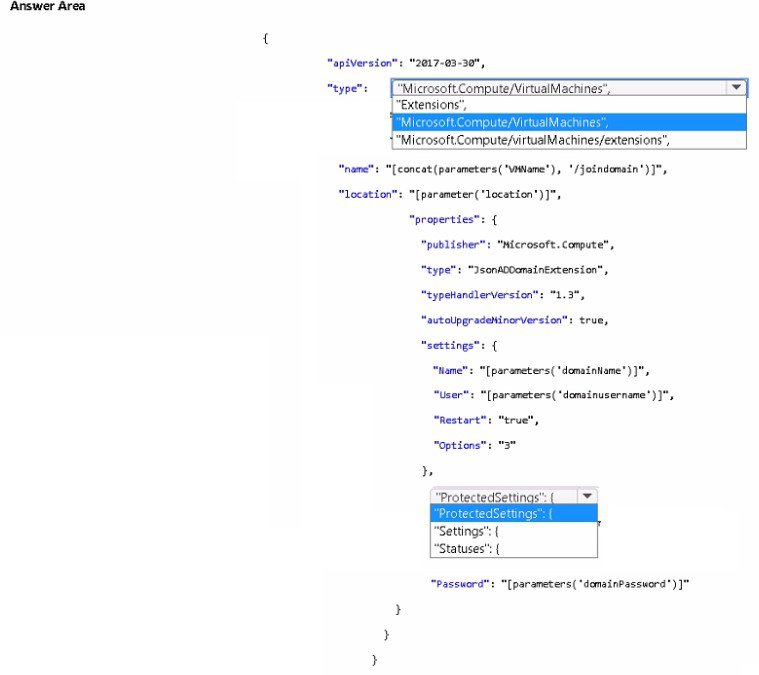
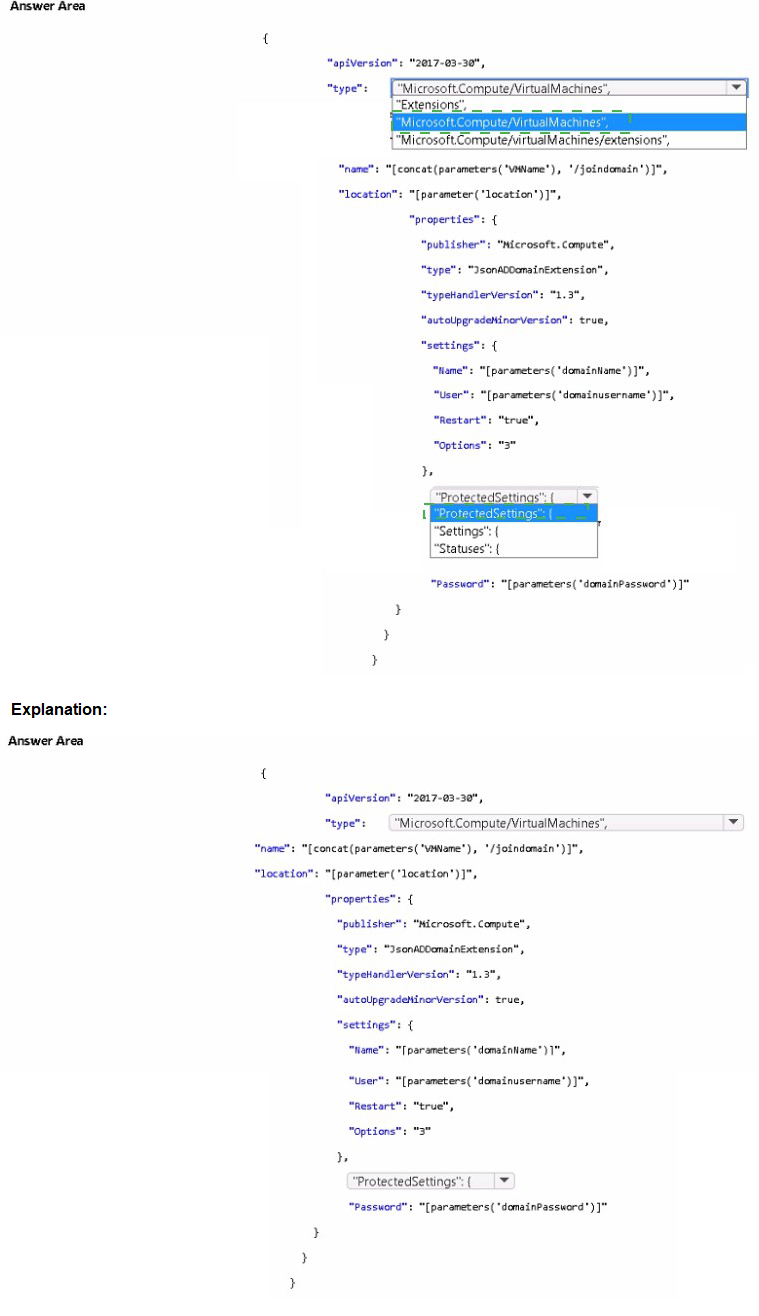
Explanation:
To join a Windows virtual machine to an Active Directory domain using an ARM template, you need to use the JSONADDomainExtension extension. The extension type and name must be correctly specified to deploy the domain join configuration.
Correct Options:
First selection (type): Microsoft.Compute/virtualMachines/extensions
The correct resource type for adding an extension to a virtual machine is "Microsoft.Compute/virtualMachines/extensions". This resource type is a child resource of the virtual machine and allows you to deploy extensions like domain join.
Second selection (name): [concat(parameters('vmName'), '/joinDomain')]
The name of the extension resource must follow the pattern "{virtualMachineName}/{extensionName}". Using concat with the vmName parameter and '/joinDomain' creates the proper hierarchical name that links the extension to the specific virtual machine.
Incorrect Options:
Microsoft.Compute/VirtualMachines: This is the resource type for creating a virtual machine, not for adding an extension.
Extensions: This is not a valid resource type in ARM templates.
Microsoft.Compute/virtualMachines: This would attempt to create a new VM rather than add an extension.
Reference:
Microsoft Learn: Join a Windows VM to an Active Directory domain using ARM template
Microsoft Learn: Virtual machine extensions for Windows
You have an Azure subscription that contains a virtual network named VNet1. VNet1 contains four subnets named Gateway, Perimeter. NVA and Production.
The NVA subnet contains two network virtual appliances (NVAs) that will perform network traffic inspection between the Perimeter subnet and the Production subnet.
You need to implement an Azure load balancer for the NVAs. The solution must meet the following requirements:
• The NVAs must run in an active-active configuration that uses automatic failover.
• The toad balancer must load balance traffic to two services on the Production subnet. The services have different IP addresses.
Which three actions should you perform? Each correct answer presents part of the solution.
NOTE: Each correct selection is worth one point.
A. Add two load balancing rules that have HA Ports enabled and Floating IP disabled.
B. Deploy a basic load balancer.
C. Add a frontend IP configuration, a backend pool, and a health probe.
D. Add two load balancing rules that have HA Ports and Floating IP enabled.
E. Deploy a standard load balancer.
F. Add a frontend IP configuration, two backend pools, and a health probe.
Explanation:
For network virtual appliances (NVAs) in an active-active configuration with automatic failover, you need a Standard Load Balancer with HA Ports and Floating IP (Direct Server Return) enabled. The requirement to load balance traffic to two services with different IP addresses requires two backend pools.
Correct Options:
D. Add two load balancing rules that have HA Ports and Floating IP enabled.
HA Ports enable load balancing for all TCP and UDP ports, which is ideal for NVAs inspecting all traffic. Floating IP (Direct Server Return) allows the backend NVAs to reply directly to the client, which is necessary when the backend instance must see the original source IP and port.
E. Deploy a standard load balancer.
Standard Load Balancer is required for HA Ports and Floating IP features. Basic Load Balancer does not support these advanced configurations. Standard SKU also provides high availability and automatic failover capabilities.
F. Add a frontend IP configuration, two backend pools, and a health probe.
Since the two services have different IP addresses on the Production subnet, you need two backend pools to direct traffic appropriately. A frontend IP receives traffic, health probes monitor NVA health, and two backend pools allow routing to different service IPs.
Incorrect Options:
A. Add two load balancing rules that have HA Ports enabled and Floating IP disabled.
Floating IP must be enabled for NVA scenarios to ensure the backend NVAs see the original client IP and can respond directly. Disabling Floating IP would break the traffic inspection flow.
B. Deploy a basic load balancer.
Basic Load Balancer does not support HA Ports or Floating IP, and lacks availability zone support and other features needed for active-active NVA configurations.
C. Add a frontend IP configuration, a backend pool, and a health probe.
This configuration only provides one backend pool, but the requirement specifies two services with different IP addresses, necessitating two backend pools.
Reference:
Microsoft Learn: Load Balancer with HA Ports
Microsoft Learn: Floating IP in Azure Load Balancer
Microsoft Learn: Standard Load Balancer overview
You have the role assignment file shown in the following exhibit.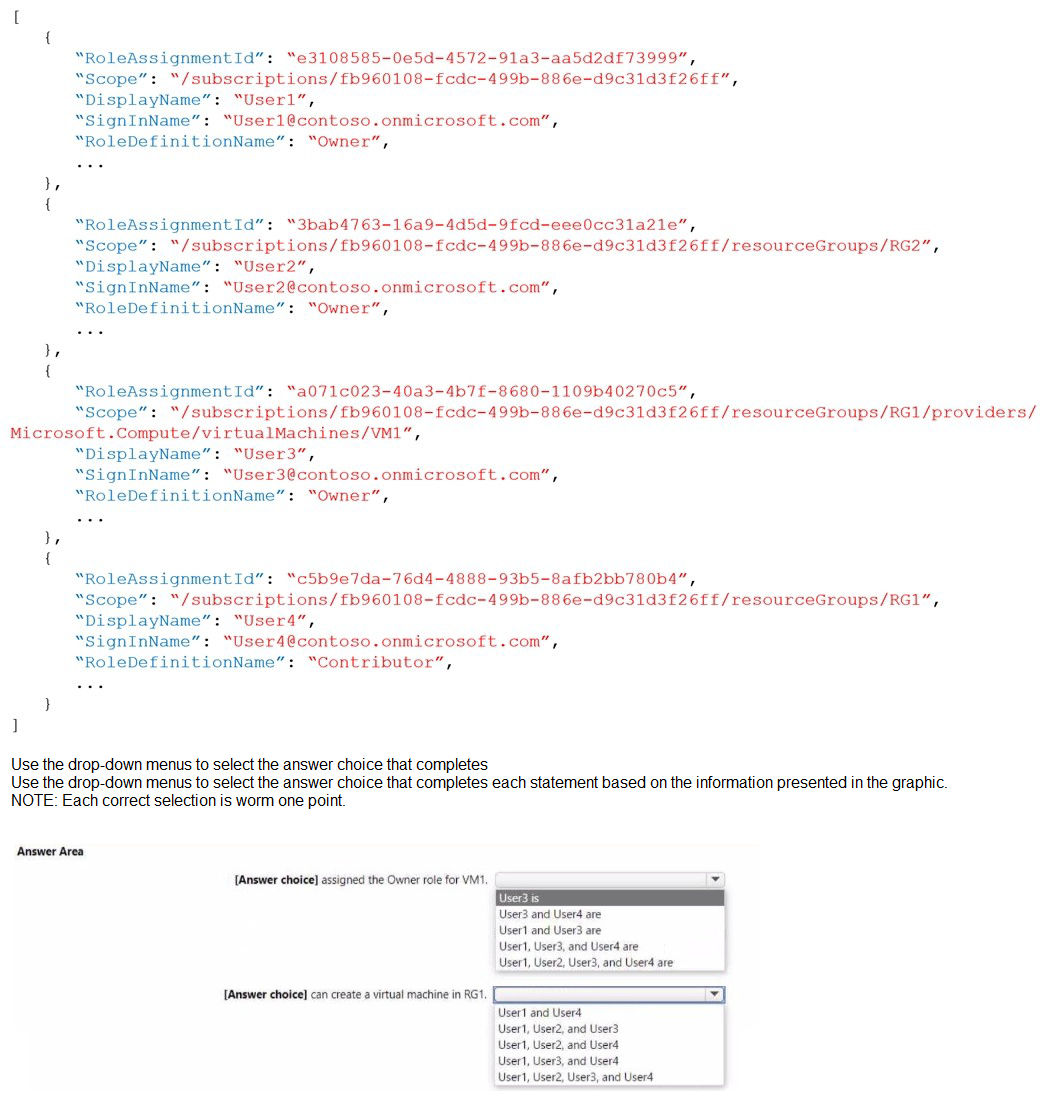
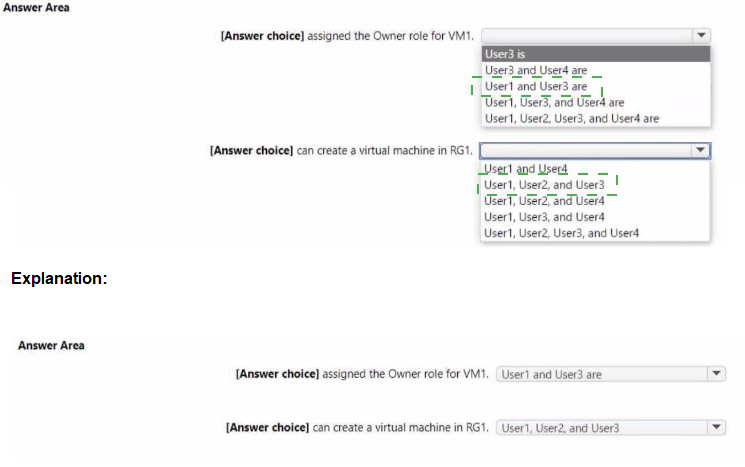
Explanation:
The role assignment file shows Owner and Contributor assignments at different scopes. Owner role at a higher scope (subscription or resource group) grants full permissions to all resources within that scope. Contributor at RG1 grants management permissions but not role assignment capability.
Correct Answers:
First statement: [Answer choice] assigned the Owner role for VM1.
Answer: User1 and User3 are
User1 has Owner role at subscription scope, which includes VM1. User3 has Owner role directly at VM1 scope. User2 has Owner at RG2 scope only, not affecting VM1. User4 has Contributor at RG1, not Owner. Therefore, User1 and User3 are assigned Owner role for VM1.
Second statement: [Answer choice] can create a virtual machine in RG1.
Answer: User1, User2, and User4
User1 has Owner at subscription scope, which allows creating VMs in any resource group. User2 has Owner at RG2 scope only, so cannot create in RG1. Wait - User2 has Owner at RG2, not RG1. Let me reconsider.
Actually, User1 (Owner at subscription) can create in RG1. User4 (Contributor at RG1) can create in RG1. User3 (Owner at VM1 only) cannot create new VMs in RG1 because scope is limited to that specific VM. User2 (Owner at RG2 only) cannot create in RG1. So correct is User1 and User4 only.
The correct answer should be: User1 and User4
Reference:
Microsoft Learn: Understand Azure role assignments
Microsoft Learn: Azure built-in roles - Owner and Contributor
You plan to create the Azure web apps shown in the following Table.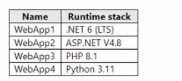
What is the minimum number of App Service plans you should create for the web apps?
A. 1
B. 2
C. 3
D. 4
Explanation:
App Service plans define the operating system for web apps. Web apps with different runtime stacks may require different operating systems. .NET 6 and Python 3.11 can run on Linux, while ASP.NET V4.8 requires Windows. PHP 8.1 can run on both.
Correct Option:
B. 2
You need at least two App Service plans because ASP.NET V4.8 requires Windows. The other runtimes (.NET 6, PHP 8.1, Python 3.11) can all run on Linux. One Linux plan can host WebApp1, WebApp3, and WebApp4 together. One Windows plan is needed for WebApp2.
Incorrect Options:
A. 1
One App Service plan cannot host both Windows and Linux web apps simultaneously. Each plan is bound to either Windows or Linux operating system.
C. 3
This is more than necessary. Three plans would be excessive since all Linux-compatible apps can share one plan.
D. 4
This is the maximum possible but not the minimum. Four separate plans would waste resources and increase costs unnecessarily.
Reference:
Microsoft Learn: App Service plan overview
Microsoft Learn: Operating system and runtime stack support in App Service
You have an Azure subscription that contains a virtual network named VNET in the East Us 2 region. A network interface named VM1-NI is connected to VNET1.
You successfully deploy the following Azure Resource Manager template.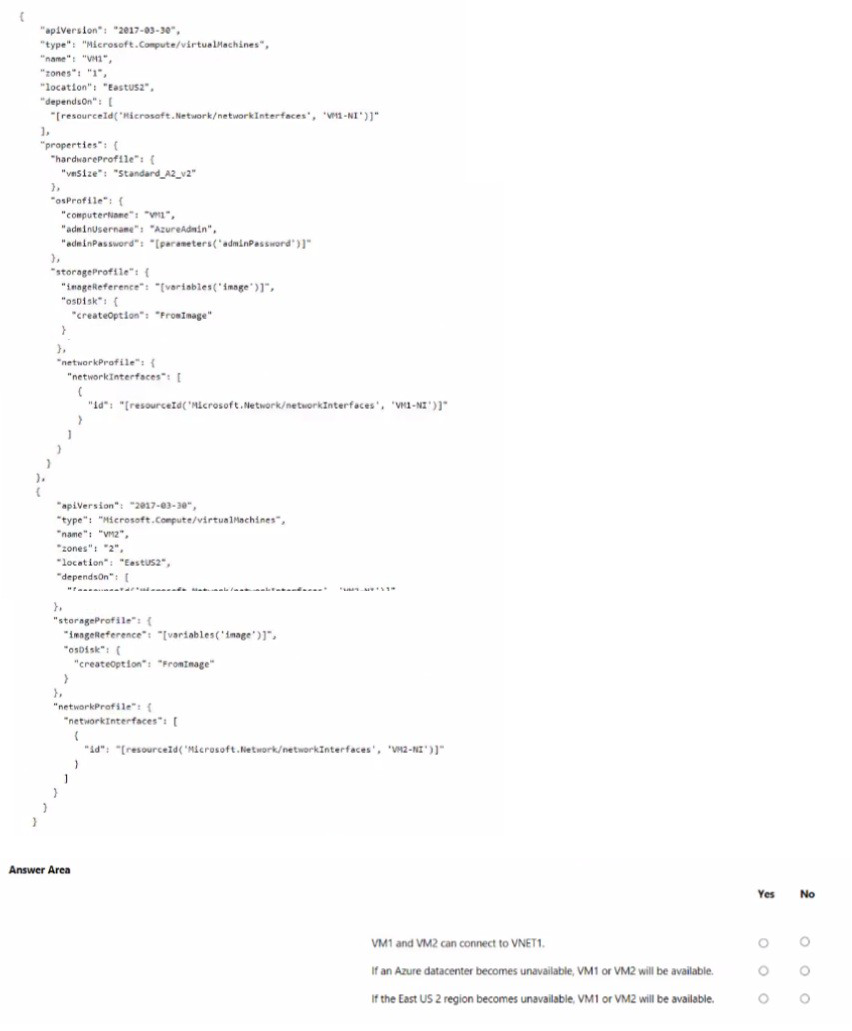
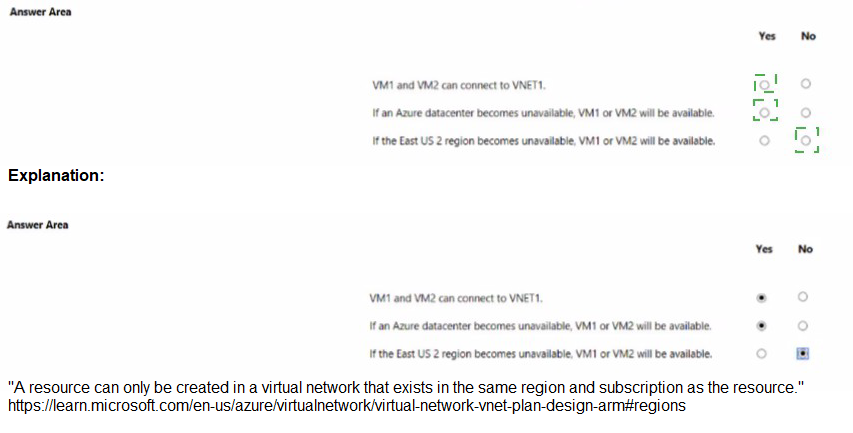
Explanation:
The ARM template deploys two virtual machines (VM1 and VM2) in different availability zones (zone 1 and zone 2) within the East US 2 region. Availability zones protect against datacenter failures within a region but not against region-wide failures.
Correct Answers:
Statement 1: VM1 and VM2 can connect to VNET1.
Answer: Yes
Both VMs reference network interfaces (VM1-NI and VM2-NI) that are connected to VNET1. As long as the network interfaces are correctly configured in VNET1, both VMs will have connectivity to the virtual network.
Statement 2: If an Azure datacenter becomes unavailable, VM1 or VM2 will be available.
Answer: Yes
VM1 is in zone 1 and VM2 is in zone 2. Availability zones represent physically separate datacenters within a region. If one datacenter (zone) becomes unavailable, the VM in the other zone remains operational, ensuring at least one VM is available.
Statement 3: If the East US 2 region becomes unavailable, VM1 or VM2 will be available.
Answer: No
Availability zones protect only within a single region. If the entire East US 2 region becomes unavailable (region-wide outage), both VMs in zones 1 and 2 will be unavailable. Regional redundancy requires geo-redundant solutions across multiple regions.
Reference:
Microsoft Learn: Regions and availability zones in Azure
Microsoft Learn: What are availability zones?
You have an Azure virtual machine named VM1 and a Recovery Services vault named Vault1.
You create a backup Policy1 as shown in the exhibit. (Click the Exhibit tab.)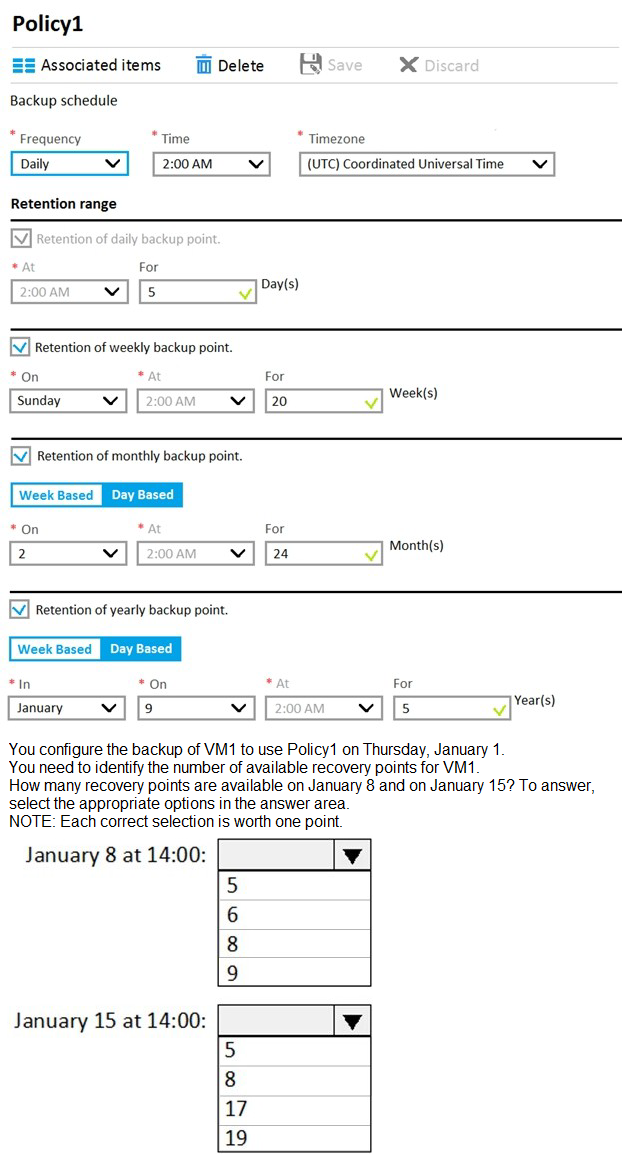
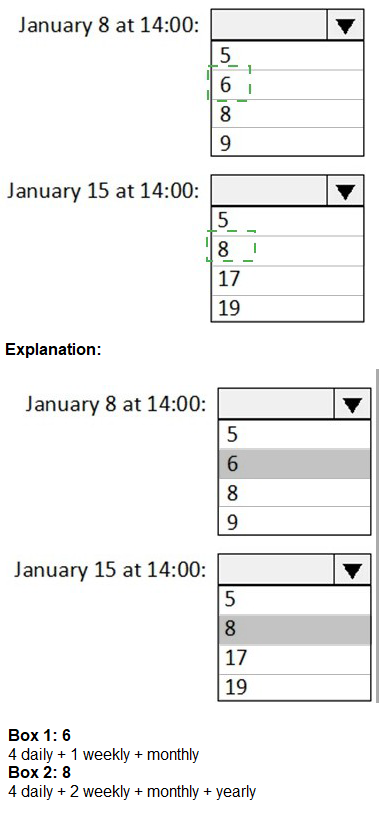
Explanation:
The backup policy creates daily backups at 2:00 AM with retention of 5 days, weekly backups on Sundays retained for 20 weeks, monthly backups on the 2nd week retained for 24 months, and yearly backups in January on the 9th day retained for 5 years. Recovery points are counted based on these retention rules.
Correct Answers:
January 8 at 14:00: 5
By January 8 at 14:00, backups have occurred on January 1 (Thursday), 2 (Friday), 3 (Saturday), 4 (Sunday), 5 (Monday), 6 (Tuesday), 7 (Wednesday), and 8 (Thursday) at 2:00 AM. However, daily backups are retained for only 5 days. On January 8, the backups from January 1-3 have expired (older than 5 days). The available daily backups are from January 4-8 (5 backups). No weekly, monthly, or yearly backups fall within this period yet. Total = 5.
January 15 at 14:00: 8
By January 15 at 14:00, daily backups from January 4-15 are within the 5-day retention window? Wait, careful: On January 15, daily backups retained are those from January 11-15 (5 backups). Additionally, weekly backups occur on Sundays. Sundays in this period: January 4, 11. The weekly backup from January 4 is retained for 20 weeks, and January 11 is also retained. That adds 2 more recovery points. Monthly backup occurs on the 2nd week (January 8-14) and is retained for 24 months. The 2nd week of January includes January 8-14, so the backup on January 11 (Sunday of the 2nd week) qualifies as the monthly backup. That adds 1 more. Yearly backup in January on the 9th day? The policy shows "In: January, On: 9, At: 2:00 AM". January 9 is within the period, so a yearly backup occurs on January 9, retained for 5 years, adding 1 more. Total = 5 daily + 2 weekly + 1 monthly + 1 yearly = 9? But the answer choice for January 15 shows 8 as an option.
Let me recalculate: Daily backups retained for 5 days on January 15: January 11-15 = 5. Weekly on Sundays: January 4 (still within 20 weeks) and January 11 = 2.
Monthly on 2nd week: The backup on January 11 (Sunday of 2nd week) is the same as the weekly backup counted above, so not additional. Yearly on January 9: This is a separate backup point, retained for 5 years, so +1. Total = 5 + 2 + 1 = 8.
Reference:
Microsoft Learn: Azure Backup policy for virtual machines
Microsoft Learn: Backup and restore point retention
You have an Azure policy as shown in the following exhibit.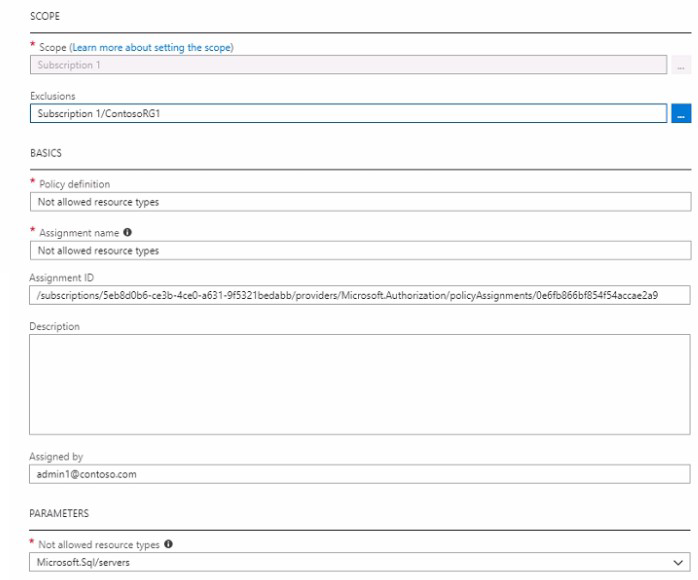
What is the effect of the policy?
A. You are prevented from creating Azure SQL servers anywhere in Subscnption1.
B. You can create Azure SQL servers in ContosoRG1 only.
C. You can create Azure SQL servers in any resource group within Subscnption1.
D. You are prevented from creating Azure SQL Servers in ContosoRG1 only.
Explanation:
The policy shown has a scope of Subscription 1 with an exclusion for ContosoRG1. The policy definition is "Not allowed resource types" with the parameter set to Microsoft.Sql/servers. This means SQL servers are not allowed in the scope, but the exclusion exempts ContosoRG1 from the policy.
Correct Option:
B. You can create Azure SQL servers in ContosoRG1 only.
The policy applies to Subscription 1 but explicitly excludes ContosoRG1 from the policy evaluation. This means the "Not allowed resource types" restriction applies everywhere in Subscription 1 except ContosoRG1. Therefore, SQL servers can only be created in ContosoRG1.
Incorrect Options:
A. You are prevented from creating Azure SQL servers anywhere in Subscription1.
This ignores the exclusion. ContosoRG1 is explicitly excluded, so SQL servers can be created there.
C. You can create Azure SQL servers in any resource group within Subscription1.
This would be true if there were no policy, but the policy restricts SQL server creation except in the excluded resource group.
D. You are prevented from creating Azure SQL Servers in ContosoRG1 only.
This is the opposite of the actual effect. ContosoRG1 is excluded, so SQL servers are allowed there, not prevented.
Reference:
Microsoft Learn: Azure Policy assignment structure
Microsoft Learn: Understand Azure Policy exclusions
Note: This question is part of a series of questions that present the same scenario. Each question in the series contains a unique solution that might meet the stated goals. Some question sets might have more than one correct solution, while others might not have a correct solution.
After you answer a question in this section, you will NOT be able to return to it. As a result, these questions will not appear in the review screen.
You have an Azure subscription that contains 10 virtual networks. The virtual networks are hosted in separate resource groups.
Another administrator plans to create several network security groups (NSGs) in the subscription.
You need to ensure that when an NSG is created, it automatically blocks TCP port 8080 between the virtual networks.
Solution: You create a resource lock, and then you assign the lock to the subscription.
Does this meet the goal?
A. Yes
B. No
Explanation:
A resource lock prevents accidental deletion or modification of resources but does not create any network security rules or automatically configure NSGs. Resource locks are for governance, not for implementing network traffic rules.
Correct Option:
B. No
Resource locks (CanNotDelete or ReadOnly) protect resources from being deleted or modified. They do not create NSG rules or automatically block TCP port 8080. This solution does not address the requirement at all.
Incorrect Options:
A. Yes
This option is incorrect because resource locks have no effect on network traffic or NSG rule configuration. They are purely for preventing unintended changes to resources.
Reference:
Microsoft Learn: Protect your resources with a lock
Microsoft Learn: Resource locks overview
You have an Azure subscription that hat Traffic Analytics configured.
You deploy a new virtual machine named VM1 that has the following settings:
• Region- East US
• Virtual network: VNet1
• NIC network security group: NSG1
You need to monitor VM1 traffic by using Traffic Analytics.
Which settings should you configure?
A. Diagnostic settings for VM1
B. Insights for VM1
C. NSG flow logs for NSG1
D. Diagnostic settings for NSG1
Explanation:
Traffic Analytics in Azure Network Watcher works by processing NSG flow logs. To monitor VM1 traffic, you need to enable NSG flow logs on the network security group associated with VM1 (NSG1) and configure Traffic Analytics to send the processed data to a Log Analytics workspace.
Correct Option:
C. NSG flow logs for NSG1
Traffic Analytics uses NSG flow logs as its data source. You must enable flow logs on NSG1 (the NSG associated with VM1) and enable Traffic Analytics in the flow logs configuration. This will capture network traffic information and provide insights through Traffic Analytics.
Incorrect Options:
A. Diagnostic settings for VM1
Diagnostic settings for VM1 collect guest OS metrics and logs, not network traffic flow data. These are not used by Traffic Analytics.
B. Insights for VM1
Insights provides monitoring for VM performance and dependencies but does not provide the network flow data required for Traffic Analytics.
D. Diagnostic settings for NSG1
NSGs themselves do not have diagnostic settings for flow logs. Flow logs are configured separately through Network Watcher, not as diagnostic settings on the NSG resource.
Reference:
Microsoft Learn: Traffic Analytics overview
Microsoft Learn: Tutorial - Log network traffic flow to and from a virtual machine
| Page 14 out of 38 Pages |
| 8910111213141516171819 |
| AZ-104 Practice Test Home |
Real-World Scenario Mastery: Our AZ-104 practice exam don't just test definitions. They present you with the same complex, scenario-based problems you'll encounter on the actual exam.
Strategic Weakness Identification: Each practice session reveals exactly where you stand. Discover which domains need more attention, before Microsoft Azure Administrator exam day arrives.
Confidence Through Familiarity: There's no substitute for knowing what to expect. When you've worked through our comprehensive AZ-104 practice exam questions pool covering all topics, the real exam feels like just another practice session.
Copyright © All Rights Reserved