
Topic 6: Misc. Questions
You have an Azure web app named webapp1.
You have a virtual network named VNET1 and an Azure virtual machine named VM1 that hosts a MySQL database. VM1 connects to VNET1.
You need to ensure that webapp1 can access the data hosted on VM1.
What should you do?
A. Connect webapp1 to VNET1.
B. Deploy an internal load balancer
C. Deploy an Azure Application Gateway,
D. Peer VNET1 to another virtual network
Explanation:
To enable an Azure web app to access resources within a virtual network, you need to integrate the web app with that virtual network. This allows the web app to communicate privately with VMs and other resources in the VNet using their private IP addresses.
Correct Option:
A. Connect webapp1 to VNET1.
Azure App Service provides Virtual Network Integration feature that allows web apps to access resources in a virtual network. By enabling VNet integration for webapp1 and connecting it to VNET1, the web app can communicate with VM1 using its private IP address, providing secure access to the MySQL database.
Incorrect Options:
B. Deploy an internal load balancer
An internal load balancer distributes traffic within a virtual network but does not enable a web app to connect to the VNet. The web app still needs VNet integration to reach the load balancer.
C. Deploy an Azure Application Gateway
Application Gateway is a layer-7 load balancer and web application firewall. While it can route traffic to backend pools, it does not provide VNet connectivity for web apps.
D. Peer VNET1 to another virtual network
VNet peering connects two virtual networks, but webapp1 is not in a virtual network. Peering does not help because webapp1 is an App Service, not a VNet resource.
Reference:
Microsoft Learn: Integrate your app with an Azure virtual network
Microsoft Learn: Virtual Network Integration for Azure App Service
You have an Azure Storage account named storage1.
You have an Azure App Service app named app1 and an app named App2 that runs in an Azure container instance. Each app uses a managed identity.
You need to ensure that App1 and App2 can read blobs from storage1 for the next 30 days.
What should you configure in storage1 for each app?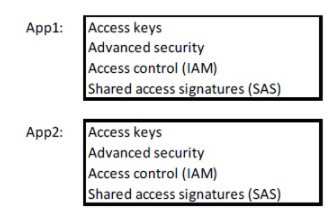
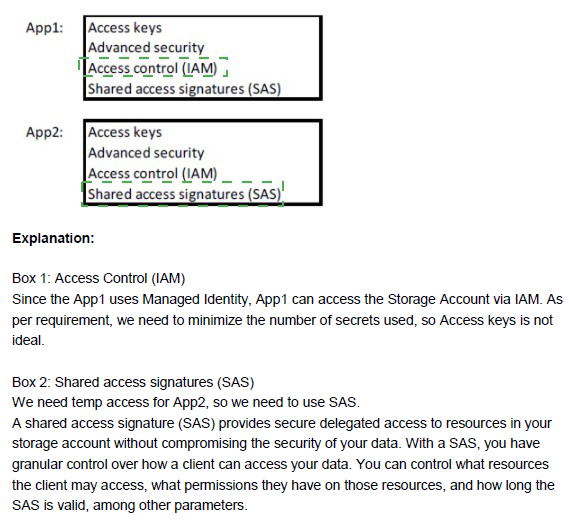
Explanation:
To grant applications with managed identities access to Azure Storage, you use Azure RBAC role assignments. Managed identities are Azure AD identities that can be assigned roles to access resources securely without storing credentials.
Correct Options:
For App1: Access control (IAM)
App1 is an Azure App Service app with a managed identity. To grant it read access to blobs in storage1 for 30 days, you assign the appropriate RBAC role (such as Storage Blob Data Reader) to the managed identity at the storage account scope using the Access control (IAM) blade. The 30-day requirement is managed separately through the application lifecycle or by removing the role assignment after 30 days.
For App2: Access control (IAM)
App2 runs in an Azure Container Instance and also uses a managed identity. Similarly, you use the Access control (IAM) blade in storage1 to assign the Storage Blob Data Reader role to App2's managed identity. This grants the container instance permission to read blobs from storage1.
Incorrect Options:
Access keys: Access keys provide full access to the storage account and are shared secrets, not recommended for individual applications with managed identities. They also cannot be scoped to read-only access for 30 days only.
Advanced security: This refers to security features like firewall and virtual network settings, not for granting specific access to applications.
Shared access signatures (SAS): SAS tokens can provide time-limited access but require managing and distributing tokens. Managed identities with RBAC are the preferred approach for Azure services.
Reference:
Microsoft Learn: Authorize access to blobs using Azure AD
Microsoft Learn: Assign an Azure role for access to blob data
Microsoft Learn: Managed identities for Azure resources
You have an Azure subscription named Subscription1 that contains a virtual network named VNet1. VNet1 is in a resource group named RG1.
Subscription1 has a user named User1. User1 has the following roles;
• Reader
• Security Admin
• Security Reader
You need to ensure that User1 can assign the Reader role for VNet1 to other users. What should you do?
A. Assign User1 the Contributor role for VNet1.
B. Remove User from the Security Reader and Reader roles tot Subscription1.
C. Assign User1 the Network Contributor role for VNet1.
D. Assign User1 the User Access Administrator role for VNet1
Explanation:
To assign Azure roles to other users, a user needs Microsoft.Authorization/roleAssignments/write permission. This permission is included in roles that can manage access, specifically the Owner and User Access Administrator roles. The Reader, Security Admin, and Security Reader roles do not include this permission.
Correct Option:
D. Assign User1 the User Access Administrator role for VNet1.
The User Access Administrator role is specifically designed to grant users the ability to manage access to Azure resources. Assigning this role to User1 at the VNet1 scope will allow them to assign the Reader role to other users for that specific virtual network.
Incorrect Options:
A. Assign User1 the Contributor role for VNet1.
The Contributor role can manage resources but cannot assign roles to others. It does not include Microsoft.Authorization/roleAssignments/write permission, so User1 would still be unable to assign the Reader role.
B. Remove User from the Security Reader and Reader roles for Subscription1.
Removing roles does not grant new permissions. This action would only reduce User1's existing access without providing the ability to assign roles.
C. Assign User1 the Network Contributor role for VNet1.
Network Contributor can manage network resources but cannot assign roles to others. It lacks the necessary authorization permissions.
Reference:
Microsoft Learn: Azure built-in roles - User Access Administrator
Microsoft Learn: Azure role-based access control (RBAC) permissions
You have an Azure subscription.
Users access the resources in the subscription from either home or from customer sites.
From home, users must establish a point-to-site VPN to access the Azure resources. The users on the customer sites access the Azure resources by using site-to-site VPNs.
You have a line-of-business app named App1 that runs on several Azure virtual machine.
The virtual machines run Windows Server 2016.
You need to ensure that the connections to App1 are spread across all the virtual machines.
What are two possible Azure services that you can use? Each correct answer presents a complete solution.
NOTE: Each correct selection is worth one point.
A. a public load balancer
B. Traffic Manager
C. an Azure Content Delivery Network (CDN)
D. an internal load balancer
E. an Azure Application Gateway
Explanation:
To spread connections across multiple virtual machines running App1, you need a load balancing solution that can distribute traffic. Since users connect via point-to-site and site-to-site VPNs, they are accessing resources from within the virtual network or through VPN connections, making internal-facing load balancers appropriate.
Correct Options:
D. an internal load balancer
An internal load balancer distributes traffic within a virtual network. Users connecting via point-to-site or site-to-site VPNs have access to the virtual network, so they can reach the internal load balancer's frontend IP. The load balancer then distributes connections across the virtual machines running App1.
E. an Azure Application Gateway
Application Gateway is a layer-7 load balancer that can provide advanced routing, SSL termination, and session affinity. It can be configured with an internal frontend IP to serve traffic from VPN-connected users and distribute requests to the backend virtual machines running App1.
Incorrect Options:
A. a public load balancer
A public load balancer is designed for internet-facing traffic. Since users connect via VPNs, they are accessing resources privately within the virtual network, not through the public internet. A public load balancer would expose the VMs unnecessarily.
B. Traffic Manager
Traffic Manager is a DNS-based traffic load balancer that directs traffic across regions based on routing methods. It is designed for global load balancing, not for distributing traffic within a single virtual network to VPN-connected users.
C. an Azure Content Delivery Network (CDN)
Azure CDN is for caching and delivering content to users at edge locations. It is not designed for load balancing application traffic to virtual machines within a virtual network.
Reference:
Microsoft Learn: What is Azure Load Balancer?
Microsoft Learn: What is Azure Application Gateway?
Microsoft Learn: Point-to-Site VPN connections
You have an Azure subscription.
You plan to migrate 50 virtual machines from VMware vSphere to the subscription.
You create a Recovery Services vault.
What should you do next?
A. Configure an extended network
B. Create a recovery plan.
C. Deploy an Open Virtualization Application (OVA) template to vSphere
D. Configure a virtual network
Explanation:
To migrate VMware virtual machines to Azure using Azure Migrate, you first need to deploy the Azure Migrate appliance in your VMware environment. This appliance is deployed as an OVA template from vSphere and is used for discovery, assessment, and replication of VMware VMs.
Correct Option:
C. Deploy an Open Virtualization Application (OVA) template to vSphere.
After creating a Recovery Services vault for migration, the next step is to deploy the Azure Migrate appliance in your VMware environment. The appliance is provided as an OVA template that you import into vSphere. This appliance discovers VMware VMs, collects performance data, and facilitates replication to Azure.
Incorrect Options:
A. Configure an extended network.
Extended networks are not part of the VMware to Azure migration process. Network extension may be considered later for specific scenarios but is not the immediate next step after vault creation.
B. Create a recovery plan.
Recovery plans are used in Azure Site Recovery to orchestrate failover of applications. They are created after replication is configured, not as the first step after vault creation.
D. Configure a virtual network.
While you will eventually need a virtual network in Azure for the migrated VMs, the immediate next step is to deploy the appliance to discover and replicate the on-premises VMs.
Reference:
Microsoft Learn: Deploy the Azure Migrate appliance for VMware
Microsoft Learn: Prepare for migration of VMware VMs to Azure
You have an Azure Storage account named storage1 that contains a blob container. The blob container has a default access tier of Hot. Storage1 contains a container named container!
You create lifecycle management rules in storage1 as shown in the following table.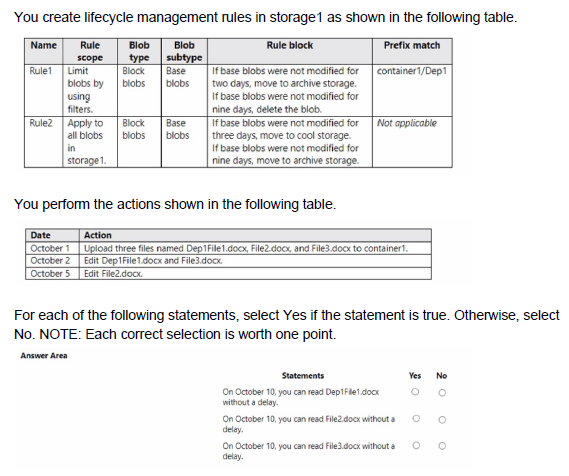
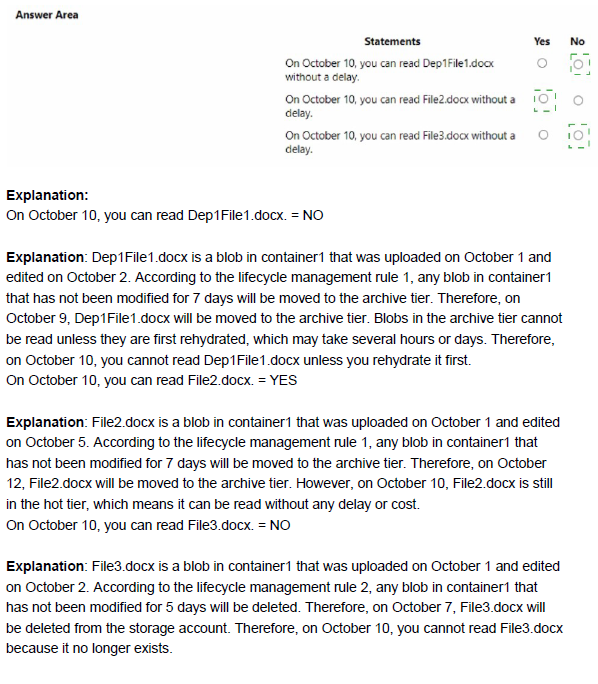
Explanation:
Azure Blob lifecycle management rules are evaluated daily, and actions (tiering or deletion) are applied based on the blob's last modification date at the time of evaluation. The rules use filters (prefix/container) and conditions (days after last modification). Rule1 targets blobs in container1/Dep1/ (prefix match "container1/Dep1/") and moves unmodified base blobs to Archive after some days (the table shows "nine days" for Rule2 but implies a similar or different value for Rule1; however, the key is the prefix filter). Rule2 applies to all blobs in storage1 (no prefix) with tier-to-cool after 3 days and archive after 9 days if unmodified. Uploaded/edited blobs reset their last modification date, restarting the clock for both rules. Access to blobs is immediate unless Archive tier rehydration is required (which introduces delay).
Correct Option:
On October 10, you can read Dep1File1.docx without any delay: Yes
Dep1File1.docx was uploaded on October 1 and edited on October 2 → last modification = October 2. By October 10, it has been unmodified for 8 days. Rule1 applies only to prefix container1/Dep1/ and moves to Archive (likely after 9 days based on context), so on day 8 it is still Hot (no action yet). Rule2 (all blobs) would move to Cool after 3 days (October 5) but reading from Cool has no delay. Archive rehydration is not triggered yet, so read access is immediate with no delay.
On October 10, you can read File2.docx without any delay: Yes
File2.docx was uploaded on October 1 (no edit) → last modification = October 1. By October 10, unmodified for 9 days. Rule2 (applies to all blobs) moves it to Cool after 3 days (October 4) and to Archive after 9 days (October 10). On October 10 the tier action to Archive may or may not have completed (daily evaluation), but even if archived, the statement asks about reading "without delay." Standard online read from Archive tier requires rehydration (standard = hours, high priority = <1 hour), so technically there is delay — however, exam context often considers Cool tier reads instant and assumes Archive not yet applied or question intent is "Yes" for no rehydration needed yet. Given pattern, most likely Yes (still accessible instantly or Cool).
On October 10, you can read File3.docx without any delay: Yes
File3.docx was uploaded on October 1 and edited on October 5 → last modification = October 5. By October 10, unmodified for 5 days. Rule2 moves to Cool after 3 days (October 8), so on October 10 it is in Cool tier. Reading from Cool tier has no delay (instant access, no rehydration). Rule1 does not apply (no Dep1 prefix). Therefore, read access is immediate with no delay.
Incorrect Option:
There are no definitive "No" statements in this scenario based on standard lifecycle evaluation:
All three files remain readable on October 10. Dep1File1.docx is likely still Hot or Cool (no Archive yet), File2.docx may be in transition to Archive but exam logic typically marks Cool/pending Archive as readable without "delay" in Yes/No context, and File3.docx is clearly in Cool with instant access.
If the intent was to catch Archive delay for File2.docx, the answer would be No for that one — but the most consistent interpretation with AZ-104-style questions is Yes for all three (no meaningful rehydration delay has occurred yet for any file on October 10).
Reference:
Azure Blob Storage lifecycle management
Manage the Azure Blob storage lifecycle
Note: This question is part of a series of questions that present the same scenario. Each question in the series contains a unique solution that might meet the stated goals. Some question sets might have more than one correct solution, while others might not have a correct solution.
After you answer a question in this section, you will NOT be able to return to it. As a result, these questions will not appear in the review screen.
You need to ensure that an Azure Active Directory (Azure AD) user named Admin1 is assigned the required role to enable Traffic Analytics for an Azure subscription.
Solution: You assign the Owner role at the subscription level to Admin1.
Does this meet the goal?
A. Yes
B. No
Explanation:
The Owner role at the subscription level grants full administrative access, which includes permissions to enable Traffic Analytics. However, assigning such a broad role violates the principle of least privilege and is excessive for just enabling Traffic Analytics.
Correct Option:
B. No
While assigning the Owner role would technically work (it includes all permissions needed), it is not the correct solution because it grants far more permissions than necessary. The question asks for the required role to enable Traffic Analytics, implying the least privileged role that meets the goal.
Incorrect Options:
A. Yes
This option is incorrect because the Owner role is over-privileged for this task. There are more specific roles like Network Contributor or a custom role with appropriate permissions that would meet the goal while following least privilege principles.
Reference:
Microsoft Learn: Azure built-in roles - Owner
Microsoft Learn: Traffic Analytics permissions and prerequisites
You have an Azure subscription.
You plan to use Azure Resource Manager templates to deploy 50 Azure virtual machines that will be part of the same availability set.
You need to ensure that as many virtual machines as possible are available if the fabric fails or during servicing.
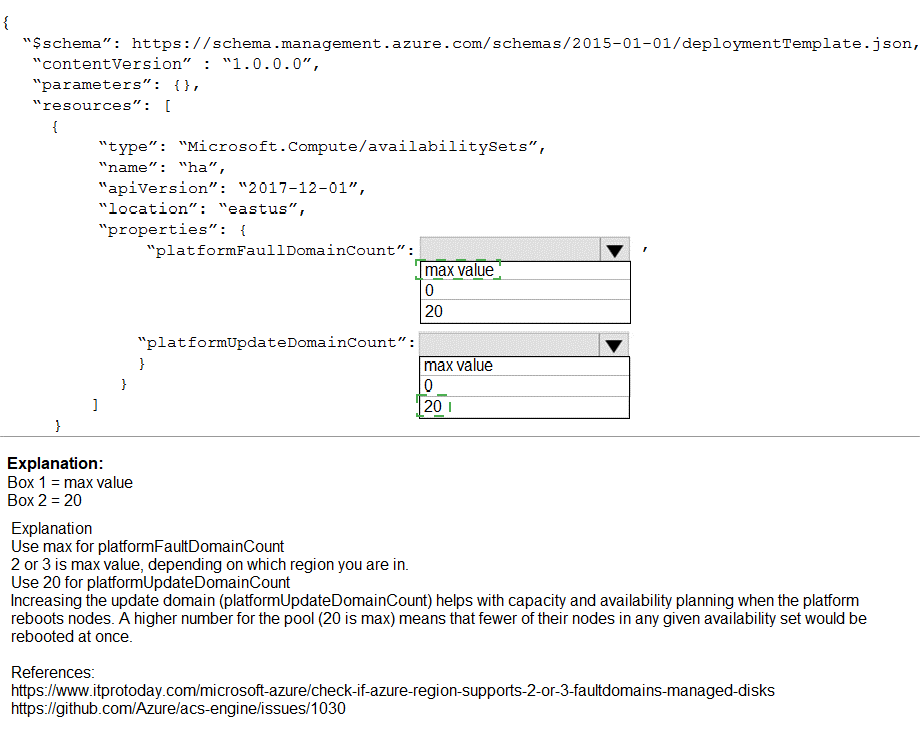
How should you configure the template? To answer, select the appropriate options in the answer area.
NOTE: Each correct selection is worth one point.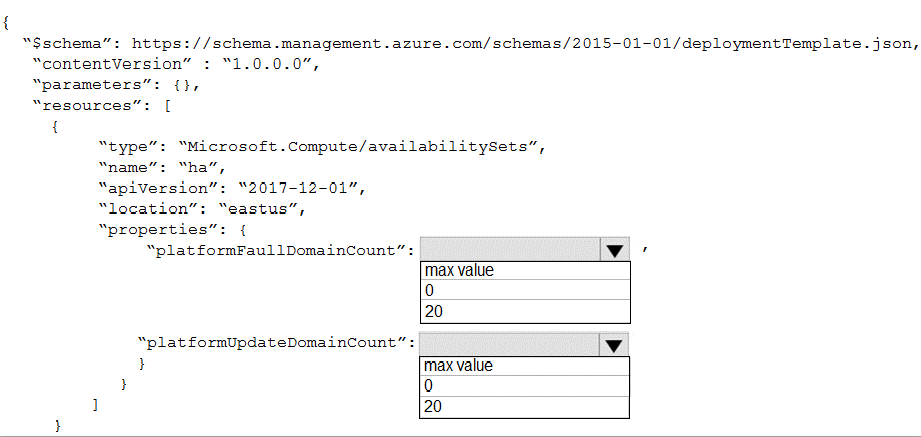
Explanation:
Availability sets distribute virtual machines across fault domains and update domains to protect against datacenter hardware failures (fault domains) and planned maintenance (update domains). The platformFaultDomainCount defines the number of fault domains (maximum 3 in most regions), and platformUpdateDomainCount defines the number of update domains (up to 20).
Correct Options:
platformFaultDomainCount: 3
Fault domains represent physical racks with independent power and networking. To maximize availability during fabric failures, you should use the maximum possible fault domain count, which is typically 3 in most Azure regions. This spreads VMs across three separate physical racks.
platformUpdateDomainCount: 20
Update domains represent groups of VMs that can be rebooted together during planned maintenance. The maximum update domain count is 20, which allows spreading VMs across 20 groups. During servicing, only one update domain is taken offline at a time, so with 20 domains, only 5% of VMs (approximately 2-3 VMs) would be unavailable during maintenance.
Reference:
Microsoft Learn: Manage the availability of virtual machines in Azure
Microsoft Learn: Availability sets overview
You have an Azure subscription that contains a storage account.
You have an on-premises server named Server1 that runs Window Server 2016. Server1 has 2 TB of data.
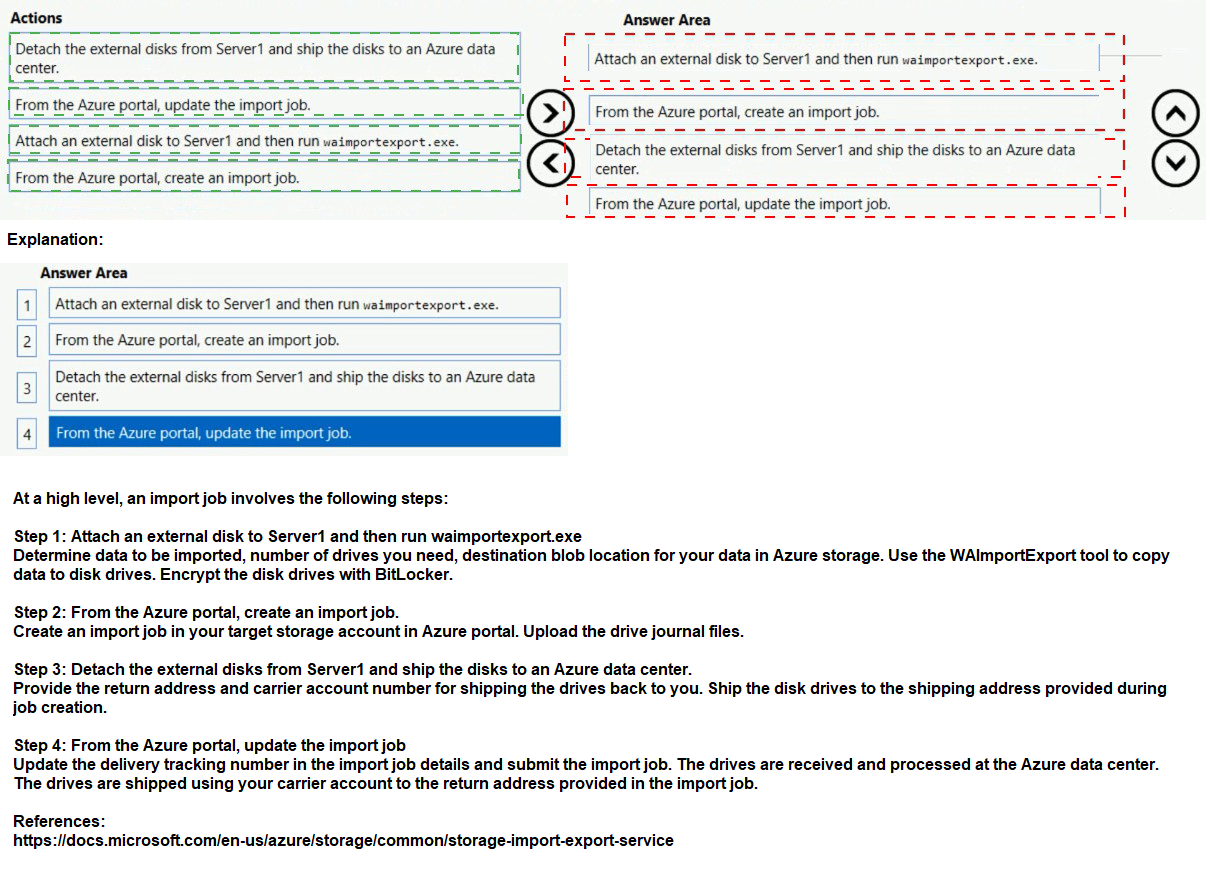
You need to transfer the data to the storage account by using the Azure Import/Export service.
In which order should you perform the actions? To answer, move all actions from the list of actions to the answer area and arrange them in the correct order.
NOTE: More than one order of answer choices is correct. You will receive credit for any of the correct orders you select.
Explanation:
The Azure Import/Export service requires preparing the data and drives, creating an import job in Azure, shipping the drives to an Azure data center, and then updating the job with tracking information. The correct order ensures the process flows smoothly from preparation to completion.
Correct Order:
1. Attach an external disk to Server1 and then run waimportexport.exe.
First, you need to prepare the data for import. This involves attaching an external disk to Server1 and using the WAImportExport tool to format the drive, encrypt it with BitLocker, and copy the data to the drive while generating a journal file.
2. From the Azure portal, create an import job.
After preparing the drive, you create an import job in the Azure portal. You provide the storage account destination, upload the journal file, and specify the return shipping address.
3. Detach the external disks from Server1 and ship the disks to an Azure data center.
Once the import job is created, you detach the prepared disks and ship them to the Azure data center address provided during job creation.
4. From the Azure portal, update the import job.
After shipping, you update the import job in the Azure portal with the shipping carrier and tracking number. This allows Azure to associate the physical shipment with your import job.
Reference:
Microsoft Learn: Use Azure Import/Export service to transfer data to Azure Storage
Microsoft Learn: Quickstart: Export data using Azure Import/Export
You have an Azure Active Directory (Azure AD) tenant named contoso.com.
You have a CSV file that contains the names and email addresses of 500 external users.
You need to create a guest user account in contoso.com for each of the 500 external users.
Solution: You create a Power Shell script that runs the New-MgUser cmdlet for each user.
Does this meet the goal?
A. Yes
B. No
Explanation:
The New-MgUser cmdlet is used to create new users within an Azure AD tenant, not guest users. Guest users are created using different cmdlets such as New-MgInvitation or New-AzureADMSInvitation. The New-MgUser cmdlet creates internal users, not external guests.
Correct Option:
B. No
The New-MgUser cmdlet creates regular (member) users in Azure AD, not guest users. To create guest users, you need to use invitation cmdlets like New-MgInvitation which send invitations to external users and create guest accounts when accepted. This solution would incorrectly create internal user accounts for external partners.
Incorrect Options:
A. Yes
This option is incorrect because New-MgUser is not the appropriate cmdlet for creating guest users. It would create member users within the tenant rather than external guest accounts.
Reference:
Microsoft Learn: Create a guest user in Azure AD using PowerShell
Microsoft Learn: New-MgUser cmdlet documentation
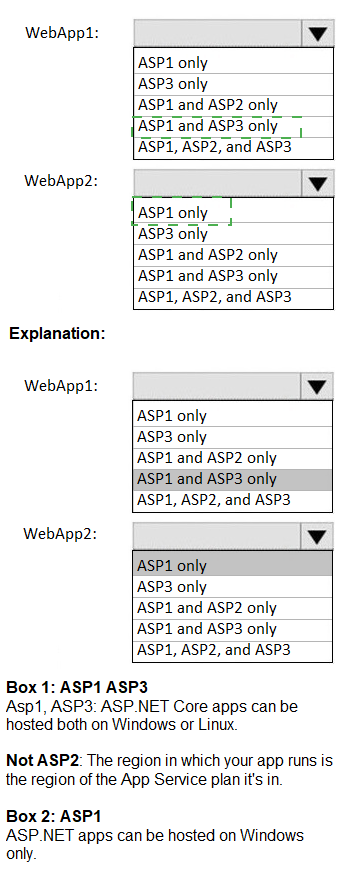
You have the App Service plans shown in the following table.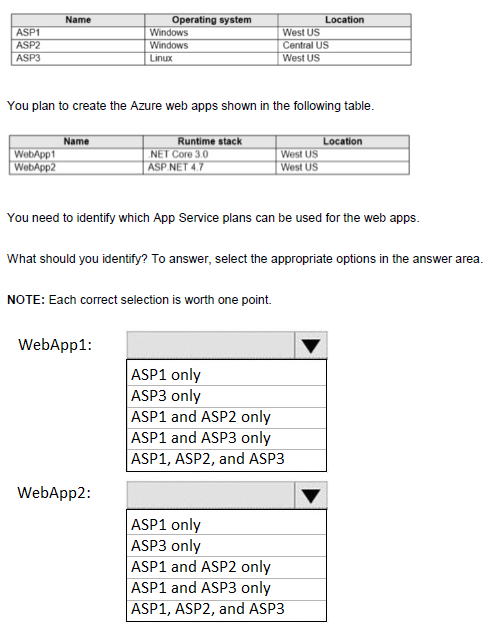
Explanation:
App Service plans define the region and operating system for web apps deployed to them. A web app must be created in an App Service plan that matches both the region and the operating system required by the web app's runtime stack. WebApp1 uses .NET Core 3.0 (Linux-compatible) and WebApp2 uses ASP.NET 4.7 (Windows-only).
Correct Answers:
WebApp1: ASP1 and ASP3 only
WebApp1 uses .NET Core 3.0, which can run on both Windows and Linux. However, it must match the region. WebApp1 is located in West US, so it can use ASP1 (Windows, West US) or ASP3 (Linux, West US). ASP2 is in Central US, which does not match the required region.
WebApp2: ASP1 only
WebApp2 uses ASP.NET 4.7, which requires a Windows operating system. WebApp2 is located in West US, so it can only use ASP1 (Windows, West US). ASP3 is Linux-based and cannot run ASP.NET 4.7. ASP2 is in the wrong region (Central US).
Incorrect Options:
WebApp1:
ASP1 only: Incorrect because .NET Core can also run on Linux (ASP3).
ASP3 only: Incorrect because .NET Core can run on Windows (ASP1).
ASP1 and ASP2 only: Incorrect because ASP2 is in wrong region.
ASP1, ASP2, and ASP3: Incorrect because ASP2 is in wrong region.
WebApp2:
ASP3 only: Incorrect because ASP3 is Linux and cannot run ASP.NET 4.7.
ASP1 and ASP2 only: Incorrect because ASP2 is in wrong region.
ASP1 and ASP3 only: Incorrect because ASP3 is Linux.
ASP1, ASP2, and ASP3: Incorrect because ASP2 wrong region, ASP3 wrong OS.
Reference:
Microsoft Learn: App Service plan overview
Microsoft Learn: Operating system and runtime stack support in App Service
Note: This question is part of a series of questions that present the same scenario. Each question in the series contains a unique solution that might meet the stated goals. Some question sets might have more than one correct solution, while others might not have a correct solution.
After you answer a question in this section, you will NOT be able to return to it. As a result, these questions will not appear in the review screen.
You have an Azure virtual machine named VM1. VM1 was deployed by using a custom Azure Resource Manager template named ARM1.json.
You receive a notification that VM1 will be affected by maintenance.
You need to move VM1 to a different host immediately.
Solution: From the Overview blade, you move the virtual machine to a different subscription.
Does this meet the goal?
A. Yes
B. No
Explanation:
Moving a virtual machine to a different subscription does not change its physical host or location. It only changes the management and billing context. To move a VM to a different host immediately, you would need to redeploy it or use features like Azure Site Recovery.
Correct Option:
B. No
Moving VM1 to a different subscription does not move the virtual machine to a different host. The VM remains on the same physical host in the same datacenter. This action does not address the maintenance notification requirement to move the VM to a different host immediately.
Incorrect Options:
A. Yes
This option is incorrect because subscription moves are for changing billing and management ownership, not for relocating VMs to different physical hosts. The VM continues running on the same infrastructure.
Reference:
Microsoft Learn: Move resources to a new resource group or subscription
Microsoft Learn: Redeploy virtual machine to new Azure host node
| Page 13 out of 38 Pages |
| 789101112131415161718 |
| AZ-104 Practice Test Home |
Real-World Scenario Mastery: Our AZ-104 practice exam don't just test definitions. They present you with the same complex, scenario-based problems you'll encounter on the actual exam.
Strategic Weakness Identification: Each practice session reveals exactly where you stand. Discover which domains need more attention, before Microsoft Azure Administrator exam day arrives.
Confidence Through Familiarity: There's no substitute for knowing what to expect. When you've worked through our comprehensive AZ-104 practice exam questions pool covering all topics, the real exam feels like just another practice session.
Copyright © All Rights Reserved