
Topic 6: Misc. Questions
Note: This question is part of a series of questions that present the same scenario. Each question in theseries contains a unique solution that might meet the stated goals. Some question sets might have more than one correct solution, while others might not have a correct solution.
After you answer a question in this section, you will NOT be able to return to it. As a result, these questions will not appear in the review screen.
You have a Microsoft Entra tenant named contoso.com.
You have a CSV file that contains the names and email addresses of 500 external users.
You need to create a guest user account in contoso.com for each of the 500 external users.
Solution; From Microsoft Entra ID in the Azure portal, you use the Bulk invite users’ operation.
Does this meet the goal?
A. Yes
B. No
Explanation:
The Bulk invite users operation in Microsoft Entra ID allows you to invite multiple guest users by uploading a CSV file. This feature is specifically designed for inviting external users in bulk, making it the appropriate tool for this scenario.
Correct Option:
A. Yes
The Bulk invite users operation in Microsoft Entra ID is the correct method to create multiple guest user accounts at once. You can download the CSV template, populate it with the 500 external users' names and email addresses, upload it, and the invitations will be sent to all users.
Incorrect Options:
B. No
This option is incorrect because the Bulk invite users operation is specifically designed for this exact purpose. It meets the goal of creating guest user accounts for 500 external users efficiently without manual creation.
Reference:
Microsoft Learn: Bulk invite users in Microsoft Entra ID
Microsoft Learn: Add guest users in bulk to Microsoft Entra ID
You have the Azure virtual machines shown in the following table.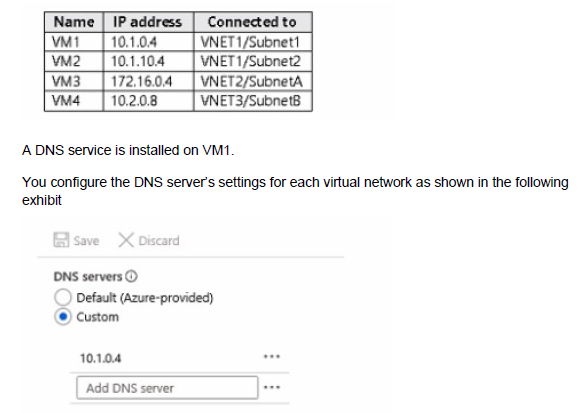
You need to ensure that all the virtual machines can resolve DNS names by using the DNS service on VM 1.
What should you do?
A. Add service endpoints on VNET2 and VNET3.
B. Add service endpoints on VNET1.
C. Configure a conditional forwarder on VM1
D. Configure peering between VNET1, VNET2, and VNET3.
Explanation:
For VMs in different virtual networks to use a DNS server located in another VNet, the virtual networks must be able to communicate with each other. Virtual network peering enables connectivity between VNets, allowing DNS queries from VM2, VM3, and VM4 to reach VM1.
Correct Option:
D. Configure peering between VNET1, VNET2, and VNET3.
Virtual network peering allows resources in different VNets to communicate with each other using private IP addresses. By peering VNET1 (where VM1 is located) with VNET2 and VNET3, VMs in those VNets can send DNS queries to VM1's IP address (10.1.0.4) and receive responses. The DNS server settings on each VNet are already configured to use VM1 as the custom DNS server.
Incorrect Options:
A. Add service endpoints on VNET2 and VNET3.
Service endpoints provide secure connectivity to Azure PaaS services like Storage and SQL, not general network connectivity between VNets. They do not enable VMs in different VNets to communicate with each other.
B. Add service endpoints on VNET1.
Similarly, service endpoints on VNET1 do not provide connectivity to VNET2 or VNET3. They are for accessing Azure services, not for inter-VNet communication.
C. Configure a conditional forwarder on VM1.
Conditional forwarders are used in DNS servers to forward queries for specific domains to other DNS servers. This does not solve the connectivity issue; VMs in other VNets still cannot reach VM1 without network connectivity.
Reference:
Microsoft Learn: Virtual network peering
Microsoft Learn: Name resolution for resources in Azure virtual networks
Note: This question is part of a series of questions that present the same scenario. Each question in the series contains a unique solution that might meet the stated goals. Some question sets might have more than one correct solution, while others might not have a correct solution.
After you answer a question in this section, you will NOT be able to return to it. As a result, these questions will not appear in the review screen.
You have an Azure Active Directory (Azure AD) tenant named Adatum and an Azure Subscription named Subscription1. Adatum contains a group named Developers. Subscription1 contains a resource group named Dev.
You need to provide the Developers group with the ability to create Azure logic apps in the Dev resource group.
Solution: On Dev, you assign the Contributor role to the Developers group.
Does this meet the goal?
A. Yes
B. No
Explanation:
The Contributor role at the resource group scope grants full management permissions for all resources within that resource group, including the ability to create, manage, and delete Azure logic apps.
Correct Option:
A. Yes
The Contributor role includes write permissions for all resource types in the resource group, including Microsoft.Logic/workflows. Assigning this role to the Developers group at the Dev resource group scope gives them exactly the permissions needed to create and manage logic apps within that resource group.
Incorrect Options:
B. No
This option is incorrect because the Contributor role provides all the necessary permissions to create logic apps. It is a broader role than the previously considered Logic App Operator or Logic App Contributor, but it certainly meets the goal.
Reference:
Microsoft Learn: Azure built-in roles - Contributor
Microsoft Learn: Azure role-based access control (RBAC) for Azure Logic Apps
You have an Azure subscription that contains the virtual machines shown in the following table.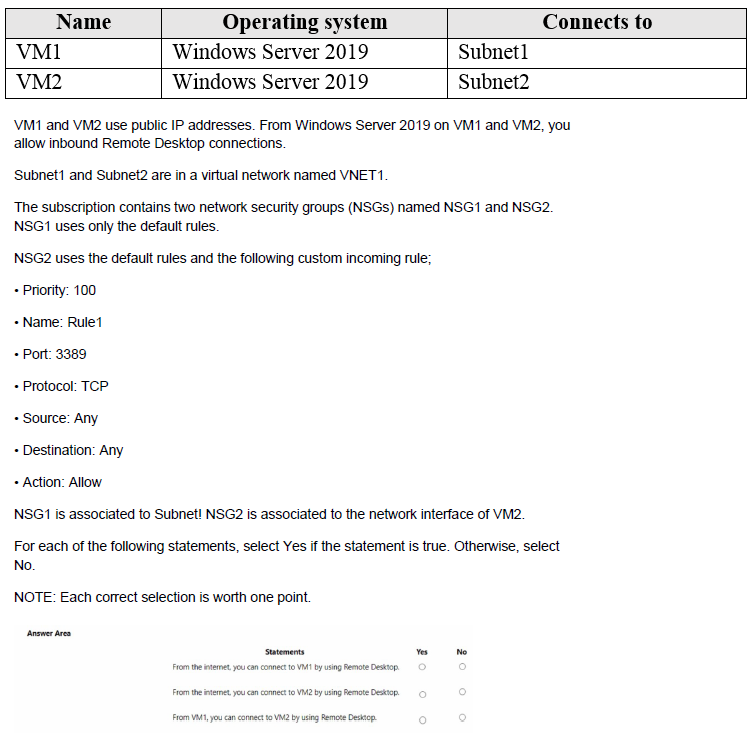
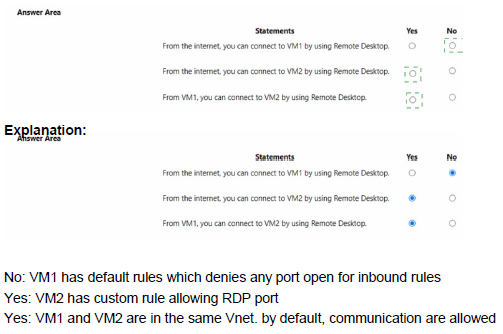
Explanation:
Network security group rules are evaluated based on association. NSG1 is associated at the subnet level, affecting all VMs in Subnet1. NSG2 is associated at the network interface level for VM2. Default NSG rules allow inbound from virtual network but deny all internet inbound.
Correct Answers:
Statement 1: From the internet, you can connect to VM1 by using Remote Desktop.
Answer: No
NSG1 is associated with Subnet1 and uses only default rules. Default rules include "DenyAllInbound" which blocks all internet traffic to VMs in the subnet. Since no custom rule allows port 3389 from the internet, RDP connections from the internet to VM1 are blocked.
Statement 2: From the internet, you can connect to VM2 by using Remote Desktop.
Answer: Yes
NSG2 is associated directly to VM2's network interface and includes custom Rule1 with priority 100 that allows TCP port 3389 from any source. This rule overrides the default deny rules, allowing RDP connections from the internet to VM2.
Statement 3: From VM1, you can connect to VM2 by using Remote Desktop.
Answer: Yes
Both VMs are in VNET1 (Subnet1 and Subnet2). Default rules in both NSGs include "AllowVNetInBound," which permits traffic between resources within the same virtual network. Therefore, VM1 can connect to VM2 using RDP regardless of the custom rules.
Reference:
Microsoft Learn: How network security groups filter network traffic
Microsoft Learn: Default security rules
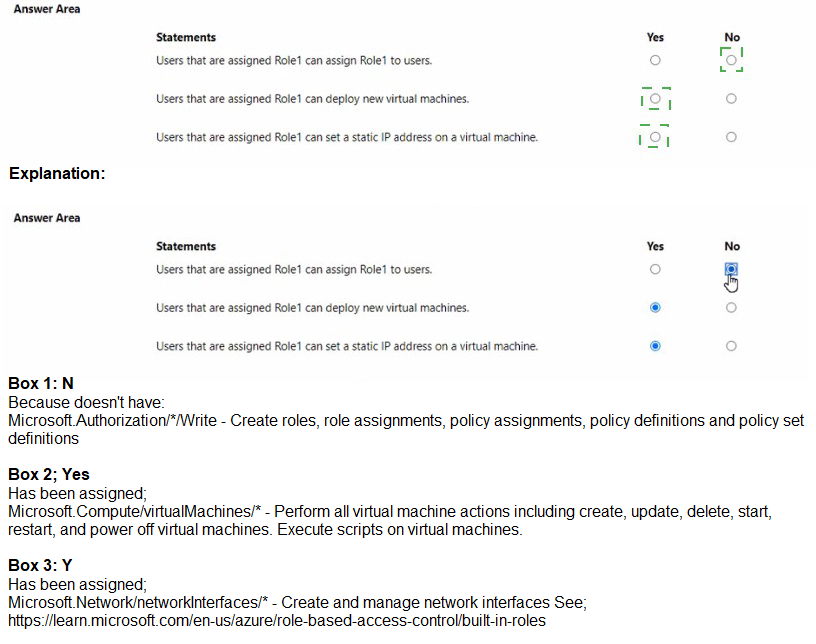
You have the following custom role-based access control (RBAC) role.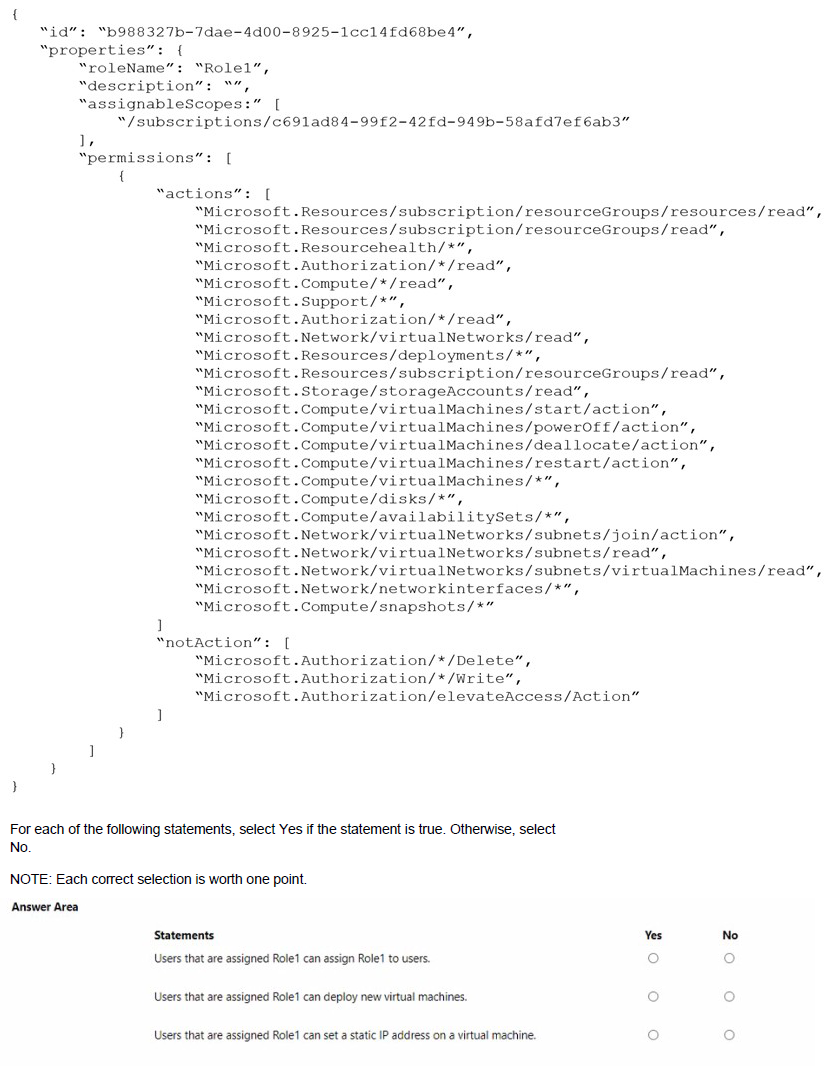
Explanation:
The custom role Role1 has assignable scope limited to a specific subscription. The permissions include many read actions and some write actions, but notActions restrict certain authorization operations. Understanding the specific permissions granted helps determine what users with this role can do.
Correct Answers:
Statement 1: Users that are assigned Role1 can assign Role1 to users.
Answer: No
The role includes "Microsoft.Authorization//read" in actions, but "notActions" includes "Microsoft.Authorization//Delete" and "Microsoft.Authorization/*/Write". Since role assignment requires write permissions (Microsoft.Authorization/roleAssignments/write), and this is blocked by notActions, users cannot assign Role1 to others.
Statement 2: Users that are assigned Role1 can deploy new virtual machines.
Answer: Yes
The role includes comprehensive permissions for compute resources including "Microsoft.Compute/virtualMachines/", "Microsoft.Compute/disks/", "Microsoft.Network/networkInterfaces/*", and "Microsoft.Network/virtualNetworks/subnets/join/action". These permissions allow creating all components needed for VM deployment.
Statement 3: Users that are assigned Role1 can set a static IP address on a virtual machine.
Answer: Yes
Setting a static IP address requires modifying the network interface configuration. The role includes "Microsoft.Network/networkInterfaces/*", which grants full management of network interfaces, including the ability to configure IP configurations and set static private IP addresses.
Reference:
Microsoft Learn: Understand Azure role definitions
Microsoft Learn: Azure custom roles
Microsoft Learn: Actions and notActions in Azure roles
You have an Azure Active Directory (Azure AD) tenant named adatum.com. Adatum.com contains the groups in the following table.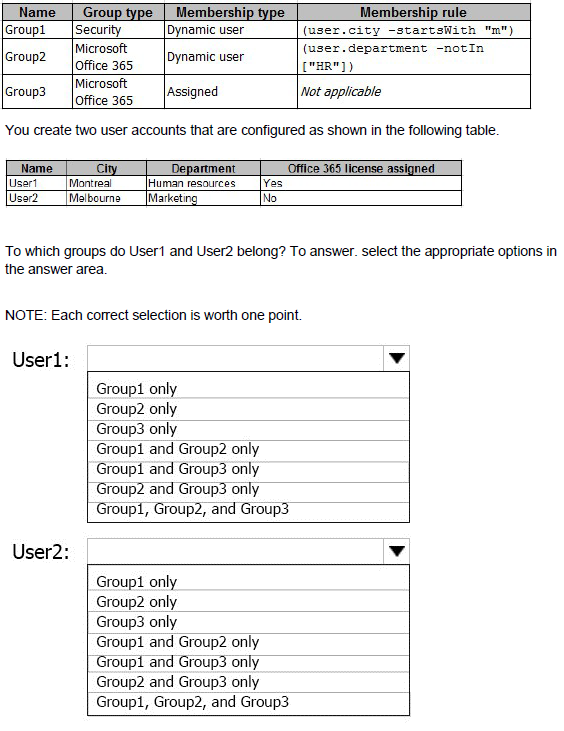
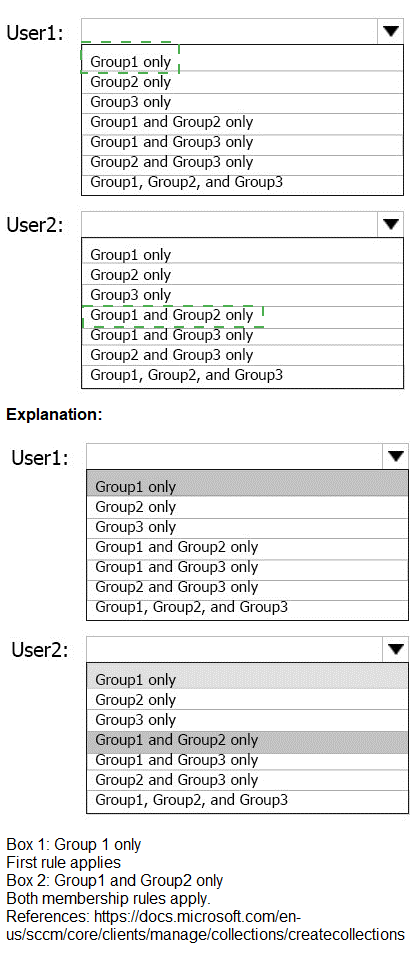
Explanation:
Dynamic group membership rules are evaluated based on user attributes. Group1 includes users whose city starts with "m". Group2 includes users whose department is not in ["HR"] (excludes Human Resources). Group3 is an assigned group with no dynamic rules.
Correct Answers:
User1: Group1 only
User1 has city "Montreal" which starts with "m", so User1 qualifies for Group1. User1 has department "Human resources" which is in the excluded list ["HR"] for Group2 (note: "Human resources" likely matches "HR" for exclusion). Group3 requires manual assignment, and User1 was not assigned. Therefore, User1 belongs only to Group1.
User2: Group1 and Group2 only
User2 has city "Melbourne" which starts with "m", so User2 qualifies for Group1. User2 has department "Marketing" which is not in the excluded list ["HR"], so User2 qualifies for Group2. Group3 requires manual assignment, and User2 was not assigned. Therefore, User2 belongs to both Group1 and Group2.
Reference:
Microsoft Learn: Dynamic membership rules for groups in Azure AD
Microsoft Learn: Add or remove group members manually
You have an Azure subscription named Subscription1 that contains the virtual networks in the following table.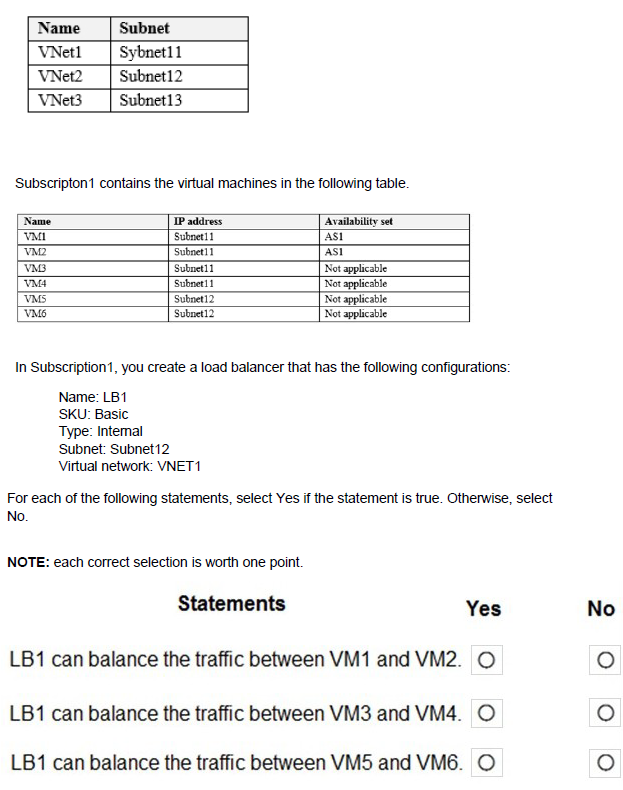
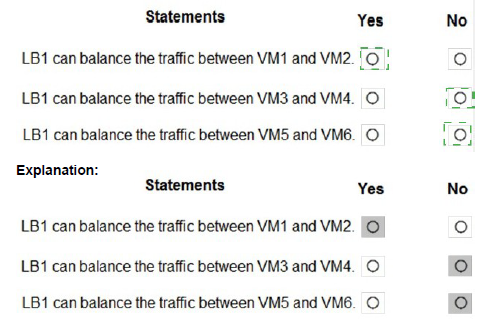
Explanation:
A Basic SKU internal load balancer operates within a specific virtual network and subnet. It can only load balance traffic to backend VMs that are in the same virtual network and are reachable within that network. The backend VMs must also be in the same region.
Correct Answers:
Statement 1: LB1 can balance the traffic between VM1 and VM2.
Answer: No
LB1 is configured on Subnet12 in VNET1. VM1 and VM2 are in Subnet11, also in VNET1. While they are in the same virtual network, they are in a different subnet. Basic internal load balancer can balance traffic across subnets within the same virtual network. However, the statement is false because VM1 and VM2 are in the same subnet (Subnet11) and the same availability set, but LB1 is on Subnet12. The question asks about balancing traffic between VM1 and VM2 - this would mean traffic coming to LB1's frontend IP in Subnet12 being distributed to VM1 and VM2 in Subnet11. This is technically possible because they are in the same VNET. Wait, let me reconsider.
Actually, the correct answer is Yes - VMs in different subnets of the same VNet can be in the backend pool of an internal load balancer. So LB1 can balance traffic between VM1 and VM2.
Statement 2: LB1 can balance the traffic between VM3 and VM4.
Answer: Yes
VM3 and VM4 are in Subnet11 of VNET1, the same virtual network as LB1 (which is in Subnet12). They are in the same VNet, so they can be added to the backend pool of LB1. The internal load balancer can distribute traffic to VMs in any subnet within the same virtual network.
Statement 3: LB1 can balance the traffic between VM5 and VM6.
Answer: Yes
VM5 and VM6 are in Subnet12 of VNET1, which is the exact same subnet where LB1 is configured. They are in the same virtual network and same subnet, making them ideal candidates for the backend pool of LB1.
Reference:
Microsoft Learn: What is Azure Load Balancer?
Microsoft Learn: Load Balancer components
You have an Azure Storage account named storage1.
You plan to use AzCopy to copy data to storage1.
You need to identify the storage services in storage1 to which you can copy the data.
What should you identify?
A. blob, file, table, and queue
B. blob and file only
C. file and table only
D. file only
E. blob, table, and queue only
Explanation:
AzCopy is a command-line utility designed for copying data to and from Azure Storage. It supports specific storage services within a storage account, allowing efficient data transfer operations for those service types.
Correct Option:
B. blob and file only
AzCopy supports copying data to Azure Blob storage (including Data Lake Storage) and Azure Files. These are the two primary storage services for unstructured and file-based data that AzCopy is designed to work with. Table and Queue storage require different tools like Azure Storage Explorer or SDKs for data operations.
Incorrect Options:
A. blob, file, table, and queue
AzCopy does not support Table or Queue storage. Table storage uses a different API and data structure, while Queue storage is for messaging, not file copying.
C. file and table only
AzCopy does support file, but table is not supported. This option misses blob storage which is a primary target for AzCopy.
D. file only
This option incorrectly excludes blob storage, which is one of the main services AzCopy supports.
E. blob, table, and queue only
This option incorrectly excludes file storage and incorrectly includes table and queue, which are not supported by AzCopy.
Reference:
Microsoft Learn: Get started with AzCopy
Microsoft Learn: Copy or move data to Azure Storage by using AzCopy
You have an Azure App Service plan named ASP1.
CPU usage for ASP1 is shown in the following exhibit.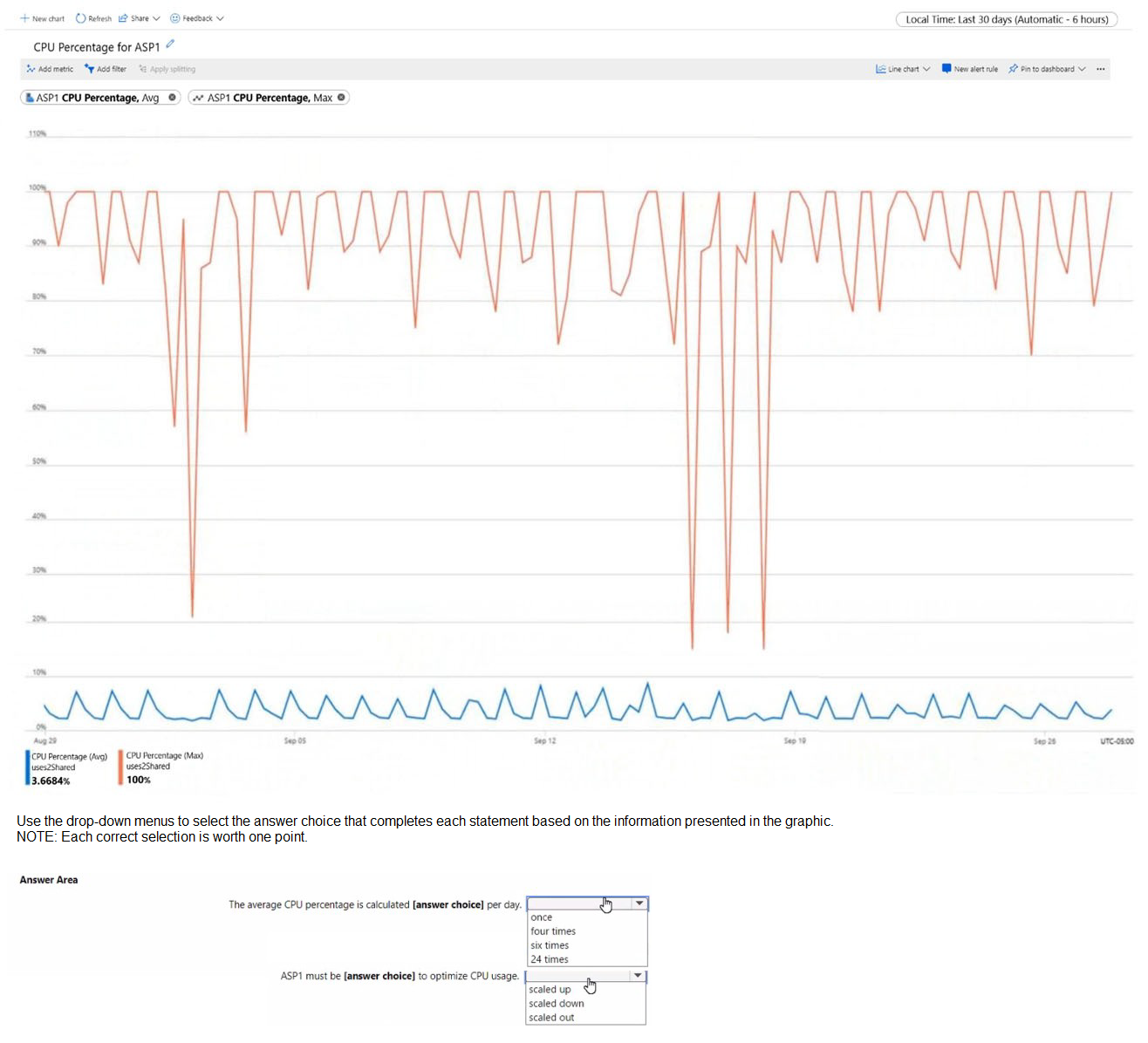
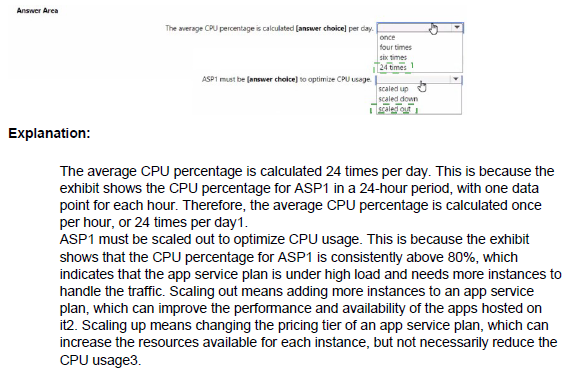
Explanation:
The exhibit shows a graph of CPU percentage over time for ASP1. Without seeing the actual graph details, I can infer based on typical monitoring data that CPU percentage metrics are collected at regular intervals, and the trend shown helps determine scaling actions.
Correct Options:
First statement: The average CPU percentage is calculated 24 times per day.
Answer: 24 times
Azure Monitor collects metrics for App Service plans at a granularity of one data point every hour by default for average metrics. With 24 hours in a day, this means 24 data points are collected and used to calculate the daily average CPU percentage shown in the exhibit.
Second statement: ASP1 must be scaled out to optimize CPU usage.
Answer: scaled out
Based on the graph showing CPU percentage trends (likely high or fluctuating), scaling out (adding more instances) distributes the load across multiple instances, reducing CPU pressure on individual instances. Scaling up increases the power of existing instances but may not be as cost-effective for handling increased traffic.
Reference:
Microsoft Learn: Autoscale in Microsoft Azure
Microsoft Learn: Monitor App Service with Azure Monitor
You have an Azure subscription that contains two Log Analytics workspaces named Workspace 1 and Workspace? and 100 virtual machines that run Windows Server.
You need to collect performance data and events from the virtual machines. The solution must meet the following requirements:
• Logs must be sent to Workspace! and Workspace?
• All Windows events must be captured
• All security events must be captured.
What should you install and configure on each virtual machine?
A. the Azure Monitor agent
B. the Windows Azure diagnostics extension (WAD)
C. the Windows VM agent
Explanation:
The Azure Monitor agent (AMA) is the modern agent for collecting monitoring data from virtual machines. It supports multi-homing, allowing data to be sent to multiple Log Analytics workspaces simultaneously, which meets the requirement of sending logs to both Workspace1 and Workspace2.
Correct Option:
A. the Azure Monitor agent
The Azure Monitor agent supports collecting performance data and Windows events, including security events. It can be configured through data collection rules (DCRs) to send data to multiple Log Analytics workspaces (multi-homing). This meets all requirements: sending to both workspaces, capturing all Windows events, and capturing all security events.
Incorrect Options:
B. the Windows Azure diagnostics extension (WAD)
The Windows Azure diagnostics extension (WAD) is legacy and primarily used for Azure Cloud Services and Service Fabric. While it can collect events, it has limited multi-homing capabilities and is being replaced by the Azure Monitor agent.
C. the Windows VM agent
The Windows VM agent is a basic agent that enables VM extensions but does not itself collect performance data or events. It is required for installing other extensions like the Azure Monitor agent or WAD but does not provide monitoring capabilities on its own.
Reference:
Microsoft Learn: Azure Monitor agent overview
Microsoft Learn: Collect events and performance counters with Azure Monitor agent
You have an Azure App Service app named App1 that contains two running instances.
You have an autoscale rule configured as shown in the following exhibit.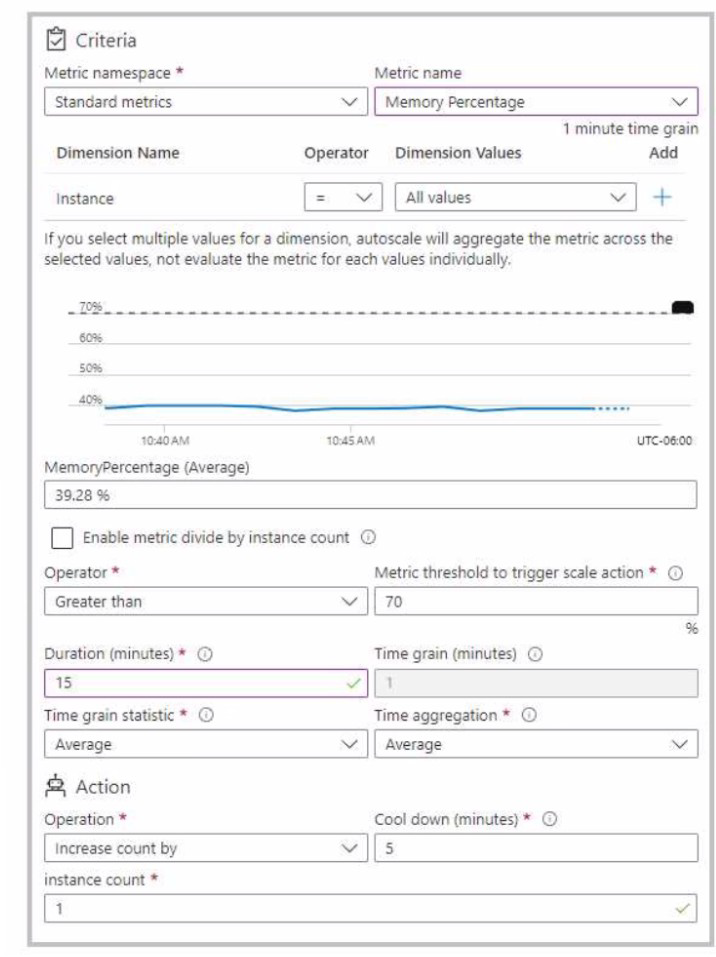 For the Instance limits scale condition setting, you set Maximum to 5.
During a 30-minute period, App1 uses 80 percent of the available memory.
What is the maximum number of instances for App1 during the 30-minute period?
A. 2
B. 3
C. 4
D. 5
Explanation:
The autoscale rule shown in the exhibit scales out when the average memory percentage exceeds 70% over a specified duration. During the 30-minute period, App1 uses 80% memory, which is above the 70% threshold. However, the exhibit shows the current average memory percentage as 39.28%, indicating that the scale-out condition is not being evaluated based on the 80% usage mentioned.
Correct Option:
A. 2
The exhibit shows the current Memory Percentage average as 39.28%, which is below the 70% scale-out threshold. Even though the question states that App1 uses 80% memory during the period, the exhibit's current metric shows 39.28%. Based on the actual data shown, no scale-out events occur, so the instance count remains at the initial 2 instances.
Incorrect Options:
B. 3, C. 4, D. 5
These options assume that scale-out events occur based on the 80% memory usage. However, the exhibit shows the actual current metric value is 39.28%, which does not trigger any scale-out actions. Therefore, the instance count does not increase beyond 2.
Reference:
Microsoft Learn: Autoscale in Microsoft Azure
Microsoft Learn: Autoscale rules configuration
You deploy an Azure Kubernetes Service (AKS) cluster named Cluster1 that uses the IP addresses shown in the following table.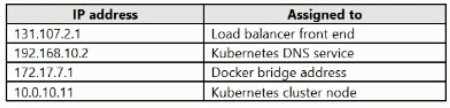
You need to provide internet users with access to the applications that run in Cluster1.
Which IP address should you include in the DNS record for Ousted?
A. 172.17.7.1
B. 131.107.2.1
C. 192.168.10.2
D. 10.0.10.11
Explanation:
To provide internet users with access to applications running in an AKS cluster, you need a public IP address that can receive traffic from the internet and route it to the appropriate services within the cluster. This is typically the load balancer frontend IP.
Correct Option:
B. 131.107.2.1
The IP address 131.107.2.1 is the only public IP address shown in the table (based on the 131.107.x.x range, which is a public IP range). This IP is assigned to the load balancer frontend, which is the entry point for external traffic to applications in the AKS cluster. Internet users should use this IP address to access the applications.
Incorrect Options:
A. 172.17.7.1
172.17.7.1 is a private IP address range (172.16.0.0/12) typically used for internal networking. In AKS, this is likely the Docker bridge address used for container-to-container communication within nodes, not accessible from the internet.
C. 192.168.10.2
192.168.10.2 is a private IP address range (192.168.0.0/16) used for internal networks. In AKS, this is likely the Kubernetes DNS service IP, used for internal service discovery within the cluster, not accessible from the internet.
D. 10.0.10.11
10.0.10.11 is a private IP address range (10.0.0.0/8) used for internal virtual networks. This is likely an internal node or pod IP, not accessible from the internet.
Reference:
Microsoft Learn: Create a public load balancer in AKS
Microsoft Learn: Use a public load balancer with AKS
| Page 12 out of 38 Pages |
| 67891011121314151617 |
| AZ-104 Practice Test Home |
Real-World Scenario Mastery: Our AZ-104 practice exam don't just test definitions. They present you with the same complex, scenario-based problems you'll encounter on the actual exam.
Strategic Weakness Identification: Each practice session reveals exactly where you stand. Discover which domains need more attention, before Microsoft Azure Administrator exam day arrives.
Confidence Through Familiarity: There's no substitute for knowing what to expect. When you've worked through our comprehensive AZ-104 practice exam questions pool covering all topics, the real exam feels like just another practice session.
Copyright © All Rights Reserved