
Topic 6: Misc. Questions
Note: This question is part of a series of questions that present the same scenario. Each question in the series contains a unique solution that might meet the stated goals. Some question sets might have more than one correct solution, while others might not have a correct solution.
After you answer a question in this section, you will NOT be able to return to it. As a result, these questions will not appear in the review screen.
You have an Azure Active Directory (Azure AD) tenant named Adatum and an Azure Subscription named Subscription1. Adatum contains a group named Developers.
Subscription1 contains a resource group named Dev.
You need to provide the Developers group with the ability to create Azure logic apps in the Dev resource group.
Solution: On Dev, you assign the Logic App Operator role to the Developers group.
Does this meet the goal?
A. Yes
B. No
Explanation:
The Logic App Operator role allows read, enable, and disable operations on logic apps, but does not grant permission to create new logic apps. Creating logic apps requires write permissions on the logic app resource.
Correct Option:
B. No
The Logic App Operator role does not include write permissions needed to create logic apps. To allow the Developers group to create logic apps, you need to assign a role with create permissions, such as Logic App Contributor or Contributor at the Dev resource group scope.
Incorrect Options:
A. Yes
This option is incorrect because the Logic App Operator role is designed for managing existing logic apps (viewing, enabling, disabling), not for creating new ones. The developers would be unable to create logic apps with this role assignment.
Reference:
Microsoft Learn: Azure built-in roles - Logic App Operator
Microsoft Learn: Azure built-in roles - Logic App Contributor
You have a Microsoft 365 tenant and an Azure Active Directory (Azure AD) tenant named contoso.com.
You plan to grant three users named User1, User2, and User3 access to a temporary Microsoft SharePoint document library named Library1.
You need to create groups for the users. The solution must ensure that the groups are deleted automatically after 180 days.
Which two groups should you create? Each correct answer presents a complete solution.
NOTE: Each correct selection is worth one point.
A. a Security group that uses the Assigned membership type
B. an Office 365 group that uses the Assigned membership type
C. an Office 365 group that uses the Dynamic User membership type
D. a Security group that uses the Dynamic User membership type
E. a Security group that uses the Dynamic Device membership type
Explanation:
To automatically delete groups after a specific period, you need groups that support expiration policies. Microsoft 365 groups have built-in expiration policies that can automatically delete groups after a specified number of days. Security groups do not support expiration policies natively.
Correct Options:
B. an Office 365 group that uses the Assigned membership type
Office 365 groups support expiration policies that automatically delete groups after a specified number of days (e.g., 180 days). Assigned membership groups can have their members manually added, and the group will still be subject to expiration policies.
C. an Office 365 group that uses the Dynamic User membership type
Office 365 groups with dynamic membership also support expiration policies. Members are added automatically based on rules, and the group will still expire and be deleted after the configured number of days.
Incorrect Options:
A. a Security group that uses the Assigned membership type
Security groups do not have built-in expiration policies. They cannot be automatically deleted after a specific period without custom automation solutions.
D. a Security group that uses the Dynamic User membership type
Security groups with dynamic membership still do not support expiration policies. They are managed through Azure AD dynamic membership rules but lack automatic deletion capabilities.
E. a Security group that uses the Dynamic Device membership type
Dynamic device membership groups are for organizing devices, not users. They do not support expiration policies and are not designed for granting access to SharePoint libraries.
Reference:
Microsoft Learn: Expiration policy for Microsoft 365 groups
Microsoft Learn: Create a dynamic group in Azure AD
You have an Azure DNS zone named adatum.com. You need to delegate a subdomain named research.adatum.com to a different DNS server in Azure. What should you do?
A. Create an PTR record named research in the adatum.com zone.
B. Create an NS record named research in the adatum.com zone.
C. Modify the SOA record of adatum.com.
D. Create an A record named *. research in the adatum.com zone
Explanation:
To delegate a subdomain to a different DNS server in Azure, you must create Name Server (NS) records in the parent zone pointing to the authoritative DNS servers for the subdomain. This tells the DNS system that the subdomain is managed separately.
Correct Option:
B. Create an NS record named research in the adatum.com zone.
Creating an NS record named "research" in the adatum.com zone delegates the research.adatum.com subdomain to the DNS servers specified in the NS record. The NS record should contain the names of the Azure DNS servers that will be authoritative for the research.adatum.com zone.
Incorrect Options:
A. Create an PTR record named research in the adatum.com zone.
PTR records are used for reverse DNS lookups (IP address to hostname). They do not delegate subdomains and are not used for DNS delegation.
C. Modify the SOA record of adatum.com.
The Start of Authority (SOA) record contains administrative information about the zone but does not delegate subdomains. Modifying it would not create a delegation for research.adatum.com.
*D. Create an A record named .research in the adatum.com zone.
A wildcard A record would resolve all subdomains of research.adatum.com to an IP address but would not delegate the subdomain to another DNS server. This does not achieve delegation.
Reference:
Microsoft Learn: Delegate a subdomain to Azure DNS
Microsoft Learn: DNS record types supported by Azure DNS
You have an Azure subscription that contains the resource groups shown in the following table.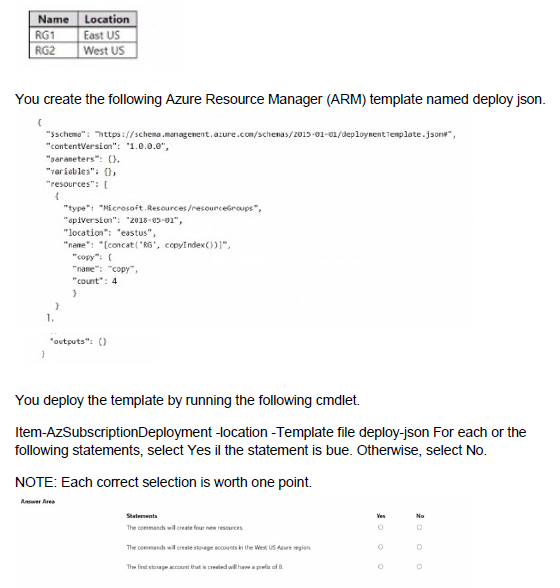
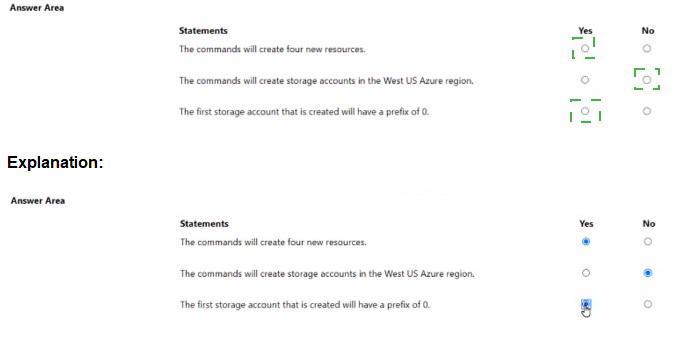
Explanation:
The ARM template attempts to create resource groups using a copy loop with count set to 4. However, there are syntax errors in the template including misspelled resource type, incorrect concat function usage, and the deployment command has syntax issues.
Correct Answers:
Statement 1: The commands will create four new resources.
Answer: No
The template contains multiple syntax errors that would cause deployment failure. The resource type "Microsoft.RecurrenceResources/resourceGroups" is incorrect (should be "Microsoft.Resources/resourceGroups"). The name property uses incorrect concat syntax. Additionally, resource groups must be created at subscription scope, but the deployment command "Item-AzSubscriptionDeployment" is not a valid cmdlet. Due to these errors, no resources will be created.
Statement 2: The commands will create storage accounts in the West US Azure region.
Answer: No
The template does not define any storage accounts at all. It attempts to create resource groups, not storage accounts. The location specified in the template is "eastus," not West US. Even if the template were corrected, it would create resource groups, not storage accounts.
Statement 3: The first storage account that is created will have a prefix of 0.
Answer: No
The template does not create storage accounts. It attempts to create resource groups. Even if it were creating storage accounts, the copyIndex() function starts at 0 by default, meaning the first resource would have index 0, but this applies to the resource name, not a prefix. However, since the template is for resource groups and contains errors, no storage accounts are created.
Reference:
Microsoft Learn: ARM template structure and syntax
Microsoft Learn: Resource group deployments with ARM templates
Microsoft Learn: Copy resources in ARM templates
You have an Azure subscription that contains an Azure Storage account named storageaccount1.
You export storageaccount1 as an Azure Resource Manager template. The template contains the following sections.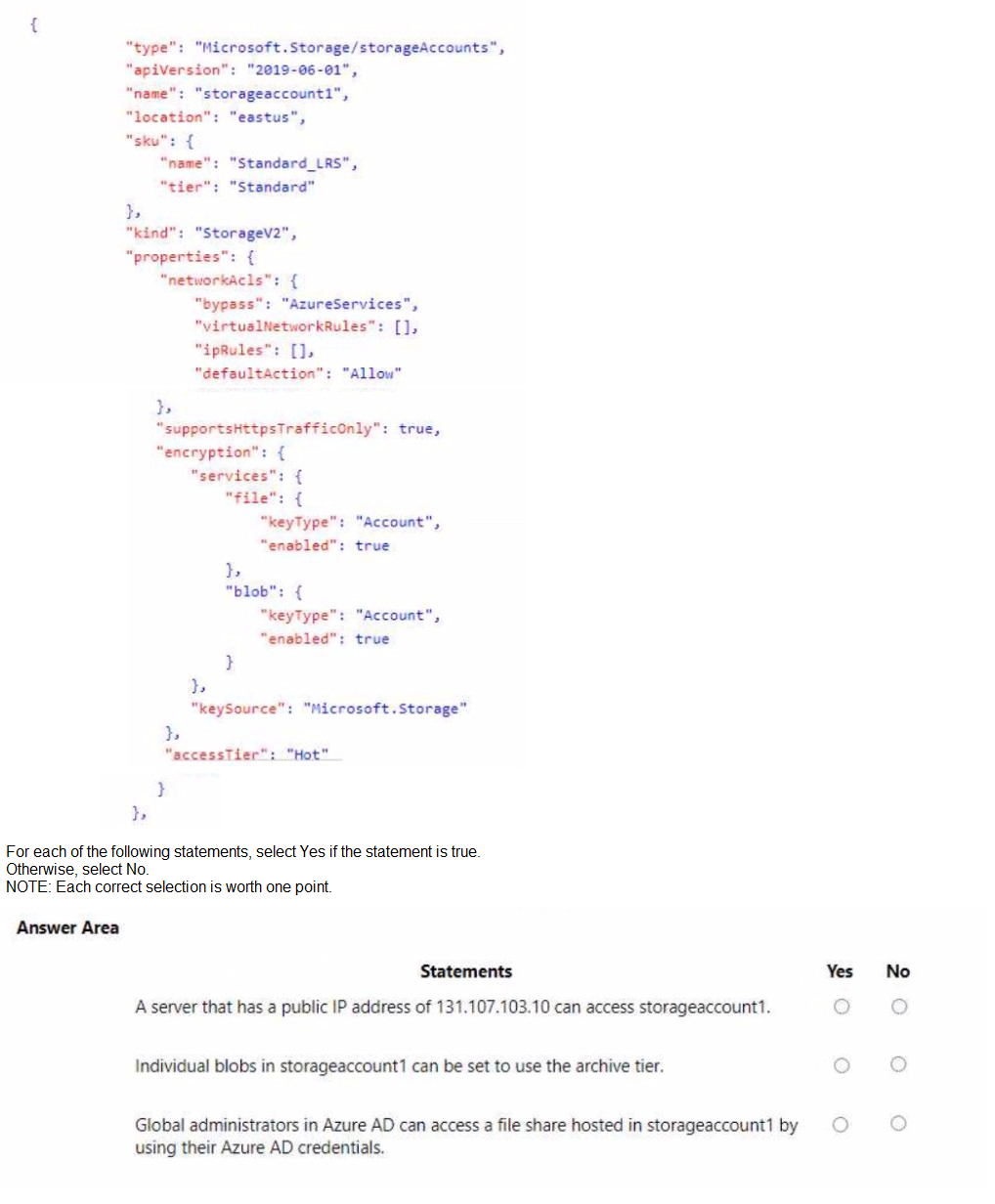
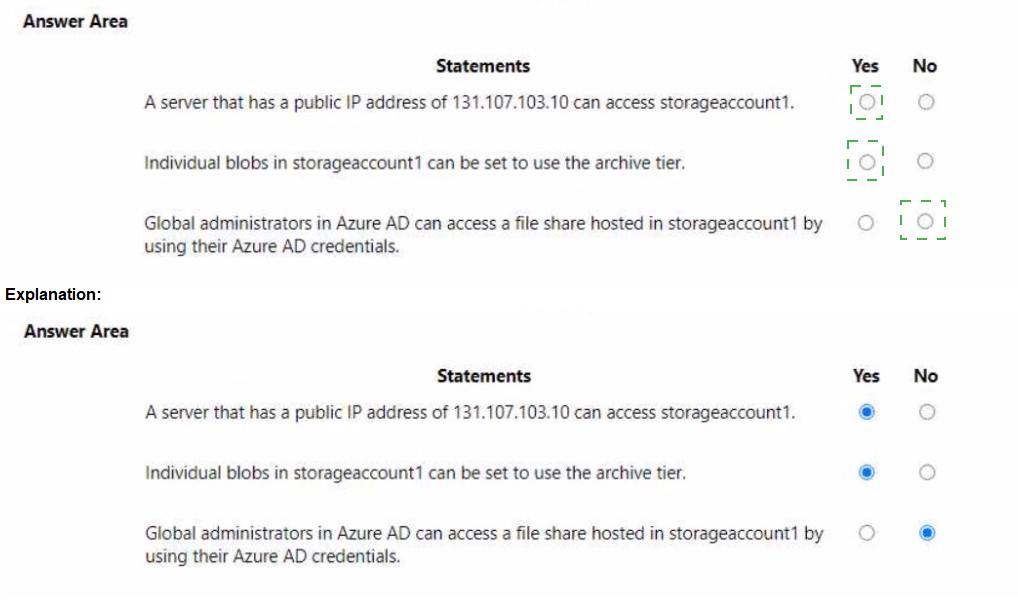
Explanation:
The ARM template shows storageaccount1 configured with network ACLs allowing all traffic (defaultAction: Allow), Standard_LRS SKU, StorageV2 kind, and encryption settings. Understanding these configurations helps determine access capabilities.
Correct Answers:
Statement 1: A server that has a public IP address of 131.107.103.10 can access storageaccount1.
Answer: Yes
The networkAcls configuration shows "defaultAction": "Allow" with empty ipRules and virtualNetworkRules. This means the storage account accepts traffic from all networks, including any public IP address. The server with IP 131.107.103.10 can access the storage account.
Statement 2: Individual blobs in storageaccount1 can be set to use the archive tier.
Answer: Yes
storageaccount1 is a StorageV2 (general-purpose v2) account, which supports all access tiers including Hot, Cool, Cold, and Archive. Individual blobs can be set to the Archive tier for lowest-cost storage, regardless of the account-level accessTier set to Hot.
Statement 3: Global administrators in Azure AD can access a file share hosted in storageaccount1 by using their Azure AD credentials.
Answer: No
The template does not show any configuration for identity-based authentication. By default, Azure Files requires either storage account keys or a configured identity provider (Azure AD DS or on-premises AD) for authentication. Global administrators cannot access file shares using their Azure AD credentials without additional configuration.
Reference:
Microsoft Learn: Configure Azure Storage firewalls and virtual networks
Microsoft Learn: Access tiers for blob data
Microsoft Learn: Overview of Azure Files identity-based authentication
You plan to move a distributed on-premises app named App1 to an Azure subscription.
After the planned move, App1 will be hosted on several Azure virtual machines.
You need to ensure that App1 always runs on at least eight virtual machines during planned Azure maintenance.
What should you create?
A. one virtual machine scale set that has 10 virtual machines instances
B. one Availability Set that has three fault domains and one update domain
C. one Availability Set that has 10 update domains and one fault domain
D. one virtual machine scale set that has 12 virtual machines instances
Explanation:
During planned Azure maintenance, virtual machines in the same update domain are rebooted together. To ensure at least eight VMs remain running during maintenance, you need enough update domains so that rebooting one update domain leaves at least eight VMs operational.
Correct Option:
D. one virtual machine scale set that has 12 virtual machines instances
A virtual machine scale set with 12 instances and the default of 5 update domains means each update domain contains approximately 2-3 VMs. When Azure performs maintenance on one update domain (rebooting 2-3 VMs), the remaining 9-10 VMs continue running, exceeding the requirement of at least eight running VMs.
Incorrect Options:
A. one virtual machine scale set that has 10 virtual machines instances
With 10 instances across 5 update domains, each domain has 2 VMs. During maintenance, 2 VMs reboot leaving 8 running, which meets the minimum but provides no buffer. Scale sets distribute instances evenly, so this would exactly meet the requirement but with no safety margin.
B. one Availability Set that has three fault domains and one update domain
With only one update domain, all VMs would reboot simultaneously during planned maintenance, leaving zero VMs running. This fails the requirement completely.
C. one Availability Set that has 10 update domains and one fault domain
While 10 update domains provide good distribution, the single fault domain creates a single point of failure for unplanned hardware failures. For planned maintenance, this would work, but the question specifically asks about planned maintenance.
Reference:
Microsoft Learn: Manage the availability of Windows virtual machines in Azure
Microsoft Learn: Virtual machine scale sets overview
You have two Azure virtual machines as shown in the following table.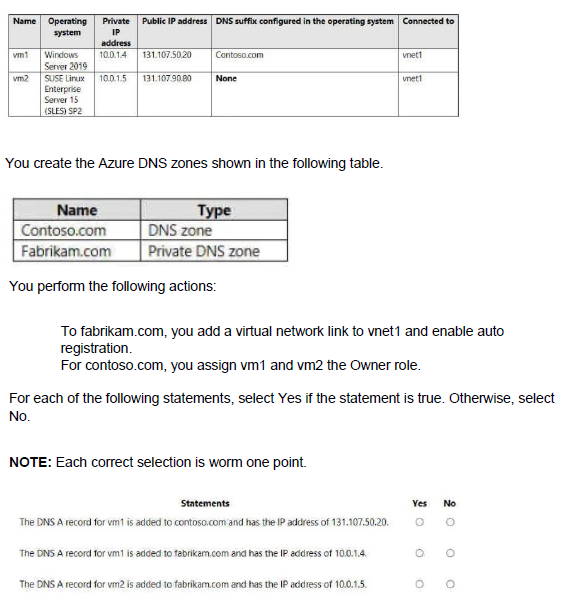
Explanation:
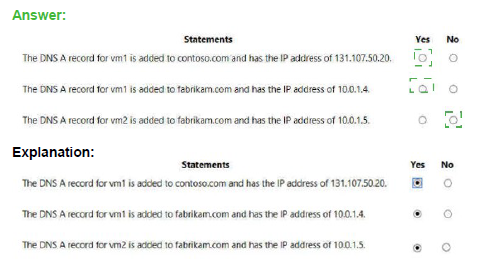
Azure Private DNS zones with auto-registration automatically create A records for virtual machines using their private IP addresses. Public DNS zones require manual record creation. The DNS suffix configured in the VM operating system does not affect Azure DNS zone record creation.
Correct Answers:
Statement 1: The DNS A record for vm1 is added to contoso.com and has the IP address of 131.107.50.20.
Answer: No
Contoso.com is a public DNS zone. No automatic registration occurs for public DNS zones. Records must be manually created. Even if a record existed, it would typically use the private IP for internal resolution or would need to be manually configured for the public IP. The Owner role assignment does not create records automatically.
Statement 2: The DNS A record for vm1 is added to fabrikam.com and has the IP address of 10.0.1.4.
Answer: Yes
Fabrikam.com is a private DNS zone with a virtual network link to vnet1 and auto-registration enabled. When auto-registration is enabled, Azure automatically creates A records for VMs in the linked virtual network using their private IP addresses. vm1's private IP is 10.0.1.4, so an A record is created with that IP.
Statement 3: The DNS A record for vm2 is added to fabrikam.com and has the IP address of 10.0.1.
Answer: Yes
The same auto-registration applies to vm2. Even though vm2 runs Linux and has no DNS suffix configured, auto-registration still creates an A record for it in the fabrikam.com private DNS zone using its private IP address 10.0.1.5. Auto-registration works for all VMs regardless of operating system or DNS suffix settings.
Reference:
Microsoft Learn: What is Azure Private DNS?
Microsoft Learn: Auto-registration in Azure Private DNS
You plan to use Azure Network Watcher to perform the following tasks:
Task1: Identify a security rule that prevents a network packet from reaching an Azure virtual machine
Task2: Validate outbound connectivity from an Azure virtual machine to an external host
Which feature should you use for each task? To answer, select the appropriate options in the answer area.
NOTE: Each correct selection is worth one point.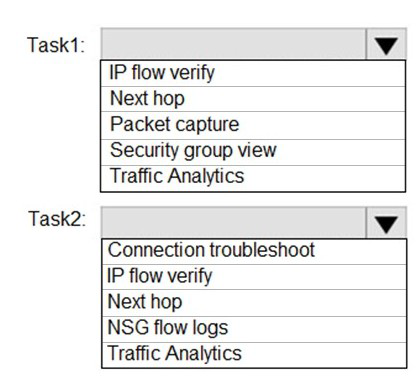
Explanation:
Azure Network Watcher provides several diagnostic tools for troubleshooting network issues in Azure. Task 1 requires identifying the exact NSG security rule (or rules) that is blocking a specific packet from reaching a VM — this needs a tool that simulates the packet flow and returns the allowing/denying rule name along with the NSG it belongs to. Task 2 requires validating actual outbound connectivity from a VM to an external destination (IP/FQDN), checking whether the connection succeeds, including routing, NSG, firewall, and endpoint behavior — this needs a real connectivity test rather than just a rule simulation.
Correct Option:
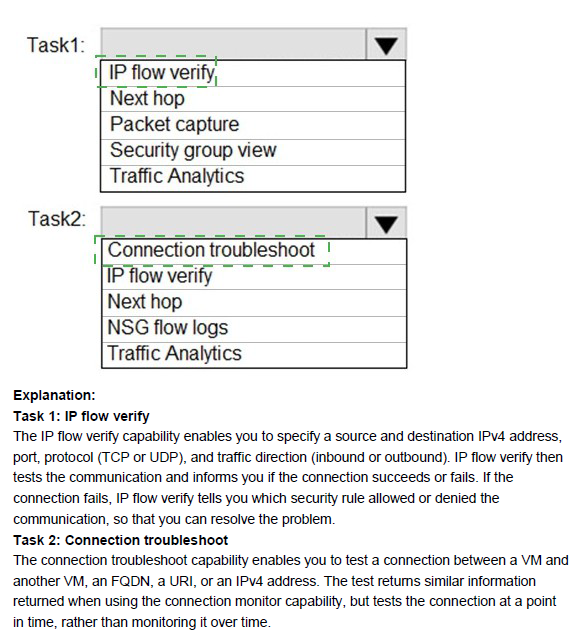
Task 1: IP flow verify
IP flow verify simulates a specific packet (source IP/port, destination IP/port, protocol, direction) from/to a VM NIC and checks it against all applied NSG rules (and effective admin rules). When the packet is denied, it explicitly returns the name of the security rule that blocked it and the associated Network Security Group — exactly what is needed to identify the preventing security rule.
Task 2: Connection troubleshoot
Connection troubleshoot performs an actual end-to-end connectivity test from the source VM to the target external host (IP address or FQDN). It attempts the connection (TCP handshake or equivalent), reports success/failure, round-trip time, the path taken (next hops), and any blocking component (NSG, route, firewall). This is the correct tool for validating real outbound reachability to an external destination.
Incorrect Option:
Next hop — Shows the next routing hop for traffic from a VM to a destination IP, useful for routing issues, but does not evaluate NSG rules or perform actual connectivity tests.
Packet capture — Captures live packets on a VM NIC for later analysis, but does not proactively simulate/test a packet or directly identify which rule blocked it.
Security group view (Effective security rules) — Displays all NSG rules applied to a NIC/subnet, but does not simulate a specific packet flow or tell you which rule blocks a particular connection — manual review is required.
NSG flow logs — Logs historical allowed/denied traffic that passed through NSGs; useful for forensics, but not for real-time simulation or immediate outbound connectivity validation.
Traffic Analytics — Provides aggregated insights, visualizations, and top talkers from NSG flow logs over time — not suitable for identifying a specific blocking rule or testing live outbound connectivity.
Reference:
Azure Network Watcher overview
IP flow verify overview
Connection troubleshoot overview
You have an Azure subscription that contains a virtual machine named VM1.
To VM1, you plan to add a 1-TB data disk that meets the following requirements:
• Provides data resiliency in the event of a datacenter outage.
• Provides the lowest latency and the highest performance.
• Ensures that no data loss occurs if a host fails.
You need to recommend which type of storage and host caching to configure for the new data disk.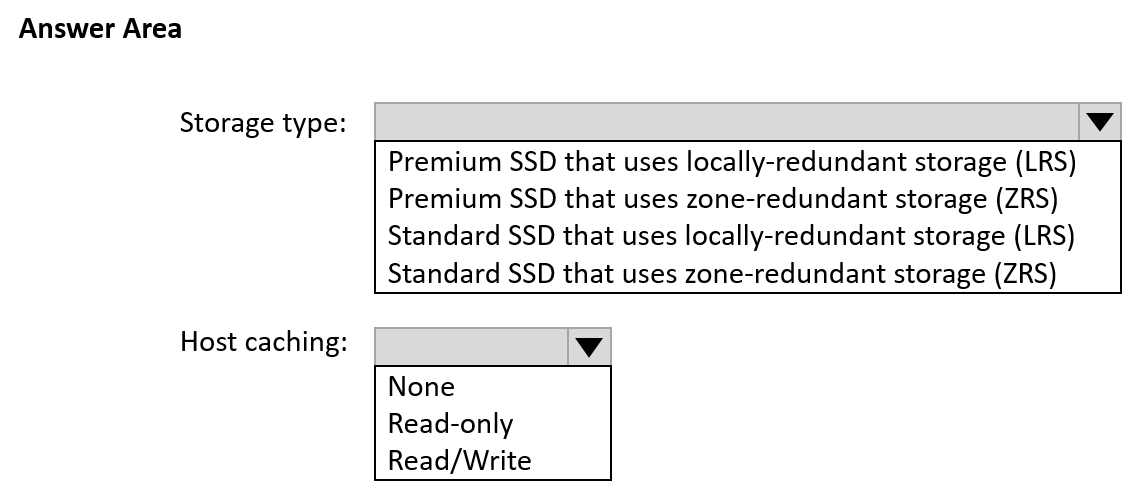
Explanation:
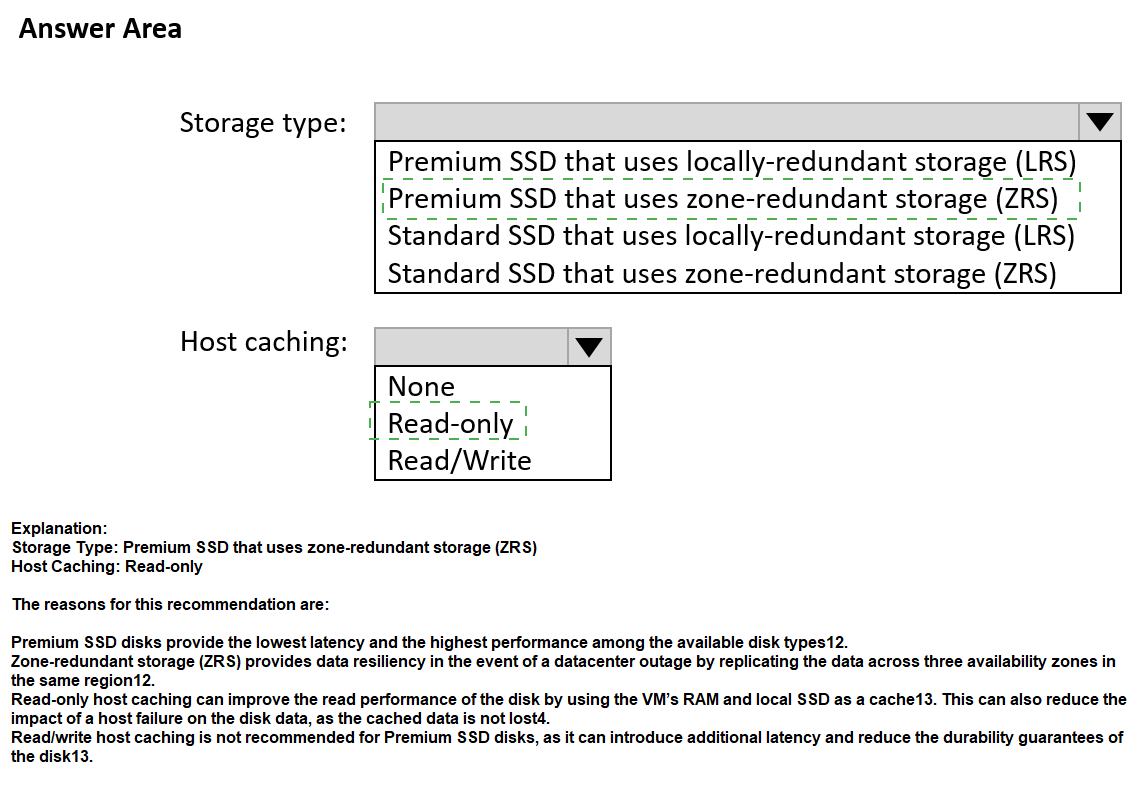
The requirements specify data resiliency during a datacenter outage (requires zone-redundant storage), lowest latency and highest performance (requires Premium SSD), and no data loss on host failure (requires Read/Write caching for writes to be acknowledged only after persistence).
Correct Options:
Storage type: Premium SSD that uses zone-redundant storage (ZRS)
Premium SSD provides the lowest latency and highest performance for Azure managed disks. Zone-redundant storage (ZRS) replicates data synchronously across three availability zones in the same region, providing data resiliency even if an entire datacenter fails. This meets both performance and datacenter outage requirements.
Host caching: Read/Write
Read/Write host caching ensures that writes are cached on the host but are only acknowledged to the application after they are persisted to storage. This provides both performance benefits from caching and ensures no data loss occurs if the host fails because writes are durably stored before acknowledgment.
Incorrect Options:
Storage type:
Premium SSD with LRS: Provides performance but lacks datacenter outage resilience (LRS is single-datacenter only).
Standard SSD with LRS/ZRS: Standard SSD provides lower performance than Premium SSD, failing the lowest latency requirement.
Host caching:
None: Provides no performance benefit from caching, failing to meet the highest performance requirement.
Read-only: Only caches reads, not writes. Write performance suffers and write acknowledgment occurs before persistence, risking data loss on host failure.
Reference:
Microsoft Learn: Azure managed disk types
Microsoft Learn: Premium SSD managed disks
Microsoft Learn: Disk caching
You have a Microsoft Entra tenant that contains the groups shown in the following table.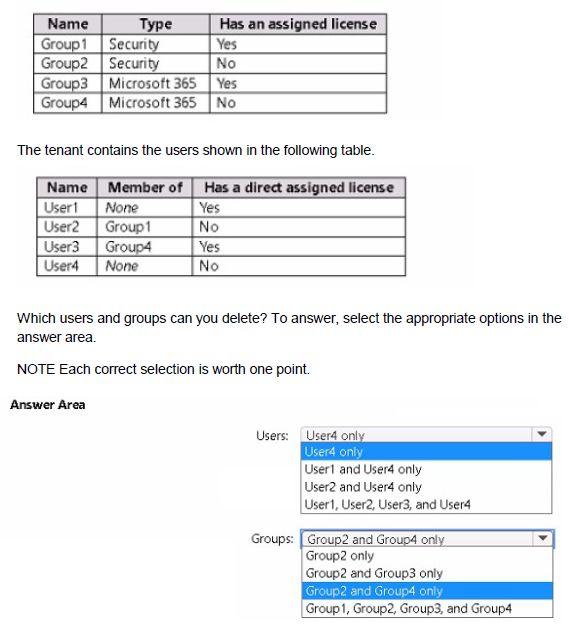
Explanation:
In Microsoft Entra ID (Azure AD), you can delete users and groups that do not have assigned licenses and are not referenced by other dependencies. Users with direct or group-based licenses cannot be deleted until licenses are removed. Groups with assigned licenses cannot be deleted until the license assignment is removed.
Correct Answers:
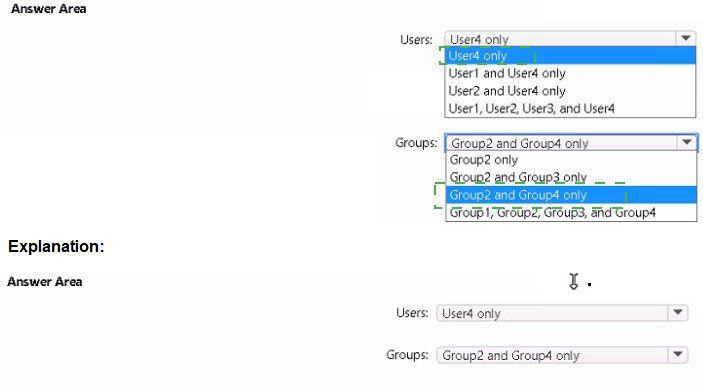
Users: User4 only
User4 has no direct assigned license and is not a member of any group. Users with licenses (User1 direct, User3 direct) cannot be deleted. User2 inherits a license from Group1, so User2 cannot be deleted while Group1 exists with a license. Only User4 has no license and no group memberships, making User4 eligible for deletion.
Groups: Group2 and Group4 only
Group2 is a security group with no assigned license, so it can be deleted. Group4 is a Microsoft 365 group with no assigned license, so it can be deleted. Group1 has an assigned license, so it cannot be deleted. Group3 has an assigned license, so it cannot be deleted.
Incorrect Options:
Users:
User4 only (duplicate option in the list, but correct)
User1 and User4 only: User1 has a direct license and cannot be deleted.
User2 and User4 only: User2 inherits license from Group1 and cannot be deleted.
User1, User2, User3, and User4: User1, User2, and User3 have licenses.
Groups:
Group2 and Group4 only (correct)
Group2 only: Misses Group4 which is also deletable.
Group2 and Group3 only: Group3 has license and cannot be deleted.
Group1, Group2, Group3, and Group4: Group1 and Group3 have licenses.
Reference:
Microsoft Learn: Delete a user in Azure AD
Microsoft Learn: Delete a group in Azure AD
Microsoft Learn: Licensing in Azure AD
Note: This question is part of a series of questions that present the same scenario. Each question in the series contains a unique solution that might meet the stated goals. Some question sets might have more than one correct solution, while others might not have a correct solution.
After you answer a question in this section, you will NOT be able to return to it. As a result, these questions will not appear in the review screen.
You have an Azure subscription that contains 10 virtual networks. The virtual networks are hosted in separate resource groups.
Another administrator plans to create several network security groups (NSGs) in the subscription.
You need to ensure that when an NSG is created, it automatically blocks TCP port 8080 between the virtual networks.
Solution: From the Resource providers blade, you unregister the Microsoft.ClassicNetwork provider.
Does this meet the goal?
A. Yes
B. No
Explanation:
Unregistering the Microsoft.ClassicNetwork provider affects classic deployment model resources only. It has no impact on Azure Resource Manager (ARM) resources like network security groups or the ability to automatically block TCP port 8080 between virtual networks.
Correct Option:
B. No
Unregistering the Microsoft.ClassicNetwork provider does not create any automatic rules for blocking TCP port 8080. The requirement requires a mechanism to automatically apply a rule to new NSGs, such as Azure Policy, not disabling a resource provider. This solution does not address the goal at all.
Incorrect Options:
A. Yes
This option is incorrect because the Microsoft.ClassicNetwork provider relates to classic deployment model resources. Modern NSGs use the Microsoft.Network provider. Unregistering a classic provider has no effect on new NSG creation or automatic rule application.
Reference:
Microsoft Learn: Azure resource providers and types
Microsoft Learn: What is Azure Policy?
You have an Azure subscription named Subscription1. Subscription1 contains the resource groups in the following table.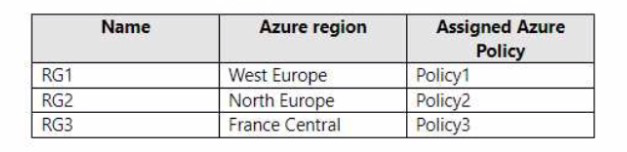
RG1 has a web app named WebApp1. WebApp1 is located in West Europe.
You move WebApp1 to RG2.
What is the effect of the move?
A. The App Service plan for WebApp1 moves to North Europe. Po1icy2 applies to WebApp1.
B. The App Service plan for WebApp1 remains in West Europe. Policy2 applies to WebApp1.
C. The App Service plan for WebApp1 moves to North Europe. Policy1 applies to WebApp1.
D. The App Service plan for WebApp1 remains in West Europe. Policy1 applies to WebApp1.
Explanation:
Moving a web app to a different resource group does not change its region or its App Service plan location. However, the resource group's assigned Azure Policy will apply to all resources within that resource group, including moved resources.
Correct Option:
B. The App Service plan for WebApp1 remains in West Europe. Policy2 applies to WebApp1.
When you move WebApp1 to RG2, the web app itself remains hosted in its original region (West Europe) because the App Service plan determines the region, and moving between resource groups does not change the App Service plan's region. However, RG2 has Policy2 assigned, so after the move, WebApp1 becomes subject to Policy2 instead of Policy1.
Incorrect Options:
A. The App Service plan for WebApp1 moves to North Europe. Policy2 applies to WebApp1.
The App Service plan does not move regions when the web app is moved to a different resource group. The plan remains in West Europe.
C. The App Service plan for WebApp1 moves to North Europe. Policy1 applies to WebApp1.
Both parts of this statement are incorrect. The plan stays in West Europe, and Policy1 no longer applies because WebApp1 is now in RG2 with Policy2.
D. The App Service plan for WebApp1 remains in West Europe. Policy1 applies to WebApp1.
While the plan remains correct, Policy1 no longer applies because WebApp1 is now in RG2, which has Policy2 assigned.
Reference:
Microsoft Learn: Move resources to a new resource group or subscription
Microsoft Learn: What is Azure Policy?
| Page 11 out of 38 Pages |
| 5678910111213141516 |
| AZ-104 Practice Test Home |
Real-World Scenario Mastery: Our AZ-104 practice exam don't just test definitions. They present you with the same complex, scenario-based problems you'll encounter on the actual exam.
Strategic Weakness Identification: Each practice session reveals exactly where you stand. Discover which domains need more attention, before Microsoft Azure Administrator exam day arrives.
Confidence Through Familiarity: There's no substitute for knowing what to expect. When you've worked through our comprehensive AZ-104 practice exam questions pool covering all topics, the real exam feels like just another practice session.
Copyright © All Rights Reserved