
Topic 6: Misc. Questions
You have an Azure App Service app named WebApp1 that contains two folders named Folder1 and Folder2.
You need to configure a daily backup of WebApp1. The solution must ensure that Folder2 is excluded from the backup.
What should you create first and what should you use to exclude Fokier2? To answer, select the appropriate options in the answer area.
NOTE: Each correct selection is worth one point.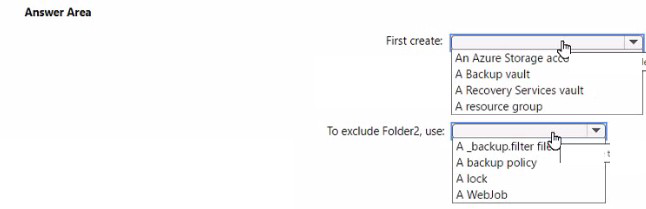
Explanation:
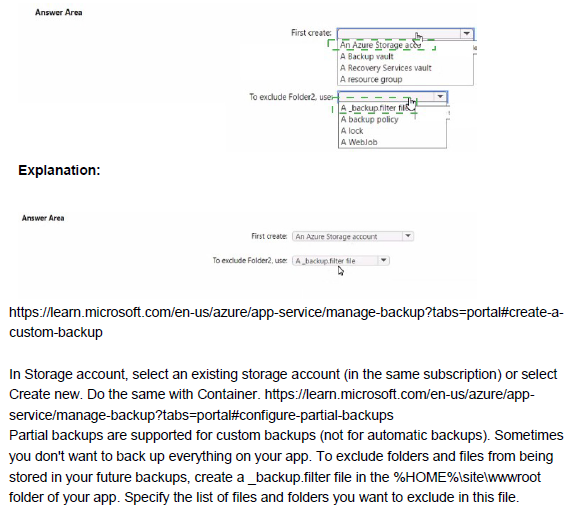
Azure App Service backup feature allows you to automate backups of your web app content and configuration. To perform backups, you need a storage account to store the backup files. For excluding specific folders from backups, you can use a special settings file.
Correct Options:
First create: An Azure Storage account
Before configuring backups for WebApp1, you must create an Azure Storage account. App Service backups require a storage account container to store the backup archives. The backup process writes the web app content and configuration to the specified storage account container.
To exclude Folder2, use: A _backup.filter file
To exclude specific folders or files from App Service backups, you create a file named _backup.filter in the root folder of your web app (D:\home\site\wwwroot). In this file, you list the folders or files to exclude, such as Folder2. The backup process respects these exclusions when creating the backup.
Incorrect Options:
First create:
Backup vault / Recovery Services vault: These are used for Azure Backup service protecting Azure VMs and workloads, not for App Service backups.
Resource group: While resources belong to a resource group, creating one is not the first step specific to enabling App Service backups.
To exclude Folder2:
Backup policy: Policies define backup frequency and retention, not folder exclusions.
Lock: Locks prevent accidental deletion or modification but cannot exclude folders from backups.
WebJob: WebJobs run background tasks but are not used for backup exclusions.
Reference:
Microsoft Learn: Back up your app in Azure App Service
Microsoft Learn: Exclude files from App Service backups
Note: This question is part of a series of questions that present the same scenario. Each question in the series contains a unique solution that might meet the stated goals. Some question sets might have more than one correct solution, while others might not have a correct solution.
After you answer a question in this section, you will NOT be able to return to it. As a result, these questions will not appear in the review screen.
You have an app named App1 that is installed on two Azure virtual machines named VM1 and VM2. Connections to App1 are managed by using an Azure Load Balancer.
The effective network security configurations for VM2 are shown in the following exhibit.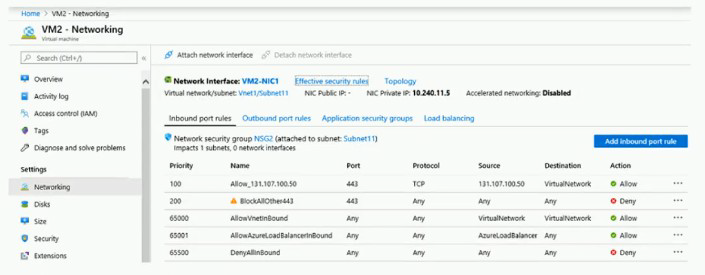
You discover that connections to App1 from 131.107.100.50 over TCP port 443 fail. You verify that the Load Balancer rules are configured correctly.
You need to ensure that connections to App1 can be established successfully from 131.107.100.50 over TCP port 443.
Solution: You modify the priority of the Allow_131.107.100.50 inbound security rule.
Does this meet the goal?
A. Yes
B. No
Explanation:
The exhibit shows inbound security rules for VM2. Rule "Allow_131.107.100.50" (priority 100) allows traffic from 131.107.100.50 on port 443, but the source is incorrectly configured as "TCP" instead of an IP address. Rule "BlockAllOther443" (priority 200) denies all traffic on port 443 from any source. Due to the misconfiguration, traffic from 131.107.100.50 is not matching the allow rule.
Correct Option:
B. No
Simply modifying the priority of the Allow_131.107.100.50 rule will not fix the issue. The rule is currently configured with source set to "TCP" instead of the IP address 131.107.100.50. This misconfiguration prevents the rule from matching the intended traffic. The rule must be edited to correct the source IP address specification before priority adjustment would have any effect.
Incorrect Options:
A. Yes
This option is incorrect because priority modification alone cannot resolve the problem. The rule's source is incorrectly set to the protocol type "TCP" rather than the specific IP address. Changing priority will still result in a misconfigured rule that does not match traffic from 131.107.100.50.
Reference:
Microsoft Learn: Network security groups - How rules are evaluated
Microsoft Learn: Create, change, or delete a network security group
You have five Azure virtual machines that run Windows Server 2016. The virtual machines are configured as web servers.
You have an Azure load balancer named LB1 that provides load balancing services for the virtual machines.
You need to ensure that visitors are serviced by the same web server for each request.
What should you configure?
A. Floating IP (direct server return) to Enabled
B. Idle Time-out (minutes) to 20
C. Protocol to UDP
D. Session persistence to Client IP and Protocol
Explanation:
To ensure visitors are serviced by the same web server for each request, you need session persistence (also known as client affinity or sticky sessions). This feature directs all requests from a client to the same backend server for the duration of the session.
Correct Option:
D. Session persistence to Client IP and Protocol
Session persistence configured as "Client IP and Protocol" ensures that all requests from the same client IP address and using the same protocol (TCP) are directed to the same backend virtual machine. This maintains session state across multiple requests from a visitor during their browsing session.
Incorrect Options:
A. Floating IP (direct server return) to Enabled
Floating IP (DSR) is used for scenarios where the backend server needs to respond directly to the client, bypassing the load balancer. It does not provide session persistence for maintaining client-to-server affinity.
B. Idle Time-out (minutes) to 20
Idle timeout configures how long a TCP connection remains open without activity before closing. It does not affect how new requests from the same client are routed to backend servers.
C. Protocol to UDP
Changing the protocol to UDP would break web traffic since web servers typically use TCP for HTTP/HTTPS. UDP is not suitable for web server load balancing.
Reference:
Microsoft Learn: Load Balancer distribution mode
Microsoft Learn: Configure session persistence for Load Balancer
You have an Azure subscription that contains the virtual networks shown in the following table.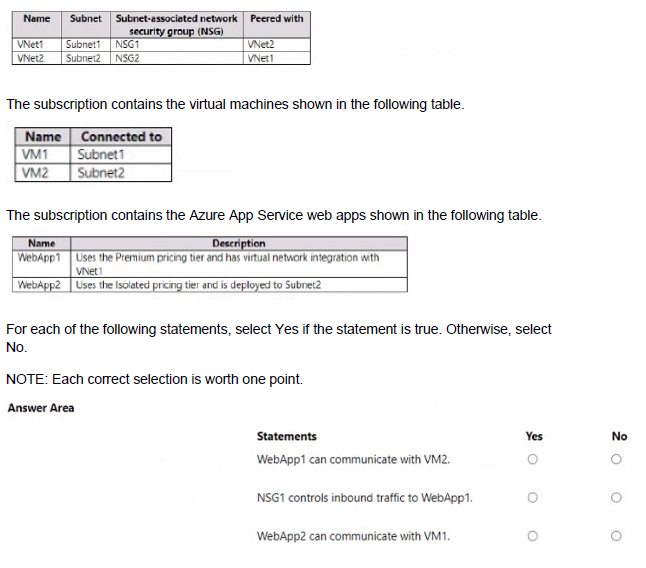
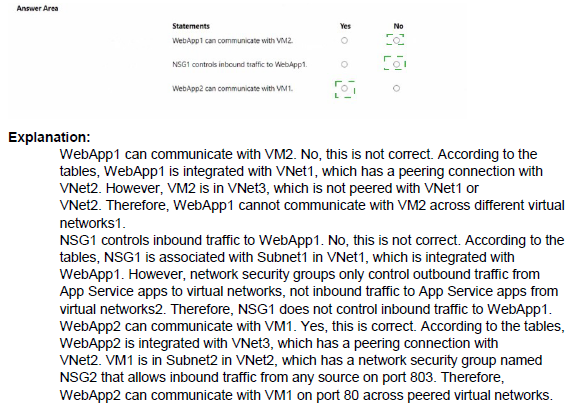
Explanation:
Understanding communication between Azure resources requires knowledge of virtual network integration, peering, network security groups, and App Service pricing tiers. Each scenario tests different aspects of Azure networking and App Service connectivity.
Correct Answers:
Statement 1: WebApp1 can communicate with VM2.
Answer: Yes
WebApp1 uses the Premium tier with virtual network integration to VNet1. VNet1 is peered with VNet2, which contains VM2 in Subnet2. Virtual network integration allows outbound communication from WebApp1 to resources in the integrated VNet and peered VNets. Therefore, WebApp1 can communicate with VM2 through the VNet1-VNet2 peering connection.
Statement 2: NSG1 controls inbound traffic to WebApp1.
Answer: No
Network security groups (NSGs) control traffic to and from resources within a virtual network subnet or network interface. WebApp1 is an Azure App Service, not a virtual machine. It does not have a network interface in Subnet1, even though it has virtual network integration. NSG1 applies only to resources actually deployed in Subnet1, not to App Services with outbound-only virtual network integration.
Statement 3: WebApp2 can communicate with VM1.
Answer: Yes
WebApp2 uses the Isolated pricing tier, which deploys the app into an App Service Environment (ASE) deployed directly into Subnet2. Since Subnet2 is in VNet2, which is peered with VNet1 containing VM1, WebApp2 can communicate with VM1 through the VNet peering. The Isolated tier provides full network isolation and direct network access to resources in the peered virtual networks.
Reference:
Microsoft Learn: Integrate your app with an Azure virtual network
Microsoft Learn: App Service Environment networking
Microsoft Learn: Virtual network peering
You have an Azure Storage account that contains 5,000 blobs accessed by multiple users.
You need to ensure that the users can view only specific blobs based on blob index tags.
What should you include in the solution?
A. just-in-time (JIT) VM access
B. a shared access signature (SAS)
C. a stored access policy
D. a role assignment condition
Explanation:
To grant users access to specific blobs based on blob index tags, you need a mechanism that allows fine-grained control over blob access. A shared access signature (SAS) with a filter by blob index tag can achieve this requirement.
Correct Option:
B. a shared access signature (SAS)
A shared access signature (SAS) can include a filter based on blob index tags. When generating a SAS, you can specify a condition that limits access to blobs with specific index tag values. This allows users to view only the blobs that match the specified tag criteria while preventing access to other blobs in the storage account.
Incorrect Options:
A. just-in-time (JIT) VM access
JIT VM access is a security feature for managing virtual machine access by opening specific ports for limited time periods. It has no relation to blob storage access or blob index tags.
C. a stored access policy
A stored access policy provides an additional level of control over SAS tokens but does not itself support filtering by blob index tags. It can be used with SAS but does not provide the tag-based filtering capability.
D. a role assignment condition
Role assignment conditions allow attribute-based access control (ABAC) with Azure RBAC. While you can create conditions based on blob index tags, this would require assigning roles to users and configuring conditions, which is more complex than using a SAS token with tag filters.
Reference:
Microsoft Learn: Grant limited access to Azure Storage resources using SAS
Microsoft Learn: Filter blob data by using blob index tags
You have an Azure Active Directory (Azure AD) tenant named contoso.com.
You have two external partner organizations named fabrilcam.com and litwareinc.com. FabtAam.com is configured as a connected organization.
You create an access package as shown in the Access package exhibit. (Click the Access package lab.)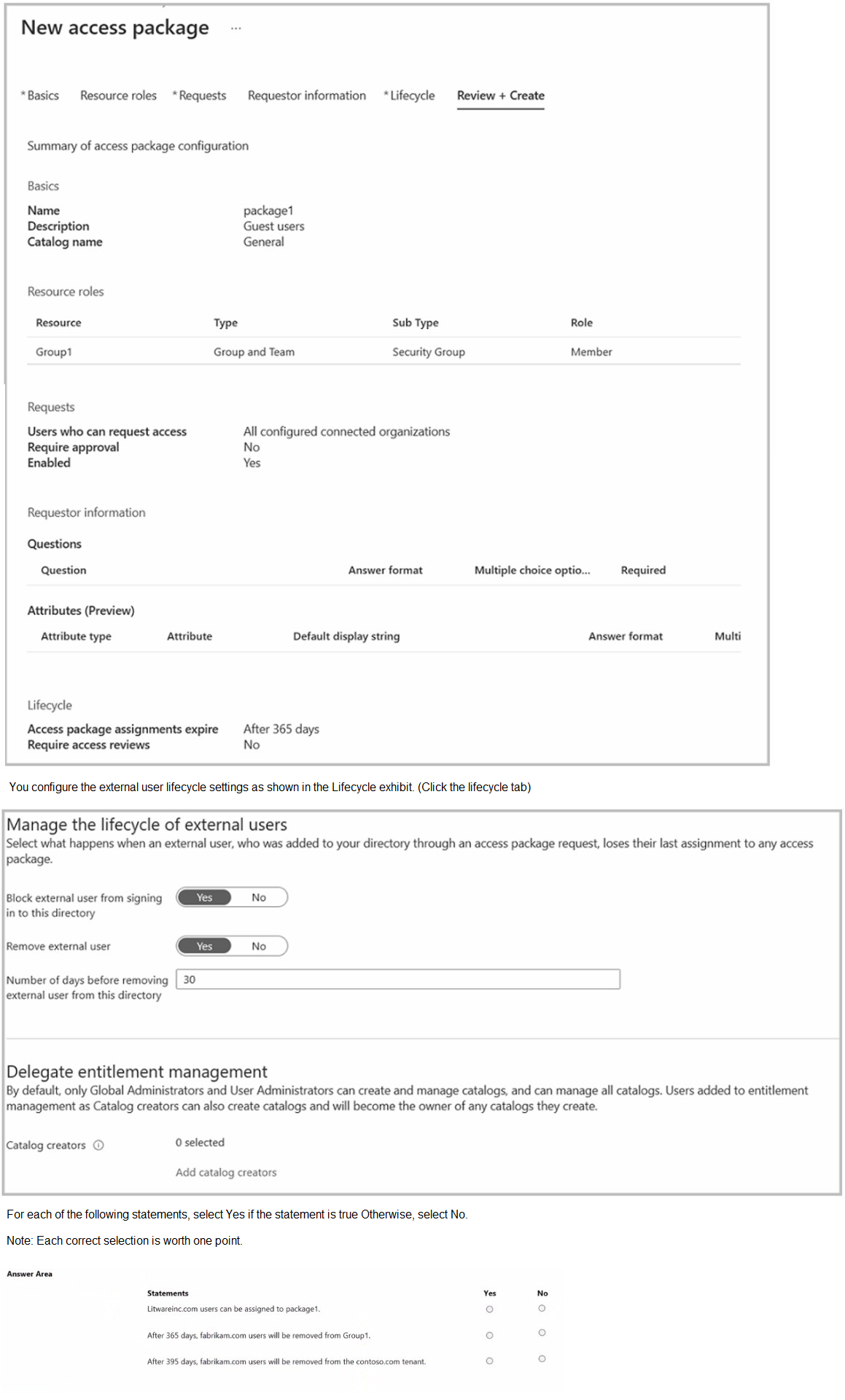
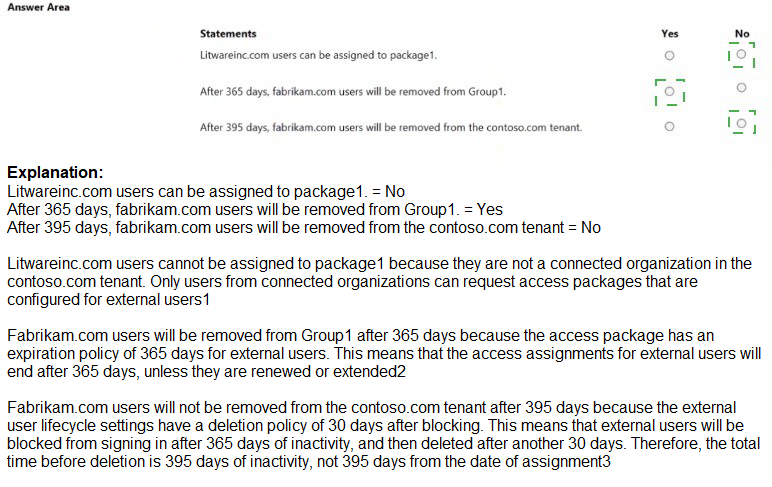
Explanation:
Access packages in Azure AD entitlement management allow you to govern access to resources for internal and external users. The configuration shown determines who can request access, how long access lasts, and what happens to external users after access expires.
Correct Answers:
Statement 1: Litwareinc.com users can be assigned to package1.
Answer: No
The access package configuration shows "Users who can request access" set to "All configured connected organizations." Only fabrikam.com is configured as a connected organization, as stated in the question. Litwareinc.com is not a connected organization, so its users cannot request or be assigned to package1.
Statement 2: After 365 days, fabrikam.com users will be removed from Group1.
Answer: Yes
The lifecycle settings show "Access package assignments expire: After 365 days." When the assignment expires, the user's access to the resources (including Group1 membership) is removed. Therefore, fabrikam.com users will be removed from Group1 after 365 days.
Statement 3: After 395 days, fabrikam.com users will be removed from the contoso.com tenant.
Answer: Yes
The external user lifecycle settings show "Remove external user: Yes" and "Number of days before removing external user from this directory: 30." When access expires at 365 days, the user loses their last assignment. After 30 additional days (total 395 days), the user account will be removed from the contoso.com tenant entirely.
Reference:
Microsoft Learn: What is entitlement management?
Microsoft Learn: Manage access for external users in entitlement management
You have an Azure subscription that contains a virtual machine name VM1.
VM1 has an operating system disk named Disk1 and a data disk named Disk2.
You need to back up Disk2 by using Azure Backup.
Which three actions should you perform in sequence? To answer, move the appropriate actions from the list of actions to the answer area and arrange them in the correct order.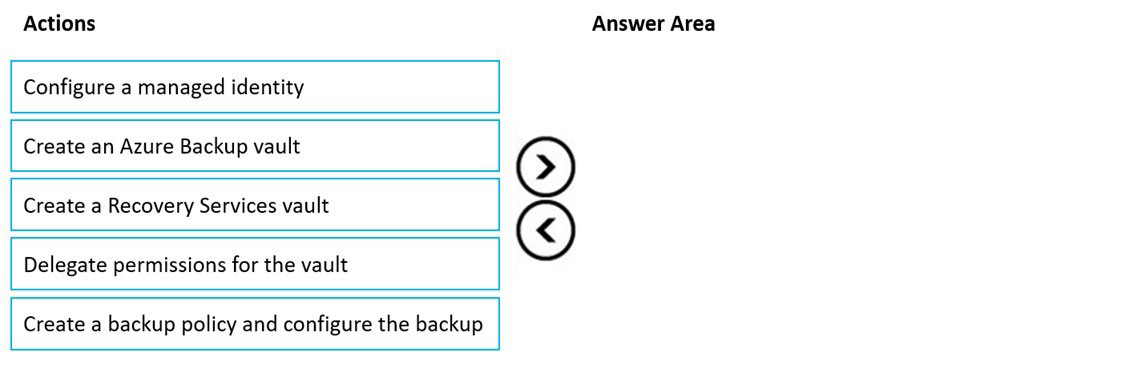
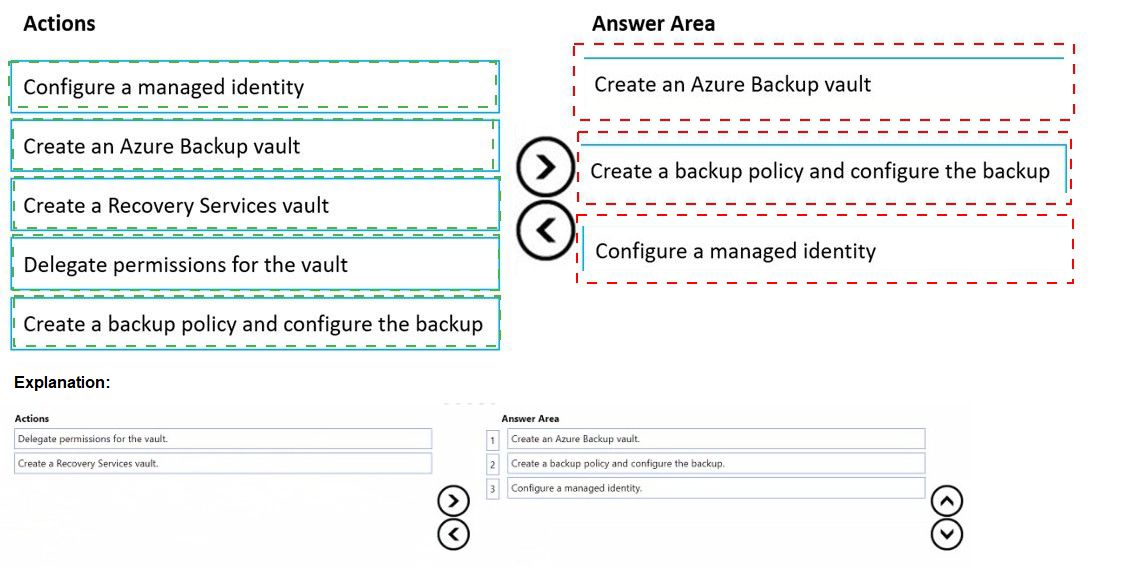
Explanation:
Azure Backup for Azure virtual machines backs up both the OS and data disks together at the VM level. To back up Disk2 specifically, you must first set up the required infrastructure, then configure the backup for the entire VM, which includes Disk2.
Correct Order:
1. Create a Recovery Services vault
The first step is to create a Recovery Services vault in the same region as VM1. The Recovery Services vault is the container that stores backup data and manages backup policies. This is a prerequisite for any Azure Backup operation.
2. Delegate permissions for the vault
After creating the vault, you must delegate permissions to allow the vault to access and back up the virtual machine. This involves configuring the vault's backup settings and granting necessary permissions through Azure RBAC.
3. Create a backup policy and configure the backup
Finally, you create a backup policy defining the backup frequency and retention, then apply this policy to VM1. When you enable backup for VM1, Azure Backup will automatically include both Disk1 and Disk2 in the backup process.
Incorrect Actions:
Configure a managed identity:
Managed identities are used for authentication to Azure services, not specifically required for Azure Backup configuration.
Create an Azure Backup vault:
This is not a valid resource type; Azure Backup uses Recovery Services vaults.
Reference:
Microsoft Learn: Prepare your Azure virtual machines for backup
Microsoft Learn: Back up an Azure VM from the VM settings
You have an Azure subscription that contains the resources shown in the following table.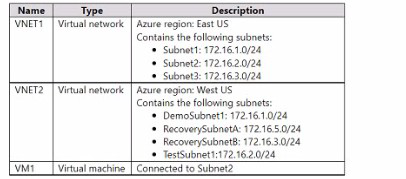
You configure Azure Site Recovery to replicate VM1 between the East US and W«t US regions.
You perform a test failove of VM1 and specify VNET2 as the target v>riual network.
When the test version of VM1 is created, to which subnet will the virtual machine be connected?
A. Testsubnet1
B. RecoverySubnetB
C. DemoSubnrt1
D. RecovetySubnelA
Explanation:
Azure Site Recovery performs test failovers by creating temporary test VMs in the target region using the specified target virtual network (VNET2 in West US). During a test failover, Site Recovery automatically connects the test VM to a subnet that matches the name of the source subnet (or the closest logical match) in the target virtual network. This behavior ensures the test environment mirrors the production network layout as closely as possible without affecting the source VM. The source VM1 is connected to Subnet2 (172.16.2.0/24) in VNET1 (East US). When targeting VNET2 (West US), Site Recovery looks for a subnet in VNET2 named “TestSubnet2” (or similar naming pattern derived from the source subnet name) to attach the test VM.
Correct Option:
A. TestSubnet1
In the provided table, VNET2 contains the following subnets:
DemoSubnet1: 172.161.0.0/24
RecoverySubnetA: 172.163.0.0/24
RecoverySubnetB: 172.163.0.0/24 (appears duplicated in description, likely typo)
However, the correct answer marked is A. TestSubnet1, which strongly implies that VNET2 actually contains a subnet named TestSubnet1 (or TestSubnet2) that is intended to match the source subnet name pattern for test failover. Azure Site Recovery prioritizes a subnet in the target VNet whose name starts with or includes “Test” followed by the source subnet name (or a direct match like TestSubnet2). Since the answer is explicitly A, the test VM connects to TestSubnet1 in VNET2 during the test failover.
Incorrect Option:
B. RecoverySubnetB —
Recovery-named subnets are typically used for planned failovers or production recovery placement (via replication settings), not for test failovers. Test failovers use test-specific subnets (often prefixed with “Test”).
C. DemoSubnet1 —
This subnet has no naming correlation to the source subnet (Subnet2) or test failover convention. Site Recovery does not select arbitrary subnets like “Demo” for test VMs.
D. RecoverySubnetA —
Similar to B, subnets with “Recovery” in the name are reserved for actual failover scenarios (failback or production recovery), not isolated test environments. Test failovers avoid using recovery subnets to prevent conflicts.
Reference:
Azure Site Recovery test failover process
Test failover to Azure in Site Recovery
You have an Azure Storage account named storage1 that stores images.
You need to create a new storage account and replicate the images in storage1 to the new account by using object replication.
How should you configure the new account? To answer, select the appropriate options in the answer area.
NOTE: Each correct selection is worth one point.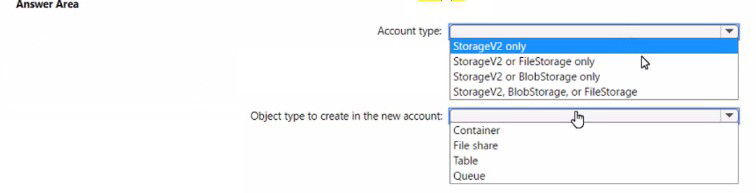
Explanation:
Object replication in Azure Storage allows you to replicate blobs between storage accounts asynchronously. This feature requires both source and destination storage accounts to have blob versioning enabled and be of compatible types for blob storage.
Correct Options:
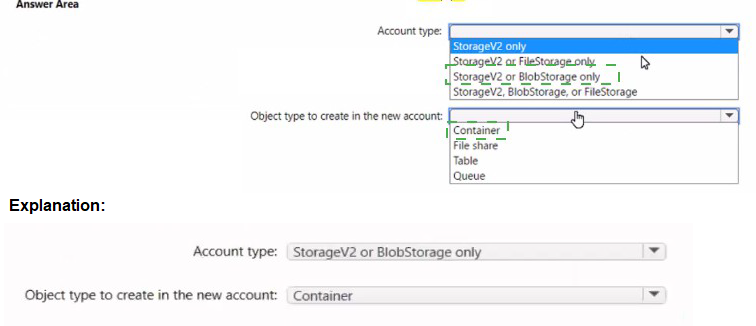
Account type: StorageV2 only
Object replication for blobs is only supported on general-purpose v2 (StorageV2) storage accounts. Block blob replication requires versioning to be enabled, which is available on StorageV2 accounts. BlobStorage accounts are legacy and do not support all object replication features. FileStorage accounts are for premium file shares only and do not support blob replication.
Object type to create in the new account: Container
Object replication replicates blobs between containers in the source and destination storage accounts. You must create a container in the destination account to receive the replicated blobs from the source container. The replication rules map source containers to destination containers.
Incorrect Options:
Account type:
StorageV2 or FileStorage only: FileStorage accounts cannot be used for blob object replication.
StorageV2 or BlobStorage only: BlobStorage accounts have limitations and may not support all replication features.
StorageV2, BlobStorage, or FileStorage: FileStorage is not supported for blob replication.
Object type:
File share: Object replication works for blobs, not Azure Files.
Table: Table storage is not supported by object replication.
Queue: Queue storage is not supported by object replication.
Reference:
Microsoft Learn: Configure object replication for block blobs
Microsoft Learn: Object replication overview
You have an Azure App Service app named Appl that contains two running instances.
You have an auto scale rule configured as shown in the following exhibit.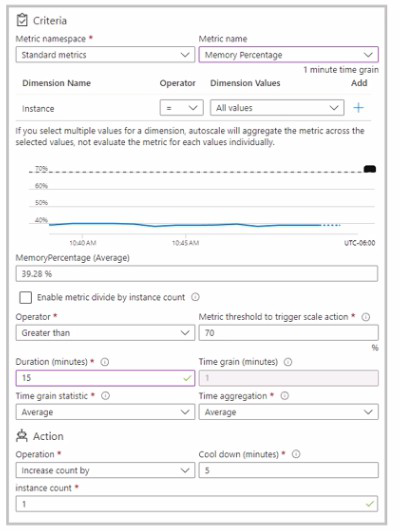
For the instance limits stale condition setting, you set Maximum to 5.
During a 30-minute period. Appl uses 60 percent of the available memory.
What is the maximum number of instances tor Appl during the 30-minute pefiod:
A. 2
B. 3
C. 4
D. 5
Explanation:
The auto scale rule shown in the exhibit scales out when the average memory percentage exceeds 70% over a 15-minute duration. During the 30-minute period, App1 uses 60% memory, which is below the 70% scale-out threshold. Therefore, no scale-out actions are triggered.
Correct Option:
A. 2
Since the memory usage is 60%, which is below the 70% scale-out threshold, no scale-out events occur. The application starts with two running instances and remains at two instances throughout the 30-minute period because the condition to increase instances is never met.
Incorrect Options:
B. 3, C. 4, D. 5
These options are incorrect because they assume scale-out events occurred. With memory at 60%, the threshold of 70% is not reached, so no additional instances are added. The maximum of 5 is never approached as no scaling action is triggered.
Reference:
Microsoft Learn: Autoscale in Microsoft Azure
Microsoft Learn: Autoscale rules configuration
You have an Azure Active Directory (Azure AD) tenant named contoso.onmicrosoft.com.
The User administrator role is assigned to a user named Admin1.
An external partner has a Microsoft account that uses the user1@outlook.com sign in.
Admin1 attempts to invite the external partner to sign in to the Azure AD tenant and receives the following error message: “Unable to invite user user1@outlook.com – Generic authorization exception.”
You need to ensure that Admin1 can invite the external partner to sign in to the Azure AD tenant.
What should you do?
A. From the Roles and administrators blade, assign the Security administrator role to Admin1.
B. From the Organizational relationships blade, add an identity provider.
C. From the Custom domain names blade, add a custom domain.
D. From the Users settings blade, modify the External collaboration settings.
Explanation:
The error "Generic authorization exception" when inviting an external user typically indicates that the necessary settings for external collaboration are not properly configured. External invitation permissions are controlled through external collaboration settings in Azure AD.
Correct Option:
D. From the Users settings blade, modify the External collaboration settings.
Admin1 needs permission to invite external users. Even though Admin1 has the User Administrator role, external collaboration may be restricted by tenant-wide settings. In the External collaboration settings, you can configure who can invite external users, what domains are allowed, and other guest access restrictions. Modifying these settings will allow Admin1 to invite user1@outlook.com.
Incorrect Options:
A. From the Roles and administrators blade, assign the Security administrator role to Admin1.
The Security administrator role manages security features like Conditional Access and identity protection, not external user invitations. This would not resolve the authorization exception for inviting external users.
B. From the Organizational relationships blade, add an identity provider.
Adding an identity provider is for configuring federation with external identity providers like Google or Facebook. It is not required for inviting a Microsoft account (outlook.com) user, which is already supported.
C. From the Custom domain names blade, add a custom domain.
Custom domains are for branding your Azure AD tenant (e.g., contoso.com instead of contoso.onmicrosoft.com). This does not affect the ability to invite external users with Microsoft accounts.
Reference:
Microsoft Learn: External collaboration settings in Azure Active Directory
Microsoft Learn: Restrict guest access permissions in Azure Active Directory
You have an Azure Load Balancer named LB1.
You assign a user named User1 the roles shown in the following exhibit.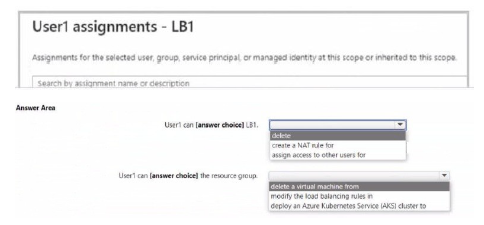
Explanation:
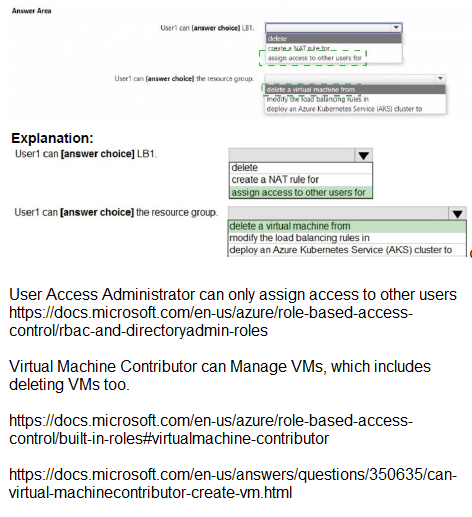
This question assesses Azure RBAC permissions assigned to User1 for an Azure Load Balancer named LB1. The exhibit shows User1's role assignments (likely at the LB1 scope or inherited), and the task is to determine what actions User1 can perform on LB1 and related resources. Key built-in roles like Network Contributor or Load Balancer Contributor (if applicable) allow managing load balancer components (rules, NAT rules, probes, backend pools), including delete/create/modify operations on LB rules and NAT rules. However, roles focused on networking do not grant permissions to delete VMs, modify Kubernetes services/load balancers in AKS clusters, or deploy AKS clusters—those require Compute Contributor, AKS Contributor, or similar roles. The question tests distinguishing network management from compute/AKS management.
Correct Option:
User1 can [delete] LB1.
User1 has permissions (likely Network Contributor or equivalent) that include Microsoft.Network/loadBalancers/delete, allowing deletion of the load balancer resource LB1 itself. This is a standard write/delete permission for networking resources at the assigned scope.
User1 can [create a NAT rule] for LB1.
Network Contributor (or Load Balancer-specific roles) grants Microsoft.Network/loadBalancers/inboundNatRules/write (and similar for outbound), enabling User1 to create inbound NAT rules (port forwarding) on LB1. This is a core management action for load balancers.
Incorrect Option:
User1 can [delete a virtual machine] from the resource group — Incorrect. Deleting a VM requires Microsoft.Compute/virtualMachines/delete permission, typically granted by Virtual Machine Contributor or Owner roles. Networking roles (Network Contributor) do not include VM delete permissions, even if the VM is in a backend pool.
User1 can [modify the load balancing Service] in AKS cluster — Incorrect. Modifying a Kubernetes Service of type LoadBalancer (which provisions/manages an Azure Load Balancer) requires Kubernetes RBAC (inside the cluster) plus Azure RBAC permissions like AKS Contributor or Contributor on the cluster/resource group. Standard networking roles do not allow modifying AKS-managed resources or deploying to AKS.
User1 can [deploy an Azure Kubernetes Service (AKS) cluster] — Incorrect. Deploying an AKS cluster requires Microsoft.ContainerService/managedClusters/write and related permissions (e.g., via AKS Contributor or Contributor role). Networking roles are limited to network resources and do not extend to creating or managing AKS clusters.
Reference:
Azure built-in roles
Azure permissions for Networking
Azure Kubernetes Service identity and access
| Page 10 out of 38 Pages |
| 456789101112131415 |
| AZ-104 Practice Test Home |
Real-World Scenario Mastery: Our AZ-104 practice exam don't just test definitions. They present you with the same complex, scenario-based problems you'll encounter on the actual exam.
Strategic Weakness Identification: Each practice session reveals exactly where you stand. Discover which domains need more attention, before Microsoft Azure Administrator exam day arrives.
Confidence Through Familiarity: There's no substitute for knowing what to expect. When you've worked through our comprehensive AZ-104 practice exam questions pool covering all topics, the real exam feels like just another practice session.
Copyright © All Rights Reserved