
Topic 6: Misc. Questions
You have an Azure subscription that contains a user named User1.
You need to ensure that User1 can deploy virtual machines and manage virtual networks.
The solution must use the principle of least privilege.
Which role-based access control (RBAC) role should you assign to User1?
A. Owner
B. Virtual Machine Administrator Login
C. Contributor
D. Virtual Machine Contributor
Summary:
The principle of least privilege requires granting only the permissions necessary to perform a specific task. User1 needs to deploy virtual machines and manage virtual networks. The "Virtual Machine Contributor" role grants full management capabilities for VMs but does not grant permissions for the virtual network resource type. The "Contributor" role grants full management access to all resources, including VMs and virtual networks, without granting higher-privilege actions like access management.
Correct Option:
C. Contributor
The Contributor role allows a user to create, manage, and delete all types of Azure resources, including virtual machines and virtual networks. It does not grant permission to assign roles (which is managed by the Owner or User Access Administrator roles), making it the most appropriate and least privileged built-in role that satisfies both requirements.
Incorrect Options:
A. Owner
The Owner role includes all permissions of the Contributor role and adds the ability to assign roles in RBAC. This extra permission violates the principle of least privilege, as User1 does not need to manage access for other users.
B. Virtual Machine Administrator Login
This role allows a user to log in to virtual machines with administrator privileges but does not grant the ability to create, deploy, or manage virtual machines or virtual networks. It is purely a login permission, not a resource management permission.
D. Virtual Machine Contributor
This role is specifically scoped to virtual machine operations. It allows a user to create and manage VMs but does not grant permissions to manage virtual networks, which is a core requirement stated in the question.
Reference:
Microsoft Learn: Azure built-in roles - This documentation details the permissions for each built-in role, confirming that Contributor can manage all resources, while Virtual Machine Contributor cannot manage virtual networks.
You have an Azure subscription named Subscription1 that contains the resources shown in the following table.
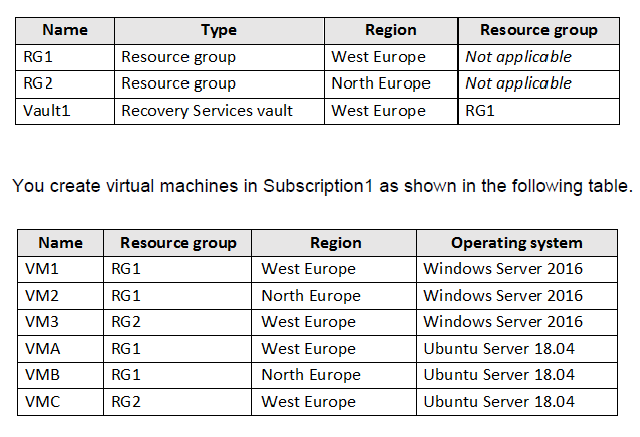
You plan to use Vault1 for the backup of as many virtual machines as possible. Which virtual machines can be backed up to Vault1?
A.
VM1, VM3, VMA, and VMC only
B.
VM1 and VM3 only
C.
VM1, VM2, VM3, VMA, VMB, and VMC
D.
VM1 only
E.
VM3 and VMC only
VM1, VM3, VMA, and VMC only
Summary
A Recovery Services vault can back up virtual machines that are in the same region as the vault itself. Vault1 is located in the West Europe region and is part of the RG1 resource group. Therefore, it can only protect VMs that are also located in the West Europe region, regardless of their resource group or operating system. The VMs in West Europe are VM1, VM3, VMA, and VMC.
Correct Option
A. VM1, VM3, VMA, and VMC only
Explanation:
The primary constraint for backing up an Azure VM to a Recovery Services vault is the region. The vault and the VM must reside in the same Azure region. Vault1 is in West Europe. Reviewing the table:
VM1 is in West Europe (RG1).
VM3 is in West Europe (RG2).
VMA is in West Europe (RG1).
VMC is in West Europe (RG2).
All four of these VMs meet the regional requirement. The operating system (Windows vs. Linux) and the resource group they are in (RG1 vs. RG2) are not restricting factors for basic backup eligibility.
Incorrect Options
B. VM1 and VM3 only
Incorrect. This selection incorrectly excludes the Linux VMs (VMA and VMC) that are also in the West Europe region. Azure Backup supports both Windows and Linux VMs.
C. VM1, VM2, VM3, VMA, VMB, and VMC
Incorrect. This selection includes VMs (VM2 and VMB) that are in the North Europe region. A Recovery Services vault cannot back up VMs that are in a different region.
D. VM1 only
Incorrect. This is overly restrictive. It excludes other eligible VMs that are in the same region as the vault (VM3, VMA, VMC) simply because they are in a different resource group (RG2). The resource group of the VM does not need to match the vault's resource group.
E. VM3 and VMC only
Incorrect. This incorrectly excludes VM1 and VMA, which are in the correct region (West Europe) but the same resource group as the vault (RG1). The vault can protect VMs in any resource group, as long as they are in the same region.
Reference:
Microsoft Learn: About Azure VM backup - This documentation confirms that Azure Backup for VMs supports VMs in the same region as the vault and supports both Windows and Linux operating systems.
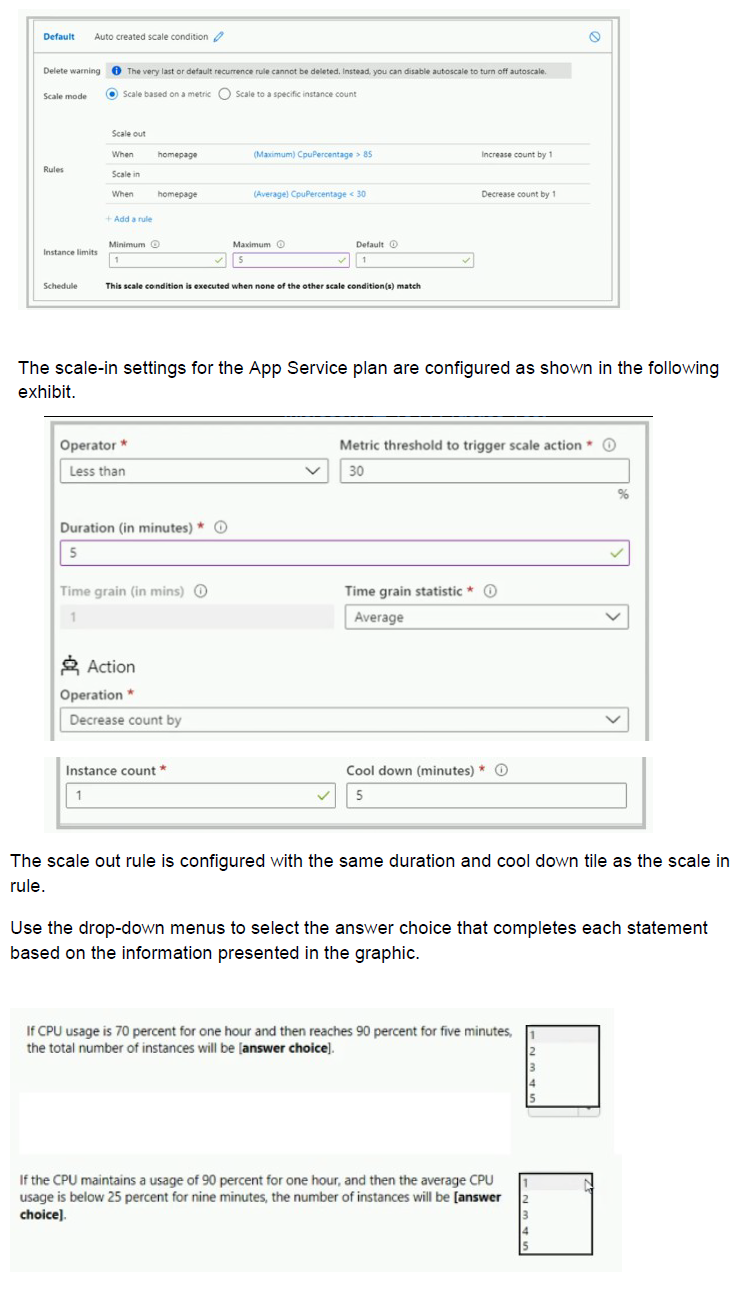
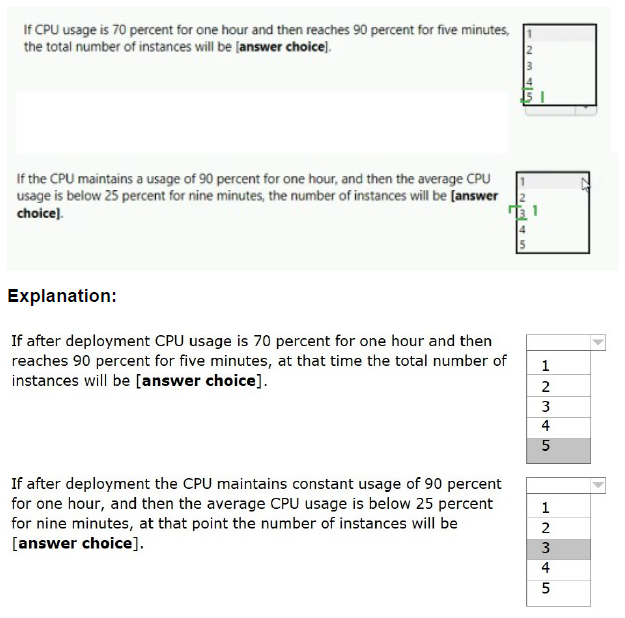
You have the App Service plan shown in the following exhibit.
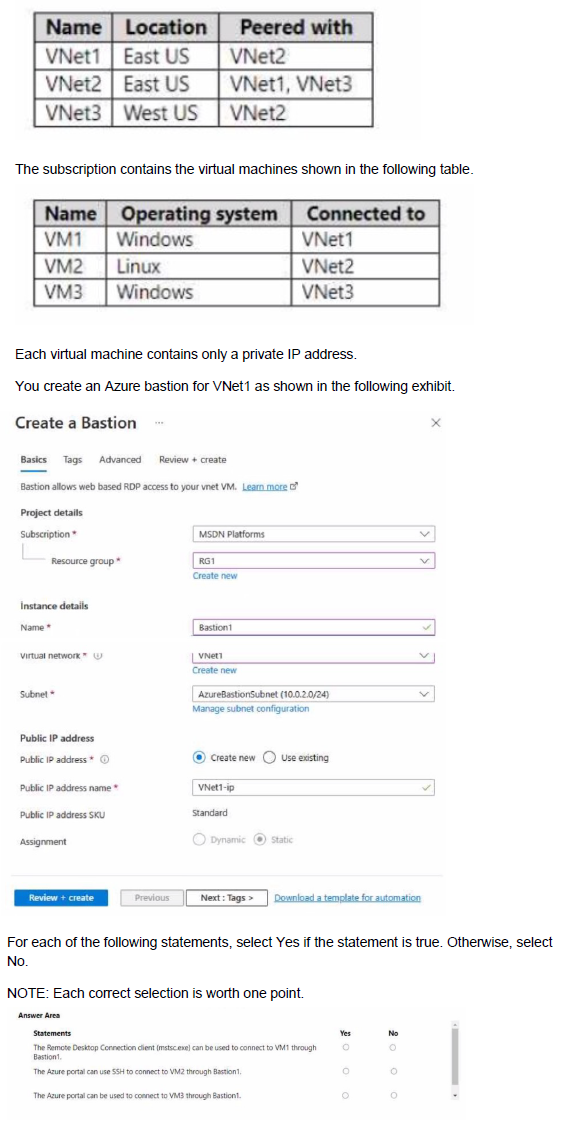
You have an Azure subscription that contains the virtual networks shown in the following table.
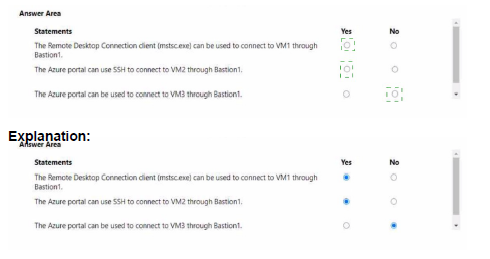
Summary
Azure Bastion provides secure RDP and SSH connectivity to VMs directly through the Azure portal over TLS, without exposing public IPs on the VMs. A Bastion host is deployed to a specific virtual network (its host VNet) and can only be used to connect to VMs that are in that same VNet. It cannot connect to VMs in peered virtual networks. Therefore, Bastion1, deployed in VNet1, can only connect to VM1.
Correct and Incorrect Options
Statement 1: The Remote Desktop Connection client (mstsc.exe) can be used to connect to VM1 through Bastion1.
Answer Explanation
Yes ○ Incorrect. A key feature of Azure Bastion is that it does not allow connections via native clients like mstsc (RDP) or ssh. All connectivity is brokered through the Azure portal using a web browser over SSL (port 443). You cannot point a native RDP client to the Bastion host.
No ● Correct. Bastion uses a web-based gateway for connections. Native client tools like the Remote Desktop Connection client (mstsc) are not supported.
Statement 2: The Azure portal can use SSH to connect to VM2 through Bastion1.
Answer Explanation
Yes ○ Incorrect. Bastion1 is deployed in VNet1. VM2 is connected to VNet2. Although VNet1 and VNet2 are peered, Azure Bastion does not support transitive connectivity across peered virtual networks. A Bastion host can only connect to VMs in its own host virtual network.
No ● Correct. Bastion's scope is limited to its own VNet. It cannot be used to connect to VMs in a different VNet, even a peered one.
Statement 3: The Azure portal can be used to connect to VM3 through Bastion1.
Answer Explanation
Yes ○ Incorrect. This fails for two reasons. First, VM3 is in VNet3, and as with Statement 2, Bastion1 in VNet1 cannot connect to it. Second, VNet3 is in a different region (West US) than Bastion1 (East US). Global VNet Peering allows network traffic, but Azure Bastion is a regional service and its connectivity is strictly limited to its own VNet within its own region.
No ● Correct. Bastion cannot connect to VMs in a different VNet, especially one in a different region.
Reference:
Microsoft Learn: What is Azure Bastion? - This documentation confirms that Bastion provides RDP/SSH connectivity to VMs within the same virtual network, or within peered virtual networks in the same region (when using the Standard SKU and specific configuration). The basic connectivity scope is the same VNet.
You have an Azure virtual machine named VM1 and an Azure key vault named Vault1. On VM1, you plan to configure Azure Disk Encryption to use a key encryption key (KEK) You need to prepare Vault! for Azure Disk Encryption.
Which two actions should you perform on Vault1? Each correct answer presents part of the solution.
NOTE: Each correct selection is worth one point.
A. Create a new key.
B. Select Azure Virtual machines for deployment
C. Configure a key rotation policy.
D. Create a new secret.
E. Select Azure Disk Encryption for volume encryption
Summary:
Azure Disk Encryption (ADE) uses a Key Encryption Key (KEK) to provide an additional security layer by wrapping the actual BitLocker encryption keys. To prepare a key vault for ADE with a KEK, you must create the asymmetric RSA key that will be used as the KEK. Furthermore, you must enable the key vault for deployment so the Azure platform (specifically the VM's managed identity) can retrieve the key during the disk encryption process.
Correct Options:
A. Create a new key.
This action creates the actual Key Encryption Key (KEK). ADE requires an asymmetric RSA key to be stored in the key vault. This key is used to encrypt the secrets (the BitLocker keys) before they are written to the key vault, adding an extra layer of security.
B. Select Azure Virtual machines for deployment
This access policy enables the Azure Disk Encryption service to access the key vault on behalf of the virtual machine. It grants the Azure platform the necessary permissions to retrieve the KEK and wrap the disk encryption secrets during the encryption process. This is a crucial step that is often missed.
Incorrect Options:
C. Configure a key rotation policy.
While key rotation is a security best practice, it is not a prerequisite for initially configuring Azure Disk Encryption. The question asks for the actions needed to prepare the vault, not to optimize it for long-term management.
D. Create a new secret.
Azure Disk Encryption can use a secret for a volume encryption key without a KEK, but the question specifically states the plan is to use a Key Encryption Key (KEK). When using a KEK, you create a key, not a secret. The encryption secrets are generated by the platform and then wrapped by the KEK.
E. Select Azure Disk Encryption for volume encryption
This is a distractor. There is no specific access policy named exactly this. The correct, corresponding policy that enables the ADE service is "Azure Virtual machines for deployment."
Reference:
Microsoft Learn: Create and configure a key vault for Azure Disk Encryption - This documentation outlines the prerequisites, including creating a key and enabling the "Azure Virtual Machine for deployment" access policy template.
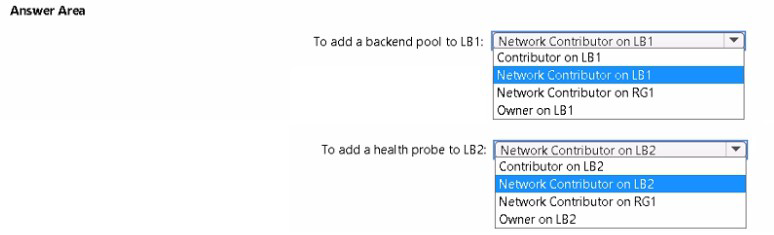
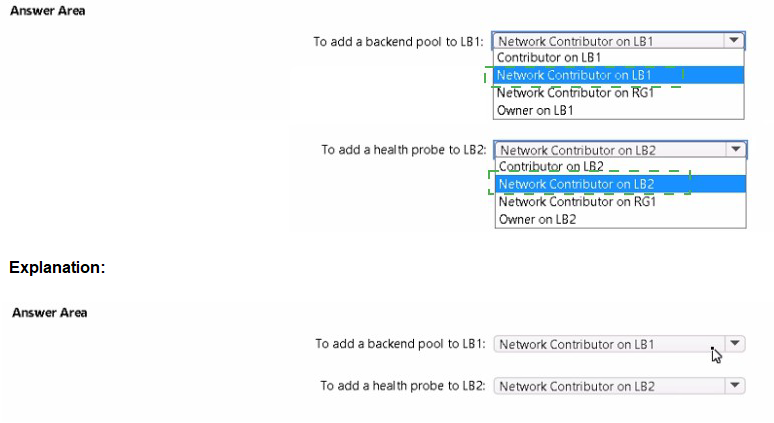
You have an Azure subscription named Subscription1 that contains a resource group named RG1.
In RG1, you create an internal load balancer named LB1 and a public load balancer named LB2.
You need to ensure that an administrator named Admin1 can manage LB1 and LB2. The solution must follow the principle of least privilege.
Which role should you assign to Admin1 for each task? To answer, select the appropriate options in the answer area.
NOTE; Each correct selection is worth one point.
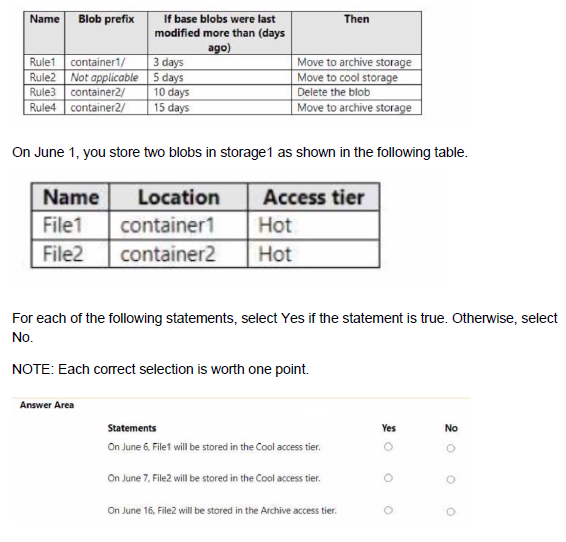
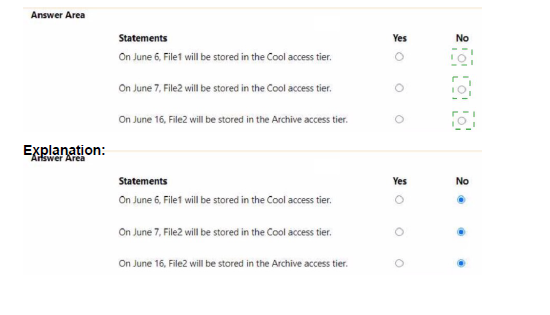
You have an Azure subscription. The subscription contains a storage account named storage1 that has the lifecycle management rules shown in the following table.
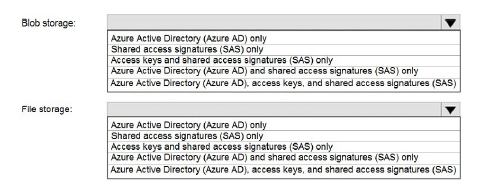
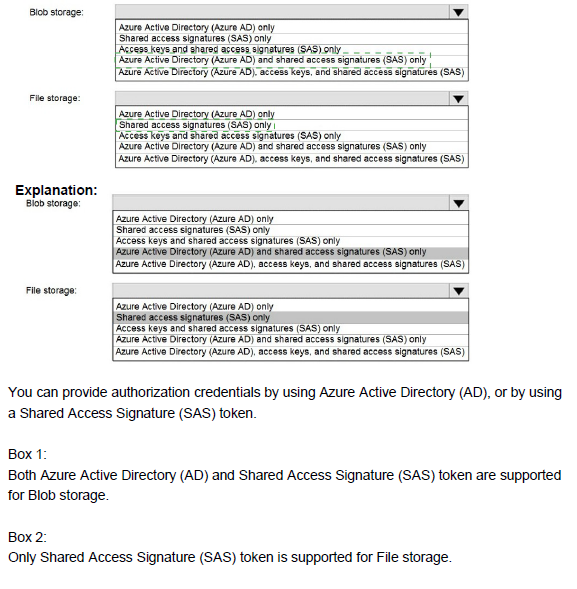
You have an Azure Storage account named storage1 that uses Azure Blob storage and Azure File storage. You need to use AzCopy to copy data to the blob storage and file storage in storage1. Which authentication method should you use for each type of storage? To answer, select the appropriate options in the answer area.
NOTE: Each correct selection is worth one point.
Note: This question is part of a series of questions that present the same scenario. Each question in the series contains a unique solution that might meet the stated goals. Some question sets might have more than one correct solution, while others might not have a correct solution.
After you answer a question in this section, you will NOT be able to return to it. As a result, these questions will not appear in the review screen.
You have an Azure subscription that contains 10 virtual networks. The virtual networks are hosted in separate resource groups.
Another administrator plans to create several network security groups (NSGs) in the subscription.
You need to ensure that when an NSG is created, it automatically blocks TCP port 8080 between the virtual networks.
Solution: You configure a custom policy definition, and then you assign the policy to the subscription.
Does this meet the goal?
A.
Yes
B.
No
No
Summary:
The goal is to automatically block TCP port 8080 between all virtual networks whenever a new NSG is created. While Azure Policy is the correct service for enforcing governance and compliance rules at scale, it cannot directly create or modify the specific rules within a resource like an NSG. It can only deny the creation of non-compliant resources or audit for their existence. Therefore, this solution does not meet the goal of automatically creating the necessary blocking rule.
Correct Answer:
B. No
Explanation:
What Azure Policy Can Do:
Azure Policy is designed to enforce rules on the properties of a resource during creation or updates. For an NSG, it can check if a specific rule exists. For instance, you could create a policy that denies the creation of any NSG that does not have a rule blocking port 8080.
What Azure Policy Cannot Do:
The policy itself cannot proactively add a new security rule to an existing or newly created NSG. The described solution of configuring and assigning a policy would not result in the automatic insertion of a "Deny 8080" rule. It could only prevent the creation of NSGs that don't already have such a rule, which is a different outcome.
Correct Tool for the Job:
To automatically create rules in an NSG, you would need a different automation service, such as an Azure Resource Manager (ARM) template deployment with the rule defined, an Azure PowerShell or CLI script run via Azure Automation, or a response to an Azure Event Grid event that triggers when an NSG is created.
Reference:
Microsoft Learn: Azure Policy definition structure - This documentation explains that policy effects like "deny", "audit", and "append" are used to control resource properties, but they do not have an "addRule" effect to modify the internal configuration of a complex resource like an NSG post-creation.
You plan to automate the deployment of a virtual machine scale set that uses the Windows Server 2016 Datacenter image.
You need to ensure that when the scale set virtual machines are provisioned, they have web server components installed.
Which two actions should you perform? Each correct answer presents part of the solution.
NOTE Each correct selection is worth one point.
A. Modify the extensionProfile section of the Azure Resource Manager template.
B. Create a new virtual machine scale set in the Azure portal.
C. Create an Azure policy.
D. Create an automation account
E. Upload a configuration script.
Summary:
To automatically install web server components during VM scale set provisioning, you need to use a custom script extension that runs an installation script. This is configured in the extensionProfile section of the ARM template. You also need to upload a PowerShell configuration script that contains the actual installation commands (like Install-WindowsFeature Web-Server) to an accessible location like Azure Storage.
Correct Options:
A. Modify the extensionProfile section of the Azure Resource Manager template.
The extensionProfile section of a virtual machine scale set ARM template is where you specify virtual machine extensions. To install software, you would add the Custom Script Extension configuration here. This extension will download and execute your installation script on each VM as it's provisioned.
E. Upload a configuration script.
You need to create and upload a script (e.g., a PowerShell script with Install-WindowsFeature -Name Web-Server -IncludeManagementTools) to a location accessible by the scale set during deployment, such as an Azure storage account. The Custom Script Extension in the ARM template will reference this script URL.
Incorrect Options:
B. Create a new virtual machine scale set in the Azure portal.
While you can create a scale set in the portal, this doesn't inherently ensure web server installation. The portal creation process would require you to use the "Extensions" tab to add a custom script, which essentially accomplishes the same as option A. However, since the question is about automation and the other correct option (E) is crucial, this is not the best paired answer. Option E is more fundamental to the solution.
C. Create an Azure policy.
Azure Policy is used for enforcing organizational standards and compliance across resources. It is not used for installing software or running deployment scripts on virtual machines.
D. Create an automation account.
Azure Automation is used for managing ongoing updates and maintenance, not for initial software installation during the provisioning of a scale set. The Custom Script Extension is the appropriate tool for initial deployment configuration.
Reference:
Microsoft Learn: Use the Custom Script Extension with Azure virtual machine scale sets - This documentation demonstrates how to use the Custom Script Extension to install a basic web server on a scale set.
You have a Microsoft Entra tenant that contains 5,000 user accounts.
You create a new user account named AdminUser1.
You need to assign the User Administrator administrative role to AdminUser1.
What should you do from the user account properties?
A. From the Groups blade, invite the user account to a new group.
B. From the Directory role blade, modify the directory role.
C. From the Licenses blade, assign a new license.
Summary:
Administrative roles in Microsoft Entra ID grant permissions to manage tenant-wide resources like users, groups, and applications. These roles are assigned directly to user accounts (or groups) rather than being managed through group membership or licenses. The specific property blade within the user account settings designed for this purpose is "Directory roles."
Correct Option:
B. From the Directory role blade, modify the directory role.
The "Directory roles" blade within a user's properties is the direct interface for assigning and managing administrative roles. Here, you can select "User administrator" from the list of available roles and assign it to AdminUser1. This grants the user the precise permissions associated with that role across the entire tenant.
Incorrect Options:
A. From the Groups blade, invite the user account to a new group.
While you can assign roles to a group in Microsoft Entra ID (for more efficient role management), the question specifies assigning the role to the user account from its properties. Simply adding a user to a standard security group does not grant any administrative privileges. This process requires using the "Directory roles" blade, not the "Groups" blade.
C. From the Licenses blade, assign a new license.
Assigning a license, such as an Entra ID P1 or P2 license, grants access to feature sets (like Identity Protection or Entra Connect Health) but does not, by itself, confer any administrative permissions. A user can have a premium license but still have no administrative rights. Licenses and directory roles are managed independently.
Reference:
Microsoft Learn: Assign roles to a user in Microsoft Entra ID - This documentation outlines the steps to assign a directory role to a user, which is performed via the "Directory roles" blade in the user's profile.
You have an Azure subscription that contains an Azure SQL database named DB1.
You plan to use Azure Monitor to monitor the performance of DB1. You must be able to run queries to analyze log data.
Which destination should you configure in the Diagnostic settings of DB 1?
A. Send to a Log Analytics workspace.
B. Archive to a storage account.
C. Stream to an Azure event hub.
Summary:
Azure Monitor diagnostic settings determine where resource logs are sent. To analyze log data by running queries, the logs must be sent to a Log Analytics workspace. This destination stores the logs in a structured format that is directly queryable using the powerful Kusto Query Language (KQL) through Log Analytics, enabling deep performance analysis and troubleshooting.
Correct Option:
A. Send to a Log Analytics workspace.
This is the only destination that allows for immediate, interactive querying of log data using Kusto Query Language (KQL) within Azure Monitor's Log Analytics tool. It is specifically designed for analytical querying, making it the correct choice for analyzing the performance of DB1 through custom queries.
Incorrect Options:
B. Archive to a storage account.
A storage account is used for long-term retention and archival of logs at a lower cost. To analyze this data, you would first need to export it from storage and load it into another system. It does not support running ad-hoc queries directly against the logs for real-time or historical analysis within Azure Monitor.
C. Stream to an Azure event hub.
An event hub is used for streaming log data to third-party or custom applications, such as a Security Information and Event Management (SIEM) system like Splunk. While it enables real-time ingestion, it does not provide a native interface for running analytical queries within Azure Monitor.
Reference:
Microsoft Learn: Create diagnostic settings to send resource logs and metrics to different destinations - This documentation explains the different destinations and their use cases, specifying that a Log Analytics workspace is used for analysis with Azure Monitor Logs.
| Page 1 out of 38 Pages |