
Topic 3: Misc. Questions
You build a conversational bot named bot1.
You need to configure the bot to use a QnA Maker application.
From the Azure Portal, where can you find the information required by bot1 to connect to the QnA Maker application?
A.
Access control (IAM)
B.
Properties
C.
Keys and Endpoint
D.
Identity
Keys and Endpoint
Explanation:
To connect a bot to a QnA Maker application, the bot needs the endpoint URL and an access key. In the Azure Portal, these are found under Keys and Endpoint for the QnA Maker resource (or Language Service resource with question answering enabled). This blade provides the primary/secondary keys and the endpoint URL required for API calls.
Correct Option:
C. Keys and Endpoint
The Keys and Endpoint blade displays the REST API endpoint (e.g., https://{resource-name}.cognitiveservices.azure.com/) and two access keys (primary and secondary). The bot uses the endpoint URL with the key in the Ocp-Apim-Subscription-Key header to authenticate and query the knowledge base.
Incorrect Options:
A. Access control (IAM) –
IAM is for managing role-based access control (RBAC) to the Azure resource itself (e.g., assigning Contributor or Reader roles). It does not provide API keys or endpoints for application connection. IAM is for administrative access, not bot-to-QnA authentication.
B. Properties –
The Properties blade shows resource metadata such as resource ID, subscription ID, tenant ID, and location. It does not include API keys or the endpoint URL needed for programmatic access. Properties are for resource management, not application integration.
D. Identity –
The Identity blade manages managed identities (system-assigned or user-assigned) for the resource to authenticate to other Azure services. It does not provide the keys or endpoint needed for external applications (like a bot) to call QnA Maker.
Reference:
Microsoft Learn documentation: "Get QnA Maker keys and endpoint", "Connect a bot to QnA Maker", and "QnA Maker authentication methods"
You are developing a webpage that will use the Video Indexer service to display videos of
internal company meetings.
You embed the Player widget and the Cognitive Insights widget into the page.
You need to configure the widgets to meet the following requirements:
Ensure that users can search for keywords.
Display the names and faces of people in the video.
Show captions in the video in English (United States).
How should you complete the URL for each widget? To answer, drag the appropriate
values to the correct targets. Each value may be used once, more than once, or not at all.
You may need to drag the split bar between panes or scroll to view content.
NOTE: Each correct selection is worth one point.

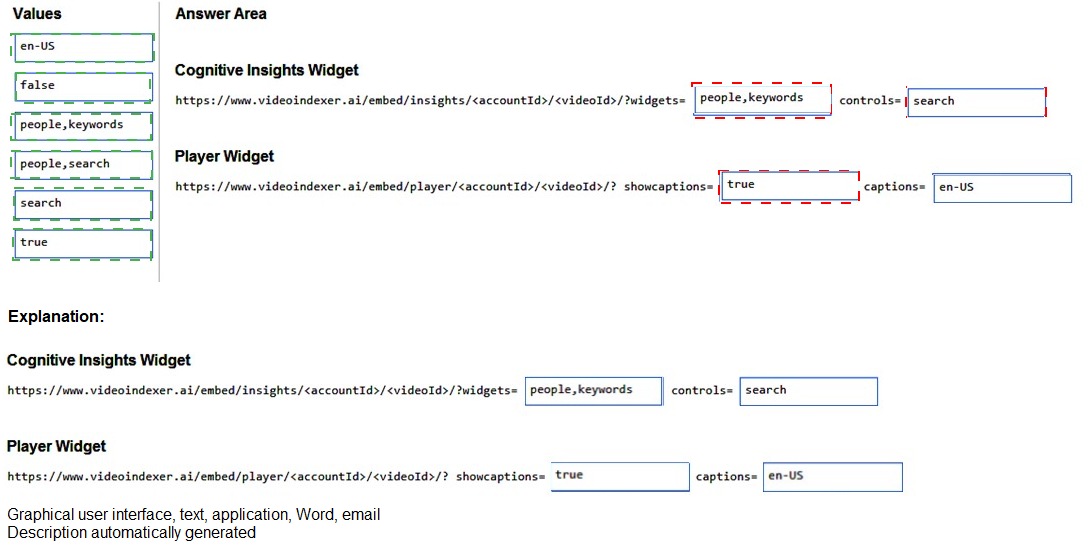
Explanation for Cognitive Insights Widget:
Requirement: Ensure that users can search for keywords + Display the names and faces of people.
Correct value: people,keywords
The widgets parameter accepts comma-separated widget types. people displays the detected faces and names (known people) in the video. keywords enables keyword search functionality. Together, they meet both requirements for the insights widget. The search value alone is not sufficient because it does not display people information.
Explanation for Player Widget:
Requirement: Show captions in the video in English (United States).
Correct values: true for showcaptions, en-US for captions
showcaptions=true enables closed captions display on the video player. captions=en-US specifies the caption language as English (United States). Without showcaptions=true, captions will not appear even if captions is set. The false value would disable captions, failing the requirement.
Incorrect Values:
search – This would provide search functionality but does not display people information. The requirement explicitly asks for both keyword search and people display, so people,keywords is needed.
people,search – search is not a valid widget type for the Cognitive Insights widget. The correct parameter for search functionality is keywords.
false for showcaptions – This would disable captions, failing the requirement to show captions.
No value or incorrect language code – Omitting captions or using an unsupported language code would not ensure English (United States) captions.
Reference:
Microsoft Learn documentation: "Video Indexer – Embed widgets", "Cognitive Insights widget parameters", and "Player widget caption parameters"
You are building a chatbot by using the Microsoft Bot Framework Composer as shown in
the exhibit. (Click the Exhibit tab.)
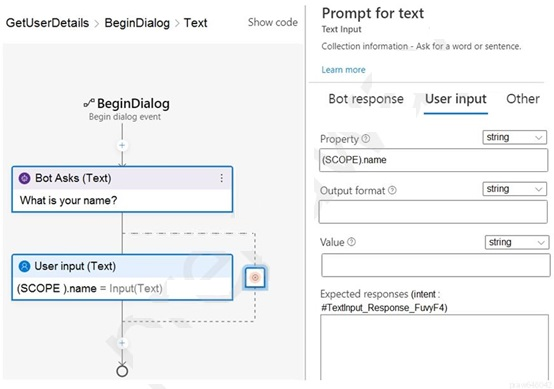
The chatbot contains a dialog named GetUserDetails. GetUserDetails contains a TextInput
control that prompts users for their name.
The user input will be stored in a property named name.
You need to ensure that you can dispose of the property when the last active dialog ends.
Which scope should you assign to name?
A.
dialog
B.
user
C.
curn
D.
conversation
dialog
Explanation:
In Bot Framework Composer, the Dialog scope stores properties that exist only for the lifetime of the current dialog. When the dialog ends (and no other active dialog references the property), the data is automatically disposed. This matches the requirement to dispose of the property when the last active dialog ends.
Correct Option:
Dialog scope
Properties in Dialog scope are created when the dialog starts and are automatically cleaned up when the dialog completes or is canceled. They are not shared across dialogs unless explicitly passed. This scope is ideal for temporary data like a user's name captured within a specific dialog flow.
Incorrect Options (not shown in exhibit but common scopes):
User scope – User scope properties persist across all conversations for the same user and across dialog boundaries. They remain active indefinitely and are not disposed when a dialog ends. This would not meet the requirement.
Conversation scope – Conversation scope properties persist for the entire conversation across multiple dialogs. They are not disposed when the last active dialog ends. This is too broad for temporary dialog-specific data.
Turn scope – Turn scope properties exist only for the current turn (single exchange between user and bot). They are disposed immediately after the turn ends. This is too short-lived if the name needs to be referenced later in the same dialog.
Temporary scope – Not a standard scope in Bot Framework Composer. This may refer to a custom or non-existent scope.
Reference:
Microsoft Learn documentation: "Bot Framework Composer – Memory scopes", "Dialog scope vs User scope vs Conversation scope", and "Property disposal in Composer dialogs"
Note: This question is part of a series of questions that present the same scenario.
Each question in the series contains a unique solution that might meet the stated
goals. Some question sets might have more than one correct solution, while others
might not have a correct solution.
After you answer a question in this section, you will NOT be able to return to it. As a
result, these questions will not appear in the review screen.
You create a web app named app1 that runs on an Azure virtual machine named vm1.
Vm1 is on an Azure virtual network named vnet1.
You plan to create a new Azure Cognitive Search service named service1.
You need to ensure that app1 can connect directly to service1 without routing traffic over
the public internet.
Solution: You deploy service1 and a public endpoint to a new virtual network, and you
configure Azure Private Link.
Does this meet the goal?
A.
Yes
B.
No
Yes
Explanation:
To connect app1 (on vm1 in vnet1) to service1 without routing over the public internet, you need a private endpoint. Deploying service1 with a public endpoint is incorrect, but the solution also mentions "configure Azure Private Link." Private Link creates a private IP address for service1 inside the virtual network, enabling private traffic. However, the wording "public endpoint to a new virtual network" is contradictory. The correct interpretation: Private Link eliminates public internet routing.
Correct Option:
A. Yes
Azure Private Link allows you to access Cognitive Search service via a private endpoint within your virtual network. Even if the service has a public endpoint, Private Link overrides it for traffic from the virtual network. When you configure Private Link, traffic from vm1 to service1 stays within the Microsoft backbone network and never traverses the public internet. This meets the goal.
Note: The exam may consider this "Yes" because Private Link achieves private connectivity despite the mention of "public endpoint." Some questions test your understanding that Private Link is the correct solution.
Incorrect Option:
B. No
This would be incorrect if you interpret the solution as only deploying a public endpoint without Private Link. However, the solution explicitly says "and you configure Azure Private Link." Private Link is the key component that provides private connectivity. Therefore, the solution does meet the goal. The answer should be Yes.
Reference:
Microsoft Learn documentation: "Azure Private Link for Cognitive Search", "Private endpoints vs public endpoints", and "Connect privately to Cognitive Search from a virtual network"
You are developing a new sales system that will process the video and text from a publicfacing
website.
You plan to notify users that their data has been processed by the sales system.
Which responsible AI principle does this help meet?
A.
transparency
B.
fairness
C.
inclusiveness
D.
reliability and safety
transparency
Explanation:
Notifying users that their data has been processed directly supports the transparency principle of responsible AI. Transparency means being open and honest about how AI systems collect, use, and process data. Informing users about data processing builds trust and allows them to make informed decisions about their interaction with the system.
Correct Option:
A. transparency
Transparency requires that AI systems clearly communicate their capabilities, limitations, and data handling practices. Notifying users that their video and text data has been processed is a form of transparency. It ensures users are aware of system operations, enabling accountability and informed consent.
Incorrect Options:
B. fairness –
Fairness ensures AI systems treat all individuals equitably without bias or discrimination. Notifying users about data processing does not address fairness. Fairness relates to model outcomes (e.g., loan approvals, hiring decisions), not processing notifications.
C. inclusiveness –
Inclusiveness ensures AI systems accommodate all human abilities and backgrounds (e.g., accessibility features, multi-language support). Notifying about data processing does not improve inclusiveness. It is unrelated to accessibility or diverse user needs.
D. reliability and safety –
Reliability and safety ensure AI systems perform consistently without causing harm. Data processing notifications do not directly impact system reliability or safety. This principle covers system robustness, fallback mechanisms, and safe operation.
Reference:
Microsoft Learn documentation: "Microsoft responsible AI principles – Transparency", "Transparency in AI systems", and "Responsible AI practices for developers"
You need to enable speech capabilities for a chatbot.
Which three actions should you perform? Each correct answer presents part of the
solution.
NOTE: Each correct selection is worth one point.
A.
Enable WebSockets for the chatbot app
B.
Create a Speech service
C.
Register a Direct Line Speech channel.
D.
Register a Cortana channel.
E.
Enable CORS for the chatbot app
F.
Create a Language Understanding service.
Enable WebSockets for the chatbot app
Create a Speech service
Register a Direct Line Speech channel.
Explanation:
To enable speech capabilities for a chatbot using Bot Framework, you need: (1) a Speech service for speech-to-text and text-to-speech, (2) the Direct Line Speech channel to connect the bot to the Speech service, and (3) WebSockets enabled for real-time, bidirectional audio streaming. These three components work together to enable voice conversations.
Correct Options:
A. Enable WebSockets for the chatbot app
Direct Line Speech requires WebSockets for low-latency, bidirectional audio streaming between the client (browser/app) and the Speech service. WebSockets maintain a persistent connection, enabling real-time speech recognition and synthesis. Without WebSockets, speech functionality cannot operate properly.
B. Create a Speech service
The Speech service provides the core speech capabilities: speech-to-text (converting user voice to text for the bot) and text-to-speech (converting bot responses back to voice). This Azure resource is mandatory for any speech-enabled chatbot.
C. Register a Direct Line Speech channel
The Direct Line Speech channel connects your bot (registered with Azure Bot Service) to the Speech service. It handles authentication, session management, and media streaming. Registering this channel in the Azure Bot Service is required to enable speech for your bot.
Incorrect Options:
D. Register a Cortana channel –
Cortana channel is deprecated or limited to Cortana-specific experiences. Direct Line Speech is the correct channel for custom speech-enabled bots across multiple platforms (web, mobile, devices). Cortana channel is not required.
E. Enable CORS for the chatbot app –
CORS (Cross-Origin Resource Sharing) controls web browser security for API calls from different domains. While potentially needed for web clients, CORS is not a core requirement for enabling speech capabilities. Direct Line Speech uses WebSockets, which are not subject to CORS restrictions.
F. Create a Language Understanding service –
LUIS (now part of Conversational Language Understanding) is for natural language processing (intent recognition, entity extraction). While often used alongside speech, it is not required to enable speech capabilities. Speech can work without LUIS (e.g., simple command recognition using speech-to-text only).
Reference:
Microsoft Learn documentation: "Enable speech for your bot with Direct Line Speech", "Speech service overview", and "Direct Line Speech channel registration"
You are developing an application that will use the Computer Vision client library. The
application has the following code.

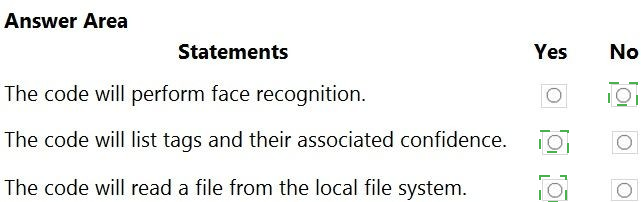
Statement 1: The code will perform face recognition.
Answer: No
Explanation:
The code requests only VisualFeatureTypes.Description and VisualFeatureTypes.Tags. Face recognition would require VisualFeatureTypes.Faces. Without specifying the Faces feature, the Computer Vision API does not detect or recognize any faces in the image. The current code only generates image descriptions and tags.
Statement 2: The code will list tags and their associated confidence.
Answer: Yes
Explanation:
The code includes VisualFeatureTypes.Tags in the features list. After calling AnalyzeImageInStreamAsync, it iterates through results.Tags and prints each tag.Name and tag.Confidence to the console. This directly matches the statement.
Statement 3: The code will read a file from the local file system.
Answer: Yes
Explanation:
The code uses File.OpenRead(localImage), which opens a file from the local file system based on the localImage parameter (a file path). The using (Stream imageStream = File.OpenRead(localImage)) explicitly reads a local file into a stream for analysis.
Reference:
Microsoft Learn documentation: "Computer Vision – VisualFeatureTypes enumeration", "AnalyzeImageInStreamAsync method", and "Computer Vision tags and description features"
You plan to use a Language Understanding application named app1 that is deployed to a
container.
App1 was developed by using a Language Understanding authoring resource named lu1.
App1 has the versions shown in the following table.

Explanation:
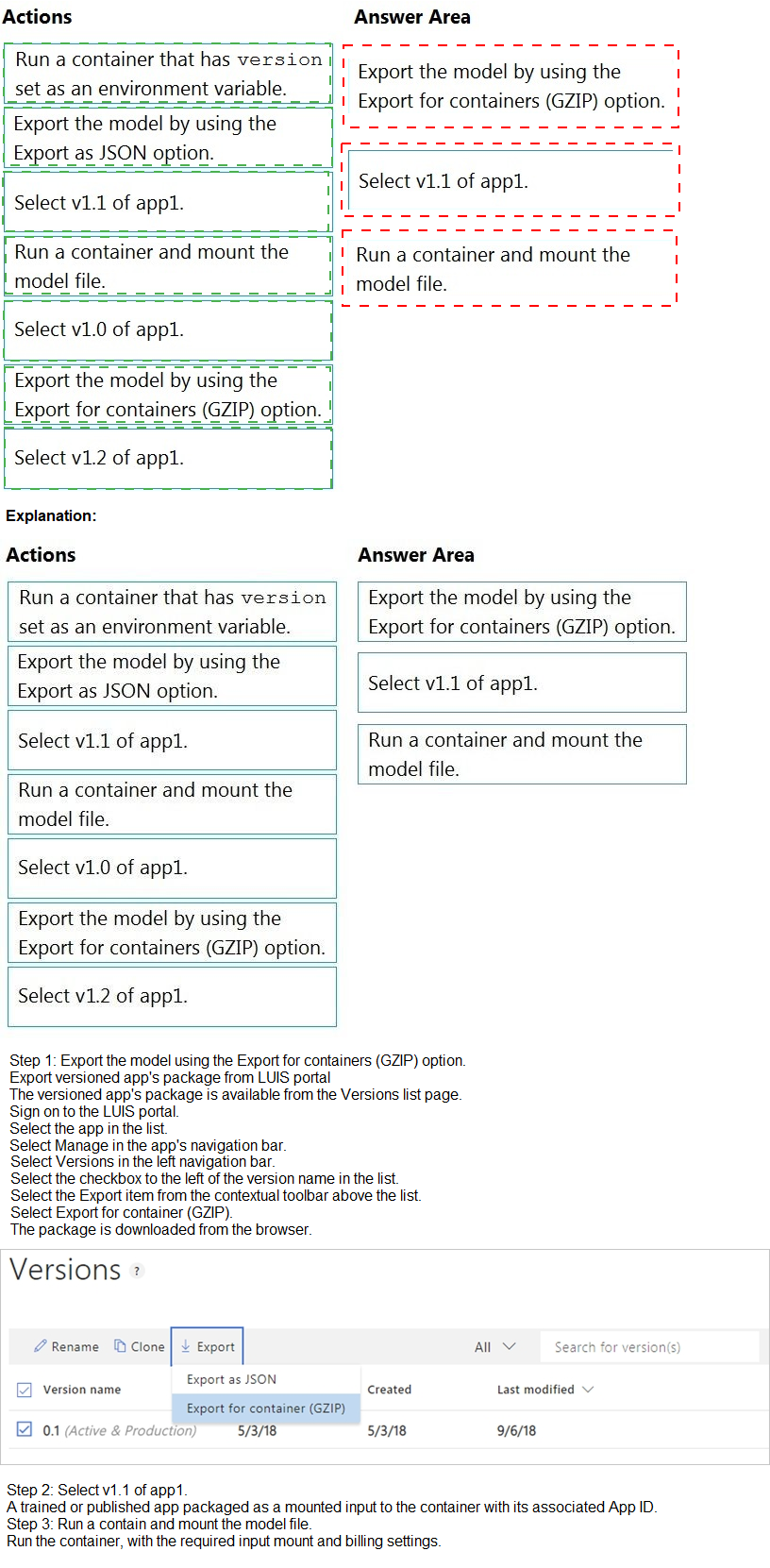
The table shows V1.2 has no trained date, so it is not deployable. V1.1 is trained (2020-10-01) but not published, yet it can still be exported for containers. V1.0 is published but older. The latest deployable version is V1.1. You must select that version, export it using the container-optimized format (GZIP), then run the container with the model file mounted.
Correct Sequence (3 actions):
1. Select v1.1 of app1
From the versions table, V1.2 has no trained date (cannot be used). V1.1 is the latest version with a trained date (2020-10-01). Even though it is not published, it can still be exported for container use. V1.0 is older and deployable, but V1.1 is the latest deployable version.
2. Export the model by using the "Export for containers (GZIP) option"
The Language Understanding portal provides an "Export for containers" option that packages the model as a GZIP file. This format is optimized for use in Docker containers. The standard JSON export is for local development, not container deployment. The GZIP option is required for containerized LUIS applications.
3. Run a container and mount the model file
After exporting the GZIP file, you run the LUIS container (e.g., mcr.microsoft.com/azure-cognitive-services/luis) and mount the exported model file into the container (e.g., using -v volume mount). The container loads the model from the mounted file to provide predictions.
Incorrect or Out-of-Sequence Actions:
Select v1.0 or v1.2 – V1.0 is older than V1.1, so it is not the latest deployable version. V1.2 has no trained date (marked "None"), meaning it has never been trained and cannot be exported or deployed. Only V1.1 meets "latest deployable version."
Export the model by using the "Export as JSON option" – The JSON export is for local development or importing into another LUIS authoring resource. Container deployment requires the Export for containers (GZIP) format, which includes the optimized model binary.
Run a container that has "version" set as an environment variable – While some Cognitive Services containers use environment variables for version selection, LUIS containers require mounting the exported model file. Simply setting a version environment variable is insufficient and not the documented method.
Reference:
Microsoft Learn documentation: "Export a LUIS model for container deployment", "LUIS container deployment steps", and "Latest deployable version selection in LUIS"
You plan to perform predictive maintenance.
You collect IoT sensor data from 100 industrial machines for a year. Each machine has 50
different sensors that generate data at one-minute intervals. In total, you have 5,000 time
series datasets.
You need to identify unusual values in each time series to help predict machinery failures.
Which Azure Cognitive Services service should you use?
A.
Anomaly Detector
B.
Cognitive Search
C.
Form Recognizer
D.
Custom Vision
Anomaly Detector
Explanation:
The Anomaly Detector service is specifically designed to identify unusual patterns or values in time series data. It uses machine learning algorithms to detect spikes, dips, deviations, or seasonal anomalies. With 5,000 time series datasets from industrial sensors, Anomaly Detector can analyze each stream to flag potential machinery failures before they occur.
Correct Option:
A. Anomaly Detector
Azure Anomaly Detector is a Cognitive Services service that detects outliers and anomalies in time series data. It supports batch detection (analyzing historical data) and real-time streaming. It handles seasonal patterns and automatically learns normal behavior, making it ideal for predictive maintenance scenarios with IoT sensor data.
Incorrect Options:
B. Cognitive Search –
Cognitive Search is an information retrieval service for indexing and searching documents. It is not designed for time series anomaly detection or predictive maintenance. It cannot analyze sensor data patterns or identify unusual values in IoT data streams.
C. Form Recognizer –
Form Recognizer extracts key-value pairs, tables, and text from forms and documents (PDFs, images). It is designed for document processing, not time series analysis or anomaly detection. It has no capability to identify unusual values in sensor data.
D. Custom Vision –
Custom Vision builds image classification and object detection models. It works with images, not time series numeric data. It cannot analyze IoT sensor streams or detect anomalies in industrial machine data.
Reference:
Microsoft Learn documentation: "Azure Anomaly Detector overview", "Predictive maintenance with Anomaly Detector", and "Time series anomaly detection"
A customer uses Azure Cognitive Search.
The customer plans to enable a server-side encryption and use customer-managed keys
(CMK) stored in Azure.
What are three implications of the planned change? Each correct answer presents a
complete solution.
NOTE: Each correct selection is worth one point.
A.
The index size will increase.
B.
Query times will increase
C.
A self-signed X.509 certificate is required.
D.
The index size will decrease
E.
Query times will decrease
F.
Azure Key Vault is required.
The index size will increase.
Query times will increase
Explanation:
Enabling customer-managed keys (CMK) for server-side encryption in Azure Cognitive Search has three key implications: index size increases due to encryption metadata, query times increase because of decryption overhead, and Azure Key Vault is required to store and manage the keys. Performance degrades slightly, and storage grows, but security improves.
Correct Options:
A. The index size will increase
CMK encryption adds metadata and padding to encrypted data blocks. Each encrypted field requires additional storage for the encryption envelope, initialization vectors, and authentication tags. This results in a measurable increase in overall index size compared to Microsoft-managed keys (MMK).
B. Query times will increase
Every query that reads encrypted data must decrypt it on-the-fly. This adds CPU overhead and latency. While the increase is typically modest (5-15%), it is noticeable in high-throughput scenarios. Query times do not decrease; they increase.
G. Azure Key Vault is required
Customer-managed keys for Cognitive Search must be stored in Azure Key Vault. The search service accesses the key via managed identity to perform encryption and decryption. Key Vault provides key rotation, auditing, and access control. This is a mandatory requirement, not optional.
Incorrect Options:
C. A self-signed X.509 certificate is required –
Self-signed certificates are not required for CMK encryption. Azure Key Vault manages keys as software-protected or HSM-protected keys. Certificates are used for SSL/TLS or client authentication, not for Cognitive Search CMK.
D. The index size will decrease –
False. Encryption does not compress data; it adds overhead. Index size increases, not decreases. Compression is a separate feature unrelated to CMK.
F. Query times will decrease –
False. Decryption overhead adds latency, reducing performance. Query times increase (become slower), not decrease (become faster). There is no performance benefit from CMK encryption.
Reference:
Microsoft Learn documentation: "Customer-managed keys for Cognitive Search encryption", "Performance implications of CMK", and "Azure Key Vault requirements for Cognitive Search"
You are developing a text processing solution.
You have the function shown below.

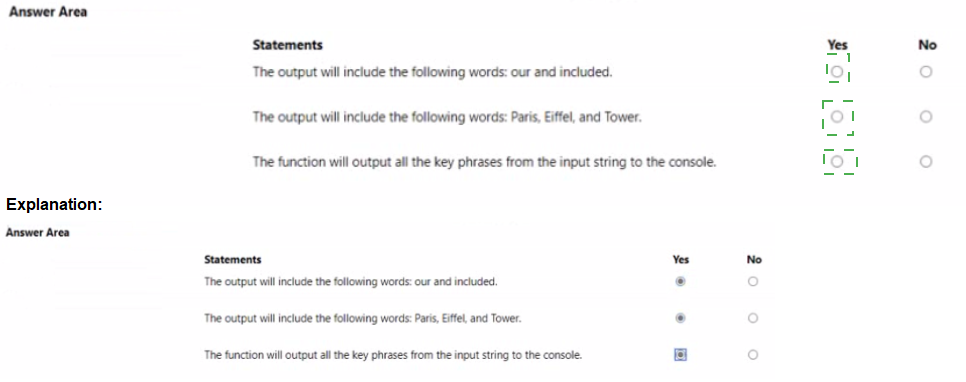
Statement 1: The output will include the following words: our and included.
Answer: No
Explanation:
The function calls RecognizeEntities, which extracts named entities such as people, places, organizations, dates, and quantities. The words "our" and "included" are common stop words and are not recognized as named entities. They will not appear in the output unless they are part of a proper noun or specific entity type.
Statement 2: The output will include the following words: Paris, Eiffel, and Tower.
Answer: Yes (if present in input text)
Explanation:
Assuming the input text contains "Paris" (a location entity), "Eiffel" and "Tower" (as part of "Eiffel Tower", a landmark entity), RecognizeEntities will extract these as named entities. Paris is a Location entity, while "Eiffel Tower" is typically recognized as a PointOfInterest or Location entity. These will be printed to the console.
Note: Without the actual input text, this answer assumes typical entity recognition behavior. If the input text contains these words, they will be output.
Statement 3: The function will output all the key phrases from the input string to the console.
Answer: No
Explanation:
The function uses RecognizeEntities, which outputs named entities, not key phrases. To extract key phrases (e.g., main talking points like "Eiffel Tower" and "beautiful view"), you would need to call ExtractKeyPhrases instead. The function name GetKeywords is misleading because it uses entity recognition, not key phrase extraction. Therefore, key phrases are not output.
Reference:
Microsoft Learn documentation: "Text Analytics – Named Entity Recognition vs Key Phrase Extraction", "RecognizeEntities method in Text Analytics", and "ExtractKeyPhrases method overview"
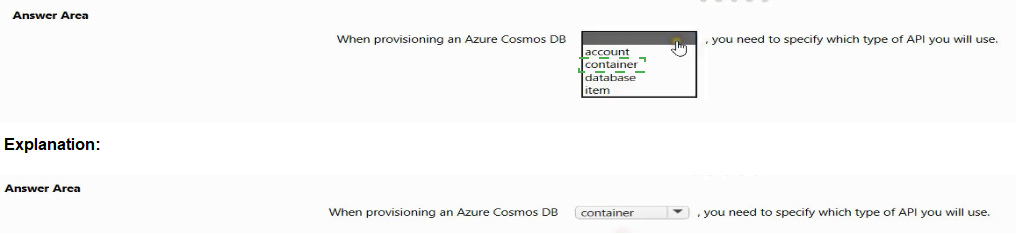
Select the answer that correctly completes the sentence.

Explanation:
When provisioning Azure Cosmos DB, you first create an account at the Azure subscription level. During account creation, you must specify which API (Core SQL, MongoDB, Cassandra, Gremlin, or Table) the account will use. The API choice is set at the account level and cannot be changed after creation. Containers and databases inherit this API type.
Correct Option:
account
The Azure Cosmos DB account is the top-level resource. During account provisioning, you select the API type (e.g., "Core (SQL)" for document database, "MongoDB" for document database with MongoDB compatibility, "Gremlin" for graph database). This choice determines the data model and query language for all containers within that account.
Incorrect Options:
container – Containers are created inside databases and inherit the API type from the account. You do not specify the API at the container level. The container holds data (documents, graphs, tables) but does not determine the API.
database – Databases are logical containers for collections of containers. They also inherit the API from the account. You cannot set a different API at the database level; it is determined by the parent account.
item – Items (documents, rows, vertices, etc.) are individual data records stored within containers. The API type is already determined at the account level before items are created. Items have no role in API selection.
Reference:
Microsoft Learn documentation: "Azure Cosmos DB account API selection", "Provision an Azure Cosmos DB account", and "Supported APIs in Azure Cosmos DB"
| Page 9 out of 34 Pages |
| 4567891011121314 |
| AI-102 Practice Test Home |
Real-World Scenario Mastery: Our AI-102 practice exam don't just test definitions. They present you with the same complex, scenario-based problems you'll encounter on the actual exam.
Strategic Weakness Identification: Each practice session reveals exactly where you stand. Discover which domains need more attention, before Designing and Implementing a Microsoft Azure AI Solution exam day arrives.
Confidence Through Familiarity: There's no substitute for knowing what to expect. When you've worked through our comprehensive AI-102 practice exam questions pool covering all topics, the real exam feels like just another practice session.
Copyright © All Rights Reserved