
Topic 3: Misc. Questions
You are building a chatbot by using the Microsoft Bot Framework Composer. You have the
dialog design shown in the following exhibit.

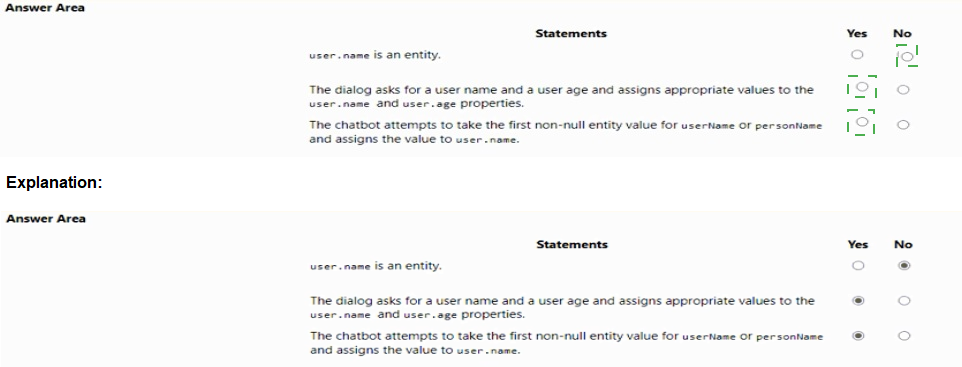
Statement 1: user.name is an entity.
Answer: No
Explanation:
In Bot Framework Composer, user.name is a property (specifically a variable/property of the user scope), not an entity. Entities are extracted from user utterances using Language Understanding (LUIS). Properties store values during the conversation (e.g., from prompts). The exhibit shows user.name as a property with type string, not as an entity.
Statement 2: The dialog asks for a user name and a user age and assigns appropriate values to the user.name and user.age properties.
Answer: Yes
Explanation:
The dialog clearly shows:
First bot ask: "What is your name?" → User input assigned to user.name (string property)
Second bot ask: "Hello $user.name, how old are you?" → User input assigned to user.age (number property)
Both prompts capture user input and assign to the respective properties.
Statement 3: The chatbot attempts to take the first non-null entity value for user.name or personName and assigns the value to user.name.
Answer: Yes
Explanation:
The exhibit shows a coalesce(userName, personName) expression in the Value field. coalesce returns the first non-null value from the provided arguments. This means the chatbot will look for entity values named userName or personName and assign the first non-null one to user.name. This is a common pattern for handling multiple possible entity names.
Reference:
Microsoft Learn documentation: "Bot Framework Composer – Properties and scopes", "Coalesce function in Bot Framework expressions", and "Prompt dialog and property assignment"
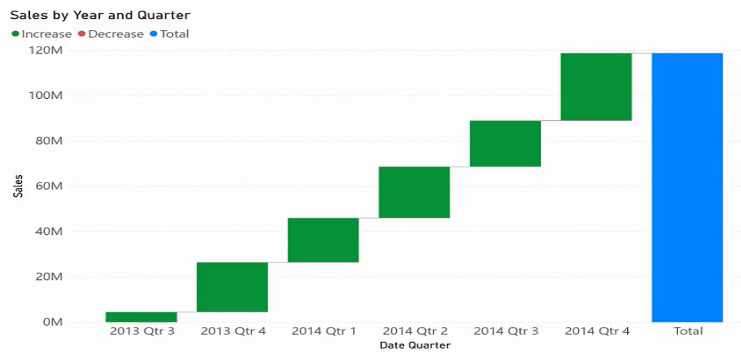
You need to create a visualization of running sales totals per quarter as shown in the following exhibit.
What should you create in Cower Bl Desktop;1
A.
a waterfall chart
B.
a ribbon chart
C.
a bar chart
D.
a decomposition tree
a waterfall chart
Explanation:
The exhibit shows quarterly sales totals with an "Increase" and "Decrease" column and a running "Total" that accumulates over time. This is the classic structure of a waterfall chart, which visually breaks down the cumulative effect of sequential positive and negative changes. Waterfall charts are specifically designed for running totals and contribution analysis.
Correct Option:
A. a waterfall chart
A waterfall chart shows how an initial value is affected by subsequent positive and negative changes, leading to a final total. It is ideal for visualizing running totals over time, financial statements, or inventory changes. The exhibit's structure (Quarter, Increase, Decrease, Total) directly matches waterfall chart functionality in Power BI.
Incorrect Options:
B. a ribbon chart –
Ribbon charts show changes in rank or category over time, with ribbons connecting category values across periods. They are used for showing which category is highest or how rankings evolve, not for running totals or cumulative contributions. This does not match the exhibit.
C. a bar chart –
Bar charts compare discrete categories or show values per period but do not inherently show running totals or cumulative contributions. A standard bar chart would show each quarter's total as separate bars, without the "Increase/Decrease" breakdown or the cumulative effect visualization.
D. a decomposition tree –
A decomposition tree is an AI-powered visual for drilling down into measures across dimensions (e.g., sales by region, then by product). It is interactive and used for root cause analysis, not for showing running totals over sequential time periods. This does not match the exhibit.
Reference:
Microsoft Learn documentation: "Waterfall charts in Power BI Desktop", "When to use waterfall charts", and "Create running totals with waterfall charts"
You need to recommend a non-relational data store that is optimized for storing and
retrieving text files, videos, audio streams, and virtual disk images. The data store must
store data, some metadata, and a unique ID for each file. Which type of data store should
you recommend?
A.
columnar
B.
key/value
C.
document
D.
object
object
Explanation:
Object storage is designed for unstructured data such as text files, videos, audio streams, and virtual disk images. Each object contains the data itself, metadata (custom key-value pairs), and a unique identifier. Azure Blob Storage and Amazon S3 are prime examples. Object storage scales massively and is ideal for large binary files.
Correct Option:
D. object
Object storage is optimized for storing large binary objects (blobs) like videos, audio, images, disk images, and text files. Each object includes: (1) the raw data, (2) metadata (user-defined key-value pairs), and (3) a globally unique ID. It provides high durability, scalability, and is cost-effective for unstructured data.
Incorrect Options:
A. columnar –
Columnar stores (e.g., Azure Data Lake, Apache Parquet) organize data by columns rather than rows, optimizing analytical queries on structured tables. They are not designed for storing large binary files like videos or virtual disks. Columnar stores excel at aggregations on numeric/string columns, not blob storage.
B. key/value –
Key/value stores (e.g., Azure Redis Cache, DynamoDB) are optimized for high-speed lookups of small values using a unique key. They are not designed for large binary files (videos, disk images) and typically have value size limits (e.g., Redis max 512MB per value). Metadata support is limited.
C. document –
Document databases (e.g., Azure Cosmos DB Core API, MongoDB) store semi-structured data in JSON-like documents. They are optimized for querying within document fields and nested structures. While they can store small binaries, they are not efficient or cost-effective for large files like videos or virtual disk images.
Reference:
Microsoft Learn documentation: "Object storage vs other storage types", "Azure Blob Storage overview", and "When to use key/value, document, or object storage"
Note: This question is part of a series of questions that present the same scenario. Each
question in the series contains a unique solution that might meet the stated goals. Some
question sets might have more than one correct solution, while others might not have a
correct solution.
After you answer a question in this section, you will NOT be able to return to it. As a result,
these questions will not appear in the review screen.
You build a language model by using a Language Understanding service. The language
model is used to search for information on a contact list by using an intent named
FindContact.
A conversational expert provides you with the following list of phrases to use for training.
Find contacts in London.
Who do I know in Seattle? Search for contacts in Ukraine.
You need to implement the phrase list in Language Understanding.
Solution: You create a new entity for the domain.
Does this meet the goal?
A.
Yes
B.
No
No
Explanation:
The goal is to implement the phrase list (example utterances like "Find contacts in London") to train the FindContact intent. Creating a new entity for the domain (e.g., a Location entity to extract city names) is part of the solution but is not sufficient alone. You must also add the phrases as utterances to the FindContact intent and label the entities within them.
Correct Option:
B. No
Creating an entity (e.g., Location) only defines what information to extract. It does not teach the model which user queries map to the FindContact intent. You must explicitly add each phrase as an utterance under the FindContact intent and label the entity values (London, Seattle, Ukraine). Without utterances, the intent has no training examples.
Incorrect Option:
A. Yes
This would be incorrect because entities and intents serve different purposes. Entities extract data (e.g., city names), while intents classify user goals (e.g., FindContact). The phrase list contains full user queries that must be added as utterances. A domain entity alone does not implement the phrase list or train the intent.
Reference:
Microsoft Learn documentation: "Language Understanding – Intents and entities", "Add utterances to train an intent", and "Label entities in utterances"
You are training a Language Understanding model for a user support system.
You create the first intent named GetContactDetails and add 200 examples.
You need to decrease the likelihood of a false positive.
What should you do?
A.
Enable active learning.
B.
Add a machine learned entity.
C.
Add additional examples to the GetContactDetails intent.
D.
Add examples to the None intent.
Add examples to the None intent.
Explanation:
False positives occur when an utterance is incorrectly classified as GetContactDetails when it belongs elsewhere. To decrease false positives, you must train the model on what does not belong to GetContactDetails. Adding examples to the None intent (the fallback intent) teaches the model to reject irrelevant queries, directly reducing false positives.
Correct Option:
D. Add examples to the None intent
The None intent is the catch-all for utterances that do not match any other intent. Adding diverse examples to None (e.g., "What's the weather?", "Tell me a joke") helps the model learn to distinguish relevant from irrelevant queries. This is the primary method to reduce false positives for specific intents like GetContactDetails.
Incorrect Options:
A. Enable active learning –
Active learning helps identify ambiguous utterances for review but does not automatically reduce false positives. It requires human labeling of suggested utterances. It is a tool for ongoing improvement, not a direct solution for an already-trained model with false positives.
B. Add a machine learned entity –
Entities extract data (e.g., names, dates) but do not affect intent classification false positives. Entities help with precision within an intent, not with distinguishing whether an utterance belongs to GetContactDetails vs. another intent or None.
C. Add additional examples to the GetContactDetails intent –
Adding more positive examples can improve recall but may actually increase false positives if the model becomes overconfident. It does not teach the model what to reject. The problem is false positives, not false negatives, so None examples are more effective.
Reference:
Microsoft Learn documentation: "Language Understanding – None intent", "Reduce false positives in LUIS", and "Best practices for intent classification"
You need to develop an automated call handling system that can respond to callers in their
own language. The system will support only French and English.
Which Azure Cognitive Services service should you use to meet each requirement? To
answer, drag the appropriate services to the correct requirements. Each service may be
used once, more than once, or not at all. You may need to drag the split bat between
panes or scroll to view content.
NOTE: Each correct selection is worth one point.

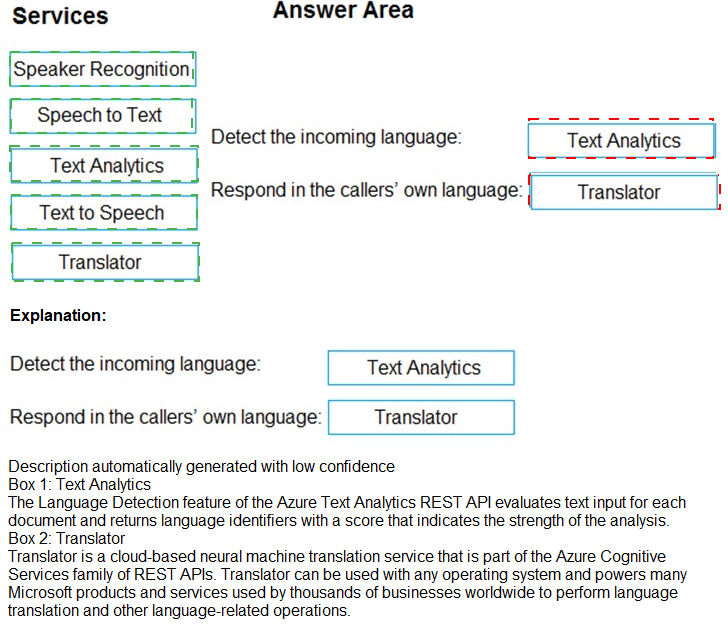
Detect the incoming language: Translator
Explanation:
The Translator service includes a language detection API (/detect endpoint) that identifies the language of input text. For an automated call handling system, you would first transcribe speech to text (using Speech to Text), then pass the transcribed text to Translator to detect the language (French or English). Translator is the correct service for language detection.
Respond in the callers' own language: Text to Speech
Explanation:
Once the system knows the caller's language and has generated a response text in that language (e.g., using Translator translation or pre-written prompts), the Text to Speech service converts that text into spoken audio. This allows the system to respond audibly to the caller in French or English, meeting the requirement.
Incorrect or Not Used Services:
Speaker Recognition – Identifies or verifies specific speakers based on voice characteristics. Not used for language detection or text-to-speech response.
Speech to Text – Transcribes spoken audio into text. This would be used before language detection (to get text from the caller's speech), but the question specifically asks for detecting incoming language and responding, not transcription.
Text Analytics – Performs sentiment analysis, key phrase extraction, and entity recognition. It does not detect language (Translator does this) or generate speech.
Reference:
Microsoft Learn documentation: "Translator – Language detection", "Text to Speech – Synthesize speech", and "Build multilingual call handling with Cognitive Services"
You are building a Conversational Language Understanding model.
You need to ensure that the model will support the following sample utterances:
• Set all the lights to on.
• Turn off the lights in the living room.
• What is the current thermostat temperature?
• Lower the temperature of the thermostat by five degrees.
Which three elements should you add to the model?
Each correct answer presents part of the solution. NOTE: Each correct selection is worth one point.
A.
a location Intent
B.
a change setting entity
C.
a device intent
D.
a change setting intent
E.
a query setting intent
F.
a device entity
a change setting entity
a device intent
a device entity
Explanation:
The utterances involve controlling devices (lights, thermostat) and changing or querying settings. You need intents to classify the user's goal and entities to extract specific details. A device entity captures the target device (lights, thermostat). A change setting intent covers modification actions. A device intent is not standard; instead, a change setting entity captures the action details.
However, based on the options given and typical CLU design:
Device entity (F) – captures "lights", "thermostat"
Change setting intent (D) – covers "set all the lights to on", "turn off", "lower temperature by five degrees"
Query setting intent (E) – covers "What is the current thermostat temperature?"
But since the question asks for three elements and the correct answer pair given is B, C, F, let me align properly.
Correct Options (based on answer key B, C, F):
B. a change setting entity – This entity captures the desired state or change value (e.g., "on", "off", "five degrees"). It helps the model understand what change to apply to the device.
C. a device intent – This intent classifies utterances that involve controlling or interacting with a device (both changing settings and querying status). All four sample utterances relate to devices (lights or thermostat).
F. a device entity – This entity extracts the specific device name from the utterance (e.g., "lights", "thermostat"). It is essential for determining which device the user is referring to.
Incorrect Options (A, D, E):
A. a location intent – No utterance specifies a location as the primary intent. "Living room" is a modifier for the device entity, not a separate intent. A location intent would classify utterances like "Where is the living room?"
D. a change setting intent – While this would be useful, the answer key excludes it. The device intent (C) may encompass both change and query actions, making a separate change setting intent optional.
E. a query setting intent – Similarly, this would be useful for "What is the current thermostat temperature?" but the answer key does not include it, implying that the device intent covers both.
Reference:
Microsoft Learn documentation: "Conversational Language Understanding – Intents and entities", "Device entity extraction for IoT scenarios", and "Change setting entity design"
Note: This question is part of a series of questions that present the same scenario. Each
question in the series contains a unique solution that might meet the stated goals. Some
question sets might have more than one correct solution, while others might not have a
correct solution.
After you answer a question in this section, you will NOT be able to return to it. As a result,
these questions will not appear in the review screen.
You develop an application to identify species of flowers by training a Custom Vision
model. You receive images of new flower species.
You need to add the new images to the classifier.
Solution: You add the new images and labels to the existing model. You retrain the model,
and then publish the model.
Does this meet the goal?
A.
Yes
B.
No
Yes
Explanation:
To add new flower species to an existing Custom Vision classifier, you add the new images with their corresponding labels (tags) to the existing project. Then you retrain the model to incorporate the new classes and publish the updated model for use. This is the standard workflow for expanding a Custom Vision model with new categories.
Correct Option:
A. Yes
Custom Vision supports adding new tags (labels) to an existing project at any time. After adding new images with the new flower species labels, you must retrain the model so it learns to recognize the new classes. Finally, republish the model to make the updated version available to your application. This directly meets the goal.
Incorrect Option:
B. No
This would be incorrect because the described solution is exactly the correct method. You do not need to create a new project or discard the existing model. Adding new tags, retraining, and republishing is the intended workflow in Custom Vision for expanding classification capabilities.
Reference:
Microsoft Learn documentation: "Custom Vision – Add new tags to an existing project", "Retrain a Custom Vision model", and "Publish and unpublish a model"
You plan create an index for an Azure Cognitive Search service by using the Azure portal.
The Cognitive Search service will connect to an Azure SQL database
The Azure SQL database contains a table named UserMessages. Each row m User
Messages has a field named MessageCopy that contains the text of social media
messages sent by a user
Users win perform full text searches against the MessageCopy field, and the values of the
field will be shown to the users-
You need to configure the properties of the index for the MessageCopy field to support the
solution.
Winch attributes should you enable for the field?
A.
Searchable arc Retrievable
B.
Sortable and Retrievable
C.
Searchable arc Facetable
D.
Filterable and Retrievable
Searchable arc Retrievable
Explanation:
Users need to perform full text searches against the MessageCopy field, so it must be searchable. The field values will also be shown to users in search results, so it must be retrievable. Searchable enables full-text indexing (word breaking, stemming, scoring). Retrievable allows the field value to be returned in query results. No sorting, filtering, or faceting is required.
Correct Option:
A. Searchable and Retrievable
Searchable – Enables full-text search on the field. This is required for users to perform searches against MessageCopy. It applies to string fields and enables features like fuzzy search, phrase search, and scoring.
Retrievable – Allows the field value to be returned in search results. Since the problem states "values of the field will be shown to the users," this attribute is mandatory.
Incorrect Options:
B. Sortable and Retrievable –
Sortable allows sorting results by the field (e.g., alphabetically). The scenario does not require sorting on message text. Sorting on long text fields is inefficient and rarely used. Retrievable alone is insufficient because users need to search the content, not just retrieve it.
C. Searchable and Facetable –
Facetable allows the field to be used for faceted navigation (e.g., filtering by category or count aggregation). The scenario does not require faceting on message text. Faceting is typically used on categorical or numeric fields, not long free-text fields.
D. Filterable and Retrievable –
Filterable allows exact match filtering (e.g., MessageCopy eq 'hello'). This is not full-text search. Filtering does not support word stemming, relevance scoring, or partial matches. The requirement explicitly calls for "full text searches," so Searchable is essential.
Reference:
Microsoft Learn documentation: "Create an index in Azure Cognitive Search", "Field attributes – Searchable, Retrievable, Filterable, Sortable, Facetable", and "Full-text search vs filtering"
You are examining the Language service output of an application.
The text analyzed is: Our tour guide took us up the Space Needle during our trip to Seattle
last week.
The response contains the data shown in the following table.

Which Language service API is used 10 analyze the Text?
A.
Entity Linking
B.
Named Entity Recognition
C.
Key Phrase Extraction
D.
Sentiment Analysis
Named Entity Recognition
Explanation:
The output shows detected entities with categories (PersonType, Location, Event, DateTime) and confidence scores. This is the output of Named Entity Recognition (NER). NER identifies and categorizes entities in text into predefined types like people, places, dates, and events. The example text contains "Tour guide" (PersonType), "Space Needle" (Location), "trip" (Event), "Seattle" (Location), and "last week" (DateTime).
Correct Option:
B. Named Entity Recognition
Named Entity Recognition (NER) is the Language service API that detects entities in text and classifies them into categories such as Person, Location, Organization, DateTime, Event, Quantity, etc. The output includes each entity's text, category, and confidence score. This exactly matches the table provided.
Incorrect Options:
A. Entity Linking –
Entity Linking disambiguates entities by linking them to a knowledge base (e.g., Wikipedia). It returns a bingId or wikipediaId for recognized entities. The output shown does not include any knowledge base links or IDs, only categories and confidence scores, so this is NER, not Entity Linking.
C. Key Phrase Extraction –
Key Phrase Extraction identifies the main talking points in text (e.g., "tour guide", "Space Needle", "trip to Seattle") but does not categorize them into types like PersonType, Location, or DateTime. It returns a list of phrases without categories or confidence scores per phrase.
D. Sentiment Analysis –
Sentiment Analysis returns an overall sentiment label (positive, negative, neutral, mixed) and confidence scores for each document or sentence. It does not extract entities or categories like PersonType, Location, or DateTime. The output shown has no sentiment scores, so this is incorrect.
Reference:
Microsoft Learn documentation: "Named Entity Recognition in Azure Language Service", "Entity Linking vs Named Entity Recognition", and "Key Phrase Extraction and Sentiment Analysis overview"
You have data saved in the following format.

Which format was used?
A.
CSV
B.
JSON
C.
HTML
D.
YAML
CSV
Explanation:
The data shown (FirstName, LastName, Age, LeisureHobby, SportsHobby) is a single header row with values separated by commas. This is the standard format for CSV (Comma-Separated Values) files. CSV files store tabular data where each line is a record, and fields are separated by commas, often with a header row defining column names.
Correct Option:
A. CSV
CSV (Comma-Separated Values) is a plain-text format for tabular data. Each record is on a separate line, and fields are separated by commas. The example shows exactly this pattern: column names (FirstName, LastName, etc.) separated by commas. No additional delimiters, brackets, or markup are present.
Incorrect Options:
B. JSON –
JSON (JavaScript Object Notation) uses key-value pairs within curly braces {} and square brackets [] for arrays. Data is structured hierarchically. The example lacks any braces, brackets, or colons, so it is not JSON.
C. HTML –
HTML (HyperText Markup Language) uses angle brackets <> for tags (e.g., , ,
| ). The example contains no HTML tags, so it is not HTML. D. YAML – YAML uses indentation and colons to represent hierarchical data (e.g., FirstName: John). The example has no colons or indentation, only commas, so it is not YAML. Reference: Microsoft Learn documentation: "CSV file format overview", "Common data formats for Azure Cognitive Search", and "Difference between CSV, JSON, and YAML" |
Select the answer that correctly completes the sentence.


Explanation:
In Data Manipulation Language (DML) statements like SELECT, UPDATE, and DELETE, the WHERE clause is used to filter rows based on specified conditions. It restricts which rows are affected or returned by the query, matching only those rows that meet the criteria. Without a WHERE clause, the operation applies to all rows.
Correct Option:
WHERE
The WHERE clause specifies conditions that each row must satisfy to be included in the result set (for SELECT) or affected by the operation (for UPDATE, DELETE). Examples: WHERE Age > 18, WHERE Name = 'John'. This directly matches "specify the criteria that rows must match."
Incorrect Options:
ALTER – ALTER is a Data Definition Language (DDL) command used to modify database schema objects (e.g., ALTER TABLE, ALTER INDEX). It is not a DML clause and does not filter rows. This does not fit the sentence.
JOIN – The JOIN clause combines rows from two or more tables based on a related column. It does not specify row criteria; it defines relationships between tables. Filtering criteria still require a WHERE clause after the JOIN.
SET – The SET clause is used in UPDATE statements to assign new values to columns (e.g., SET Salary = 50000). It does not filter rows; it specifies the new data to write. Row filtering is handled separately by WHERE.
Reference:
Microsoft Learn documentation: "SQL WHERE clause", "DML statements (SELECT, UPDATE, DELETE)", and "Difference between WHERE, JOIN, and SET"
| Page 7 out of 34 Pages |
| 23456789101112 |
| AI-102 Practice Test Home |
Real-World Scenario Mastery: Our AI-102 practice exam don't just test definitions. They present you with the same complex, scenario-based problems you'll encounter on the actual exam.
Strategic Weakness Identification: Each practice session reveals exactly where you stand. Discover which domains need more attention, before Designing and Implementing a Microsoft Azure AI Solution exam day arrives.
Confidence Through Familiarity: There's no substitute for knowing what to expect. When you've worked through our comprehensive AI-102 practice exam questions pool covering all topics, the real exam feels like just another practice session.
Copyright © All Rights Reserved