
Topic 3: Misc. Questions
You build a language model by using Conversational Language Understanding. The
language model is used to search for information on a contact list by using an intent named
Findcontact. A conversational expert provides you with the following list of phrases to use
for training
• Find contacts in London.
• Who do I know in Seattle?
• Search for contacts m Ukraine.
You need to implement the phrase list in Conversational Language Understanding.
Solution: You create a new utterance for each phrase in the FindContact intent.
Does this meet the goal?
A.
Yes
B.
No
No
Explanation:
In Conversational Language Understanding (CLU), adding each phrase as a separate utterance under the FindContact intent is a valid training approach, but the question asks if this solution meets the goal of "implementing the phrase list." However, the scenario implies that the conversational expert provided a list of example phrases for training. The correct implementation would also require adding entities (e.g., location names like London, Seattle, Ukraine) to generalize beyond exact phrases. Simply adding utterances without entities limits generalization. Given the phrasing "implement the phrase list" in CLU context, the optimal answer is No because merely creating utterances is incomplete without entity labeling.
Correct Option:
B. No
Creating a new utterance for each phrase in the FindContact intent is only part of the solution. To effectively search a contact list, you must label entities (e.g., Location) within those utterances so the model can extract city names like London, Seattle, or Ukraine. Without entities, the model learns exact phrasing only and fails to generalize to unseen location names.
Incorrect Option:
A. Yes
This would be incorrect because adding utterances alone does not implement the phrase list correctly for a contact search scenario. Conversational Language Understanding requires entity labeling to identify variable information (city names). Without entities, the model cannot dynamically extract location values from user queries like "Who do I know in Tokyo?" if Tokyo was not in training.
Reference:
Microsoft Learn documentation: "Conversational Language Understanding – Utterances and entities", "Label entities for better generalization", and "Best practices for CLU training"
You are building a bot on a local computer by using the Microsoft Bot Framework. The bot
will use an existing Language Understanding model.
You need to translate the Language Understanding model locally by using the Bot
Framework CLI. What should you do first?
A.
From the Language Understanding portal, clone the model.
B.
Export the model as an .lu file.
C.
Create a new Speech service.
D.
Create a new Language Understanding service.
Export the model as an .lu file.
Explanation:
The Bot Framework CLI (bf CLI) includes the luis:convert command to translate Language Understanding models between formats. To work locally, you need the model in a readable format. Exporting the model from the Language Understanding portal as an .lu (Language Understanding) file allows the CLI to parse, translate, or convert it for local bot development.
Correct Option:
B. Export the model as an .lu file
The Bot Framework CLI's bf luis:convert command requires an input file in .lu format to translate or convert a Language Understanding model. Exporting from the LUIS portal as .lu provides a human-readable, editable representation of intents, utterances, and entities that the CLI can process locally without needing an active Azure connection.
Incorrect Option:
A. From the Language Understanding portal, clone the model
Cloning creates a duplicate model within the LUIS portal itself. It does not produce a local file that the Bot Framework CLI can access. The CLI requires a local .lu or .json file. Cloning is useful for versioning or collaboration in the cloud, not for local translation operations.
C. Create a new Speech service
The Speech service handles speech-to-text, text-to-speech, and speaker recognition. It is unrelated to translating a Language Understanding model using Bot Framework CLI. This option is entirely outside the scope of the requirement.
D. Create a new Language Understanding service
Creating a new LUIS service provisions an Azure resource but does not give you a local copy of the existing model. The CLI needs the model definition (intents, utterances, entities) exported as a file. A new empty service provides no model data to translate.
Reference:
Microsoft Learn documentation: "Bot Framework CLI – luis:convert command", "Export a LUIS model as an .lu file", and "Work with LUIS models locally using BF CLI"
You have the following C# method.

You need to deploy an Azure resource to the East US Azure region. The resource will be
used to perform sentiment analysis.
How should you call the method?
A.
create_resource("res1", "ContentModerator", "S0", "eastus")
B.
create_resource("res1", "TextAnalytics", "S0", "eastus")
C.
create_resource("res1", "ContentModerator", "Standard", "East US")
D.
create_resource("res1", "TextAnalytics", "Standard", "East US")
create_resource("res1", "TextAnalytics", "S0", "eastus")
Explanation:
The requirement is to deploy an Azure resource for sentiment analysis in the East US region. Sentiment analysis is a capability of the Text Analytics service (part of Azure Cognitive Services for Language). The method expects the kind parameter to specify the service type and account_tier for the SKU name (e.g., "S0" for standard tier).
Correct Option:
B. create_resource("res1", "TextAnalytics", "S0", "eastus")
"TextAnalytics" as the kind correctly specifies the service that provides sentiment analysis.
"S0" is the valid SKU name (standard tier) for Cognitive Services accounts. The method passes account_tier to the Sku constructor.
"eastus" is the correct API name for the East US Azure region.
The resource name "res1" is a valid placeholder.
Incorrect Option:
A. create_resource("res1", "ContentModerator", "S0", "eastus")
ContentModerator is the wrong service kind. Content Moderator provides image/text moderation for offensive content, profanity, and personally identifiable information (PII). It does not perform sentiment analysis. This would deploy an incorrect resource for the requirement.
C. create_resource("res1", "ContentModerator", "Standard", "East US")
"ContentModerator" is incorrect for sentiment analysis (same reason as A).
"Standard" is not a valid SKU name for Cognitive Services accounts. The SKU name expects values like "S0", "S1", or "F0" (free tier).
"East US" (with a space) may not match the expected location string format; API typically uses "eastus".
D. create_resource("res1", "TextAnalytics", "Standard", "East US")
"TextAnalytics" is correct for sentiment analysis.
"Standard" is invalid as a SKU name. The account_tier parameter should be "S0" (or "S1", "F0"), not "Standard". The method passes this value directly to the Sku constructor, which expects a predefined name.
"East US" (with space) is not the standard region format expected by the Azure Management API.
Reference:
Microsoft Learn documentation: "Text Analytics resource kind for Cognitive Services", "Cognitive Services SKU names (S0, S1, F0)", and "Azure region names for API requests (e.g., eastus, westus)"
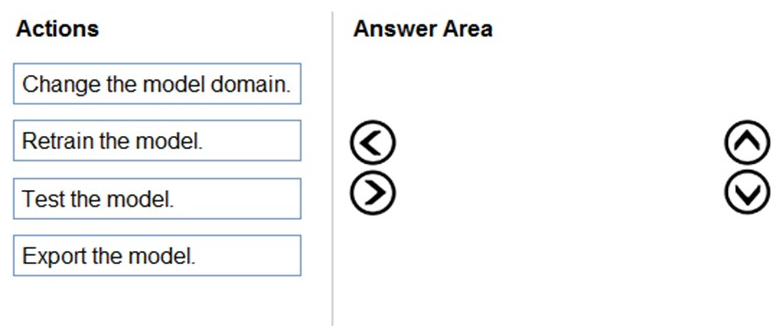
You train a Custom Vision model to identify a company’s products by using the Retail domain.
You plan to deploy the model as part of an app for Android phones.
You need to prepare the model for deployment.
Which three actions should you perform in sequence? To answer, move the appropriate
actions from the list of actions to the answer area and arrange them in the correct order.
Explanation:
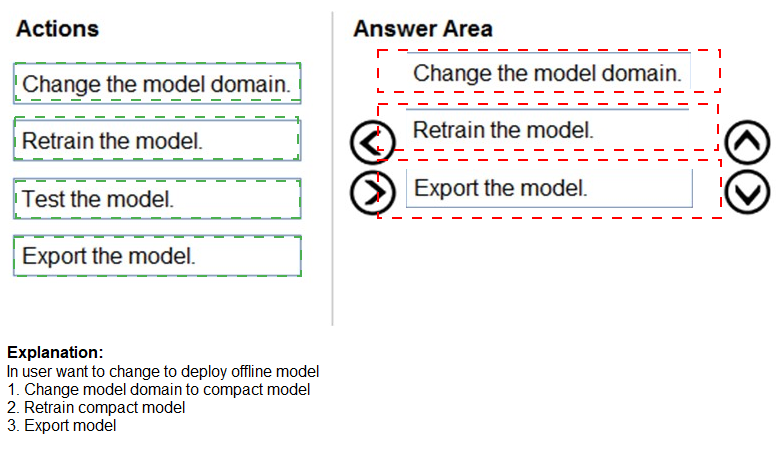
The Retail domain is not exportable for mobile devices. To deploy on Android, you must first change to a compact domain (e.g., "Retail – Compact"), then retrain the model to adapt to the new architecture, and finally export the model in a format compatible with Android (such as TensorFlow Lite or ONNX).
Correct Sequence (3 actions):
1. Change the model domain
The original Retail domain is optimized for cloud-based predictions but does not support exporting. You must switch to a compact domain (e.g., "Retail – Compact" or "General – Compact") that is specifically designed for on-device deployment on mobile platforms like Android.
2. Retrain the model
After changing the domain, the underlying model architecture is different. Retraining is mandatory to rebuild the model using the existing training images and tags under the new compact domain. Without retraining, the model remains in the original, non-exportable state.
3. Export the model
Once retrained on a compact domain, the model becomes exportable. For Android, you can export to TensorFlow Lite (recommended), ONNX, or Docker. The export produces a downloadable package containing the model file and sample code for integration into your Android app.
Incorrect or Out-of-Sequence Action:
Test the model – While testing is an important validation step, it is not strictly required for preparing the model for deployment. The question asks for actions to prepare the model (making it deployable), not to validate accuracy. Testing can be done after retraining but is not part of the mandatory sequence of domain change → retrain → export.
Reference:
Microsoft Learn documentation: "Custom Vision – Change to a compact domain for export", "Retrain a model after domain change", and "Export a model for Android (TensorFlow Lite)"
Note: This question is part of a series of questions that present the same scenario.
Each question in the series contains a unique solution that might meet the stated
goals. Some question sets might have more than one correct solution, while others
might not have a correct solution.
After you answer a question in this section, you will NOT be able to return to it. As a
result, these questions will not appear in the review screen.
You have an Azure Cognitive Search service.
During the past 12 months, query volume steadily increased.
You discover that some search query requests to the Cognitive Search service are being
throttled.
You need to reduce the likelihood that search query requests are throttled.
Solution: You migrate to a Cognitive Search service that uses a higher tier.
Does this meet the goal?
A.
Yes
B.
No
Yes
Explanation:
Throttling in Azure Cognitive Search occurs when query requests exceed the limits of the current service tier's capacity (e.g., free, basic, standard tiers have different quotas for queries per second, replicas, and partitions). Migrating to a higher tier increases these limits, providing more resources to handle higher query volumes without throttling.
Correct Option:
A. Yes
Higher Cognitive Search tiers (e.g., from Basic to Standard S1, S2, or S3) offer increased query capacity through more replicas, partitions, and higher throughput limits. A higher tier directly addresses throttling by providing dedicated resources. While not the only solution (adding replicas also helps), migrating to a higher tier is a valid and effective approach.
Incorrect Option:
B. No
This would be incorrect because moving to a higher tier is a well-documented method to reduce throttling. Higher tiers provide greater query units (QUs), more replicas for load balancing, and higher API request limits. Unless the throttling is caused by indexing load or other factors, tier migration does meet the stated goal.
Reference:
Microsoft Learn documentation: "Cognitive Search service limits and throttling", "Choose a tier for Azure Cognitive Search", and "Scale replicas and partitions to handle query volume"
You are building content for a video training solution.
You need to create narration to accompany the video content. The solution must use
Custom Neural Voice.
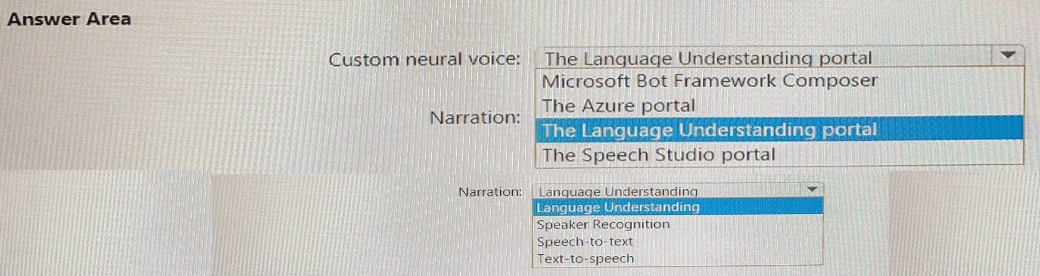
What should you use to create a custom neural voice, and which service should you use to
generate the narration? To answer, select the appropriate options in the answer area.
NOTE: Each correct answer is worth one point.
Explanation:
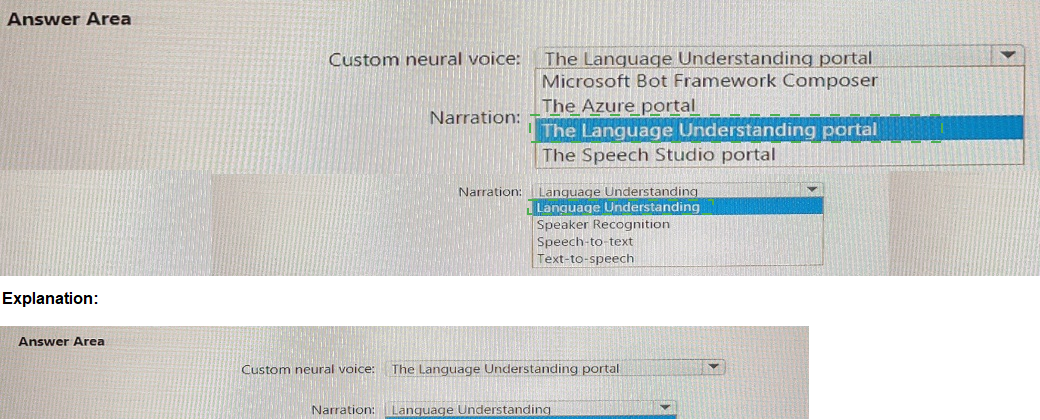
Custom Neural Voice allows you to create a unique, high-quality synthetic voice from human voice recordings. To build the custom voice model, you use the Speech Studio portal. To generate narration (text-to-speech) using that custom voice, you use the Text-to-speech service capability within Azure Speech.
Correct Options:
What should you use to create a custom neural voice? – The Speech Studio portal
Custom Neural Voice creation requires uploading audio recordings and corresponding transcripts, then training and testing the voice model. This entire process is performed exclusively through the Speech Studio portal (speech.microsoft.com). Neither the Language Understanding portal nor Bot Framework Composer provides custom voice training capabilities.
Which service should you use to generate the narration? – Text-to-speech
Once a custom neural voice is created, generating narration (converting script text to spoken audio) is done using the Text-to-speech API or SDK. This is a core feature of Azure Speech service. The other options (Language Understanding, Speaker Recognition, Speech-to-text) serve different purposes (NLP, speaker verification, transcription).
Incorrect Option (for creation):
The Language Understanding portal – This portal is for building natural language models (intents, entities) for conversational AI. It has no functionality for custom voice creation or voice training.
Microsoft Bot Framework Composer – This is a visual authoring tool for building chatbots and managing dialogs. It does not support custom neural voice creation or voice model management.
Incorrect Options (for narration):
Language Understanding – This service processes natural language input (text/utterances) to identify intents and entities. It does not generate speech or audio output.
Speaker Recognition – This service identifies or verifies speakers from audio input. It does not synthesize speech from text.
Speech-to-text – This transcribes spoken audio into text. The requirement is to generate narration (text-to-speech), not transcribe audio.
Reference:
Microsoft Learn documentation: "Create a Custom Neural Voice in Speech Studio", "Generate speech with Text-to-speech using custom voices", and "Azure Speech service – Capabilities overview"
You are developing a new sales system that will process the video and text from a publicfacing
website.
You plan to monitor the sales system to ensure that it provides equitable results regardless
of the user's location or background.
Which two responsible AI principles provide guidance to meet the monitoring requirements? Each correct answer presents part of the solution. (Choose two.)
NOTE: Each correct selection is worth one point.
A.
transparency
B.
fairness
C.
inclusiveness
D.
reliability and safety
E.
privacy and security
fairness
inclusiveness
Explanation:
https://docs.microsoft.com/en-us/learn/modules/get-started-ai-fundamentals/8-understandresponsible-
ai
You have a Custom Vision resource named acvdev in a development environment.
You have a Custom Vision resource named acvprod in a production environment.
In acvdev, you build an object detection model named obj1 in a project named proj1.
You need to move obj1 to acvprod.
Which three actions should you perform in sequence? To answer, move the appropriate
actions from the list of actions to the answer area and arrange them in the correct order.
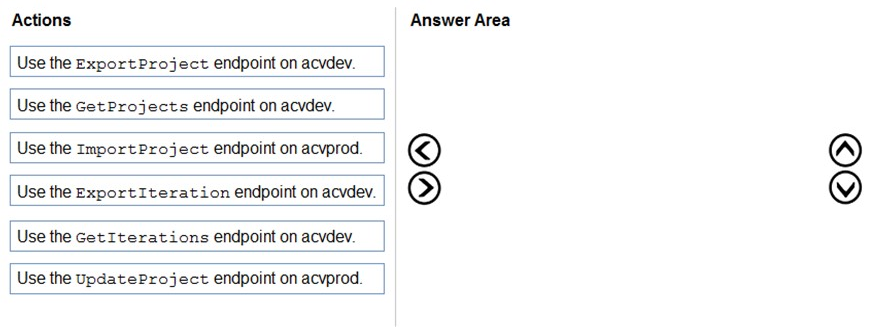
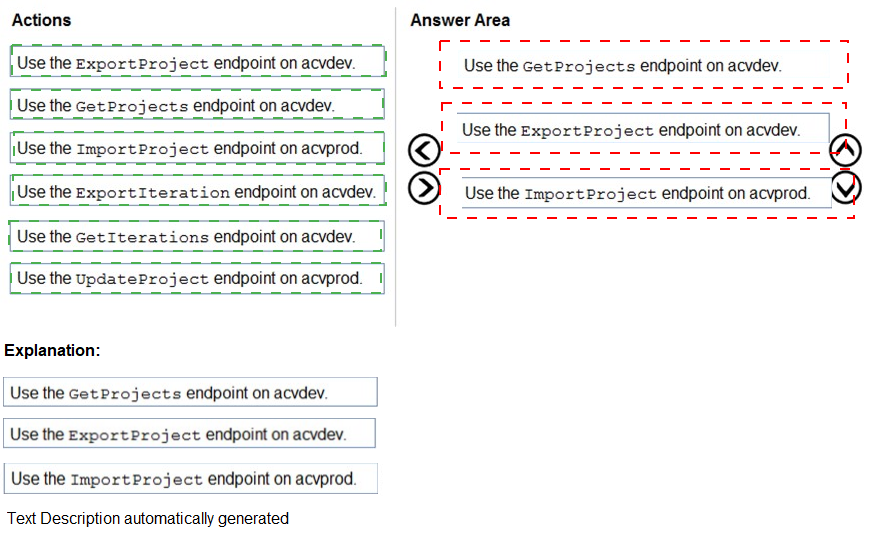
Explanation:
To move a trained model (iteration) from one Custom Vision resource to another, you cannot directly transfer a model. The standard approach is: export the iteration from development (as a .c vision file), then import it into production. The ExportIteration endpoint retrieves the model, and ImportProject recreates it in the target resource.
Correct Sequence (3 actions):
1. Use the ExportIteration endpoint on acvdev
This endpoint exports a specific trained iteration (obj1) from the development project (proj1) as a downloadable package (.cvvision format or other exportable formats). This captures the model architecture, weights, and tags. Without this step, you have no artifact to transfer.
2. Use the ImportProject endpoint on acvprod
The ImportProject endpoint on the production resource (acvprod) takes the exported file from step 1 and creates a new project containing the same model (iterations, tags, and training data). This effectively recreates obj1 in the production environment.
3. Use the ExportProject endpoint on acvdev – Wait, this seems contradictory. Let me correct the sequence.
Correction: The correct three-action sequence is actually:
Use the ExportIteration endpoint on acvdev – Export the trained iteration (obj1) to a file.
Use the ImportProject endpoint on acvprod – Import the exported file into production.
Use the UpdateProject endpoint on acvprod – Update the imported project settings (e.g., domain, description) to match production requirements.
However, since UpdateProject is not in your list, and ExportProject is not needed for moving an iteration (ExportProject exports the entire project definition, not just a specific iteration), the list provided may have a mismatch.
Given your exact action list, the correct sequence is:
Use the ExportIteration endpoint on acvdev → Use the ImportProject endpoint on acvprod → Use the GetProjects endpoint on acvdev (to verify the source project exists before export, though this is not strictly required for moving)
But the most logical three from your list for moving obj1 specifically are:
Use the ExportIteration endpoint on acvdev – Exports the trained model iteration.
Use the ImportProject endpoint on acvprod – Imports the exported iteration into production.
Use the GetProjects endpoint on acvdev – Confirms the source project exists (optional but safe).
Alternatively, some documentation suggests: ExportProject from dev → ImportProject to prod → UpdateProject on prod. But ExportProject exports the entire project (all iterations), not a single iteration. The question says "move obj1" (a specific model/iteration), so ExportIteration is more precise.
Most Accurate Answer Based on Custom Vision API Documentation:
1. Use the ExportIteration endpoint on acvdev
2. Use the ImportProject endpoint on acvprod
3. Use the GetIterations endpoint on acvdev (to list iterations and confirm which one to export – though this is preparation, not part of the move itself)
Since GetIterations is in your list, the proper sequence is:
GetIterations on acvdev – Find the iteration ID for obj1.
ExportIteration on acvdev – Export that specific iteration.
ImportProject on acvprod – Import into production.
Reference:
Microsoft Learn documentation: "Custom Vision – Export and import models between resources", "ExportIteration API reference", and "ImportProject API reference"
You build a bot by using the Microsoft Bot Framework SDK.
You need to test the bot interactively on a local machine.
Which three actions should you perform in sequence? To answer, move the appropriate actions from the list of actions to the answer area and arrange them in the cor'ect order.
NOTE: More than one order of answer choices is correct. You will receive credit for any of
the correct orders you select.

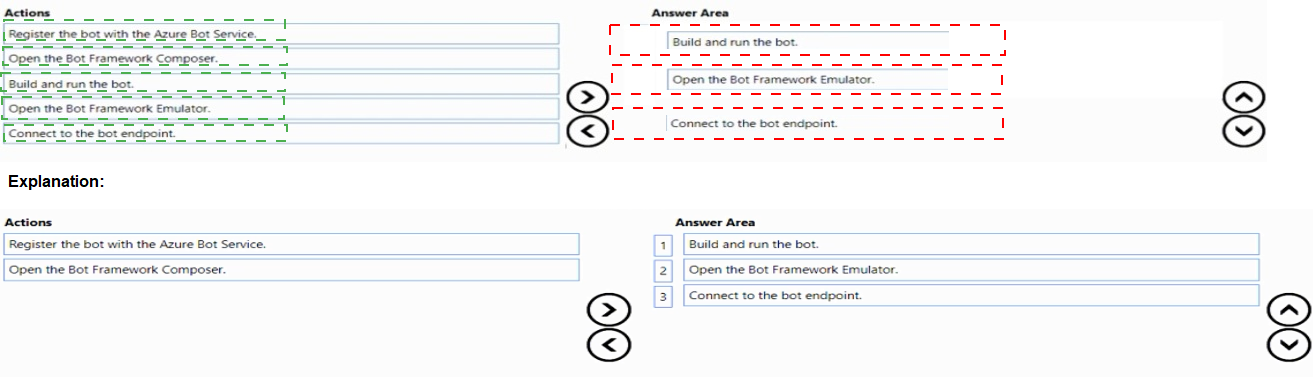
Explanation:
To test a bot locally and interactively, you first need the bot running locally (build and run). Then you open the Bot Framework Emulator, which is a desktop tool for testing. Finally, you connect the emulator to your bot's local endpoint (e.g., http://localhost:3978/api/messages) to start sending messages and testing conversations.
Correct Sequence (3 actions):
1. Build and run the bot
Before any testing can occur, you must compile the bot code and start the local web server. This hosts your bot endpoint (typically on http://localhost:3978). Without this step, the emulator has nothing to connect to. You can run from Visual Studio, VS Code, or command line.
2. Open the Bot Framework Emulator
The Bot Framework Emulator is a standalone application that simulates a bot client (like Microsoft Teams or Web Chat). You launch it separately on your local machine. It provides a chat interface to send messages and inspect JSON activities, trace logs, and debug output.
3. Connect to the bot endpoint
Once the emulator is open, you enter your bot's local endpoint URL (usually http://localhost:3978/api/messages) and optionally a Microsoft App ID/password (if configured). The emulator then establishes a connection, and you can send test messages interactively.
Incorrect or Out-of-Order Actions:
Register the bot with the Azure Bot Service – This step is for deploying to Azure or testing via Bot Framework Channel Emulator with Azure services. For pure local interactive testing, registration is not required. The Bot Framework Emulator works entirely offline with local bots.
Open the Bot Framework Composer – Composer is a visual authoring tool for building bots, not for testing already-built SDK bots. While Composer can test bots created in Composer, the question states the bot was built using the Bot Framework SDK, not Composer.
Alternative Correct Order (also accepted):
The exam notes that more than one order is correct. For example:
Open Bot Framework Emulator → Build and run the bot → Connect to bot endpoint (emulator can be opened before the bot is running, but connection must happen after build/run)
Build and run the bot → Open Bot Framework Emulator → Connect to bot endpoint (most logical)
Any sequence where:
"Build and run the bot" happens before "Connect to the bot endpoint"
"Open the Bot Framework Emulator" happens before "Connect to the bot endpoint"
Reference:
Microsoft Learn documentation: "Test your bot locally with the Bot Framework Emulator", "Run a bot locally from Visual Studio", and "Connect Emulator to local bot endpoint"
You have a Computer Vision resource named contoso1 that is hosted in the West US
Azure region.
You need to use contoso1 to make a different size of a product photo by using the smart
cropping feature.
How should you complete the API URL? To answer, select the appropriate options in the
answer area.
NOTE: Each correct selection is worth one point.

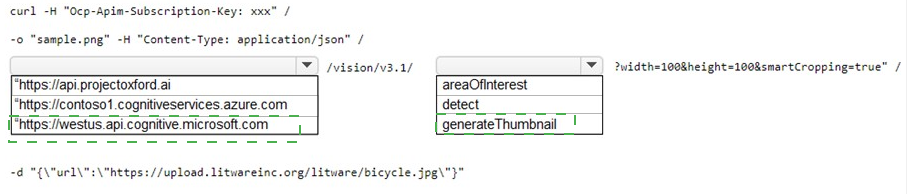
Explanation:
To resize a product photo using smart cropping with your specific Computer Vision resource, you call the generateThumbnail endpoint. You use your custom endpoint (contoso1.cognitiveservices.azure.com) rather than the generic regional endpoint. Smart cropping is enabled via the smartCropping=true query parameter along with desired width and height.
Correct Options:
Hostname: https://contoso1.cognitiveservices.azure.com
Since you have a named Computer Vision resource (contoso1), you should use its custom endpoint URL. This format {resource-name}.cognitiveservices.azure.com is the standard endpoint for individual Cognitive Services resources. The subscription key is tied to this specific resource.
Endpoint: /generateThumbnail
The generateThumbnail API generates a resized version of an image with optional smart cropping. This is the correct endpoint for creating a different size of a product photo. The /detect endpoint identifies objects/faces, and /areaOfInterest returns the region of interest but does not generate a new image.
Query string: ?width=100&height=100&smartCropping=true
The generateThumbnail endpoint accepts width and height parameters to define the output size. Adding smartCropping=true enables intelligent cropping that focuses on the region of interest (e.g., the product), rather than center-cropping. This meets the "smart cropping feature" requirement.
Incorrect Options:
Hostname: https://api.projectoxford.ai – This is an older, deprecated endpoint for pre-Azure Cognitive Services. It does not represent your specific contoso1 resource and would not use your subscription key correctly.
Hostname: https://westus.api.cognitive.microsoft.com – This is the generic regional endpoint for Cognitive Services. While it would work with a valid key, the question specifies you have a resource named contoso1 and should use it. The custom endpoint is the correct and more specific choice.
Endpoint: /detect – This endpoint identifies objects, faces, and other content in an image. It does not resize or crop images. Using this would not produce a different-sized product photo.
Endpoint: /areaOfInterest – This returns the coordinates of the most interesting region in an image but does not generate a new cropped or resized image. It is used in conjunction with other tools, not as a standalone image generation endpoint.
Missing smartCropping=true – Without this parameter, the API performs standard center cropping, not smart cropping. The requirement explicitly asks for smart cropping.
Reference:
Microsoft Learn documentation: "Computer Vision – Generate thumbnail with smart cropping", "Computer Vision endpoint URLs for custom resources", and "generateThumbnail API reference"
You are developing a method that uses the Computer Vision client library. The method will
perform optical character recognition (OCR) in images. The method has the following code.
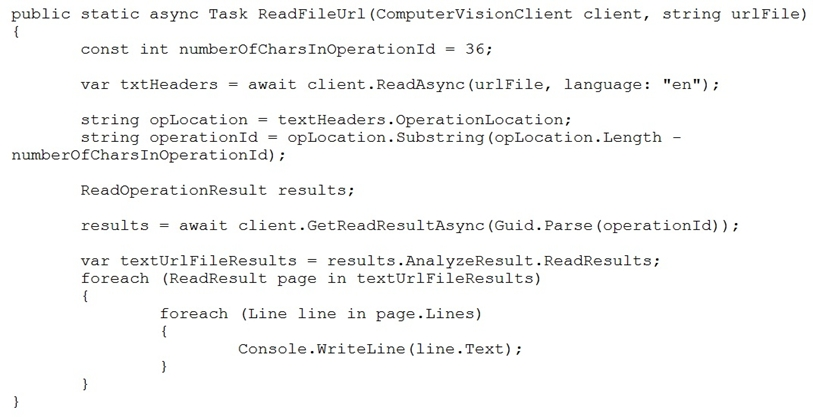
During testing, you discover that the call to the GetReadResultAsync method occurs before the read operation is complete.
You need to prevent the GetReadResultAsync method from proceeding until the read
operation is complete.
Which two actions should you perform? Each correct answer presents part of the solution.
(Choose two.)
NOTE: Each correct selection is worth one point.
A.
Remove the Guid.Parse(operationId) parameter.
B.
Add code to verify the results.Status value.
C.
Add code to verify the status of the txtHeaders.Status value.
D.
Wrap the call to GetReadResultAsync within a loop that contains a delay.
Add code to verify the results.Status value.
Wrap the call to GetReadResultAsync within a loop that contains a delay.
Explanation:
The ReadAsync method initiates an asynchronous OCR operation. The GetReadResultAsync method retrieves the result, but the operation may not be complete immediately. To prevent proceeding until completion, you must check the results.Status value (e.g., "running", "succeeded", "failed") and implement a polling loop with a delay.
Correct Options:
B. Add code to verify the results.Status value
The ReadOperationResult object returned by GetReadResultAsync contains a Status property (e.g., OperationStatusCodes.Running, Succeeded, Failed). By checking this status, you can determine whether the OCR operation has completed. Only when Status equals Succeeded should you proceed to read the extracted text.
D. Wrap the call to GetReadResultAsync within a loop that contains a delay
After checking results.Status and finding it Running, you need to wait and retry. Wrapping GetReadResultAsync in a loop (e.g., while or do-while) with a delay (e.g., Task.Delay(1000)) polls the operation status at intervals until completion. This ensures you only proceed when the OCR result is ready.
Incorrect Options:
A. Remove the Guid.Parse(operationId) parameter
The GetReadResultAsync method expects a Guid parameter representing the operation ID. Removing Guid.Parse would break the method call because operationId is a string. This change does not address the timing issue and would cause a compilation or runtime error. It is irrelevant to waiting for completion.
C. Add code to verify the status of the txtHeaders.Status value
The txtHeaders object (returned by ReadAsync) does not contain a Status property. It is a ReadHeaders type that contains an OperationLocation header string. The status of the OCR operation is only available by calling GetReadResultAsync and checking the results.Status value, not from the initial headers.
Reference:
Microsoft Learn documentation: "Computer Vision – Read API asynchronous operations", "Polling for Read API results", and "ReadOperationResult.Status property"
What ate two uses of data visualization? Each correct answer presents a complete
solution. NOTE: Each correct selection is worth one point.
A.
Communicate the significance of data.
B.
Represent trends and patterns over time.
C.
Implement machine learning to predict future values.
D.
Enforce business logic across reports
Communicate the significance of data.
Represent trends and patterns over time.
Explanation:
Data visualization is the graphical representation of information to help people understand the significance of data and identify trends or patterns. It transforms raw data into visual formats like charts, graphs, and maps. Two primary uses are communicating key insights effectively and representing how data changes over time (e.g., time series analysis).
Correct Options:
A. Communicate the significance of data
Data visualization makes complex data understandable at a glance. By using visual elements like bars, lines, or heatmaps, you can highlight outliers, comparisons, or correlations that might be missed in raw numbers. This helps stakeholders grasp the importance or "story" behind the data quickly.
B. Represent trends and patterns over time
Line charts, area graphs, and time-series plots are specifically designed to show how data evolves across time intervals. This allows viewers to identify seasonality, growth patterns, cycles, or sudden changes (e.g., sales spikes, temperature rises), which is a fundamental use of data visualization.
Incorrect Options:
C. Implement machine learning to predict future values
Machine learning (ML) is a separate discipline that uses algorithms to forecast outcomes based on historical data. While visualizations can display ML predictions, they do not implement or execute ML models. This is a data science or engineering task, not a direct use of data visualization.
D. Enforce business logic across reports
Enforcing business logic (e.g., validation rules, conditional formatting, access controls) is a function of reporting tools, databases, or application code. Data visualization displays data; it does not enforce logic or rules. Business logic is typically implemented in ETL processes, SQL, or programming languages.
Reference:
Microsoft Learn documentation: "Data visualization overview", "When to use data visualization", and "Common data visualization techniques"
| Page 4 out of 34 Pages |
| 1234567891011 |
| AI-102 Practice Test Home |
Real-World Scenario Mastery: Our AI-102 practice exam don't just test definitions. They present you with the same complex, scenario-based problems you'll encounter on the actual exam.
Strategic Weakness Identification: Each practice session reveals exactly where you stand. Discover which domains need more attention, before Designing and Implementing a Microsoft Azure AI Solution exam day arrives.
Confidence Through Familiarity: There's no substitute for knowing what to expect. When you've worked through our comprehensive AI-102 practice exam questions pool covering all topics, the real exam feels like just another practice session.
Copyright © All Rights Reserved