
Topic 3: Misc. Questions
You develop a custom question answering project in Azure Cognitive Service for Language. The project will be used by a chatbot. You need to configure the project to engage in multi-turn conversations. What should you do?
A. Add follow-up prompts
B. Enable active learning.
C. Add alternate questions
D. Enable chit-chat
Explanation:
Multi-turn conversation in a custom question answering knowledge base is specifically achieved by defining a hierarchical relationship between question/answer pairs. This allows the bot to ask clarifying questions or guide the user through a process, creating a conversational flow.
Correct Option:
A. Add follow-up prompts:
This is the explicit feature for enabling multi-turn conversations. Follow-up prompts allow you to connect a source QnA pair to one or more related destination QnA pairs. When the source answer is returned, the system presents the linked prompts as clickable options to continue the conversation in a guided, logical path.
Incorrect Option:
B. Enable active learning:
This feature helps improve the knowledge base over time by suggesting real user questions as alternate phrasings for existing answers. It is for refining and expanding QnA pairs, not for structuring conversational turns.
C. Add alternate questions:
This improves the matching accuracy for a single answer by adding different ways a user might ask the same core question. It enhances a single turn, but does not create a linked, multi-step dialogue.
D. Enable chit-chat:
This adds a layer of pre-built, casual conversational QnA pairs (like greetings, jokes, or "How are you?"). It makes the bot more personable but does not create a logical, task-oriented multi-turn flow for custom domain knowledge.
Reference:
Microsoft Learn: "Create multiple turns of a conversation"
You plan to build a chatbot to support task tracking.
You create a Language Understanding service named lu1.
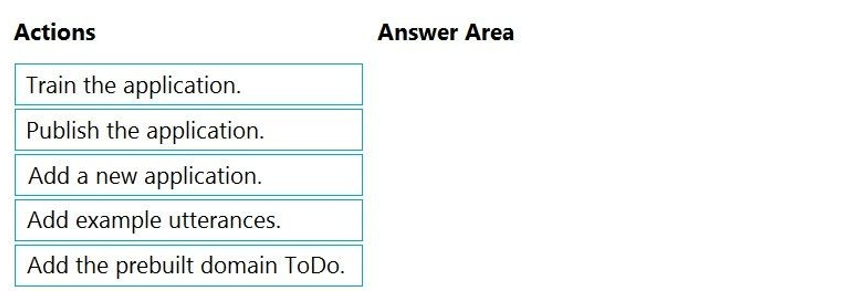
You need to build a Language Understanding model to integrate into the chatbot. The solution must minimize development time to build the model.
Which four actions should you perform in sequence? To answer, move the appropriate
actions from the list of actions to the answer area and arrange them in the correct order.
(Choose four.)

Explanation:
This scenario describes building a Language Understanding (LUIS) model to minimize development time. The most efficient approach is to start with a prebuilt domain model that already contains intents and entities for common scenarios, like task management, and then customize it with your own examples.
Correct Option (Sequence):
Add a new application.
The first logical step is to create a new LUIS application within the lu1 service to serve as the container for your custom model.
Add the prebuilt domain ToDo.
To minimize development time, you import the prebuilt ToDo domain. This domain comes with pre-trained intents (like "AddToDo", "DeleteToDo", "MarkToDoComplete") and relevant entities, providing an immediate, robust foundation for a task-tracking bot.
Add example utterances.
After importing the prebuilt domain, you add your own example utterances. This step is crucial to tailor the pre-trained model to your specific users' phrasing and to improve prediction accuracy for your application.
Train the application.
Once you have added your custom utterances, you must train the application. This process updates the underlying machine learning model with the new data (the prebuilt domain + your examples).
Incorrect Option / Not in Sequence:
Publish the application:
This is the final step to deploy the trained model to a prediction endpoint so the chatbot can call it. However, it is performed after the four steps listed above. The question asks for the sequence to build the model, not the final deployment action.
Reference:
Microsoft Learn: "Prebuilt domains in LUIS"
You are designing a conversation flow to be used in a chatbot.
You need to test the conversation flow by using the Microsoft Bot Framework Emulator.
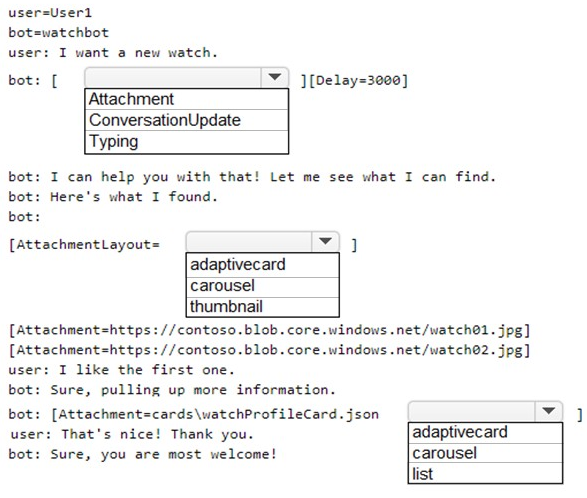
How should you complete the .chat file? To answer, select the appropriate options in the
answer area.
NOTE: Each correct selection is worth one point.
Explanation:
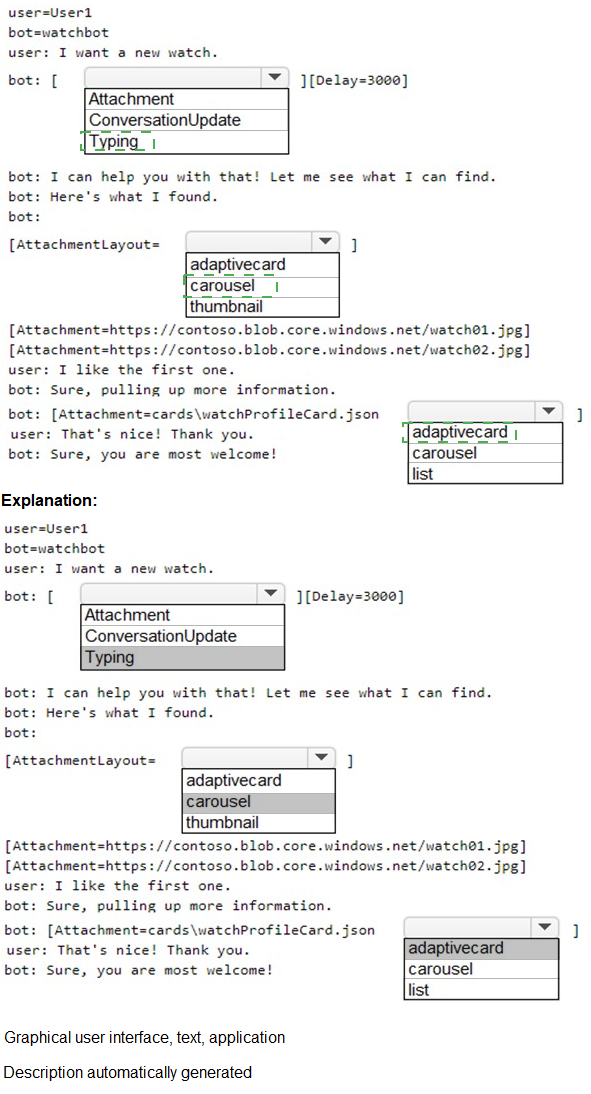
A .chat file is used in the Bot Framework Emulator to script and simulate a conversation for testing. It uses specific activities and formatting directives. The correct choices depend on simulating realistic bot behavior (like showing a typing indicator before a response) and specifying how multiple attachments should be displayed.
Correct Option:
First Dropdown (After user says "I want a new watch."):
Typing
Explanation:
When the bot needs time to process or "think," it should send a Typing activity to the user. This is a standard UX pattern in chatbots to indicate the bot is working on a response. The subsequent 3-second delay (Delay=3000) mimics this processing time before the actual message is delivered.
Second Dropdown (When displaying multiple watch images):
carousel
Explanation:
The AttachmentLayout property controls how multiple attachments are presented. A carousel layout displays attachments as a horizontally scrollable set of cards, which is ideal for visually rich items like product images (watch01.jpg, watch02.jpg). A list layout is better for simple, vertical text-based lists.
Third Dropdown (When displaying a single JSON card file):
adaptivecard
Explanation:
The file watchProfileCard.json is an Adaptive Card, a rich, structured JSON document. The Attachment directive should specify adaptivecard as the content type to instruct the emulator/channel to render the JSON as a rich interactive card, not as a simple file attachment or image.
Incorrect Option / Rationale:
First Dropdown - ConversationUpdate:
This activity is sent when a member joins or leaves a conversation. It is used for system notifications, not for indicating the bot is processing a user's message.
Second Dropdown - list / thumbnail:
list is incorrect for displaying side-by-side product images. thumbnail is not a valid value for the AttachmentLayout property in this context (valid options are list or carousel).
Third Dropdown - carousel:
This is for the layout of multiple attachments. Since only a single card file (watchProfileCard.json) is being sent here, specifying a layout is not applicable. The content type of the single attachment itself must be declared.
Reference:
Bot Framework SDK Documentation: "How to test with the Emulator" and "Add media attachments to messages".
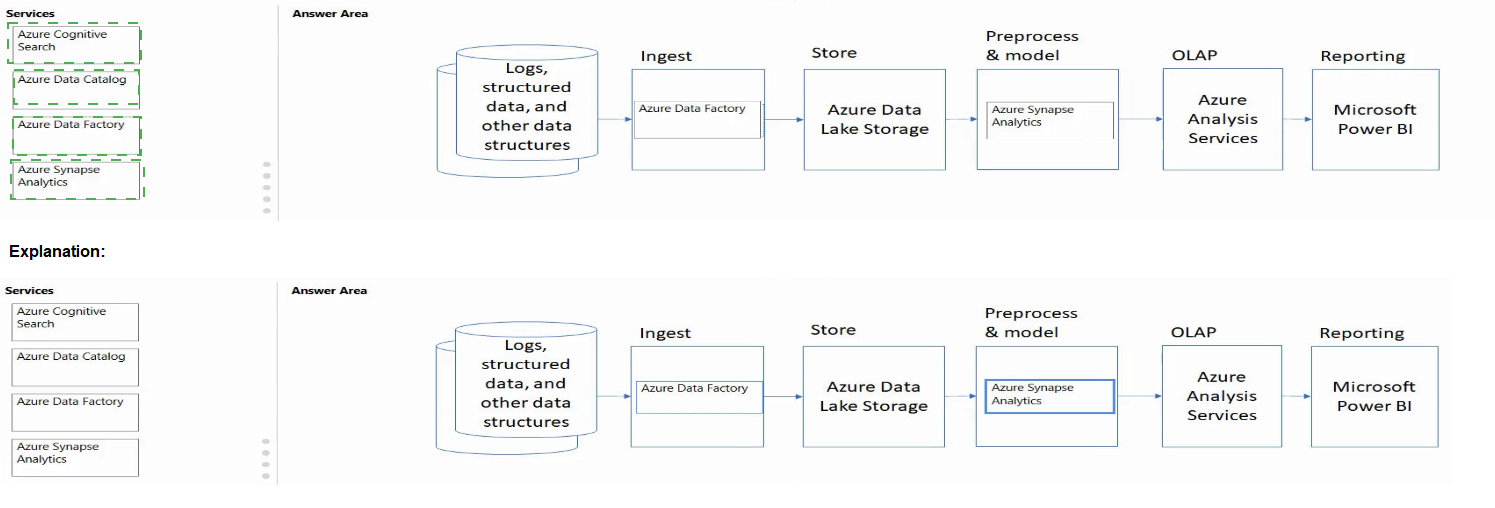
Match the Azure services to the appropriate locations in the architecture.
To answer, drag the appropriate service from the column on the left to its location on the
right. Each service may be used once, more than once, or not at all.
NOTE: Each correct match is worth one point.

Explanation:
This diagram depicts a classic data pipeline architecture: Ingest -> Store -> Prepare and Serve (OLAP) -> Consume (Reporting). The task is to match Azure services to their typical role in this pipeline. The "Preprocess" stage is part of the "Prepare and Serve" phase, often handled by data orchestration or transformation services.
Correct Option:
Azure Data Factory -> Ingest:
Azure Data Factory is a cloud-based data integration service. It is primarily used to create, schedule, and orchestrate data pipelines that move and transform data from various source systems—making it the ideal tool for the Ingest stage.
Azure Synapse Analytics -> OLAP:
Azure Synapse Analytics is an integrated analytics service that provides both serverless and dedicated SQL pools for large-scale data warehousing and analytics. It is specifically designed for Online Analytical Processing (OLAP) workloads, involving complex queries over large datasets.
Azure Data Lake Storage -> Store:
Azure Data Lake Storage Gen2 is a massively scalable and secure data lake for high-performance analytics workloads. It is the foundational storage service designed to hold vast amounts of raw data in its native format during the Store stage of a data lakehouse architecture.
Azure Data Catalog -> Reporting (or possibly the "Preprocess" stage in some contexts, but Reporting fits the available target better):
Azure Data Catalog (now part of Azure Purview) is an enterprise-wide metadata catalog. It enables data discovery and governance, which is a critical supporting service for the Reporting and consumption phase, as it helps analysts find and understand the available data assets.
Incorrect Option / Not Used:
Azure Search:
This service is a dedicated AI-powered search engine. While it can be part of a data solution (e.g., powering search over cataloged assets or reports), it does not directly map to the core, high-level stages shown in this specific data pipeline diagram (Ingest, Store, OLAP, Reporting). It would likely remain unused in this matching exercise.
Reference:
"What is Azure Data Factory?"
What is used to define a query in a stream processing jobs in Azure Stream Analytics?
A. SQL
B. XML
C. YAML
D. KOL
Explanation:
Azure Stream Analytics (ASA) is a real-time analytics and complex event-processing engine. To define the logic for transforming, aggregating, and analyzing streaming data, you need a declarative query language. ASA provides a dialect of SQL that is extended to handle temporal and streaming concepts like windows.
Correct Option:
A. SQL:
Azure Stream Analytics uses a SQL-like query language. This language is based on ANSI SQL but includes specific extensions for temporal operations (e.g., TIMESTAMP BY, tumbling windows, hopping windows) that are essential for processing infinite, time-series data streams. The job's transformation logic is authored in this Stream Analytics SQL.
Incorrect Option:
B. XML:
While XML may be used for configuration files (like the job's input/output definitions in an ARM template), it is not the language used to write the core data transformation and processing query logic within the job itself.
C. YAML:
YAML is sometimes used for CI/CD pipeline definitions or deployment manifests in Azure, but it is not the query language for defining the real-time data processing logic in a Stream Analytics job.
D. KQL (Kusto Query Language):
KQL is the powerful query language used by Azure Data Explorer and Azure Monitor Logs. While both handle time-series data, KQL is not used in Azure Stream Analytics jobs. This is a common point of confusion. Stream Analytics uses its own SQL variant.
Reference:
"Stream Analytics Query Language Reference"
You have a Language Understanding resource named lu1.
You build and deploy an Azure bot named bot1 that uses lu1.
You need to ensure that bot1 adheres to the Microsoft responsible AI principle of
inclusiveness.
How should you extend bot1?
A. Implement authentication for bot1
B. Enable active learning for Iu1
C. Host Iu1 in a container
D. Add Direct Line Speech to bot1.
Explanation:
The principle of inclusiveness in responsible AI means designing systems that are accessible to and work well for people with a wide range of abilities, backgrounds, and characteristics. For a chatbot, this includes ensuring it can be used by people with disabilities, such as those with visual impairments or motor difficulties that prevent easy typing.
Correct Option:
D. Add Direct Line Speech to bot1:
This directly addresses inclusiveness. Direct Line Speech is a feature that adds high-quality, two-way speech capability to a bot, allowing users to interact with it through voice commands and hear spoken responses. This makes the bot accessible to users who cannot read screens or type effectively.
Incorrect Option:
A. Implement authentication for bot1:
This relates to security and privacy (accountability or reliability principles), not directly to making the bot usable by a diverse audience with varying abilities.
B. Enable active learning for lu1:
This improves the performance and accuracy of the Language Understanding model over time by learning from user interactions. It relates to the principles of reliability and performance, but does not inherently make the bot more accessible or inclusive in its mode of interaction.
C. Host lu1 in a container:
Containerization is primarily about deployment flexibility, portability, and data residency/compliance (privacy principle). It does not change the bot's user interface or interaction model to be more inclusive.
Reference:
"Principles of responsible AI"
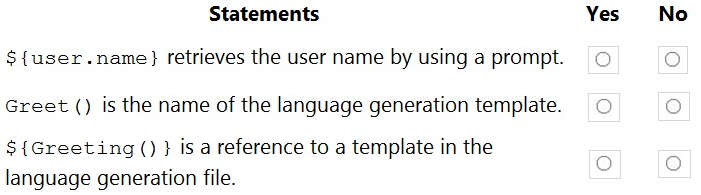
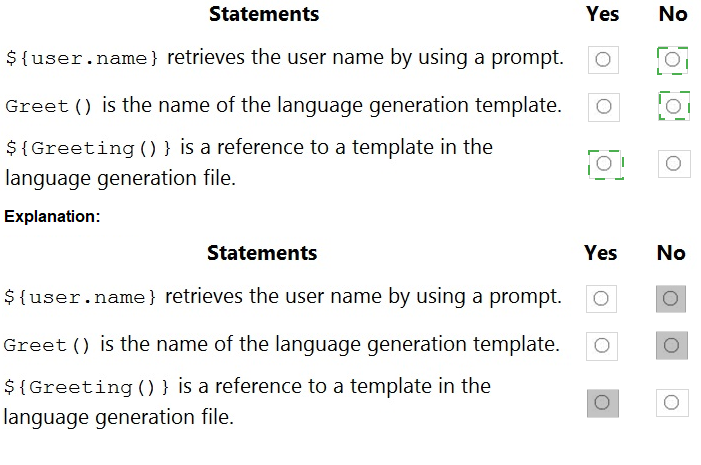
You are reviewing the design of a chatbot. The chatbot includes a language generation file
that contains the following fragment.
# Greet(user)
- ${Greeting()}, ${user.name}
For each of the following statements, select Yes if the statement is true. Otherwise, select
No.
NOTE: Each correct selection is worth one point.
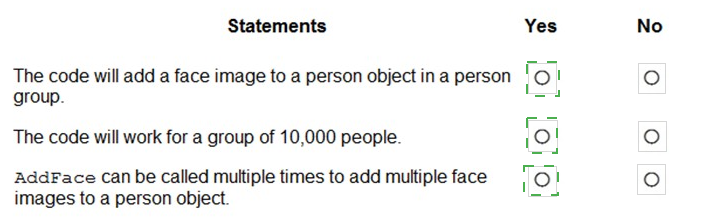
You are developing an application to recognize employees’ faces by using the Face
Recognition API. Images of the faces will be accessible from a URI endpoint.
The application has the following code.

Explanation:
The code calls the Face API endpoint to add a persisted face to a specific person within a PersonGroup using an image URL. This operation is used during the training phase of face recognition systems. It is important to understand API capabilities such as how faces are associated with persons and the limitations of PersonGroup versus LargePersonGroup when evaluating the statements.
Correct Option:
The code will add a face image to a person object in a person group – Yes
The endpoint /persistedFaces is specifically designed to attach a face image to a person within a PersonGroup. The image is provided via a URI, and the API extracts facial features and stores them as a persisted face. This enables the system to later identify or verify the person using trained data.
AddFace can be called multiple times to add multiple face images to a person object – Yes
The Face API allows multiple persisted faces per person to improve recognition accuracy. Each API call adds a new face image, helping the model learn variations such as lighting, angles, and expressions. This is a recommended practice when building robust face recognition solutions.
Incorrect Option:
The code will work for a group of 10,000 people – No
The standard PersonGroup has a limitation on the number of persons it can contain. It does not support very large datasets such as 10,000 people. For such scenarios, a LargePersonGroup must be used instead. Therefore, this code will not work if the group size exceeds the supported limit.
Reference:
Microsoft Learn – Face service documentation (PersonGroup, Persisted Faces, and service limits)
You have the following data sources:
Finance: On-premises Microsoft SQL Server database
Sales: Azure Cosmos DB using the Core (SQL) API
Logs: Azure Table storage
HR: Azure SQL database
You need to ensure that you can search all the data by using the Azure Cognitive Search
REST API. What should you do?
A.
Configure multiple read replicas for the data in Sales.
B.
Mirror Finance to an Azure SQL database
C.
Migrate the data in Sales to the MongoDB API.
D.
Ingest the data in Logs into Azure Sentinel.
Mirror Finance to an Azure SQL database
Explanation:
Azure Cognitive Search requires data sources to be accessible via a supported indexer or pushed via the REST API. On-premises SQL Server is not directly accessible. You must either use an indexer (which requires Azure SQL, Cosmos DB, or Table Storage) or push data via SDK/REST. Mirroring Finance to Azure SQL enables indexer-based crawling.
Correct Option:
B. Mirror Finance to an Azure SQL database
Azure Cognitive Search has a built-in indexer for Azure SQL Database, but not for on-premises SQL Server. By mirroring (using Azure Data Factory or SQL Data Sync) the Finance data to an Azure SQL database, you enable Cognitive Search to connect directly, schedule incremental indexing, and search all data together via the REST API.
Incorrect Option:
A. Configure multiple read replicas for the data in Sales
Read replicas improve read scalability and availability but do not address the core problem: on-premises SQL Server (Finance) is not natively accessible to Azure Cognitive Search. Sales is already in Cosmos DB (Core API), which Cognitive Search supports directly via an indexer. Replicas are irrelevant here.
C. Migrate the data in Sales to the MongoDB API
Sales is already in Cosmos DB using the Core (SQL) API, which Cognitive Search supports natively. Migrating to MongoDB API would not improve searchability. Cognitive Search has a separate MongoDB indexer, but only for MongoDB Atlas (not Cosmos DB MongoDB API), making this unnecessary and potentially breaking existing functionality.
D. Ingest the data in Logs into Azure Sentinel
Azure Sentinel is a SIEM (Security Information and Event Management) tool, not a search indexing platform. Ingesting Logs into Sentinel does not make them searchable via Azure Cognitive Search REST API. Logs are already in Azure Table Storage, which Cognitive Search can index directly using the Table Storage indexer.
Reference:
Microsoft Learn documentation: "Azure Cognitive Search indexers – Azure SQL Database", "Indexer access to on-premises SQL Server requires Azure SQL mirroring", and "Supported data sources for Azure Cognitive Search indexers"
You need to build a chatbot that meets the following requirements:
Supports chit-chat, knowledge base, and multilingual models
Performs sentiment analysis on user messages
Selects the best language model automatically
What should you integrate into the chatbot?
A.
QnA Maker, Language Understanding, and Dispatch
B.
Translator, Speech, and Dispatch
C.
Language Understanding, Text Analytics, and QnA Maker
D.
Text Analytics, Translator, and Dispatch
Language Understanding, Text Analytics, and QnA Maker
Explanation:
The requirements include chit-chat/knowledge base (QnA Maker), multilingual support (built into Language Understanding and Translator but not explicitly required as a separate service if LUIS handles it), sentiment analysis (Text Analytics), and automatic model selection (Dispatch). QnA Maker handles KB, LUIS handles language models and chit-chat, Text Analytics handles sentiment, and Dispatch routes between them.
Correct Option:
C. Language Understanding, Text Analytics, and QnA Maker
Language Understanding (LUIS): Provides natural language understanding, supports multilingual models, and includes pre-built chit-chat capabilities. It selects the best intent model automatically.
Text Analytics: Performs sentiment analysis on user messages to detect positive, negative, or neutral tones.
QnA Maker: Manages the knowledge base for FAQ-style responses. Dispatch coordinates routing between LUIS and QnA Maker.
Incorrect Option:
A. QnA Maker, Language Understanding, and Dispatch
Missing Text Analytics for sentiment analysis. While Dispatch helps route between LUIS and QnA Maker, sentiment analysis is a requirement that cannot be fulfilled by LUIS alone (LUIS provides intent/entity recognition, not sentiment scoring).
B. Translator, Speech, and Dispatch
Translator handles language translation, Speech handles voice input/output, and Dispatch routes requests. This combination lacks sentiment analysis (requires Text Analytics) and knowledge base support (requires QnA Maker). Chit-chat is also not covered.
D. Text Analytics, Translator, and Dispatch
Includes sentiment analysis (Text Analytics) and translation (Translator) but lacks QnA Maker for knowledge base and LUIS for language model selection. Dispatch alone cannot select the best language model without LUIS intents. Chit-chat capability is also missing.
Reference:
Microsoft Learn documentation: "Azure Bot Service – Combining LUIS and QnA Maker with Dispatch", "Text Analytics – Sentiment Analysis", and "LUIS – Multilingual models and chit-chat"
You have a chatbot that was built by using the Microsoft Bot Framework. You need to
debug the chatbot endpoint remotely.
Which two tools should you install on a local computer? Each correct answer presents part
of the solution. (Choose two.)
NOTE: Each correct selection is worth one point.
A.
Fiddler
B.
Bot Framework Composer
C.
Bot Framework Emulator
D.
Bot Framework CLI
E.
ngrok
F.
nginx
Bot Framework Emulator
ngrok
Explanation:
To debug a Microsoft Bot Framework chatbot endpoint remotely, you need to expose your locally running bot to the internet so Azure Bot Service can send messages to it. The Bot Framework Emulator connects to your bot for testing, while ngrok creates a secure tunnel to expose your local endpoint with a public HTTPS URL.
Correct Option:
C. Bot Framework Emulator
The Bot Framework Emulator is a desktop application that allows you to test and debug your bot locally. It can connect to any bot endpoint (including ngrok tunnels) and simulate conversations, inspect JSON activities, and debug message flow. It is essential for interactive debugging of bot logic, dialogs, and responses.
E. ngrok
ngrok creates a secure HTTPS tunnel from a public URL to your locally running bot. Azure Bot Service requires a publicly accessible messaging endpoint. ngrok forwards messages from Azure to your local machine, enabling remote debugging without deploying your bot to Azure. It provides inspection of HTTP traffic for troubleshooting.
Incorrect Option:
A. Fiddler
Fiddler is an HTTP debugging proxy that captures traffic between client and server. While useful for inspecting HTTP requests, it does not expose a local endpoint to the internet. Without ngrok or similar tunneling, Azure Bot Service cannot reach your local bot. Fiddler can complement ngrok but is not required.
B. Bot Framework Composer
Bot Framework Composer is a visual authoring tool for building bots using dialogs, Language Generation, and Language Understanding. It is not designed for remote endpoint debugging. Composer helps with bot design but does not expose local endpoints or provide runtime debugging of a deployed bot endpoint.
D. Bot Framework CLI
Bot Framework CLI is a command-line tool for managing bot resources, such as registering bots with Azure, managing LUIS and QnA Maker, and deploying skills. It does not assist with remote endpoint debugging or tunneling. It is used for lifecycle management, not runtime inspection or local exposure.
F. nginx
nginx is a web server and reverse proxy typically used for load balancing and serving static content. It does not create public tunnels to local machines. While it can proxy requests internally, it cannot make a local bot accessible from the internet without additional configuration and public IP exposure.
Reference:
Microsoft Learn documentation: "Debug your bot with the Bot Framework Emulator", "Set up ngrok for remote debugging with Azure Bot Service", and "Test locally with ngrok and the Bot Framework Emulator"
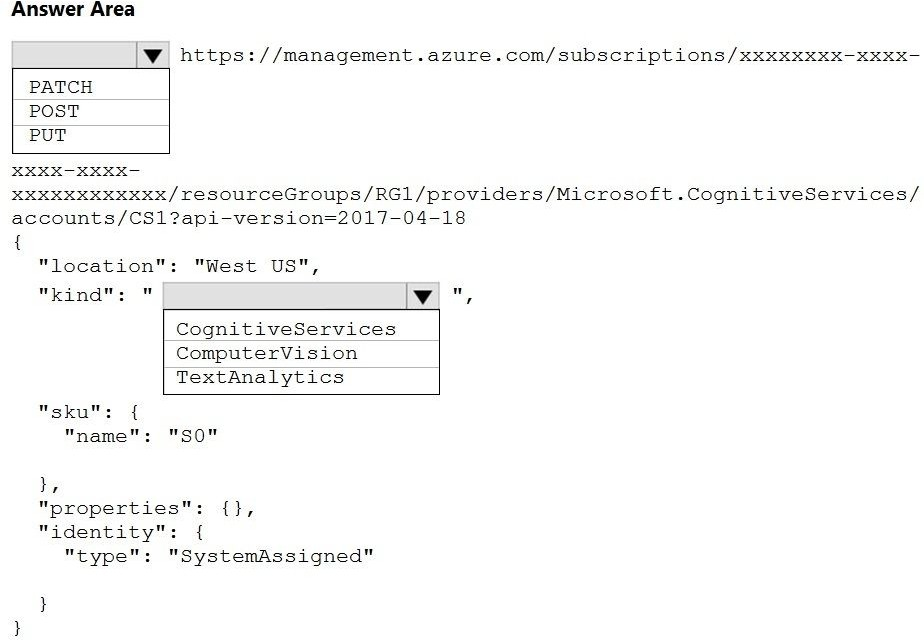
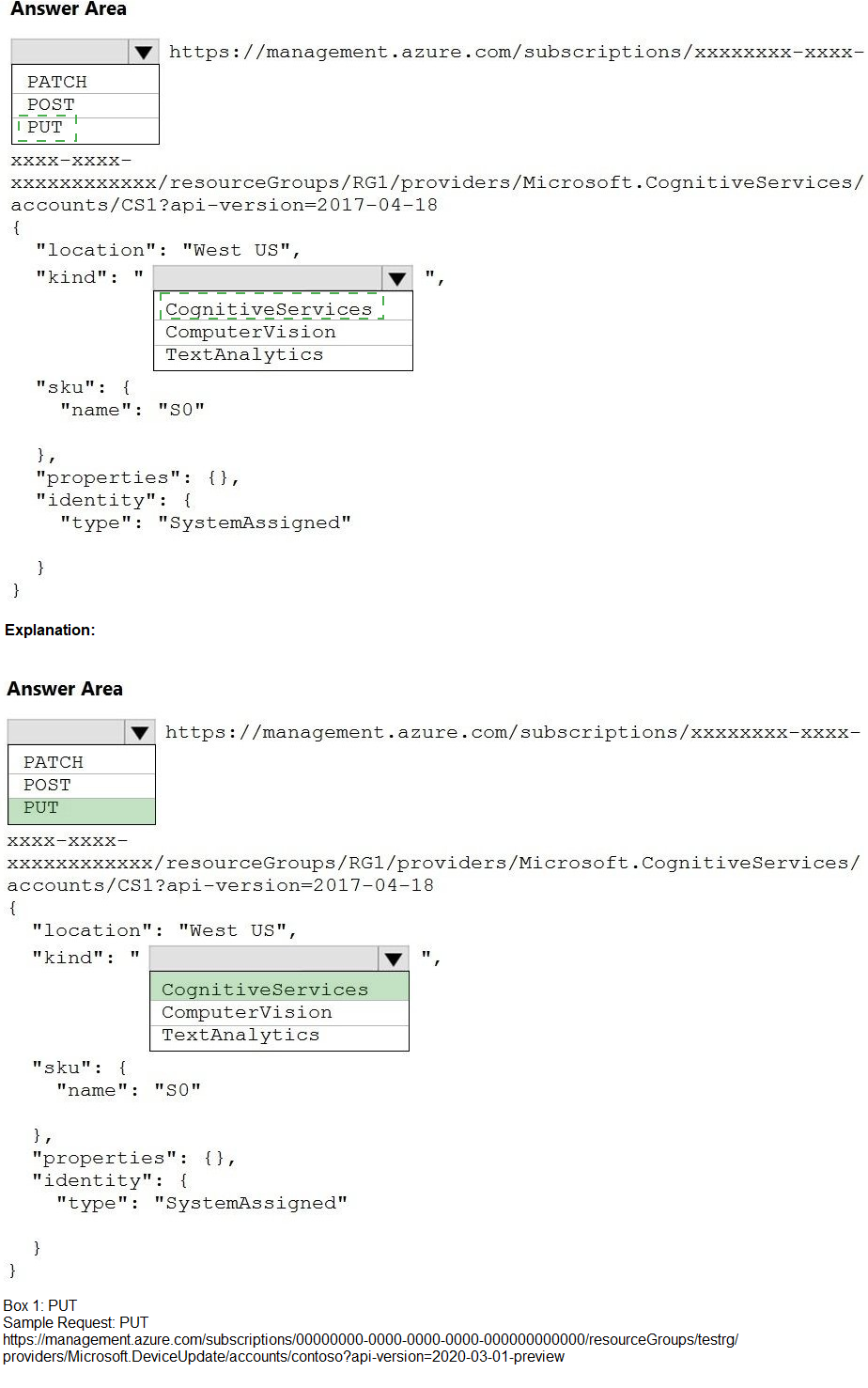
You need to create a new resource that will be used to perform sentiment analysis and
optical character recognition (OCR). The solution must meet the following requirements:
Use a single key and endpoint to access multiple services.
Consolidate billing for future services that you might use.
Support the use of Computer Vision in the future.
How should you complete the HTTP request to create the new resource? To answer, select
the appropriate options in the answer area.
NOTE: Each correct selection is worth one point.
Explanation:
You need a single key/endpoint for multiple AI services (Text Analytics for sentiment, Computer Vision for OCR) with consolidated billing. The multi-service resource type (CognitiveServices) allows this. PUT creates or updates a resource. SystemAssigned identity enables Azure AD authentication and future security integration without managing secrets.
Correct Options:
HTTP Method: PUT
PUT is used to create or update a resource at a specific URI. When provisioning a new Cognitive Services account, PUT specifies the resource parameters (location, kind, SKU, identity) in the request body. POST is typically for actions or queries, not resource creation. PATCH is for partial updates.
Kind: CognitiveServices
The CognitiveServices kind creates an all-in-one multi-service account that includes Computer Vision, Text Analytics, Translator, and others. Using this kind meets the requirement of a single key/endpoint for multiple services and consolidated billing. ComputerVision or TextAnalytics as kind would create single-service accounts.
Identity Type: SystemAssigned
SystemAssigned identity automatically creates a managed identity in Azure AD tied to the resource's lifecycle. This allows secure access to other Azure resources (e.g., Key Vault, Storage) without storing credentials. It supports future security requirements and is recommended for Cognitive Services multi-service accounts.
Incorrect Option:
HTTP Method: POST – POST is typically used for operations that are not idempotent or for submitting data to a resource. Creating a new resource in ARM follows the PUT convention. POST might be used for action endpoints like /analyze, not for provisioning.
HTTP Method: PATCH – PATCH applies partial updates to an existing resource. Since you are creating a new resource (not modifying one), PUT is correct. PATCH would fail if the resource does not already exist.
Kind: ComputerVision – This creates a single-service Computer Vision account. It would not include Text Analytics for sentiment analysis. You would need separate keys and endpoints for sentiment, and billing would be separate per resource.
Kind: TextAnalytics – This creates a single-service Text Analytics account. It includes sentiment analysis but not OCR (Computer Vision). Future Computer Vision support would require provisioning a separate resource with its own key and billing.
Identity Type (blank or omitted) – Without a managed identity, you would rely only on access keys for authentication. This does not support Azure AD-based security or managed identity scenarios for future integrations. SystemAssigned is explicitly required for the identity type field when enabling managed identity.
Reference:
Microsoft Learn documentation: "Create a multi-service resource for Azure Cognitive Services", "Cognitive Services resource kinds – CognitiveServices vs single-service", and "Managed identities for Cognitive Services"
| Page 3 out of 34 Pages |
| 1234567891011 |
| AI-102 Practice Test Home |
Real-World Scenario Mastery: Our AI-102 practice exam don't just test definitions. They present you with the same complex, scenario-based problems you'll encounter on the actual exam.
Strategic Weakness Identification: Each practice session reveals exactly where you stand. Discover which domains need more attention, before Designing and Implementing a Microsoft Azure AI Solution exam day arrives.
Confidence Through Familiarity: There's no substitute for knowing what to expect. When you've worked through our comprehensive AI-102 practice exam questions pool covering all topics, the real exam feels like just another practice session.
Copyright © All Rights Reserved