
Topic 3: Misc. Questions
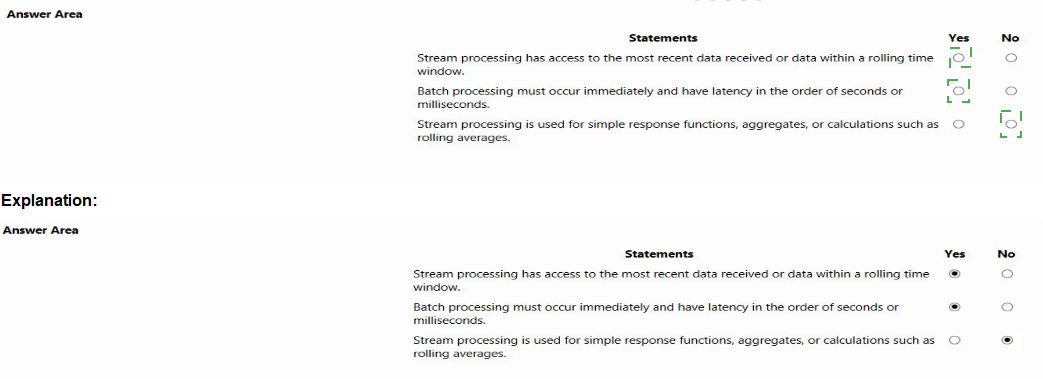
For each of the following statements, select Yes if the statement is tine. Otherwise, select
No. NOTE: Each correct selection is worth one point.

Explanation:
Stream processing handles continuous, real-time data as it arrives, typically within time windows. Batch processing processes large volumes of stored data with higher latency (minutes to hours). Stream processing is ideal for real-time aggregates like rolling averages. The statements must be evaluated against these fundamental differences.
Correct Answers:
Statement 1: Stream processing has access to the most recent data received or data within a rolling time window.
Yes – Stream processing operates on unbounded data streams, processing each event as it arrives. It naturally has access to the most recent data and commonly uses tumbling, hopping, or sliding windows (e.g., last 5 minutes) for computations.
Statement 2: Batch processing must occur immediately and have latency in the order of seconds or milliseconds.
No – This describes stream processing, not batch processing. Batch processing operates on large, static datasets stored in files or databases, with latency ranging from minutes to hours. It is scheduled (e.g., nightly), not immediate.
Statement 3: Stream processing is used for simple response functions, aggregates, or calculations such as rolling averages.
Yes – Stream processing excels at real-time aggregations like rolling averages, counts over sliding windows, anomaly detection, and simple alerting functions. Examples include average sensor reading over last 10 seconds or hourly event counts.
Reference:
Microsoft Learn: "Real-time vs batch processing" – Stream: low latency, unbounded data, time windows. Batch: high latency, bounded data, scheduled execution.
Azure Stream Analytics documentation: Supports windowed aggregates (rolling averages, counts, sums) on streaming data.
You have a Video Indexer service that is used to provide a search interface over company
videos on your company's website.
You need to be able to search for videos based on who is present in the video. What
should you do?
A.
Create a person model and associate the model to the videos.
B.
Create person objects and provide face images for each object.
C.
Invite the entire staff of the company to Video Indexer
D.
Edit the faces in the videos.
E.
Upload names to a language model.
Create a person model and associate the model to the videos.
Explanation:
Video Indexer can detect and identify known faces in videos. To search for videos based on specific people, you need to create a custom person model and train it with face images of those individuals. Then associate that model with your videos during indexing. This enables named face identification and searchability by person.
Correct Option:
A. Create a person model and associate the model to the videos.
Video Indexer allows creating custom person models where you define persons and upload reference face images. After training, you associate the model with videos during indexing or re-indexing. The service then identifies those specific people in videos, and you can search by person name.
Incorrect Options:
B. Create person objects and provide face images for each object. –
This is partially correct but incomplete. You must also associate the model with videos (option A). Without association, the person model is not applied to video indexing. Option A encompasses both creation and association.
C. Invite the entire staff of the company to Video Indexer –
Video Indexer does not require user invitations for face identification. Inviting staff members gives them portal access, which is unrelated to face detection/search functionality. This does not enable person-based search.
D. Edit the faces in the videos. –
Video Indexer does not support manual face editing. Faces are detected automatically. You cannot manually edit or label faces directly in the video timeline for identification purposes.
E. Upload names to a language model. –
Language models handle speech-to-text transcription accuracy (custom vocabulary, acoustic models). They have no role in face detection or person identification. This is unrelated to searching by who is present.
Reference:
Microsoft Learn: "Custom person models in Video Indexer" – Create a person model, add persons with face images, associate model with videos, then search by person name.
You are creating an enrichment pipeline that will use Azure Cognitive Search. The
knowledge store contains unstructured JSON data and scanned PDF documents that
contain text.
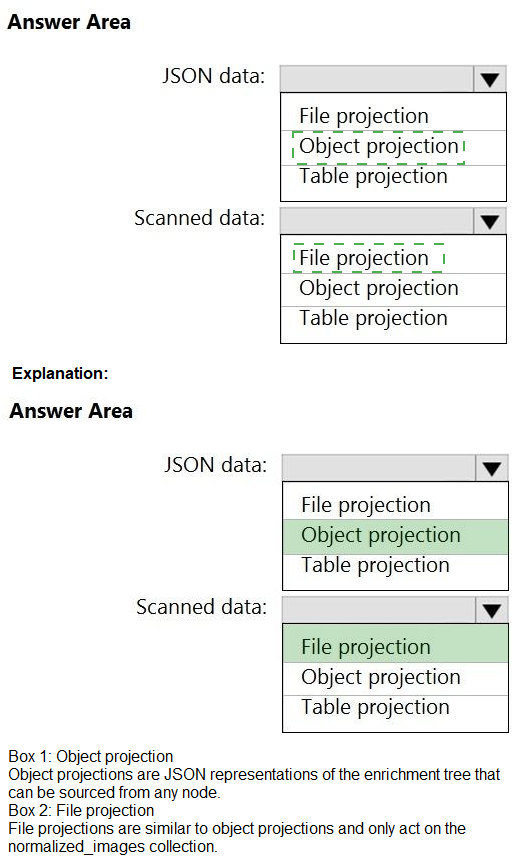
Which projection type should you use for each data type? To answer, select the
appropriate options in the answer area.
NOTE: Each correct selection is worth one point.

Explanation:
In Azure Cognitive Search, projections define how enriched data is shaped and stored in the knowledge store. Object projections output JSON objects suitable for hierarchical or semi-structured data (like JSON). File projections store images or binary data extracted from scanned documents (like PDFs). Table projections store normalized, relational data in Azure Table storage.
Correct Answers:
For JSON data: Object projection
JSON data is inherently hierarchical and semi-structured. An object projection stores it as a JSON object in Azure Blob storage, preserving nested structures and complex types. This is ideal for unstructured JSON data from the enrichment pipeline.
For scanned PDF documents that contain text: File projection
Scanned PDFs produce images or extracted binary content (e.g., JPEG of each page). A file projection stores such binary or image files in Azure Blob storage. While the OCR text can go to object/table projections, the scanned document images themselves require file projection.
Why Other Options Are Incorrect:
Table projection for JSON data – Table projections flatten hierarchical data into rows and columns (relational schema). This is not suitable for preserving the original JSON structure; you lose nesting and may create many sparse rows.
File projection for JSON data – File projections store binary files (images, PDFs, documents). JSON is text, not binary. Storing JSON as a file projection would be inefficient and lose queryability.
Object projection for scanned PDFs – Object projections store JSON objects. Scanned PDFs are binary image data, not JSON. You cannot store a PDF as a JSON object without base64 encoding, which is not the intended use.
Table projection for scanned PDFs – Table projections store relational data. Scanned PDFs are binary images, not tabular data. While OCR text extracted from the PDF can go to tables, the original scanned data (the image) requires file projection.
Reference:
Microsoft Learn: "Knowledge store projections" – Object projections (JSON blobs), File projections (binary/images), Table projections (Azure Tables for relational data).
You are building a bot and that will use Language Understanding.
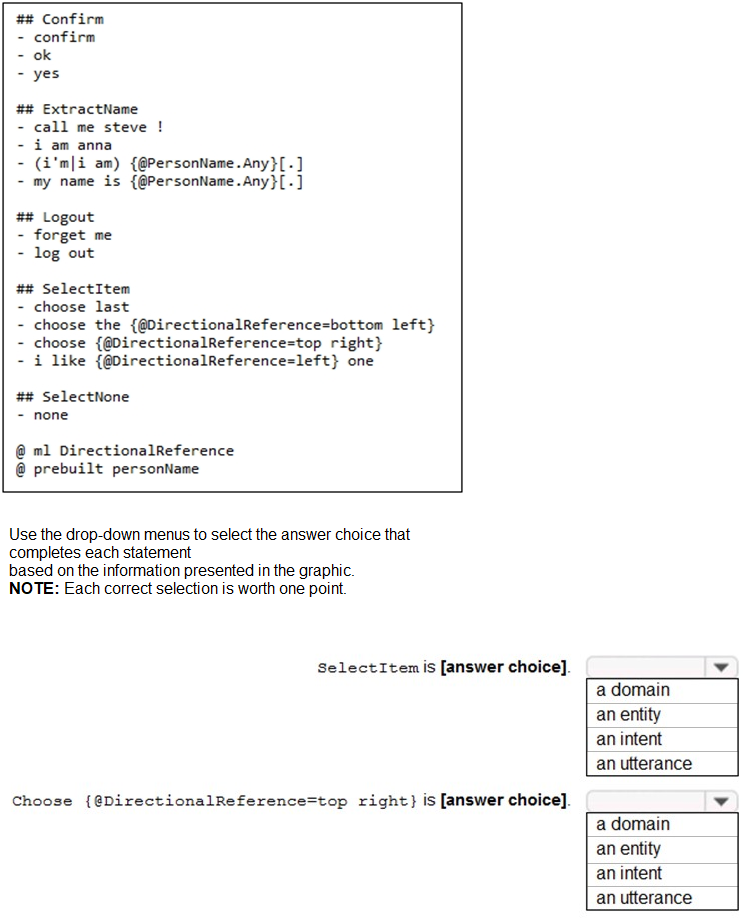
You have a LUDown file that contains the following content.
Explanation:
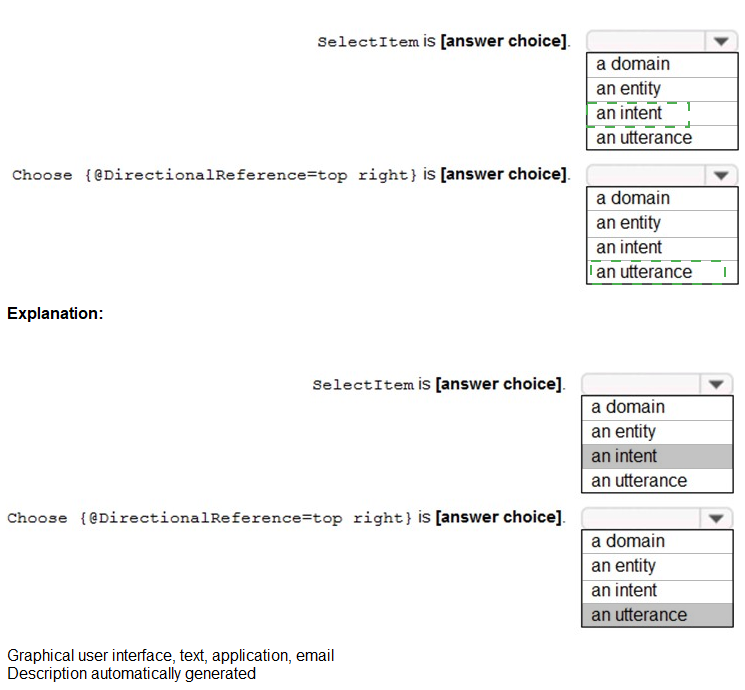
The LUDown file defines a Language Understanding model. SelectItem is marked with "##" (two hashes), which defines an intent. The line choose {{@DirectionalReference=top right}} is an example utterance (phrase) for that intent, containing a labeled entity reference.
Correct Answers:
SelectItem is [an intent]
In LUDown syntax, ## denotes an intent definition. SelectItem appears as ## SelectItem, making it an intent. Intents represent actions or goals the user wants to perform (e.g., selecting an item). Below it are example utterances for that intent.
Choose {{@DirectionalReference=top right}} is [an utterance]
This line is a complete example sentence/phrase that a user might say. It is an utterance belonging to the SelectItem intent. The {{@DirectionalReference=top right}} syntax indicates an entity label within the utterance, but the line itself is an utterance.
Incorrect Options:
For SelectItem:
a domain – Domains are high-level categories (e.g., Calendar, Communication). SelectItem is not a predefined domain; it's a custom intent name.
an entity – Entities extract specific data (e.g., DirectionalReference is an entity). SelectItem is not an entity; it's an intent.
an utterance – Utterances are example phrases, not intent names. SelectItem appears as a heading (## SelectItem), not as a user phrase.
For choose {{@DirectionalReference=top right}}:
a domain – This is a specific user phrase, not a high-level domain category.
an entity – The {{@DirectionalReference=top right}} part is an entity label, but the entire line including the word "choose" is an utterance. The question asks about the whole line, not just the bracketed part.
an intent – Intents are defined with ## (e.g., ## SelectItem). This line is an example utterance belonging to that intent, not the intent definition itself.
Reference:
Microsoft Learn: "LUDown syntax" – ## defines intents; lines under intents are utterances; @ defines entities; {{}} marks entity labels within utterances.
Which scenario is an example of a streaming workload?
A.
sending transactions daily from point of sale (POS) devices
B.
sending cloud infrastructure metadata every 30 minutes
C.
sending transactions that are older than a month to an archive
D.
sending telemetry data from edge devices
sending telemetry data from edge devices
Explanation:
A streaming workload processes data continuously and in real-time as it is generated. Telemetry data from edge devices (sensors, IoT devices) is typically sent continuously with low latency requirements for immediate analysis. This matches the definition of stream processing, unlike batch workloads that operate on scheduled intervals or historical data.
Correct Option:
D. sending telemetry data from edge devices
Edge devices (temperature sensors, industrial equipment, wearables) generate continuous, high-velocity data that requires real-time processing for monitoring, alerts, or immediate actions. This is a classic streaming workload, often handled by services like Azure Stream Analytics or IoT Hub.
Incorrect Options:
A. sending transactions daily from point of sale (POS) devices
"Daily" indicates a batch processing schedule. POS transactions are aggregated and sent once per day, not continuously. This is a batch workload, not streaming.
B. sending cloud infrastructure metadata every 30 minutes
A fixed 30-minute interval is micro-batch or scheduled batch processing. True streaming has no fixed intervals; data is processed as it arrives, typically within milliseconds or seconds.
C. sending transactions that are older than a month to an archive
This describes an archival or data movement job for historical data. It is not real-time; it operates on old, static data. This is clearly a batch workload for cold storage.
Reference:
Microsoft Learn: "Streaming vs batch processing" – Streaming: continuous, real-time, low latency (sub-second to seconds). Batch: scheduled, high latency (minutes to hours/days).
For each of the following statements, select Yes if the statement is true. Otherwise, select
No.
NOTE: Each correct selection is worth one point.

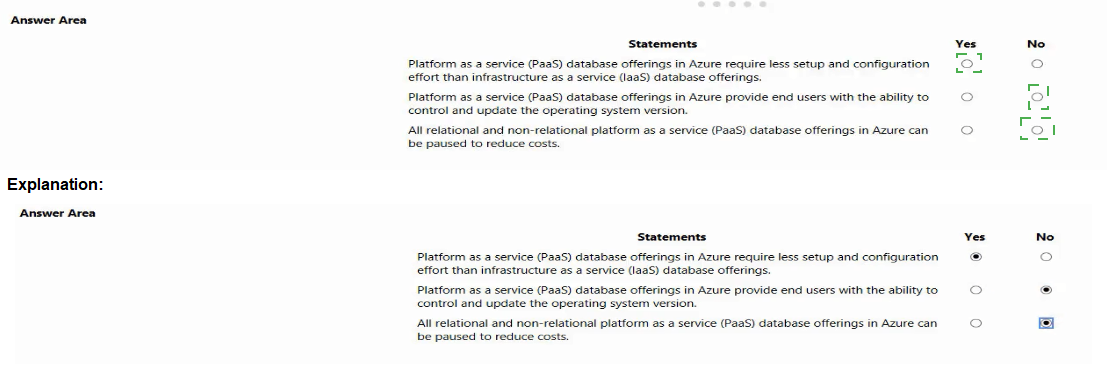
Explanation:
PaaS database services (Azure SQL Database, Cosmos DB) abstract infrastructure management, reducing setup effort compared to IaaS (SQL Server on VMs). However, PaaS limits OS control (Azure manages OS updates). Not all PaaS databases support pausing; some (e.g., Azure SQL Database serverless) do, while others (Cosmos DB, provisioned SQL DB) do not.
Correct Answers:
Statement 1: Platform as a service (PaaS) database offerings in Azure require less setup and configuration effort than infrastructure as a service (IaaS) database offerings.
Yes – PaaS handles provisioning, patching, backups, and high availability automatically. IaaS requires manual VM setup, OS configuration, SQL installation, and maintenance. PaaS significantly reduces administrative overhead.
Statement 2: Platform as a service (PaaS) database offerings in Azure provide end users with the ability to control and update the operating system version.
No – In PaaS, Azure manages the underlying OS, including updates and patching. Users have no access to the OS layer (no RDP, no OS version control). This is a key distinction from IaaS where users have full OS control.
Statement 3: All relational and non-relational platform as a service (PaaS) database offerings in Azure can be paused to reduce costs.
No – Not all PaaS databases support pausing. Azure SQL Database serverless supports auto-pause, but provisioned SQL Database, Azure SQL Managed Instance, and Cosmos DB (provisioned throughput) cannot be paused. Cosmos DB serverless exists but is not "pausable" in the same way.
Reference:
Microsoft Learn: "PaaS vs IaaS for databases" – PaaS reduces management effort but limits OS control.
You are developing an application that includes language translation.
The application will translate text retrieved by using a function named
getTextToBeTranslated. The text can be in one of many languages. The content of the text
must remain within the Americas Azure geography.
You need to develop code to translate the text to a single language.
How should you complete the code? To answer, select the appropriate options in the
answer area.
NOTE: Each correct selection is worth one point.

Explanation:
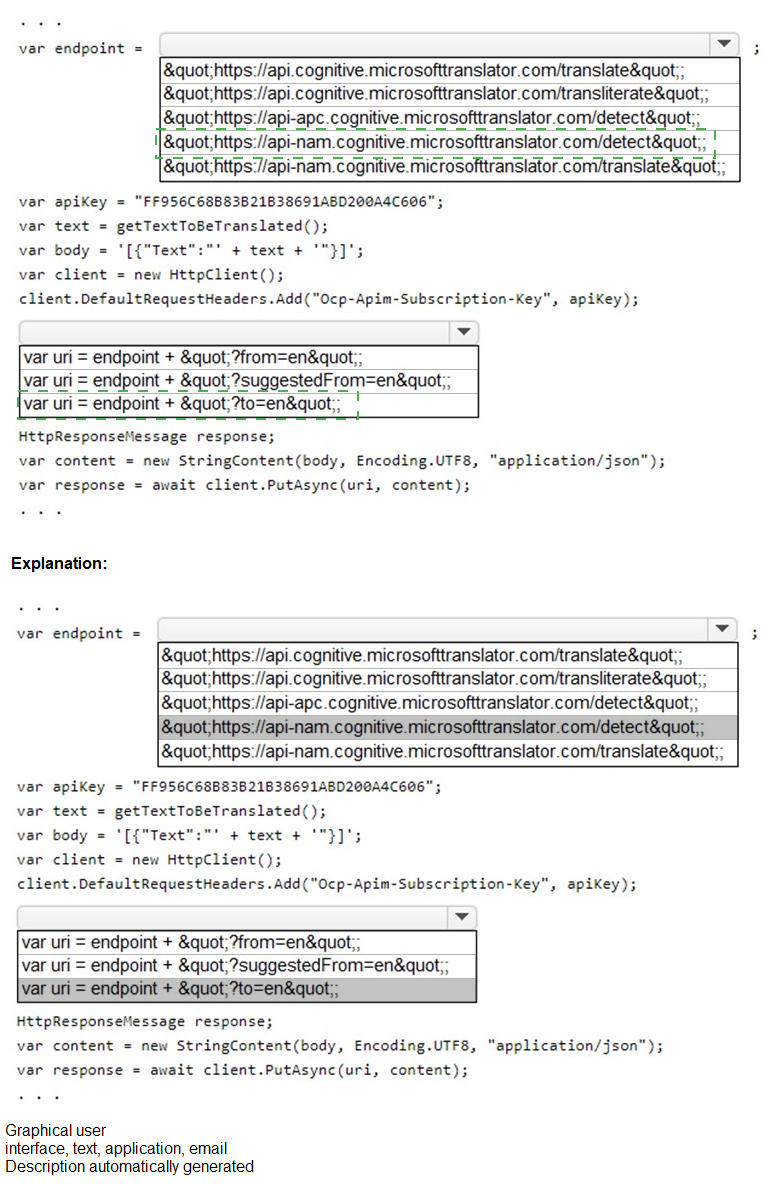
The Translator API requires the translate endpoint. Since the source language is unknown, you omit ?from= to enable auto-detection. The target language is specified with ?to=. For Americas geography, use the api-nam (North America) or api (global) endpoint. The correct HTTP method is POST, not PUT.
Correct Options:
For the endpoint URI: "https://api-nam.cognitive.microsofttranslator.com/translate"
The requirement "remain within the Americas Azure geography" means using a regional endpoint. api-nam is the North America endpoint. The /translate path is correct for translation. The global api.cognitive.microsofttranslator.com may route outside Americas.
For the query parameter: uri = endpoint + "?to=en"
The source language is unknown (text can be in many languages), so do not use ?from=. Auto-detection is default. ?to=en specifies English as the single target language. This matches "translate the text to a single language."
For the HTTP method: await client.PostAsync(uri, content)
The Translator API translate endpoint requires an HTTP POST request, not PUT. PostAsync sends the JSON body correctly. PutAsync would result in a 405 Method Not Allowed error.
Incorrect Options:
Endpoint URI choices:
"https://api.cognitive.microsofttranslator.com/translate" – Global endpoint, not guaranteed to stay within Americas geography.
"https://api.cognitive.microsofttranslator.com/transliterate" – Transliteration converts script (e.g., Cyrillic to Latin), not translation. Wrong API.
"https://api-apc.cognitive.microsofttranslator.com/detect" – APC is Asia-Pacific region; detect detects language, does not translate.
"https://api-nan.cognitive.microsofttranslator.com/translate" – nan is not a valid geography (likely typo for nam).
Query parameter choices:
"?from=en" – Assumes source is always English, which is false (text can be in many languages). Also no ?to= specified, so no translation target.
"?suggestedFrom=en" – Not a valid Translator API parameter. suggestedFrom is not supported.
HTTP method:
PutAsync – Incorrect HTTP verb. Translator API translate endpoint requires POST.
Reference:
Microsoft Learn: "Translator API – Translate" – Endpoint: https://api-nam.cognitive.microsofttranslator.com/translate?to={targetLanguage}. HTTP method: POST.
Which Azure Storage service implements the key/value model?
A.
Azure Files
B.
Azure Blob
C.
Azure Table
D.
Azure Queue
Azure Table
Explanation:
The key/value model stores data as a collection of attribute-value pairs, similar to a NoSQL database. Azure Table storage implements this model, where each entity (row) has a partition key, row key, and a set of properties (name-value pairs). Tables are optimized for semi-structured data with fast lookups by key.
Correct Option:
C. Azure Table
Azure Table storage is a NoSQL key-value store. Each entity is identified by a composite key (PartitionKey + RowKey). All other properties are stored as name-value pairs. Tables support schema-less design, making them ideal for flexible, scalable key/value data scenarios.
Incorrect Options:
A. Azure Files –
Azure Files provides fully managed file shares accessible via SMB protocol. It uses a hierarchical folder/file structure, not a key/value model. Files are accessed by path, not by key lookup.
B. Azure Blob –
Blob storage stores unstructured binary or text data as blobs (objects) in containers. While blobs have a URI (key-like), the model is object storage, not a true key/value store. Blobs do not support individual property-level key/value access like tables.
D. Azure Queue –
Queue storage is a message queuing service for decoupling application components. It stores messages in FIFO order, not key/value pairs. Messages are retrieved by queue position, not by key.
Reference:
Microsoft Learn: "Azure Table storage overview" – A NoSQL key-value store for rapid development using massive semi-structured datasets.
What are two benefits of platform as a service (PaaS) relational database offerings in
Azure, such as Azure SQL Database? Each correct answer presents a complete solution.
NOTE: Each correct selection Is worth one point.
A.
reduced administrative effort for managing the server infrastructure
B.
complete control over backup and restore processes
C.
in-database machine learning services S3
D.
access to the latest features
reduced administrative effort for managing the server infrastructure
access to the latest features
Explanation:
PaaS relational databases like Azure SQL Database abstract infrastructure management, reducing administrative overhead. They also provide immediate access to the latest database features and updates without manual patching. Unlike IaaS, PaaS limits low-level control (e.g., backup customization) and does not automatically include features like in-database ML for all tiers.
Correct Options:
A. reduced administrative effort for managing the server infrastructure
With PaaS, Azure automatically handles hardware provisioning, OS patching, database engine updates, high availability, and backups. There is no need to manage VMs, storage, or networking. This significantly reduces DBA and infrastructure team effort.
D. access to the latest features
PaaS offerings are updated by Microsoft with continuous innovation. Azure SQL Database receives new features (e.g., intelligent performance, security enhancements) immediately without requiring manual upgrades. IaaS requires manual patching and version upgrades.
Incorrect Options:
B. complete control over backup and restore processes
PaaS abstracts backup management. While you can configure backup retention (e.g., point-in-time restore), you do not have complete control (e.g., cannot directly access backup files or manage log shipping). IaaS provides full control over backup processes.
C. in-database machine learning services
This is not a benefit of all PaaS relational databases. Azure SQL Managed Instance supports machine learning services, but Azure SQL Database does not. Even where available, this is a feature, not a fundamental benefit of PaaS architecture.
Reference:
Microsoft Learn: "Azure SQL Database benefits" – Managed by Microsoft, always up-to-date, reduced administrative burden.
Note: This question is part of a series of questions that present the same scenario. Each question in the series contains a unique solution that might meet the stated goals. Some question sets might have more than one correct solution, while others might not have a correct solution.
After you answer a question in this section, you will NOT be able to return to it. As a result, these questions will not appear in the review screen.
You have a chatbot that uses question answering in Azure Cognitive Service for Language.
Users report that the responses of the chatbot lack formality when answering random questions that are outside the scope of the knowledge base.
You need to ensure that the chatbot provides formal responses to these spurious questions.
Solution: From Language Studio, you modify the question and answer pairs for the custom intents, and then retrain and republish the model.
Does this meet the goal?a
A.
Yes
B.
No
No
You have a factory that produces cardboard packaging for food products. The factory has intermittent internet connectivity.
The packages are required to include four samples of each product.
You need to build a Custom Vision model that will identify defects in packaging and provide the location of the defects to an operator. The model must ensure that each package contains the four products.
Which project type and domain should you use? To answer, drag the appropriate options to the correct targets. Each option may be used once, more than once, or not at all. You may need to drag the split bar between panes or scroll to view content.
NOTE: Each correct selection is worth one point.
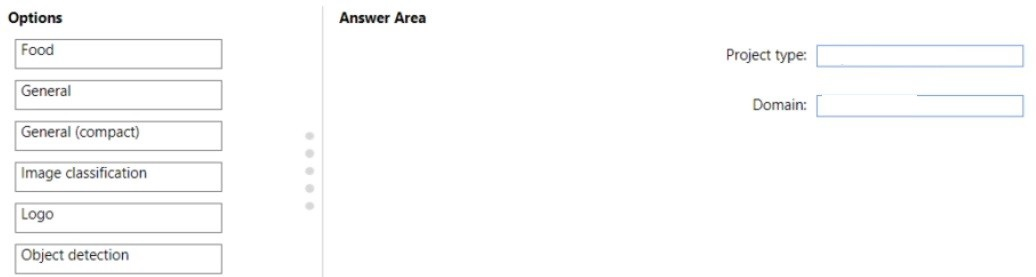
Explanation:
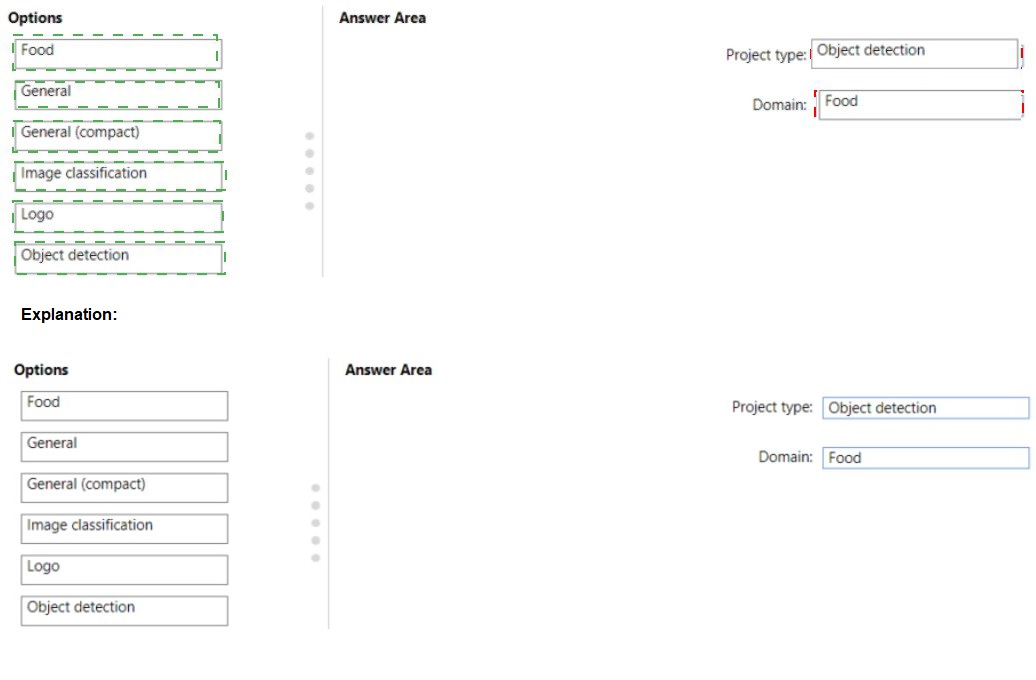
Identifying defects and ensuring four products are present requires object detection to locate each product/item within the image (bounding boxes). The General (compact) domain is optimized for real-time detection on edge devices with intermittent connectivity, supporting export to mobile/edge. Food is a specific domain but not needed here.
Correct Answers:
Project type: Object detection
Object detection identifies and locates multiple objects within an image by drawing bounding boxes. This is required to verify that four samples/products are present and to locate defect positions. Classification only labels the entire image without location information.
Domain: General (compact)
The General (compact) domain is designed for export to edge devices (TensorFlow, ONNX, Docker) and operates with intermittent connectivity. It prioritizes inference speed and small model size. Standard General domain models cannot be exported for offline edge use.
Why Other Options Are Incorrect:
Project type alternatives:
Image classification – Only assigns a label to the whole image (e.g., "defect" or "no defect"). Cannot locate where defects are or count individual products.
Logo – A specialized classification domain for logo detection, irrelevant for packaging defect detection.
Food – This is a domain, not a project type. Even as a domain, it is specific to food images, not general packaging defects.
Domain alternatives:
Food – Specialized for food-related images (dishes, ingredients). Not appropriate for cardboard packaging defect detection.
General – Standard domain for classification/detection but cannot be exported to edge devices. Requires continuous internet connectivity for prediction.
Logo – Specialized for logo detection. Not suitable for defect detection on packaging.
General (compact) – Correct as explained.
Image classification – This is a project type, not a domain.
Reference:
Microsoft Learn: "Custom Vision object detection" – Use object detection when you need to locate and count multiple objects in an image.
You plan to deploy an Azure OpenAI resource by using an Azure Resource Manager (ARM) template.
You need to ensure that the resource can respond to 600 requests per minute.
How should you complete the template? To answer, select the appropriate options in the answer area.
NOTE: Each correct selection is worth one point.

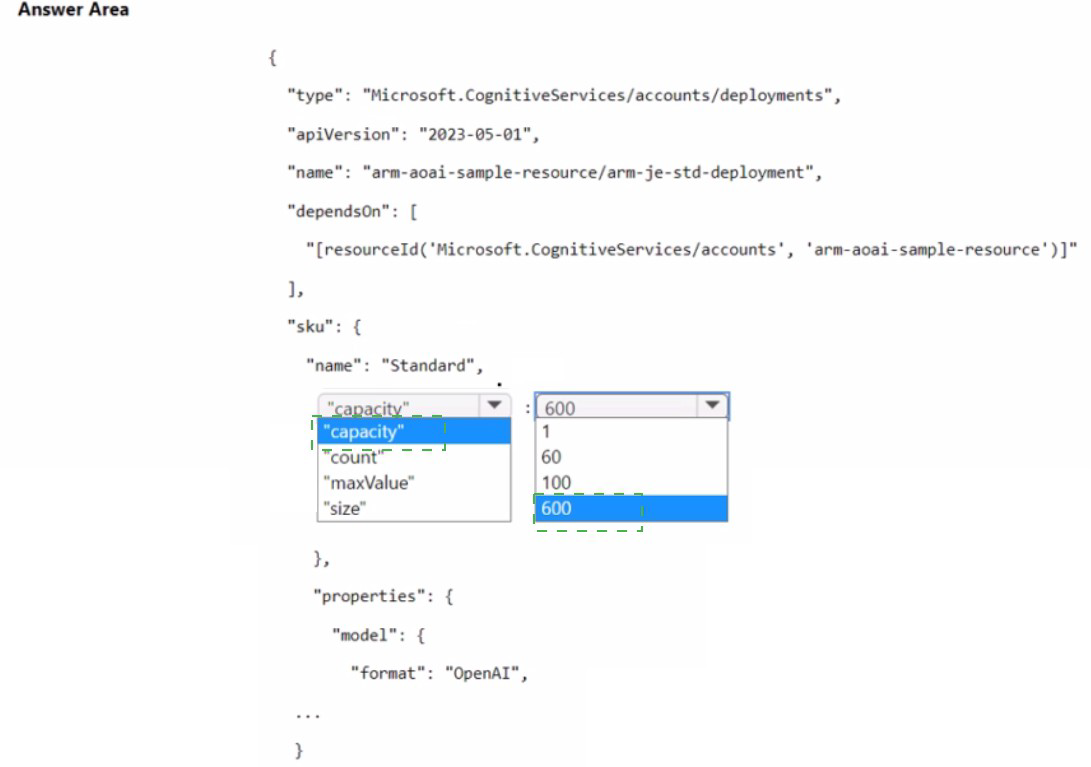
Explanation:
In an Azure OpenAI ARM template deployment, the sku section defines the capacity (throughput). The name property under sku sets the pricing tier (e.g., "Standard"). The capacity property specifies the number of provisioned throughput units or rate limit. For 600 requests per minute, you need to set "capacity": 600 in the sku object.
Correct Options:
For sku name: "Standard"
Azure OpenAI offers Standard (pay-as-you-go) or Provisioned (reserved throughput) tiers. The requirement is 600 requests per minute. With Standard, capacity value directly sets the rate limit in requests per minute (RPM). Provisioned uses throughput units (PTU) with different scaling.
For sku capacity: 600
The capacity property in the sku object defines the throughput limit. For Standard tier, capacity = requests per minute (RPM). Setting "capacity": 600 ensures the resource can respond to 600 requests per minute.
Incorrect Options (from the choices in the image):
sku.name alternatives:
"count": 1 – This is a property of some resource types but not the pricing tier name. It is not valid for sku.name in Azure OpenAI deployments.
"maxValue": 60 – This is not a valid property name in the sku object for ARM templates.
"size": 100 – This is not relevant to throughput. size might be used for disks or other resources, not for Azure OpenAI capacity.
sku.capacity alternatives:
"count": 1 – This is not a valid property for specifying requests per minute. count might appear in other resources (e.g., VM scale sets) but not here.
"maxValue": 60 – Invalid property name for sku. The correct property is capacity.
"size": 100 – Invalid for throughput. size is unrelated to request rate limiting.
Reference:
Microsoft Learn: "ARM template deployment for Azure OpenAI" – sku.name = "Standard" or "Provisioned"; sku.capacity = requests per minute for Standard tier.
| Page 15 out of 34 Pages |
| 1011121314151617181920 |
| AI-102 Practice Test Home |
Real-World Scenario Mastery: Our AI-102 practice exam don't just test definitions. They present you with the same complex, scenario-based problems you'll encounter on the actual exam.
Strategic Weakness Identification: Each practice session reveals exactly where you stand. Discover which domains need more attention, before Designing and Implementing a Microsoft Azure AI Solution exam day arrives.
Confidence Through Familiarity: There's no substitute for knowing what to expect. When you've worked through our comprehensive AI-102 practice exam questions pool covering all topics, the real exam feels like just another practice session.
Copyright © All Rights Reserved