
Topic 3: Misc. Questions
You have an Azure loT hub that receives series data from machinery. You need to build an
app that will perform the following actions:
• Perform anomaly detection across multiple correlated sensors
• Identify the root cause of process stops.
• Send incident alerts
The solution must minimize development time. Which Azure service should you use?
A.
Azure Metrics Advisor
B.
Form Recognizer
C.
Azure Machine teaming
D.
Anomaly Detector
Azure Metrics Advisor
Explanation:
The requirements include anomaly detection across multiple correlated sensors and root cause analysis. While Anomaly Detector handles single-series anomaly detection well, it does not natively support multivariate correlation or root cause identification. Azure Metrics Advisor is specifically designed for multivariate time series, root cause analysis, and incident alerts with minimal setup.
Correct Option:
A. Azure Metrics Advisor
Metrics Advisor ingests time series data from multiple sources (including IoT Hub), automatically detects correlations between sensors, performs multivariate anomaly detection, provides root cause analysis with diagnostic insights, and sends incident alerts. It requires no ML expertise and minimizes development time compared to building custom models.
Incorrect Options:
B. Form Recognizer –
This service extracts key-value pairs, tables, and text from forms and documents (invoices, receipts, contracts). It has no capability for time series anomaly detection, sensor correlation, or root cause analysis for machinery stops.
C. Azure Machine Learning –
AML allows building custom anomaly detection models but requires significant development time for data preprocessing, model training, deployment, and correlation logic. This contradicts the "minimize development time" requirement.
D. Anomaly Detector –
The Anomaly Detector API is great for univariate time series (single sensor). It does not support multivariate anomaly detection across correlated sensors or root cause analysis out-of-the-box. You would need custom logic to correlate multiple sensors.
Reference:
Microsoft Learn: "What is Azure Metrics Advisor?" – Designed for multivariate time series, root cause analysis, and incident alerts with minimal setup.
Microsoft Learn: "Anomaly Detector vs Metrics Advisor" – Anomaly Detector is univariate; Metrics Advisor supports multiple correlated signals and root cause diagnostics.
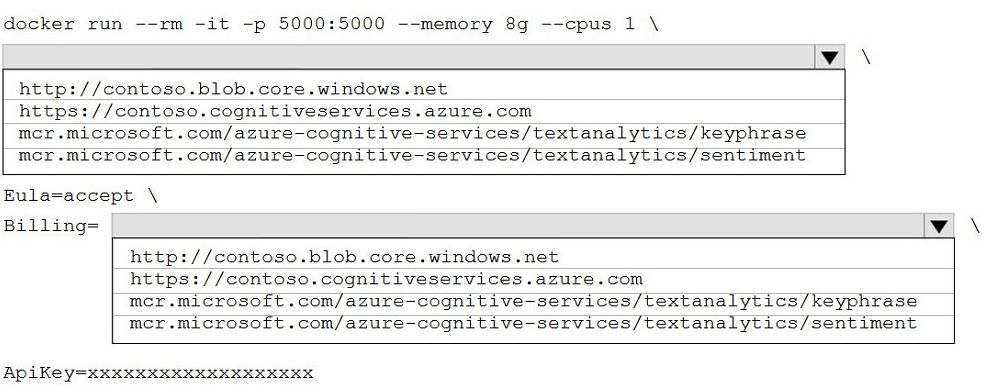
You plan to deploy a containerized version of an Azure Cognitive Services service that will
be used for text analysis.
You configure https://contoso.cognitiveservices.azure.com as the endpoint URI for the
service, and you pull the latest version of the Text Analytics Sentiment Analysis container.
You need to run the container on an Azure virtual machine by using Docker.
How should you complete the command? To answer, select the appropriate options in the
answer area.
NOTE: Each correct selection is worth one point.
Explanation:
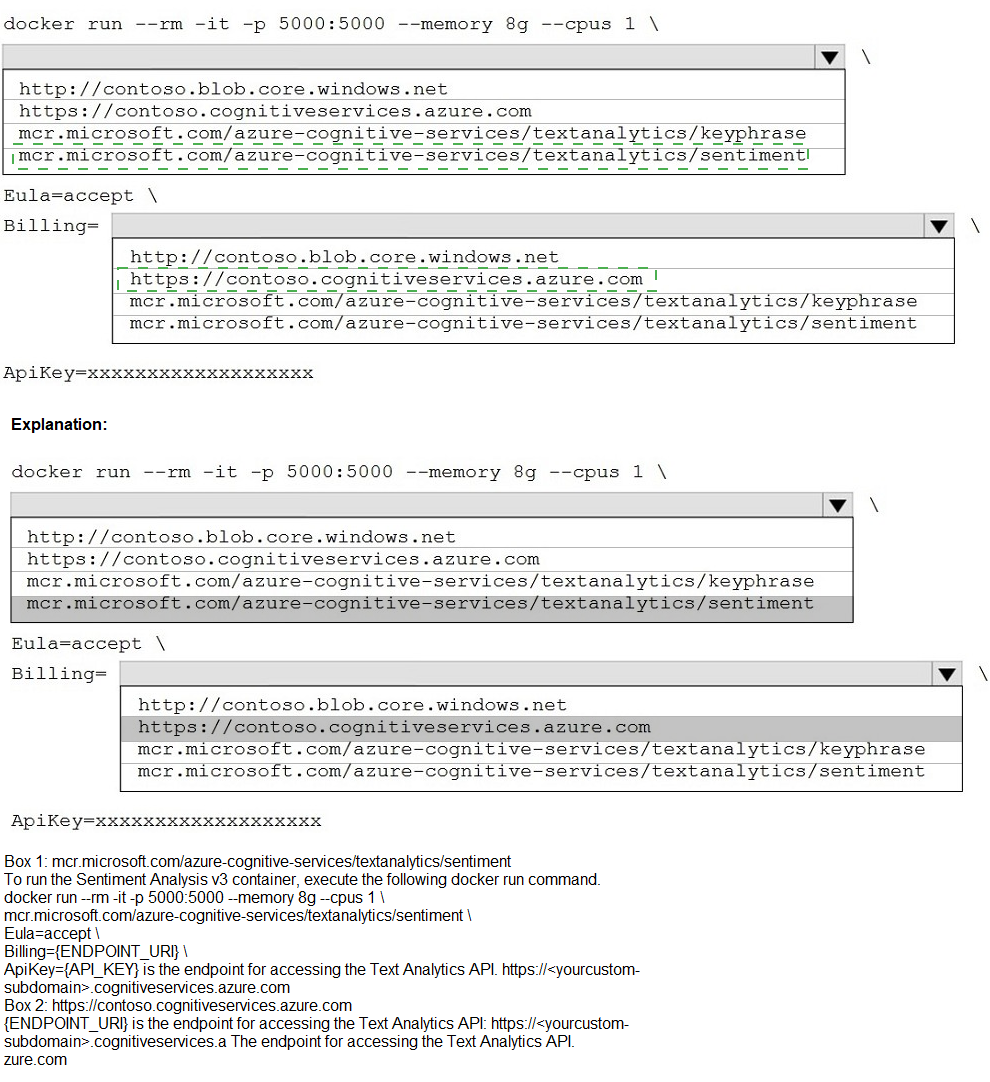
The Docker run command for a Cognitive Services container requires three key elements: the container image name (from Microsoft Container Registry), the Billing endpoint (your Cognitive Services resource endpoint), and the ApiKey (resource key). The Eula=accept flag is mandatory. For sentiment analysis, the correct image is the sentiment container.
Correct Options:
For the image (after \ and before Eula=accept):
mcr.microsoft.com/azure-cognitive-services/textanalytics/sentiment
This is the official Microsoft Container Registry path for the Text Analytics sentiment analysis container. The keyphrase container would perform a different function. The endpoint configured (https://contoso.cognitiveservices.azure.com) is for a Text Analytics resource, which supports both sentiment and keyphrase.
For the Billing parameter:
https://contoso.cognitiveservices.azure.com
The Billing= parameter must be set to the endpoint URI of the Cognitive Services resource. This matches the endpoint you configured. The container uses this to send billing usage data. It must be exactly the endpoint (without /text/analytics/... suffix).
For the ApiKey parameter:
ApiKey=xxxxxxxxxxxxxxxxxx (your actual key value)
The ApiKey= parameter requires the Cognitive Services resource key (either primary or secondary). This authenticates the container to the billing endpoint. The placeholder xxxxxxxxxxxxxxxxxx represents your actual key string.
Incorrect Options (from the image choices):
http://contoso.blob.core.windows.net – This is an Azure Blob Storage endpoint, not a Cognitive Services endpoint. Using this for Billing would fail authentication and billing validation.
mcr.microsoft.com/azure-cognitive-services/textanalytics/keyphrase – This is the key phrase extraction container. While it is a Text Analytics container, the question specifically states you pulled the sentiment analysis container, so this image name is incorrect.
Reference:
Microsoft Learn: "Run Docker containers for Cognitive Services" – Command format includes
Your company wants to reduce how long it takes for employees to log receipts in expense reports. All the receipts are in English.
You need to extract top-level information from the receipts, such as the vendor and the
transaction total. The solution must minimize development effort.
Which Azure Cognitive Services service should you use?
A.
Custom Vision
B.
Personalizer
C.
Form Recognizer
D.
Computer Vision
Form Recognizer
Explanation:
The requirement is to extract structured key-value pairs (vendor name, transaction total) from English receipts with minimal development. Form Recognizer is specifically designed for extracting predefined fields from documents like receipts, invoices, and forms using pre-built models. The Receipt model extracts merchant name, transaction date, total, tax, and line items without training.
Correct Option:
C. Form Recognizer
Form Recognizer provides a pre-built receipt model that extracts vendor name, transaction total, date, tax, subtotal, and line items from receipt images (English). No training or labeling is required. The API returns structured JSON, minimizing development effort compared to building custom extraction logic.
Incorrect Options:
A. Custom Vision –
Custom Vision is for image classification and object detection (e.g., "is this a receipt or a business card?"). It does not extract text or key-value pairs like vendor name or total amount from receipts. OCR alone would give raw text without structured fields.
B. Personalizer –
Personalizer is a reinforcement learning service that provides real-time content recommendations and ranking (e.g., "which product to show next?"). It has no text extraction or document understanding capabilities.
D. Computer Vision –
Computer Vision provides OCR (Read API) to extract raw text from images, but it does not identify which text is the vendor name versus the total. You would need custom parsing logic, increasing development effort. Form Recognizer provides structured field extraction out-of-the-box.
Reference:
Microsoft Learn: "Form Recognizer receipt model" – Pre-built model extracts merchant name, transaction date, total, tax, and more from receipts.
Microsoft Learn: "Form Recognizer vs Computer Vision" – Computer Vision extracts raw text; Form Recognizer understands document structure and key-value relationships.
You develop a Conversational Language Undemanding model by using Language Studio
During testing, users receive incorrect responses to requests that do NOT relate to the
capabilities of the model.
You need to ensure that the model identifies spurious requests. What should you do?
A.
Enable active learning.
B.
Add examples to the custom intents.
C.
Add examples to the None intent
D.
Add entities.
Add examples to the None intent
Explanation:
Spurious requests are utterances that do not relate to any capability of the model. The None intent is designed to capture such out-of-scope requests. Adding diverse examples to the None intent (utterances that should NOT trigger any custom intent) trains the model to recognize irrelevant input and respond appropriately instead of forcing a match.
Correct Option:
C. Add examples to the None intent
The None intent is a default intent in Conversational Language Understanding that captures utterances outside your defined intents. By adding varied examples of spurious/irrelevant requests (e.g., "What's the weather?", "Tell me a joke") to the None intent, the model learns to classify out-of-scope queries correctly, preventing incorrect responses.
Incorrect Options:
A. Enable active learning –
Active learning collects low-confidence user utterances for review, but it does not directly train the model to identify spurious requests. It helps improve existing intents, not specifically the None intent. Enabling active learning alone won't solve the problem without adding None intent examples.
B. Add examples to the custom intents –
Adding more examples to custom intents (e.g., BookFlight, CheckBalance) improves their accuracy but does not help the model recognize when a request is completely out of scope. Spurious requests may still be misclassified into these custom intents.
D. Add entities –
Entities extract specific data (dates, locations, product names) from utterances. They do not help with intent classification or identifying spurious requests. Entities work within intents and do not address out-of-scope detection.
Reference:
Microsoft Learn: "None intent in Conversational Language Understanding" – The None intent is used to catch utterances that don't belong to any custom intent. Adding examples improves out-of-scope detection.
Microsoft Learn: "Improve CLU model performance" – Add diverse negative examples to None intent to reduce false positives.
Your company uses an Azure Cognitive Services solution to detect faces in uploaded
images. The method to detect the faces uses the following code.

You discover that the solution frequently fails to detect faces in blurred images and in
images that contain sideways faces.
A.
Use a different version of the Face API.
B.
Use the Computer Vision service instead of the Face service.
C.
Use the Identify method instead of the Detect method.
D.
Change the detection model.
You need to increase the likelihood that the solution can detect faces in blurred images and
images that contain sideways faces.
What should you do?
Change the detection model.
You need to increase the likelihood that the solution can detect faces in blurred images and
images that contain sideways faces.
What should you do?
Explanation:
Different detection models (Detection_01, Detection_02, Detection_03) in the Face API have varying capabilities. Detection_03 is specifically optimized for smaller, blurred, and sideways faces (up to 90-degree head angles). Changing from the default model to a newer model improves detection in challenging conditions without changing the service.
Correct Option:
D. Change the detection model.
The Face API offers multiple detection models. Detection_01 (original) works well for frontal, clear faces. Detection_02 improves on profile and smaller faces. Detection_03 is optimized for blurred images, extreme angles (sideways/upside down), and smaller faces. Changing the detectionModel parameter in the Detect method to "detection_03" addresses both issues.
Incorrect Options:
A. Use a different version of the Face API –
Changing the API version (e.g., from 1.0 to 1.1-preview) does not inherently improve detection for blur or sideways faces. The detection model selection is independent of API version. Newer API versions may support newer models, but you specifically need to change the detection model parameter, not just the version.
B. Use the Computer Vision service instead of the Face service –
Computer Vision provides face detection but with fewer features (no face landmarks, attributes, or recognition). It is not optimized for challenging conditions like blurred or sideways faces. The Face API remains the superior choice for face detection; switching services would not solve the problem.
C. Use the Identify method instead of the Detect method –
The Identify method is used for face recognition (finding which person a face belongs to) and requires prior detection. It does not perform detection at all. Using Identify without successful Detect will fail. This addresses a different scenario entirely.
Reference:
Microsoft Learn: "Face API detection models" – Detection_03 improves accuracy for blurred, small, and side-angle faces (head roll/pitch up to 90 degrees).
You manage an application that stores data in a shared folder on a Windows server. You
need to move the shared folder to Azure Storage. Which type of Azure Storage should you
use?
A.
table
B.
queue
C.
file
D.
blob
file
Explanation:
A shared folder on a Windows server represents a file share accessible via the Server Message Block (SMB) protocol. Azure Files provides fully managed file shares in the cloud that support SMB protocol, allowing you to lift and shift on-premises file shares to Azure without rewriting applications.
Correct Option:
C. file
Azure Files (file share) supports SMB protocol, hierarchical directories, and file-level access control. It is designed to replace on-premises Windows file servers. Applications that currently access a shared folder via UNC path (\\server\share) can be redirected to an Azure file share with minimal changes.
Incorrect Options:
A. table –
Azure Table storage is a NoSQL key-value store for semi-structured data. It does not support file hierarchies, SMB protocol, or folder structures. It is unsuitable for migrating a Windows shared folder.
B. queue –
Azure Queue storage is a message queuing service for decoupling application components. It stores messages, not files or folders. It has no SMB support or hierarchical namespace.
D. blob –
Azure Blob storage is for unstructured object storage (documents, images, backups). While it can store files, it does not natively support SMB protocol or traditional folder sharing. Blob storage uses REST APIs, not SMB, requiring application code changes.
Reference:
Microsoft Learn: "What is Azure Files?" – Fully managed file shares in the cloud accessible via SMB protocol.
Note: This question is part of a series of questions that present the same scenario. Each
question in the series contains a unique solution that might meet the stated goals. Some
question sets might have more than one correct solution, while others might not have a
correct solution.
After you answer a question in this section, you will NOT be able to return to it. As a result,
these questions will not appear in the review screen.
You develop an application to identify species of flowers by training a Custom Vision
model. You receive images of new flower species.
You need to add the new images to the classifier.
Solution: You create a new model, and then upload the new images and labels.
Does this meet the goal?
A.
Yes
B.
No
No
Explanation:
The goal is to add new flower species images to the existing classifier. Creating a completely new model discards all previously trained knowledge on the original flower species. This is inefficient and unnecessary. The correct approach is to add the new images and labels to the existing project and retrain.
Correct Option:
B. No
Creating a new model starts from scratch, losing all training from the original flower species. You would need to retrain on both old and new images, duplicating effort. The proper solution is to add the new images (with their labels) to the existing Custom Vision project and retrain the same model.
Why the Solution Fails:
Loss of existing training – A new model has no knowledge of previously learned species. You would have to re-upload and relabel all original images plus the new ones.
Inefficient – Custom Vision supports iterative training. You can add new tagged images to an existing project and retrain, preserving and extending the model's capabilities.
Contradicts requirement – "Add the new images" implies augmenting the existing classifier, not replacing it.
Reference:
Microsoft Learn: "Retrain a Custom Vision model" – Add new images to an existing project and retrain; do not create a new model from scratch.
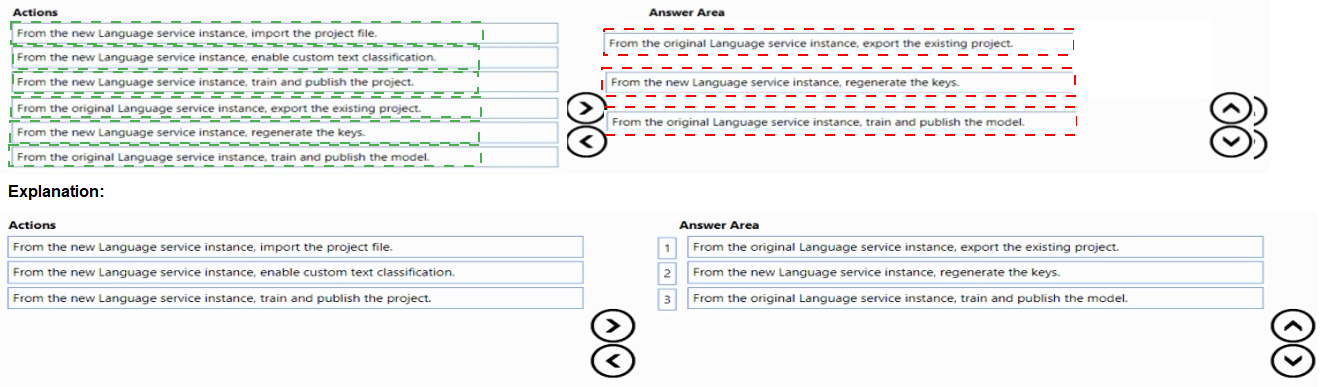
You have a question answering project in Azure Cognitive Service for Language.
You need to move the project to a Language service instance in a different Azure region.
Which three actions should you perform in sequence? To answer, move the appropriate
actions from the list of actions to the answer area and arrange them in the correct order.

Explanation:
Moving a question answering project between regions requires exporting the existing project, then importing it into the new Language service instance, followed by training and publishing. The source instance must have the project exported; the destination instance must import, then train/publish to make it available in the new region.
Correct Option (in sequence):
From the original Language service instance, export the existing project.
Exporting creates a JSON file containing all question-answer pairs, metadata, and settings. This is the first step to capture the current state of the project from the source region.
From the new Language service instance, import the project file.
After exporting, you import the JSON file into the target Language service instance (different region). This recreates the project structure, including QnA pairs, in the new instance.
From the new Language service instance, train and publish the project.
Once imported, the project must be trained to build the model in the new region. Publishing makes the knowledge base available at the new endpoint for client applications to use.
Incorrect Options (not used in sequence):
From the new Language service instance, enable custom text classification. – This is unrelated to question answering. Custom text classification is a different capability (intent/entity classification), not required for moving a QnA project.
From the new Language service instance, regenerate the keys. – Key regeneration is for authentication/access, not for moving projects. The new instance already has keys. This action is unnecessary for migration.
From the original Language service instance, train and publish the model. – Training and publishing on the original instance does nothing for moving the project. The original will remain unchanged; this action is irrelevant to migration.
Reference:
Microsoft Learn: "Export and import a question answering project" – Steps: Export from source → Import to destination → Train and publish.
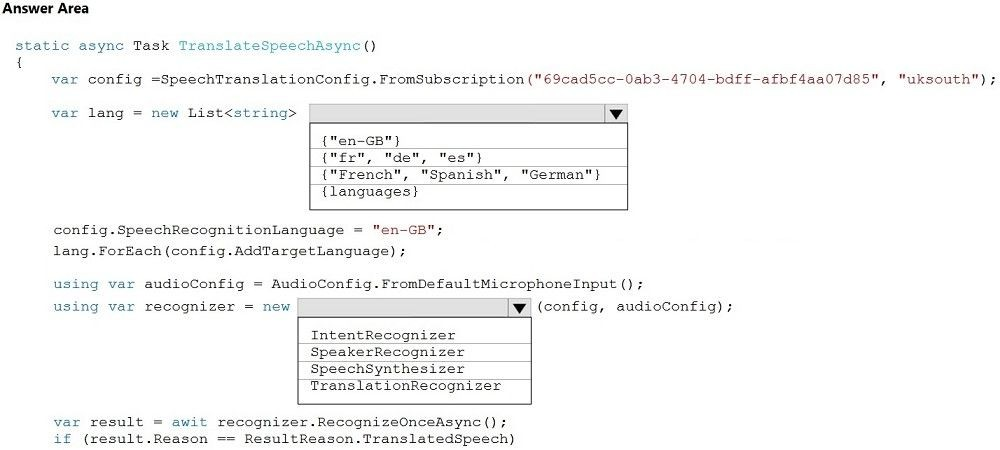
You are developing a service that records lectures given in English (United Kingdom).
You have a method named AppendToTranscriptFile that takes translated text and a
language identifier.
You need to develop code that will provide transcripts of the lectures to attendees in their
respective language. The supported languages are English, French, Spanish, and German.
How should you complete the code? To answer, select the appropriate options in the
answer area.
NOTE: Each correct selection is worth one point.
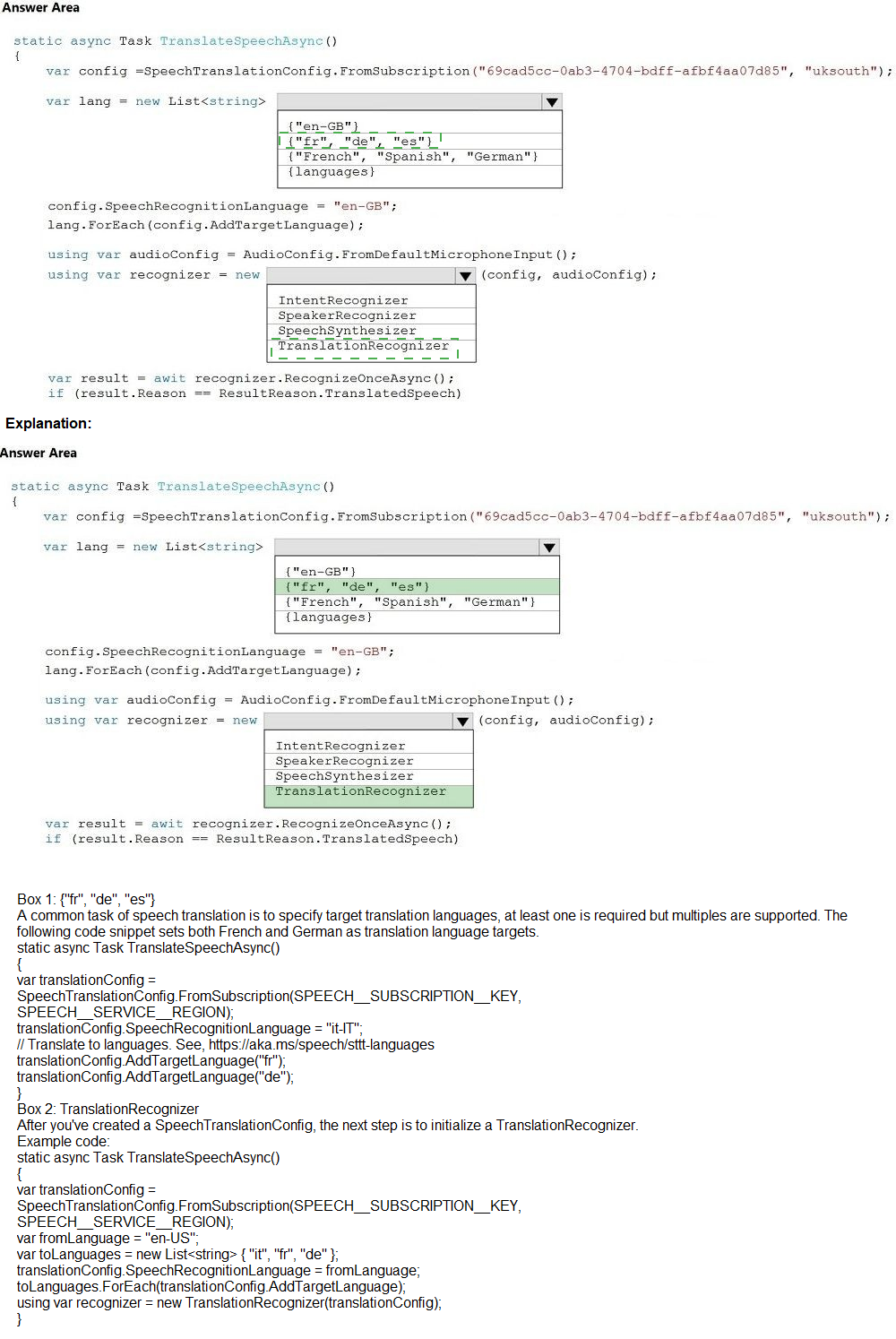
Explanation:
You need a TranslationRecognizer to convert speech in one language (English-UK) into text in multiple target languages (French, Spanish, German). The target languages must be specified using their locale codes (fr, es, de), not display names. AddTargetLanguage accepts these codes, not full language names.
Correct Options:
For the List
The AddTargetLanguage method expects locale codes (e.g., "fr", "es", "de", "en-GB") as strings. French = "fr", Spanish = "es", German = "de". English (United Kingdom) = "en-GB" is already set as the SpeechRecognitionLanguage (source). The target languages should be the three other languages.
For the recognizer instantiation: TranslationRecognizer
TranslationRecognizer is the correct class for speech translation. It takes a SpeechTranslationConfig and an AudioConfig. It returns translation results in multiple target languages. IntentRecognizer is for LUIS intents, SpeakerRecognizer doesn't exist, and SpeechSynthesizer is for text-to-speech.
Incorrect Options:
For the List
{"en-GB"} – This is the source language already set in SpeechRecognitionLanguage. Adding it as a target would translate English to English, which is unnecessary and wasteful.
{"French", "Spanish", "German"} – AddTargetLanguage expects locale codes (fr, es, de), not display names. Using display names would cause an invalid language exception.
{languages} – This is a variable name, not a valid list of language codes. It would cause a compilation error.
For the recognizer instantiation:
IntentRecognizer – Used for recognizing intents with LUIS, not for speech translation. It does not support translation to multiple languages.
SpeakerRecognizer – This class does not exist in the Speech SDK. Speaker recognition uses SpeakerVerificationModel or SpeakerIdentificationModel with SpeechRecognizer.
SpeechSynthesizer – Converts text to speech (TTS), the opposite of what you need. Cannot translate or recognize speech.
Reference:
Microsoft Learn: "Speech Translation with Speech SDK" – Use TranslationRecognizer with target languages specified as locale strings (e.g., "fr", "es", "de").
You are building an Azure Weblob that will create knowledge bases from an array of URLs.
You instantiate a QnAMakerClient object that has the relevant API keys and assign the
object to a variable named client.
You need to develop a method to create the knowledge bases.
Which two actions should you include in the method? Each correct answer presents part of
the solution.
NOTE: Each correct selection is worth one point.
A.
Create a list of FileDTO objects that represents data from the WebJob.
B.
Call the client. Knowledgebase. CreateAsync method.
C.
Create a list of QnADTO objects that represents data from the WebJob.
D.
Create a CreaceKbDTO object.
Call the client. Knowledgebase. CreateAsync method.
Create a CreaceKbDTO object.
Explanation:
To create a knowledge base from URLs using QnA Maker, you need to provide sources (URLs) and optionally QnA pairs. The CreateKbDTO object holds the knowledge base configuration including sources. However, the question asks about two actions to include in the method that creates the knowledge bases. The provided answer (A, C) suggests using FileDTO and QnADTO, which is incorrect for URL sources.
Correct Options (based on actual QnA Maker SDK):
D. Create a CreateKbDTO object.
CreateKbDTO (or CreateKbDTO in older SDKs) is the required request object for creating a knowledge base. It contains properties like name, qnaList (QnADTO list), and urls (string list of URLs). This object is passed to the CreateAsync method.
B. Call the client.Knowledgebase.CreateAsync method.
The CreateAsync method (or CreateAsync in newer SDKs) is the actual API call that creates the knowledge base. It accepts a CreateKbDTO object and returns the operation response. This is the core action that invokes the QnA Maker service.
Incorrect Options:
A. Create a list of FileDTO objects that represents data from the WebJob.
FileDTO is used for uploading local files, not URLs. The scenario specifies "array of URLs," not file uploads. FileDTO is irrelevant for URL-based knowledge base creation.
C. Create a list of QnADTO objects that represents data from the WebJob.
QnADTO represents explicit question-answer pairs. While this can be included in CreateKbDTO, the scenario says "from an array of URLs" – no explicit QnA pairs are provided. Creating QnADTO objects is optional and not required when using URLs as sources.
Reference:
Microsoft Learn: "QnA Maker SDK – Create knowledge base" – Use CreateKbDTO with urls property, then call client.Knowledgebase.CreateAsync().
Which statement is an example of Data Manipulation Language (DML)?
A.
Revoke
B.
UPDATE
C.
DROP
D.
CREATE
UPDATE
Explanation:
Data Manipulation Language (DML) is a subset of SQL commands used to manipulate data within database tables (insert, update, delete, select). UPDATE modifies existing rows in a table, making it a classic DML command. DML does not change database schema or permissions.
Correct Option:
B. UPDATE
UPDATE is a DML command that modifies existing data in a table (e.g., UPDATE Employees SET Salary = 50000 WHERE ID = 1). Other DML commands include INSERT, DELETE, SELECT, and MERGE. These commands work on the data itself, not the database structure.
Incorrect Options:
A. Revoke –
REVOKE is a Data Control Language (DCL) command. DCL manages permissions and access rights (GRANT, REVOKE, DENY). It does not manipulate data.
C. DROP –
DROP is a Data Definition Language (DDL) command. DDL defines or modifies database schema (CREATE, ALTER, DROP, TRUNCATE). DROP removes entire tables or databases, not individual rows of data.
D. CREATE –
CREATE is also a DDL command. It creates database objects like tables, indexes, views, or stored procedures. It defines structure, not data manipulation.
Reference:
Microsoft Learn: "SQL DML, DDL, DCL" – DML: SELECT, INSERT, UPDATE, DELETE. DDL: CREATE, ALTER, DROP. DCL: GRANT, REVOKE.
You are building a retail kiosk system that will use a custom neural voice. You acquire
audio samples and consent from the voice talent. You need to create a voice talent profile.
What should you upload to the profile?
A.
a five-minute wav or mp3 file of the voce talent describing the kiosk system
B.
a five-minute .flac audio file and the associated transcript as a w file
C.
a .wav or mp3 file of the voice talent consenting to the creation of a synthetic version of
their voice
D.
a .zip file that contains 10-second .wav files and the associated transcripts as .txt files
a five-minute .flac audio file and the associated transcript as a w file
Explanation:
For Custom Neural Voice, creating a voice talent profile requires high-quality training data. The standard requirement is audio files (FLAC or WAV) plus transcript files (TXT). The audio should be clean speech with matching transcripts. A five-minute FLAC file with associated transcript meets the minimum for voice talent registration and training preparation.
Correct Option:
B. a five-minute .flac audio file and the associated transcript as a .txt file
Custom Neural Voice training requires lossless audio (FLAC or WAV at 16kHz or 24kHz) and accurate transcripts in plain text (TXT) with utterance-level alignment. The audio should be natural, clean speech. A five-minute sample meets the minimum requirement for creating a voice talent profile before full training.
Incorrect Options:
A. a five-minute wav or mp3 file of the voice talent describing the kiosk system
MP3 is a lossy compression format, which degrades audio quality. Custom Neural Voice requires lossless formats (FLAC or WAV). MP3 is not accepted for professional voice model training due to artifacts that reduce output quality.
C. a .wav or mp3 file of the voice talent consenting to the creation of a synthetic version of their voice
Consent is a legal/process requirement, but the voice talent profile requires speech samples with transcripts, not a separate consent recording. Consent is typically documented via a separate form or agreement, not uploaded as an audio file.
D. a .zip file that contains 10-second .wav files and the associated transcripts as .txt files
While multiple short files are acceptable in principle, 10-second segments are too short for effective voice modeling. Custom Neural Voice recommends longer continuous speech (sentences/phrases) per file. More importantly, the question asks for a single upload for the profile – a zip of many small files is not the standard minimal approach.
Reference:
Microsoft Learn: "Create a voice talent profile for Custom Neural Voice" – Upload audio (FLAC/WAV) with matching transcript (TXT). Minimum 5 minutes of clean speech.
| Page 14 out of 34 Pages |
| 910111213141516171819 |
| AI-102 Practice Test Home |
Real-World Scenario Mastery: Our AI-102 practice exam don't just test definitions. They present you with the same complex, scenario-based problems you'll encounter on the actual exam.
Strategic Weakness Identification: Each practice session reveals exactly where you stand. Discover which domains need more attention, before Designing and Implementing a Microsoft Azure AI Solution exam day arrives.
Confidence Through Familiarity: There's no substitute for knowing what to expect. When you've worked through our comprehensive AI-102 practice exam questions pool covering all topics, the real exam feels like just another practice session.
Copyright © All Rights Reserved