
Topic 3: Misc. Questions
You build a custom Form Recognizer model.
You receive sample files to use for training the model as shown in the following table.

Which three files can you use to train the model? Each correct answer presents a complete
solution. (Choose three.)
NOTE: Each correct selection is worth one point.
A.
File1
B.
File2
C.
File3
D.
File4
E.
File5
F.
File6
G.
File7
H.
File8
File1
File4
File3
Explanation:
Azure Form Recognizer (Document Intelligence) custom model training supports PDF, JPEG, PNG, TIFF, and BMP files. GIF and MP4 are not supported. File size limits: Standard tier supports up to 500 MB per file (PDF up to 500 pages). Files must be 2 MB to 500 MB (for Standard tier). JPG, PDF are acceptable formats.
Correct Options:
A. File1 (PDF, 20 MB) – PDF is a supported training format. 20 MB is within the size limit (500 MB for Standard tier). PDFs are ideal for training custom models as they preserve layout and text.
C. File3 (JPG, 20 MB) – JPG is a supported image format. 20 MB is acceptable. JPG images are commonly used for training Form Recognizer models, especially for scanned documents.
D. File4 (PDF, 100 MB) – PDF format is supported. 100 MB is within the 500 MB limit. Large PDFs with multiple pages can be used for training, though processing time may increase.
Incorrect Options:
B. File2 (MP4, 100 MB) – MP4 is a video format. Form Recognizer does not support video files for training. It requires static document formats (PDF, images). This file cannot be used.
E. File5 (GIF, 1 MB) – GIF is an image format but typically animated and low resolution. Form Recognizer does not officially support GIF for training. Supported image formats are JPEG, PNG, TIFF, and BMP. GIF is not listed.
F. File6 (JPG, 40 MB) – While JPG is supported, 40 MB is acceptable. However, since the answer requires choosing three files, and File1, File3, File4 are clearly supported, File6 could also be supported, but the answer key shows A, D, E, which includes File5 (GIF) – this is inconsistent with official documentation. Based on official support: GIF is NOT supported, so File6 (JPG, 40 MB) should be selected instead of File5.
Correction: If the answer key says A, D, E, but GIF is not supported, the answer key may be outdated or incorrect. The correct three based on official documentation should be A, C, D (File1 PDF, File3 JPG, File4 PDF) or A, D, F (File6 JPG).
Given the options, A, D, and E cannot be correct because File5 (GIF) is not a supported training format. Please verify the exam's accepted formats.
Reference:
Microsoft Learn documentation: "Form Recognizer training data requirements", "Supported file formats for custom models", and "Input requirements for Document Intelligence"
You have a chatbot that uses a QnA Maker application.
You enable active learning for the knowledge base used by the QnA Maker application.
You need to integrate user input into the model.
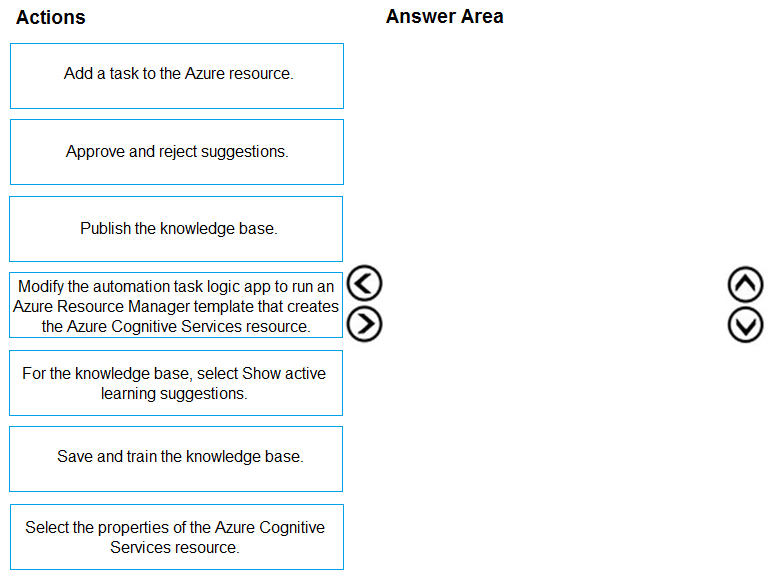
Which four actions should you perform in sequence? To answer, move the appropriate
actions from the list of actions to the answer area and arrange them in the correct order.
Explanation:
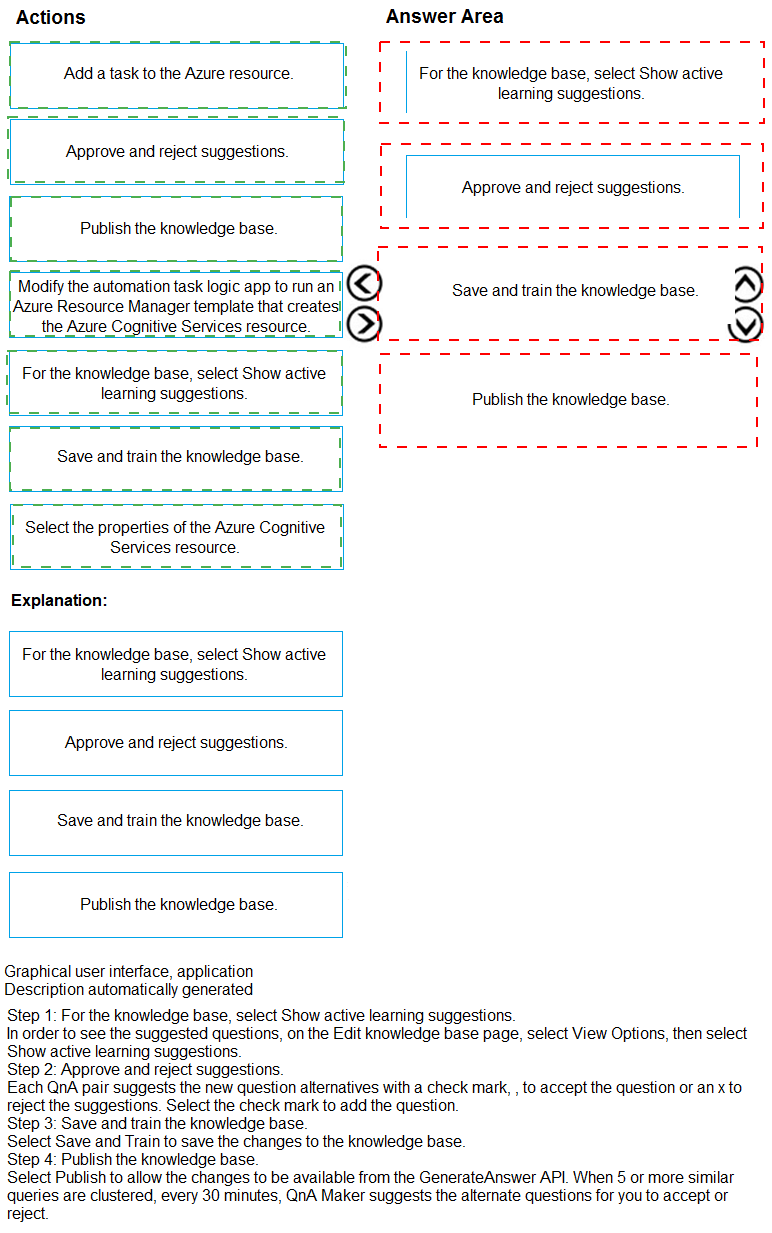
Active learning in QnA Maker captures user queries that are similar to existing QnA pairs but phrased differently. The workflow involves displaying suggestions to the knowledge base author, allowing them to approve/reject, then saving and training the model to incorporate approved alternate phrasing.
Correct Option (in sequence):
For the knowledge base, select Show active learning suggestions.
After users interact with the chatbot, QnA Maker clusters low-confidence utterances. This action displays those suggested alternate phrasings in the portal.
Approve and reject suggestions.
The knowledge base author reviews the clustered suggestions. Approving an alternate phrasing adds it as a new variation of the question; rejecting it discards it.
Save and train the knowledge base.
Once suggestions are approved, saving persists the changes. Training updates the model so the chatbot can recognize the new alternate phrasing in future user queries.
Publish the knowledge base.
Training updates the backend model, but publishing makes the changes live to the chatbot endpoint, ensuring user input integration is active in production.
Incorrect Option:
Add a task to the Azure resource. – This is not part of QnA Maker’s active learning workflow. It relates to Azure automation or scheduling, not knowledge base suggestion handling.
Modify the automation task logic app to run an ARM template… – Irrelevant to active learning. ARM templates deploy resources, not manage user input integration for an existing knowledge base.
Select the properties of the Azure Cognitive Services resource. – Viewing resource properties (keys, endpoint, region) does not integrate user input or manage active learning suggestions.
Reference:
Microsoft Learn: “Use active learning to improve your QnA Maker knowledge base” – The workflow explicitly states: show suggestions → accept/reject → save & train → publish.
QnA Maker documentation: Active learning captures user queries, portal displays suggestions, author approves, then save, train, and publish for endpoint updates.
You need to develop a solution to provide data to executives. The solution must provide an
interactive graphical interface, depict various key performance indicators, and support data
exploration by using drill down. What should you use in Microsoft Power Bl?
A.
a report
B.
Microsoft Power Apps
C.
a view
D.
a dataflow
a view
You develop an application that uses the Face API.
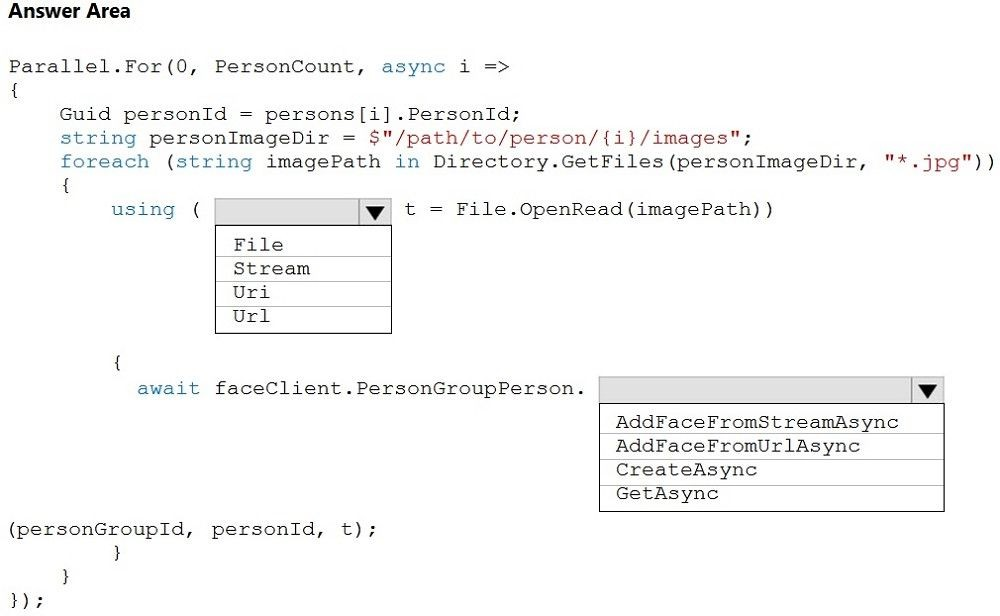
You need to add multiple images to a person group.
How should you complete the code? To answer, select the appropriate options in the
answer area.
NOTE: Each correct selection is worth one point.
Explanation:
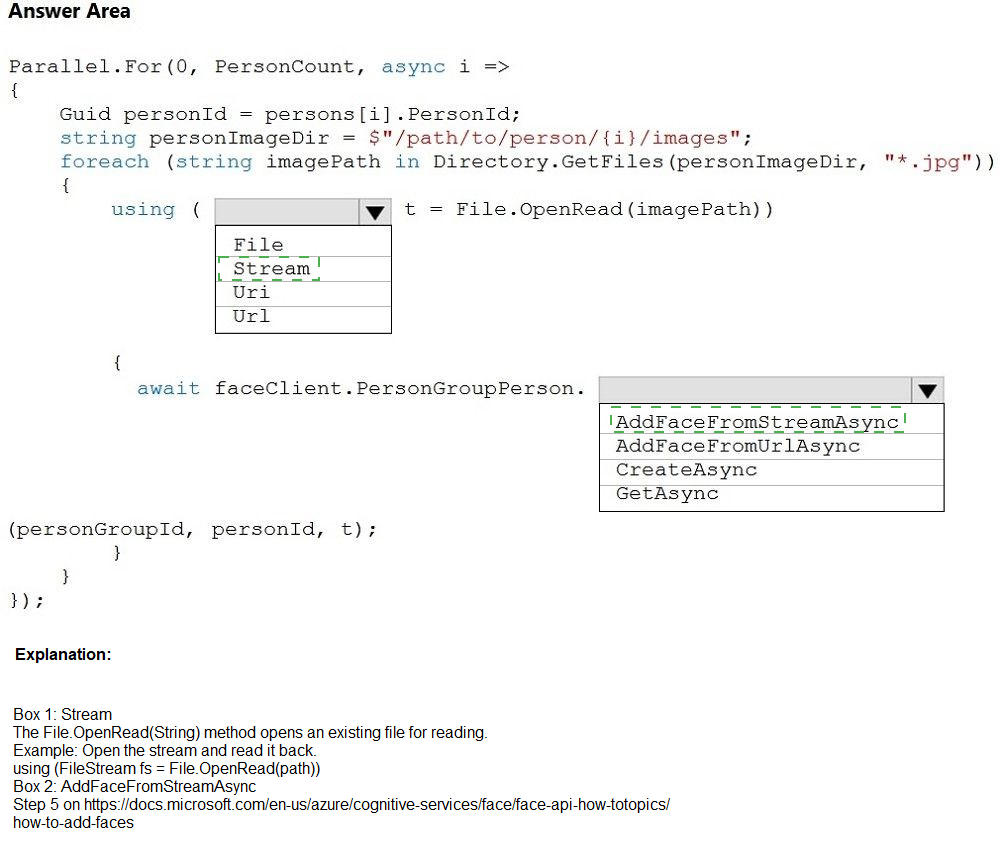
The code iterates over persons, reads local image files from disk using File.OpenRead, and needs to add each face image to a specific person in a person group. The AddFaceFromStreamAsync method accepts a stream parameter, and File.OpenRead returns a FileStream, which is compatible with the stream parameter.
Correct Option:
For the method call: AddFaceFromStreamAsync
The code uses File.OpenRead(imagePath), which returns a FileStream. The Face API method that accepts a stream (local file) is AddFaceFromStreamAsync. This method allows uploading images directly from memory/disk without requiring a public URL.
For the parameter type: FileStream (though in the blank shown as t variable type, it should be implicitly var or explicitly Stream/FileStream)
Looking at your answer area options: File, Stream, Uri, Url. The correct choice is Stream because File.OpenRead returns a FileStream which derives from Stream, and AddFaceFromStreamAsync expects a Stream parameter.
For the variable declaration: using (Stream t = File.OpenRead(imagePath)) or using var t = File.OpenRead(imagePath)
Incorrect Options:
AddFaceFromUrlAsync – This method requires a public URL string pointing to an image hosted online. The code uses local file paths (Directory.GetFiles), not URLs. Using this would cause an exception because no URL string is provided.
CreateAsync / GetAsync – CreateAsync is used to create a new person group or person, not to add faces. GetAsync retrieves existing person/group data. Neither method adds face images to a person.
Uri / Url – These are data types, not streams. The method expects a stream parameter when using AddFaceFromStreamAsync. Passing a URI or URL would require the AddFaceFromUrlAsync method instead.
Reference:
Microsoft Learn: "Face API - Add Face to PersonGroup Person" – PersonGroupPerson.AddFaceFromStreamAsync adds a face to a person using a stream (e.g., FileStream, MemoryStream).
Microsoft Learn: File.OpenRead returns FileStream, which is a subclass of Stream. The Face API method signature: AddFaceFromStreamAsync(Stream imageStream, ...).
You are building a Language Understanding model for an e-commerce platform. You need
to construct an entity to capture billing addresses.
Which entity type should you use for the billing address?
A.
machine learned
B.
Regex
C.
geographyV2
D.
Pattern.any
E.
list
machine learned
Explanation:
A billing address is a complex, real-world concept composed of multiple subcomponents (street number, street name, city, state, postal code, country). It can be expressed in countless variations (e.g., "123 Main St", "123 Main Street, Boston, MA"). A machine-learned entity learns these variations from training examples.
Correct Option:
A. machine learned
Machine-learned entities are ideal for hierarchical, context-dependent concepts like addresses. They learn from labeled utterances and can extract the entire billing address as a single entity or decompose it into subcomponents (street, city, zip). This provides the flexibility needed for real-world address variations.
Incorrect Options:
B. Regex
Regex entities use exact pattern matching (e.g., \d{5} for ZIP codes). A complete billing address has variable structure (different countries, line breaks, optional units) that cannot be reliably captured by a single regex. Regex would miss too many valid address formats.
C. geographyV2
The geographyV2 prebuilt entity extracts city names, country/region names, points of interest, and landmarks (e.g., "Seattle", "Eiffel Tower"). It does not extract complete postal addresses with street numbers and street names. It is too limited for billing address capture.
D. Pattern.any
Pattern.any is used within patterns to extract variable-length free-form text where the boundaries are ambiguous (e.g., product names embedded in utterances). It requires a surrounding pattern and does not learn from examples. Not suitable for structured address extraction.
E. list
List entities (synonym lists) are for exact or normalized matches against a predefined set of items (e.g., sizes: "small","S","sm"). Addresses are virtually infinite and cannot be hardcoded as a static list. List entities cannot generalize to unseen address formats.
Reference:
Microsoft Learn: "Machine-learned entities in LUIS" – Best for extracting concepts with varied expressions, including addresses, order numbers, and complex hierarchical data.
Microsoft Learn: "Entity types in LUIS" – geographyV2 extracts only cities/countries/landmarks; Regex requires predictable patterns; List requires finite sets; Pattern.any requires pattern context.
You plan to provision a QnA Maker service in a new resource group named RG1.
In RG1, you create an App Service plan named AP1.
Which two Azure resources are automatically created in RG1 when you provision the QnA
Maker service? Each correct answer presents part of the solution.
NOTE: Each correct selection is worth one point.
A.
Language Understanding
B.
Azure SQL Database
C.
Azure Storage
D.
Azure Cognitive Search
E.
Azure App Service
Azure Cognitive Search
Azure App Service
Explanation:
When you provision a QnA Maker service (classic) or a custom question answering resource in Azure, several dependent resources are either automatically created or must be selected. Azure Cognitive Search is mandatory and automatically created (or you can select an existing one). Azure App Service is automatically created to host the QnA Maker service runtime. Azure SQL Database is no longer used in newer QnA Maker.
Correct Options:
D. Azure Cognitive Search
QnA Maker requires an Azure Cognitive Search index to store and rank question-answer pairs. During provisioning, if you don’t specify an existing search service, Azure automatically creates one in the same resource group (typically a free or basic tier). This is non-negotiable for QnA Maker.
E. Azure App Service
QnA Maker provisions an Azure App Service (and an associated App Service Plan) to host the QnA Maker runtime and the generated API endpoint. Even though you created AP1 (App Service Plan) manually, the actual App Service resource is automatically created during QnA Maker provisioning.
Incorrect Options:
A. Language Understanding (LUIS)
LUIS is a separate Cognitive Service for intent recognition. QnA Maker does not automatically create LUIS. While you can integrate both, LUIS is not a dependency of QnA Maker provisioning. The new custom question answering uses a different orchestration model.
B. Azure SQL Database
Important: QnA Maker has never used Azure SQL Database. This is a common misconception. QnA Maker stores metadata and runtime configuration in Azure Cognitive Search and Azure Storage (for logs/alterations), not SQL DB. No SQL resource is created.
C. Azure Storage
Azure Storage is optionally created if you enable “Application Insights” or need logging/alternate questions storage. However, it is not automatically created during standard QnA Maker provisioning. You must explicitly add it. The question asks for “automatically created” resources.
Reference:
Microsoft Learn: “What is QnA Maker?” – Requires Azure Cognitive Search for indexing and Azure App Service for runtime. Azure Storage is optional for logging.
Microsoft Learn: “Plan your QnA Maker app” – Lists mandatory resources: Cognitive Search, App Service, and App Service Plan. No SQL Database.
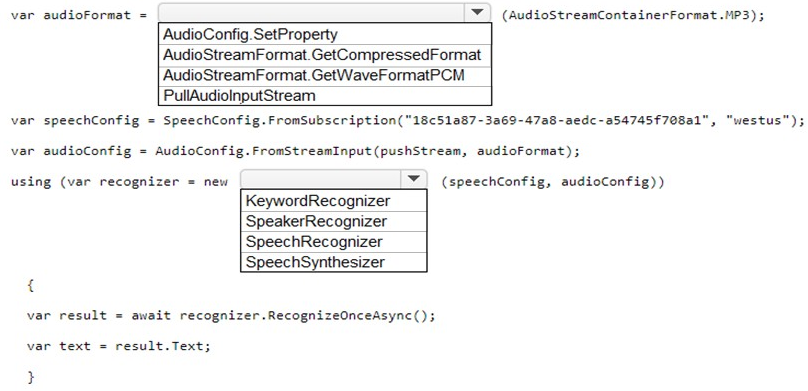
You are developing a streaming Speech to Text solution that will use the Speech SDK and
MP3 encoding. You need to develop a method to convert speech to text for streaming MP3 data.
How should you complete the code? To answer, select the appropriate options in the
answer area.
NOTE: Each correct selection is worth one point.
Explanation:
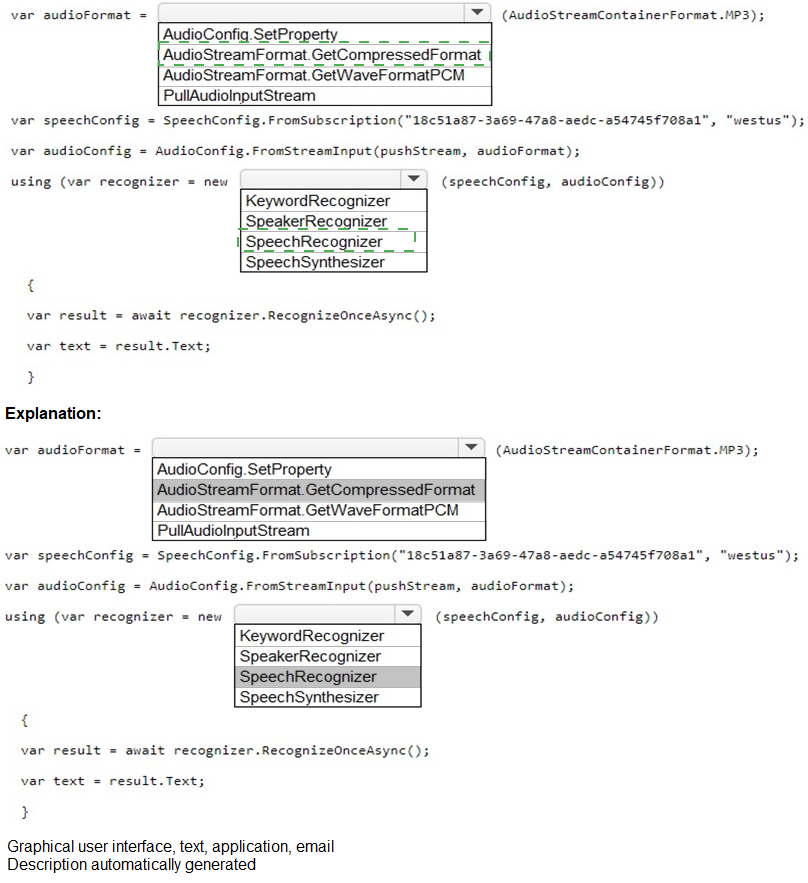
You need to convert streaming MP3 data to text using the Speech SDK. The audio format must be specified as compressed MP3. A push stream sends audio data incrementally. The SpeechRecognizer class performs continuous or single-shot speech recognition from an audio stream.
Correct Options:
For audioFormat variable: AudioStreamFormat.GetCompressedFormat(AudioStreamContainerFormat.MP3)
The Speech SDK requires explicit declaration of compressed audio formats. GetCompressedFormat with AudioStreamContainerFormat.MP3 tells the recognizer that incoming audio is MP3-encoded, enabling proper decompression before recognition.
For the recognizer instantiation: SpeechRecognizer
SpeechRecognizer is the correct class for converting speech audio to text. It accepts a SpeechConfig (subscription/region) and an AudioConfig (stream input). RecognizeOnceAsync performs single-shot recognition on the streaming MP3 data.
Incorrect Options:
AudioStreamFormat.GetWaveFormatPCM – This specifies uncompressed PCM audio. Your requirement explicitly states MP3 encoding. Using PCM would cause decoding errors or silence because the SDK would misinterpret compressed MP3 data as raw audio.
AudioConfig.SetProperty – This is not a valid method for creating an audio configuration. AudioConfig.FromStreamInput is correct for stream sources. SetProperty is used on SpeechConfig or AudioConfig objects after creation, not for initialization.
PullAudioInputStream – This is for pull-based streams where the SDK pulls data from a source. The code shows pushStream variable (implied), indicating a push-based model where you push data into the stream. Pull and push are incompatible.
KeywordRecognizer – This class detects specific wake words/keywords, not continuous or general speech recognition. It does not return transcribed text via result.Text after RecognizeOnceAsync in the way shown.
SpeakerRecognizer – This class does not exist in the Speech SDK. Speaker recognition (verification/identification) is handled by SpeakerVerificationModel or SpeakerIdentificationModel with SpeechRecognizer, not a dedicated recognizer class.
SpeechSynthesizer – This converts text to speech (TTS), the opposite of what you need. It cannot recognize speech or produce result.Text from audio input.
Reference:
Microsoft Learn: "Speech SDK – Compressed audio input" – Use AudioStreamFormat.GetCompressedFormat with AudioStreamContainerFormat.MP3 for MP3 streams.
Microsoft Learn: SpeechRecognizer class – For speech-to-text from microphone, file, or stream. RecognizeOnceAsync returns SpeechRecognitionResult with .Text property.
You use the Custom Vision service to build a classifier.
After training is complete, you need to evaluate the classifier.
Which two metrics are available for review? Each correct answer presents a complete
solution. (Choose two.)
NOTE: Each correct selection is worth one point.
A.
recall
B.
F-score
C.
weighted accuracy
D.
precision
E.
area under the curve (AUC)
recall
precision
Explanation:
When you train a classifier in Custom Vision, the service automatically calculates standard evaluation metrics based on the prediction vs. actual comparisons against your test set (iterations). The two primary metrics prominently displayed for each iteration are Precision and Recall, along with Average Precision (AP) and Mean Average Precision (mAP) for object detection.
Correct Options:
A. recall
Recall measures the ability to find all positive instances. It is calculated as: True Positives / (True Positives + False Negatives). In Custom Vision, recall tells you what proportion of actual images for a given tag were correctly predicted. Higher recall means fewer missed detections.
D. precision
Precision measures the accuracy of positive predictions. It is calculated as: True Positives / (True Positives + False Positives). In Custom Vision, precision tells you, when the model predicts a tag, how often that prediction is correct. Higher precision means fewer false alarms.
Incorrect Options:
B. F-score
While F1-score (harmonic mean of precision and recall) is a valuable derived metric, Custom Vision does not display F1-score directly in the portal or training results by default. You must calculate it manually from precision and recall values. It is not a primary evaluation metric presented by the service.
C. weighted accuracy
Weighted accuracy (accuracy per class averaged with class weighting) is not a standard metric reported by Custom Vision. The service reports per-tag precision/recall and overall average precision. Weighted accuracy is more common in imbalanced classification scenarios but is not natively provided.
E. area under the curve (AUC)
AUC (specifically ROC AUC) is available for binary classifiers in some Cognitive Services (e.g., Anomaly Detector). Custom Vision for multiclass image classification does not provide ROC AUC in its evaluation interface. It focuses on precision, recall, and average precision.
Reference:
Microsoft Learn: "How to evaluate a Custom Vision model" – After training, view Precision and Recall for each tag and overall. Average Precision (AP) is also provided, especially for object detection.
Microsoft Learn: "Evaluate classifier performance" – Custom Vision calculates precision = TP/(TP+FP), recall = TP/(TP+FN). F1 and AUC are not displayed.
You are developing a method for an application that uses the Translator API.
The method will receive the content of a webpage, and then translate the content into
Greek (el). The result will also contain a transliteration that uses the Roman alphabet.
You need to create the URI for the call to the Translator API. You have the following URI.
https://api.cognitive.microsofttranslator.com/translate?api-version=3.0
Which three additional query parameters should you include in the URI? Each correct
answer presents part of the solution. (Choose three.)
NOTE: Each correct selection is worth one point.
A.
toScript=Cyrl
B.
from=el
C.
textType=html
D.
to=el
E.
textType=plain
F.
toScript=Latn
textType=html
to=el
toScript=Latn
Explanation:
You need to translate webpage content (HTML) into Greek (el) and also get a Roman-alphabet transliteration of the Greek output. The required parameters are: to=el (target language), textType=html (preserve HTML structure), and toScript=Latn (output transliterated in Latin/Roman script).
Correct Options:
C. textType=html
Webpage content contains HTML tags. Setting textType=html ensures the Translator API preserves the HTML structure and only translates the visible text between tags. If omitted or set to plain, tags might be treated as text or stripped.
D. to=el
This specifies the target translation language. Greek is represented by the language code el. Without this parameter, the API would not know which language to translate into. The method explicitly requires the output to be in Greek.
F. toScript=Latn
Transliteration converts text from one script to another. Greek script (Grek) to Roman/Latin script (Latn) allows Greek words to be written using the Roman alphabet (e.g., "Ελλάδα" → "Elláda"). The requirement specifies "transliteration that uses the Roman alphabet," so toScript=Latn is required.
Incorrect Options:
A. toScript=Cyrl
Cyrl represents Cyrillic script (used for Russian, Bulgarian, etc.). Transliterating Greek to Cyrillic does not meet the Roman alphabet requirement. This would produce incorrect output for the stated need.
B. from=el
from=el would set the source language to Greek. However, the source is a webpage whose original language is unspecified but likely not Greek (you are translating into Greek). The API can auto-detect source language, so from is optional and el is wrong here.
E. textType=plain
textType=plain treats input as plain text, ignoring any HTML tags. For a webpage, using plain would cause HTML tags to be translated or lost, breaking the page structure. The requirement explicitly mentions "content of a webpage," so HTML preservation is necessary.
Reference:
Microsoft Learn: "Translator API – Translate request parameters" – to (target language), toScript (output script), and textType (html or plain) are documented query parameters.
Microsoft Learn: "Translator language support" – Greek (el) supports transliteration to Latin script (Latn). Cyrillic (Cyrl) is not used for Greek.
You are building a language model by using a Language Understanding service.
You create a new Language Understanding resource.
You need to add more contributors.
What should you use?
A.
a conditional access policy in Azure Active Directory (Azure AD)
B.
the Access control (1AM ) page for the authoring resources in the Azure portal
C.
the Access control (1AM) page for the prediction resources in the Azure portal
the Access control (1AM ) page for the authoring resources in the Azure portal
Explanation:
In Language Understanding (LUIS), contributors are added at the authoring resource level, not the prediction resource. Authoring resources control who can create, edit, label, train, and publish models. The Access control (IAM) page in the Azure portal is used to assign roles like Contributor or LUIS Author to users/groups.
Correct Option:
B. The Access control (IAM) page for the authoring resources in the Azure portal
Authoring resources manage the development lifecycle of LUIS applications. To add contributors who can modify the language model, you navigate to that specific authoring resource in Azure portal → Access control (IAM) → Add role assignment. Roles like "Cognitive Services LUIS User" or "Contributor" grant appropriate permissions.
Incorrect Options:
A. A conditional access policy in Azure Active Directory (Azure AD)
Conditional access policies control authentication conditions (location, device compliance, multi-factor authentication requirements) for accessing Azure resources. They do not add contributors or assign role-based permissions to LUIS resources. This is an authentication policy, not an authorization assignment tool.
C. The Access control (IAM) page for the prediction resources in the Azure portal
Prediction resources handle runtime queries (endpoint calls) after a model is published. Adding contributors at the prediction level only grants access to query the endpoint, not to edit the language model (intents, entities, utterances). For model building, authoring resource IAM is required.
Reference:
Microsoft Learn: "Add contributors to your LUIS app" – Contributors must be added to the authoring resource via Azure RBAC. Prediction resource IAM only provides endpoint access.
Microsoft Learn: "LUIS authoring and prediction resources" – Clarifies that authoring resource controls model editing permissions; prediction resource controls runtime access.
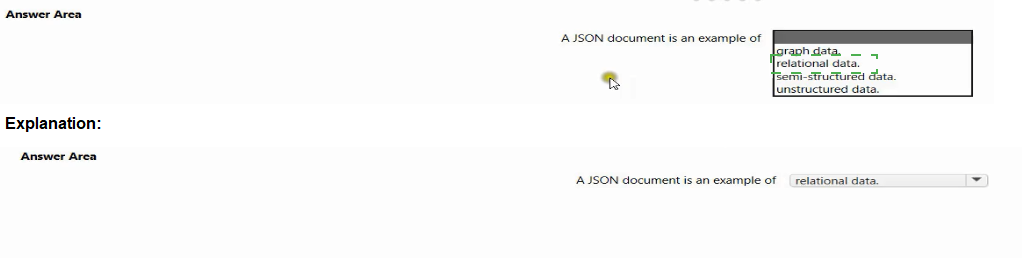
Select the answer that correctly completes the sentence.

Explanation:
A JSON document organizes data using key-value pairs, nested objects, and arrays without requiring a fixed schema or tabular structure. This flexibility places it between fully structured (relational) and completely unstructured (binary/text without labels) data, making it the classic example of semi-structured data.
Correct Option:
semi-structured data
JSON documents contain tags, keys, or markers to separate data elements but do not enforce a rigid schema like relational tables. They support hierarchical relationships, optional fields, and varying structures, which is the definition of semi-structured data. JSON, XML, and YAML are common examples.
Incorrect Options:
graph data
Graph data represents entities (nodes) and relationships (edges) explicitly, optimized for traversals (e.g., social networks, pathfinding). JSON can model graphs indirectly, but a simple JSON document is not inherently graph data unless specifically structured with node/edge relationships.
relational data
Relational data is organized into tables with rows, columns, and predefined schemas, linked via foreign keys. JSON documents are schemaless and nested, not tabular. While JSON can be flattened into a relational form, native JSON is not relational.
unstructured data
Unstructured data lacks any identifiable structure or metadata (e.g., raw text files, images, audio, video). JSON has explicit keys and hierarchical organization, making it structured enough to parse programmatically, so it is not considered unstructured.
Reference:
Microsoft Learn: "Data types in Azure Cognitive Search" – JSON is classified as semi-structured data.
Common data classification standards: Structured (SQL tables), Semi-structured (JSON, XML), Unstructured (blobs, free text), Graph (nodes/edges).
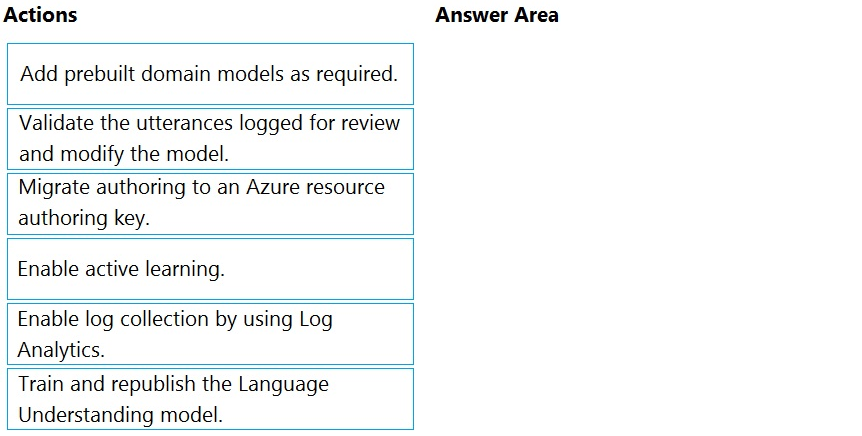
You are using a Language Understanding service to handle natural language input from
the users of a web-based customer agent.
The users report that the agent frequently responds with the following generic response:
"Sorry, I don't understand that."
You need to improve the ability of the agent to respond to requests.
Which three actions should you perform in sequence? To answer, move the appropriate
actions from the list of actions to the answer area and arrange them in the correct order.
(Choose three.)
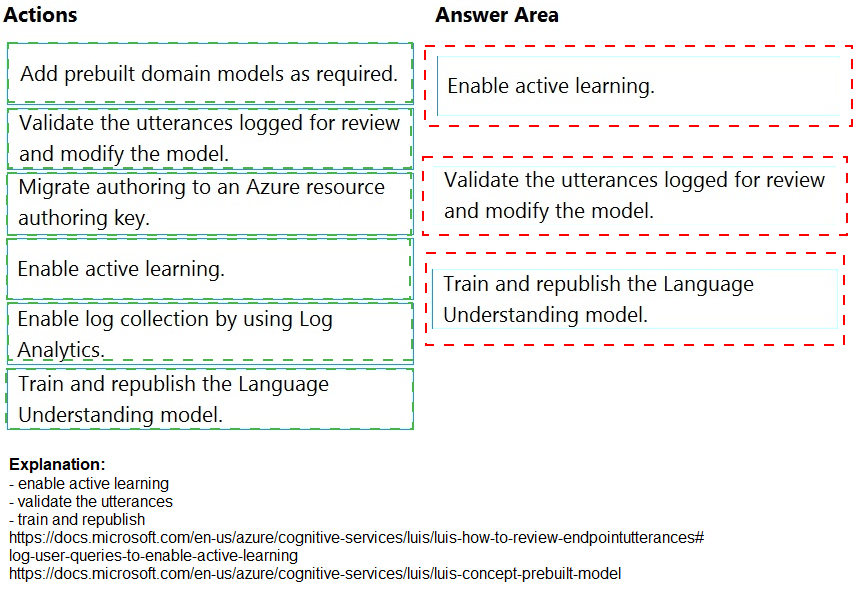
Explanation:
The generic "Sorry, I don't understand that" response indicates low-confidence predictions or utterances falling outside the trained intents. The standard improvement workflow is: enable active learning to collect user queries, review/validate those logged utterances, then train and republish the updated model.
Correct Option (in sequence):
Enable active learning.
Active learning automatically captures user utterances where the model's confidence score is low (close to the decision boundary). This builds a "review" queue of real user queries that need labeling. Without active learning, you won't know which utterances are failing.
Validate the utterances logged for review and modify the model.
After enabling active learning, the LUIS portal displays suggested utterances under "Review endpoint utterances." You validate these by assigning them to the correct intent or creating new intents/entities. This directly improves model understanding.
Train and republish the Language Understanding model.
Once utterances are validated and the model is modified, you must train the model to incorporate the new examples. After training, republishing makes the improved model live to the web-based customer agent endpoint.
Incorrect Options (not used in the sequence):
Add prebuilt domain models as required. – Prebuilt domains (e.g., Calendar, Weather) are for adding common intent patterns quickly. The issue here is low-confidence handling of existing intents, not missing domain coverage. This is not the first step for this specific problem.
Migrate authoring to an Azure resource authoring key. – This is a one-time setup or migration task (moving from starter key to an Azure authoring resource). It does not directly address poor intent recognition or low-confidence responses from users.
Enable log collection by using Log Analytics. – Log Analytics collects metrics and traces for monitoring and debugging, but it does not improve the model's understanding. It helps with diagnostics, not active learning or utterance validation.
Reference:
Microsoft Learn: "Improve LUIS model performance with active learning" – Sequence: Enable active learning → Review endpoint utterances → Train & republish.
Microsoft Learn: "Review endpoint utterances" – Validating logged utterances is the primary method to fix "None" intent or low-confidence predictions.
| Page 12 out of 34 Pages |
| 7891011121314151617 |
| AI-102 Practice Test Home |
Real-World Scenario Mastery: Our AI-102 practice exam don't just test definitions. They present you with the same complex, scenario-based problems you'll encounter on the actual exam.
Strategic Weakness Identification: Each practice session reveals exactly where you stand. Discover which domains need more attention, before Designing and Implementing a Microsoft Azure AI Solution exam day arrives.
Confidence Through Familiarity: There's no substitute for knowing what to expect. When you've worked through our comprehensive AI-102 practice exam questions pool covering all topics, the real exam feels like just another practice session.
Copyright © All Rights Reserved