
Topic 3: Misc. Questions
You have a SQL query that combines customer data and order data. The query includes
calculated columns. You need to create a database object that would allow other users to
rerun the same SOL query. What should you create?
A.
an Index
B.
a view
C.
a scalar function
D.
a table
a view
Explanation:
A view is a virtual table based on a SQL query. It allows users to rerun the same complex query (including joins, calculated columns, and filters) without rewriting the SQL each time. Views encapsulate query logic, provide security (restricting access to underlying tables), and simplify data access for other users. They are the ideal object for this scenario.
Correct Option:
B. a view
A view stores a SQL query as a database object. Users can SELECT * FROM view_name to execute the underlying query. Views can include joins, calculated columns, aggregations, and filters. They do not store data themselves but present data from underlying tables dynamically. This perfectly matches the requirement to rerun the same SQL query.
Incorrect Options:
A. an Index – Indexes improve query performance by providing fast data access paths. They do not store query logic or allow users to rerun queries. An index is a physical database structure, not a reusable query object.
C. a scalar function – Scalar functions return a single value based on input parameters. They do not return result sets with multiple rows and columns (like a customer-orders combination). While functions can encapsulate logic, they are not designed for the requirement of rerunning a full SELECT query.
D. a table – A table stores raw data, not a query. If you create a table, you would need to manually insert or update data each time, which is inefficient and does not automatically reflect changes in the underlying customer and order data. Tables store persistent data; views provide a dynamic window.
Reference:
Microsoft Learn documentation: "SQL views overview", "Create views to simplify queries", and "Difference between views and tables in SQL"
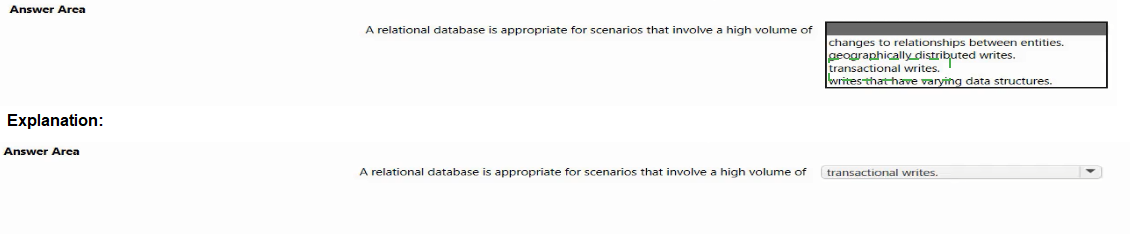
Select the answer that correctly completes the sentence.

Explanation:
Relational databases are optimized for ACID transactions (Atomicity, Consistency, Isolation, Durability). They excel at transactional writes where data integrity is critical, such as banking, order processing, and inventory systems. They enforce schema, support complex joins, and ensure that writes succeed or fail as complete units, making them ideal for transactional workloads.
Correct Option:
transactional writes.
Relational databases use ACID transactions to guarantee data consistency. Each write operation (INSERT, UPDATE, DELETE) is part of a transaction that either commits fully or rolls back. This ensures data integrity in scenarios like financial transactions, e-commerce checkouts, and reservation systems, where partial writes would be catastrophic.
Incorrect Options:
a high volume of changes to relationships between entities. – Relational databases handle relationships well, but frequent changes to relationships (e.g., many-to-many links) can be complex and less performant. Graph databases are better suited for highly dynamic relationship changes.
geographically distributed writes. – Relational databases traditionally struggle with geographically distributed writes (multi-master scenarios) due to consistency challenges. NoSQL databases (e.g., Cosmos DB) are better optimized for global distribution with low-latency writes across regions.
writes that have varying data structures. – Relational databases require a fixed schema (predefined tables, columns, data types). For writes with varying data structures (schema-less), document databases like Cosmos DB or MongoDB are more appropriate.
Reference:
Microsoft Learn documentation: "When to use a relational database", "ACID transactions in relational databases", and "Relational vs NoSQL database scenarios"
What is a primary characteristic of a relational database?
A.
data is queried and manipulated by using a variant of the SOL language
B.
a lack of dependencies between tables
C.
a flexible data structure
D.
a large amount of duplicate data
data is queried and manipulated by using a variant of the SOL language
Explanation:
A primary characteristic of a relational database is that data is queried and manipulated using SQL (Structured Query Language) or its variants (T-SQL, PL/SQL, etc.). SQL is the standard language for defining, querying, and manipulating relational data. Relational databases enforce schema, relationships (dependencies), and minimize duplicate data (normalization), not the opposite.
Correct Option:
A. data is queried and manipulated by using a variant of the SQL language
SQL is the universal language for relational databases. Whether Microsoft SQL Server (T-SQL), PostgreSQL (PL/pgSQL), or MySQL, all use SQL variants to perform queries, inserts, updates, deletes, and schema definitions. This is a defining characteristic that distinguishes relational databases from NoSQL databases.
Incorrect Options:
B. a lack of dependencies between tables –
Relational databases are built on dependencies between tables using foreign keys. Dependencies enforce referential integrity (e.g., an order must belong to an existing customer). Lack of dependencies is characteristic of NoSQL or flat-file systems, not relational databases.
C. a flexible data structure –
Relational databases have rigid, predefined schemas (tables, columns, data types, constraints). Flexible data structures (schema-less) are characteristic of document databases like MongoDB or Cosmos DB. Relational databases require structure before data insertion.
D. a large amount of duplicate data –
Relational databases aim to minimize duplicate data through normalization. Duplicate data leads to anomalies and waste. Large amounts of duplicate data are characteristic of denormalized or unstructured data stores, not properly designed relational databases.
Reference:
Microsoft Learn documentation: "What is a relational database?", "SQL language overview", and "Relational database characteristics"
Your company has a repotting solution that has paginated reports. The reports query a
dimensional model in a data warehouse. Which type of processing does the reporting
solution use?
A.
Online Transaction Processing (OLTP)
B.
Online Analytical Processing (OLAP)
C.
batch processing
D.
stream processing
Online Analytical Processing (OLAP)
Explanation:
Paginated reports querying a dimensional model in a data warehouse represent Online Analytical Processing (OLAP). OLAP is optimized for complex queries, aggregations, and historical analysis across large datasets. Dimensional models (facts and dimensions) are specifically designed for OLAP scenarios like reporting, business intelligence, and data warehousing.
Correct Option:
B. Online Analytical Processing (OLAP)
OLAP systems are designed for read-heavy analytical queries, aggregations, and reporting. They use dimensional models (star schema, snowflake schema) to enable fast querying of large historical datasets. Paginated reports that summarize, group, and calculate totals are classic OLAP workloads, not transaction processing.
Incorrect Options:
A. Online Transaction Processing (OLTP) –
OLTP is designed for high-volume, real-time transactional writes (e.g., banking, order entry). It uses normalized schemas and optimizes for insert/update/delete operations. Querying a data warehouse dimensional model is the opposite of OLTP.
C. batch processing –
Batch processing handles large volumes of data at scheduled intervals (e.g., ETL jobs, nightly data loads). While batch processing may prepare the data warehouse, the reporting solution itself (querying the dimensional model) is OLAP, not batch processing.
D. stream processing –
Stream processing handles real-time, continuous data flows (e.g., IoT sensors, clickstreams). Paginated reports querying a data warehouse are not real-time or continuous; they are batch-oriented analytical queries, making stream processing incorrect.
Reference:
Microsoft Learn documentation: "OLAP vs OLTP", "Dimensional modeling for data warehouses", and "Paginated reports in Power BI"
You build a bot by using the Microsoft Bot Framework SDK and the Azure Bot Service.
You plan to deploy the bot to Azure.
You register the bot by using the Bot Channels Registration service.
Which two values are required to complete the deployment? Each correct answer presents
part of the solution.
NOTE: Each correct selection is worth one point.
A.
botld
B.
tenancld
C.
appld
D.
objeccld
E.
appSecrec
appld
appSecrec
Explanation:
When registering a bot using Bot Channels Registration and deploying to Azure, you need the bot's App ID (Application ID) and App Secret (Client Secret). These values are generated when you create an App Registration in Azure AD for the bot. They are used to authenticate the bot with Azure Bot Service and enable communication between the bot and channels.
Correct Options:
C. appId (Application ID)
The App ID is a unique GUID that identifies your bot's application registration in Azure Active Directory. It is required for the Bot Channels Registration to link your bot code to the registered bot resource. Without it, the bot cannot authenticate.
E. appSecret (Client Secret)
The App Secret (or Client Secret) is a cryptographic key associated with the App ID. It serves as a password to verify the bot's identity when it exchanges authentication tokens. The bot code must include this secret (usually in configuration files or Key Vault) for successful deployment and operation.
Incorrect Options:
A. botId –
The botId is often the same as the App ID, but it is not a separate required value. Microsoft Bot Framework uses the App ID as the bot ID. "botId" is not a distinct credential; it is derived from the App ID.
B. tenantId –
The Tenant ID identifies your Azure AD tenant. While useful for multi-tenant scenarios, it is not strictly required for basic bot registration and deployment. The App ID and App Secret are sufficient for single-tenant or default configurations.
D. objectId –
The Object ID is the Azure AD directory object ID for the service principal. It is not required for bot deployment or runtime authentication. It is used for administrative operations via Azure CLI or PowerShell, not for bot-to-service communication.
Reference:
Microsoft Learn documentation: "Register a bot with Bot Channels Registration", "App ID and App Secret for bot authentication", and "Deploy a bot to Azure"
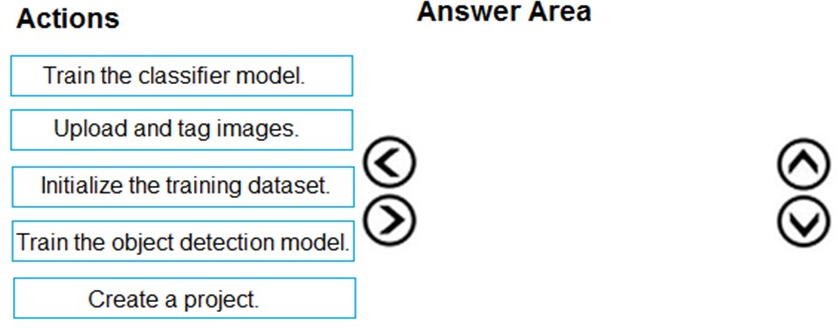
You are developing an application that will recognize faults in components produced on a
factory production line. The components are specific to your business. You need to use the Custom Vision API to help detect common faults.
Which three actions should you perform in sequence? To answer, move the appropriate
actions from the list of actions to the answer area and arrange them in the correct order.
Explanation:
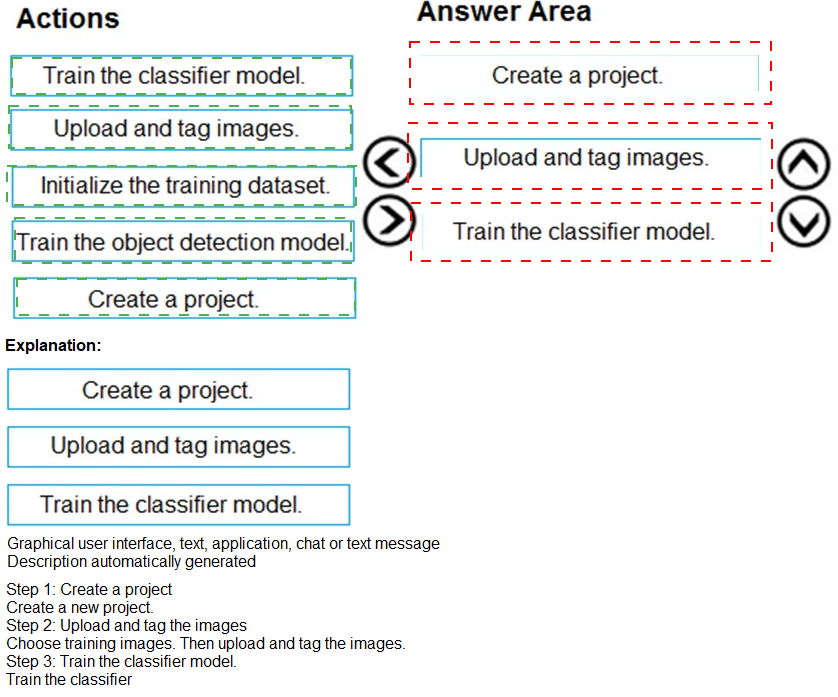
To detect faults using Custom Vision, you first create a project in the Custom Vision portal. Then you upload and tag images (e.g., "crack", "scratch", "normal") to provide labeled training data. Finally, you train the classifier model (or object detection model depending on project type). The question specifies "classifier model," so classification is used.
Correct Sequence (3 actions):
1. Create a project
In Custom Vision portal (or via API), create a new project. Choose the project type (Classification - Multiclass or Multilabel, or Object Detection). For fault detection, classification is suitable to categorize components as "faulty" or "normal."
2. Upload and tag images
Upload images of components (both faulty and non-faulty) and assign corresponding tags (e.g., "crack", "dent", "good"). Tagging is essential for supervised learning. The model learns to associate visual features with each fault type.
3. Train the classifier model
After tagging, initiate training. Custom Vision uses the labeled images to build a classification model that can predict fault types on new images. Training may take minutes depending on dataset size. After training, evaluate performance and publish the model.
Incorrect or Out-of-Sequence Actions:
Initialize the training dataset – This is not a standard Custom Vision action. Uploading and tagging images effectively initializes the dataset. "Initialize" is redundant.
Train the object detection model – While object detection is an option in Custom Vision, the question specifically says "classifier model" in the actions list. Classification is appropriate for detecting presence/type of faults without needing bounding boxes around each fault.
Upload and tag images after training – Training requires tagged images as input. Uploading and tagging after training would be useless. This order would result in no training data.
Reference:
Microsoft Learn documentation: "Custom Vision – Create a project", "Upload and tag images in Custom Vision", and "Train a Custom Vision classifier"
You are building a natural language model.
You need to enable active learning.
What should you do?
A.
Add show-all-intents=true to the prediction endpoint query.
B.
Enable speech priming
C.
Add log=true to the prediction endpoint query.
D.
Enable sentiment analysis.
Add log=true to the prediction endpoint query.
Explanation:
Active learning in Language Understanding (LUIS) identifies ambiguous utterances that the model is unsure about. To enable active learning, you must set log=true on the prediction endpoint query. This logs user utterances, which then appear in the "Review labeled utterances" and "Endpoint utterances" sections for manual review and retraining.
Correct Option:
C. Add log=true to the prediction endpoint query
When log=true is included in the prediction endpoint query, each user utterance is logged. These logged utterances can be reviewed in the LUIS portal to identify low-confidence predictions. You can then label them correctly and retrain the model. This is the core mechanism for active learning.
Incorrect Options:
A. show-all-intents=true –
This parameter returns all intents and their scores for a prediction, not just the top intent. It is used for debugging and analysis but does not enable active learning. It does not log utterances for review.
B. Enable speech priming –
Speech priming is a feature that improves speech-to-text accuracy by providing LUIS expected words or phrases. It is unrelated to active learning for natural language models. Speech priming is used with Speech service, not for logging utterances.
D. Enable sentiment analysis –
Sentiment analysis adds sentiment scores to predictions (positive, negative, neutral). This is a separate analysis feature, not active learning. It does not log utterances or help identify ambiguous predictions for model improvement.
Reference:
Microsoft Learn documentation: "Active learning in LUIS", "Enable logging for endpoint queries", and "Review endpoint utterances for active learning"
Which database transaction property ensures that transactional changes to a database are
preserved during unexpected operating system restarts?
A.
durability
B.
atomicity
C.
consistency
D.
isolation
durability
Explanation:
Durability is the ACID property that guarantees once a transaction is committed, its changes persist permanently, even in the event of system failures such as power loss, operating system crashes, or hardware failures. Durability is typically achieved through mechanisms like write-ahead logging (WAL), transaction logs, and redundant storage.
Correct Option:
A. durability
Durability ensures that committed transactions survive system failures. After a transaction commits, its changes are written to non-volatile storage (disk). Even if the OS restarts unexpectedly, the committed changes remain intact. This property is critical for data reliability and recovery scenarios.
Incorrect Options:
B. atomicity –
Atomicity ensures that a transaction is "all or nothing" (either fully completes or fully rolls back). It does not guarantee persistence after system restarts. Atomicity addresses transaction completeness, not crash recovery.
C. consistency –
Consistency ensures that a transaction brings the database from one valid state to another, respecting all defined rules (constraints, triggers, foreign keys). It does not relate to persistence after restarts.
D. isolation –
Isolation ensures that concurrently executing transactions do not interfere with each other (e.g., preventing dirty reads, non-repeatable reads). It does not address crash recovery or persistence of committed transactions.
Reference:
Microsoft Learn documentation: "ACID properties – Durability", "Transaction logging and crash recovery", and "Durability in database systems"
You need to store event log data that is semi-structured and received as the logs occur.
What should you use?
A.
Azure Table storage
B.
Azure Queue storage
C.
Azure Files
Azure Table storage
Explanation:
Azure Table storage is a NoSQL key-value store designed for semi-structured data. It supports fast inserts for high-volume, time-series data like event logs. Each log entry can have different properties (semi-structured), and Table storage scales to billions of rows. It is ideal for storing event logs as they occur, with efficient querying by partition key and row key.
Correct Option:
A. Azure Table storage
Azure Table storage provides schema-less storage where each entity (row) can have up to 252 custom properties. This is perfect for semi-structured event logs where different log entries may contain different fields. It supports high-throughput writes (thousands per second) and is cost-effective for log data.
Incorrect Options:
B. Azure Queue storage –
Queue storage is for message queuing and decoupling components (e.g., work queues). It is not designed for persistent storage of log data. Messages have a maximum size of 64KB and are typically deleted after processing. Queues are not suitable for long-term log storage.
C. Azure Files –
Azure Files provides fully managed file shares (SMB/NFS protocol). It is designed for shared file storage, not for ingesting high-volume semi-structured log data. Files are not optimized for frequent appends or querying by log properties.
Reference:
Microsoft Learn documentation: "Azure Table storage for semi-structured data", "Store event logs in Table storage", and "Table storage vs Queue storage vs Files"
You are building a chatbot that will provide information to users as shown in the following
exhibit.

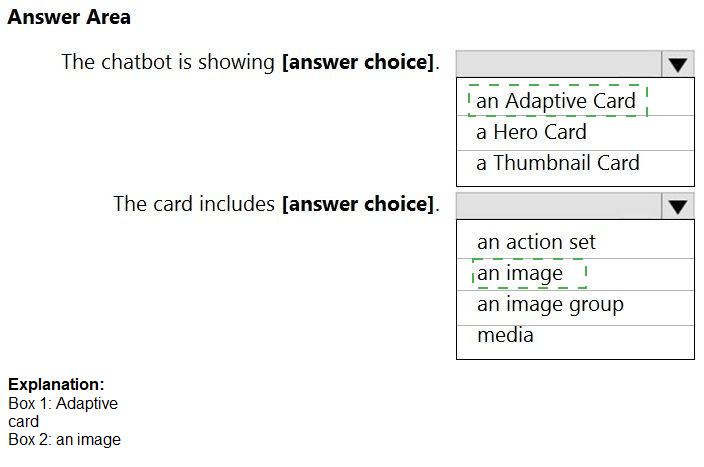
Statement 1: The chatbot is showing [answer choice].
Answer: an Adaptive Card
Explanation:
Adaptive Cards are highly customizable, JSON-based cards that can display rich content like text, images, inputs, buttons, and tables. The flight itinerary shown includes structured data (passengers, stops, dates, airports, total price) arranged in a visually rich layout. Adaptive Cards are ideal for complex, interactive information displays.
Statement 2: The card includes [answer choice].
Answer: an image
Explanation:
The exhibit shows airport codes (SFO, AMS) likely accompanied by small airport/city images or icons. Even if not explicitly visible in the text description, Adaptive Cards in flight booking scenarios typically include airline logos, airport icons, or map images. Among the options, "an image" is the most plausible inclusion. "Action set" (buttons) may also be present but not confirmed.
Note: Based on standard flight itinerary cards, images (airline logos, airport icons) are common. If the card had buttons like "Select" or "Cancel", that would be an action set, but the exhibit does not clearly show buttons.
Incorrect Options (for Statement 1):
a Hero Card – Hero cards typically display a single large image with a title, subtitle, and one or two buttons. They are less flexible than Adaptive Cards and not ideal for structured itinerary data with multiple fields (passengers, stops, dates, total price).
a Thumbnail Card – Thumbnail cards are similar to Hero cards but with a smaller image. They are designed for simple list items (e.g., contact list, product listing), not complex flight itineraries with multiple data points.
Incorrect Options (for Statement 2):
an action set – An action set contains buttons (e.g., "OK", "Cancel", "Select"). The exhibit does not clearly show any buttons or interactive actions. While Adaptive Cards can include actions, the visible content appears to be display-only.
an image group – An image group displays multiple images in a gallery. The exhibit shows only airport codes, not a group of images. Flight itineraries rarely use image groups.
media – Media refers to audio or video playback controls. The exhibit is a flight itinerary summary, which does not include media playback functionality.
Reference:
Microsoft Learn documentation: "Adaptive Cards in Bot Framework", "Hero Card vs Adaptive Card", and "Card types in Microsoft Teams"
What is a characteristic of a non-relational database?
A.
full support for Transact-SGL
B.
a fixed schema
C.
self describing entities
self describing entities
Explanation:
A characteristic of a non-relational (NoSQL) database is self-describing entities, meaning each record (document, row, item) carries its own schema information. For example, in a document database like Cosmos DB, each JSON document contains its own field names and values. This allows schema flexibility, unlike relational databases which require predefined table schemas.
Correct Option:
C. self describing entities
In non-relational databases, each entity (e.g., JSON document, key-value pair) contains its own metadata and structure. This allows different records in the same collection to have different fields, making them self-describing. This contrasts with relational databases where schema is defined at the table level, not per row.
Incorrect Options:
A. full support for Transact-SQL –
Transact-SQL (T-SQL) is a proprietary extension of SQL used by Microsoft SQL Server and Azure SQL Database, both relational databases. Non-relational databases typically do not support full T-SQL; they use their own query languages (e.g., MongoDB query language, Gremlin, Cassandra Query Language).
B. a fixed schema –
Non-relational databases are characterized by flexible or dynamic schemas, not fixed schemas. Fixed schemas are a hallmark of relational databases where you must define tables, columns, and data types before inserting data. NoSQL databases allow schema-less data insertion.
Reference:
Microsoft Learn documentation: "Non-relational (NoSQL) data characteristics", "Self-describing entities in document databases", and "Relational vs Non-relational databases"
You have a bot that was built by using the Microsoft Bot Framework composer as shown in
the following exhibit.

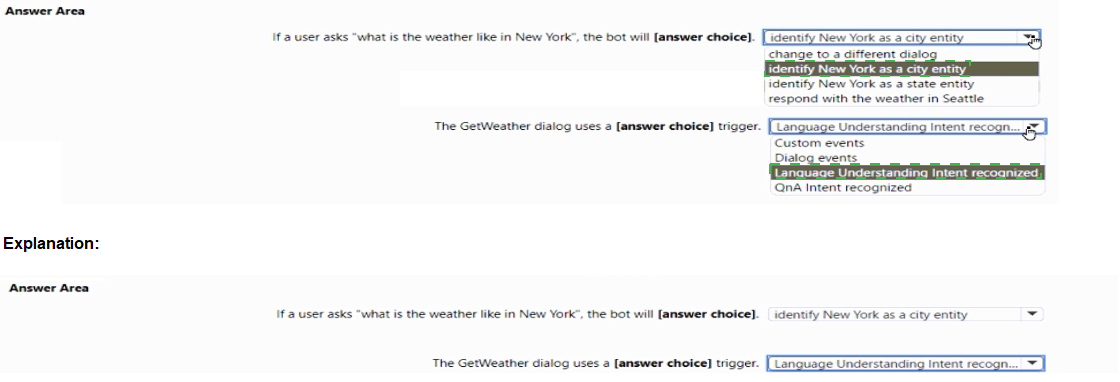
Statement 1: If a user asks "what is the weather like in New York", the bot will [answer choice].
Answer: Identify New York as a city entity
Explanation:
The trigger phrase includes {citySeattle} @ ml city, where @ ml city indicates a machine-learned entity of type city. When a user asks about "New York", the Language Understanding model will extract "New York" as a city entity, not as a state or a fixed value. The entity is identified correctly regardless of the specific city name.
Statement 2: The GetWeather dialog uses a [answer choice] trigger.
Answer: Language Understanding Intent recognized
Explanation:
The exhibit shows "Intent recognized" in the dialog header and includes trigger phrases like "please tell me the weather" and "what is the weather like in {citySeattle} @ ml city". This indicates the dialog is triggered by a Language Understanding intent. "Intent recognized" is the specific event type in Bot Framework Composer for LUIS-based intent detection.
Incorrect Options (Statement 1):
change to a different dialog – The dialog is designed to handle weather queries. It will not change to a different dialog; it will process the city entity within the same GetWeather dialog.
identify New York as a state entity – The entity is defined as @ ml city, not state. The model will extract "New York" as a city, not as a state entity. New York can be both a city and a state, but the entity type is explicitly city.
respond with the weather in Seattle – The trigger uses {citySeattle} as an example variable, but the entity is dynamic. For "New York", the bot will extract "New York" as the city value, not default to Seattle.
Incorrect Options (Statement 2):
Custom events – Custom events are user-defined events triggered by emitEvent(), not by natural language utterances. This dialog is triggered by user speech/text, not custom events.
Dialog events – Dialog events include BeginDialog, EndDialog, CancelDialog, etc. The trigger shown is for intent recognition, not dialog lifecycle events.
QnA Intent recognized – QnA Maker intent recognition is used for FAQ-style question answering. The trigger phrases and entity extraction indicate Language Understanding (LUIS), not QnA Maker.
Reference:
Microsoft Learn documentation: "Bot Framework Composer – Intent recognized trigger", "Language Understanding entities in Composer", and "Machine-learned entities in Composer"
| Page 11 out of 34 Pages |
| 678910111213141516 |
| AI-102 Practice Test Home |
Real-World Scenario Mastery: Our AI-102 practice exam don't just test definitions. They present you with the same complex, scenario-based problems you'll encounter on the actual exam.
Strategic Weakness Identification: Each practice session reveals exactly where you stand. Discover which domains need more attention, before Designing and Implementing a Microsoft Azure AI Solution exam day arrives.
Confidence Through Familiarity: There's no substitute for knowing what to expect. When you've worked through our comprehensive AI-102 practice exam questions pool covering all topics, the real exam feels like just another practice session.
Copyright © All Rights Reserved