
A customer asked to integrate Unity Connection with Cisco UCM using SIP protocol Which
two features must be enabled on SIP security profiles? (Choose two)
A.
Accept presence subscription
B.
Enable application level authorization.
C.
Allow charging header
D.
Accept replaces header
E.
Accept unsolicited notification
Accept replaces header
Accept unsolicited notification
Explanation:
For SIP integration between Cisco Unity Connection (CUC) and Cisco Unified Communications Manager (CUCM), the SIP trunk security profile must permit signaling needed for voicemail-related functions. Cisco's integration guide specifically identifies Accept Unsolicited Notification and Accept Replaces Header as required settings. The former allows unsolicited SIP NOTIFY messages, including those used for message-waiting indications (MWI); the latter supports SIP dialogs that replace existing dialogs, including supervised transfers.
Correct Options: D and E
D. Accept Replaces Header
This setting allows CUCM to accept new SIP dialogs that replace existing SIP dialogs. It supports call-transfer scenarios, including supervised transfers initiated through Cisco Unity Connection. When the SIP trunk security profile does not permit the Replaces header, certain transfer operations may fail. Cisco's Unity Connection SIP integration documentation explicitly instructs administrators to enable this option on the CUCM SIP trunk security profile.
E. Accept Unsolicited Notification
This setting allows CUCM to accept SIP NOTIFY messages that arrive without a prior subscription or solicitation. In a Unity Connection integration, these messages are used for message-waiting indication (MWI), which signals that a user has voicemail. If unsolicited notifications are not accepted, CUCM may reject the relevant SIP NOTIFY messages, preventing voicemail message-waiting indicators from updating correctly.
Incorrect Option:
A. Accept presence subscription
This setting controls whether CUCM accepts SIP presence-subscription requests through the trunk. Presence subscriptions are not the primary requirement for standard Unity Connection voicemail integration. The documented SIP integration settings instead include unsolicited notifications and Replaces-header support, along with out-of-dialog REFER. Therefore, this option is not one of the two expected answers for this question.
B. Enable application level authorization
This option enables application-level authorization for SIP trunk requests and requires corresponding permissions for application users. It is not a general requirement for standard Unity Connection SIP integration. Cisco's integration procedure focuses on enabling the specific SIP signaling features needed for voicemail functions and transfers. Application-level authorization should be enabled only when the deployment's security design specifically requires it.
C. Allow charging header
This option concerns handling the SIP charging header, which can carry charging-related information. It is not one of the standard settings Cisco identifies for basic Unity Connection SIP trunk integration. The relevant requirements for this question are support for SIP NOTIFY messages and Replaces-header processing, rather than charging information.
Reference:
1. Cisco Unity Connection 15 — Setting Up a CUCM SIP Trunk Integration
Refer to the exhibit.
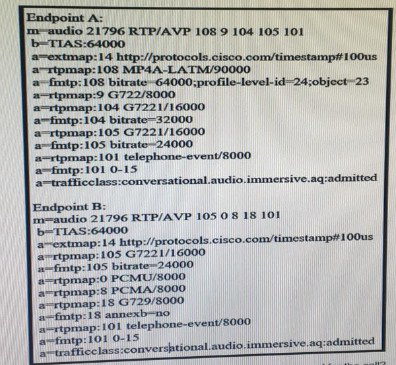
Endpoint A calls endpoint B. What is the only audio codec that can be used for the call?
A.
G722/8000
B.
PCMA/8000
C.
Telephone-event/8000
D.
G7221/16000
G7221/16000
Explanation:
To determine the only audio codec that Endpoint A and Endpoint B can use, compare the audio codecs listed in their SDP offers. A codec must be supported by both endpoints, including a compatible codec name and clock rate, to be selected for the call. The exhibit shows different codec lists for each endpoint, so the correct answer is the codec whose advertised format matches on both sides.
Correct Option:
D. G7221/16000
Endpoint A advertises G.722.1 at a 16 kHz clock rate with payload type 105 and a bitrate of 24,000 bps. Endpoint B advertises the same codec, clock rate, payload type, and bitrate. This is the matching audio codec that both endpoints support. Therefore, G.722.1/16000 at 24 kbps is the only common audio codec available for this call.
Incorrect Options
A. G722/8000
Endpoint A advertises G.722/8000 using payload type 9, but Endpoint B does not include payload type 9 or G.722/8000 in its SDP media description. Although G.722 is a valid wideband audio codec, it cannot be negotiated for this call because Endpoint B does not advertise support for it.
B. PCMA/8000
PCMA/8000, also known as G.711 A-law, is advertised by Endpoint B using payload type 8. However, Endpoint A does not advertise PCMA/8000 in its SDP offer. Because the endpoints do not share this codec, it cannot be selected for their media session.
C. Telephone-event/8000
Both endpoints advertise telephone-event/8000, but this is used for RTP-based DTMF signaling, not for encoding the call's voice audio. It carries telephone keypad events rather than speech. Although it appears in both codec lists, it is not the audio codec requested by the question.
Reference
1. RFC 4566 — SDP: Session Description Protocol — Defines how media formats and payload types are advertised in SDP.
An employee of company ABC just quit. The IT administrator deleted the employee’s userid
from the active directory at 10 a m. on March 4th The nightly sync occurs at 10 p.m daily.
The IT administrator wants to troubleshoot and find a way to delete the userid as soon as
possible How is this issue resolved?
A.
Wait until 10 pm on March 4th when the user is automatically removed from Cisco UCM
B.
Wait until 10 pm on March 5th when the user is automatically removed from Cisco UCM.
C.
Wait until 3:15 a.m. on March 6th for garbage collection to remove the user from Cisco
UCM.
D.
Wait until 3:15 a.m. on March 5th for garbage collection to remove the user from Cisco
UCM
Wait until 3:15 a.m. on March 6th for garbage collection to remove the user from Cisco
UCM.
Explanation:
When Cisco Unified Communications Manager (CUCM) synchronizes end users from Microsoft Active Directory, deleting an account in Active Directory does not necessarily remove the corresponding user from CUCM immediately. The configured synchronization schedule determines when CUCM detects the directory change. After synchronization identifies a deleted user, CUCM's database cleanup processes may take additional time to remove the user record completely. Therefore, the answer depends on both the nightly synchronization time and the garbage-collection schedule.
Correct Option:
C. Wait until 3:15 a.m. on March 6th for garbage collection to remove the user from Cisco UCM
At 10 p.m. on March 4, the nightly LDAP synchronization detects that the account was deleted from Active Directory and marks the corresponding CUCM user record inactive. CUCM's garbage-collection process runs daily at 3:15 a.m., but it permanently removes accounts only after they have been inactive for more than 24 hours. The March 5 run is too early; the March 6 run removes the account.
Incorrect Options
A. Wait until 10 p.m. on March 4th when the user is automatically removed from Cisco UCM
This is incorrect because the 10 p.m. synchronization does not immediately delete the CUCM user record. Instead, it identifies the missing Active Directory account and marks the synchronized user as inactive. The user record remains in the CUCM database until the garbage-collection process removes it after the required inactive period.
B. Wait until 10 p.m. on March 5th when the user is automatically removed from Cisco UCM
This is incorrect because the March 5 synchronization is not the final deletion step. The account is marked inactive during synchronization, and garbage collection performs the permanent removal. The scheduled synchronization and the garbage-collection process serve different purposes, so waiting for another nightly sync is not the correct explanation.
D. Wait until 3:15 a.m. on March 5th for garbage collection to remove the user from Cisco UCM
This is incorrect because the account will have been marked inactive for only about 5 hours and 15 minutes when garbage collection runs on March 5. CUCM requires the record to remain inactive for more than 24 hours before permanent deletion. The next garbage-collection run, at 3:15 a.m. on March 6, satisfies this requirement.
Reference
1. Cisco Collaboration System SRND — Account Synchronization with Active Directory
Which user group is targeted by MRA services?
A.
Call center agents who dial out to remote customers
B.
Mobile workers in a host desk environment at HQ who log in every morning at possibility
a different phone
C.
Production floor users who need wireless mobility in remote areas of the factory
D.
On-the-go mobile workforce who connect to corporate phone services using their own
mobile device
On-the-go mobile workforce who connect to corporate phone services using their own
mobile device
Which action prevent toll fraud in Cisco Unified Communications Manager?
A.
Configure ad hoc conference restriction
B.
Implement toll fraud restriction in the Cisco IOS router
C.
Allow off-net to off-net transfers
D.
Implement route patterns in Cisco Unified CM.
Configure ad hoc conference restriction
Explanation:
Toll fraud occurs when unauthorized callers place expensive external (off-net) calls through the CUCM system. One common vector is an ad-hoc conference that is left open after the legitimate parties disconnect, allowing an external caller to stay connected and dial further off-net numbers. Configuring ad-hoc conference restriction forces the conference to drop when the only remaining participant is an off-net party, thereby closing this fraud path.
Correct Option:
A. Configure ad hoc conference restriction
In CUCM Service Parameters (or the Conference Bridge configuration) enable the “Drop Ad Hoc Conference” / “Restrict Ad Hoc Conferences” setting. When the last on-net participant leaves, the conference is automatically torn down, preventing an external caller from remaining in the conference and placing fraudulent long-distance calls.
Incorrect Option:
B. Implement toll fraud restriction in the Cisco IOS router
Router-level class-of-restriction or translation rules can help, but the question asks specifically for an action inside Cisco Unified Communications Manager.
C. Allow off-net to off-net transfers
Explicitly permitting off-net-to-off-net transfers opens, rather than closes, a toll-fraud vector.
D. Implement route patterns in Cisco Unified CM
Route patterns are required for normal call routing; they do not by themselves prevent the conference-based toll-fraud scenario addressed by the restriction setting.
Reference:
Cisco Unified Communications Manager System Guide / Security Guide – “Preventing Toll Fraud”: configure the Drop Ad Hoc Conference parameter to ensure conferences are released when only off-net parties remain.
An engineer is designing a load balancing solution for two Cisco Unified Border routers.
The first router (cube1.abc.com) takes 60% of the calls and the second router
(cute2.abc.com) takes 40% of the calls, Assume all DNS A records have been created.
Which two SRV records are needed for a load balanced solution? (Choose two.)
A.
sip_udp.abc.com 60 IN SRV 1 40 5060 cube2.abc.com
B.
sip_udp.abc.com 60 IN SRV 3 60 5060 cube2.abc.com
C.
sip_udp.abc.com 60 IN SRV 60 1 5060 cube1.abc.com
D.
sip_udp.abc.com 60 IN SRV 2 60 5060 cube1.abc.com
E.
sip_udp.abc.com 60 IN SRV 1 60 5060 cube1.abc.com
sip_udp.abc.com 60 IN SRV 1 40 5060 cube2.abc.com
sip_udp.abc.com 60 IN SRV 1 60 5060 cube1.abc.com
Explanation:
DNS SRV records distribute SIP traffic according to priority and weight. Records that share the same (lowest) priority are load-balanced by their relative weights. To give cube1 60 % of the calls and cube2 40 % of the calls, both records must use the same priority value and the weights must be set to 60 and 40 respectively. The two correct SRV records therefore use priority 1 with the matching weights.
Correct Option:
A. sip_udp.abc.com 60 IN SRV 1 40 5060 cube2.abc.com
Priority 1, weight 40 → cube2 receives 40 % of the traffic.
E. sip_udp.abc.com 60 IN SRV 1 60 5060 cube1.abc.com
Priority 1, weight 60 → cube1 receives 60 % of the traffic.
Because both records have identical priority, the DNS resolver distributes queries proportionally to the weights (60 : 40).
Incorrect Option:
B. sip_udp.abc.com 60 IN SRV 3 60 5060 cube2.abc.com
Higher priority number (3) means this record is used only if lower-priority records fail; it does not participate in the 60/40 load share.
C. sip_udp.abc.com 60 IN SRV 60 1 5060 cube1.abc.com
Priority and weight values are swapped; priority 60 is very low preference and weight 1 produces almost no traffic share.
D. sip_udp.abc.com 60 IN SRV 2 60 5060 cube1.abc.com
Priority 2 is lower preference than priority 1, so this record is not used while the priority-1 records are available.
Reference:
RFC 2782 (DNS SRV) and Cisco Unified Border Element / CUCM DNS SRV design guides: equal-priority records are load-balanced by weight; the weight ratio determines the percentage of calls each target receives.
Which description of the Mobile and Remote Access feature is true?
A.
Collaboration Edge feature that enables remote individuals to perform international calls
from Jabber with a VPN connection
B.
Collaboration Edge feature that enables remote individual to access enterprise
collaboration services via Jabber with the use of a VPN connection
C.
Collaboration Edge feature that enables remote individuals to access enterprise
collaboration services via Jabber without the use of a VPN connection
D.
Collaboration Edge feature that enables remote individuals to access all enterprise
collaboration services using a PC within the corporate environment
Collaboration Edge feature that enables remote individuals to access enterprise
collaboration services via Jabber without the use of a VPN connection
Explanation:
Mobile and Remote Access (MRA) is a Collaboration Edge feature that allows remote users to register their Cisco Jabber clients (and other endpoints) to the on-premises Unified Communications infrastructure. Registration, presence, instant messaging, voice, video and other collaboration services are provided securely over the Internet without requiring a VPN tunnel into the corporate network.
Correct Option:
C. Collaboration Edge feature that enables remote individuals to access enterprise collaboration services via Jabber without the use of a VPN connection
MRA terminates the external SIP/HTTPS connections on the Expressway-E/C pair and proxies them into the internal CUCM/IM&P cluster. Remote Jabber users therefore obtain full enterprise services while remaining outside the corporate firewall and without a VPN.
Incorrect Option:
A.
MRA is not limited to international calling; it provides the full set of collaboration services, and a VPN is not required.
B.
The defining characteristic of MRA is that a VPN is not needed; the option incorrectly states that a VPN is used.
D.
MRA is specifically for remote (off-premises) users; it is not an access method for PCs that are already inside the corporate environment.
Reference:
Cisco Expressway / Mobile and Remote Access Deployment Guide: “Mobile and Remote Access allows endpoints such as Cisco Jabber to have registration, call control, provisioning, messaging and presence services provided by Cisco Unified Communications Manager when the endpoint is not within the enterprise network \ldots without the need for a separate VPN client.”
Which DHCP option must be set up for new phones to obtain the TFTP server IP address?
A.
Option 66
B.
Option 15
C.
Option 120
D.
Option 6
Option 66
Explanation:
When a Cisco IP phone boots it uses DHCP to obtain its IP address, subnet mask, default gateway and the address of the TFTP server that holds its configuration files. DHCP Option 66 is the standard option defined for this purpose; it carries the IP address or hostname of the TFTP server. The phone reads Option 66 and then contacts that TFTP server to download its device configuration.
Correct Option:
A. Option 66
Configure the DHCP scope with Option 66 set to the IP address (or hostname) of the TFTP/CUCM server. New phones automatically receive this value and proceed with the TFTP download of their configuration.
Incorrect Option:
B. Option 15
Option 15 supplies the DNS domain name; it is not used for TFTP.
C. Option 120
Option 120 is used for SIP server addresses, not for the TFTP server.
D. Option 6
Option 6 provides DNS server IP addresses; it does not convey the TFTP server location.
Reference:
Cisco IP Phone Administration Guide and CUCM documentation: “DHCP Option 66 (TFTP Server Name) must be configured so that the phone can locate the TFTP server and download its configuration files.”
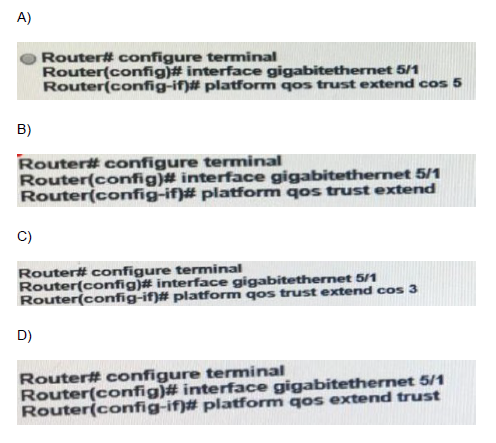
Which configuration tells a switch port to send Cisco Discovery protocol packets that
configure an attached Cisco IP phone to trust tagged traffic that is received from a device that is connected to the access port on the Cisco IP phone?
A.
Option A
B.
Option B
C.
Option C
D.
Option D
Option B
Explanation
The question relates to QoS trust settings for Cisco IP phones in the Cisco 350-801 (CCNP Collaboration) exam.
When a Cisco IP phone connects to a switch port, a computer can connect through the phone’s access port. To allow the phone to trust the Class of Service (CoS) markings on tagged traffic received from that computer, the switch must advertise the appropriate trust configuration through Cisco Discovery Protocol (CDP).
The relevant configuration is switchport priority extend trust, which instructs the phone to trust the priority markings of traffic received from the attached PC.
Correct Option: B
The correct command is:
Switch(config)# interface GigabitEthernet1/0/2
Switch(config-if)# switchport priority extend trust
This interface-level command instructs the Cisco IP phone to trust the IEEE 802.1p priority (CoS) markings received from a PC or another device connected to the phone’s access port. The phone preserves the received priority instead of overwriting it with a configured CoS value. Cisco documents this behavior in its switch command reference.
Incorrect Options
- A. Incorrect if it configures a fixed CoS value rather than trusting the priority markings received from the attached device.
- C. Incorrect if it configures a voice VLAN or another unrelated port feature; those settings do not enable the phone to trust the attached PC’s priority markings.
- D. Incorrect if it configures a different QoS or switching behavior rather than the trust keyword of switchport priority extend.
Note: The supplied image’s option text is not visible in the question, so these incorrect-option explanations are conditional rather than verified against the exact commands shown.
Reference
Cisco official documentation:
- Catalyst 2960-XR Switch Command Reference — QoS Commands.
What is set when using CoS to mark an Ethernet frame?
A.
IPP bits
B.
802.1p User Priority bits
C.
IP ECN bits
D.
DCSP bits
802.1p User Priority bits
Explanation
Class of Service (CoS) is a Layer 2 Quality of Service (QoS) marking mechanism used to prioritize Ethernet frames based on their importance. CoS uses the 3-bit Priority Code Point (PCP) field in the IEEE 802.1Q VLAN tag, commonly called the 802.1p User Priority field. These three bits provide eight priority values, from 0 to 7, which network devices can use to classify and prioritize traffic.
Correct Option:
B. 802.1p User Priority bits
The IEEE 802.1p User Priority field contains three bits within the 802.1Q Ethernet VLAN tag. These bits encode the CoS value, ranging from 0 (lowest priority) to 7 (highest priority). Switches use these markings to determine how frames should be queued and forwarded during congestion. For example, voice traffic may receive a higher priority than ordinary data traffic to reduce latency and jitter.
Incorrect Options
- A. IPP bits:
IP Precedence (IPP) uses the first three bits of the IP Differentiated Services field in the IP header. It is a Layer 3 marking mechanism, not the field used by CoS to mark Ethernet frames.
- C. IP ECN bits:
Explicit Congestion Notification (ECN) uses two bits in the IP Differentiated Services field to indicate congestion-related information. It does not represent the Ethernet CoS priority value.
- D. DSCP bits:
Differentiated Services Code Point (DSCP) uses six bits in the IP header to classify Layer 3 traffic for QoS treatment. DSCP is not the field used to mark Ethernet frames with CoS.
Reference
- IEEE 802.1Q — defines VLAN tagging and the three-bit Priority Code Point (PCP) field.
Refer to the exhibit.
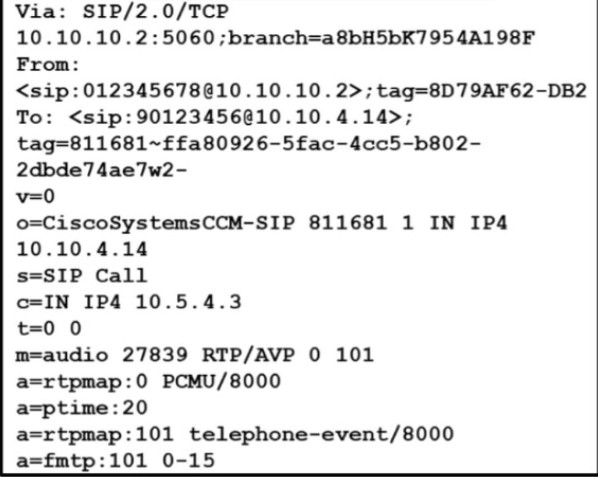
Which Codec is negotiated?
A.
G.729
B.
ILBC
C.
G.711ulaw
D.
G.728
G.711ulaw
Explanation
In Cisco Collaboration, codec negotiation determines which audio compression algorithm two endpoints will use for a voice call. The exhibit typically contains Session Description Protocol (SDP) information, including RTP payload types that identify the codecs offered during call setup.
The supplied answer is C. G.711ulaw. This matches the published version of this 350-801 practice question.
Correct Option:
C. G.711ulaw
G.711 μ-law (G.711ulaw) is an audio codec that provides uncompressed PCM voice at 64 kbps. It is widely used in North American telephony and generally delivers high voice quality with low processing requirements.
In SDP, the static RTP payload type 0 identifies G.711 μ-law. If the exhibit shows payload type 0 as the negotiated codec, the answer is G.711ulaw.
Incorrect Options
- A. G.729:
Compresses voice to approximately 8 kbps, reducing bandwidth usage compared with G.711.
- B. iLBC:
The Internet Low Bitrate Codec is designed to provide reasonable voice quality under packet-loss conditions. It commonly uses dynamic RTP payload type assignments.
- D. G.728:
Uses low-delay code-excited linear prediction (LD-CELP) and operates at 16 kbps.
These codecs are incorrect because the expected negotiated codec in this question is G.711ulaw.
Reference
- Cisco IOS Voice Command Reference — Codec Definitions
An engineer is notified that the Cisco TelePresence MX800 that is registered in Cisco
Unified communications Manager shows an empty panel, and the Touch 10 shows a
corresponding icon with no action when pressed. Where does the engineer go to remove the inactive custom panel?
A.
The phone configuration page in CUCM Administration
B.
The SIP Trunk security profile page in CUCM Administration
C.
The software Upgrades page in CUCM OS Administration
D.
The In-Room control Editor on the webpage of the MX800
The In-Room control Editor on the webpage of the MX800
Explanation
The Cisco TelePresence MX800 supports custom in-room control panels displayed on the Cisco Touch 10 controller. These panels can control room peripherals such as lights, blinds, and other equipment.
An empty panel can still appear on the Touch 10 with its corresponding icon, even when it contains no functional controls. To remove the inactive panel and its icon, the engineer must delete it from the device's In-Room Control Editor.
Correct Option:
D. The In-Room Control Editor on the webpage of the MX800
The engineer should:
1. Open the MX800's web interface.
2. Navigate to Integration → In-Room Control.
3. Launch the In-Room Control Editor.
4. Select the inactive custom panel.
5. Click the Delete panel (trash/bin) icon.
6. Push the updated configuration to the video system, if required.
The empty panel and its associated icon will then be removed from the Touch 10 interface.
Incorrect Options
- A. Phone configuration page in CUCM Administration:
Used to configure registered phones and their settings, not to delete custom in-room control panels stored on the MX800.
- B. SIP Trunk security profile page in CUCM Administration:
Controls SIP trunk security settings, such as transport and authentication-related parameters. It does not manage Touch 10 custom panels.
- C. Software Upgrades page in CUCM OS Administration:
Used for software upgrade and installation tasks, not for editing or deleting custom control panels.
Reference
- Cisco TelePresence MX and SX Series In-Room Control Guide
| Page 4 out of 46 Pages |
| 1234567891011121314 |
| 350-801 Practice Test Home |
Real-World Scenario Mastery: Our 350-801 practice exam don't just test definitions. They present you with the same complex, scenario-based problems you'll encounter on the actual exam.
Strategic Weakness Identification: Each practice session reveals exactly where you stand. Discover which domains need more attention, before Implementing Cisco Collaboration Core Technologies (350-801 CLCOR) exam day arrives.
Confidence Through Familiarity: There's no substitute for knowing what to expect. When you've worked through our comprehensive 350-801 practice exam questions pool covering all topics, the real exam feels like just another practice session.
Copyright © All Rights Reserved