
Which two conditions must a user meet to provision a new device using the selfprovisioning
feature? (Choose two.)
A.
The user must have the appropriate universal device template linked to the linked to the
user profile.
B.
The user must have at least one user device profile assigned.
C.
The user must have a primary extension
D.
At least DNs must be assigned to the user device
E.
The user must be part of “standard CCM Super User”.
The user must have the appropriate universal device template linked to the linked to the
user profile.
The user must have a primary extension
A customer wants to deploy Cisco Jabber Phone Mode with contacts. Which two
configurations are needed to accomplish this goal? (Choose two)
A.
Add the Application Client Users role to the Cisco UCM end users
B.
Remove the IM and Presence servers from the Cisco UCM service profile.
C.
Disable Instant Messaging on IM and Presence
D.
Import Contacts.xml into Jabber.
E.
Enable Cisco UCM end-users for IM and Presence.
Disable Instant Messaging on IM and Presence
Enable Cisco UCM end-users for IM and Presence.
Correct Options: C and E
Cisco's official guidance confirms both configurations for deploying Jabber Phone Mode with contacts.
C. Disable Instant Messaging on IM and Presence
In Cisco Unified CM IM and Presence Administration, navigate to Messaging > Settings and uncheck Enable instant messaging. Jabber Phone Mode can then use the IM and Presence server to store and retrieve contact lists without providing instant messaging functionality. Restart the Cisco XCP Router service on all nodes after changing this setting.
E. Enable Cisco UCM end-users for IM and Presence
In Cisco Unified CM Administration, open User Management > End User and select Enable User for Unified CM IM and Presence for the relevant users. This setting remains necessary for contact-list functionality even when the UC Service Profile has no IM and Presence server configured.
Incorrect Options
- A. Add the Application Client Users role:
This role is not a prerequisite for Phone Mode contacts.
- B. Remove the IM and Presence servers from the UC Service Profile:
This can be part of the Phone Mode configuration, but it is not one of the two required settings targeted by this question.
- D. Import Contacts.xml into Jabber:
Importing this file is not required for the documented Phone Mode contacts feature.
References
1. Cisco — Configure Jabber in Phone Mode for Contacts
An administrator executes the debug isdn q931 command while debugging a failed call.
After a test call is placed, the logs return a disconnect cause code of 1. What is the cause
of this problem?
A.
The destination number rejects the call
B.
The destination number is busy
C.
The media resource is unavailable
D.
The dialed number is not assigned to an endpoint
The dialed number is not assigned to an endpoint
Explanation
The correct answer is D. The dialed number is not assigned to an endpoint.
In ISDN Q.931 signaling, cause code 1 means “Unallocated (unassigned) number.” It indicates that the dialed number is in a valid format, but no destination equipment is assigned to that number. The issue may involve an incorrect number, a missing directory number, or a routing configuration that fails to reach the intended destination.
Correct Option
D. The dialed number is not assigned to an endpoint
This is the best match for cause code 1. Check the dialed digits, the destination's assigned directory number, and the gateway's dial-peer or call-routing configuration. Cisco also documents cases where this cause appears when the gateway has no matching outbound dial peer.
Incorrect Options
- A. The destination number rejects the call:
A rejected call is typically associated with Q.931 cause code 21 (“Call rejected”), not cause 1.
- B. The destination number is busy:
A busy destination normally returns cause code 17 (“User busy”).
- C. The media resource is unavailable:
This is not the meaning of cause code 1. Resource or channel availability problems are associated with other cause codes, such as 34 (“No circuit/channel available”).
References
1. Cisco — Understanding debug isdn q931 Disconnect Cause Codes
After an engineer implements the FAC and CMC features together, users report that calls
take almost one minute to complete and that they occasionally hear the reorder tone Which
two actions address this issue? (Choose two.)
A.
Advise the user to press the "#" button after dialling the FAC and CMC codes
B.
Change the code if the problem persists i/i-Advise the user to hang up and try again
C.
Adjust the T302 timer from the default of 15 seconds to 5 seconds to shorten the interdigit timer
D.
Do not wait for the tones immediately dial the FAC and CMC
Advise the user to press the "#" button after dialling the FAC and CMC codes
Adjust the T302 timer from the default of 15 seconds to 5 seconds to shorten the interdigit timer
Explanation
The correct answers are A and C.
Forced Authorization Codes (FAC) and Client Matter Codes (CMC) require users to enter codes when prompted during a call. If users do not terminate their codes with #, Cisco Unified Communications Manager (Unified CM) waits for the T302 interdigit timer to expire before proceeding. This delay can make calls take much longer to complete. Reducing the timer and teaching users to press # addresses the delay.
Correct Options
A. Advise the user to press the # button after dialing the FAC and CMC codes.
Pressing # signals that code entry is complete, so Unified CM does not need to wait for the interdigit timer to expire. When FAC and CMC are both enabled, users should enter the authorization code at the first prompt and the client matter code at the second prompt, terminating each code with # as appropriate.
C. Adjust the T302 timer from the default of 15 seconds to 5 seconds.
The T302 timer controls how long Unified CM waits for additional digits after code entry. Reducing it from 15 seconds to 5 seconds shortens the delay when users do not press #. However, this timer also affects other digit-entry scenarios, so test the change carefully before deploying it.
Incorrect Options
B. Change the code if the problem persists / advise the user to hang up and try again.
Retrying may help if the user entered an invalid code, because an invalid FAC can produce a reorder tone. However, retrying does not address the underlying delay caused by the interdigit timer. Change or verify the code only if there is evidence that the code is incorrect.
D. Do not wait for the tones; immediately dial the FAC and CMC.
Users should follow the prompts and enter the appropriate code at each stage. Although Cisco notes that users can begin entering a code before a prompt tone finishes, this is not the main remedy for the timer-related delay described in the question.
References
1. Cisco — Configuration of Forced Authorization Codes (FAC)
Which Cisco Unity Connection handler plays a greeting that announces the option to dial a user extension by default?
A.
the Goodbye call handler
B.
the Operator call handler
C.
the Directory handler
D.
the Interview handler
the Directory handler
Explanation
The Directory handler provides callers with directory assistance to find users and reach their extensions. However, Cisco's official documentation states that directory handlers do not have greetings of their own. Instead, a call handler—often the Opening Greeting handler—plays the greeting that tells callers they can dial an extension or press a key to access the directory.
So, C is likely the intended exam answer if the question is referring to the handler that provides directory access, but the wording is technically imprecise.
Option review
- A. Goodbye call handler: Handles the end of a call; not directory assistance.
- B. Operator call handler: Handles calls routed to the operator.
- C. Directory handler: Provides directory lookup and extension access; likely intended.
- D. Interview handler: Collects caller responses to a series of questions.
References
1. Cisco — System Administration Guide: Call Management
Which action is required for a firewall configuration on a Mobile and Remote Access through Cisco Expressway deployment?
A.
The traversal zone on Expressway-C points to Expressway-E through the peer address
field on the traversal zone, which specifies the Expressway-E server address. For dual NIC
deployments, set the Expressway-E address using an FQDN that resolves the IP address
of the internal interface
B.
The internal firewall must allow these inbound and outbound connections between
Expressway-C and Expressway-E. SIP: HTTPS (tunnelled
overSSH between C and E): TCP 2222; TCP 7001; Traversal Media: UDP 2776 to 2777 (or
36000 to 36011 for large VM/appliance): XMPP: TCP 7400.
C.
The external firewall must allow these inbound connections to Expressway: SIP: TCP
5061; HTTPS: TCP 8443: XMPP: TCP 5222; Media: UDP 36002 to 59999.
D.
Do not use a shared address for Expressway-E and Expressway-C, as the firewall
cannot distinguish between them If static NAT for IP addressing on Expressway-E is used,
ensure that any NAT operation on Expressway-C does not resolve the same traffic IP
address Shared NAT is not supported.
The internal firewall must allow these inbound and outbound connections between
Expressway-C and Expressway-E. SIP: HTTPS (tunnelled
overSSH between C and E): TCP 2222; TCP 7001; Traversal Media: UDP 2776 to 2777 (or
36000 to 36011 for large VM/appliance): XMPP: TCP 7400.
Explanation
The intended answer is B, because a Mobile and Remote Access (MRA) deployment using Cisco Expressway requires specific firewall rules between the internal Expressway-C and external-facing Expressway-E servers.
The internal firewall must permit the required traversal signaling, HTTPS tunnel, XMPP, and media traffic between the two Expressway servers. These ports must match the Expressway deployment type and software version; incorrect firewall rules can prevent remote users from registering or establishing calls.
Correct Option: B
Cisco's official MRA deployment guide confirms these internal firewall connections from Expressway-C to Expressway-E:
Purpose Protocol / destination port
SIP traversal TCP 7001
HTTPS tunneled over SSH TCP 2222
Traversal media UDP 2776–2777, or UDP 36000–36011 on large systems
XMPP TCP 7400
These are outbound connections from Expressway-C; inbound connections do not need to be opened on the internal firewall.
Why the other options are incorrect
- A: The traversal zone peer address should identify Expressway-E appropriately, but the dual-NIC FQDN detail is not the required firewall action.
- C: These are the external firewall ports specified in Cisco's MRA guide, but the question's intended answer focuses on the internal firewall configuration.
- D: Cisco does advise against sharing an address between Expressway-C and Expressway-E, but that is a separate addressing/NAT requirement, not the port rules asked for here.
Reference
Cisco, Mobile and Remote Access Through Cisco Expressway Deployment Guide — MRA Requirements and Prerequisites:
Which destination does cisco UCM use DNS to resolve fully qualified domain names to IP addresses?
A.
Cisco UCM Name
B.
primary TFTP server for option 150
C.
SIP trunk
D.
application server name
SIP trunk
Explanation
The correct answer is C. SIP trunk.
Cisco Unified Communications Manager (Unified CM) can use DNS to resolve a fully qualified domain name (FQDN) to an IP address when a SIP trunk's destination is configured with a hostname rather than a literal IP address. DNS resolution enables Unified CM to locate the remote SIP peer or service. Depending on the configuration, Unified CM can also use DNS SRV records to discover SIP services and their associated hosts.
Correct Option
C. SIP trunk
When configuring a SIP trunk in Unified CM, the destination address can be specified as an IP address or an FQDN. If an FQDN is used, Unified CM relies on DNS to resolve it to the destination IP address. This supports hostname-based routing and can simplify administration when the remote SIP server's IP address changes.
Incorrect Options
- A. Cisco UCM Name:
The Unified CM node name is configured as part of the cluster and system identity. DNS may be used for node-name resolution in some deployments, but this is not the intended SIP destination example in this question.
- B. Primary TFTP server for Option 150:
DHCP Option 150 supplies the TFTP server address to IP phones, typically as an IP address. This is not the destination being asked about.
- D. Application server name:
Application names may use DNS in various integrations, but this is not the standard answer for the Unified CM call-routing scenario described.
References
1. Cisco — System Configuration Guide for Cisco Unified CM: Configure SIP Trunks
Refer to the exhibit.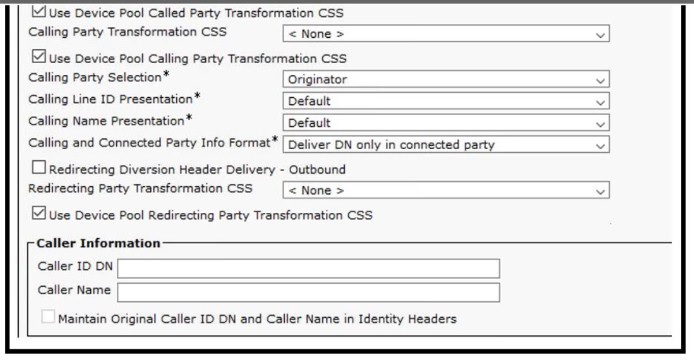
Unanswered calls do not reach the voicemail associated with the phones Instead, callers receive the default greeting Which action fixes the configuration?
A.
Reboot Cisco Unity Connection
B.
Review the conversation manager logs on Cisco Unity Connection
C.
Check the box "Redirecting Diversion Header Delivery - Outbound", then reset the trunk
D.
Check the box "Redirecting Diversion Header Delivery - Outbound"
Check the box "Redirecting Diversion Header Delivery - Outbound", then reset the trunk
Explanation
The correct answer is C. Check “Redirecting Diversion Header Delivery – Outbound,” then reset the trunk.
When an unanswered call is forwarded from Cisco Unified Communications Manager (Unified CM) to Cisco Unity Connection, Unity Connection needs the original called-party and redirection information to identify the correct user's mailbox. If the SIP trunk does not send the required Diversion header, Unity Connection may not recognize which mailbox should handle the call, causing callers to hear the default greeting instead of the user's voicemail greeting.
Correct Option: C
The exhibit shows that Redirecting Diversion Header Delivery – Outbound is unchecked. Enable the checkbox and reset the SIP trunk so the change takes effect.
Why the other options are incorrect
- A. Reboot Cisco Unity Connection:
A reboot does not correct the missing SIP diversion-header setting.
- B. Review conversation manager logs:
Logs may help diagnose problems, but the exhibit already identifies the configuration issue.
- D. Enable the checkbox only:
Enabling the setting is necessary, but resetting the trunk is also required for the intended fix in this question.
References
1. Cisco — Configuration Example for CUCM Non-Secure SIP Integration with Unity Connection
Refer to the exhibit.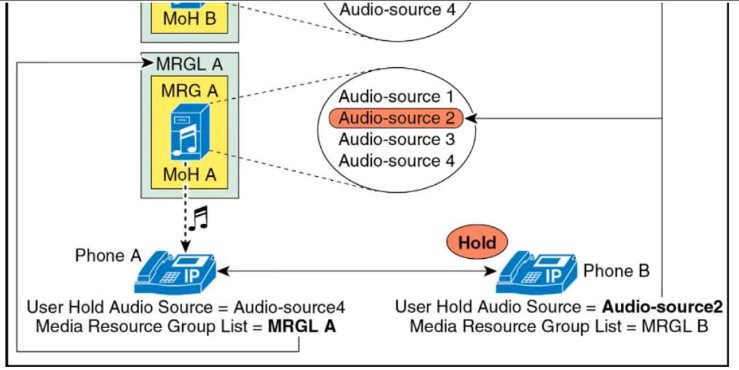
There is a call flow between Phone A and Phone B Phone B (holder) places Phone A (holder) on hold Which MRGL and Audio Source are played to Phone A?
A.
MRGL A and Audio Source 4
B.
MRGL B and Audio Source 4
C.
MRGL B and Audio Source 2
D.
MRGL A and Audio Source 2
MRGL B and Audio Source 2
Explanation
Cisco Unified CM selects Music on Hold (MoH) using two different devices' settings:
- Audio source: Determined by the holder — the device that initiates the hold.
- MRGL: Determined by the holdee — the device placed on hold.
In this scenario, Phone B is the holder and Phone A is the holdee. Therefore, Phone B's configured User Hold Audio Source, Audio Source 2, is played, while Phone A's configured MRGL A provides the MoH server.
Important correction: Based on Cisco's documented behavior and the exhibit's labels, the technically correct combination is MRGL A and Audio Source 2 — option D, not C.
Why the other options are incorrect
- A. MRGL A and Audio Source 4:
Correct MRGL, but the audio source belongs to Phone B, which is configured for Audio Source 2.
- B. MRGL B and Audio Source 4:
Both values are incorrect for this call flow.
- C. MRGL B and Audio Source 2:
Correct audio source, but the MRGL is determined by Phone A, the held device.
Reference
Cisco — Music on Hold: MoH Selection Process
A collaboration engineer configures Global Dial Plan Replication for multiple Cisco UCM clusters. The local cluster acts as the hub cluster and the remaining clusters act as spoke clusters. Which service must the engineer configure on the local cluster?
A.
Location Conveyance on intercluster SIP trunks
B.
intra-Cluster Communication Signaling
C.
Mobility Cross Cluster
D.
Intercluster Lookup Service
intra-Cluster Communication Signaling
Explanation
Global Dial Plan Replication (GDPR) allows multiple Cisco Unified Communications Manager (CUCM) clusters to share global dial-plan information, including directory URIs, alternate numbers, and route strings. It uses the Intercluster Lookup Service (ILS) to exchange this information between hub and spoke clusters. Cisco’s configuration guide specifically identifies configuring ILS and enabling global dial-plan data exchange as prerequisites for GDPR.
Important: The supplied answer, B. Intra-Cluster Communication Signaling (ICCS), appears to be incorrect. The correct choice is D. Intercluster Lookup Service.
Correct Option
D. Intercluster Lookup Service (ILS)
ILS creates the multi-cluster network, supports the hub-and-spoke topology, and enables clusters to exchange global dial-plan information. On the hub cluster, configure Advanced Features > ILS Configuration, select Hub Cluster, enable Exchange Global Dial Plan Replication Data with Remote Clusters, and activate ILS.
Incorrect Options
- A. Location Conveyance on intercluster SIP trunks —
relates to conveying location information, not replicating global dial-plan data.
- B. Intra-Cluster Communication Signaling (ICCS) —
supports communications within CUCM clustering; it is not the service used for GDPR across clusters.
- C. Mobility Cross Cluster —
supports Extension Mobility Cross Cluster, allowing users to roam between clusters; it does not provide global dial-plan replication.
References
- Cisco CUCM 14 — Configure Global Dial Plan Replication
An engineer must configure a cisco ISR 4000 as an MGCP gateway to download its MGCP-specific configuration from cisco UCM. Which Cisco IOS configuration snippet accomplishes this task?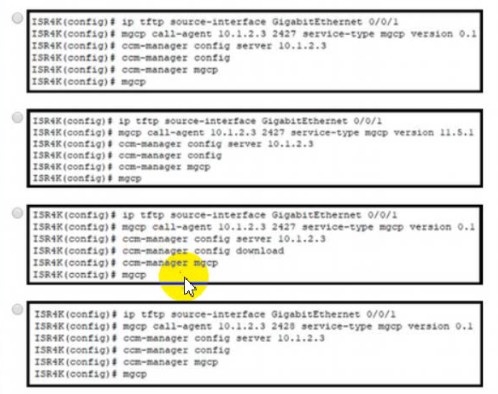
A.
Option A
B.
Option B
C.
Option C
D.
Option D
Option C
Explanation
For a Cisco ISR 4000 configured as an MGCP gateway, Cisco Unified Communications Manager (CUCM) can centrally generate and download the gateway-specific XML configuration through its TFTP service. The key commands are ccm-manager config server to specify the TFTP server and ccm-manager config to enable and trigger configuration download. Cisco also documents ip tftp source-interface as a possible additional requirement on ISR 4000 platforms if downloading fails.
Correct Option
C. Option C — according to the supplied answer key.
To verify the option, look for the configuration that includes the essential commands:
ccm-manager config server 10.1.2.3
ccm-manager config
A complete MGCP setup also typically includes mgcp call-agent, ccm-manager mgcp, and mgcp. The server address must match the configured CUCM TFTP server.
Incorrect Options
The image’s actual command snippets are not visible in the text of your message, so I can’t reliably explain the differences between A, B, and D individually. Common errors include using ccm-manager config download instead of ccm-manager config, or specifying the wrong MGCP call-agent port.
References
- Cisco — Configuring MGCP Gateway Support for CUCM
An engineer implements a new Cisco UCM based telephony system per these
requirements:
• The local Ethernet bandwidth is sized based on the total bandwidth per call
• A G.736 codec is used.
• The bit rate is 64 kbps
• The codec sample interval is 10 ms.
• The voice payload size is 160 bytes per 20 ms.
What should the size of the Ethernet bandwidth be per call?
A.
31 2 kbps
B.
38.4 kbps
C.
55.2 kbps
D.
87.2 kbps
31 2 kbps
Explanation
The question appears to contain a codec typo: G.736 is likely intended to be G.711, the standard 64 kbps codec with a 160-byte payload for 20 ms of audio. Cisco’s bandwidth tables show that a G.711 stream using 20 ms packetization requires 87.2 kbps over Ethernet when protocol and Ethernet overhead are included.
The stated 10 ms codec sample interval does not mean the packet contains only 10 ms of audio: the question explicitly specifies a 160-byte payload per 20 ms.
Correct Option
D. 87.2 kbps
Calculation per one-way voice stream:
- Voice payload: 160 bytes
- RTP + UDP + IP headers: \(12+8+20=40\) bytes
- Ethernet overhead: 18 bytes
- Total: \(160+40+18=218\) bytes per packet
- Packets per second: \(1000/20=50\)
\[
218 \times 8 \times 50 = 87{,}200\text{ bps}
\]
Therefore, the Ethernet bandwidth is 87.2 kbps per stream. Cisco’s codec bandwidth table confirms this value.
Incorrect Options
- A. 31.2 kbps —
matches Cisco’s documented bandwidth for iLBC at 20 ms, not G.711 at 64 kbps.
- B. 38.4 kbps —
does not match the specified codec, packet size, and Ethernet overhead.
- C. 55.2 kbps —
does not match the standard Ethernet bandwidth calculation for the given 160-byte payload.
References
- Cisco — Codec and Bandwidth Information
| Page 18 out of 46 Pages |
| 1112131415161718192021222324 |
| 350-801 Practice Test Home |
Real-World Scenario Mastery: Our 350-801 practice exam don't just test definitions. They present you with the same complex, scenario-based problems you'll encounter on the actual exam.
Strategic Weakness Identification: Each practice session reveals exactly where you stand. Discover which domains need more attention, before Implementing Cisco Collaboration Core Technologies (350-801 CLCOR) exam day arrives.
Confidence Through Familiarity: There's no substitute for knowing what to expect. When you've worked through our comprehensive 350-801 practice exam questions pool covering all topics, the real exam feels like just another practice session.
Copyright © All Rights Reserved