
Which Cisco Unified Communications Manager service parameter should be enabled to
disconnect a multiparty call when the call initiator hangs up?
A.
Block OffNet to OffNet Transfer
B.
Drop Ad Hoc Conference
C.
H.225 Block Setup destination
D.
Enterprise Feature Access code for conference
Drop Ad Hoc Conference
Explanation:
In an ad-hoc (multiparty) conference the call initiator is normally the only party who can tear the conference down. If that initiator hangs up while other parties remain connected, the conference can stay active and become a toll-fraud or resource-consumption risk. Enabling the “Drop Ad Hoc Conference” service parameter forces CUCM to disconnect the entire conference as soon as the initiator leaves, guaranteeing that the multiparty call ends cleanly.
Correct Option:
B. Drop Ad Hoc Conference
Set the Cisco CallManager service parameter “Drop Ad Hoc Conference” to “When Conference Controller Leaves” (or the equivalent “True” value). When the party that created the conference hangs up, CUCM immediately releases all remaining legs of the conference.
Incorrect Option:
A. Block OffNet to OffNet Transfer
This parameter prevents transfers between two external numbers; it does not control conference teardown.
C. H.225 Block Setup destination
This is an H.323-related setting and has no effect on ad-hoc conference behavior.
D. Enterprise Feature Access code for conference
This is a feature-access code used to invoke conferencing features; it does not dictate when a conference is dropped.
Reference:
Cisco Unified Communications Manager System Guide / Service Parameters – “Drop Ad Hoc Conference”: enables automatic disconnection of a multiparty call when the conference initiator hangs up.
Refer to the exhibit.
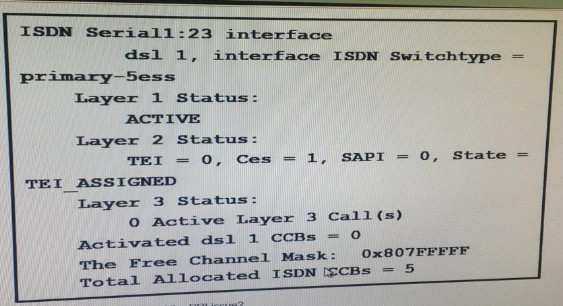
What is a possible cause of the PRI issue?
A.
The cable is unplugged.
B.
The controller shut down.
C.
The clock source is incorrect.
D.
The framing is configured incorrectly.
The framing is configured incorrectly.
Explanation:
The output shows Layer 1 ACTIVE (physical layer is up) while Layer 2 remains in the TEI_ASSIGNED state instead of the normal MULTIPLE_FRAME_ESTABLISHED state. TEI_ASSIGNED means the router has obtained a TEI but has not successfully established the multi-frame LAPD link with the ISDN switch. A common root cause of this Layer-2 failure on a PRI is a framing mismatch (ESF vs. SF / CRC4 vs. no-CRC4, etc.) between the router and the service provider.
Correct Option:
D. The framing is configured incorrectly.
Verify the framing command under the T1/E1 controller (framing esf or framing sf for T1, framing crc4 or framing no-crc4 for E1) matches the provider’s setting. Correcting the framing allows Layer 2 to progress to MULTIPLE_FRAME_ESTABLISHED and restores normal PRI operation.
Incorrect Option:
A. The cable is unplugged.
Layer 1 would show DEACTIVATED or DOWN if the cable were unplugged.
B. The controller shut down.
An administratively shut-down controller also results in Layer 1 down.
C. The clock source is incorrect.
Clocking problems usually produce slips or Layer 1 errors, not a persistent TEI_ASSIGNED state once Layer 1 is ACTIVE.
Reference:
Cisco ISDN PRI Troubleshooting Guide: Layer 2 stuck in TEI_ASSIGNED while Layer 1 is ACTIVE most often indicates a framing, line-code, or switch-type mismatch with the carrier.
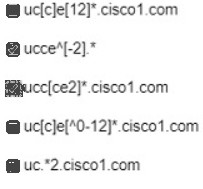
An administrator configured SIP route patterns cisco com and uc(5-7] cisco 1 com in Cisco
UCM A route pattern must be added for ucce2.cisco1.com. Which two patterns complete
the configuration*? (Choose two.)
A.
Option A
B.
Option B
C.
Option C
D.
Option D
E.
Option E
Option A
Option E
Explanation:
SIP route patterns in CUCM use domain-name matching with wildcards similar to dial-plan patterns. The existing patterns already cover “cisco.com” and “uc[5-7].cisco1.com”. To also match the specific host “ucce2.cisco1.com” two additional patterns are required that correctly expand to that FQDN while remaining compatible with the existing set.
Correct Option:
A. uc[c-e][12]*.cisco1.com
Matches “uc” followed by a character in the range c–e, then any number of 1s or 2s, then “.cisco1.com”. This includes the string “ucce2.cisco1.com”.
*E. uc.2.cisco1.com
Matches “uc” followed by any characters, then a literal “2”, then “.cisco1.com”. This also matches “ucce2.cisco1.com”.
Incorrect Option:
B. ucce[^-2]*
The character class [^-2] excludes the digit 2, so “ucce2\ldots” cannot match.
C. ucc[ce2]*.cisco1.com
After “ucc” it expects only the characters c, e or 2; the required extra “e” in “ucce2” is not produced correctly by this pattern.
D. uc[c]e[^0-12]*.cisco1.com
The negated class [^0-12] excludes the digit 2, preventing a match on “ucce2\ldots”.
Reference:
Cisco Unified Communications Manager Dial Plan / SIP Route Pattern documentation: domain patterns support the same wildcard and character-class syntax used in route patterns; the two selected patterns both expand to the required host ucce2.cisco1.com.
Which service must be enabled when LDAP on cisco UCM is used?
A.
Cisco AXL Web Service
B.
Cisco CallManager SNMP Service
C.
Cisco DirSync
D.
Cisco Bulk provisioning Service
Cisco DirSync
Explanation:
When Cisco Unified Communications Manager is configured to synchronize users and directories from an external LDAP directory, the Cisco DirSync service is responsible for the actual LDAP queries, data retrieval, and periodic synchronization. Without DirSync running, UCM cannot pull user accounts, attributes, or authentication information from the LDAP server.
Correct Option:
C. Cisco DirSync
Enable the Cisco DirSync service (under Cisco Unified Serviceability → Tools → Service Activation) on the publisher (and any subscribers that will perform directory lookups). Once activated, DirSync uses the configured LDAP Directory and LDAP Authentication settings to keep the UCM end-user database in sync with the external directory.
Incorrect Option:
A. Cisco AXL Web Service
AXL is used for programmatic provisioning via SOAP/XML; it is not required for native LDAP synchronization.
B. Cisco CallManager SNMP Service
SNMP provides monitoring data; it has no role in LDAP directory integration.
D. Cisco Bulk Provisioning Service
BAT is used for bulk inserts/updates of phones, users, etc.; it is independent of the LDAP sync process.
Reference:
Cisco Unified Communications Manager Administration Guide – LDAP Directory Configuration: “The Cisco DirSync service must be activated for LDAP synchronization and authentication to function.”
An administrator recently upgraded a Cisco Webex DX80 through its web interface but
discovered the next morning that the unit had reverted to its previous version. What must
the administrator do to prevent this from happening again?
A.
Confirm the phone load name in the phone configuration.
B.
Set the prepare cluster for rollback to pre-8.0 enterprise parameter to true.
C.
Assign a universal device template to the phone.
D.
Assign a phone security profile with secure SIP.
Confirm the phone load name in the phone configuration.
Explanation:
A Cisco Webex DX80 that is registered to Cisco Unified Communications Manager will always download and install the firmware load that is defined in its Phone Configuration (or in the Device Defaults / Phone Load Name field). If the administrator upgrades the endpoint directly through its web interface, the next time the device registers or resets, CUCM re-provisions the older load that is still configured on the server, causing the unit to revert. To keep the new firmware, the Phone Load Name (or the corresponding Device Package / firmware entry) on CUCM must be updated to the same version that was installed locally.
Correct Option:
A. Confirm the phone load name in the phone configuration.
In CUCM Administration → Device → Phone, open the DX80 and set the Phone Load Name field to the exact firmware image that was installed via the web interface (or update the Device Defaults for the DX80 model). After this change the endpoint will no longer be instructed to downgrade.
Incorrect Option:
B. Set the prepare cluster for rollback to pre-8.0 enterprise parameter to true.
This enterprise parameter is used only for cluster-wide rollback scenarios and has no effect on an individual endpoint’s firmware.
C. Assign a universal device template to the phone.
Universal Device Templates control configuration settings, not the firmware load name that causes the revert.
D. Assign a phone security profile with secure SIP.
Security profiles affect TLS/SRTP settings; they do not control which firmware image is provisioned.
Reference:
Cisco Collaboration Endpoint Administrator Guide and CUCM Phone Configuration documentation: the Phone Load Name field on the device record determines the firmware that CUCM pushes; it must match any manually applied load to prevent automatic reversion.
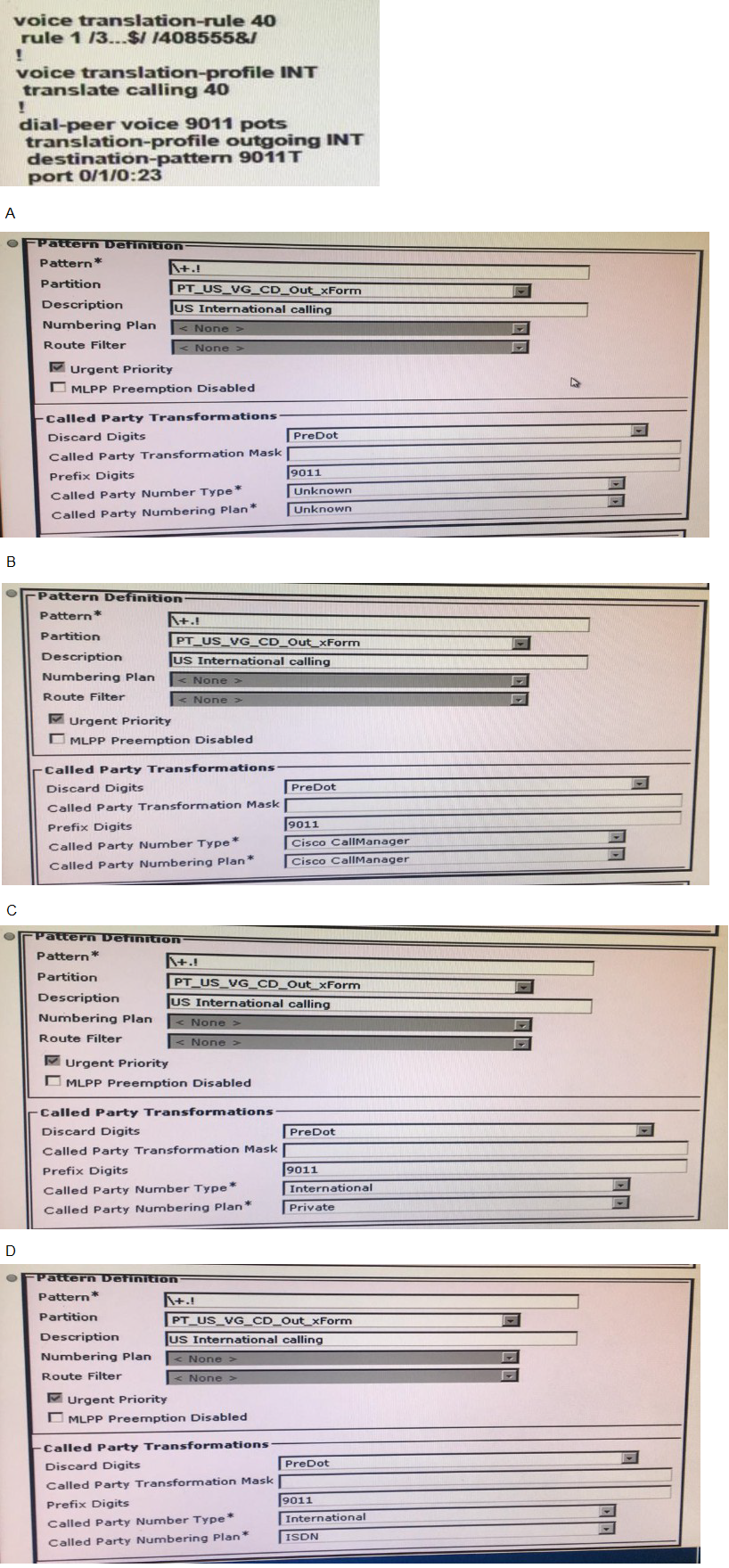
Given this H.323 gateway configuration and using cisco best practices, how must the called
party transformation pattern to ensure that a proper ISDN type of number is set?
A.
Option A
B.
Option B
C.
Option C
D.
Option D
Option D
Explanation:
The H.323 gateway is configured to dial international destinations with the prefix 9011. Cisco best practice for ISDN Type of Number (TON) requires that an international called number be marked with Number Type = International and Numbering Plan = ISDN. This tells the PSTN switch how to interpret the digits that remain after the gateway strips the access code. The transformation pattern that applies these two values (while still discarding the leading dot and prefixing 9011) is the correct one.
Correct Option:
D. Option D
Pattern: +.!
Discard Digits: PreDot
Prefix Digits: 9011
Called Party Number Type: International
Called Party Numbering Plan: ISDNThese settings produce a properly formatted international ISDN information element that matches Cisco-recommended gateway and CUCM practices.
Incorrect Option:
A. Option A
Number Type and Numbering Plan both set to Unknown – the PSTN will not treat the number as international.
B. Option B
Number Type/Plan set to Cisco CallManager – this is an internal value and is not sent to the ISDN network.
C. Option C
Numbering Plan set to Private – incorrect for a public international ISDN call.
Reference:
Cisco Collaboration SRND and CUCM Dial-Plan documentation: for international destinations set Called Party Number Type = International and Numbering Plan = ISDN so that the H.323/ISDN gateway presents the correct TON/NPI to the carrier.
You are adding regions in Cisco Unified Communications Manager. Which codec(s) are
selected when a call is placed if you set up the max audio bit rate to use 8 kbps?
A.
G.722
B.
G.729
C.
G.729 and G.711ualw
D.
G.711ulaw and G.711alaw
G.729
Explanation:
In Cisco Unified Communications Manager a Region defines the maximum audio bit rate that may be used between devices. When the maximum audio bit rate is set to 8 kbps, the only codec that fits within that bandwidth ceiling is G.729 (which runs at 8 kbps). Higher-bit-rate codecs such as G.711 or G.722 are automatically excluded from the negotiation.
Correct Option:
B. G.729
With Max Audio Bit Rate = 8 kbps the Region permits only G.729. CUCM therefore offers and selects G.729 for any call that uses this Region relationship.
Incorrect Option:
A. G.722
G.722 requires 64 kbps and is not allowed when the Region limit is 8 kbps.
C. G.729 and G.711ulaw
G.711ulaw needs 64 kbps and is therefore excluded.
D. G.711ulaw and G.711alaw
Both G.711 variants require 64 kbps and cannot be selected under an 8 kbps Region limit.
Reference:
Cisco Unified Communications Manager System Guide – Regions: the Max Audio Bit Rate setting restricts codec selection; 8 kbps permits only G.729.
An administrator is trying to change the default LINECODE for a voice ISDN T1 PRI. Which
command makes the change?
A.
linecode ami
B.
linecode hdb3
C.
linecode b8zs
D.
linecode esf
linecode ami
Explanation:
On a T1 controller the line coding method is configured with the linecode command. The two valid values for T1 are b8zs (the default) and ami. To change the default LINECODE the administrator therefore enters linecode ami under the T1 controller configuration mode.
Correct Option:
A. linecode amitextRouter(config)# controller t1 0/1/0
Router(config-controller)# linecode amiThis replaces the factory-default B8ZS line coding with AMI.
Incorrect Option:
B. linecode hdb3
HDB3 is an E1 line-coding method and is rejected on a T1 controller.
C. linecode b8zs
B8ZS is already the default; the command does not change anything.
D. linecode esf
ESF is a framing type, not a line-code value; the correct framing command is framing esf.
Reference:
Cisco IOS T1/E1 Controller Configuration Guide: the linecode command accepts ami or b8zs for T1 interfaces; ami is used when the service provider requires Alternate Mark Inversion.
Which wildcard must an engineer configure to match a whole domain in SIP route
patterns?
A.
*
B.
@
C.
.
D.
!
*
Explanation:
SIP route patterns in Cisco Unified Communications Manager match the host portion of a SIP URI (the domain or IP address). The asterisk (*) is the wildcard that matches any sequence of characters, allowing a single pattern such as *.cisco.com or simply * to match an entire domain or any domain.
Correct Option:
**A. ***
Configure the SIP route pattern as *.example.com (or *) to match every host inside the domain example.com (or every domain). The * wildcard expands to any number of characters, fulfilling the requirement to match a whole domain.
Incorrect Option:
B. @
The @ symbol separates the user and host parts of a SIP URI; it is not a wildcard.
C. .
The dot is a literal character in domain names and does not act as a wildcard in SIP route patterns.
D. !
The exclamation point is a wildcard used in traditional route patterns (matches one or more digits); it is not used for domain matching in SIP route patterns.
Reference:
Cisco Unified Communications Manager Administration Guide – SIP Route Pattern Configuration: “Use the asterisk (*) wildcard to match multiple characters or an entire domain.”
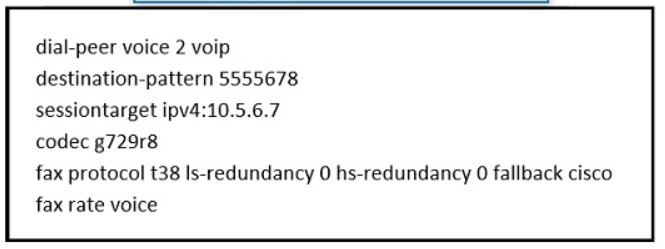
Refer to the exhibit. An administrator configures fax dial-peers on a Cisco IOS gateway and
finds that faxes are not working correctly Which change should be made to resolve this
issue?
A.
codec g723ar63
B.
codec g729br81
C.
codec g726r32
D.
codec g711ulaw
codec g711ulaw
Explanation:
The dial-peer is configured for T.38 fax relay with a fallback to Cisco fax-passthrough, yet the codec is set to G.729. Fax tones cannot be reliably transported by a low-bit-rate compressed codec such as G.729. When T.38 negotiation fails or passthrough is used, the gateway must switch to a clear-channel codec—G.711 µ-law—so that the analog fax signals are preserved. Changing the codec to g711ulaw resolves the problem.
Correct Option:
D. codec g711ulaw
Replace codec g729r8 with codec g711ulaw. G.711 provides the uncompressed 64 kbps channel required for successful fax passthrough and for the Cisco fax-relay fallback path.
Incorrect Option:
A. codec g723ar63
G.723 is also a compressed codec and cannot carry fax tones.
B. codec g729br81
Still a G.729 variant; same limitation as the original configuration.
C. codec g726r32
G.726 is an ADPCM compressed codec and is unsuitable for fax.
Reference:
Cisco IOS Fax Services over IP Configuration Guide: for T.38 with fallback to passthrough, or for pure fax passthrough, the dial-peer codec must be G.711 (µ-law or A-law). Compressed codecs such as G.729 prevent proper fax transmission.
An engineer encounters third-party devices that do not support Cisco Discovery Protocol.
What must be configured on the network to allow device discovery?
A.
TFTP
B.
LACP
C.
LLDP
D.
SNMP
LLDP
Explanation:
Cisco Discovery Protocol (CDP) is proprietary and is not supported by most non-Cisco devices. Link Layer Discovery Protocol (LLDP) is the IEEE 802.1AB open-standard equivalent. By enabling LLDP on the switch ports that connect to the third-party devices, the network can still discover device identity, capabilities, and neighbor information.
Correct Option:
C. LLDP
Globally enable LLDP (lldp run) and, if needed, enable it on the specific interfaces (lldp transmit / lldp receive). The third-party devices will then exchange LLDP PDUs, allowing the network to discover them.
Incorrect Option:
A. TFTP
TFTP is a file-transfer protocol used for phone firmware and configuration; it does not perform neighbor discovery.
B. LACP
LACP is used for link aggregation (EtherChannel); it is not a discovery protocol.
D. SNMP
SNMP provides management and monitoring data but is not used for automatic Layer-2 device discovery the way CDP/LLDP are.
Reference:
Cisco IOS Discovery Protocol Configuration Guide: when CDP is not supported by attached devices, enable LLDP (IEEE 802.1AB) to achieve the same neighbor-discovery function.
A user reports that when receiving an inbound call on their IP Phone from the PSTN they
are unable to transfer this call to another PSTN number What is the reason for this failure?
A.
The incoming calling search space of the SIP trunk does not include the partition of the
line in the IP phone
B.
The gateway is configured with the wrong device pool
C.
The service parameter related to Öffnet to Offnet Call Transfer is set to TRUE
D.
The IP phone is configured with the wrong region
The service parameter related to Öffnet to Offnet Call Transfer is set to TRUE
Explanation:
Cisco Unified Communications Manager includes a service parameter that blocks transfers from an OffNet (PSTN) party to another OffNet party. When this parameter is set to True (the default in many versions), an inbound PSTN call that lands on an IP phone cannot be transferred back out to another PSTN number. Setting the parameter to False (or configuring the appropriate Transfer On-Net / Off-Net rules) is required to permit the transfer.
Correct Option:
C. The service parameter related to OffNet to OffNet Call Transfer is set to TRUE
The service parameter “Block OffNet to OffNet Transfer” (or the equivalent Clusterwide / CallManager parameter) is enabled. CUCM therefore rejects the attempt to transfer the inbound PSTN call to another external number.
Incorrect Option:
A. The incoming calling search space of the SIP trunk does not include the partition of the line in the IP phone
This would prevent the inbound call from reaching the IP phone in the first place, not merely block the subsequent transfer.
B. The gateway is configured with the wrong device pool
An incorrect device pool may affect codec or location, but it does not specifically block OffNet-to-OffNet transfers.
D. The IP phone is configured with the wrong region
Region settings control codec selection; they do not control transfer permissions between OffNet parties.
Reference:
Cisco Unified Communications Manager System Guide – Service Parameters: “Block OffNet to OffNet Transfer” prevents a call that arrives from the PSTN from being transferred back to the PSTN, which is the exact symptom described.
| Page 13 out of 46 Pages |
| 678910111213141516171819 |
| 350-801 Practice Test Home |
Real-World Scenario Mastery: Our 350-801 practice exam don't just test definitions. They present you with the same complex, scenario-based problems you'll encounter on the actual exam.
Strategic Weakness Identification: Each practice session reveals exactly where you stand. Discover which domains need more attention, before Implementing Cisco Collaboration Core Technologies (350-801 CLCOR) exam day arrives.
Confidence Through Familiarity: There's no substitute for knowing what to expect. When you've worked through our comprehensive 350-801 practice exam questions pool covering all topics, the real exam feels like just another practice session.
Copyright © All Rights Reserved