
Which settings are needed to configure the SIP route pattern in Cisco Unified
Communications Manager?
A.
Pattern usage, IPv4 pattern, IPv6 pattern, and description
B.
Pattern usage, IPv4 pattern, and SIP trunk/Route list
C.
Pattern usage, IPv6 pattern, and SIP trunk/Route list
D.
SIP trunk/Route list, description, and IPv4 pattern
Pattern usage, IPv4 pattern, and SIP trunk/Route list
Explanation
The correct answer is B. Pattern usage, IPv4 pattern, and SIP trunk/Route list.
In Cisco Unified Communications Manager (CUCM), a SIP route pattern defines how SIP requests are routed based on a domain name or IP address. The key configuration settings include Pattern Usage, which specifies the routing method; IPv4 Pattern, which identifies the destination; and SIP Trunk/Route List, which specifies the next-hop destination for routing. Cisco documentation identifies these as core fields in SIP route pattern configuration.
Correct Option
B. Pattern usage, IPv4 pattern, and SIP trunk/Route list
These fields establish the routing behavior, the destination pattern, and the SIP trunk or route list used to forward matching requests. The IPv4 Pattern is used for IPv4 addressing or applicable domain-routing configurations. An IPv6 Pattern can also be configured when IPv6 is required, but it does not replace the need to define the routing usage and destination.
Incorrect Options
- A. Includes Pattern Usage, IPv4 Pattern, IPv6 Pattern, and Description, but omits the SIP Trunk/Route List, which identifies the routing destination. The description is optional and does not replace the destination selection.
- C. Includes Pattern Usage, IPv6 Pattern, and SIP Trunk/Route List, but omits the IPv4 Pattern. This is not the expected answer when the question asks for the standard IPv4-based configuration.
- D. Includes SIP Trunk/Route List, Description, and IPv4 Pattern, but omits Pattern Usage, a required field that defines the type of SIP route pattern.
Reference
- Cisco Unified Communications Manager System Configuration Guide — Configure SIP Route Patterns
A network administrator deleted a user from the LDAP directory of a company. The end
user shows as Inactive LDAP Synchronize User in Cisco Unified Communications Manager. Which step is next to remove this user from Cisco Unified Communications
Manager?
A.
Restart the Dirsync service after the user is deleted from LDAP directory.
B.
Delete the user directly from Cisco Unified Communications Manager.
C.
Wait 24 hours for the garbage collector to remove the user.
D.
Execute a manual sync to refresh the local databased and delete the end user.
Wait 24 hours for the garbage collector to remove the user.
Explanation
The correct answer is C. Wait 24 hours for the garbage collector to remove the user.
When an administrator deletes a user from the LDAP directory, Cisco Unified Communications Manager (CUCM) marks the corresponding LDAP-synchronized end user as Inactive LDAP Synchronize User after synchronization detects the deletion. CUCM does not immediately remove the record. Instead, its garbage collection process automatically removes the inactive user after the record has been inactive for at least 24 hours.
Correct Option
C. Wait 24 hours for the garbage collector to remove the user.
This is the expected behavior for LDAP-synchronized users. The administrator does not need to restart the DirSync service or manually delete the user in CUCM. The garbage collection process runs periodically, so actual deletion may occur later than exactly 24 hours after the account becomes inactive.
Incorrect Options
- A. Restart the DirSync service:
Restarting DirSync is not the normal procedure for removing a deleted LDAP user. DirSync handles synchronization; garbage collection removes the inactive record.
- B. Delete the user directly from CUCM:
LDAP-synchronized users are managed through LDAP synchronization, and direct deletion is not the expected procedure for this scenario.
- D. Execute a manual sync:
A manual sync can help CUCM detect directory changes sooner, but it does not bypass the 24-hour inactive-user retention period.
Reference
- Cisco Unified Communications Manager System Configuration Guide — Configure LDAP Synchronization
Due to service provider restriction, Cisco Unified Communications Manager cannot send
video in the SDP. Which two options on Cisco Unified CM are configured to suppress video
in the SDP is outgoing invites? (Choose two.)
A.
Check the Send send-receive SDP in mid-call INVITE check box on the SIP trunk SIP
profile.
B.
Add the audio forced command to voice service voip on the Unified Border Elements.
C.
Check the Retry Call as Audio on the SIP trunk
D.
Set Video bandwidth in the Region settings to 0.
E.
Change the Video Capabilities dropdown on the endpoint to Disabled
Set Video bandwidth in the Region settings to 0.
Change the Video Capabilities dropdown on the endpoint to Disabled
Explanation
The correct answers are D and E, according to the options as presented in the question. However, there is an important distinction: the two settings most directly associated with suppressing video in outgoing SIP INVITE SDP on CUCM are setting the Region's video bandwidth to zero/None and disabling video capabilities on the endpoint. The wording of the options appears to have been shuffled across versions of this exam question.
Correct Options
- D. Set Video bandwidth in the Region settings to 0.
This prevents the region from allocating bandwidth for video calls, allowing CUCM to restrict video and negotiate audio-only calls when configured to do so.
- E. Change the Video Capabilities dropdown on the endpoint to Disabled.
This disables video capability for the endpoint, preventing it from participating in video calls. It is a direct way to ensure that endpoint does not offer video.
Incorrect Options
- A. Send send-receive SDP in mid-call INVITE:
This SIP profile setting concerns SDP handling during mid-call INVITEs; it does not disable video in the initial outgoing INVITE.
- B. Add audio forced on CUBE:
This is a Cisco Unified Border Element configuration, not a CUCM setting. It can suppress video at the border element, but the question specifically asks for CUCM options.
- C. Retry Call as Audio:
This allows CUCM to retry a video call as audio when video cannot be established. It does not itself disable video capability or guarantee that video is omitted from the initial SDP.
Reference
- Cisco, Feature Configuration Guide — Video Telephony
An administrator with ID392116981 is receiving complaints of pixilation smearing, and
pulsing of video calls between two offices that are connected by a WAN. Assuming that
QoS is implemented on the WAN connection, which classification is used to mark the video
traffic, according to the Cisco QoS baseline?
A.
AF31
B.
CS3
C.
EF
D.
AF41
AF41
Explanation
The correct answer is D. AF41.
According to Cisco's Collaboration QoS baseline, interactive video traffic is typically marked AF41 (Assured Forwarding 41, DSCP decimal 34). Symptoms such as pixelation, smearing, and pulsing can indicate packet loss, jitter, or congestion across the WAN. Even when QoS is implemented, administrators should verify that video packets are classified correctly and that the WAN preserves the markings and provides the intended queueing treatment.
Correct Option
D. AF41
Cisco's QoS baseline classifies interactive video conferencing traffic as AF41 (DSCP 34). This marking allows network devices to place video traffic into an appropriate forwarding class with assured bandwidth and controlled drop behavior. It differs from AF31, which Cisco uses for multimedia streaming, CS3 for call signaling, and EF for voice media.
Incorrect Options
- A. AF31:
Used for multimedia streaming or certain data applications, not the baseline marking for interactive video conferencing.
- B. CS3:
Used for call signaling, such as SIP signaling traffic, rather than video media.
- C. EF:
Used for real-time voice traffic, which requires low latency and jitter.
Reference
- Cisco, Video Quality of Service (QoS) Tutorial
Which Cisco Unified communications manager configuration is required for SIP MWI
integration?
A.
Select “Redirecting Diversion Header Delivery – Inbound” on
the SIP trunk.
B.
Enable “Accept presence subscription” on the SIP trunk security profile.
C.
Select “Redirecting Diversion Header Delivery – outbound” on
the SIP trunk.
D.
Enable “Accept unsolicited notification” on the SIP Trunk security profile.
Enable “Accept unsolicited notification” on the SIP Trunk security profile.
Correct Option
D. Enable “Accept unsolicited notification” on the SIP Trunk Security Profile.
Cisco Unity Connection sends SIP NOTIFY messages to CUCM to turn Message Waiting Indicator (MWI) lamps on or off. CUCM must accept these unsolicited notifications through the SIP trunk's security profile. If this setting is disabled, MWI updates may be rejected even when voicemail integration is otherwise configured correctly.
Incorrect Options
- A. Redirecting Diversion Header Delivery – Inbound:
Controls inbound diversion-header handling, not acceptance of MWI notification messages.
- B. Accept presence subscription:
Allows presence subscription requests, which are unrelated to MWI notification delivery.
- C. Redirecting Diversion Header Delivery – Outbound:
Controls outbound diversion-header delivery rather than SIP NOTIFY acceptance.
Reference
- Cisco, Understanding and Troubleshooting MWI on Unity Connection
An engineer deploys a Cisco Expressway edge server for a customer who wants to utilize
all feature on the server. Which feature does the engineer configure on the Expressway
edge?
A.
VTC bridge
B.
H.323 endpoint registration
C.
SIP gateway for PSTN providers
D.
MRA
MRA
Correct Option
D. MRA (Mobile and Remote Access)
Cisco Expressway-E is deployed at the network edge and works with Expressway-C to provide secure remote access to enterprise collaboration services. MRA enables users outside the corporate network to access services such as Cisco Jabber registration, call control, messaging, and presence without requiring a VPN. This makes MRA the best answer when the question emphasizes enabling the full set of collaboration features.
Incorrect Options
- A. VTC bridge:
A video teleconferencing bridge provides conferencing resources; it is not the primary Expressway-E feature in this scenario.
- B. H.323 endpoint registration:
Expressway supports H.323-related interoperability and registration scenarios, but this is not the broad remote-access solution described.
- C. SIP gateway for PSTN providers:
PSTN connectivity is typically provided through a voice gateway or session border controller, not the principal purpose of Expressway-E.
Reference
- Cisco, Mobile and Remote Access Through Cisco Expressway Deployment Guide
Configuration of DNS is required to achieve a fully functional Cisco UCM system. Cisco
UCM uses DNS to resolve fully qualified domain names to IP addresses for which
destinations?
A.
H.323
B.
trunk
C.
AAR
D.
MRA
trunk
Explanation
The correct answer is B. Trunk.
Cisco Unified Communications Manager (CUCM) uses DNS to resolve fully qualified domain names (FQDNs) into IP addresses when a trunk's destination is configured using a hostname rather than an IP address. For SIP trunks, CUCM supports destination addresses specified as IPv4 addresses, FQDNs, or DNS SRV records. DNS must be configured correctly for hostname-based trunk routing to work.
Correct Option
B. Trunk
A SIP trunk can connect CUCM to a gateway, another CUCM cluster, a SIP proxy, or another collaboration application. If its destination is an FQDN, CUCM performs DNS resolution to determine the destination IP address. DNS SRV records can also provide destination discovery and support multiple servers for a cluster.
Incorrect Options
- A. H.323:
H.323 trunks can use IP addresses or hostnames in some configurations, but this is not the expected answer to this question.
- C. AAR:
Automated Alternate Routing provides an alternate route when call admission control prevents a call over a preferred path. It is not the destination type being asked about.
- D. MRA:
Mobile and Remote Access uses Expressway and DNS for service discovery and connectivity, but it is not the specific trunk destination identified in this question.
Reference
- Cisco, System Configuration Guide — Configure SIP Trunks
When a new SIP phone is registered to Cisco Unified communications Manager, it keeps
failing and showing an “unprovisioned” error message in the phone display. Which problem
is a possible cause of this issue?
A.
Auto-registration is disabled on the Cisco Unified Communications Manager nodes and
the phone device does not have a DN configured.
B.
The DHCP settings are incorrectly and the phone does not have an alternate TFTP
defined.
C.
The phone cannot download and install the latest firmware.
D.
The DN assigned to the phone is already in use by another SIP phone.
E.
The DN configuration for this phone is shared with SCCP phone, which is not supported.
Auto-registration is disabled on the Cisco Unified Communications Manager nodes and
the phone device does not have a DN configured.
Explanation
The correct answer is A. Auto-registration is disabled on the Cisco Unified Communications Manager nodes and the phone device does not have a DN configured.
When a new SIP phone connects to CUCM, it must be provisioned with a directory number (DN) to function as an extension. If the phone has no DN assigned and auto-registration is disabled, CUCM cannot automatically assign one, so the phone may display “Unprovisioned.” Cisco documentation confirms that auto-registration assigns DNs automatically, whereas manually registered phones require administrator configuration.
Correct Option
A. Auto-registration is disabled and no DN is configured.
This combination explains the symptom directly. The administrator should either enable auto-registration with a valid DN range or manually add the phone in CUCM and assign a DN.
Incorrect Options
- B. Incorrect DHCP settings and no alternate TFTP:
DHCP/TFTP issues can prevent a phone from reaching CUCM or downloading its configuration, but this is not the most direct explanation for the specific unprovisioned message.
- C. Phone cannot download the latest firmware:
Firmware problems can cause registration failures, but the absence of a DN and disabled auto-registration more directly explains this symptom.
- D. DN already in use:
A duplicate DN can create directory-number configuration or assignment issues, but it does not best explain a new phone displaying “Unprovisioned.”
- E. DN shared with an SCCP phone:
This is not generally prohibited; CUCM can support shared lines across SIP and SCCP phones, depending on device and feature compatibility.
Reference
- Cisco, Configure Autoregistration — CUCM 12.5
Which statement describes the outcome when the trust boundary is defined at the Cisco IP
phone?
A.
Packets or Ethernet frames are not remarked by the IP phone.
B.
Packets or Ethernet frames are remarked at the distribution layer switch.
C.
Packets of Ethernet frames are remarked at the access layer switch.
D.
Packets of Ethernet frames are not remarked at the access layer switch.
Packets of Ethernet frames are not remarked at the access layer switch.
Explanation
The correct answer is D. Packets or Ethernet frames are not remarked at the access layer switch.
When the trust boundary is defined at the Cisco IP phone, the phone marks voice traffic with appropriate QoS values, and the connected access switch trusts those markings rather than reclassifying or remarking them under its normal trust configuration. This helps preserve voice prioritization across the network. The access switch may still remark traffic if an explicit QoS policy overrides the trusted markings.
Correct Option
D. Packets or Ethernet frames are not remarked at the access layer switch.
The phone is the trust boundary: QoS markings from the trusted phone are accepted by the switch. Voice traffic is commonly marked with CoS 5 and DSCP EF (46), while signaling commonly uses CoS 3 and DSCP CS3 (24). The switch can then use these markings for classification and queuing.
Incorrect Options
- A. Packets or Ethernet frames are not remarked by the IP phone:
The phone can mark its own voice traffic and may reset markings on traffic received from a connected PC.
- B. Packets or Ethernet frames are remarked at the distribution layer switch:
The trust boundary is at the phone, so remarking at the distribution layer is not the defining outcome.
- C. Packets or Ethernet frames are remarked at the access layer switch:
This would describe a different trust model, in which the access switch classifies or remarks incoming traffic instead of trusting the phone's markings.
Reference
- Cisco, Borderless Campus QoS Design Guide
Refer to the exhibit.
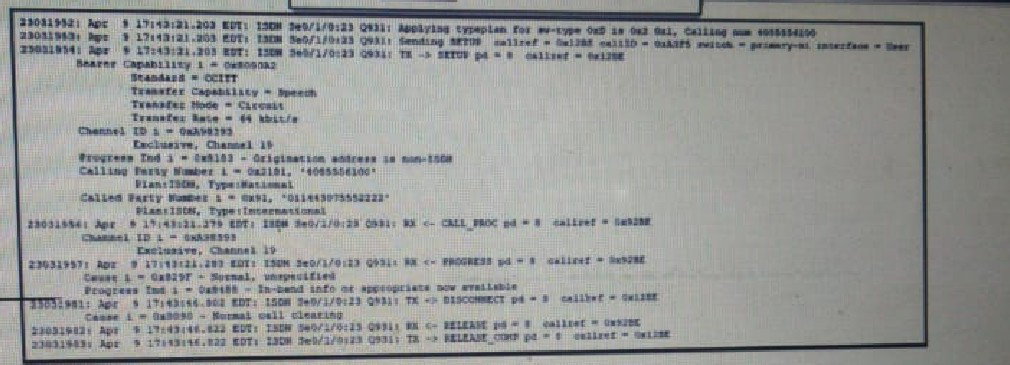
A call to an international number has failed. Which action corrects this problem?
A.
Assign a transcoder to the MRGL of the gateway
B.
Strip the leading 011 from the called party number
C.
Add the bearer-cap speech command to the voice port
D.
Add the isdn switch-type primart-dms100 command to the serial interface
Strip the leading 011 from the called party number
Explanation
The expected answer is B. Strip the leading 011 from the called party number.
The international dialing prefix 011 is commonly used in the North American Numbering Plan to initiate an international call. If the gateway's outbound dial-peer or ISDN provider expects the called number without this prefix, the call can fail because the number is sent in an unsupported format. The exhibit would need to confirm the exact digit manipulation, but option B is the likely intended correction.
Correct Option
B. Strip the leading 011 from the called party number.
Cisco gateways support digit manipulation using dial-peer digit stripping and voice translation rules. Removing the leading 011 can correct the call if the downstream carrier or gateway expects the international number without that access prefix. The exact transformation should match the dial plan shown in the exhibit.
Incorrect Options
- A. Assign a transcoder to the MRGL:
Transcoders handle media codec conversion, not international-number digit formatting.
- C. Add bearer-cap speech:
This command affects ISDN bearer capability; it does not correct an incorrect called number.
- D. Add isdn switch-type primary-dms100:
This sets the ISDN switch type. It would only be appropriate if the exhibit showed an ISDN switch-type mismatch.
Reference
- Cisco, Dial Peer Features and Configuration — Digit Stripping and Prefixes
company deploys centralized cisco ucm architecture for a hub location and two remote
sites.
The company has only one ITSP connection at the hub connection, and ITSP
supports only G.711 calls
Remote site A has a 1-Gbps fiber connection to the hub connection and calls to
and from remote side A use G.711 codec
Remote site B has a 1 T1 connection to the hub location and calls to and from
remote site B use G.729 codec
Based on the provided guidance, a Cisco voice engineer must design media resource
management for the customer. What is the method that needs to be followed?
A.
configure the hardware transcoder on the site B router.
B.
configure the hardware transcoder on the site A router.
C.
configure the hardware transcoder on the hub location router.
D.
configure the software transcoder on Cisco UCM to support voice calls to and from both
remote sites.
configure the hardware transcoder on the hub location router.
Explanation:
The ITSP accepts only G.711 while remote site B uses G.729. Any call that flows between site B and the ITSP (or between site B and site A) therefore requires a transcoder. In a centralized CUCM architecture the most efficient placement for that transcoder is at the hub, where all inter-site and PSTN traffic already converges. A hardware transcoder on the hub router can convert G.729 streams from site B into G.711 for the ITSP (and vice-versa) without forcing every remote site to host its own DSP resources.
Correct Option:
C. configure the hardware transcoder on the hub location router.
Register a hardware transcoder (PVDM or ISR DSP farm) with CUCM at the hub. CUCM inserts the transcoder into the media path whenever a G.729 endpoint at site B communicates with a G.711 endpoint (ITSP or site A). This single hub resource serves both remote sites and keeps DSP capacity centralized.
Incorrect Option:
A. configure the hardware transcoder on the site B router.
Placing the only transcoder at site B would force site-A-to-ITSP G.711 calls to hairpin through site B, wasting the T1 bandwidth and adding unnecessary latency.
B. configure the hardware transcoder on the site A router.
Site A already uses G.711; a transcoder there would not help G.729 calls from site B reach the ITSP.
D. configure the software transcoder on Cisco UCM to support voice calls to and from both remote sites.
Software (Cisco IP Voice Media Streaming App) transcoding is limited in capacity and is not recommended for production multi-site traffic; hardware DSPs are required.
Reference:
Cisco Collaboration SRND – Media Resources: in a centralized deployment place transcoders at the hub to resolve codec mismatches between low-bandwidth remote sites (G.729) and G.711-only PSTN/ITSP connections.
Which recommendation is the best practice for marking video and voice media in a cisco Unified Communications network?
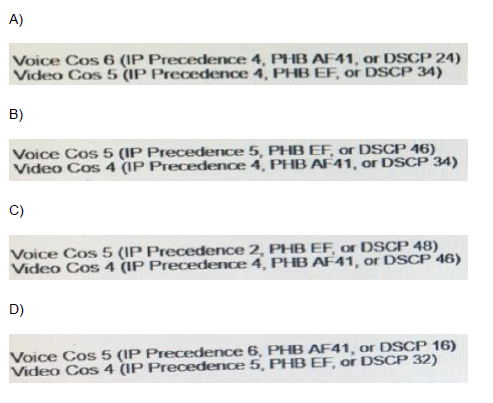
A.
Option A
B.
Option B
C.
Option C
D.
Option D
Option B
Explanation:
Cisco Collaboration best-practice QoS marking (per the SRND) assigns Expedited Forwarding (EF) to voice media so that it receives strict priority treatment, and Assured Forwarding class AF41 to video media so that it receives guaranteed bandwidth with drop preference. These values correspond to CoS 5 / DSCP 46 for voice and CoS 4 / DSCP 34 for video.
Correct Option:
B. (the option that shows)
Voice CoS 5 (IP Precedence 5, PHB EF, or DSCP 46)
Video CoS 4 (IP Precedence 4, PHB AF41, or DSCP 34)This marking is applied at the access edge (or by the endpoints themselves) and is trusted/preserved across the campus and WAN so that voice always enters the priority queue and video enters a bandwidth-guaranteed queue.
Incorrect Option:
A, C, D (the remaining choices)
These options either swap the PHB values (placing video in EF or voice in AF41), use incorrect DSCP decimal values, or assign the wrong CoS/IP-Precedence numbers, all of which violate the Cisco-recommended marking scheme and can cause voice to be treated as ordinary data or video to starve the priority queue.
Reference:
Cisco Collaboration System SRND / Preferred Architecture – Bandwidth Management: mark voice (audio) media EF (DSCP 46) and video media AF41 (DSCP 34).
| Page 12 out of 46 Pages |
| 56789101112131415161718 |
| 350-801 Practice Test Home |
Real-World Scenario Mastery: Our 350-801 practice exam don't just test definitions. They present you with the same complex, scenario-based problems you'll encounter on the actual exam.
Strategic Weakness Identification: Each practice session reveals exactly where you stand. Discover which domains need more attention, before Implementing Cisco Collaboration Core Technologies (350-801 CLCOR) exam day arrives.
Confidence Through Familiarity: There's no substitute for knowing what to expect. When you've worked through our comprehensive 350-801 practice exam questions pool covering all topics, the real exam feels like just another practice session.
Copyright © All Rights Reserved