
A laptop was stolen and a network engineer added it to the block list endpoint identity group What must be done on a new Cisco ISE deployment to redirect the laptop and restrict access?
A. Select DenyAccess within the authorization policy.
B. Ensure that access to port 8443 is allowed within the ACL.
C. Ensure that access to port 8444 is allowed within the ACL.
D. Select DROP under If Auth fail within the authentication policy.
Explanation:
When a device is added to the Blacklist endpoint identity group, Cisco ISE can redirect it to the Blacklist Portal (running on TCP port 8444, or sometimes 8443) to display a customizable message explaining why access is blocked. The network device (switch/WLC) must allow the client to access this portal before enforcing the block.
Correct Option:
C. Ensure that access to port 8444 is allowed within the ACL.
The Blacklist Portal in Cisco ISE typically listens on HTTPS port 8444 (or 8443). The redirect ACL on the NAD must permit the client to reach the ISE portal on this port. Without this, the client cannot fetch the blacklist notification page. After the portal interaction, the device may be fully blocked or quarantined.
Incorrect Options:
A. Select DenyAccess within the authorization policy –
This blocks the device completely without redirection. The question asks to redirect the laptop and restrict access, implying a portal page. DenyAccess does not redirect.
B. Ensure that access to port 8443 is allowed within the ACL –
Port 8443 is used for the BYOD portal, Guest portal, or Client Provisioning portal, not the Blacklist portal. The blacklist portal uses port 8444.
D. Select DROP under If Auth fail within the authentication policy –
The If Auth fail setting in an authentication policy applies to authentication failures, not to blacklist authorization. This is the wrong location.
Reference:
Cisco ISE Administrator Guide – "Blacklist Portal – Port 8444 and Redirect ACL"
Cisco SISE 300-715 Official Cert Guide, Chapter: "Endpoint Management – Blacklist Portal Configuration"
Which two default endpoint identity groups does Cisco ISE create? (Choose two )
A. block list
B. endpoint
C. profiled
D. allow list
E. unknown
Explanation:
When Cisco ISE is first installed, it creates several default endpoint identity groups to classify endpoints. Two of these default groups are Profiled (endpoints that have been successfully identified by profiling) and Unknown (endpoints that have not yet been profiled or recognized). Both are present out‑of‑the‑box.
Correct Options:
C. profiled
The Profiled endpoint identity group is a default group that contains endpoints successfully matched by a profiling policy (e.g., "Cisco-IP-Phone", "Apple-iPhone"). ISE automatically assigns endpoints to this group when profiling completes. It is used in authorization policies to grant access to recognized devices.
E. unknown
The Unknown endpoint identity group is a default group for endpoints that have not yet been profiled or are unrecognized. When an endpoint first connects (e.g., via MAB), it lands in this group until profiling identifies it. This group is often used to restrict access (e.g., quarantine VLAN) pending identification.
Incorrect Options:
A. block list –
Cisco ISE creates a Blacklist endpoint identity group, not "block list". The name is exactly "Blacklist". While similar, the default name is "Blacklist", not "block list".
B. endpoint –
There is no default endpoint identity group simply named "Endpoint". The default groups are "Unknown", "Profiled", "Blacklist", and "RegisteredDevices" (after BYOD).
D. allow list –
Cisco ISE does not create a default "allow list" endpoint identity group. Whitelisting is typically done using the "RegisteredDevices" group or custom groups after BYOD onboarding.
Reference:
Cisco ISE Administration Guide – "Default Endpoint Identity Groups (Profiled, Unknown, Blacklist)"
Cisco SISE 300-715 Official Cert Guide, Chapter: "Endpoint Management – Default Identity Groups"
Which RADIUS attribute is used to dynamically assign the inactivity active timer for MAB users from the Cisco ISE node'?
A. radius-server timeout
B. session-timeout
C. idle-timeout
D. termination-action
Explanation:
For MAB (MAC Authentication Bypass) users, the RADIUS attribute used to dynamically assign an inactivity timer (active timer based on idle time) is Idle-Timeout (attribute number 28). This attribute tells the network access device (switch/WLC) to terminate the session after a specified period of inactivity (no traffic). The switch must be configured to accept this attribute (e.g., with authentication timer inactivity server).
Correct Option:
C. idle-timeout
The Idle-Timeout RADIUS attribute (RFC 2865, section 5.28) is sent by ISE in an Access-Accept packet. It specifies the maximum number of seconds of inactivity after which the session will be terminated. For MAB users, this allows ISE to dynamically control how long a device remains authenticated when idle, overriding the locally configured switch timer. The network device must support this attribute.
Incorrect Options:
A. radius-server timeout –
This is a switch configuration command, not a RADIUS attribute. It controls how long the switch waits for a RADIUS server response, not the inactivity timer.
B. session-timeout –
The Session-Timeout attribute (attribute 27) sets the maximum absolute session duration (regardless of activity). After this time, the session ends. It is not an inactivity timer.
D. termination-action –
The Termination-Action attribute (attribute 29) specifies whether the session should be terminated or reauthenticated after Session-Timeout expires. It does not set an inactivity timer.
Reference:
RFC 2865 – RADIUS Attributes: Idle-Timeout (28), Session-Timeout (27)
Cisco ISE RADIUS Attributes Reference – Idle-Timeout for MAB inactivity timer
Cisco SISE 300-715 Official Cert Guide, Chapter: "MAB – Dynamic Inactivity Timer via Idle-Timeout"
An organization is hosting a conference and must make guest accounts for several of the speakers attending. The conference ended two days early but the guest accounts are still being used to access the network. What must be configured to correct this?
A. Create an authorization rule denying sponsored guest access.
B. Navigate to the Guest Portal and delete the guest accounts.
C. Create an authorization rule denying guest access.
D. Navigate to the Sponsor Portal and suspend the guest accounts.
Explanation:
When a conference ends early, guest accounts should be disabled without deleting them (in case of future need). The Sponsor Portal allows sponsors to manage (create, modify, suspend, resume, or delete) guest accounts. Suspending the accounts immediately revokes network access while preserving the account data.
Correct Option:
D. Navigate to the Sponsor Portal and suspend the guest accounts.
The Sponsor Portal is designed for sponsors (users who create and manage guest accounts). Within the portal, sponsors can select specific guest accounts and choose Suspend (or "Disable"). This immediately prevents the guest from accessing the network, but the account remains in the database and can be re‑enabled later. This is the proper action when an event ends early.
Incorrect Options:
A. Create an authorization rule denying sponsored guest access –
This would affect all sponsored guest accounts, not just the conference speakers. It is too broad and requires policy changes that affect other legitimate guests.
B. Navigate to the Guest Portal and delete the guest accounts –
The Guest Portal is for guests (self‑registration, AUP acceptance), not for account management by sponsors. Deleting accounts removes them entirely, losing audit history. Suspending is more appropriate.
C. Create an authorization rule denying guest access –
This would block all guest access (including other events or visitors), which is too draconian and not targeted.
Reference:
Cisco ISE Guest Access Guide – "Sponsor Portal – Suspending Guest Accounts"
Cisco SISE 300-715 Official Cert Guide, Chapter: "Guest Services – Managing Guest Accounts via Sponsor Portal"
Which Cisco ISE deployment model is recommended for an enterprise that has over 50,000 concurrent active endpoints?
A. large deployment with fully distributed nodes running all personas
B. medium deployment with primary and secondary PAN/MnT/pxGrid nodes with shared PSNs
C. medium deployment with primary and secondary PAN/MnT/pxGrid nodes with dedicated PSNs
D. small deployment with one primary and one secondary node running all personas
Explanation:
For more than 50,000 concurrent active endpoints, Cisco recommends a large distributed deployment (not small or medium). However, among the given options, the correct architecture for scalability is a medium deployment with primary and secondary PAN/MnT/pxGrid nodes (dedicated) plus dedicated PSNs. The key is that PSNs should be dedicated (not running administration/monitoring personas) to maximize throughput for RADIUS and posture processing.
Correct Option:
C. medium deployment with primary and secondary PAN/MnT/pxGrid nodes with dedicated PSNs
For 50,000+ endpoints, the deployment must scale horizontally. The PAN and MnT personas should run on dedicated nodes (primary/secondary pair). pxGrid also runs on dedicated nodes (or co-located with PSNs). Importantly, PSNs should be dedicated (no PAN/MnT personas) to handle the high RADIUS load. This architecture provides centralized management and monitoring while distributing the authentication workload across multiple dedicated PSNs.
Incorrect Options:
A. large deployment with fully distributed nodes running all personas –
This description is ambiguous. "Fully distributed" typically means separate nodes per persona, but "running all personas" contradicts distributed. This option is not well-defined.
B. medium deployment with primary and secondary PAN/MnT/pxGrid nodes with shared PSNs –
"Shared PSNs" suggests PSNs also run other personas (e.g., shared with MnT), which is not recommended for high scale. Dedicated PSNs are required for 50,000+ endpoints.
D. small deployment with one primary and one secondary node running all personas –
This is insufficient for 50,000+ endpoints. A two‑node deployment would be overloaded and lacks dedicated PSN capacity.
Reference:
Cisco ISE Deployment Guide – "Scalability – Concurrent Endpoints and Node Recommendations"
Cisco SISE 300-715 Official Cert Guide, Chapter: "ISE Deployment Models – Large Scale (Dedicated PSNs)"
What is the maximum number of PSN nodes supported in a medium-sized deployment?
A. three
B. five
C. two
D. eight
Explanation:
Cisco ISE deployment sizes are categorized by the number of concurrent endpoints and nodes. In a medium-sized deployment, the maximum number of Policy Service Nodes (PSNs) supported is five (5). This is based on Cisco's official deployment guide for medium-scale environments.
Correct Option:
B. five
According to Cisco ISE scalability guidelines, a medium deployment supports up to 5 PSN nodes. The exact number depends on the ISE version and endpoint count, but the certified limit for medium is typically 5 PSNs (e.g., for environments with up to 50,000 endpoints). A large deployment can support more PSNs (e.g., 6, 10, or more depending on version and hardware).
Incorrect Options:
A. three –
This is a possible number but not the maximum for medium. Three PSNs would be a smaller medium or small deployment.
C. two –
Two PSNs is typical for small deployments or for redundancy in a minimal configuration, not the maximum for medium.
D. eight –
Eight or more PSNs fall into a large deployment, not medium.
Reference:
Cisco ISE Scalability and Deployment Guide – "Deployment Sizes (Small, Medium, Large) – PSN Limits"
Cisco SISE 300-715 Official Cert Guide, Chapter: "ISE Deployment Models – PSN Scaling Limits"
A network engineer is configuring a network device that needs to filter traffic based on security group tags using a security policy on a routed into this task?
A. cts authorization list
B. cts role-based enforcement
C. cts cache enable
D. cts role-based policy priority-static
Explanation:
To filter traffic based on Security Group Tags (SGTs) on a routed interface (SVI or Layer 3 interface), the interface must be configured to enforce role‑based policy using the cts role-based enforcement command. This enables the interface to classify incoming packets based on their SGT and apply SGACLs (Security Group ACLs) from the TrustSec policy matrix.
Correct Option:
B. cts role-based enforcement
The interface command cts role-based enforcement (or cts role-based enforcement with in/out direction) enables TrustSec SGACL enforcement on a routed interface. It allows the device to filter traffic by matching the source SGT and destination SGT using policies defined in the CTS policy matrix (or imported from ISE). This is the standard command for enabling SGT‑based filtering on Layer 3 interfaces.
Incorrect Options:
A. cts authorization list –
This command is used in legacy CTS environments (pre-ISE) to designate a list of SGTs, not for enforcement on interfaces.
C. cts cache enable –
This enables caching of SGT mappings or policy entries. It does not enable enforcement filtering on an interface.
D. cts role-based policy priority-static –
This sets the priority of static vs. dynamic policies, not interface‑level enforcement.
Reference:
Cisco TrustSec Configuration Guide – "Enabling SGACL Enforcement on Routed Interfaces (cts role-based enforcement)"
Cisco SISE 300-715 Official Cert Guide, Chapter: "Cisco TrustSec – Interface Commands for SGT Enforcement"
What service can be enabled on the Cisco ISE node to identity the types of devices connecting to a network?
A. MAB
B. profiling
C. posture
D. central web authentication
Explanation:
To identify the types of devices connecting to the network (e.g., iPhone, Printer, IP Phone), Cisco ISE uses profiling. Profiling passively collects information from probes (DHCP, RADIUS, NetFlow, CDP, HTTP) or actively using scans (NMAP) to determine the device's operating system, manufacturer, and device type.
Correct Option:
B. profiling
Profiling in Cisco ISE is a service that identifies endpoint types by analyzing attributes such as MAC OUI, DHCP hostname and vendor class, HTTP user-agent, CDP/LLDP information, and more. The profiling service can be enabled on Policy Service Nodes (PSNs) and uses policies to assign a logical profile (e.g., "Cisco-IP-Phone-7940", "Apple-iPhone") to the endpoint. This identity is then used in authorization policies.
Incorrect Options:
A. MAB –
MAC Authentication Bypass (MAB) is an authentication method, not a device identification service. It uses the MAC address to authenticate, but does not determine the device type.
C. posture –
Posture checks endpoint compliance (e.g., antivirus, patches). It does not identify the device type.
D. central web authentication –
CWA is a guest access method using a web portal, not a device identification service.
Reference:
Cisco ISE Profiling Guide – "Profiling Service – Endpoint Identification"
Cisco SISE 300-715 Official Cert Guide, Chapter: "Profiling – Identifying Device Types"
Refer to the exhibit.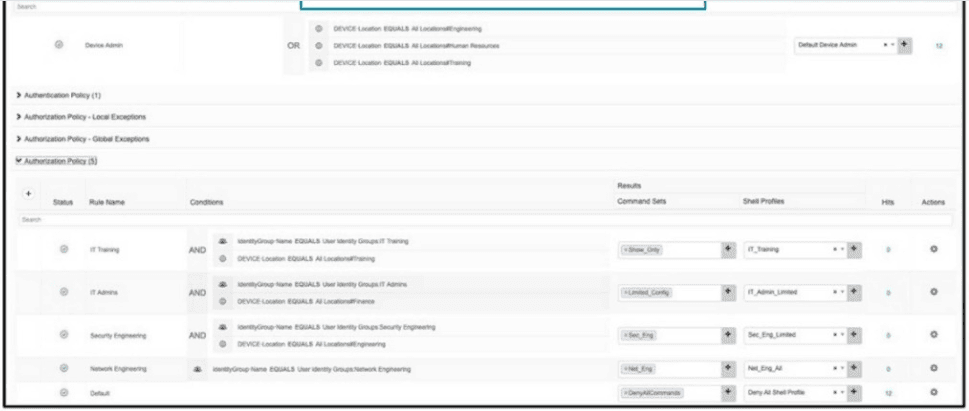
An organization recently implemented network device administration using Cisco ISE. Upon testing the ability to access all of the required devices, a user in the Cisco ISE group IT Admins is attempting to login to a device in their organization's finance department but is unable to. What is the problem?
A. The IT training rule is taking precedence over the IT Admins rule.
B. The authorization conditions wrongly allow IT Admins group no access to finance devices.
C. The finance location is not a condition in the policy set.
D. The authorization policy doesn't correctly grant them access to the finance devices.
Explanation:
The IT Admins user is attempting to log into a device in the finance department, but the authorization policy rule for IT Admins only matches devices with DEVICE Location: EQUALS All LocationManagement. The finance device is not in that location group, so it does not match the rule. The policy set does not have a rule allowing IT Admins to access finance-location devices, resulting in a deny by default.
Correct Option:
D. The authorization policy doesn't correctly grant them access to the finance devices.
The exhibit shows each rule (IT Training, IT Admins, Security Engineering, Network Engineering) includes a condition DEVICE Location: EQUALS All LocationManagement. The finance department devices likely belong to a different location (e.g., All LocationFinance). Since the IT Admins rule does not include that location, the policy fails to match, and the user is denied access. The fix would be to either modify the rule to include the finance location or create a new rule.
Incorrect Options:
A. The IT training rule is taking precedence over the IT Admins rule –
The rules are listed as separate entries; precedence is determined by order (top to bottom). However, the issue is not rule order but the lack of a matching location condition.
B. The authorization conditions wrongly allow IT Admins group no access to finance devices –
This is essentially the same as D, but D is more precisely worded: the policy does not grant access. The conditions are not "wrong" per se; they simply do not include finance.
C. The finance location is not a condition in the policy set –
The finance location is likely not a condition in the IT Admins rule. However, the policy set can have multiple rules; the problem is that no rule matches both the IT Admins group and the finance location.
Reference:
Cisco ISE Device Administration Guide – "Authorization Policy Conditions – Location NDG"
Cisco SISE 300-715 Official Cert Guide, Chapter: "TACACS+ – Policy Set Rule Matching and Location Conditions"
An engineer must use Cisco ISE to provide network access to endpoints that cannot support 802.1X. The endpoint MAC addresses must be allowlisted by configuring an endpoint identity group. These configurations were performed:
• configured an identity group named allowlist
• configured the endpoints to use the MAC address of incompatible 802.1X devices
• added the endpoints to the allowlist identity group
• configured an authentication policy for MAB users
What must be configured?
A. authorization profile that has the PermitAccess permission and matches the allowlist identity group
B. logical profile that matches the allowlist identity group based on the configured policy
C. authentication profile that has the PermitAccess permission and matches the allowlist identity group authorization policy that has the PermitAccess permission and matches the allowlist identity group
D. authorization policy that has the PermitAccess permission and matches the allowtist identity group
Explanation:
The engineer has already configured the identity group (allowlist), added the endpoints, and configured an authentication policy for MAB. The missing piece is an authorization policy that matches the allowlist identity group and explicitly grants PermitAccess. Without this, even if MAB authentication succeeds, the authorization policy may default to denying access or applying the wrong result.
Correct Option:
D. authorization policy that has the PermitAccess permission and matches the allowlist identity group
After MAB authentication, ISE evaluates authorization policies. The engineer must create an authorization rule with a condition such as Endpoints:IdentityGroup EQUALS allowlist and select an authorization profile that includes PermitAccess (or a profile with Access-Type = ACCESS_ACCEPT). This explicitly grants network access to endpoints in the allowlist. Without this, the default rule may deny access.
Incorrect Options:
A. authorization profile that has the PermitAccess permission and matches the allowlist identity group –
An authorization profile is the result of a policy, not the policy itself. The question asks "what must be configured?" — the policy (rule) is required, not just the profile.
B. logical profile that matches the allowlist identity group based on the configured policy –
Logical profiles are for profiling (device type identification), not for allowlisting endpoints for MAB. This is unrelated.
C. authentication policy that has the PermitAccess permission and matches the allowlist identity group –
Authentication policies determine how a user is authenticated (protocol, identity store), not whether access is permitted after successful authentication. PermitAccess is an authorization concept, not authentication.
Reference:
Cisco ISE Administration Guide – "Authorization Policies for Endpoint Identity Groups (MAB Allowlist)"
Cisco SISE 300-715 Official Cert Guide, Chapter: "MAB – Configuring Authorization Policy for Allowlist"
Which two features must be used on Cisco ISE to enable the TACACS. feature? (Choose two)
A. Device Administration License
B. Server Sequence
C. Command Sets
D. Enable Device Admin Service
E. External TACACS Servers
Explanation:
To enable TACACS+ on Cisco ISE, two requirements must be met. First, a Device Administration License must be installed (this enables the TACACS+ feature set). Second, the Device Admin Service must be enabled on the desired Policy Service Node(s) under Administration → System → Deployment. Without both, TACACS+ operations will not function.
Correct Options:
A. Device Administration License
Cisco ISE requires a separate Device Administration license (in addition to Base or Plus licenses) to enable TACACS+ functionality for network device administration. Without this license, TACACS+ options are greyed out or unavailable.
D. Enable Device Admin Service
On each PSN that will handle TACACS+ requests, the administrator must check the Device Admin box under Administration → System → Deployment → [Node] → General Settings. This starts the TACACS+ daemon on that node, allowing it to accept TACACS+ connections from network devices.
Incorrect Options:
B. Server Sequence –
Server sequence (identity source sequence) is used for RADIUS authentication, not for enabling TACACS+. TACACS+ uses a different configuration path.
C. Command Sets –
Command sets are used to authorize specific CLI commands within TACACS+ policies. While they are used after TACACS+ is enabled, they are not required to enable the TACACS+ feature.
E. External TACACS Servers –
This refers to using external TACACS+ servers as identity sources, which is an optional configuration, not required to enable TACACS+ on ISE.
Reference:
Cisco ISE Device Administration Guide – "Prerequisites for TACACS+ – License and Service Enablement"
Cisco SISE 300-715 Official Cert Guide, Chapter: "TACACS+ Device Administration – Enabling TACACS+ on ISE"
Which default endpoint identity group does an endpoint that does not match any profile in Cisco ISE become a member of?
A. Endpoint
B. unknown
C. blacklist
D. white list
E. profiled
Explanation:
When an endpoint does not match any profiling policy in Cisco ISE, it is placed into the Unknown endpoint identity group by default. This is a standard default group for endpoints that have not been identified (e.g., new devices, devices without distinct profiling signatures). Authorization policies can then restrict or quarantine these "unknown" devices.
Correct Option:
B. unknown
The Unknown endpoint identity group is one of Cisco ISE's default groups. Endpoints automatically become members of this group when they are first seen (e.g., via MAB) and when no profiling policy successfully matches them to a known device type (e.g., "Cisco-IP-Phone", "Apple-iPhone"). The endpoint remains in this group until manually moved or until profiling later identifies it.
Incorrect Options:
A. Endpoint –
There is no default endpoint identity group named simply "Endpoint". The default groups are Unknown, Profiled, Blacklist, and (after BYOD) RegisteredDevices.
C. blacklist –
The Blacklist group is for devices explicitly blocked (manually or by policy). Endpoints go here only when added by an administrator or via policy (e.g., stolen device), not by default.
D. white list –
Cisco ISE does not have a default "WhiteList" endpoint identity group. Whitelisting is typically done via the "RegisteredDevices" group or custom groups.
E. profiled –
The Profiled group is for endpoints that have successfully matched a profiling policy, the opposite of the condition described.
Reference:
Cisco ISE Profiling Guide – "Default Endpoint Identity Groups – Unknown Group"
Cisco SISE 300-715 Official Cert Guide, Chapter: "Profiling – Endpoint Group Assignment (Unknown vs. Profiled)"
| Page 9 out of 24 Pages |
| 56789101112 |
| 300-715 Practice Test Home |
Real-World Scenario Mastery: Our 300-715 practice exam don't just test definitions. They present you with the same complex, scenario-based problems you'll encounter on the actual exam.
Strategic Weakness Identification: Each practice session reveals exactly where you stand. Discover which domains need more attention, before Implementing and Configuring Cisco Identity Services Engine (SISE) v4.0 (300-715 SISE) exam day arrives.
Confidence Through Familiarity: There's no substitute for knowing what to expect. When you've worked through our comprehensive 300-715 practice exam questions pool covering all topics, the real exam feels like just another practice session.
Copyright © All Rights Reserved